Ditlead vs Successai (2026): Which Cold Email Tool Wins?
Ditlead and Success.ai both promise unlimited inboxes and cheap outbound at scale. Here is the honest breakdown of pricing, data quality, deliverability controls, and which one actually fits your team.
TL;DR
- Ditlead is a multichannel sequencer — email plus LinkedIn plus calls — built around inbox rotation, a unified inbox, and a light CRM. It suits agencies and teams that run many client workspaces from one login.
- Success.ai is an AI-first cold email platform bundled with a very large contact database. It suits solo founders and small teams who want leads and sending in one subscription.
- Both advertise "unlimited" email accounts. That word describes the seat license, not your sending capacity — your domains, warmup schedule, and list hygiene still set the real ceiling.
- Neither platform is a substitute for a dedicated verification layer. Bundled database emails are the single biggest bounce risk in both stacks.
- Pick Ditlead if channel breadth and client separation matter most. Pick Success.ai if you want lead sourcing and sending under one bill. Verify every address before it enters either one.
What are Ditlead and Success.ai?#
Different products with overlapping marketing. That is the core confusion.
Ditlead positions itself as a multichannel sales engagement platform. You connect an unlimited number of mailboxes, build sequences that mix email steps with LinkedIn actions and call tasks, rotate sending across inboxes, and manage replies in a shared inbox. It layers a lightweight pipeline on top so replies do not fall into a spreadsheet. The pitch is consolidation: one tool instead of a sequencer, a LinkedIn automation tool, and a mini-CRM.
Success.ai leads with data and AI. The headline is a B2B contact database in the hundreds of millions of records, paired with unlimited email accounts, built-in warmup, and AI writing assistance for sequences. The pitch is self-sufficiency: search for prospects, push them into a campaign, let the AI draft the copy, and send — without buying a separate data provider.
So the honest framing of ditlead vs successai is not "which sequencer is better." It is: do you need channel depth, or do you need a data source welded to your sender?
How do Ditlead and Success.ai compare head to head?#
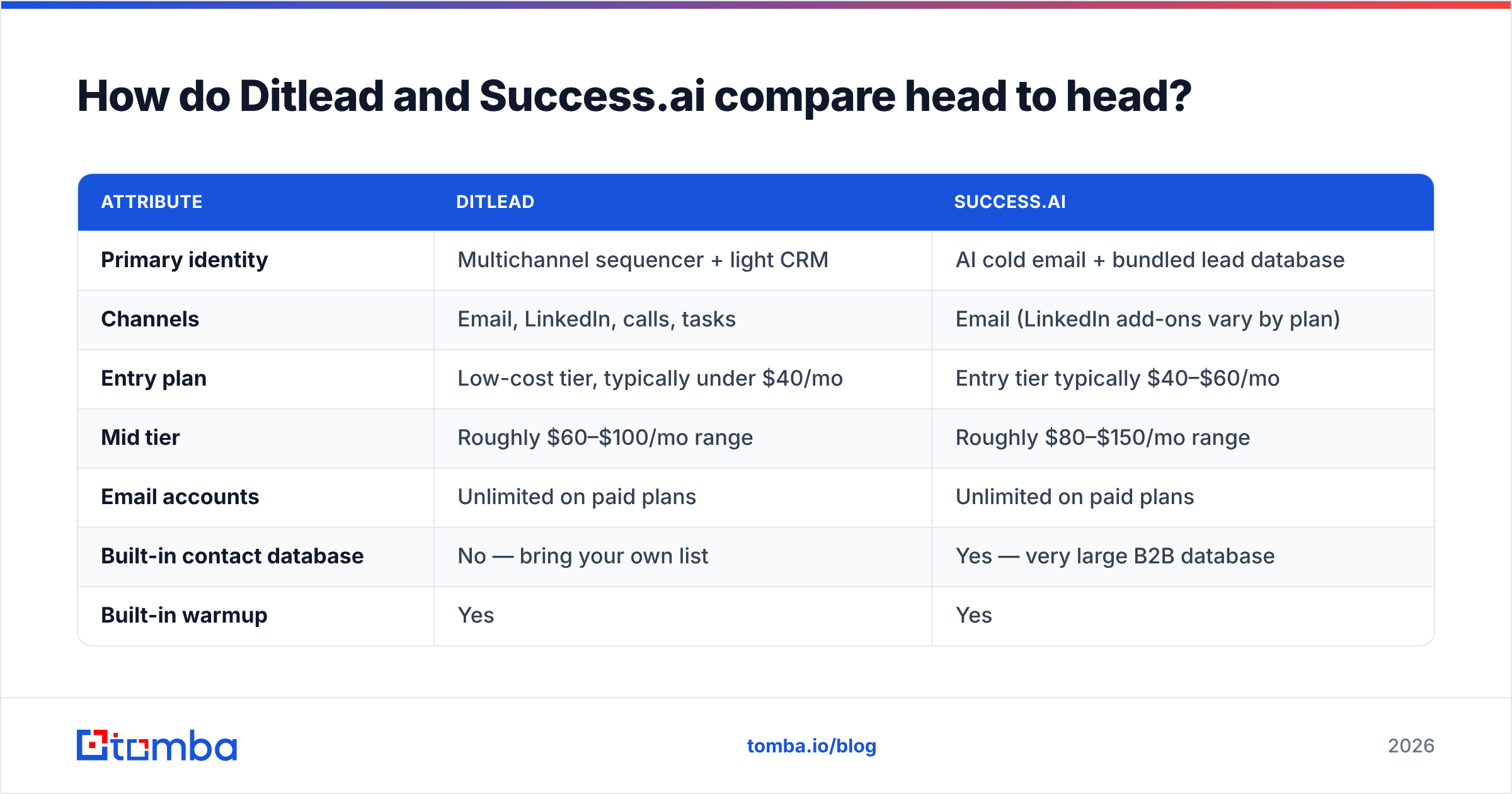
Pricing on both platforms moves frequently, and both run promotional and lifetime-style offers that distort any snapshot. Treat the numbers below as the shape of the market, not a quote — check each vendor's live pricing page before you commit.
| Attribute | Ditlead | Success.ai |
|---|---|---|
| Primary identity | Multichannel sequencer + light CRM | AI cold email + bundled lead database |
| Channels | Email, LinkedIn, calls, tasks | Email (LinkedIn add-ons vary by plan) |
| Entry plan | Low-cost tier, typically under $40/mo | Entry tier typically $40–$60/mo |
| Mid tier | Roughly $60–$100/mo range | Roughly $80–$150/mo range |
| Email accounts | Unlimited on paid plans | Unlimited on paid plans |
| Built-in contact database | No — bring your own list | Yes — very large B2B database |
| Built-in warmup | Yes | Yes |
| Inbox rotation | Yes, core feature | Yes |
| Unified inbox | Yes, multi-workspace | Yes |
| AI copywriting | Basic assistance | Central to the product |
| Client/agency workspaces | Strong — built for it | Workable, less specialised |
| Best fit | Agencies, multichannel SDR teams | Founders, small teams wanting data + sending |
The table exposes the real trade. Ditlead sells you motion — more touchpoints, more channels, more client separation. Success.ai sells you supply — a database so you never stall waiting for a list. Neither sells you accuracy, and that is the gap that decides whether either campaign works.

Which platform gives you better data?#
Success.ai wins on volume. Ditlead wins on control. Here is why that distinction matters more than the record count on either homepage.
- Bundled databases are a convenience, not a guarantee. Any large aggregated B2B database — Success.ai's included — is compiled from public sources, partner feeds, and contributed data. Records decay at roughly 2–3% per month as people change jobs. A 700M-record claim tells you about coverage, not freshness.
- Ditlead's "no database" is a feature for some teams. If your list comes from your own ICP research, a scraper, or a specialist provider, you are not paying for data you will not use, and you control provenance end to end.
- Catch-all domains break both flows. A large share of enterprise domains accept everything at the SMTP layer, so a generic "valid" verdict means nothing. You need a catch-all verifier that scores risk instead of shrugging.
- Role accounts poison sequences. info@, sales@, and support@ inflate list size and depress reply rates. Bundled exports rarely strip them by default.
- Bounce rate is the shared failure mode. Above roughly 3–4%, mailbox providers start throttling you regardless of which platform sent the message.
The practical answer: use either platform's sending engine, but treat any list — bundled or imported — as unverified until you run it through a dedicated email verifier. Teams that skip this step usually blame the sequencer for a data problem.
Is Ditlead better than Success.ai for deliverability?#
Roughly equal on paper, and both are less decisive than what you do outside the tool.
Both platforms give you the same standard toolkit: warmup pools, inbox rotation, sending limits per mailbox, randomised intervals, and spintax. Those features are table stakes in 2026, and neither vendor has a meaningful technical moat there. What actually separates a 4% reply rate from a spam-folder campaign is the setup you control:
- Domain architecture. Send from secondary domains, not your primary. Two to three mailboxes per domain, maximum.
- Authentication. SPF, DKIM, and DMARC configured correctly before a single send. Google and Yahoo's bulk-sender requirements made this non-negotiable, and neither platform configures your DNS for you.
- Ramp schedule. New mailboxes need weeks, not days. Run the numbers with a warmup calculator rather than trusting the default warmup toggle.
- List hygiene. Bounces are the fastest way to torch sender reputation. No warmup pool recovers a domain that hard-bounced 12% of a 5,000-contact blast.
Where Ditlead has a small edge: its per-workspace isolation makes it harder to accidentally cross-contaminate client domains, which matters if you run outbound for ten businesses. Where Success.ai has a small edge: because the data and the sender live in one system, list-to-campaign handoff has fewer manual export steps where mistakes creep in.
Neither edge is large enough to be the deciding factor. If a vendor's main deliverability claim is "unlimited warmup," you are being sold a commodity.
What are the real limits behind "unlimited"?#
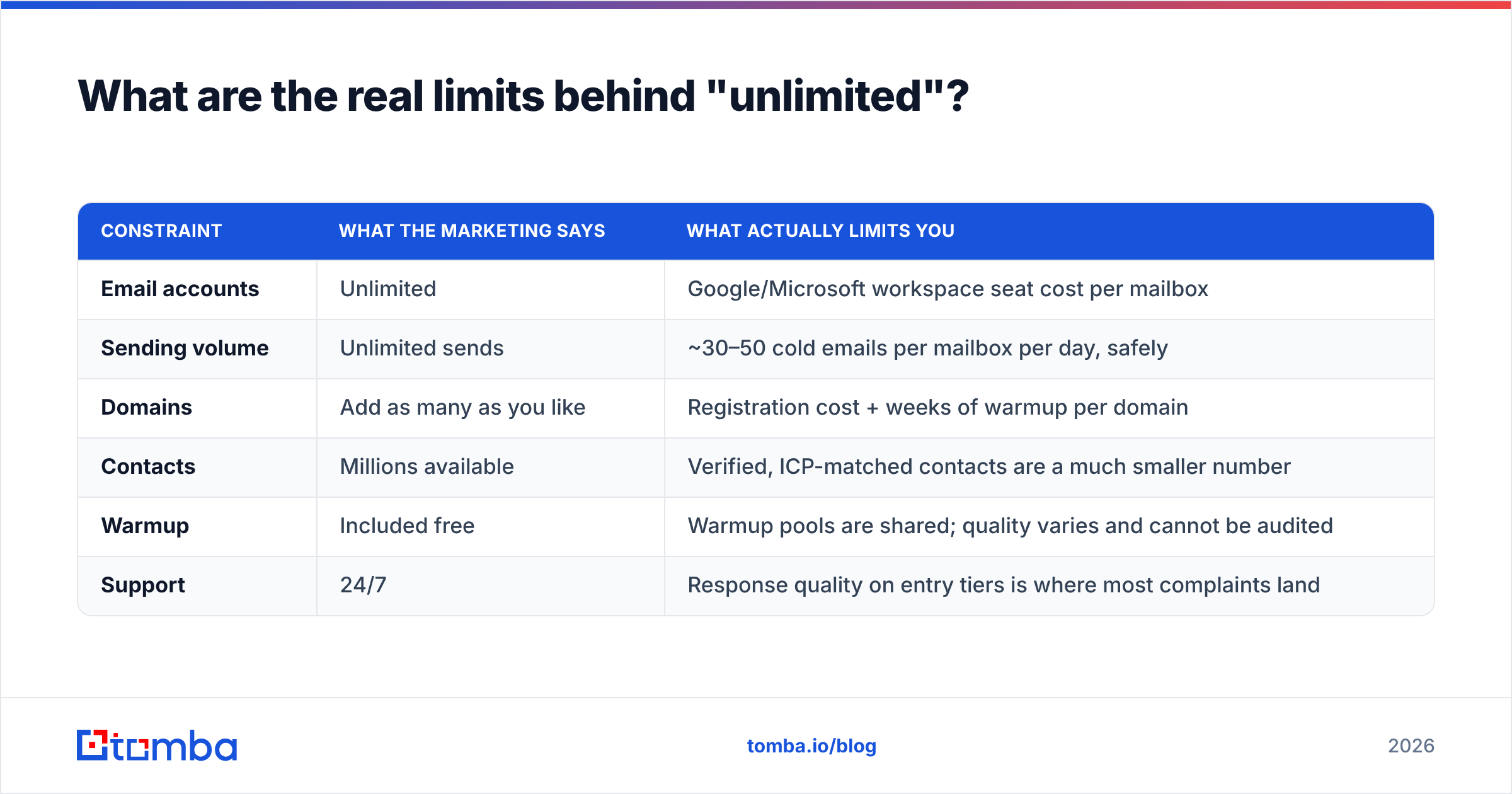
Every unlimited-inbox platform relies on the same quiet arithmetic, and it is worth spelling out before you buy either one.
| Constraint | What the marketing says | What actually limits you |
|---|---|---|
| Email accounts | Unlimited | Google/Microsoft workspace seat cost per mailbox |
| Sending volume | Unlimited sends | ~30–50 cold emails per mailbox per day, safely |
| Domains | Add as many as you like | Registration cost + weeks of warmup per domain |
| Contacts | Millions available | Verified, ICP-matched contacts are a much smaller number |
| Warmup | Included free | Warmup pools are shared; quality varies and cannot be audited |
| Support | 24/7 | Response quality on entry tiers is where most complaints land |
Read that table before you compare monthly prices. A $39/month platform attached to twenty Google Workspace seats is not a $39/month platform — it is closer to $200/month all-in. Both vendors compete on the visible number while the invisible number stays identical.
What do reviewers actually say about each?#
Public review data on both platforms skews positive but thin, and both have grown through lifetime-deal channels that attract enthusiastic early reviews. Read them with that in mind. Cross-check current ratings on G2 rather than trusting any single roundup, including this one.
The recurring themes, stripped of star ratings:
Ditlead praise: channel consolidation genuinely replaces two or three subscriptions; workspace management is well suited to agencies; pricing is aggressive for the feature set.
Ditlead criticism: the interface has more surface area than a pure email tool, so onboarding takes longer; LinkedIn automation carries the usual account-risk caveats that apply to every tool in that category; smaller ecosystem of native integrations than the market leaders.
Success.ai praise: getting from zero to a live campaign is fast because the data is already there; AI copy drafting is a real time-saver for teams without a copywriter; unlimited accounts on entry tiers is unusually generous.
Success.ai criticism: database accuracy is the most common complaint, which is standard for any bundled-data platform; some users report needing a separate verification step anyway, which erodes the "all-in-one" savings.
That last point is the one to internalise. Both sets of reviews converge on the same conclusion: the sending engine is rarely the problem, the list is.

Which one should you choose?#
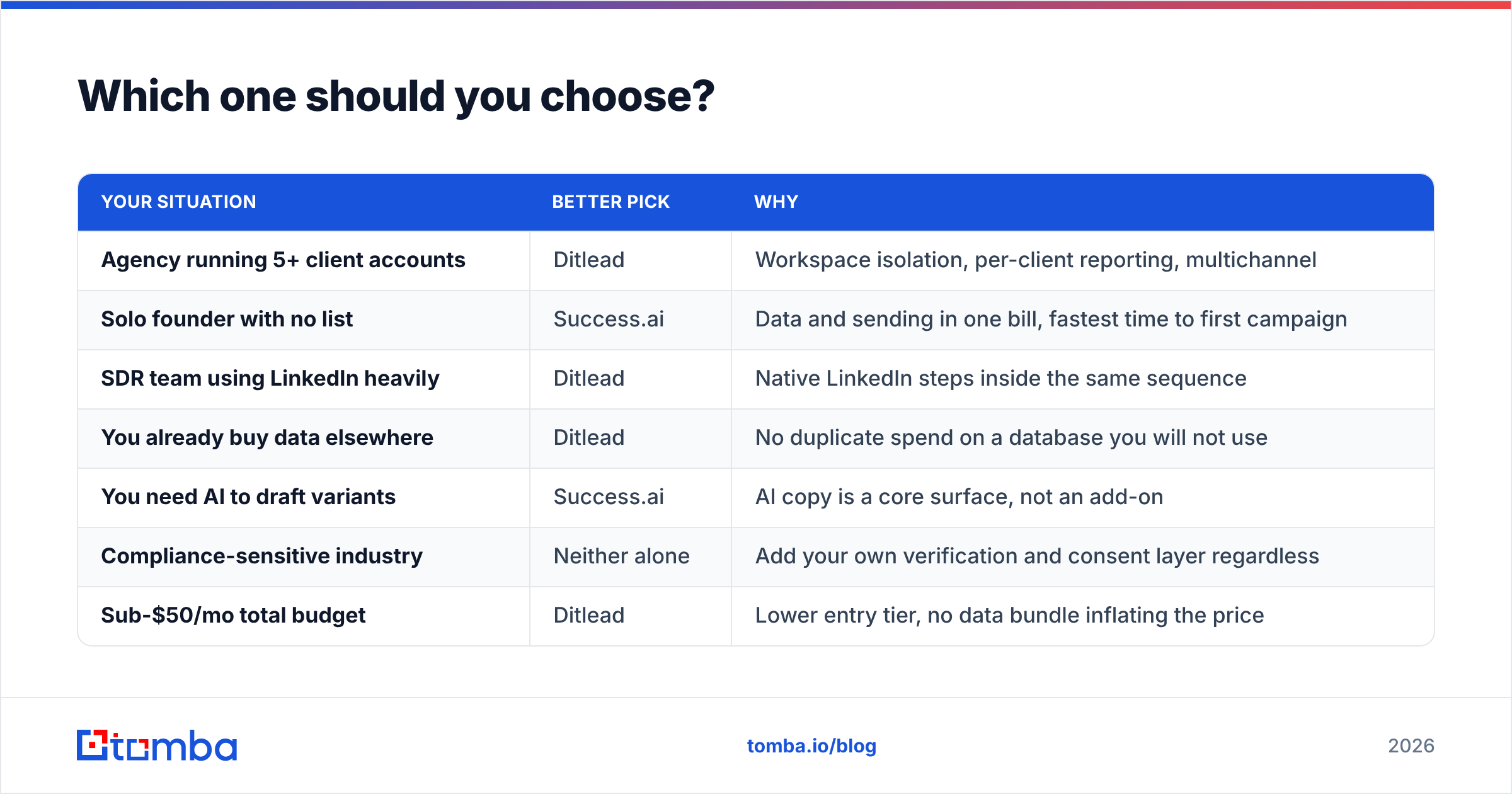
Match the tool to your constraint, not to the feature count.
| Your situation | Better pick | Why |
|---|---|---|
| Agency running 5+ client accounts | Ditlead | Workspace isolation, per-client reporting, multichannel |
| Solo founder with no list | Success.ai | Data and sending in one bill, fastest time to first campaign |
| SDR team using LinkedIn heavily | Ditlead | Native LinkedIn steps inside the same sequence |
| You already buy data elsewhere | Ditlead | No duplicate spend on a database you will not use |
| You need AI to draft variants | Success.ai | AI copy is a core surface, not an add-on |
| Compliance-sensitive industry | Neither alone | Add your own verification and consent layer regardless |
| Sub-$50/mo total budget | Ditlead | Lower entry tier, no data bundle inflating the price |
| Team that has been burned by bounces | Either + a verifier | The fix is upstream of both platforms |
If you cannot decide, run the cheapest tier of each for one month against the same 500-contact list, split by segment, and compare bounce rate and reply rate. That experiment costs less than $150 and settles the argument with your own data instead of anyone's landing page.
Where should an email finder sit in this stack?#
Before the sequencer, always.
Both Ditlead and Success.ai are execution layers. They send, rotate, track, and reply-detect. What they do not do well is guarantee that the address on row 4,872 of your CSV still belongs to a human at that company. That job belongs to a dedicated finding-and-verification layer, and running it first changes the economics of everything downstream:
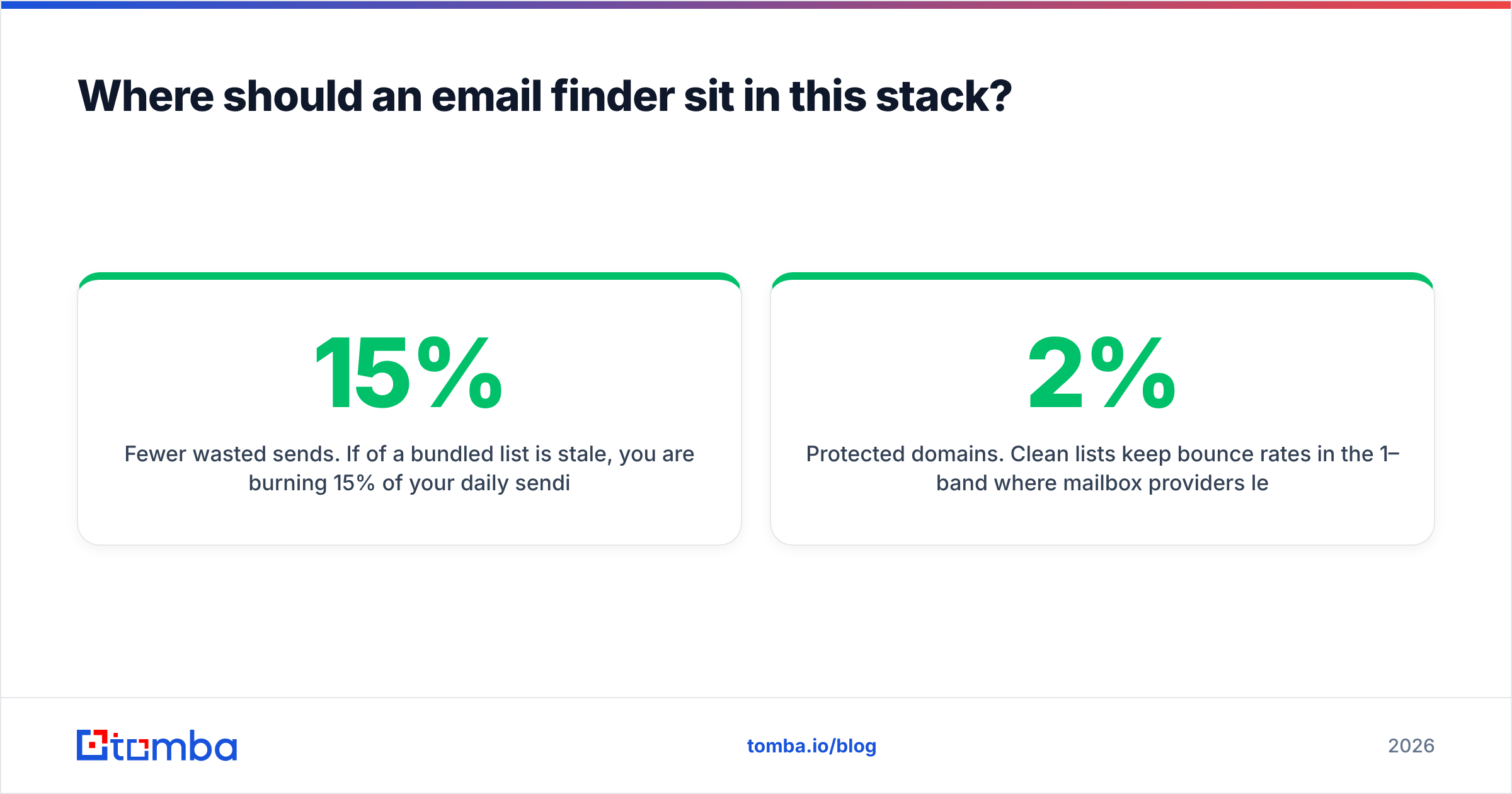
- Fewer wasted sends. If 15% of a bundled list is stale, you are burning 15% of your daily sending capacity — capacity that is genuinely scarce, unlimited plan or not.
- Protected domains. Clean lists keep bounce rates in the 1–2% band where mailbox providers leave you alone.
- Honest metrics. Reply rate calculated on a verified denominator tells you whether your copy works. Calculated on a dirty list, it tells you nothing.
- Cheaper scale. Verification credits cost a fraction of a burned domain plus a three-week rewarm.
A typical clean workflow looks like this: build the target account list, run a domain search to pull the right contacts per company, verify in bulk, drop the survivors into Ditlead or Success.ai, and let the sequencer do the one thing it is good at. Teams with engineering resources wire the same steps through an email finder API so the verification step is impossible to skip.
This is also the answer to the "all-in-one versus best-of-breed" debate. You do not need ten tools. You need two layers: one that guarantees the contact is real, and one that delivers the message. Bundling both into a single subscription usually means one of them is mediocre.
Frequently asked questions#
Is Ditlead cheaper than Success.ai? Usually yes at the entry tier, mostly because Success.ai's price includes database access. Compare total cost of ownership — mailbox seats, domains, and any verification you add — rather than the sticker price.
Do both platforms offer unlimited email accounts? Both advertise it on paid plans. Remember that the mailbox provider, not the sequencer, is what you actually pay per seat.
Can I use Success.ai's database with Ditlead? You can export contacts and import them anywhere, subject to each vendor's terms. Verify the export before importing — do not assume a database record is a deliverable address.
Which has better deliverability? Neither meaningfully. Both offer warmup and rotation. Your DNS setup, ramp schedule, and list quality decide the outcome.
Do I still need a separate email verifier? Yes. Both platforms include basic validation at best; neither replaces a dedicated verification pass, especially on catch-all domains.
Start with data you can trust#
Whichever sequencer you land on, the campaign lives or dies on the list you feed it. Run your target domains through the Tomba Email Finder first — search by domain, name, or company, get a confidence score per result, and verify before a single message leaves your outbox. The free tier includes 25 searches a month, and paid plans start at $49/month with bulk processing and API access; full details are on the Tomba pricing page. Clean the input, then let Ditlead or Success.ai do what it does best.
Related guides#
Ready to find emails that actually work?
Join 150,000+ professionals who stopped guessing and started sending. Free credits on signup — no credit card required.
Get the Tomba newsletter
Practical outbound tactics and product updates — once every two weeks.
About the author