DKIM Explained: How DKIM Email Authentication Works in 2026
DKIM is the cryptographic signature that proves your email really came from your domain. Here's how it works, how to set it up on any provider, and the five misconfigurations that silently kill your inbox placement.
TL;DR
- DKIM (DomainKeys Identified Mail) attaches a cryptographic signature to every outgoing message so receiving servers can verify the message really came from your domain and wasn't altered in transit.
- It works with two keys: a private key held by your sending platform, and a public key published as a TXT record in your DNS under
selector._domainkey.yourdomain.com. - DKIM alone does not get you into the inbox. It's one of three legs — SPF, DKIM, DMARC — and since Google and Yahoo tightened bulk-sender rules, all three are effectively mandatory.
- The most common failures are a truncated DNS record, a selector that doesn't match, message modification by a mailing list or forwarder, and keys that were never rotated.
- Use 2048-bit keys, one selector per sending platform, and check alignment (
d=matching your From domain) — not just "pass/fail."
What is DKIM, exactly?#
DKIM is a signature on an envelope that only you can produce and anyone can check.
Think of it like a wax seal on a letter. The seal is stamped with a ring only you own (your private key). Anyone who receives the letter can compare the seal against a public reference copy of your crest (your public key, published in DNS) and confirm two things: the letter came from you, and nobody steamed it open and edited it along the way.
Technically, DKIM is defined in RFC 6376 and works by hashing selected parts of the message — a defined set of headers plus the body — then encrypting that hash with a private RSA (or Ed25519) key. The result gets attached to the message as a DKIM-Signature header. The receiving mail server looks up the matching public key in DNS, decrypts the signature, recomputes the hash from the message it received, and compares. Match means pass. Mismatch means the message changed or the signer wasn't legitimate.
What DKIM does not do:
- It doesn't encrypt your email. The message body is still plaintext over TLS at best.
- It doesn't prove the person sending is trustworthy. A spammer with a domain and a DKIM key gets a pass too.
- It doesn't stop display-name spoofing on its own. That's DMARC's job, using DKIM as an input.
That last point matters and gets missed constantly. DKIM passing tells you a domain signed the message. DMARC is what ties that signed domain to the From address your recipient actually sees.

How does DKIM actually work, step by step?#
Here's the full lifecycle of a single signed message:
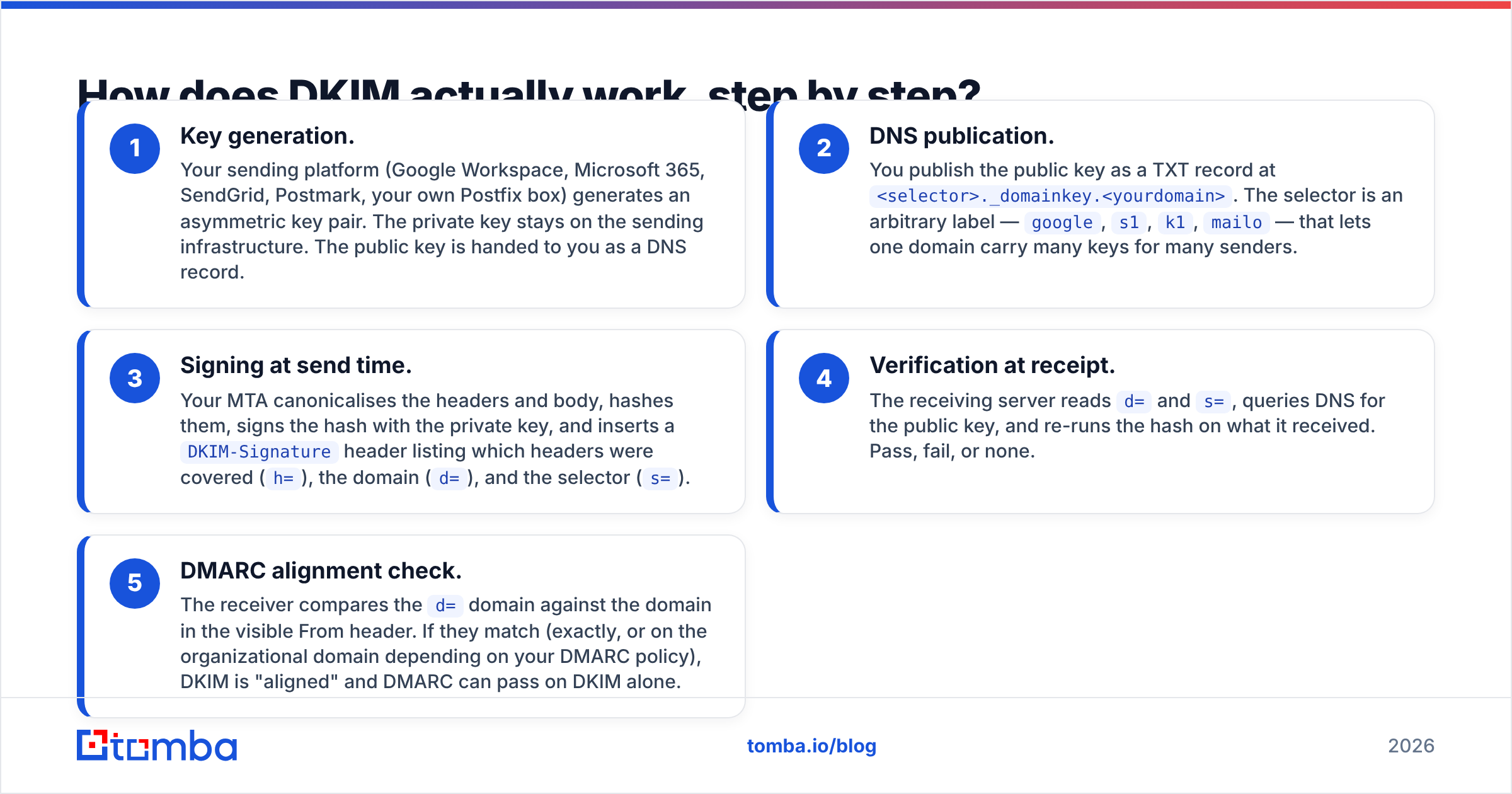
- Key generation. Your sending platform (Google Workspace, Microsoft 365, SendGrid, Postmark, your own Postfix box) generates an asymmetric key pair. The private key stays on the sending infrastructure. The public key is handed to you as a DNS record.
- DNS publication. You publish the public key as a TXT record at
<selector>._domainkey.<yourdomain>. The selector is an arbitrary label —google,s1,k1,mailo— that lets one domain carry many keys for many senders. - Signing at send time. Your MTA canonicalises the headers and body, hashes them, signs the hash with the private key, and inserts a
DKIM-Signatureheader listing which headers were covered (h=), the domain (d=), and the selector (s=). - Verification at receipt. The receiving server reads
d=ands=, queries DNS for the public key, and re-runs the hash on what it received. Pass, fail, or none. - DMARC alignment check. The receiver compares the
d=domain against the domain in the visible From header. If they match (exactly, or on the organizational domain depending on your DMARC policy), DKIM is "aligned" and DMARC can pass on DKIM alone.
Step 5 is where most teams discover their setup is technically valid but strategically useless. A message signed by d=sendgrid.net verifies perfectly — and fails DMARC alignment because your From address says you@yourcompany.com. That's why every ESP asks you to set up a custom signing domain.
What do the tags in a DKIM signature mean?#
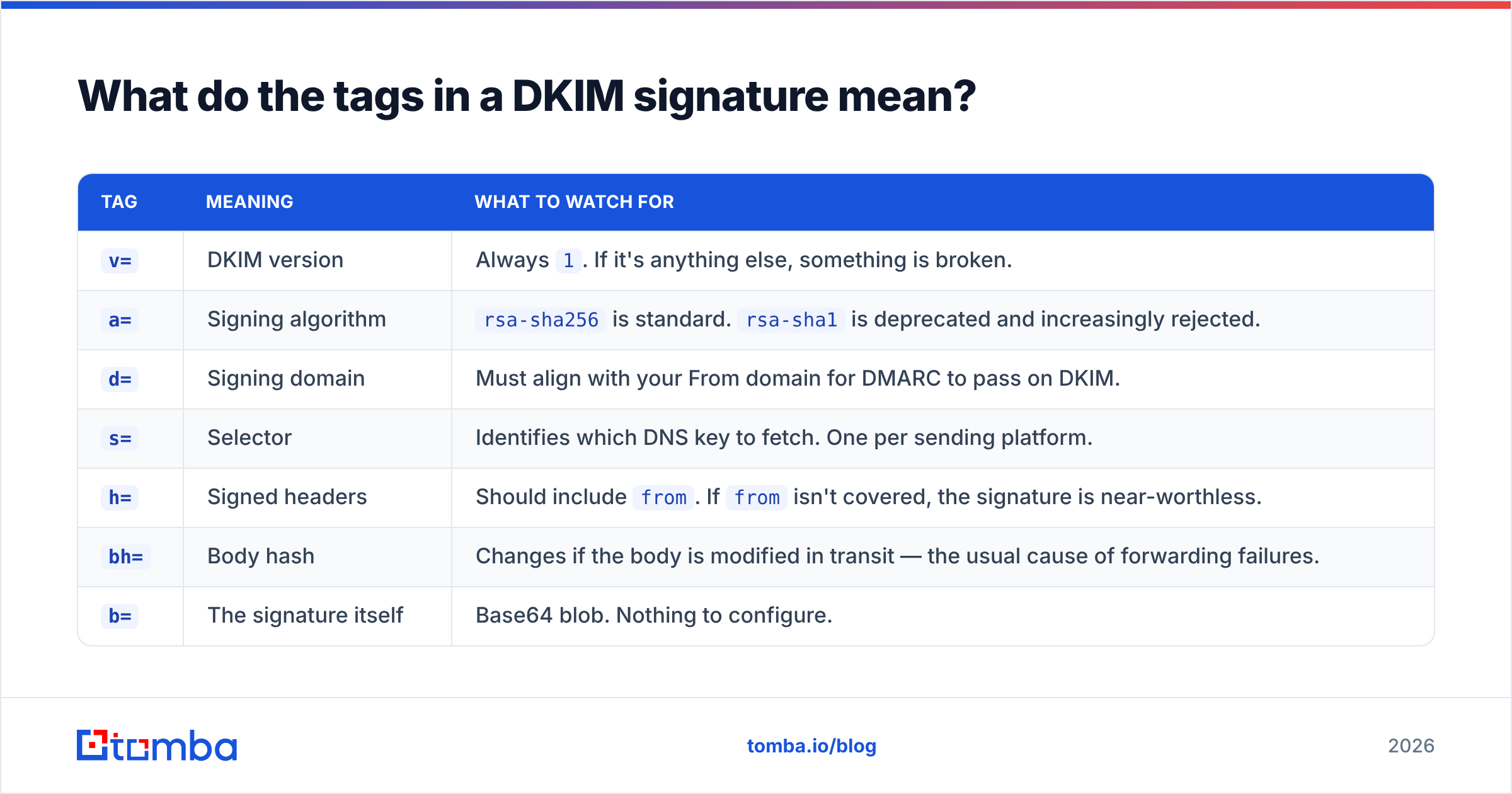
A real DKIM-Signature header looks like a wall of characters. Here's what the parts you'll actually touch mean:
| Tag | Meaning | What to watch for |
|---|---|---|
v= |
DKIM version | Always 1. If it's anything else, something is broken. |
a= |
Signing algorithm | rsa-sha256 is standard. rsa-sha1 is deprecated and increasingly rejected. |
d= |
Signing domain | Must align with your From domain for DMARC to pass on DKIM. |
s= |
Selector | Identifies which DNS key to fetch. One per sending platform. |
h= |
Signed headers | Should include from. If from isn't covered, the signature is near-worthless. |
bh= |
Body hash | Changes if the body is modified in transit — the usual cause of forwarding failures. |
b= |
The signature itself | Base64 blob. Nothing to configure. |
l= |
Body length limit | Rarely used. Avoid it — it lets attackers append content below the signed portion. |
If you inspect one message a month, inspect d= and h=. Those two carry most of the risk.
SPF vs DKIM vs DMARC: which one does what?#
These three get used interchangeably in vendor marketing, which is unhelpful because they answer completely different questions.
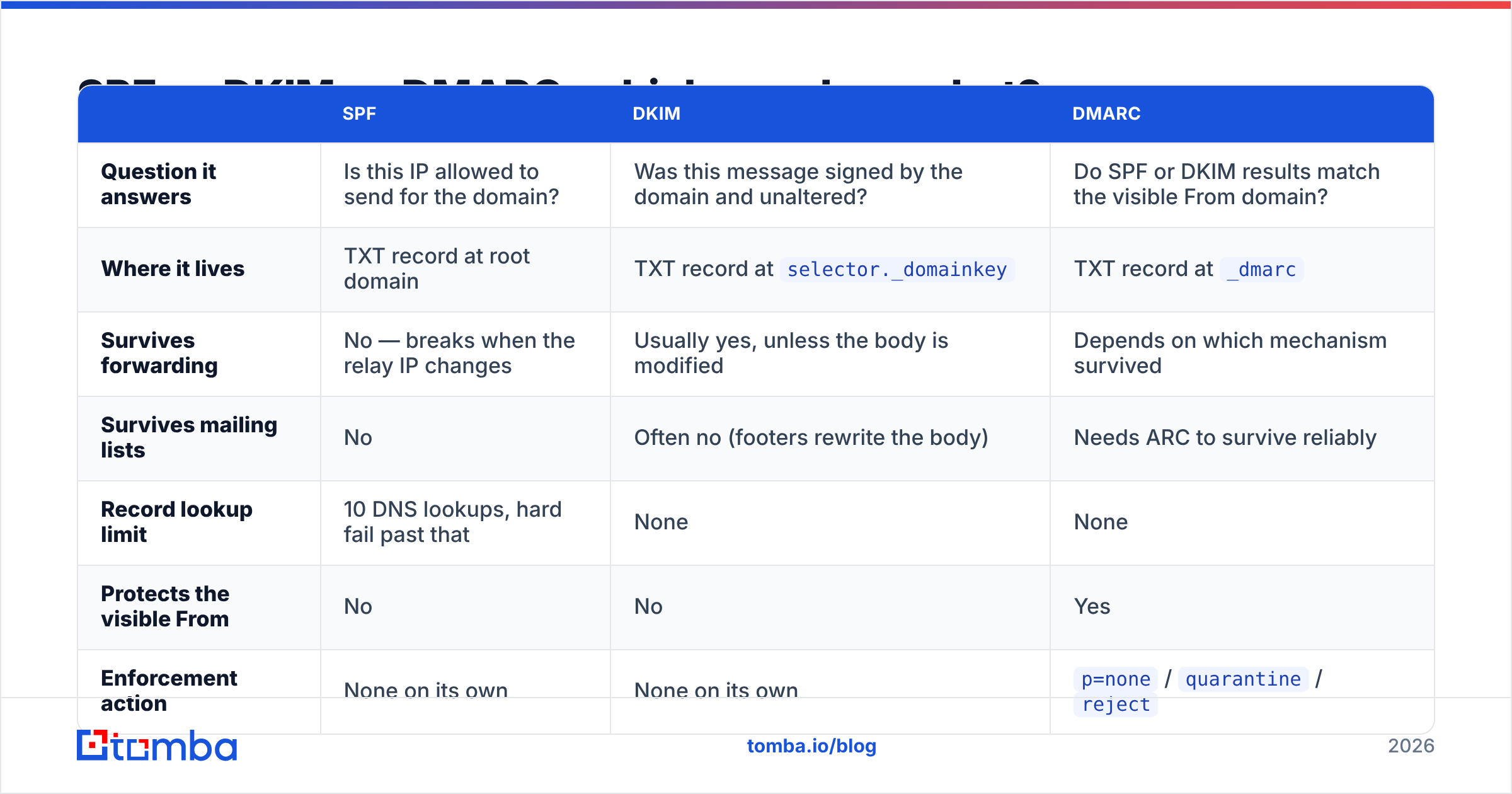
| SPF | DKIM | DMARC | |
|---|---|---|---|
| Question it answers | Is this IP allowed to send for the domain? | Was this message signed by the domain and unaltered? | Do SPF or DKIM results match the visible From domain? |
| Where it lives | TXT record at root domain | TXT record at selector._domainkey |
TXT record at _dmarc |
| Survives forwarding | No — breaks when the relay IP changes | Usually yes, unless the body is modified | Depends on which mechanism survived |
| Survives mailing lists | No | Often no (footers rewrite the body) | Needs ARC to survive reliably |
| Record lookup limit | 10 DNS lookups, hard fail past that | None | None |
| Protects the visible From | No | No | Yes |
| Enforcement action | None on its own | None on its own | p=none / quarantine / reject |
| Required by Google/Yahoo bulk rules | Yes | Yes | Yes (at minimum p=none) |
The practical reading: SPF is cheap and brittle, DKIM is durable and portable, DMARC is the policy layer that makes either one mean something. Since February 2024, Google and Yahoo have required bulk senders (5,000+ messages a day to their users) to have all three plus one-click unsubscribe and a spam rate under 0.3%. Google's sender guidelines remain the canonical reference and are updated more often than most blog posts about them.
If you're still mapping the terminology, our email deliverability glossary entry covers the surrounding vocabulary, and the SPF checker will tell you whether you've already blown past the 10-lookup limit — which is far more common than people expect once you've added a CRM, a support desk, and a marketing platform.
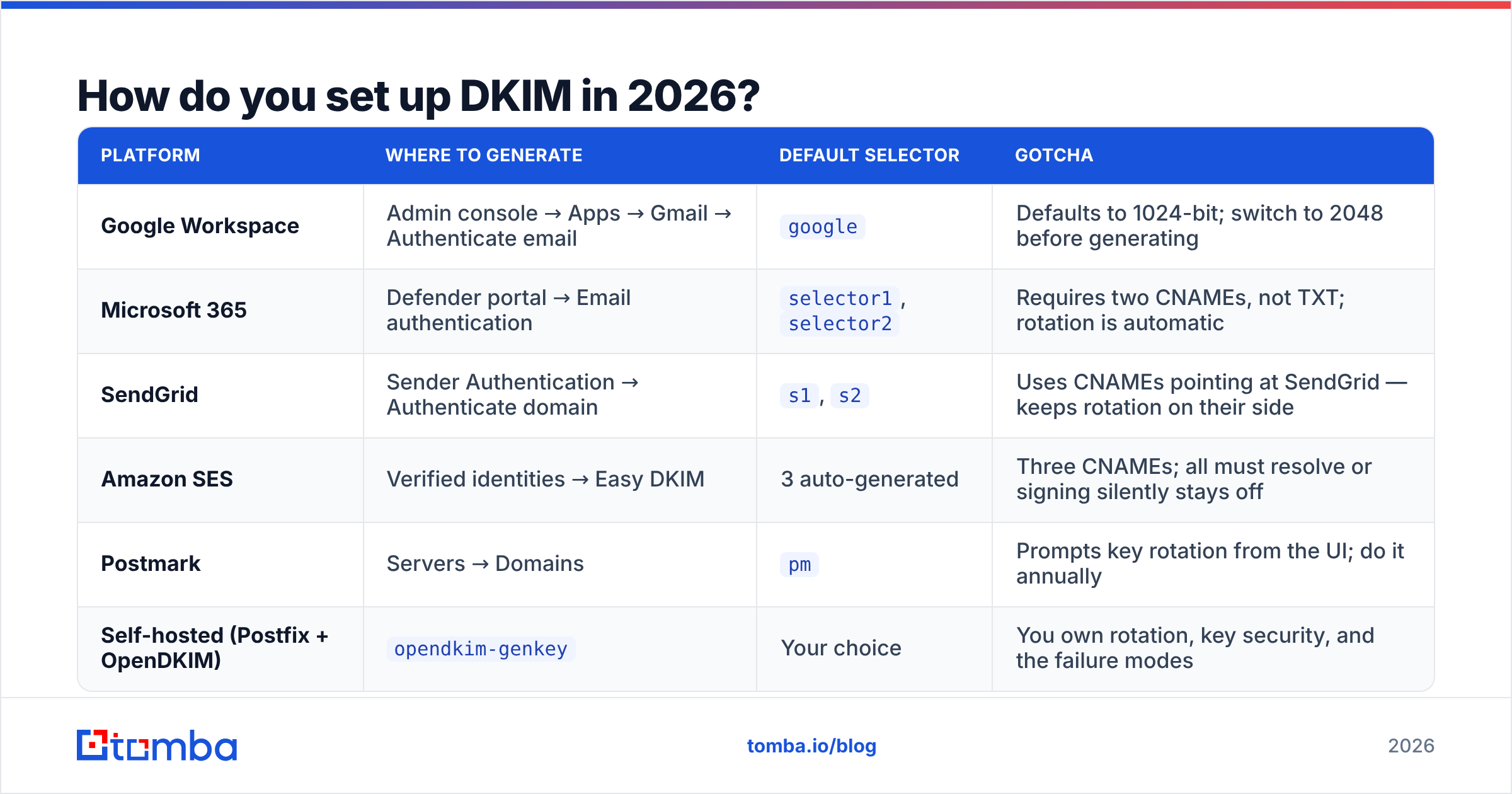
How do you set up DKIM in 2026?#
The mechanics differ per platform, but the shape is identical: generate a key, publish a DNS record, enable signing, verify.
| Platform | Where to generate | Default selector | Gotcha |
|---|---|---|---|
| Google Workspace | Admin console → Apps → Gmail → Authenticate email | google |
Defaults to 1024-bit; switch to 2048 before generating |
| Microsoft 365 | Defender portal → Email authentication | selector1, selector2 |
Requires two CNAMEs, not TXT; rotation is automatic |
| SendGrid | Sender Authentication → Authenticate domain | s1, s2 |
Uses CNAMEs pointing at SendGrid — keeps rotation on their side |
| Amazon SES | Verified identities → Easy DKIM | 3 auto-generated | Three CNAMEs; all must resolve or signing silently stays off |
| Postmark | Servers → Domains | pm |
Prompts key rotation from the UI; do it annually |
| Self-hosted (Postfix + OpenDKIM) | opendkim-genkey |
Your choice | You own rotation, key security, and the failure modes |
Three rules that apply everywhere:
- One selector per sending platform. Never share a key between your ESP and your transactional provider. When you rotate or revoke one, you don't want to break the other.
- Use 2048-bit keys. 1024-bit RSA is still accepted but is a known weak point, and some receivers have started downgrading its trust weighting. The only reason 1024 persists is that some legacy DNS providers choke on the longer record — which brings us to the next rule.
- Watch for TXT record truncation. A 2048-bit public key exceeds the 255-character limit for a single TXT string. It has to be split into multiple quoted strings inside one record. Some DNS panels do this automatically; others silently cut the key off. A truncated key produces a
permerror, not a clean failure message, so it's easy to miss.
Why does DKIM break?#
Because DKIM is a cryptographic assertion about bytes, anything that changes the bytes breaks it. The recurring culprits:
- Mailing lists and forwarders. A list server that appends "You are subscribed to..." to the body invalidates
bh=. ARC (Authenticated Received Chain) exists to preserve the original verdict across hops, but adoption is uneven. - Antivirus or security gateways that rewrite content. Link-rewriting for click protection is a frequent offender, particularly when it rewrites in the body rather than at delivery.
- Selector mismatch after a platform migration. You moved ESPs, the old DNS record is gone, and messages are still being signed with the old selector.
- Keys that were never rotated. A private key sitting on the same server for six years is a liability, not a configuration. Annual rotation is the widely-recommended cadence; twice a year if you're in a regulated space.
- Subdomain assumptions. Signing
mail.yourcompany.comwhile sending Fromyourcompany.comworks for relaxed DMARC alignment but fails strict alignment (adkim=s). Know which mode you set.

How do you test and monitor DKIM?#
Testing takes about four minutes. Monitoring takes a policy.
For a one-off check, send a message to a seed address and view the raw source. In Gmail, "Show original" gives you a three-line verdict for SPF, DKIM, and DMARC. What you want to see is DKIM: 'PASS' with domain yourcompany.com — with your domain, not your provider's. If the domain shown belongs to your ESP, you have valid DKIM but broken alignment.
For continuous monitoring, publish a DMARC record with an rua= aggregate reporting address, even at p=none. Receivers will send you daily XML reports listing every source sending as your domain, whether SPF and DKIM passed, and whether they aligned. That's the only reliable way to discover the marketing contractor who set up a sending tool on your domain nine months ago.
Two things worth checking alongside DKIM, because a perfect signature won't save a poisoned list:
- List hygiene. High bounce rates damage sender reputation faster than any authentication misstep. Running addresses through an email verifier before a send removes the invalid ones that generate hard bounces.
- Blacklist status. Authentication says who you are; blocklists say whether anyone wants to hear from you. A quick pass through a blacklist checker belongs in the same monthly routine as your DMARC report review.
Does DKIM improve deliverability on its own?#
No — and this is the honest answer most guides dodge.
DKIM is a gate, not an accelerant. Failing it will get you filtered or rejected outright at major providers. Passing it gets you nothing more than the right to be judged on your actual sending behaviour: complaint rate, bounce rate, engagement, content, sending volume consistency, and domain age.
The useful framing is that authentication is the price of entry. Once you're through the gate, reputation decides placement. Teams that spend three weeks perfecting a DMARC rollout and zero time on list quality end up with cryptographically flawless mail landing in Promotions.
Where DKIM does pay compounding dividends is domain reputation portability. Because DKIM survives IP changes and most forwarding, the reputation you build accrues to your domain rather than to a rented IP address. Switch ESPs and your SPF record changes entirely; your DKIM-anchored domain reputation largely comes with you. That's a strong argument for signing everything, including transactional mail you consider low-stakes.
What should you do this week?#
A realistic sequence, in priority order:
- Inventory every system that sends as your domain. CRM, helpdesk, billing, marketing, HR tooling, that one Zapier workflow.
- Confirm each one signs with
d=yourdomain.com, not the vendor's domain. - Upgrade any 1024-bit keys to 2048-bit, and confirm the DNS record isn't truncated.
- Publish DMARC at
p=nonewithrua=if you haven't, and read the reports for 30 days before tightening. - Set a calendar reminder to rotate keys in 12 months. It will not happen otherwise.
- Clean the list you're about to mail. Authentication is table stakes; a 12% bounce rate undoes it.
The bottom line#
DKIM is the most durable of the three authentication standards and the one worth getting exactly right. It survives forwarding, it travels with your domain rather than your IP, and it's the mechanism DMARC leans on when SPF inevitably breaks. Set it up once per sending platform, use 2048-bit keys, verify alignment rather than just pass/fail, and rotate annually.
Then go spend the rest of your effort on the part that actually moves reply rates: sending relevant messages to addresses that exist.
That last part is where clean data does more for your inbox placement than any DNS record. If your outbound list is built from scraped guesses, you'll bounce your way to a bad reputation no matter how good your signature is. Tomba's Email Finder returns verified, deliverable business addresses with a confidence score on each one, so the messages you sign are the ones that land. There's a free tier with 25 searches a month to test it against a list you already have, and paid plans start at $49/month — see Tomba pricing for the full breakdown. Get the authentication right, then give it something worth authenticating.
Related guides#
Ready to find emails that actually work?
Join 150,000+ professionals who stopped guessing and started sending. Free credits on signup — no credit card required.
Get the Tomba newsletter
Practical outbound tactics and product updates — once every two weeks.
About the author