DKIM Checker: How to Test and Fix Your DKIM Record in 2026
A DKIM checker tells you in seconds whether your signature validates — but most people misread the output. Here's how to run one, decode the errors, and fix the record properly.
TL;DR
- A DKIM checker does two separate jobs: it looks up your public key in DNS and it validates the signature on a message you actually sent. Most free tools only do the first one.
- "Record found" is not "DKIM passes." A record can be published, syntactically valid, and still fail authentication because of a key mismatch, a truncated TXT string, or a broken relay in the middle.
- The three failures that cause 90% of real-world DKIM problems: wrong selector, split/truncated
p=value, and body modification by a mailing list or security gateway. - 2048-bit keys are the 2026 default. 1024-bit still validates but is increasingly treated as weak signal by receivers.
- DKIM alone doesn't get you inboxed. It's one leg of the SPF + DKIM + DMARC tripod, and none of it matters if you're mailing dead addresses.
What is a DKIM checker, and what does it actually test?#
A DKIM checker is a tool that inspects your DomainKeys Identified Mail setup and tells you whether receiving mail servers can cryptographically verify that your email came from your domain and wasn't altered in transit.
Here's the useful distinction nobody makes clearly: there are two kinds of DKIM checker, and they answer different questions.
Record lookup checkers take a domain and a selector (google._domainkey.yourdomain.com, for example), query DNS, and show you the public key. They answer "did I publish something?" That's it. A record lookup passing means almost nothing about whether your mail authenticates.
Signature validation checkers give you an address to send a test message to, then parse the Authentication-Results and DKIM-Signature headers of the message that actually arrived. They answer "does a real message from my real sending stack verify?" That's the question you care about.
If you only run the first kind, you'll get a green checkmark on a setup that's failing in production. I've seen teams sit on a broken selector for months because their DNS checker said "valid."
How does DKIM work in plain English?#
Think of DKIM like a wax seal on a letter. Your mail server presses a unique seal into every envelope it sends. Anyone can look up what your seal is supposed to look like — it's published on a public noticeboard (DNS). When the letter arrives, the recipient compares the seal on the envelope to the one on the noticeboard. Match means the letter is genuinely from you and nobody opened it en route.
Technically: your sending server holds a private key. On the way out, it hashes selected headers (usually From, Subject, Date, To, MIME-Version) plus the message body, encrypts that hash with the private key, and attaches it as a DKIM-Signature header. The receiving server reads the d= (domain) and s= (selector) tags from that header, fetches the matching public key from DNS at <selector>._domainkey.<domain>, decrypts the signature, recomputes the hash, and compares. Same hash, DKIM passes.
The full specification is RFC 6376, and the Wikipedia overview of DKIM is a decent primer if you want the history.
What does a DKIM checker actually look at?#
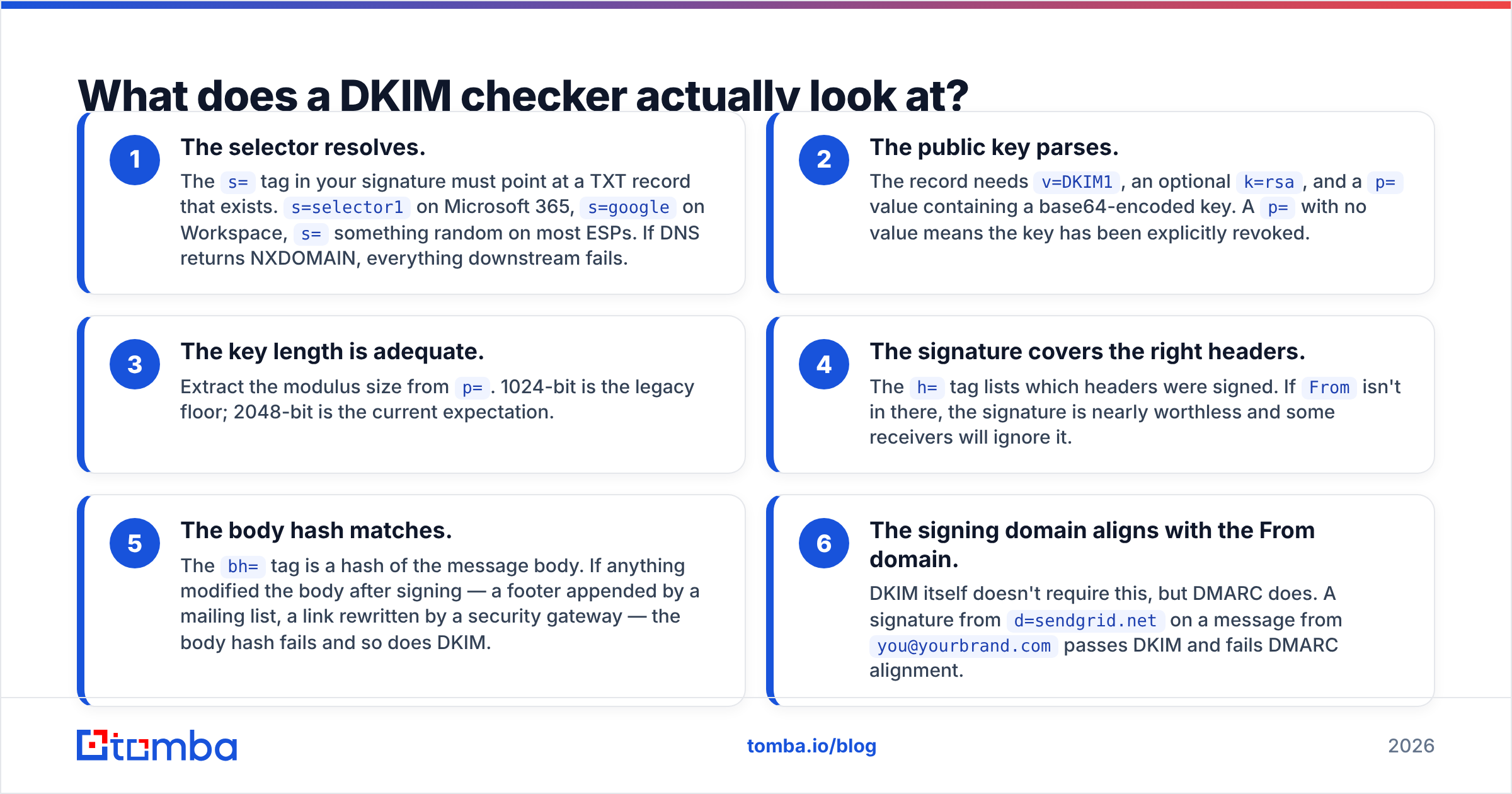
When you run a proper check, these are the six things being evaluated. Knowing them turns a cryptic red X into a five-minute fix.
- The selector resolves. The
s=tag in your signature must point at a TXT record that exists.s=selector1on Microsoft 365,s=googleon Workspace,s=something random on most ESPs. If DNS returns NXDOMAIN, everything downstream fails. - The public key parses. The record needs
v=DKIM1, an optionalk=rsa, and ap=value containing a base64-encoded key. Ap=with no value means the key has been explicitly revoked. - The key length is adequate. Extract the modulus size from
p=. 1024-bit is the legacy floor; 2048-bit is the current expectation. - The signature covers the right headers. The
h=tag lists which headers were signed. IfFromisn't in there, the signature is nearly worthless and some receivers will ignore it. - The body hash matches. The
bh=tag is a hash of the message body. If anything modified the body after signing — a footer appended by a mailing list, a link rewritten by a security gateway — the body hash fails and so does DKIM. - The signing domain aligns with the From domain. DKIM itself doesn't require this, but DMARC does. A signature from
d=sendgrid.neton a message fromyou@yourbrand.compasses DKIM and fails DMARC alignment.
That last point trips up more people than the other five combined. Passing DKIM and passing DMARC are not the same test.
Which DKIM checker should you use in 2026?#
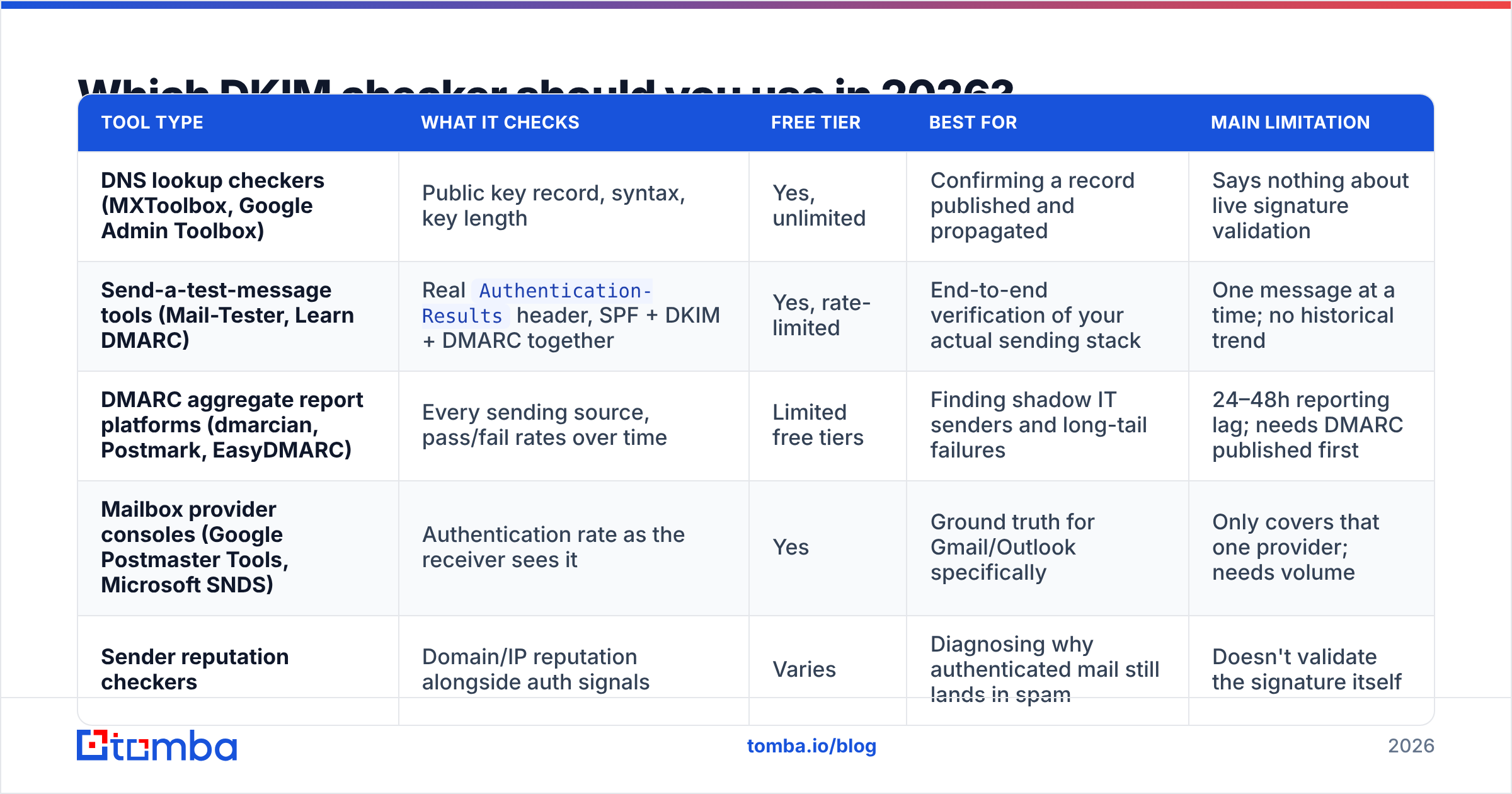
There's no single best tool — they're specialized differently. Here's an honest breakdown of what each type gives you and where it falls short.
| Tool type | What it checks | Free tier | Best for | Main limitation |
|---|---|---|---|---|
| DNS lookup checkers (MXToolbox, Google Admin Toolbox) | Public key record, syntax, key length | Yes, unlimited | Confirming a record published and propagated | Says nothing about live signature validation |
| Send-a-test-message tools (Mail-Tester, Learn DMARC) | Real Authentication-Results header, SPF + DKIM + DMARC together |
Yes, rate-limited | End-to-end verification of your actual sending stack | One message at a time; no historical trend |
| DMARC aggregate report platforms (dmarcian, Postmark, EasyDMARC) | Every sending source, pass/fail rates over time | Limited free tiers | Finding shadow IT senders and long-tail failures | 24–48h reporting lag; needs DMARC published first |
| Mailbox provider consoles (Google Postmaster Tools, Microsoft SNDS) | Authentication rate as the receiver sees it | Yes | Ground truth for Gmail/Outlook specifically | Only covers that one provider; needs volume |
| Sender reputation checkers | Domain/IP reputation alongside auth signals | Varies | Diagnosing why authenticated mail still lands in spam | Doesn't validate the signature itself |
The practical workflow is to use three of these, not one: a DNS lookup to confirm publication, a send-a-test tool to confirm live validation, and DMARC reports to catch the sending sources you forgot about. Tomba's free sender reputation checker and SPF checker cover the surrounding layers when you're auditing a domain end to end.
What do the common DKIM errors mean?#
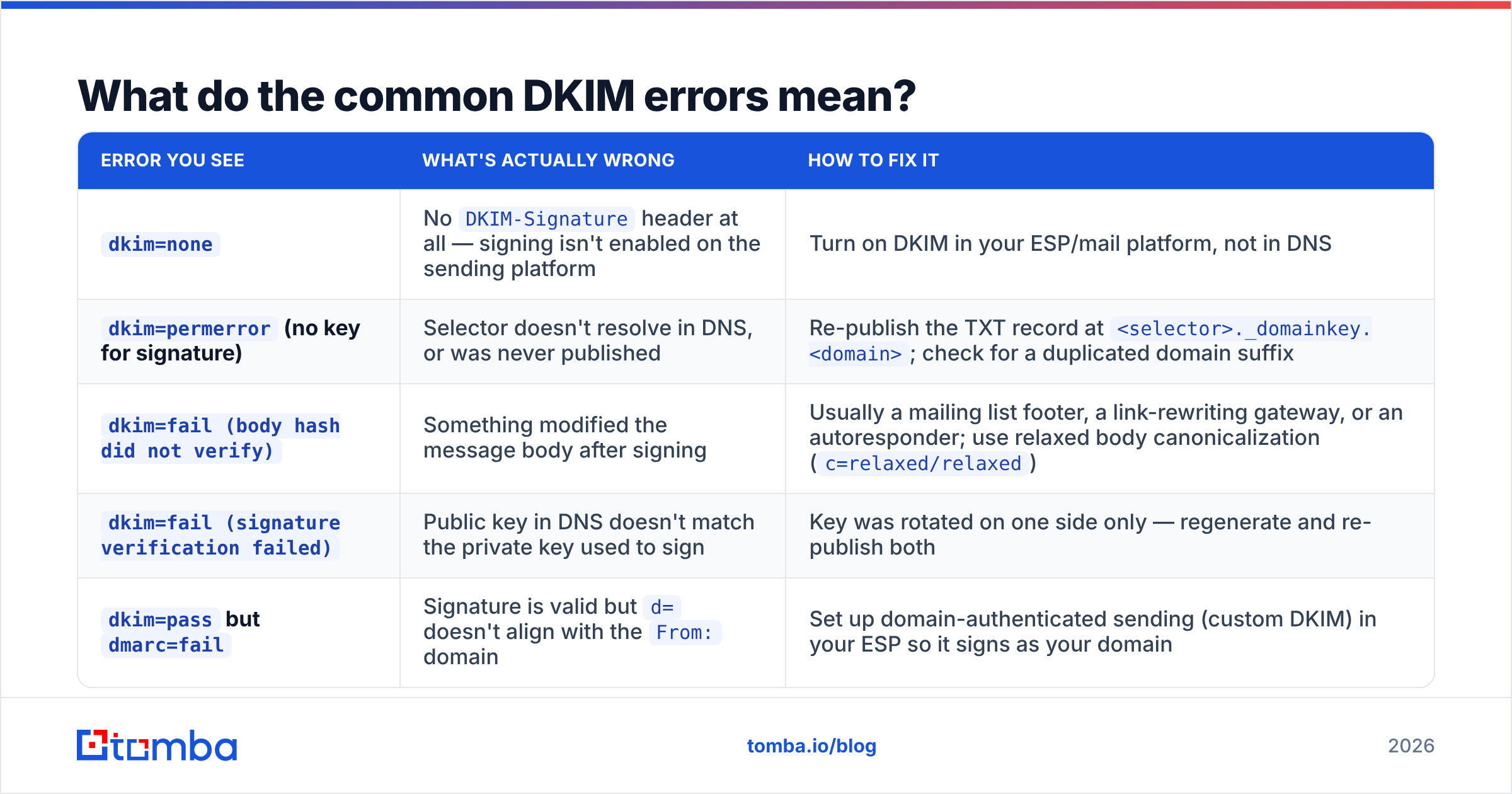
Here's the decoder ring. These five account for the overwhelming majority of failures I've had to debug.
| Error you see | What's actually wrong | How to fix it |
|---|---|---|
dkim=none |
No DKIM-Signature header at all — signing isn't enabled on the sending platform |
Turn on DKIM in your ESP/mail platform, not in DNS |
dkim=permerror (no key for signature) |
Selector doesn't resolve in DNS, or was never published | Re-publish the TXT record at <selector>._domainkey.<domain>; check for a duplicated domain suffix |
dkim=fail (body hash did not verify) |
Something modified the message body after signing | Usually a mailing list footer, a link-rewriting gateway, or an autoresponder; use relaxed body canonicalization (c=relaxed/relaxed) |
dkim=fail (signature verification failed) |
Public key in DNS doesn't match the private key used to sign | Key was rotated on one side only — regenerate and re-publish both |
dkim=pass but dmarc=fail |
Signature is valid but d= doesn't align with the From: domain |
Set up domain-authenticated sending (custom DKIM) in your ESP so it signs as your domain |
The truncation problem deserves its own note. Individual DNS TXT strings are capped at 255 characters, and a 2048-bit public key is longer than that. Correctly published, it gets split into multiple quoted strings that the resolver concatenates. Some DNS control panels handle this automatically; some silently mangle it. If your record looks fine in your registrar's UI but your DKIM checker says the key won't parse, this is almost always why — pull the raw record with dig TXT selector._domainkey.yourdomain.com and look at how it's chunked.
Is 1024-bit or 2048-bit better for DKIM?#
Use 2048-bit. It's been the recommended default for years, and by 2026 large receivers increasingly discount or flag 1024-bit signatures as a weak authentication signal rather than a clean pass.
The historical excuse for 1024-bit was the DNS TXT length limit — the record was easier to publish. That excuse expired a long time ago; every serious DNS provider handles split strings correctly now.
The one real constraint: some legacy DNS hosts and a handful of budget shared-hosting panels still choke on long TXT values. If yours does, that's a signal to move DNS to a provider that doesn't, not a reason to downgrade your key.
Rotate keys on a schedule — quarterly is a reasonable cadence, annually is the minimum. The clean way to rotate without downtime is to publish a second selector, switch signing to it, verify with a DKIM checker that mail is passing on the new selector, and only then revoke the old one by setting p= to empty.
How do you fix a failing DKIM record step by step?#
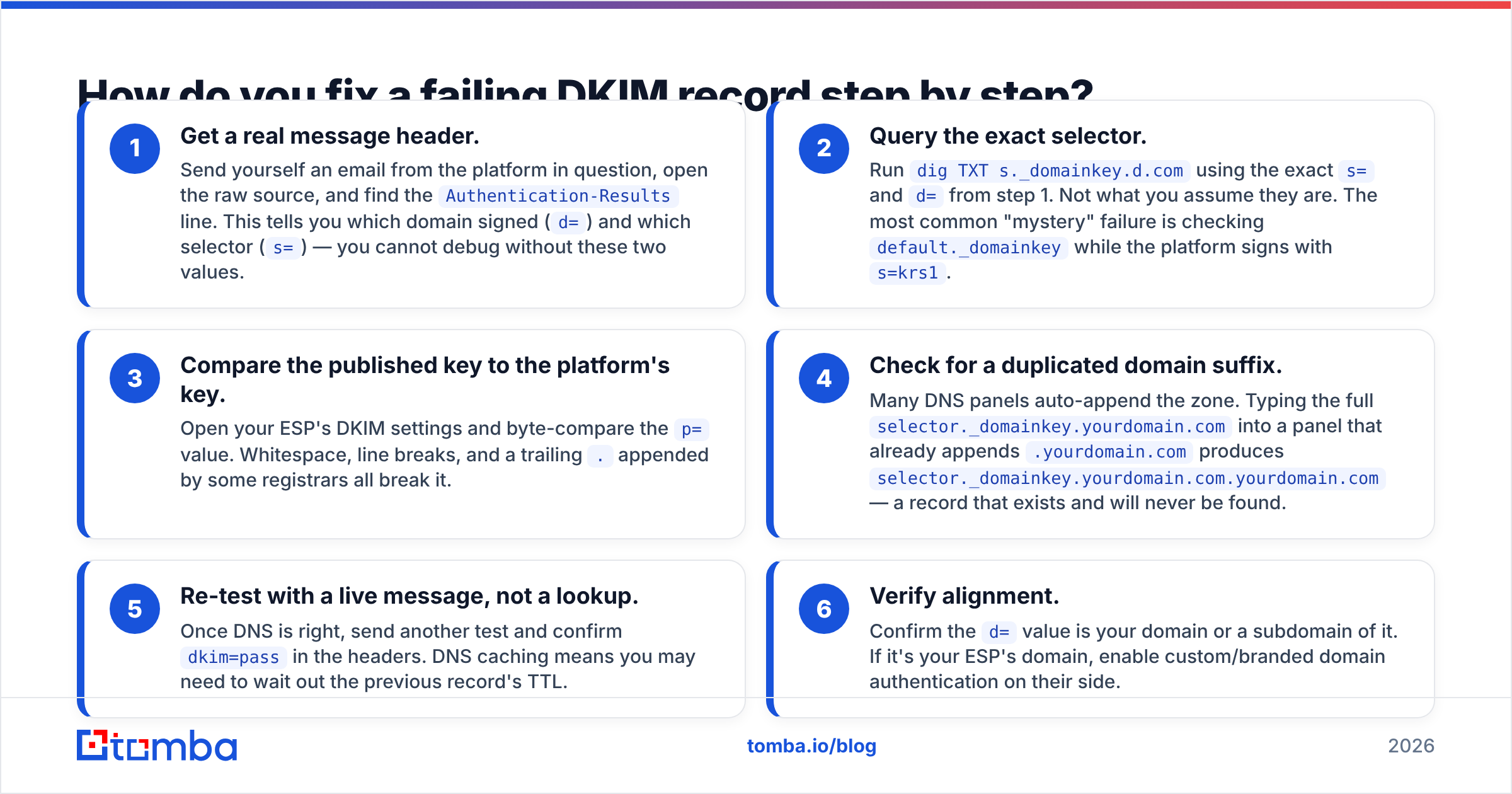
- Get a real message header. Send yourself an email from the platform in question, open the raw source, and find the
Authentication-Resultsline. This tells you which domain signed (d=) and which selector (s=) — you cannot debug without these two values. - Query the exact selector. Run
dig TXT s._domainkey.d.comusing the exacts=andd=from step 1. Not what you assume they are. The most common "mystery" failure is checkingdefault._domainkeywhile the platform signs withs=krs1. - Compare the published key to the platform's key. Open your ESP's DKIM settings and byte-compare the
p=value. Whitespace, line breaks, and a trailing.appended by some registrars all break it. - Check for a duplicated domain suffix. Many DNS panels auto-append the zone. Typing the full
selector._domainkey.yourdomain.cominto a panel that already appends.yourdomain.comproducesselector._domainkey.yourdomain.com.yourdomain.com— a record that exists and will never be found. - Re-test with a live message, not a lookup. Once DNS is right, send another test and confirm
dkim=passin the headers. DNS caching means you may need to wait out the previous record's TTL. - Verify alignment. Confirm the
d=value is your domain or a subdomain of it. If it's your ESP's domain, enable custom/branded domain authentication on their side.
Does passing a DKIM checker actually get you into the inbox?#
No — and this is the part where teams over-invest in authentication and under-invest in everything else.
Authentication is a gate, not a ranking factor. Passing SPF, DKIM, and DMARC gets you considered. It doesn't get you preferred. Once you're through the gate, placement is decided by engagement, complaint rate, bounce rate, sending consistency, and domain reputation. Gmail and Yahoo's bulk-sender requirements made authentication table stakes, which means it's now the price of entry rather than a competitive advantage.
The fastest way to destroy a perfectly authenticated domain is to send to a list full of dead addresses. Hard bounces above roughly 2–3% signal to receivers that you're not maintaining your data, and reputation damage from that outweighs any benefit a 2048-bit key gives you. Run your list through an email verifier before a campaign, and check your domain against the major blocklists with a blacklist checker if placement drops suddenly.
The honest priority order for a cold outbound program:
- Clean data first. Valid, current, correctly formatted addresses.
- Authentication second. SPF, DKIM, DMARC, all aligned, on a subdomain dedicated to outbound.
- Volume discipline third. Warm up gradually; don't 10x sending overnight.
- Content last. Copy matters, but it can't rescue the three above.
If you want the broader context on how these layers interact, Tomba's glossary entry on email deliverability walks through the full stack, and Google's own DKIM documentation is the authoritative reference for Workspace senders.
How often should you re-run a DKIM checker?#
Set a recurring check rather than treating this as a one-time setup task. DKIM breaks silently and you find out weeks later from a drop in reply rate.
Re-check whenever any of these happen: you migrate DNS providers, you add a new sending platform (billing systems, support desks, and marketing automation all send mail and all need signing), you change ESP plans in a way that touches domain authentication, you rotate keys, or you see an unexplained dip in open and reply rates. Beyond that, a monthly manual verification and a DMARC aggregate report review is enough for most senders.
The subdomain habit is worth adopting too: sign cold outbound from mail.yourbrand.com or similar, keep transactional on a separate subdomain, and never send prospecting mail from your primary corporate domain. A reputation problem then stays contained instead of taking your invoices and password resets down with it.
Where should you start?#
Run one live send test today. Not a DNS lookup — an actual message from your actual sending stack, headers inspected, dkim=pass confirmed alongside dmarc=pass. If both are green and your placement is still poor, your problem is data quality, not authentication.
That's usually where it ends up. Perfect DKIM on a list of guessed, scraped, or year-old addresses is a well-sealed letter sent to an empty house. Start with contacts that actually exist: the Tomba Email Finder verifies addresses at the point of discovery so your bounce rate stays low and the reputation you just spent an afternoon protecting keeps compounding. The free tier covers 25 searches a month, and paid plans start at $49/mo — check Tomba pricing for the full breakdown.
Related guides#
Ready to find emails that actually work?
Join 150,000+ professionals who stopped guessing and started sending. Free credits on signup — no credit card required.
Get the Tomba newsletter
Practical outbound tactics and product updates — once every two weeks.
About the author