DKIM Generator: How to Create and Verify DKIM Keys in 2026
A DKIM generator takes ten seconds to run and can still leave you unsigned. Here's what the key pair actually does, which generator to use, and how to publish, test, and rotate the record without breaking mail.
TL;DR
- A DKIM generator creates an RSA key pair: a private key your mail server signs with, and a public key you publish as a DNS TXT record at
selector._domainkey.yourdomain.com. - If you send through Google Workspace, Microsoft 365, SendGrid, or almost any ESP, do not use a third-party generator — the provider generates the key for you and keeps the private half. You only publish what it gives you.
- Standalone generators matter in one case: you run your own MTA (Postfix + OpenDKIM, Postal, Mailcow) or you need a key for a subdomain the provider won't handle.
- Use 2048-bit. 1024-bit still validates but is deprecated in practice and offers no upside beyond fitting in a single DNS string.
- Generating the key is 5% of the job. Publishing it correctly, confirming
dkim=passin a real received header, and rotating it on a schedule is the other 95%.
What is a DKIM generator and what does it actually produce?#
A DKIM generator is a tool that produces a cryptographic key pair for DomainKeys Identified Mail. Think of it like a wax seal and the ring that stamps it: the ring (private key) never leaves your desk, the seal impression (signature) travels on every letter, and anyone holding a picture of the ring's pattern (public key, published in DNS) can confirm the letter is genuinely yours and wasn't altered in transit.
Concretely, a generator outputs two artifacts:
- A private key — a PEM block starting with
-----BEGIN RSA PRIVATE KEY-----. This stays on your sending server. Anyone who gets it can sign mail as you. - A public key record — a DNS TXT record, published at a hostname built from a selector you choose, e.g.
mail._domainkey.example.com, containing something likev=DKIM1; k=rsa; p=MIIBIjANBgkq....
The selector is just a label. It lets one domain hold several active keys at once — one for your transactional provider, one for your marketing platform, one for your own MTA — without collisions. google._domainkey, s1._domainkey, and sendgrid._domainkey can all coexist happily.
What a generator does not do: configure your mail server, tell your ESP to start signing, or make your mail land in the inbox. It hands you two strings. Everything after that is your job.
How does DKIM signing work in plain terms?#
When your server sends a message, it hashes a defined set of headers (From, Subject, Date, To, and often more) plus the body, encrypts that hash with the private key, and staples the result into a new DKIM-Signature: header.
The receiving server reads that header, sees d=example.com; s=mail, and does a DNS lookup for mail._domainkey.example.com. It pulls your public key, decrypts the signature, recomputes the hash from the message it actually received, and compares. Match means dkim=pass. Mismatch — because a header was rewritten, the body was mangled by a forwarder, or the key is wrong — means dkim=fail.
DMARC then asks a further question: does the domain in d= align with the domain in the visible From: header? A signature from mailer.vendor.com on a message from you@example.com passes DKIM but fails DMARC alignment. This is the single most common reason a "correctly configured" DKIM setup still doesn't satisfy DMARC — the mechanics are documented in RFC 6376, and it's the reason ESPs push you toward a CNAME-based custom signing domain.
What should a good DKIM generator give you?#
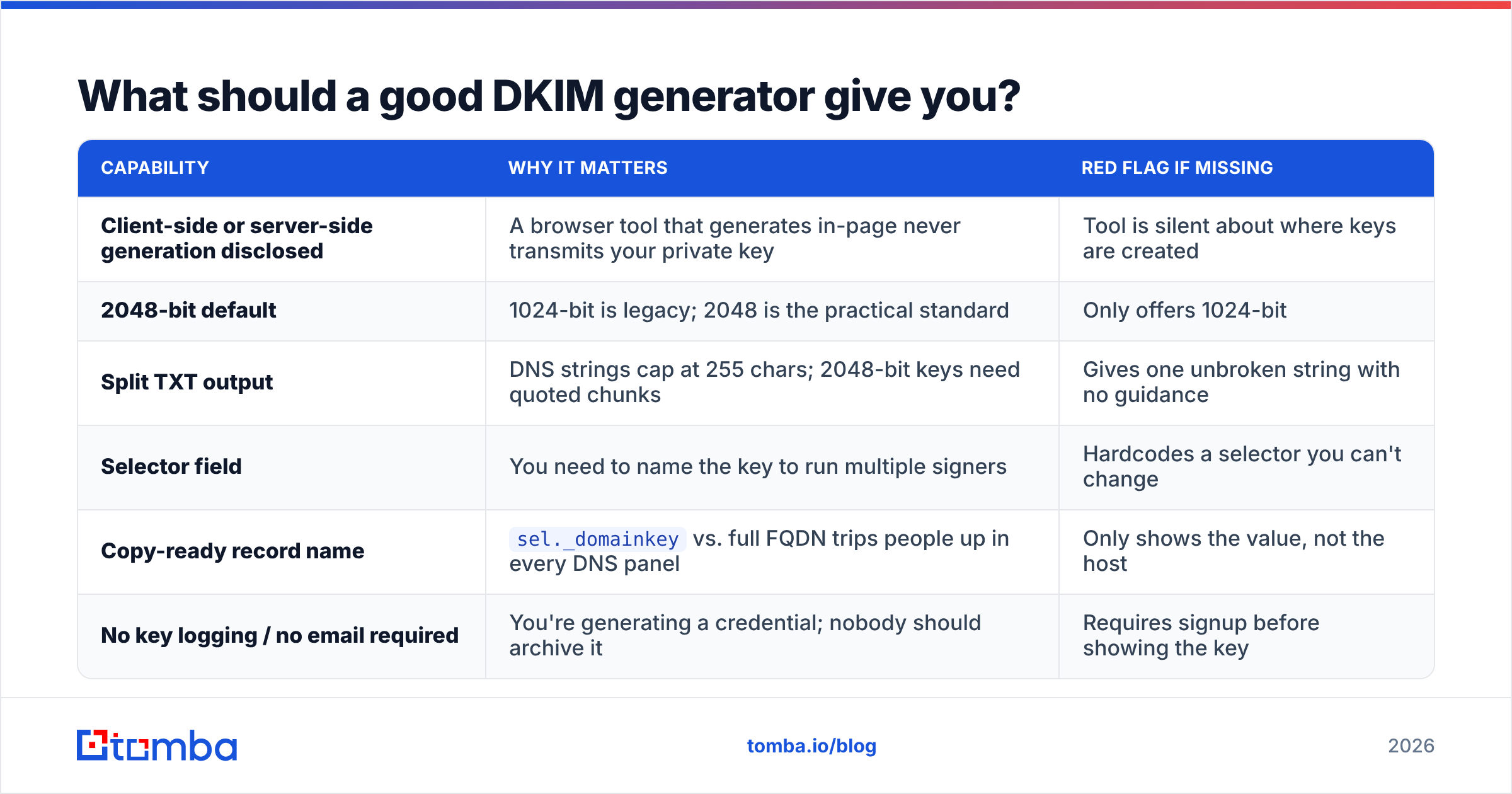
Not all generators are equal. Here's what separates a tool you can trust from a form that spits out a base64 blob:
| Capability | Why it matters | Red flag if missing |
|---|---|---|
| Client-side or server-side generation disclosed | A browser tool that generates in-page never transmits your private key | Tool is silent about where keys are created |
| 2048-bit default | 1024-bit is legacy; 2048 is the practical standard | Only offers 1024-bit |
| Split TXT output | DNS strings cap at 255 chars; 2048-bit keys need quoted chunks | Gives one unbroken string with no guidance |
| Selector field | You need to name the key to run multiple signers | Hardcodes a selector you can't change |
| Copy-ready record name | sel._domainkey vs. full FQDN trips people up in every DNS panel |
Only shows the value, not the host |
| No key logging / no email required | You're generating a credential; nobody should archive it | Requires signup before showing the key |
That last row deserves emphasis. A private key generated on someone else's server and emailed to you is a credential that existed in at least three places it shouldn't. If you have shell access, openssl genrsa -out private.key 2048 takes two seconds and never leaves your laptop.
Which DKIM generator should you use?#
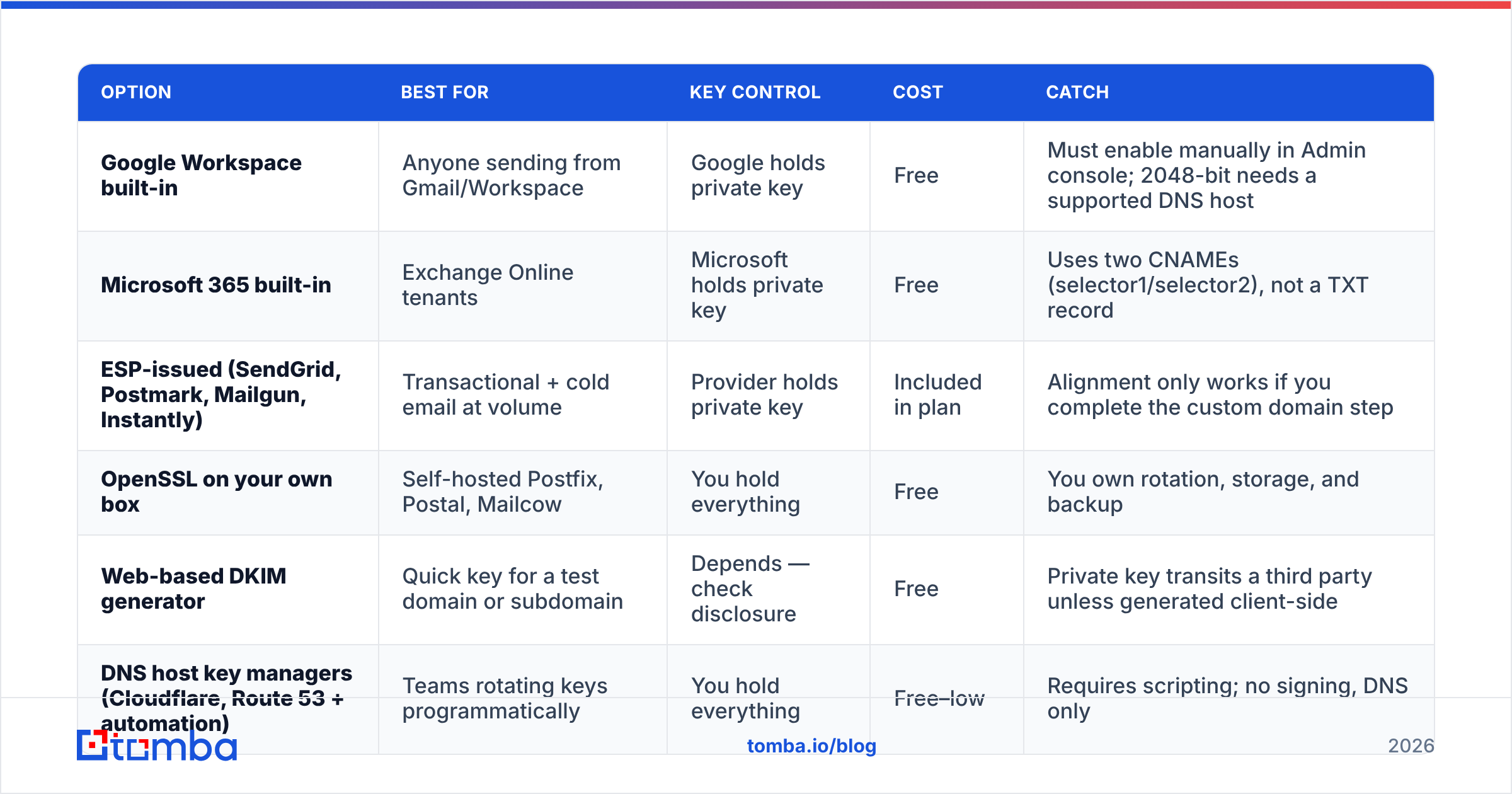
The honest answer for most senders: your provider's, not a standalone one. But the right pick depends on how you send.
| Option | Best for | Key control | Cost | Catch |
|---|---|---|---|---|
| Google Workspace built-in | Anyone sending from Gmail/Workspace | Google holds private key | Free | Must enable manually in Admin console; 2048-bit needs a supported DNS host |
| Microsoft 365 built-in | Exchange Online tenants | Microsoft holds private key | Free | Uses two CNAMEs (selector1/selector2), not a TXT record |
| ESP-issued (SendGrid, Postmark, Mailgun, Instantly) | Transactional + cold email at volume | Provider holds private key | Included in plan | Alignment only works if you complete the custom domain step |
| OpenSSL on your own box | Self-hosted Postfix, Postal, Mailcow | You hold everything | Free | You own rotation, storage, and backup |
| Web-based DKIM generator | Quick key for a test domain or subdomain | Depends — check disclosure | Free | Private key transits a third party unless generated client-side |
| DNS host key managers (Cloudflare, Route 53 + automation) | Teams rotating keys programmatically | You hold everything | Free–low | Requires scripting; no signing, DNS only |
A practical rule: if a vendor sends your mail, that vendor generates the key. If you send the mail, you generate the key. Mixing the two — generating a key yourself and pasting the public half into DNS while your ESP signs with its own — produces a record that resolves and validates nothing.
How do you publish and verify the DKIM record?#
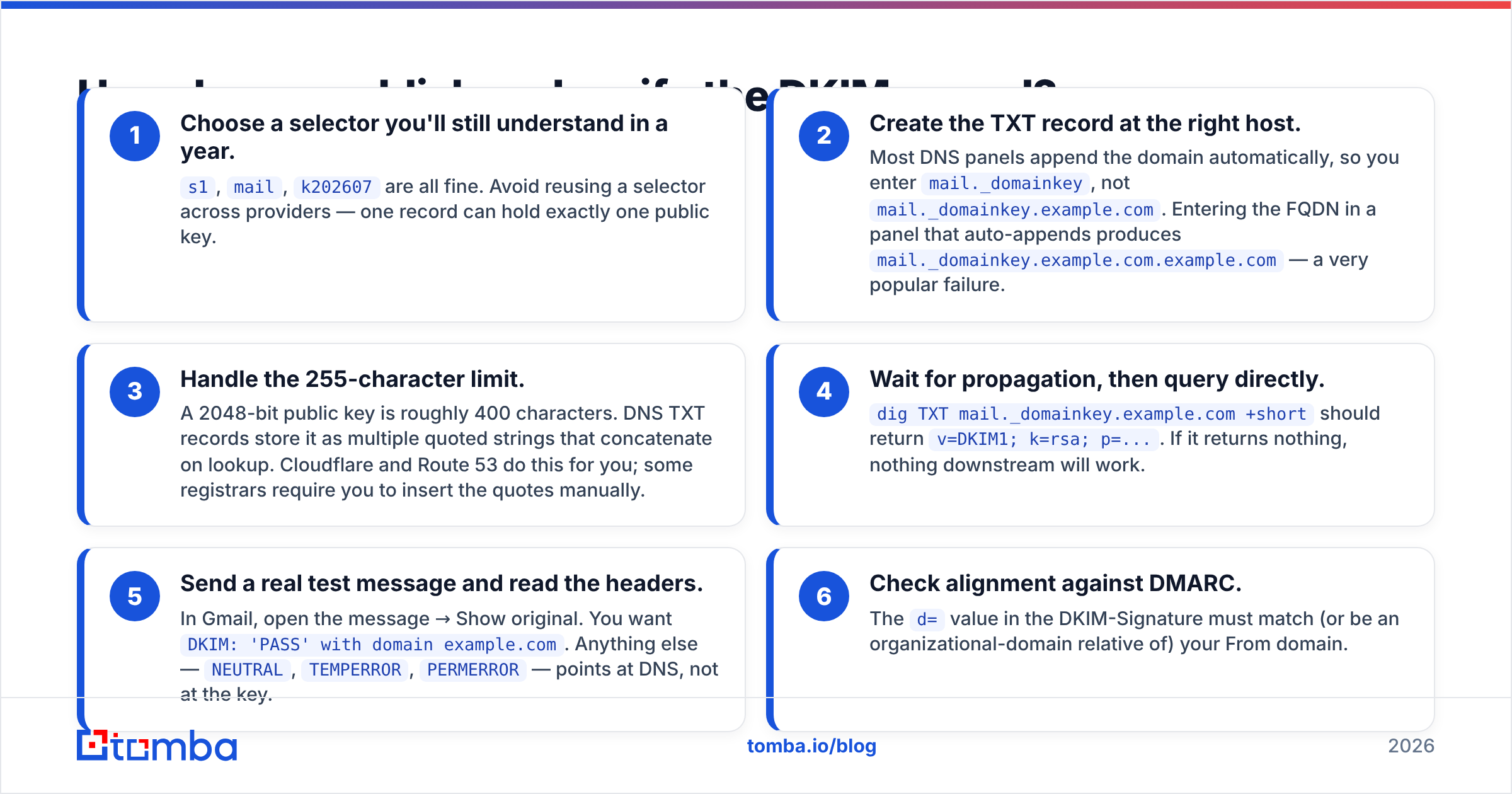
Generation is the easy half. Publication is where setups quietly break. Work through these in order:
- Choose a selector you'll still understand in a year.
s1,mail,k202607are all fine. Avoid reusing a selector across providers — one record can hold exactly one public key. - Create the TXT record at the right host. Most DNS panels append the domain automatically, so you enter
mail._domainkey, notmail._domainkey.example.com. Entering the FQDN in a panel that auto-appends producesmail._domainkey.example.com.example.com— a very popular failure. - Handle the 255-character limit. A 2048-bit public key is roughly 400 characters. DNS TXT records store it as multiple quoted strings that concatenate on lookup. Cloudflare and Route 53 do this for you; some registrars require you to insert the quotes manually.
- Wait for propagation, then query directly.
dig TXT mail._domainkey.example.com +shortshould returnv=DKIM1; k=rsa; p=.... If it returns nothing, nothing downstream will work. - Send a real test message and read the headers. In Gmail, open the message → Show original. You want
DKIM: 'PASS' with domain example.com. Anything else —NEUTRAL,TEMPERROR,PERMERROR— points at DNS, not at the key. - Check alignment against DMARC. The
d=value in the DKIM-Signature must match (or be an organizational-domain relative of) your From domain.
That sixth step is the one people skip. A message can show dkim=pass and still be rejected under a p=reject DMARC policy because the signing domain belongs to your vendor. Google's own DKIM setup documentation walks through the Workspace side; Microsoft's DKIM guide covers the CNAME model, which behaves differently enough to matter.
While you're in DNS, confirm the rest of the stack is coherent. A broken SPF record undermines everything DKIM buys you — run a quick SPF checker on the same domain before you close the tab, and re-run your sender reputation checker a week later to see whether authentication changes moved the needle.
Should you use 1024-bit or 2048-bit keys?#
Use 2048-bit. The only historic argument for 1024 was that its public key fits in a single 255-character DNS string, which sidestepped registrar panels that couldn't handle chunked TXT records. In 2026 that's a rounding-error problem — every major DNS provider handles it.
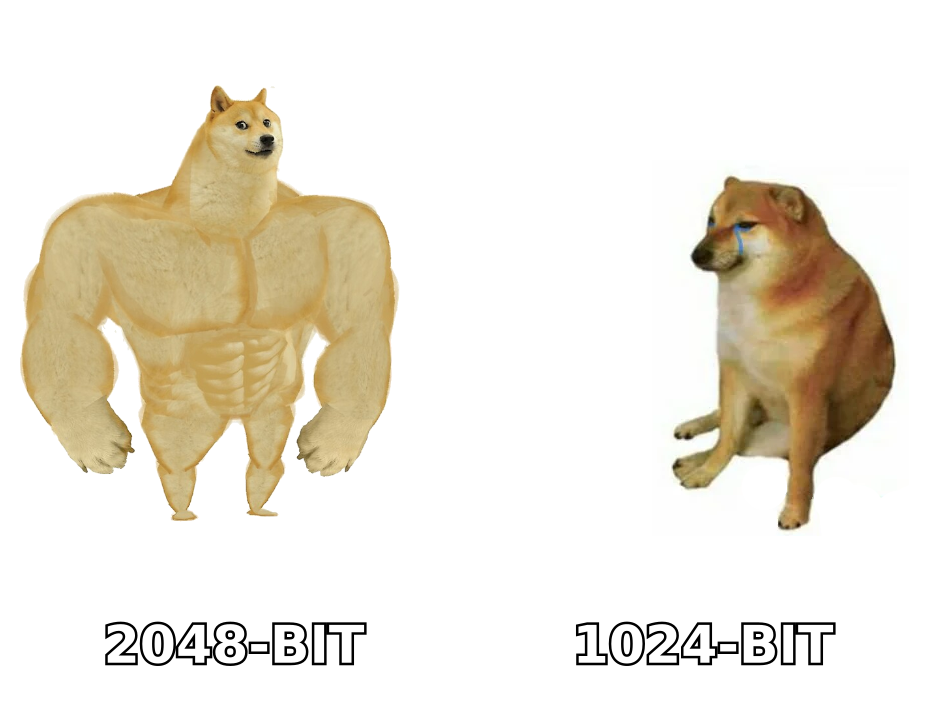
The reverse argument is stronger: 1024-bit RSA is considered weak by every serious cryptographic guideline, and large mailbox providers have publicly nudged senders upward for years. Some receivers already downgrade trust on short keys. If your generator defaults to 1024, that's a signal the tool hasn't been maintained.
The only legitimate reason to stay at 1024 is a legacy MTA that can't sign with a longer key. If that's your situation, the fix is the MTA, not the key length.
How often should you rotate DKIM keys?#
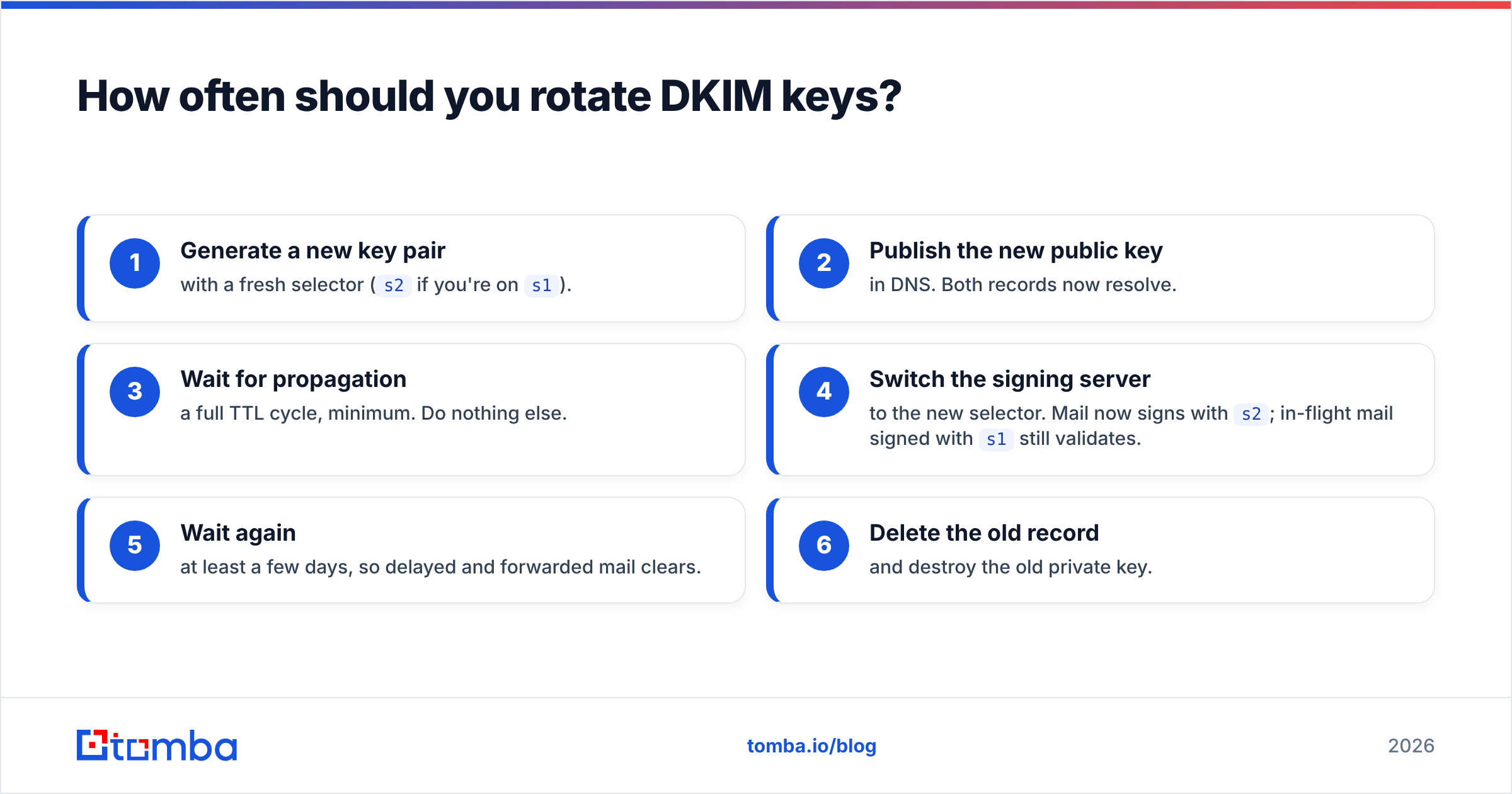
Every 6 to 12 months for most senders, quarterly if you're high-volume or in a regulated industry. Rotation matters because a private key is a long-lived credential sitting on a server — and servers get replaced, snapshotted, backed up to buckets, and handed to contractors.
The safe rotation pattern uses two selectors, never one:
- Generate a new key pair with a fresh selector (
s2if you're ons1). - Publish the new public key in DNS. Both records now resolve.
- Wait for propagation — a full TTL cycle, minimum. Do nothing else.
- Switch the signing server to the new selector. Mail now signs with
s2; in-flight mail signed withs1still validates. - Wait again — at least a few days, so delayed and forwarded mail clears.
- Delete the old record and destroy the old private key.
Rotating in place — overwriting one selector's TXT record while the server still signs with the old private key — creates a window where every message fails DKIM. If you have DMARC at p=reject, that window is an outage.
What breaks DKIM after it was working?#
Setups don't usually fail on day one. They fail on day 200, quietly. The usual causes:
- Mailing lists and forwarders that rewrite the Subject or append a footer. The body hash no longer matches. This is expected behavior, not a misconfiguration — it's why ARC exists.
- A new sending tool added by marketing that signs with its own domain, breaking alignment without breaking DKIM.
- DNS migration to a new provider where TXT records were exported but the chunked key string got mangled.
- Key deleted during "cleanup" because nobody recognized
s1._domainkey. - Signing scope too narrow — OpenDKIM configured to sign only for one domain while you added three.
- Reputation damage that DKIM can't fix. Authentication proves identity; it doesn't prove you're welcome. If your lists are stale, passing DKIM just means spam filters know exactly whom to distrust.
That last point is the one that costs the most money. Authentication is table stakes; it is not a deliverability strategy. If your bounce rate is above 3%, no amount of DNS work moves your placement — you need to clean the list first with an email verifier and check whether your domain or IP landed on a blacklist.
Does DKIM alone fix deliverability?#
No. DKIM is one leg of a three-leg stool, and the stool only supports weight when all three are present:
- SPF — which servers may send for your domain
- DKIM — proof the message wasn't altered and came from a key you control
- DMARC — what receivers should do when SPF and DKIM disagree with the From header, plus reporting so you find out
Since the 2024 bulk-sender requirements from Google and Yahoo, all three are effectively mandatory for anyone sending meaningful volume to consumer mailboxes, alongside one-click unsubscribe and a spam complaint rate under 0.3%. Passing DKIM gets you to the starting line. What determines placement after that is engagement: are the addresses real, are the recipients relevant, and do they reply.
Broader context on how these signals interact is worth a read in the email deliverability primer if you're building the whole stack from scratch.
What's the fastest correct setup path?#
If you're starting today and send through a provider:
- Enable DKIM in your provider's admin panel — Workspace, Microsoft 365, or your ESP's domain authentication screen.
- Copy the record exactly as given. Don't regenerate anything.
- Publish, wait,
dig, send a test, read the header. - Add DMARC at
p=nonewith a reporting address, read reports for two weeks, then tighten toquarantine. - Calendar a rotation reminder for six months out.
If you self-host, swap step 1 for openssl genrsa -out /etc/opendkim/keys/example.com/s1.private 2048 followed by openssl rsa -in s1.private -pubout, then chmod the private key to 600 and point OpenDKIM at it. Everything else is identical.
Where do you go from here?#
Authentication is infrastructure. It stops your legitimate mail from being mistaken for a forgery, and it stops forgers from being mistaken for you. What it can't do is find you people worth emailing.
Once DKIM passes, SPF aligns, and DMARC reports come back clean, the constraint moves to your data. Sending perfectly authenticated mail to guessed, scraped, or two-year-old addresses produces bounces, complaints, and the exact reputation damage your DNS work was meant to prevent. Start from verified, current contacts instead: Tomba Email Finder sources professional addresses by domain, name, or company and verifies them before they hit your sequence. The free tier covers 25 searches a month, and paid plans start at $49/mo — see Tomba pricing for the full breakdown. Get the DNS right once, then spend your energy on the list.
Related guides#
Ready to find emails that actually work?
Join 150,000+ professionals who stopped guessing and started sending. Free credits on signup — no credit card required.
Get the Tomba newsletter
Practical outbound tactics and product updates — once every two weeks.
About the author