What Is a DKIM Record? The 2026 Setup and Fix Guide
A DKIM record is one TXT entry in your DNS — and one of the most common places cold email breaks silently. Here's what goes in it, how to publish it, and the five failures that quietly kill your signatures.

TL;DR
- A DKIM record is a public key published as a TXT record in your DNS at
selector._domainkey.yourdomain.com. Your sending server signs each message with the matching private key; receivers fetch the public key and verify the signature. - DKIM proves a message wasn't altered in transit and that it came from a server authorized to sign for your domain. It does not prove the visible
From:address is legitimate — that's DMARC's job. - Since 2024, Google and Yahoo require SPF or DKIM for every sender, and both plus DMARC alignment for bulk senders (5,000+ messages/day). In practice, treat all three as mandatory in 2026.
- The five failures that break DKIM most often: wrong selector, DNS TXT string-splitting, a key that was rotated on the server but not in DNS, forwarding/list rewrites, and
l=length tags. - Authentication gets your mail eligible for the inbox. List quality decides whether it stays there — bounce rates above 2–3% will sink a perfectly signed domain.
What is a DKIM record?#
A DKIM record is a single DNS TXT entry that publishes the public half of a cryptographic key pair for your domain.
Think of it like a wax seal on a letter. Your mail server presses a seal (the private key) into every outgoing message. Anyone receiving the letter can compare that seal against the official impression you've filed at the town hall (the public key in DNS). If the seal matches, the letter is genuinely from you and nobody opened it along the way. If it doesn't, something is wrong — forged sender, tampered content, or a seal that was replaced and never re-filed.
Technically: DKIM (DomainKeys Identified Mail, specified in RFC 6376) adds a DKIM-Signature: header to outbound mail. That header contains a hash of selected headers and the body, encrypted with your private key. The receiving server reads the d= (domain) and s= (selector) values from the signature, queries s._domainkey.d in DNS, retrieves the public key, and checks the math.
Two things matter about the location. First, the record lives at a subdomain of _domainkey, not at the root — so google._domainkey.example.com, not example.com. Second, the selector is arbitrary and chosen by whoever generates the key. That's why one domain can carry a dozen DKIM records at once: one for Google Workspace, one for your ESP, one for your transactional provider, one for your invoicing system.
What actually goes inside a DKIM record?#
Here's a real-shaped record, wrapped for readability:
Host:  s1._domainkey.example.com
Type:  TXT
Value: v=DKIM1; k=rsa; t=s; p=MIIBIjANBgkqhkiG9w0BAQEFAAOCAQ8AMIIBCgKCAQEA...
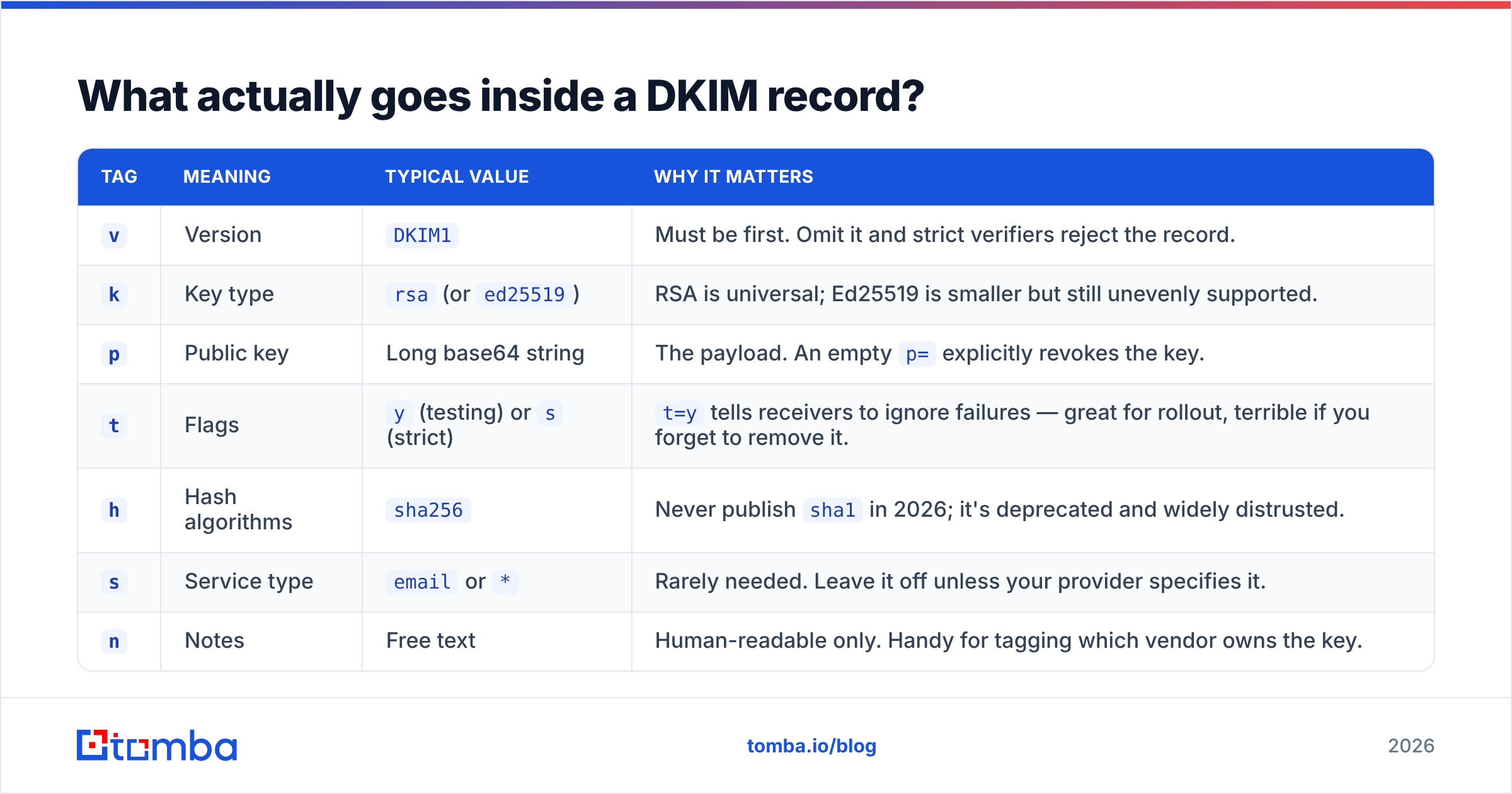
Everything after the host is a semicolon-separated list of tags. Only a couple are strictly required, but the optional ones cause a disproportionate share of real-world breakage.
| Tag | Meaning | Typical value | Why it matters |
|---|---|---|---|
v |
Version | DKIM1 |
Must be first. Omit it and strict verifiers reject the record. |
k |
Key type | rsa (or ed25519) |
RSA is universal; Ed25519 is smaller but still unevenly supported. |
p |
Public key | Long base64 string | The payload. An empty p= explicitly revokes the key. |
t |
Flags | y (testing) or s (strict) |
t=y tells receivers to ignore failures — great for rollout, terrible if you forget to remove it. |
h |
Hash algorithms | sha256 |
Never publish sha1 in 2026; it's deprecated and widely distrusted. |
s |
Service type | email or * |
Rarely needed. Leave it off unless your provider specifies it. |
n |
Notes | Free text | Human-readable only. Handy for tagging which vendor owns the key. |
The signature header on the message side carries its own tags — d= for the signing domain, s= for the selector, bh= for the body hash, b= for the signature itself, and l= for an optional body length limit. That last one is a trap, and we'll come back to it.
Is DKIM different from SPF and DMARC?#
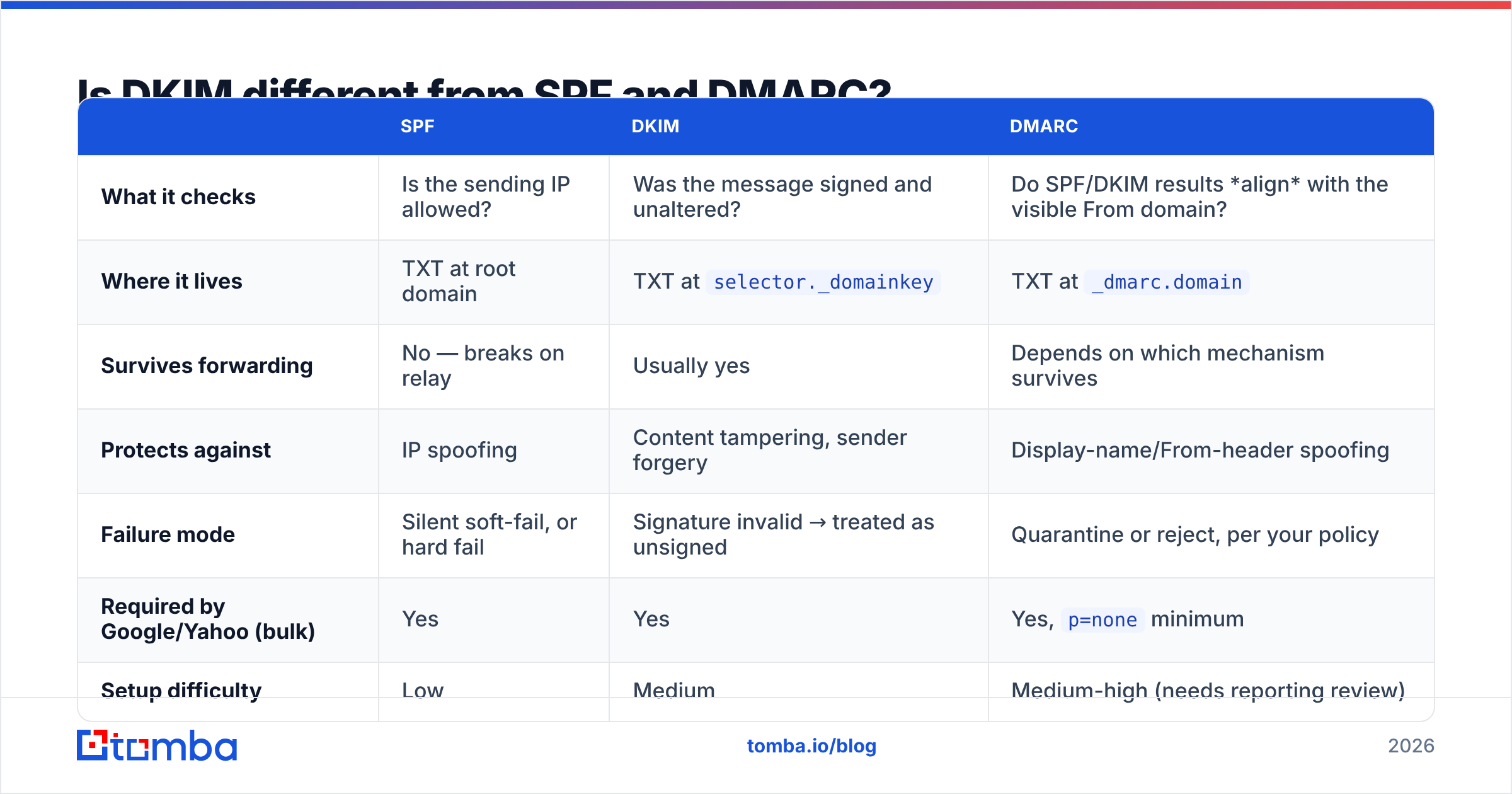
Yes, and conflating them is the single most common reason a "fully authenticated" domain still lands in spam. Each protocol answers a different question.
| SPF | DKIM | DMARC | |
|---|---|---|---|
| What it checks | Is the sending IP allowed? | Was the message signed and unaltered? | Do SPF/DKIM results align with the visible From domain? |
| Where it lives | TXT at root domain | TXT at selector._domainkey |
TXT at _dmarc.domain |
| Survives forwarding | No — breaks on relay | Usually yes | Depends on which mechanism survives |
| Protects against | IP spoofing | Content tampering, sender forgery | Display-name/From-header spoofing |
| Failure mode | Silent soft-fail, or hard fail | Signature invalid → treated as unsigned | Quarantine or reject, per your policy |
| Required by Google/Yahoo (bulk) | Yes | Yes | Yes, p=none minimum |
| Setup difficulty | Low | Medium | Medium-high (needs reporting review) |
The short version: SPF authenticates the envelope path, DKIM authenticates the message, and DMARC ties either of them to the domain your recipient actually sees. DKIM is the most durable of the three because the signature travels with the message — an SPF pass evaporates the moment a mailing list or corporate gateway relays your mail, but a DKIM signature usually survives.
If any of this vocabulary is new, the email deliverability glossary entry covers the surrounding terms without the RFC dialect.
How do you set up a DKIM record?#
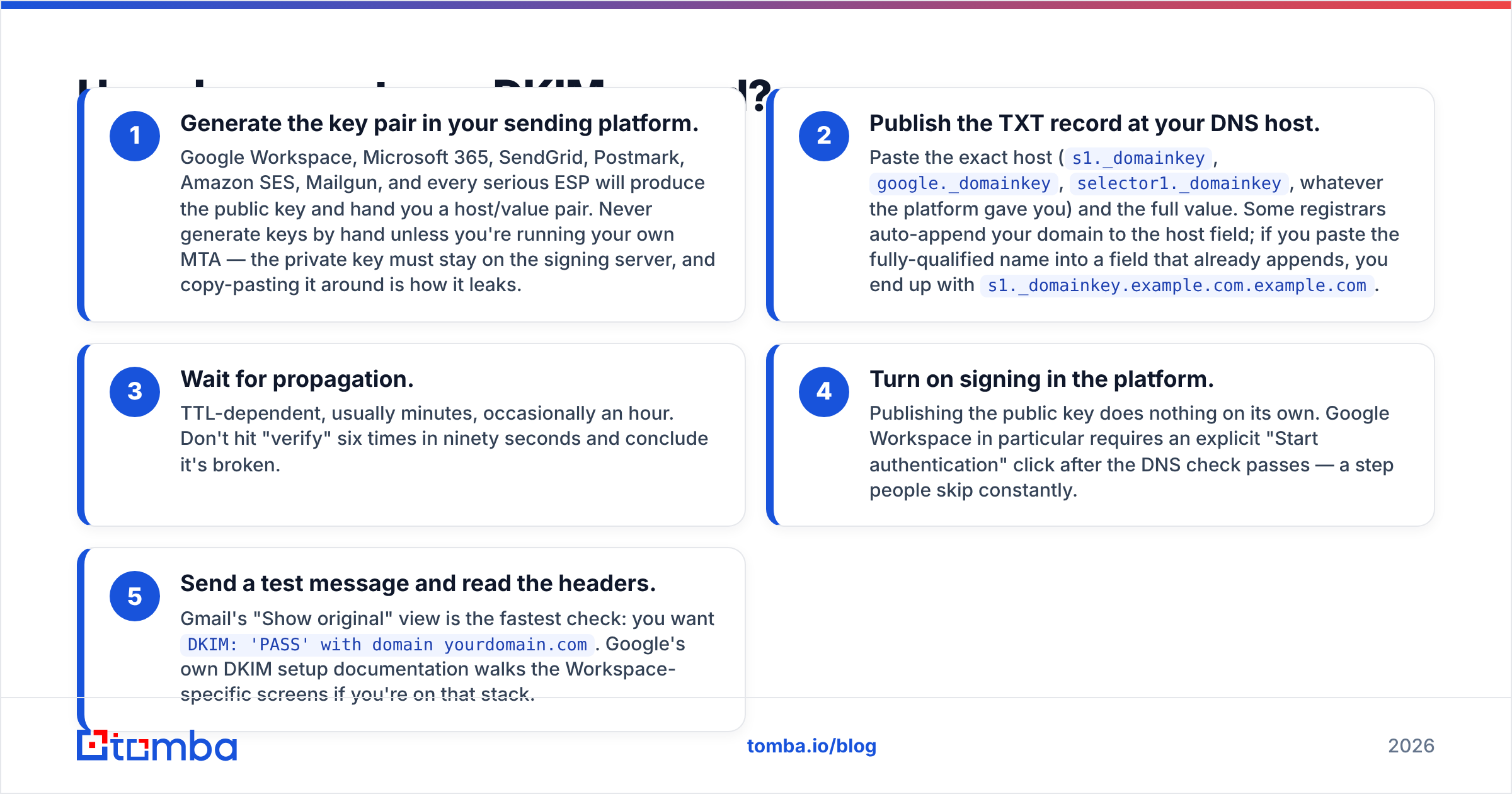
The mechanics are nearly identical across providers. Five steps:
- Generate the key pair in your sending platform. Google Workspace, Microsoft 365, SendGrid, Postmark, Amazon SES, Mailgun, and every serious ESP will produce the public key and hand you a host/value pair. Never generate keys by hand unless you're running your own MTA — the private key must stay on the signing server, and copy-pasting it around is how it leaks.
- Publish the TXT record at your DNS host. Paste the exact host (
s1._domainkey,google._domainkey,selector1._domainkey, whatever the platform gave you) and the full value. Some registrars auto-append your domain to the host field; if you paste the fully-qualified name into a field that already appends, you end up withs1._domainkey.example.com.example.com. - Wait for propagation. TTL-dependent, usually minutes, occasionally an hour. Don't hit "verify" six times in ninety seconds and conclude it's broken.
- Turn on signing in the platform. Publishing the public key does nothing on its own. Google Workspace in particular requires an explicit "Start authentication" click after the DNS check passes — a step people skip constantly.
- Send a test message and read the headers. Gmail's "Show original" view is the fastest check: you want
DKIM: 'PASS' with domain yourdomain.com. Google's own DKIM setup documentation walks the Workspace-specific screens if you're on that stack.
Repeat per sending service. If you send from Workspace and a cold email tool and Stripe, that's three separate selectors, three separate records, and three separate rotation schedules.
Should you use a 1024-bit or 2048-bit key?#
Use 2048-bit unless your DNS provider physically won't accept it.
The tradeoff is real but small. A 2048-bit RSA public key produces a base64 string around 400 characters, which exceeds the 255-character limit for a single DNS TXT string. The record has to be split into multiple quoted strings that the resolver concatenates. Most modern DNS panels (Cloudflare, Route 53, Google Cloud DNS) handle this transparently. Some older registrar interfaces silently truncate instead, which produces a record that looks published and never validates.
1024-bit keys avoid the splitting problem entirely and are still accepted by every major mailbox provider. They're also considered cryptographically weak by current standards, and several large receivers have signaled they'll begin distrusting them. Treat 1024 as a temporary workaround while you migrate DNS hosts, not a decision.
Rotate keys on a schedule — quarterly is a reasonable default, twice a year is the realistic floor. Rotation means generating a new key under a new selector, publishing it, switching the signing server to it, waiting a few days for in-flight mail, then revoking the old selector by setting p=.
Why does DKIM fail when the record already exists?#
Because "the record exists" and "the signature validates" are different claims. Five failure modes account for most of what you'll actually hit:
- Selector mismatch. The server signs with selector
s2, DNS only hass1. Common after a platform migration or a half-finished rotation. Symptom:dkim=permerrororno key for signature. - Truncated or mangled
p=value. The 255-character split problem, or a copy-paste that dropped trailing=padding, or a DNS panel that helpfully inserted line breaks. Symptom: the record resolves but the signature never verifies. - Key rotated on one side only. Someone regenerated keys in the ESP and never updated DNS, or updated DNS and never restarted the signing service. Symptom: DKIM passed yesterday, fails today, nothing else changed.
- Forwarding and mailing-list rewrites. A list server that appends an unsubscribe footer changes the body, invalidating the body hash. This is expected behavior, not a misconfiguration — it's why ARC exists and why DMARC policies need
p=noneobservation before enforcement. - The
l=length tag. If your signature includesl=, only the first N bytes of the body are covered. An attacker can append arbitrary content below that boundary and the signature still passes. Some providers set it by default. Turn it off.
A sixth, less common one: t=y left in the record after testing. It doesn't break verification, but it tells receivers to treat failures as non-events, which quietly defeats the point.
How do you test a DKIM record?#
Three layers, cheapest first.
DNS layer. Query the record directly and confirm it resolves and isn't truncated:
dig TXT s1._domainkey.example.com +short
nslookup -type=TXT s1._domainkey.example.com
You should see a single logical string starting v=DKIM1; and ending in a plausible base64 key. If you get NXDOMAIN, the host is wrong. If you get a value with visible quote marks mid-string, you're looking at the multi-string split — usually fine, but worth verifying against a validator.
Message layer. Send to a Gmail and an Outlook address you control, open the raw source, and read Authentication-Results:. You want all three of spf=pass, dkim=pass, dmarc=pass, and you want the DKIM header.d= to match the domain in your From address. A DKIM pass on a different domain than your From is an alignment failure — it authenticates, but DMARC won't count it.
Ecosystem layer. Authentication is necessary, not sufficient. Before a campaign goes out, check the surrounding signals: your SPF record for syntax errors and lookup-count overruns, your domain and IP against blacklists, and your content against a spam checker for the trigger patterns filters actually weight. DMARC.org publishes the canonical reference if you want to go deeper on policy design.
Does DKIM alone get you to the inbox?#
No — and this is where most deliverability projects stall.
Perfect authentication makes you eligible for the inbox. What decides placement after that is engagement and hygiene: bounce rate, spam complaints, opens, replies, and whether your sending volume looks organic. Google's guidance is explicit that spam complaint rates should stay below 0.3%, and hard bounces above roughly 2–3% will damage your sender reputation regardless of how cleanly your mail is signed.
Which means the highest-leverage deliverability work usually isn't DNS at all. It's list quality. A campaign to 5,000 addresses where 400 don't exist will generate a bounce spike that no DKIM record can offset — and once reputation drops, even your signed, aligned, DMARC-passing mail starts landing in Promotions or worse.
The practical order of operations:
- Authenticate first. SPF, DKIM, DMARC at
p=none, all three passing and aligned. - Warm gradually. New domains and new keys both need ramp time. Model it before you scale volume.
- Verify every list before send. Catch-all domains, role accounts, and stale contacts are the three biggest bounce sources.
- Watch DMARC reports. They'll surface signing sources you forgot existed — old marketing tools, invoicing systems, that one Zapier automation.
- Move to enforcement. Only after reports are clean should you go to
p=quarantine, thenp=reject.
What's the fastest way to keep bounces from undoing your DKIM work?#
Fix the DNS once, then fix the list every time.
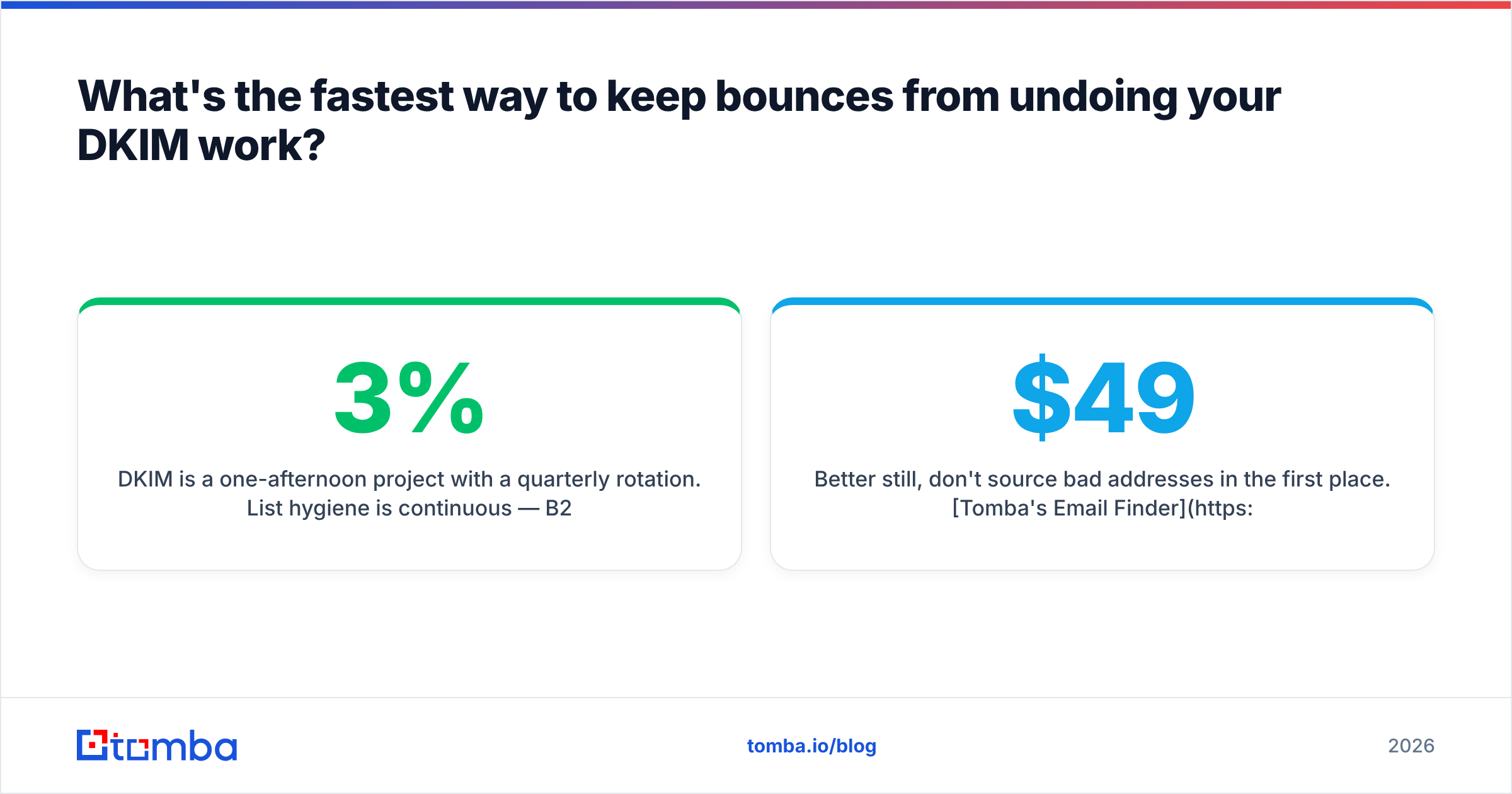
DKIM is a one-afternoon project with a quarterly rotation. List hygiene is continuous — B2B contact data decays at roughly 2–3% per month as people change jobs, and every stale address is a bounce waiting to happen. Running addresses through an email verifier before send catches invalid mailboxes, and a catch-all verifier handles the domains that accept everything at SMTP time and bounce later.
Better still, don't source bad addresses in the first place. Tomba's Email Finder returns verified professional addresses with a confidence score attached, so your list starts clean instead of getting cleaned. The free tier covers 25 searches a month if you want to test accuracy against a sample you can already verify; paid plans start at $49/mo on Starter, with Growth at $99/mo — full Tomba pricing is public. Publish the DKIM record, then stop sending to addresses that were never going to arrive anyway.
Related guides#
Ready to find emails that actually work?
Join 150,000+ professionals who stopped guessing and started sending. Free credits on signup — no credit card required.
Get the Tomba newsletter
Practical outbound tactics and product updates — once every two weeks.
About the author