DKIM Record vs DKIM Header: What's the Difference in 2026?
A DKIM record lives in your DNS. A DKIM header rides along with every message you send. Confuse the two and you will spend hours debugging the wrong half of your authentication setup.
TL;DR
- A DKIM record is a TXT record you publish in DNS. It holds the public key. You set it up once per selector, per sending domain.
- A DKIM header (
DKIM-Signature:) is added to the top of every individual message by your sending server, using the matching private key. - The record is the lock on the wall. The header is the key handed over with each delivery. Verification only passes when both match.
- Most "DKIM failed" incidents are header-side (body modified in transit, wrong selector, misconfigured relay), not record-side — but record-side errors fail 100% of mail instead of some of it.
- DKIM authenticates the sending domain, not the accuracy of your list. Bad addresses still generate bounces and spam complaints, which is a separate reputation problem.
What is a DKIM record?#
A DKIM record is a DNS TXT record that publishes the public half of a cryptographic key pair. Nothing more.
It sits at a predictable hostname built from two parts: a selector you choose, plus the fixed label _domainkey. If your selector is s1 and your domain is example.com, the record lives at:
s1._domainkey.example.comIts value looks like this:
v=DKIM1; k=rsa; p=MIIBIjANBgkqhkiG9w0BAQEFAAOCAQ8AMIIBCgKCAQEAy...Three tags carry the weight:
v=DKIM1— version. Always this value. If it is missing or misspelled, strict verifiers may skip the record entirely.k=rsa— key type. RSA is the near-universal default;k=ed25519exists in the spec but has thin support at large mailbox providers, so most senders publish RSA and treat Ed25519 as an experiment.p=— the base64-encoded public key. This is the long blob. Truncate it, wrap it wrong, or paste it with a stray space and verification breaks silently.
Two facts about DKIM records that trip people up:
- You can publish many. Each sending platform gets its own selector. Google Workspace might use
google._domainkey, your cold-email tool might usek1._domainkey, your transactional providersmtp1._domainkey. They coexist without conflict because the selector namespaces them. - DNS TXT records have a 255-character string limit. A 2048-bit key exceeds that. Most DNS hosts split it into multiple quoted strings automatically and concatenate them at resolution. Some do not, which is the single most common cause of a "record exists but never validates" ticket.
The record is static. You publish it, you check it, you forget about it — until you rotate keys or migrate providers.
What is a DKIM header?#
The DKIM header is a per-message artifact. Your sending MTA generates it at send time and prepends it to the message headers. It carries the actual signature.
A real one, wrapped for readability:
DKIM-Signature: v=1; a=rsa-sha256; c=relaxed/relaxed;
  d=example.com; s=s1; t=1751000000;
  h=from:to:subject:date:message-id;
  bh=2jmj7l5rSw0yVb/vlWAYkK/YBwk=;
  b=dzdVyOfAKCdLXdJOc9G2q8LoXSlEniSbav+yuU4zGeeruD00lszZVoG4ZHRNiYzR
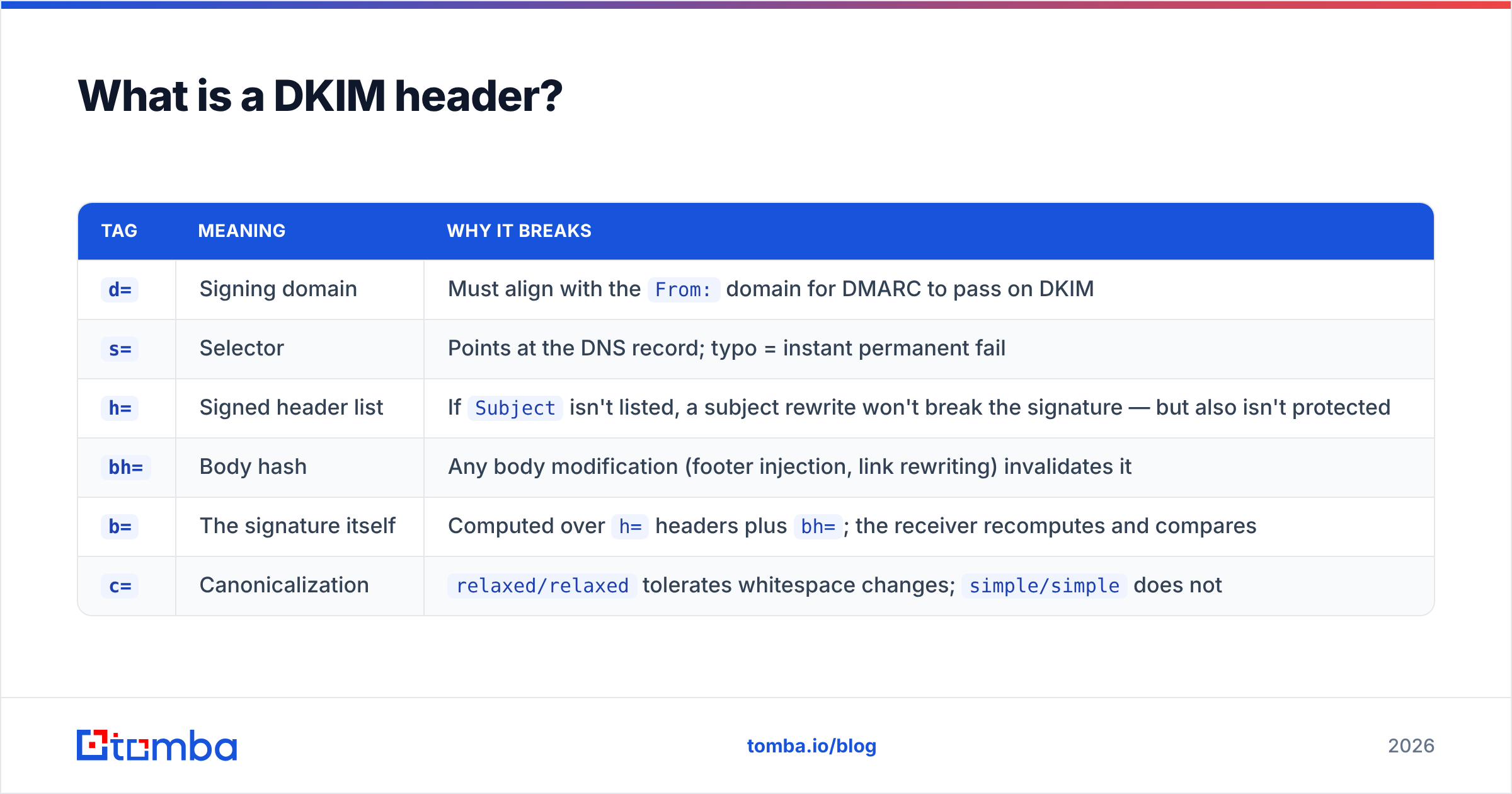
Each tag does a specific job:
| Tag | Meaning | Why it breaks |
|---|---|---|
d= |
Signing domain | Must align with the From: domain for DMARC to pass on DKIM |
s= |
Selector | Points at the DNS record; typo = instant permanent fail |
h= |
Signed header list | If Subject isn't listed, a subject rewrite won't break the signature — but also isn't protected |
bh= |
Body hash | Any body modification (footer injection, link rewriting) invalidates it |
b= |
The signature itself | Computed over h= headers plus bh=; the receiver recomputes and compares |
c= |
Canonicalization | relaxed/relaxed tolerates whitespace changes; simple/simple does not |
The header is dynamic. It changes with every send, and it is where transit damage shows up.

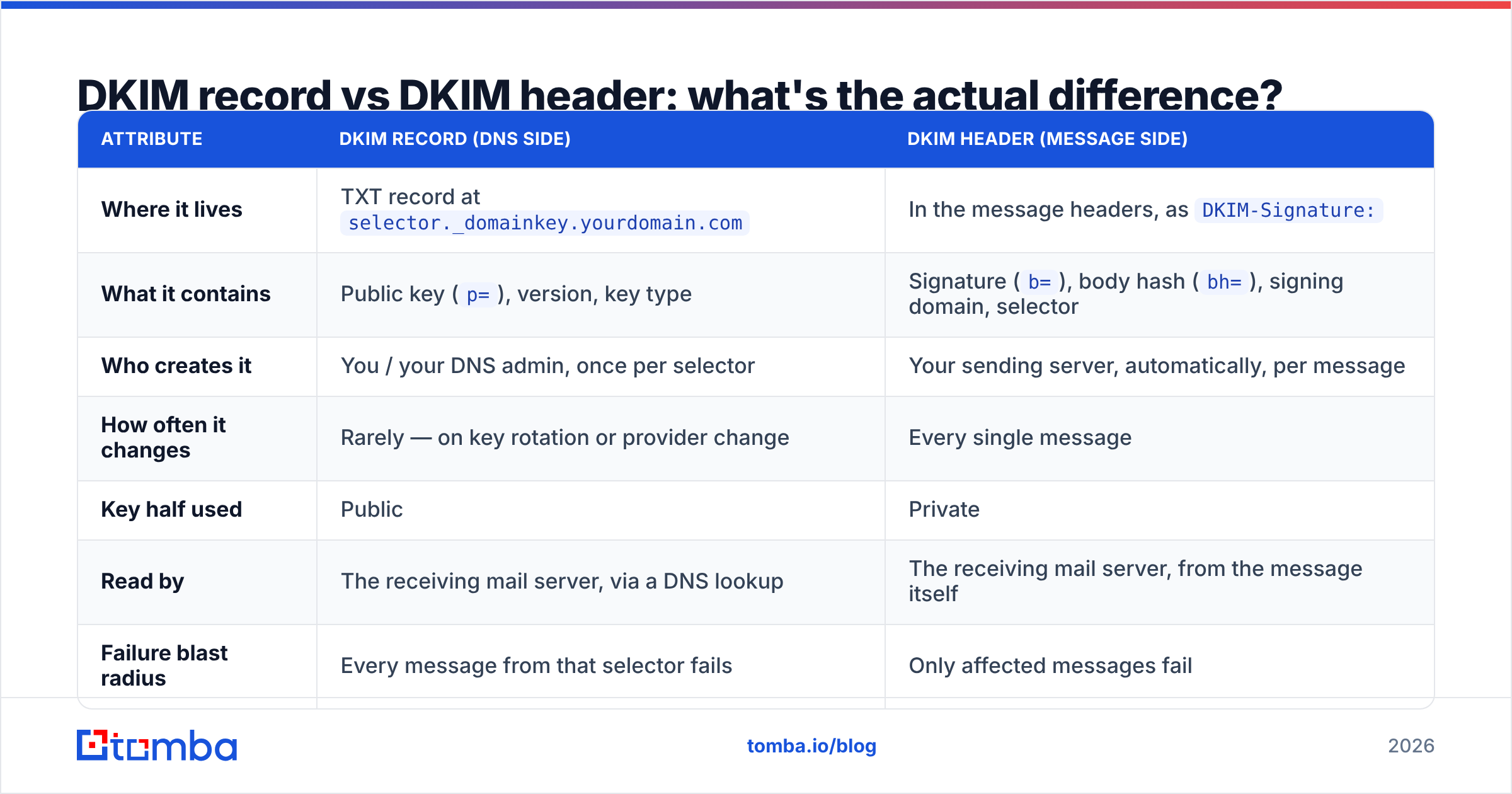
DKIM record vs DKIM header: what's the actual difference?#
Here is the side-by-side. This is the table to screenshot for your runbook.
| Attribute | DKIM record (DNS side) | DKIM header (message side) |
|---|---|---|
| Where it lives | TXT record at selector._domainkey.yourdomain.com |
In the message headers, as DKIM-Signature: |
| What it contains | Public key (p=), version, key type |
Signature (b=), body hash (bh=), signing domain, selector |
| Who creates it | You / your DNS admin, once per selector | Your sending server, automatically, per message |
| How often it changes | Rarely — on key rotation or provider change | Every single message |
| Key half used | Public | Private |
| Read by | The receiving mail server, via a DNS lookup | The receiving mail server, from the message itself |
| Failure blast radius | Every message from that selector fails | Only affected messages fail |
| Typical failure cause | Truncated p=, wrong hostname, DNS not propagated, provider deleted the record |
Body modified in transit, wrong selector referenced, header rewritten by a relay or list server |
| How you check it | dig TXT s1._domainkey.example.com |
View original message → read Authentication-Results |
| Cost of fixing | Minutes, one DNS edit | Hours, because you have to find what's mutating the message |
The analogy that sticks: the DKIM record is the notarized signature specimen on file at the bank. The DKIM header is the signature on the individual cheque. The teller compares the two. Publishing a specimen is one-time paperwork. Signing every cheque correctly is an operational discipline — and it is where things go wrong at volume.
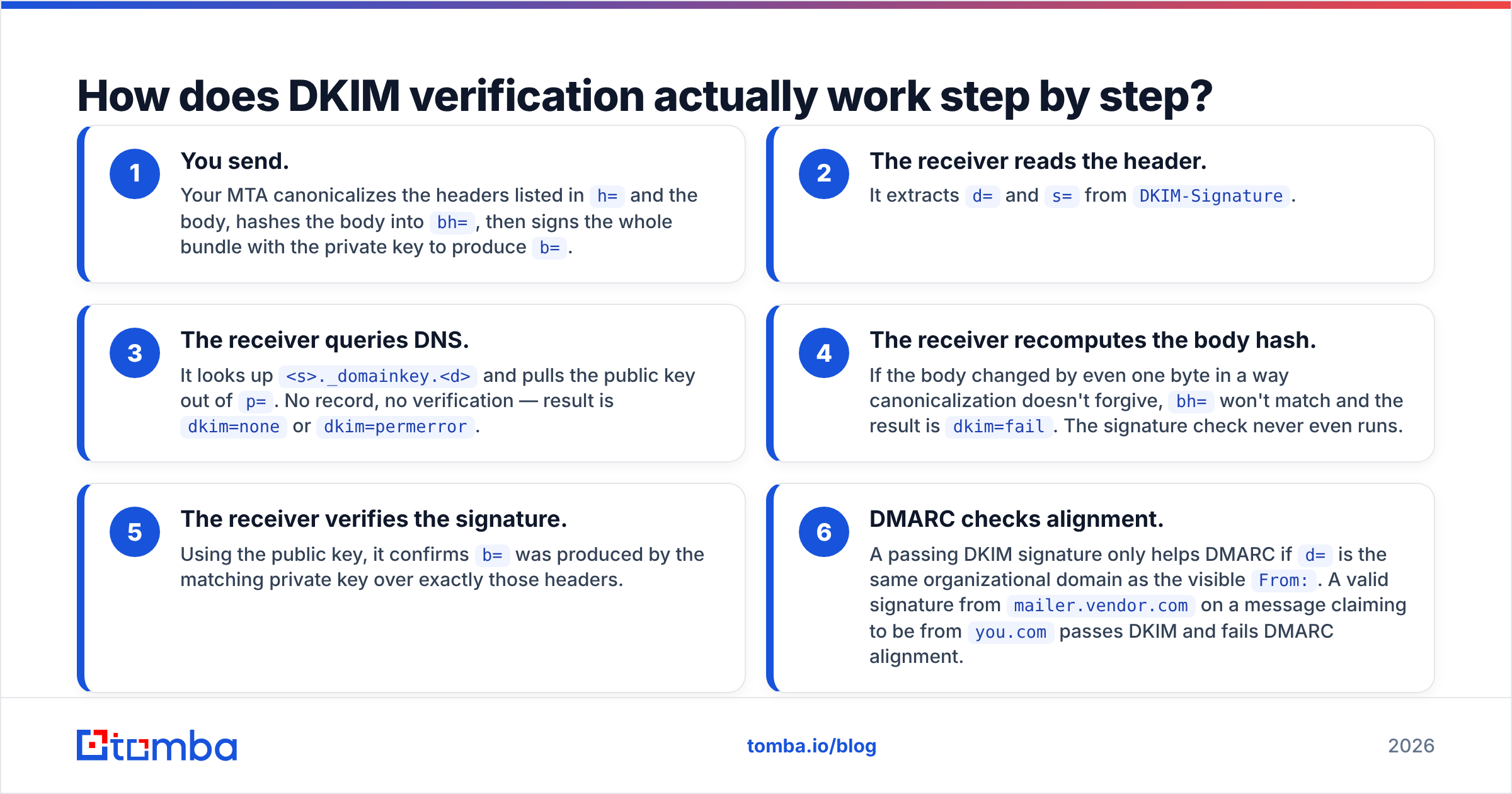
How does DKIM verification actually work step by step?#
- You send. Your MTA canonicalizes the headers listed in
h=and the body, hashes the body intobh=, then signs the whole bundle with the private key to produceb=. - The receiver reads the header. It extracts
d=ands=fromDKIM-Signature. - The receiver queries DNS. It looks up
<s>._domainkey.<d>and pulls the public key out ofp=. No record, no verification — result isdkim=noneordkim=permerror. - The receiver recomputes the body hash. If the body changed by even one byte in a way canonicalization doesn't forgive,
bh=won't match and the result isdkim=fail. The signature check never even runs. - The receiver verifies the signature. Using the public key, it confirms
b=was produced by the matching private key over exactly those headers. - DMARC checks alignment. A passing DKIM signature only helps DMARC if
d=is the same organizational domain as the visibleFrom:. A valid signature frommailer.vendor.comon a message claiming to be fromyou.compasses DKIM and fails DMARC alignment.
Step 6 is the one that costs teams the most. You can stare at dkim=pass in the headers and still be failing email deliverability checks because the signing domain doesn't align. The full mechanics are specified in RFC 6376 if you want the normative language.
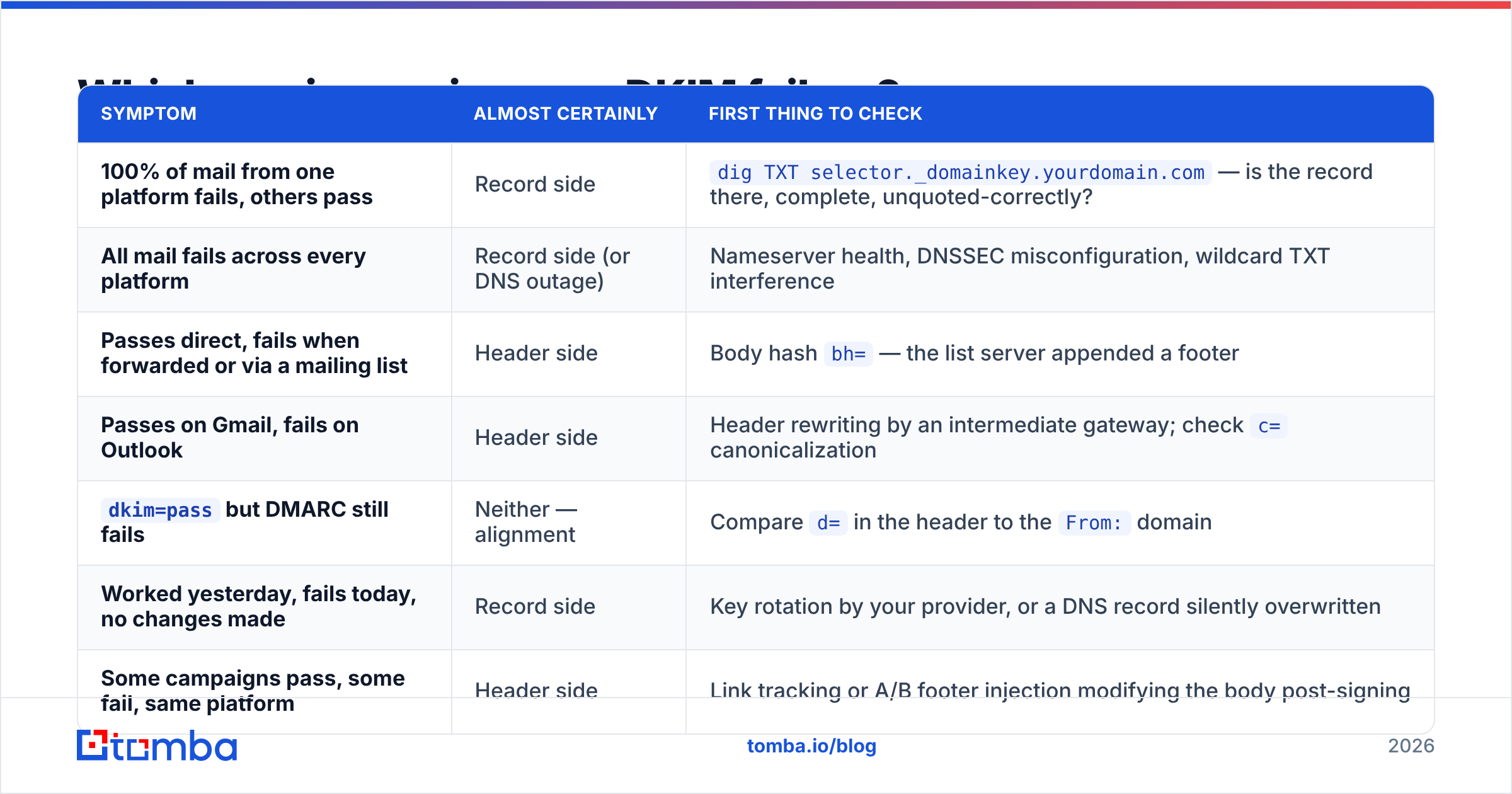
Which one is causing your DKIM failure?#
Diagnose by blast radius first. It cuts your search space in half in under a minute.
| Symptom | Almost certainly | First thing to check |
|---|---|---|
| 100% of mail from one platform fails, others pass | Record side | dig TXT selector._domainkey.yourdomain.com — is the record there, complete, unquoted-correctly? |
| All mail fails across every platform | Record side (or DNS outage) | Nameserver health, DNSSEC misconfiguration, wildcard TXT interference |
| Passes direct, fails when forwarded or via a mailing list | Header side | Body hash bh= — the list server appended a footer |
| Passes on Gmail, fails on Outlook | Header side | Header rewriting by an intermediate gateway; check c= canonicalization |
dkim=pass but DMARC still fails |
Neither — alignment | Compare d= in the header to the From: domain |
| Worked yesterday, fails today, no changes made | Record side | Key rotation by your provider, or a DNS record silently overwritten |
| Some campaigns pass, some fail, same platform | Header side | Link tracking or A/B footer injection modifying the body post-signing |
Two record-side landmines worth naming explicitly:
- Key length. 1024-bit RSA still verifies, but major providers have been signalling for years that 2048-bit is the expectation. If your provider only offers 1024, that is a reason to ask them why, not a reason to shrug. Google's DKIM setup documentation walks through generating a 2048-bit key.
- Multiple TXT records at the same hostname. Two DKIM records at
s1._domainkeyis undefined behaviour. Some verifiers take the first, some fail. Never leave a duplicate behind after a migration.
Does fixing DKIM fix your inbox placement?#
No, and this is where a lot of deliverability work stalls out.
DKIM is an identity mechanism. It proves the message was signed by someone holding the private key for that domain. It says nothing about whether the message is wanted. Authentication is table stakes — the price of admission, not the seat.
The three layers, in the order mailbox providers weigh them:
- Authentication — SPF, DKIM, DMARC. Binary-ish. Either you're aligned or you're not. Fix once, monitor forever. Use an SPF checker and an email reputation checker to confirm the baseline.
- Reputation — bounce rate, complaint rate, spam-trap hits, engagement. This is continuous and it is where most senders actually lose. Sender reputation degrades from list quality far faster than from authentication gaps.
- Content and cadence — subject lines, link density, sending volume ramp, reply rates.
A perfectly signed message to an address that hard-bounces still damages you. A perfectly signed message to a spam trap damages you badly. Teams that send cold outbound frequently get DKIM right, then watch placement collapse anyway because 18% of their scraped list is invalid. Running lists through an email verifier before send removes the bounces that authentication cannot help with — and if you're dealing with catch-all domains where standard SMTP checks return "unknown", a dedicated catch-all verifier is the difference between guessing and knowing.

How do you inspect both sides in under five minutes?#
Record side — command line:
dig +short TXT s1._domainkey.example.comYou want one record, starting with v=DKIM1, with a p= value that looks unbroken. If dig returns multiple quoted chunks, that's usually fine — resolvers concatenate them. If it returns nothing, the record isn't published where you think it is.
Header side — any received message:
In Gmail, open the message → three-dot menu → Show original. In Outlook, File → Properties → Internet headers. Look for:
Authentication-Results: mx.google.com;
  dkim=pass header.i=@example.com header.s=s1;
  spf=pass ...;
  dmarc=pass (p=REJECT sp=REJECT dis=NONE) header.from=example.com
Read it in this order: dkim= result, then header.s= (does it match the selector you published?), then header.i= / header.from= (do they align?). Three values, ten seconds, and you know which half of the system is broken.
Ongoing: publish a DMARC record with a rua= reporting address. Aggregate reports tell you which sources are signing correctly and which aren't — including sources you forgot existed. The general background is well summarised in the DKIM overview on Wikipedia if you need to bring a non-technical stakeholder up to speed.
What are the mistakes that keep recurring?#
- Rotating the private key before publishing the new public record. Publish the new selector, wait for propagation, then switch signing. Never the reverse.
- Deleting an old selector too fast. Messages already in transit or sitting in a forwarding queue still reference it. Leave old selectors up for a couple of weeks.
- Assuming one DKIM record covers all senders. Every platform that sends as your domain needs its own selector and its own record. Missing one means that platform's mail is unsigned.
- Signing with a subdomain that doesn't align. Vendors love
d=mail.vendor.com. If yourFrom:isyou.com, that fails DMARC alignment. Insist on a custom signing domain under your own DNS. - Letting a footer injector run after signing. Legal disclaimers, tracking pixels, and unsubscribe blocks added by a downstream gateway invalidate
bh=. Sign last, or don't modify after signing. - Treating DKIM as a project instead of a monitored control. Records get overwritten during DNS migrations. Without DMARC reporting, you find out from a customer.
So which one should you care about more?#
Both, but at different cadences.
Spend an hour on the record side once per sending platform, verify it with dig, and revisit only on rotation. Spend ongoing attention on the header side, because that's where every downstream change — a new relay, a new footer, a new tracking domain — quietly breaks things that were working.
Then spend the rest of your effort on the layer DKIM can't touch: who you're actually emailing. Authentication gets your message evaluated. List quality decides whether that evaluation goes your way.
If you're building outbound lists and want addresses that resolve to real, verified mailboxes instead of guesses, start with the Tomba Email Finder. It finds professional addresses by domain, name, or company, and pairs directly with verification so your properly signed messages actually land in front of humans. The free tier covers 25 searches a month to test the accuracy on your own target accounts; paid plans start at $49/mo on Starter, with full Tomba pricing laid out if you need higher volume or API access for your own pipeline.
Related guides#
Ready to find emails that actually work?
Join 150,000+ professionals who stopped guessing and started sending. Free credits on signup — no credit card required.
Get the Tomba newsletter
Practical outbound tactics and product updates — once every two weeks.
About the author