DMARC Alignment Explained: SPF, DKIM, and Why Mail Fails
Your SPF passes, your DKIM passes, and DMARC still fails. The reason is almost always alignment. Here is how relaxed vs strict alignment actually works, and how to fix it before you enforce p=reject.
TL;DR
- DMARC alignment means the domain a human sees in the
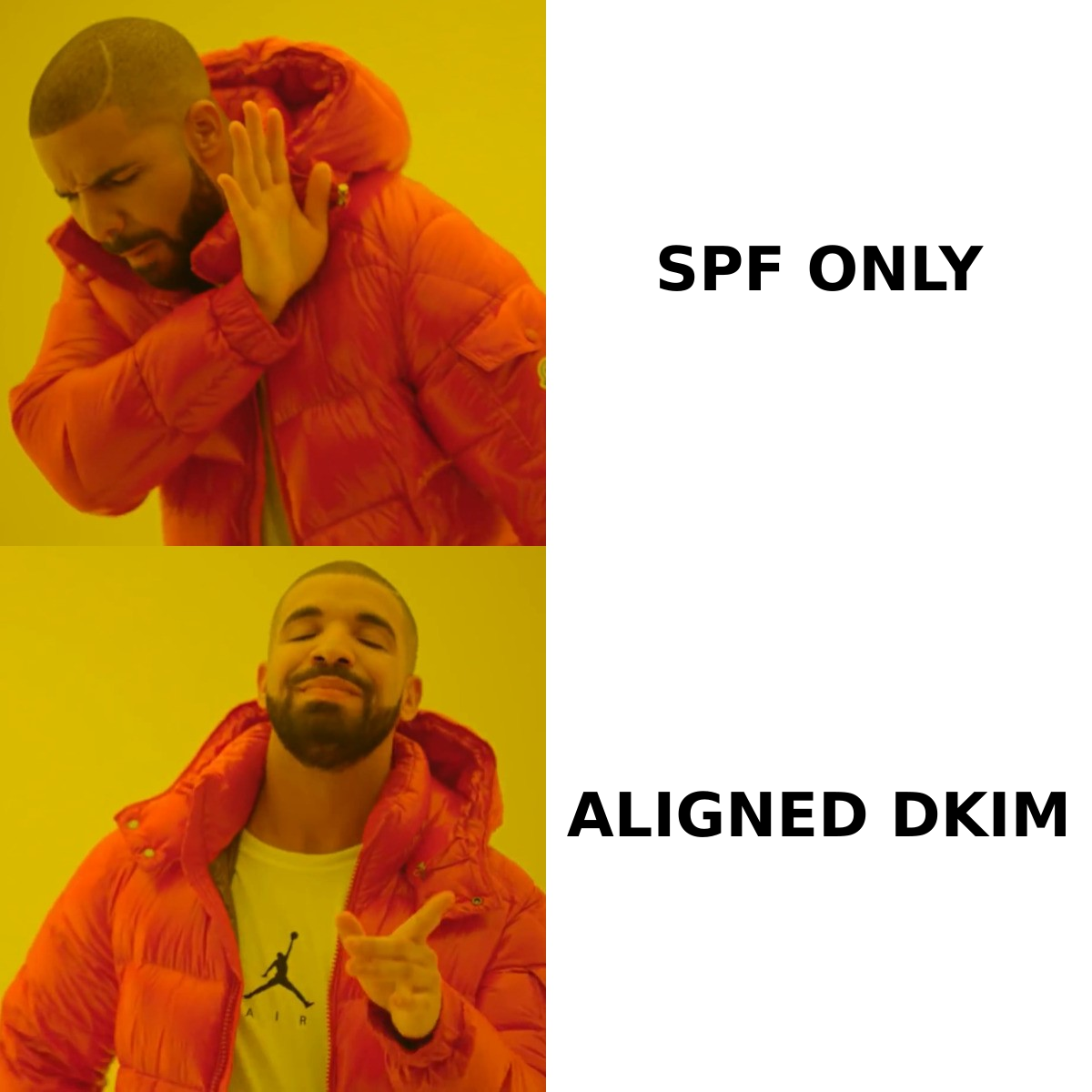
From:header must match the domain that passed SPF or DKIM. Passing SPF alone proves nothing about alignment. - You only need one aligned pass — SPF or DKIM. DKIM alignment is the one worth engineering for, because it survives forwarding and most ESP relays.
- Relaxed alignment (
aspf=r,adkim=r, the defaults) allows subdomains to match the organizational domain. Strict alignment requires an exact match and breaks far more often than teams expect. - The classic failure is a third-party sender (Mailchimp, Zendesk, a billing system) that returns a bounce domain it owns, not one you own. SPF passes for their domain, alignment fails for yours.
- Go to
p=rejectonly after 2–4 weeks of aggregate reports show 100% aligned pass rates across every legitimate sending source.
What is DMARC alignment, in plain terms?#
Think of an envelope in the postal system. The address printed on the outside of the envelope is what the sorting machine reads. The letterhead inside is what the human reads. SPF checks the outside. DKIM signs the contents. DMARC alignment is the postal inspector asking a much simpler and much more useful question: does the name on the letterhead match the name the mail actually came from?
Technically, DMARC compares the domain in the From: header — the RFC 5322 "header From" your recipient actually sees in Gmail — against two other identifiers:
- The Return-Path domain (RFC 5321 MAIL FROM / envelope sender), which is what SPF authenticates.
- The
d=tag in the DKIM signature, which is the domain that signed the message.
If the header From domain matches the SPF-authenticated domain, you have SPF alignment. If it matches the DKIM d= domain, you have DKIM alignment. DMARC passes if either identifier is both authenticated and aligned. That's it. Every DMARC failure you will ever debug is some variant of "one of these three domains isn't the one you think it is."
This is why so many teams get blindsided. They run a checker, see SPF: PASS and DKIM: PASS, publish p=reject, and then watch invoices and password resets vanish into the void. Authentication and alignment are two separate gates.
How do SPF alignment and DKIM alignment actually differ?#
They fail for completely different reasons, which is the whole point of having both.
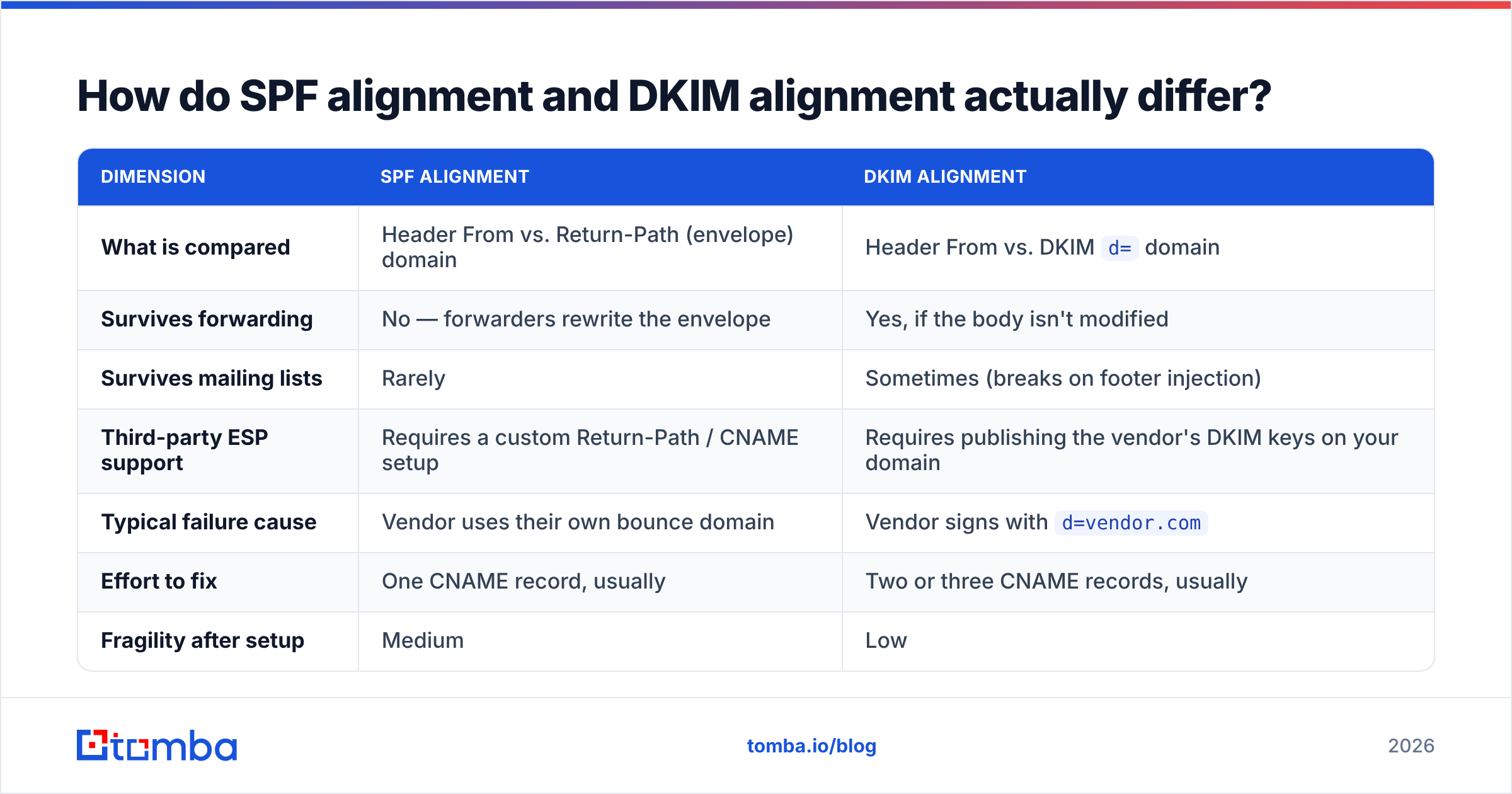
| Dimension | SPF alignment | DKIM alignment |
|---|---|---|
| What is compared | Header From vs. Return-Path (envelope) domain | Header From vs. DKIM d= domain |
| Survives forwarding | No — forwarders rewrite the envelope | Yes, if the body isn't modified |
| Survives mailing lists | Rarely | Sometimes (breaks on footer injection) |
| Third-party ESP support | Requires a custom Return-Path / CNAME setup | Requires publishing the vendor's DKIM keys on your domain |
| Typical failure cause | Vendor uses their own bounce domain | Vendor signs with d=vendor.com |
| Effort to fix | One CNAME record, usually | Two or three CNAME records, usually |
| Fragility after setup | Medium | Low |
The practical takeaway: engineer for DKIM alignment first. SPF alignment is nice to have and easy to lose. A message forwarded from alex@yourcompany.com to a personal Gmail address will almost always break SPF, because the forwarding server becomes the new envelope sender. DKIM alignment survives that trip as long as nothing rewrites the signed headers or body.
That single asymmetry explains most of the "our email works fine except when it doesn't" complaints in B2B outbound.
What do relaxed and strict alignment mean?#
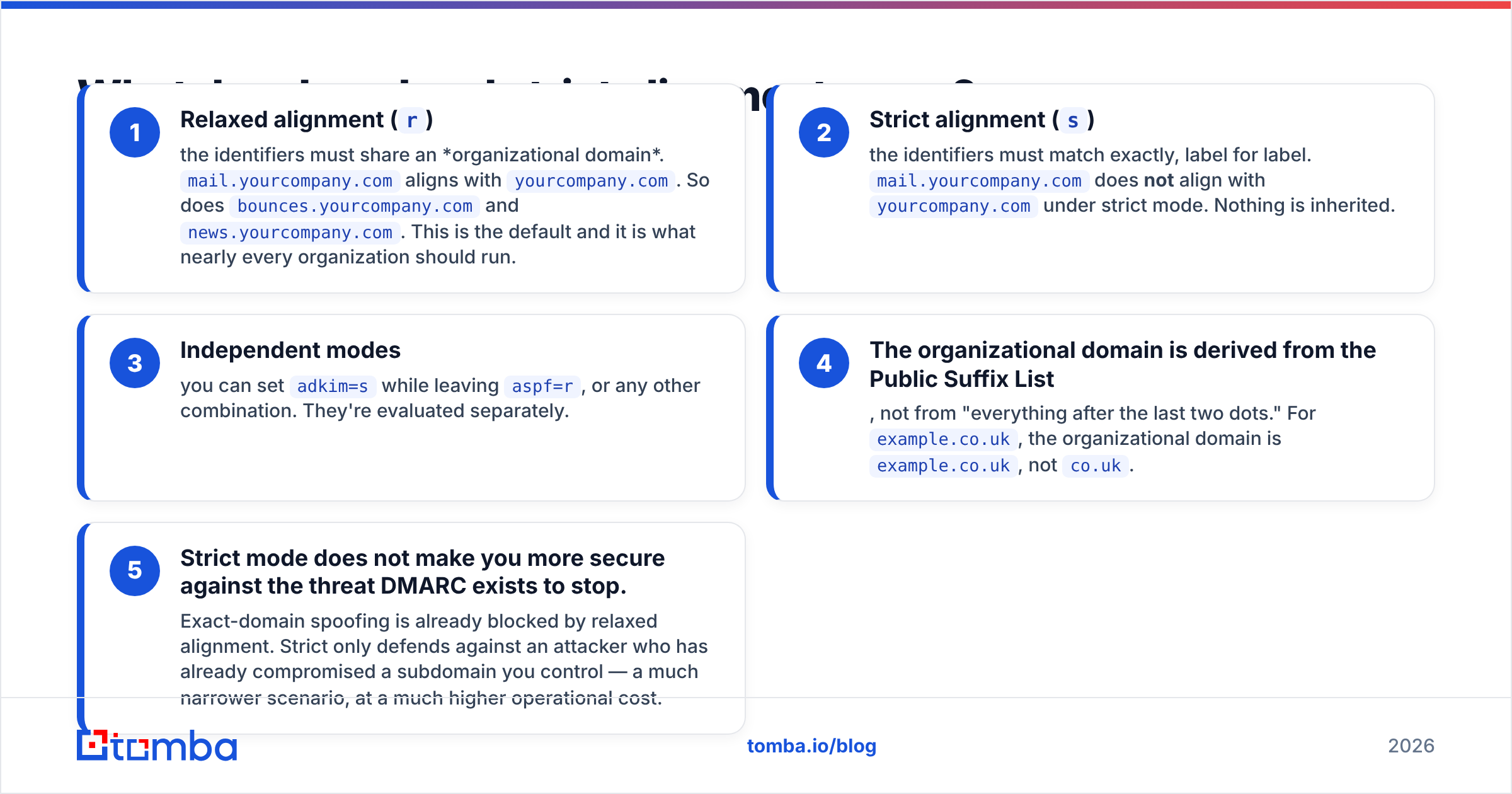
DMARC gives you two knobs in your policy record: aspf for SPF alignment mode and adkim for DKIM alignment mode. Both default to relaxed (r) when you omit them.
- Relaxed alignment (
r) — the identifiers must share an organizational domain.mail.yourcompany.comaligns withyourcompany.com. So doesbounces.yourcompany.comandnews.yourcompany.com. This is the default and it is what nearly every organization should run. - Strict alignment (
s) — the identifiers must match exactly, label for label.mail.yourcompany.comdoes not align withyourcompany.comunder strict mode. Nothing is inherited. - Independent modes — you can set
adkim=swhile leavingaspf=r, or any other combination. They're evaluated separately. - The organizational domain is derived from the Public Suffix List, not from "everything after the last two dots." For
example.co.uk, the organizational domain isexample.co.uk, notco.uk. - Strict mode does not make you more secure against the threat DMARC exists to stop. Exact-domain spoofing is already blocked by relaxed alignment. Strict only defends against an attacker who has already compromised a subdomain you control — a much narrower scenario, at a much higher operational cost.
A sample record with everything spelled out:
v=DMARC1; p=reject; rua=mailto:dmarc@yourcompany.com;
ruf=mailto:forensics@yourcompany.com; adkim=r; aspf=r; pct=100; fo=1
Unless you have a specific compliance requirement, leave both modes relaxed. Teams that switch to strict usually do it because "strict sounds safer," then spend the next quarter chasing subdomain senders they forgot existed.
Why does DMARC fail when SPF and DKIM both pass?#
Here are the five patterns that account for the overwhelming majority of real-world alignment failures, roughly in order of how often you'll hit them.
1. The third-party ESP bounce domain. You send from hello@yourcompany.com through a marketing platform. The platform sets the Return-Path to bounce-1234@mailer.esp-vendor.com. SPF checks esp-vendor.com, finds the vendor's IPs, and passes — for the vendor's domain. Your header From is yourcompany.com. Zero alignment. If the vendor also signs with d=esp-vendor.com, DMARC fails outright.
Fix: enable the vendor's custom/branded sending domain feature. It's almost always a set of CNAME records that point a subdomain of yours at their infrastructure, which brings both the Return-Path and the DKIM d= under your organizational domain.
2. Strict mode plus a sending subdomain. You publish adkim=s, your transactional mail signs with d=mail.yourcompany.com, and your From is @yourcompany.com. Exact match fails. Under relaxed mode this would have passed silently.
Fix: drop to adkim=r, or make the signing domain match the From domain exactly.
3. Forwarding and mailing lists. An employee auto-forwards work mail to a personal account, or your outreach lands in a distribution list that appends a footer. The footer breaks the DKIM body hash; the forward breaks SPF. Both identifiers die at once.
Fix: you cannot fully control this. Accept a small percentage of forwarding failures in your aggregate reports, and confirm the affected volume is genuinely list/forwarder traffic before assuming your setup is broken.
4. Multiple From domains inside one platform. Sales sends from @yourcompany.com, support replies from @help.yourcompany.com, and the billing system uses @yourcompany-billing.com — a different organizational domain someone registered years ago and never told IT about. That third one will never align, in any mode.
Fix: consolidate onto one organizational domain, or publish a separate DMARC record for the outlier and authenticate it properly.
5. SPF record exceeding the 10-DNS-lookup limit. SPF returns permerror once you chain too many include: statements. A permerror is not a pass, so SPF alignment can't happen even if the sending IP is legitimately yours.
Fix: flatten your record or remove dead vendor includes. A quick pass with an SPF checker will tell you your current lookup count in seconds.

How do you diagnose alignment failures without guessing?#
Aggregate reports (RUA) are the only source of truth. Everything else is a snapshot; RUA is the census.
Publish a p=none record with a rua= address on day one. Within 24–72 hours, mailbox providers start sending you daily XML reports covering every IP that sent mail claiming to be your domain. Each record tells you the source IP, the volume, the SPF result, the DKIM result, and — critically — the alignment result for each.
What to look for when you read them:
- Sources with high volume and zero alignment. These are your unconfigured vendors. Identify each one before you tighten policy.
- Sources with DKIM aligned but SPF unaligned. This is normal and fine. DMARC passes. Don't "fix" it.
- Low-volume sources you don't recognize. Could be shadow IT, could be spoofing. Check whether the IPs belong to a known ESP before you panic — most of the time it's a department that signed up for a tool with a corporate credit card.
- Sudden new sources after a policy change. A vendor migration or an IP pool change can reintroduce failures on a domain that was clean for months.
Because raw XML is unpleasant to read at volume, most teams pipe RUA into a parser. The official dmarc.org resources list the spec and tooling, and Google's Postmaster Tools documentation explains how Gmail specifically evaluates authentication for bulk senders. Both are worth reading before you touch production DNS.
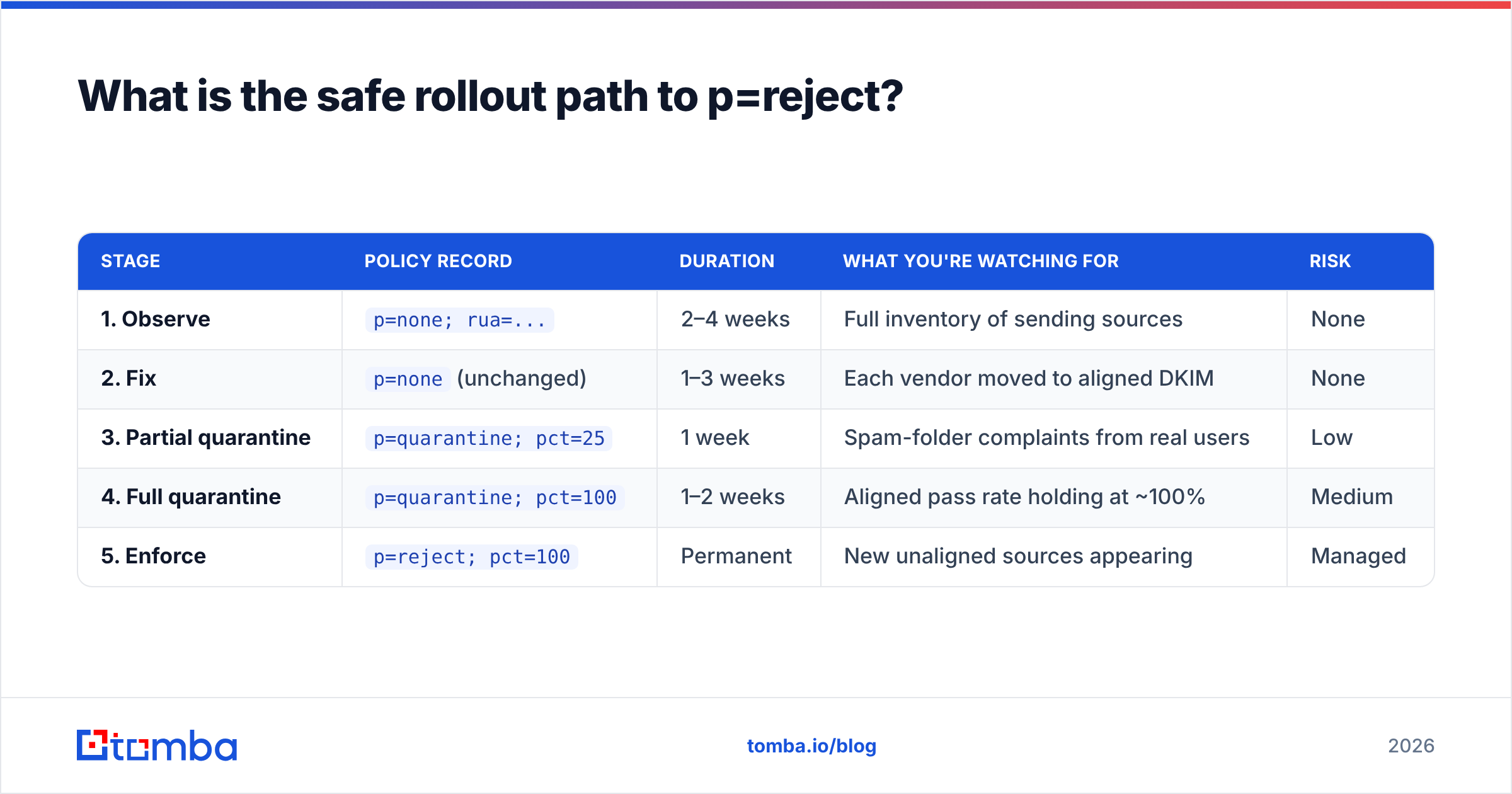
What is the safe rollout path to p=reject?#
Alignment work fails when it's done as a single flip. Stage it.
| Stage | Policy record | Duration | What you're watching for | Risk |
|---|---|---|---|---|
| 1. Observe | p=none; rua=... |
2–4 weeks | Full inventory of sending sources | None |
| 2. Fix | p=none (unchanged) |
1–3 weeks | Each vendor moved to aligned DKIM | None |
| 3. Partial quarantine | p=quarantine; pct=25 |
1 week | Spam-folder complaints from real users | Low |
| 4. Full quarantine | p=quarantine; pct=100 |
1–2 weeks | Aligned pass rate holding at ~100% | Medium |
| 5. Enforce | p=reject; pct=100 |
Permanent | New unaligned sources appearing | Managed |
Two rules that save people from outages. First, never skip stage 1 — you cannot fix senders you haven't enumerated, and every organization has more of them than the IT inventory shows. Second, use pct= as a real dial, not decoration; it lets a quarter of your mail take the new policy while the rest stays safe, which is exactly the blast-radius control you want on a Tuesday morning.
Alignment is also worth revisiting whenever you change infrastructure. New CRM, new billing provider, new outbound sequencer — each one can introduce an unaligned source that silently degrades email deliverability weeks before anyone notices reply rates dropping.
How does alignment fit into overall sending health?#
DMARC alignment is necessary but not sufficient. It proves the mail is genuinely yours. It says nothing about whether recipients want it.
Since February 2024, both Google and Yahoo have required bulk senders to publish a DMARC policy, use aligned authentication, offer one-click unsubscribe, and keep spam complaint rates under 0.3%. Microsoft followed with similar requirements for high-volume senders. Alignment is now the price of admission, not a differentiator. What still moves the needle:
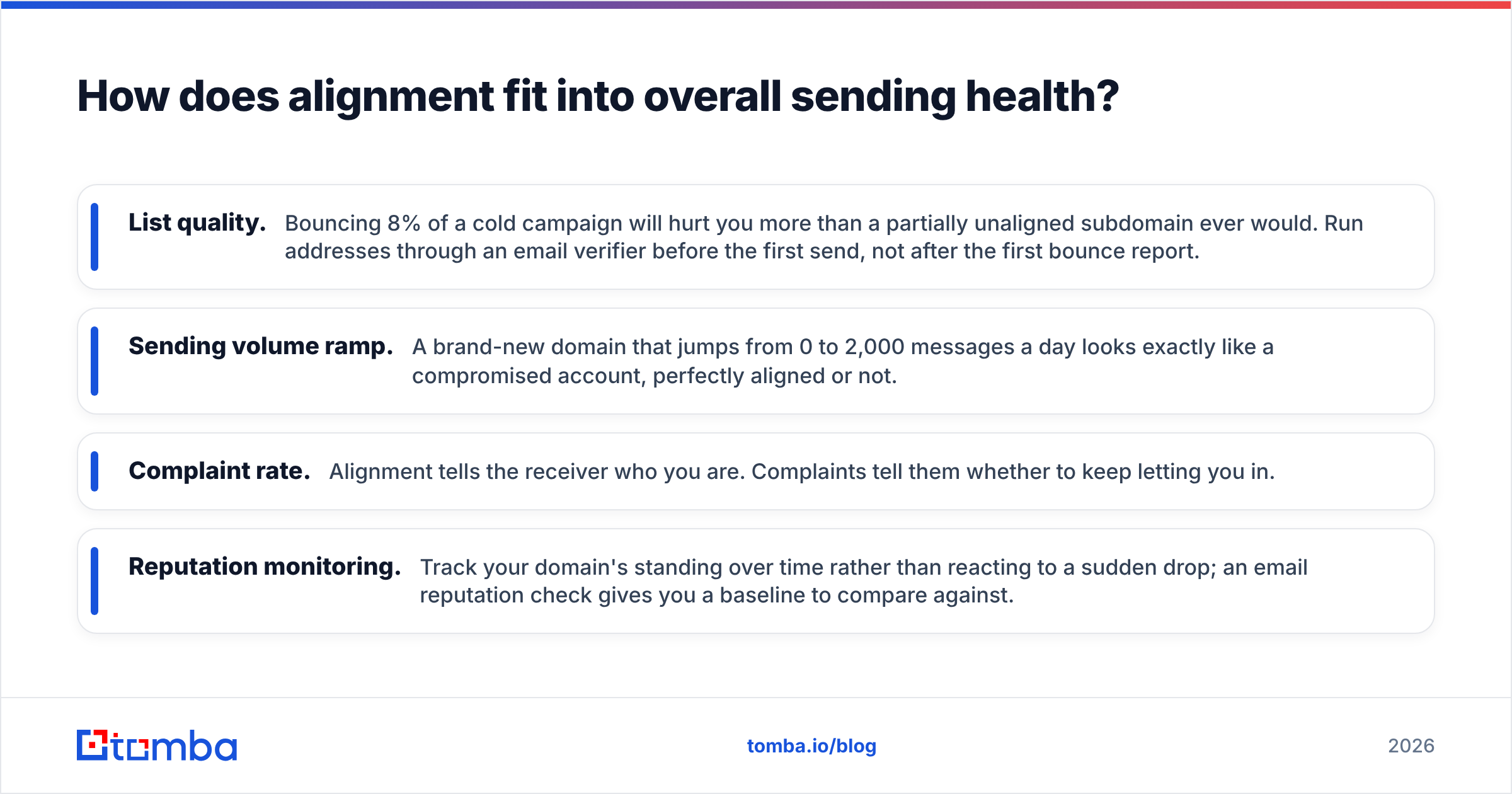
- List quality. Bouncing 8% of a cold campaign will hurt you more than a partially unaligned subdomain ever would. Run addresses through an email verifier before the first send, not after the first bounce report.
- Sending volume ramp. A brand-new domain that jumps from 0 to 2,000 messages a day looks exactly like a compromised account, perfectly aligned or not.
- Complaint rate. Alignment tells the receiver who you are. Complaints tell them whether to keep letting you in.
- Reputation monitoring. Track your domain's standing over time rather than reacting to a sudden drop; an email reputation check gives you a baseline to compare against.
For a broader primer on how these authentication mechanisms interlock, the DMARC entry on Wikipedia is a reasonable neutral reference — it covers the history of why alignment was bolted onto SPF and DKIM in the first place, rather than designed into them.
What should you do this week?#
Three concrete steps, in order.
- Check what you're publishing right now. Query
_dmarc.yourdomain.comfor a TXT record. If there isn't one, publishv=DMARC1; p=none; rua=mailto:dmarc@yourdomain.comtoday. If there is one atp=nonewith norua, add the reporting address — a policy with no reports is a policy you can never safely tighten. - List every system that sends mail as you. Marketing platform, CRM, help desk, billing, calendar invites, e-signature, recruiting, status page, monitoring alerts. For each one, find the "custom sending domain" or "authenticated domain" setting and turn it on.
- Read your first week of aggregate reports before touching the policy. Sort by volume descending. Fix the top three sources. Re-check. Repeat until the unaligned column is empty.
Do those three things and enforcement becomes an anticlimax rather than an incident.
Where does contact data quality fit in?#
Perfect alignment still won't save a campaign built on guessed addresses. Every hard bounce is a signal to the receiving provider that you don't know who you're mailing — and that signal outweighs a clean DMARC record. The teams with the best deliverability treat authentication and data accuracy as one project, not two.
If your prospect list is the weak link, start there. Tomba's Email Finder returns verified professional addresses by name, domain, or company, with a confidence score attached to each result, so your aligned, DKIM-signed, reject-policy mail actually lands in a real inbox. The free tier covers 25 searches a month; paid plans start at $49/mo on Starter and scale to Growth at $99/mo — full details on the Tomba pricing page. Get the authentication right, then feed it clean data.
Related guides#
Ready to find emails that actually work?
Join 150,000+ professionals who stopped guessing and started sending. Free credits on signup — no credit card required.
Get the Tomba newsletter
Practical outbound tactics and product updates — once every two weeks.
About the author