DMARC Alignment Check: How to Test SPF and DKIM Alignment
Your SPF and DKIM can both pass and DMARC can still fail. Here's how alignment actually works, how to run a DMARC alignment check in under 10 minutes, and how to fix the three failures that cause 90% of problems.
TL;DR
- DMARC passes only when SPF or DKIM passes and the passing domain aligns with the domain in your visible
From:header. Two separate conditions, and most people only check the first one. - SPF alignment compares the
From:domain to the Return-Path (envelope sender) domain. DKIM alignment compares theFrom:domain to thed=tag in the DKIM signature. These are different domains in almost every ESP setup by default. - Relaxed alignment (the default) allows subdomains:
mail.acme.comaligns withacme.com. Strict alignment requires an exact match. - The fastest DMARC alignment check: send a test message to a mailbox you control, open the raw headers, and read the
Authentication-Resultsline. It literally printsdmarc=passordmarc=failplus the reason. - Fixing alignment is almost always a DNS job — a custom Return-Path (CNAME) or a properly delegated DKIM key with your own domain in
d=.
What is a DMARC alignment check?#
A DMARC alignment check is the test that confirms the domain your recipients see matches the domain that actually authenticated the message.
Think of it like a package delivery. SPF and DKIM verify that the courier is legitimate and the box hasn't been tampered with. Alignment asks a different question: does the name on the shipping label match the name of the company that sent it? A perfectly sealed box from a verified courier is still suspicious if the label says "Acme Corp" and the courier's paperwork says "randombulkmailer-47.net."
That mismatch is the whole reason DMARC exists. Before DMARC, an attacker could pass SPF on their own domain (evil-sender.com) while putting billing@yourbank.com in the From: field that users actually read. Both checks passed. The spoof worked. DMARC closed that hole by requiring the authenticated domain and the visible domain to be the same organizational domain.
So there are two layers:
- Authentication — did SPF or DKIM pass at all?
- Alignment — does the domain that passed match the
From:domain?
DMARC requires at least one of these pairs to succeed. Fail alignment on both, and DMARC fails no matter how clean your SPF record is.

How do SPF alignment and DKIM alignment differ?#
They compare different fields, and that difference is where most senders get burned.
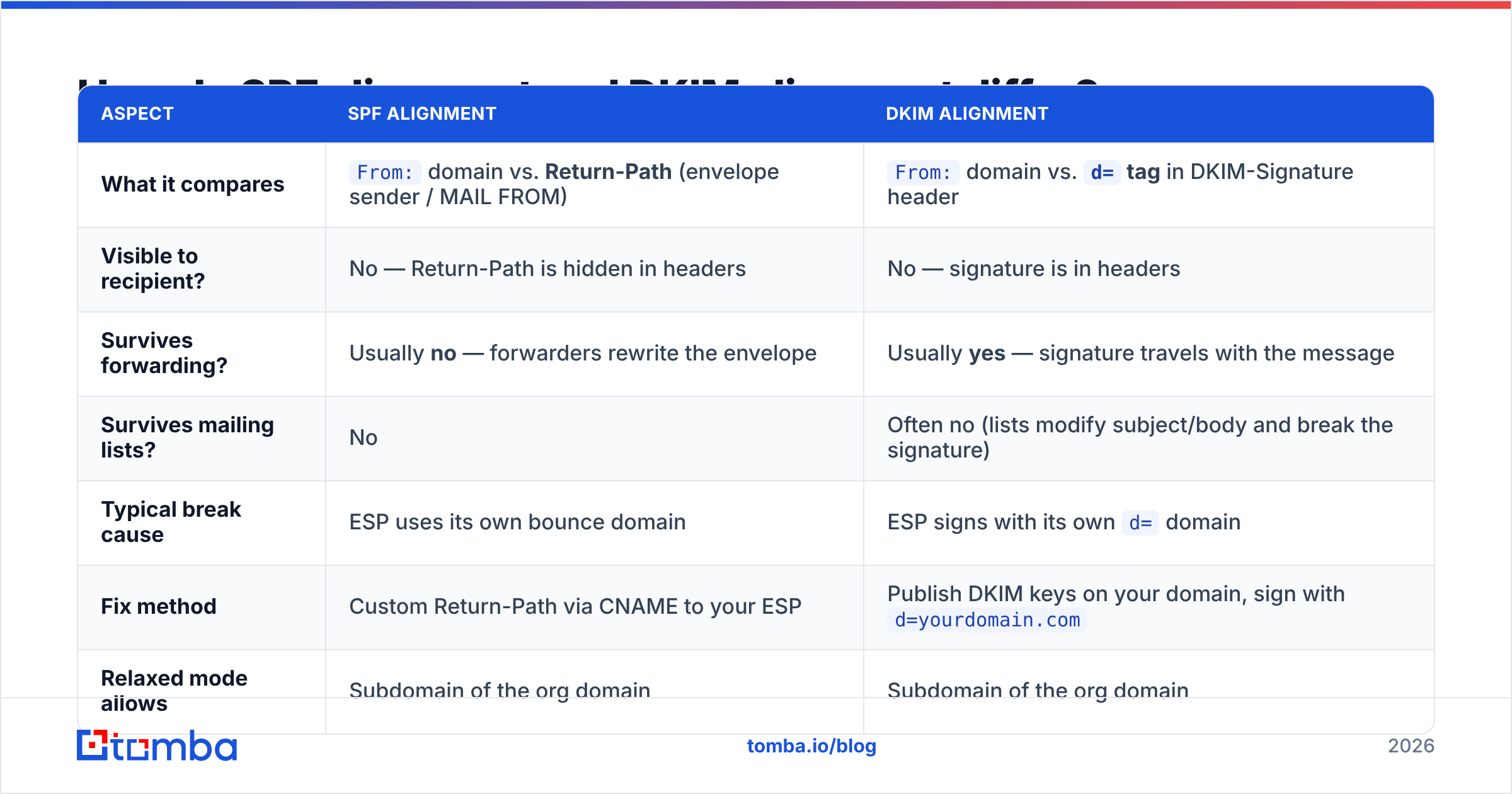
| Aspect | SPF alignment | DKIM alignment |
|---|---|---|
| What it compares | From: domain vs. Return-Path (envelope sender / MAIL FROM) |
From: domain vs. d= tag in DKIM-Signature header |
| Visible to recipient? | No — Return-Path is hidden in headers | No — signature is in headers |
| Survives forwarding? | Usually no — forwarders rewrite the envelope | Usually yes — signature travels with the message |
| Survives mailing lists? | No | Often no (lists modify subject/body and break the signature) |
| Typical break cause | ESP uses its own bounce domain | ESP signs with its own d= domain |
| Fix method | Custom Return-Path via CNAME to your ESP | Publish DKIM keys on your domain, sign with d=yourdomain.com |
| Relaxed mode allows | Subdomain of the org domain | Subdomain of the org domain |
| Strict mode requires | Exact domain match | Exact domain match |
The forwarding row matters more than it looks. If a recipient auto-forwards your email to another address, SPF alignment almost always breaks because the forwarding server becomes the new envelope sender. DKIM alignment usually survives, which is why DKIM alignment is the one you should prioritize. A sender that relies on SPF alignment alone is one auto-forward rule away from a DMARC failure.
How does relaxed vs. strict alignment work?#
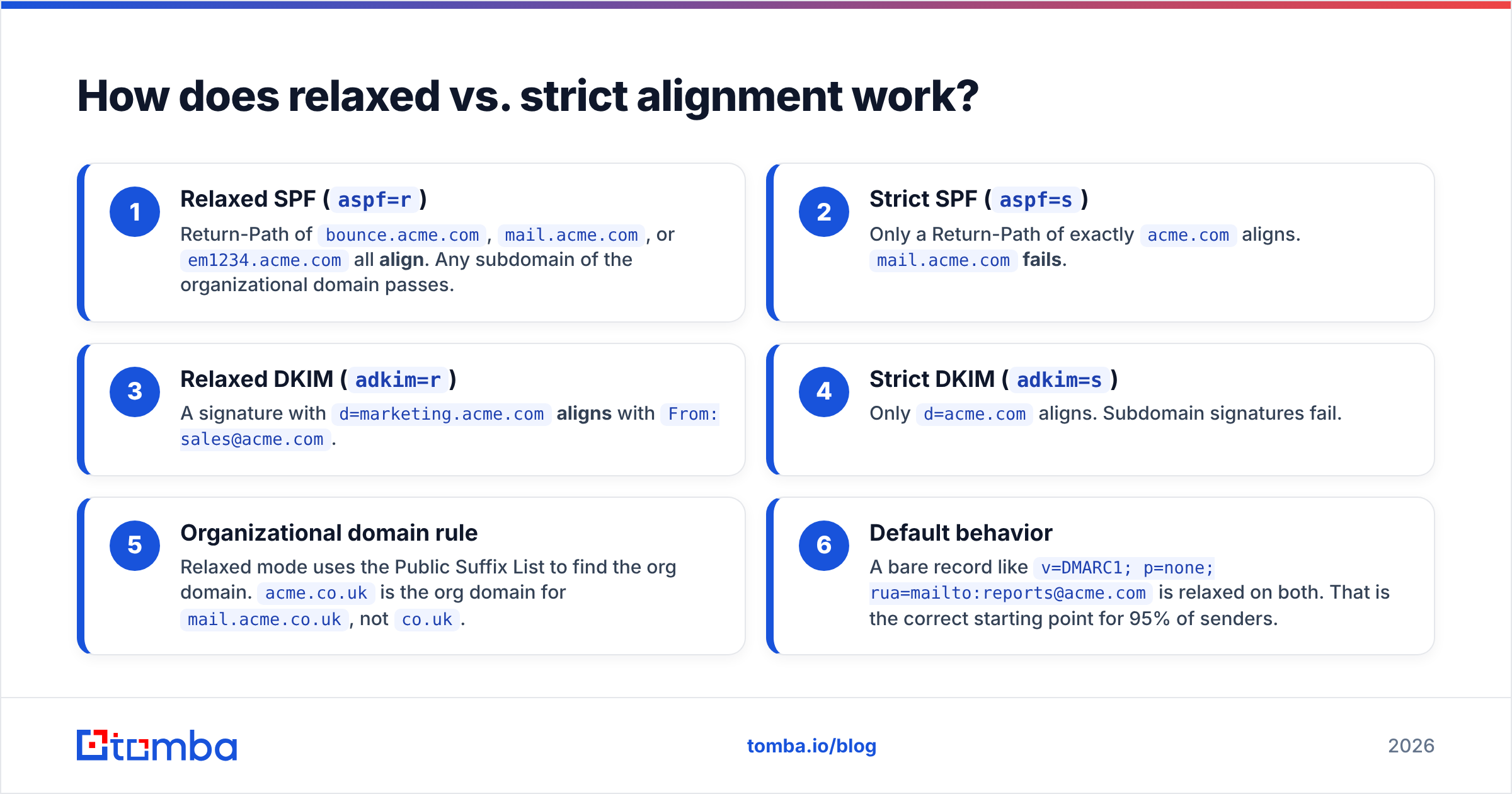
The aspf and adkim tags in your DMARC record control this. Both default to r (relaxed) if you don't specify them.
Here's the practical difference, using From: sales@acme.com:
- Relaxed SPF (
aspf=r) — Return-Path ofbounce.acme.com,mail.acme.com, orem1234.acme.comall align. Any subdomain of the organizational domain passes. - Strict SPF (
aspf=s) — Only a Return-Path of exactlyacme.comaligns.mail.acme.comfails. - Relaxed DKIM (
adkim=r) — A signature withd=marketing.acme.comaligns withFrom: sales@acme.com. - Strict DKIM (
adkim=s) — Onlyd=acme.comaligns. Subdomain signatures fail. - Organizational domain rule — Relaxed mode uses the Public Suffix List to find the org domain.
acme.co.ukis the org domain formail.acme.co.uk, notco.uk. - Default behavior — A bare record like
v=DMARC1; p=none; rua=mailto:reports@acme.comis relaxed on both. That is the correct starting point for 95% of senders.
Unless you have a specific security mandate, stay relaxed. Strict alignment breaks legitimate mail from subdomains — your help desk, your billing system, your marketing platform — and buys you very little additional protection. The official DMARC specification treats relaxed as the sensible default for exactly this reason.
How do you run a DMARC alignment check in 10 minutes?#
You do not need a paid tool for the first pass. You need one test email and the ability to read raw headers.
Step 1 — Send a real message through the channel you're testing. Not from your desktop client, from the actual system: your ESP, your CRM sequence, your transactional service. Send it to a Gmail address you control. Different sending paths have different alignment outcomes, so test each one separately.
Step 2 — Open the raw headers. In Gmail, open the message, click the three-dot menu, choose "Show original." You'll get a summary box at the top showing SPF, DKIM, and DMARC status, plus the full header dump below.
Step 3 — Read the Authentication-Results header. It looks like this:
Authentication-Results: mx.google.com;
  dkim=pass header.i=@sendingservice.net header.s=s1;
  spf=pass (google.com: domain of bounces@sendingservice.net
    designates 1.2.3.4 as permitted sender)
    smtp.mailfrom=bounces@sendingservice.net;
  dmarc=fail (p=NONE sp=NONE dis=NONE) header.from=acme.com
That block is the entire diagnosis. SPF passed. DKIM passed. DMARC failed — because header.from=acme.com doesn't match smtp.mailfrom=bounces@sendingservice.net or header.i=@sendingservice.net. Classic dual misalignment.
Step 4 — Compare the three domains manually. Write them down side by side:
From:header domain → this is your identityReturn-Path/smtp.mailfromdomain → SPF alignment candidate- DKIM
d=tag → DKIM alignment candidate
If neither candidate matches the From: domain (allowing subdomains under relaxed mode), you have an alignment failure.
Step 5 — Confirm with aggregate reports. A single test email tells you about one path. DMARC rua reports tell you about every path, including systems you forgot existed. Add rua=mailto:dmarc@yourdomain.com to your DMARC record and give it 48 hours. The XML is unreadable by hand — pipe it into a free parser or a reporting service.
Step 6 — Check your DNS records are actually resolving. Run an SPF checker against your domain before assuming the alignment layer is at fault. A syntactically broken or 10-lookup-exceeded SPF record fails authentication before alignment is even evaluated.
What are the three most common alignment failures?#
Almost every real-world DMARC failure traces back to one of these.
Failure 1: The ESP bounce domain. You send through a marketing platform. The platform uses its shared bounce infrastructure — bounces.esp-domain.com — as the Return-Path. SPF passes on the ESP's domain, aligns with nothing on yours. Fix: enable the ESP's custom Return-Path / custom bounce domain feature. This is a CNAME record like em.yourdomain.com → esp.sendgrid.net. Nearly every serious ESP supports it, and it is usually a single toggle plus a DNS record.
Failure 2: Shared DKIM signing. The ESP signs with d=esp-domain.com instead of yours. Fix: generate a domain-specific DKIM key in the ESP dashboard, publish the TXT record at selector._domainkey.yourdomain.com, and verify the ESP switches the d= tag to your domain. Do not assume it flipped automatically — send a test and read the header.
Failure 3: Forwarding and mailing lists. A recipient's @company.com address forwards to their personal Gmail. The forwarder rewrites the envelope, so SPF now evaluates the forwarder's IP against your record and fails. If DKIM alignment is in place, DMARC still passes on the DKIM leg. If it isn't, you get a DMARC failure you can do nothing about — which is the strongest practical argument for getting DKIM alignment right first.
There's a fourth failure worth flagging because it's silent: subdomain policy drift. Your p=reject on the parent domain inherits down to subdomains unless you set sp=. If your billing system sends from billing.yourdomain.com without its own aligned auth, p=reject will bounce your invoices. Set sp=none while you audit, then tighten.
How does alignment affect cold outreach deliverability?#
Directly and expensively. If your DMARC policy is p=none, misalignment doesn't bounce mail — but Gmail and Yahoo both now require DMARC for bulk senders, and inconsistent authentication signals degrade sender reputation over time. Google's bulk sender guidelines make DMARC a baseline requirement, not a nice-to-have, for anyone sending at volume.
For outbound teams the compounding effect looks like this: misaligned auth pushes borderline messages to spam, spam placement kills reply rates, low engagement further depresses reputation, and now even your aligned mail struggles. Alignment is upstream of everything else in email deliverability.
The other half of that equation is list quality. Perfect DMARC alignment on a list full of dead addresses still produces a high bounce rate, and bounce rate is a reputation input. Clean the list with an email verifier before you scale volume — authentication and hygiene are two legs of the same stool, and mailbox providers score you on both.

What does a healthy DMARC setup look like?#
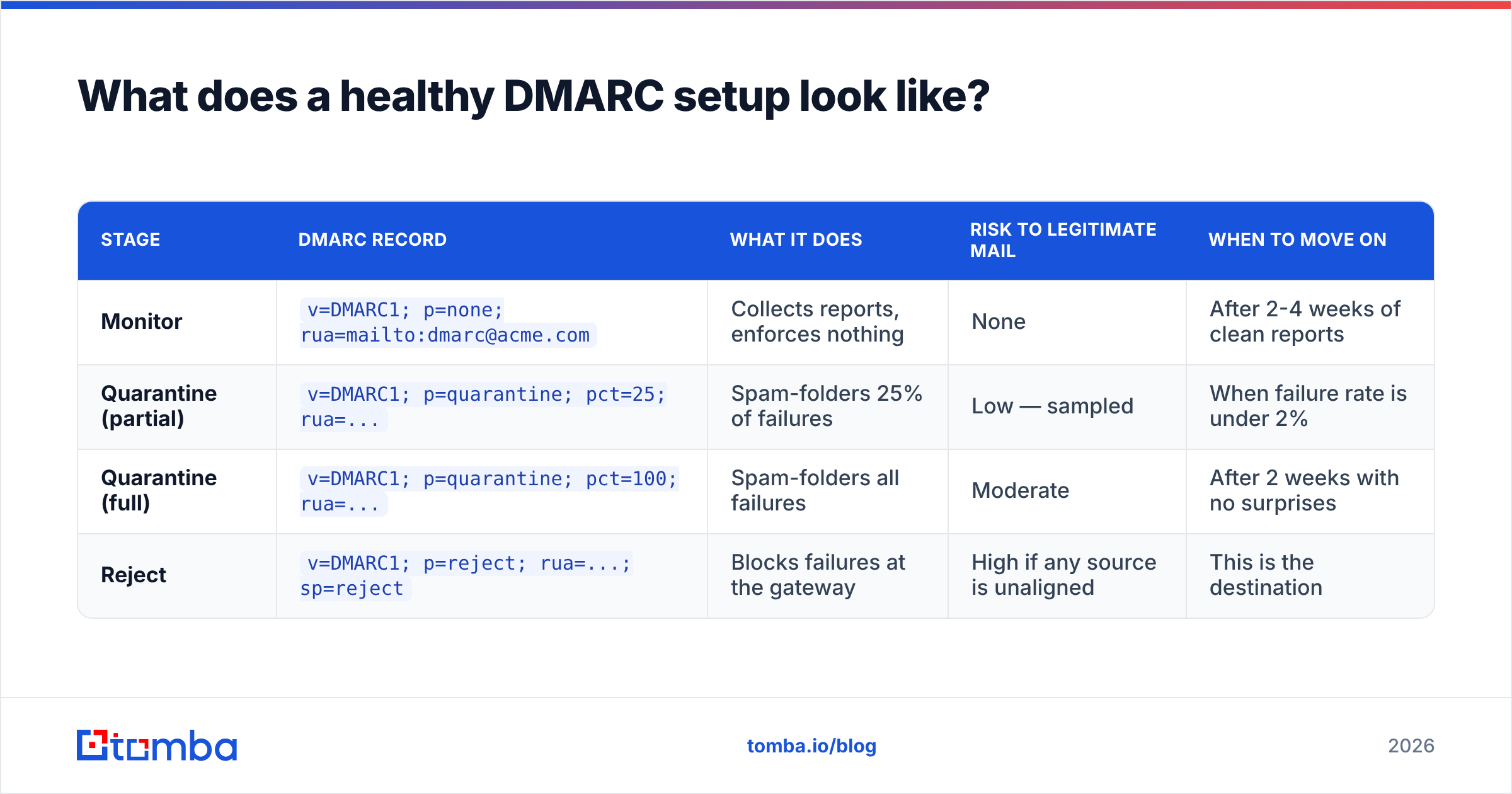
Here's a rollout comparison across the three policy stages, so you can see where you should be and what each stage actually costs you.
| Stage | DMARC record | What it does | Risk to legitimate mail | When to move on |
|---|---|---|---|---|
| Monitor | v=DMARC1; p=none; rua=mailto:dmarc@acme.com |
Collects reports, enforces nothing | None | After 2-4 weeks of clean reports |
| Quarantine (partial) | v=DMARC1; p=quarantine; pct=25; rua=... |
Spam-folders 25% of failures | Low — sampled | When failure rate is under 2% |
| Quarantine (full) | v=DMARC1; p=quarantine; pct=100; rua=... |
Spam-folders all failures | Moderate | After 2 weeks with no surprises |
| Reject | v=DMARC1; p=reject; rua=...; sp=reject |
Blocks failures at the gateway | High if any source is unaligned | This is the destination |
Two rules for this table. First, never skip monitoring. Every organization discovers at least one forgotten sending system — an old ticketing tool, a CI pipeline, a vendor invoice service — and you want to find it in a report, not in an angry Slack message. Second, pct= is your friend. It lets you enforce gradually instead of flipping a switch on your entire mail flow.
A healthy final state has: aligned DKIM on every sending path, aligned SPF wherever you control the Return-Path, p=reject with an explicit sp=, and an ongoing rua feed you actually read monthly. Vendors like Valimail and dmarcian publish comparison data on rollout timelines; independent reviews on G2 are a reasonable starting point if you want a managed reporting layer instead of parsing XML yourself.
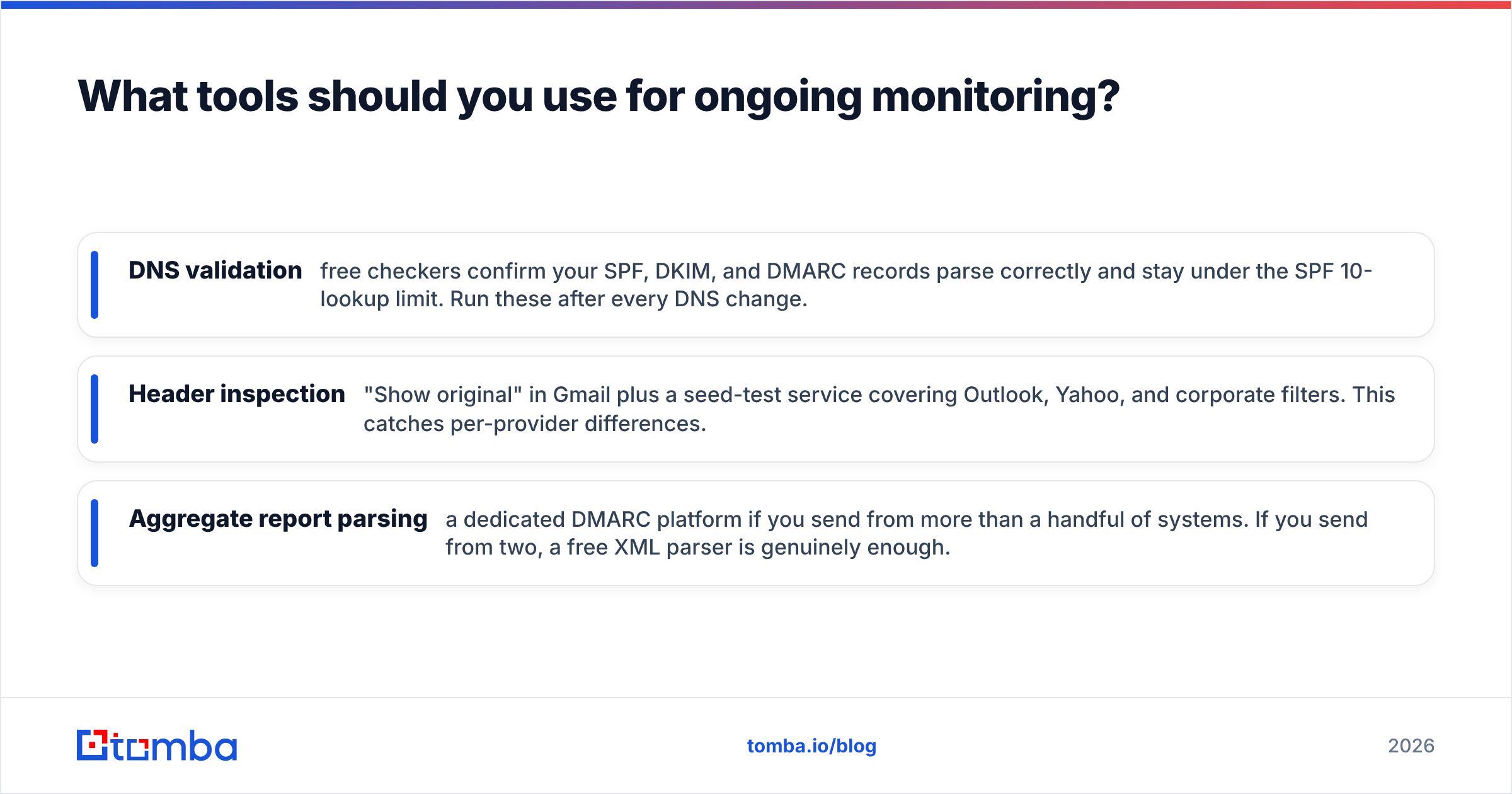
What tools should you use for ongoing monitoring?#
Split the job into three buckets and pick accordingly.
- DNS validation — free checkers confirm your SPF, DKIM, and DMARC records parse correctly and stay under the SPF 10-lookup limit. Run these after every DNS change.
- Header inspection — "Show original" in Gmail plus a seed-test service covering Outlook, Yahoo, and corporate filters. This catches per-provider differences.
- Aggregate report parsing — a dedicated DMARC platform if you send from more than a handful of systems. If you send from two, a free XML parser is genuinely enough.
For outbound teams, the pre-send layer matters just as much. Before a campaign goes out, confirm the addresses are real and the domains accept mail — a free email checker handles spot checks, and bulk verification handles the list. Pair that with a blacklist checker on your sending IPs and you've covered the three things that actually move inbox placement: authentication, list quality, and IP reputation.
Fix your alignment, then fix your list#
Alignment is a DNS problem with a 10-minute diagnosis and usually a same-day fix. Send one test, read the Authentication-Results header, compare three domains, and you'll know exactly which leg is broken. Get DKIM alignment right first — it survives forwarding, which SPF alignment mostly doesn't — then add a custom Return-Path, then walk p=none → p=quarantine → p=reject on a schedule you control.
Once authentication is solid, the constraint moves to your data. Bad addresses bounce, bounces hurt reputation, and reputation undoes the work you just did on DNS. Tomba Email Finder gives you verified, deliverable business addresses at the source — real contacts with confidence scoring, so your aligned, authenticated mail actually lands in front of a human. Start free with 25 searches a month, or step up to Starter at $49/mo when you're ready to scale; full Tomba pricing is public with no sales call required.
Related guides#
Ready to find emails that actually work?
Join 150,000+ professionals who stopped guessing and started sending. Free credits on signup — no credit card required.
Get the Tomba newsletter
Practical outbound tactics and product updates — once every two weeks.
About the author