DMARC for Google in 2026: Setup, Policies, and Common Errors
Google now enforces DMARC on bulk senders instead of politely warning you. Here's what the requirement actually checks, which policy to publish, and the alignment mistakes that quietly send your cold email to spam.

TL;DR
- Google requires every bulk sender (5,000+ messages/day to Gmail addresses) to publish a DMARC record on the sending domain.
p=nonesatisfies the letter of the rule — it does not protect you. - DMARC only passes if SPF or DKIM aligns with the visible
From:domain. Most "DMARC fails but SPF passes" tickets are alignment problems, not record problems. - Start at
p=none, read aggregate reports for two to four weeks, then move top=quarantinewithpct=ramping, thenp=reject. Jumping straight to reject on a domain with unknown senders will kill legitimate mail. - Google Postmaster Tools is the only free place to see how Gmail actually judged your authentication and spam rate. If you're sending cold email without it, you're flying blind.
- DMARC is a spoofing control, not an inbox-placement fix. Bad list quality still gets you filtered — clean data does more for placement than any DNS record.
What does "DMARC Google" actually mean in 2026?#
It means two different things depending on who's asking, and conflating them is where most teams go wrong.
Sending to Gmail: Google's bulk sender requirements — rolled out in February 2024 and tightened since — say that if you send 5,000 or more messages per day to Gmail accounts, you must authenticate with SPF and DKIM, publish a DMARC policy on your From domain, keep your spam complaint rate under 0.3%, and support one-click unsubscribe on marketing mail. Google enforces this with rejections and rate-limiting, not with a warning email.
Sending from Google Workspace: You use Google as your outbound mail provider, so you need DMARC configured on your own domain while Google handles the DKIM signing and SPF publishing on their infrastructure. Different job, same acronym.
If you run cold outbound, you are almost certainly doing both — Workspace inboxes sending to Gmail recipients — which is why the topic feels tangled. The record you publish is the same either way. What changes is which failures you care about.
One thing worth stating plainly: the 5,000/day threshold is per sending domain, counted across all Gmail recipients. Teams running twenty burner domains at 250 emails/day each sometimes assume they're under the limit. They are, technically. They're also running a pattern Gmail's filters recognize on sight, and the authentication requirements are the least of their problems.
How does DMARC actually work with SPF and DKIM?#
DMARC is a decision layer sitting on top of two older protocols. Think of it like a bouncer checking two forms of ID and then following a written house policy about what to do when the IDs don't match the name on the guest list.
- SPF publishes which IP addresses may send for your domain. Google Workspace users publish
v=spf1 include:_spf.google.com ~all. It authenticates the envelope sender (the Return-Path), which is often not the address your recipient sees. - DKIM cryptographically signs the message with a private key; the public key lives in DNS at
selector._domainkey.yourdomain.com. Google generates a 2048-bit key for you in the Admin console — but it is not enabled by default, and that single unchecked box breaks more DMARC deployments than anything else. - Alignment is the piece nobody explains. DMARC passes only when the domain that passed SPF or DKIM matches the domain in the visible
From:header. Relaxed alignment (the default) allows subdomains; strict alignment requires an exact match. - The DMARC record at
_dmarc.yourdomain.comtells receivers what to do when alignment fails: nothing (p=none), sandbox it (p=quarantine), or refuse it (p=reject). - Reporting is the payoff. The
rua=tag sends you daily aggregate XML from Gmail, Outlook, Yahoo and others showing every IP sending as your domain — including the ones you forgot about.
The practical consequence: you can pass SPF and still fail DMARC. A sequencer sending as you@yourcompany.com while its Return-Path is bounce@sequencer-infra.com passes SPF for the sequencer's domain, aligns with nothing, and fails DMARC unless the tool also DKIM-signs with your domain. That's the single most common failure in outbound stacks.
What DMARC policy should you publish?#
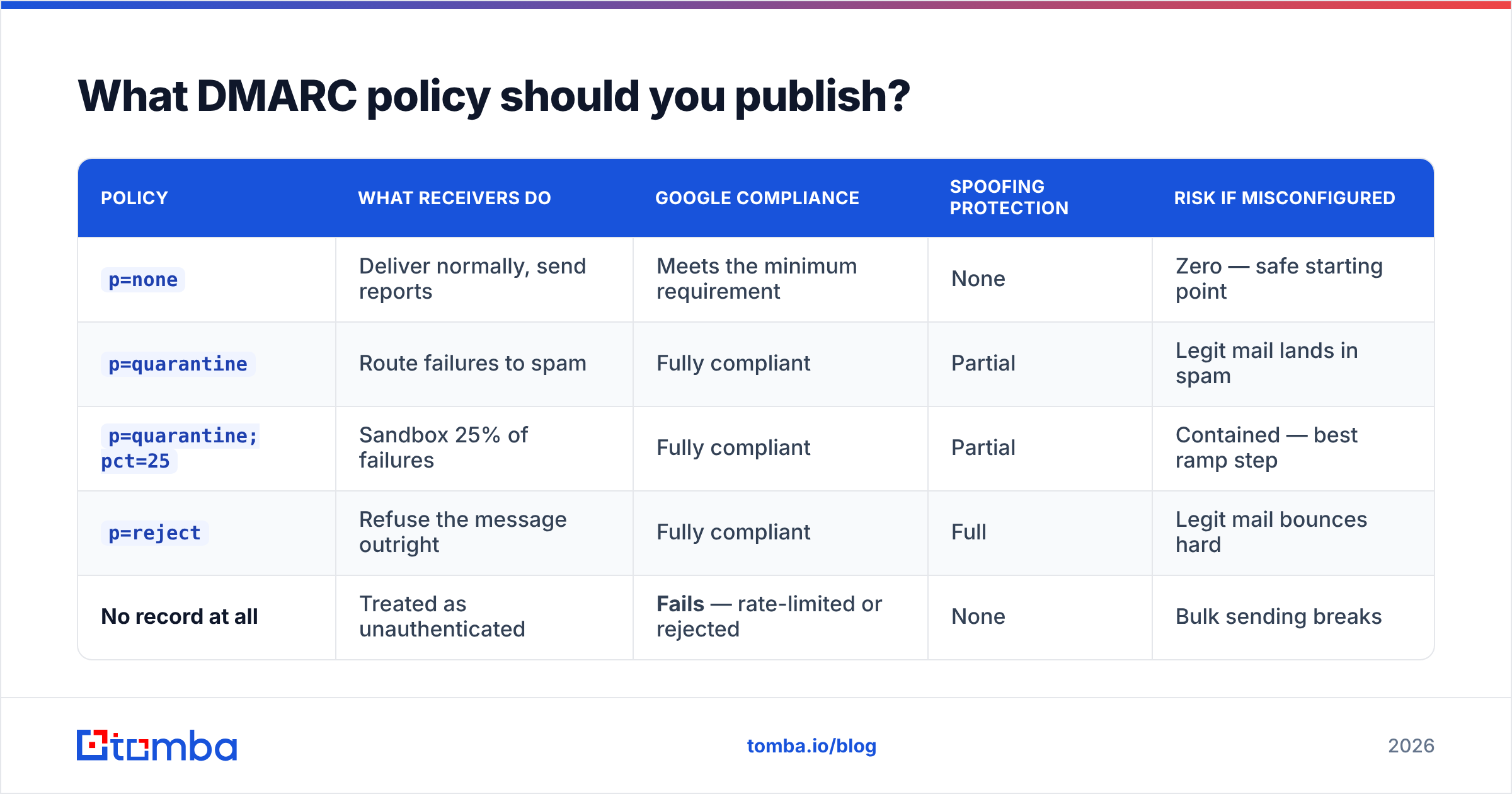
Here's the honest trade-off. p=none gets you compliant with Google's checklist and protects nobody. p=reject protects your brand from exact-domain spoofing and gets you nothing extra from Gmail's filters — the benefit is real but it is a security benefit, not a deliverability one.
| Policy | What receivers do | Google compliance | Spoofing protection | Risk if misconfigured |
|---|---|---|---|---|
p=none |
Deliver normally, send reports | Meets the minimum requirement | None | Zero — safe starting point |
p=quarantine |
Route failures to spam | Fully compliant | Partial | Legit mail lands in spam |
p=quarantine; pct=25 |
Sandbox 25% of failures | Fully compliant | Partial | Contained — best ramp step |
p=reject |
Refuse the message outright | Fully compliant | Full | Legit mail bounces hard |
| No record at all | Treated as unauthenticated | Fails — rate-limited or rejected | None | Bulk sending breaks |
The sequence that works: publish p=none with a reporting address, wait two to four weeks, read the aggregate reports until you can name every IP sending as your domain, then move to p=quarantine; pct=10, ramp to 100 over a few weeks, then flip to p=reject. Skipping the reporting window is how finance teams discover their invoicing tool stopped working three days after go-live.
A working record for a mid-sized sender looks like this:
v=DMARC1; p=quarantine; pct=25; rua=mailto:dmarc@yourdomain.com;
ruf=mailto:forensic@yourdomain.com; fo=1; adkim=r; aspf=r; sp=reject
Note sp=reject — subdomain policy. Attackers love spoofing mail.yourdomain.com when the root domain is locked down and the subdomain isn't. Set it early; you almost certainly don't send from bare subdomains anyway.
How do you set up DMARC for Google Workspace, step by step?#
- Turn on DKIM. Admin console → Apps → Google Workspace → Gmail → Authenticate email. Generate a 2048-bit key, publish the
google._domainkeyTXT record at your DNS host, wait for propagation, then click "Start authentication." Skipping the last click is a classic — the key exists, the signing doesn't. - Publish SPF. One record, one
v=spf1string, under 10 DNS lookups. If you also send through HubSpot, Mailchimp, and a sequencer, eachinclude:burns lookups and blowing the limit causes a permanent SPF error. Check it with a free SPF checker before you trust it. - Publish DMARC at
_dmarc. TXT record, host_dmarc, value startingv=DMARC1; p=none; rua=mailto:.... - Verify with Google's own docs. The Google Workspace DMARC guide lists the exact record syntax Google's parser accepts — including the tags it silently ignores.
- Register for Postmaster Tools. Add and verify your domain at Google Postmaster Tools. Authentication pass rates, spam rate, domain reputation, and delivery errors show up within a few days of meaningful volume.
- Read reports for a month before enforcing. Raw XML is unreadable by design; pipe it into any aggregate parser, or just grep for source IPs you don't recognize.
Total DNS work: about fifteen minutes. Total time before you should enforce: about a month. Most of the pain in DMARC deployments comes from compressing step 6 into an afternoon.
Why does Gmail still filter you after DMARC passes?#
Because DMARC answers "is this really from you?" — not "does anyone want this?"
Gmail's filtering weighs engagement signals far more heavily than authentication. Authentication is a gate: fail it and you don't get considered at all. Pass it and you're merely eligible. What decides placement after that:
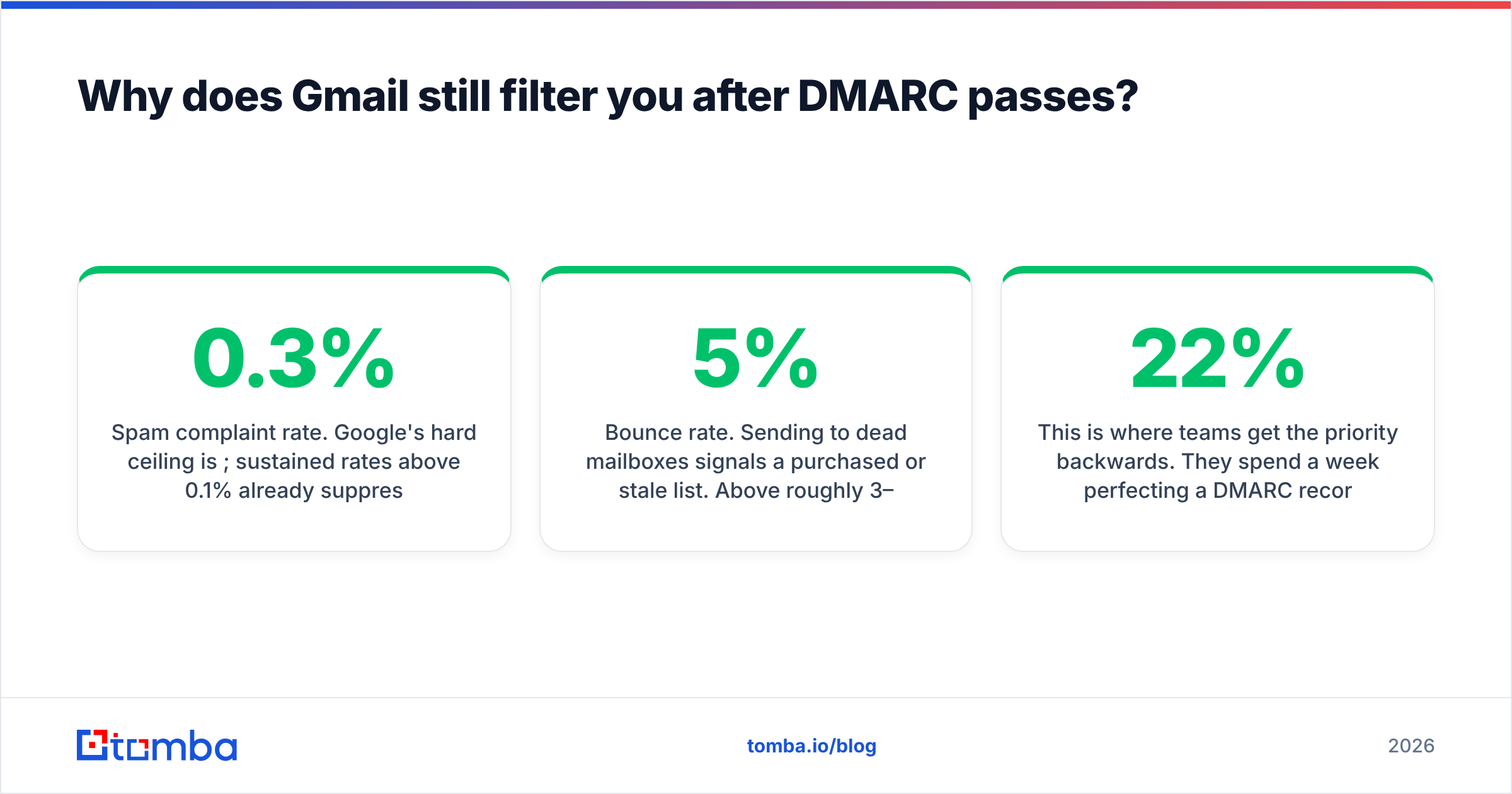
- Spam complaint rate. Google's hard ceiling is 0.3%; sustained rates above 0.1% already suppress you. This is measured in Postmaster Tools and nowhere else.
- Bounce rate. Sending to dead mailboxes signals a purchased or stale list. Above roughly 3–5% and Gmail starts throttling the sending domain.
- Reply and open behavior. Cold email that nobody answers looks statistically identical to bulk mail nobody wants — because it is.
- Domain age and volume ramp. A three-week-old domain jumping to 400 sends/day trips volume anomaly detection regardless of perfect DNS.
- Content and link reputation. Shortened links, tracking domains sharing an IP with spammers, and image-only bodies all cost you.
This is where teams get the priority backwards. They spend a week perfecting a DMARC record and then upload a scraped list with a 22% bounce rate. The record is fine. The list destroyed the domain. If you want the underlying mechanics, our email deliverability glossary entry breaks down how these signals compound.

Which DMARC and Gmail mistakes actually cause rejections?#
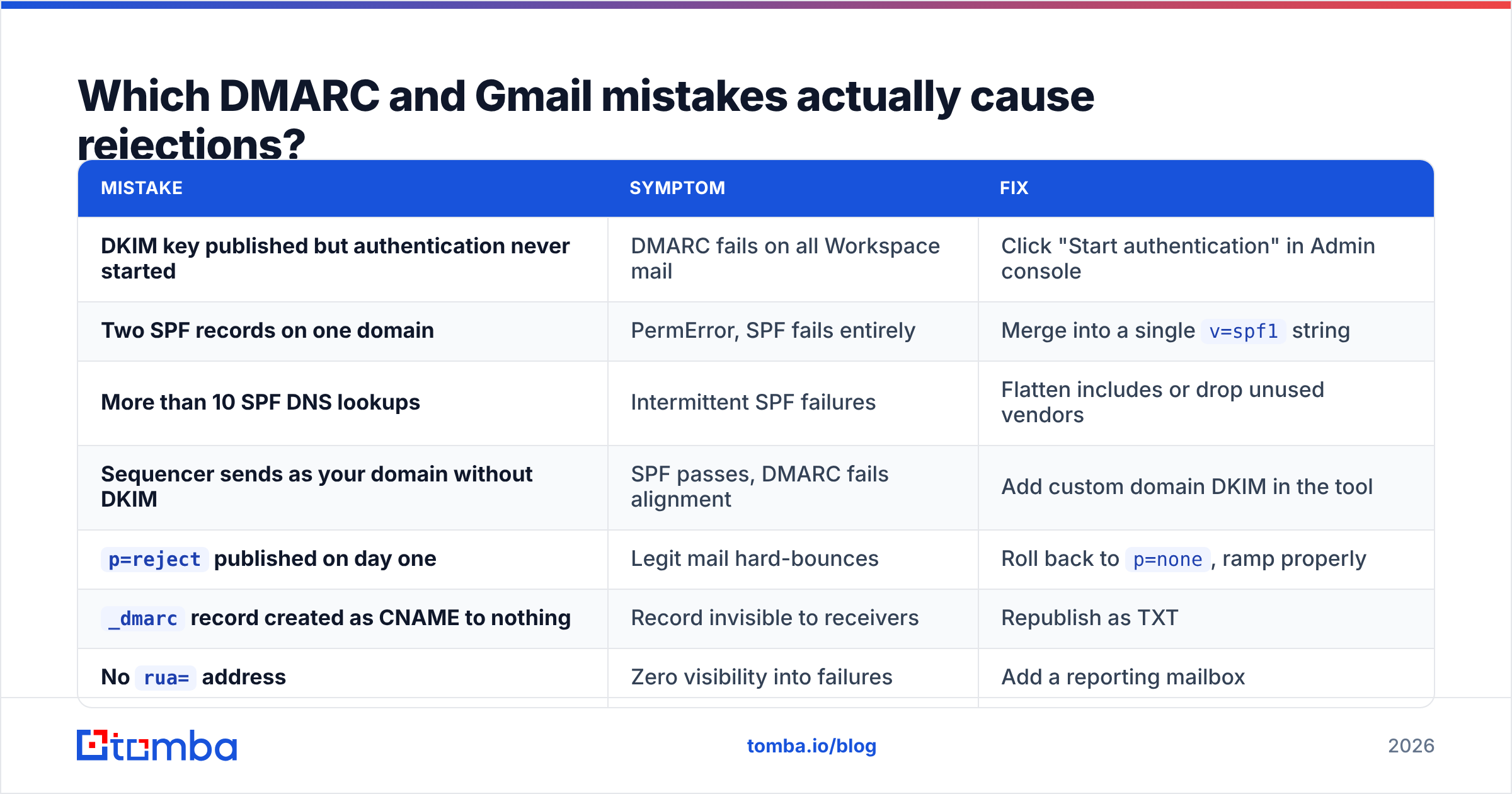
| Mistake | Symptom | Fix |
|---|---|---|
| DKIM key published but authentication never started | DMARC fails on all Workspace mail | Click "Start authentication" in Admin console |
| Two SPF records on one domain | PermError, SPF fails entirely | Merge into a single v=spf1 string |
| More than 10 SPF DNS lookups | Intermittent SPF failures | Flatten includes or drop unused vendors |
| Sequencer sends as your domain without DKIM | SPF passes, DMARC fails alignment | Add custom domain DKIM in the tool |
p=reject published on day one |
Legit mail hard-bounces | Roll back to p=none, ramp properly |
_dmarc record created as CNAME to nothing |
Record invisible to receivers | Republish as TXT |
No rua= address |
Zero visibility into failures | Add a reporting mailbox |
| Forwarded mail breaking SPF | Sporadic failures from schools, associations | Rely on DKIM alignment, which survives forwarding |
That last row deserves a note. Mailing lists and forwarders rewrite envelopes and break SPF by design. DKIM signatures survive forwarding as long as the body isn't modified, which is exactly why DMARC accepts either mechanism. If your DKIM is solid, forwarding stops being a problem.
For the protocol details themselves — tag syntax, report formats, the reasoning behind alignment modes — dmarc.org remains the canonical, vendor-neutral reference.
How does list quality change the DMARC equation?#
Authentication and data quality pull the same lever from opposite ends.
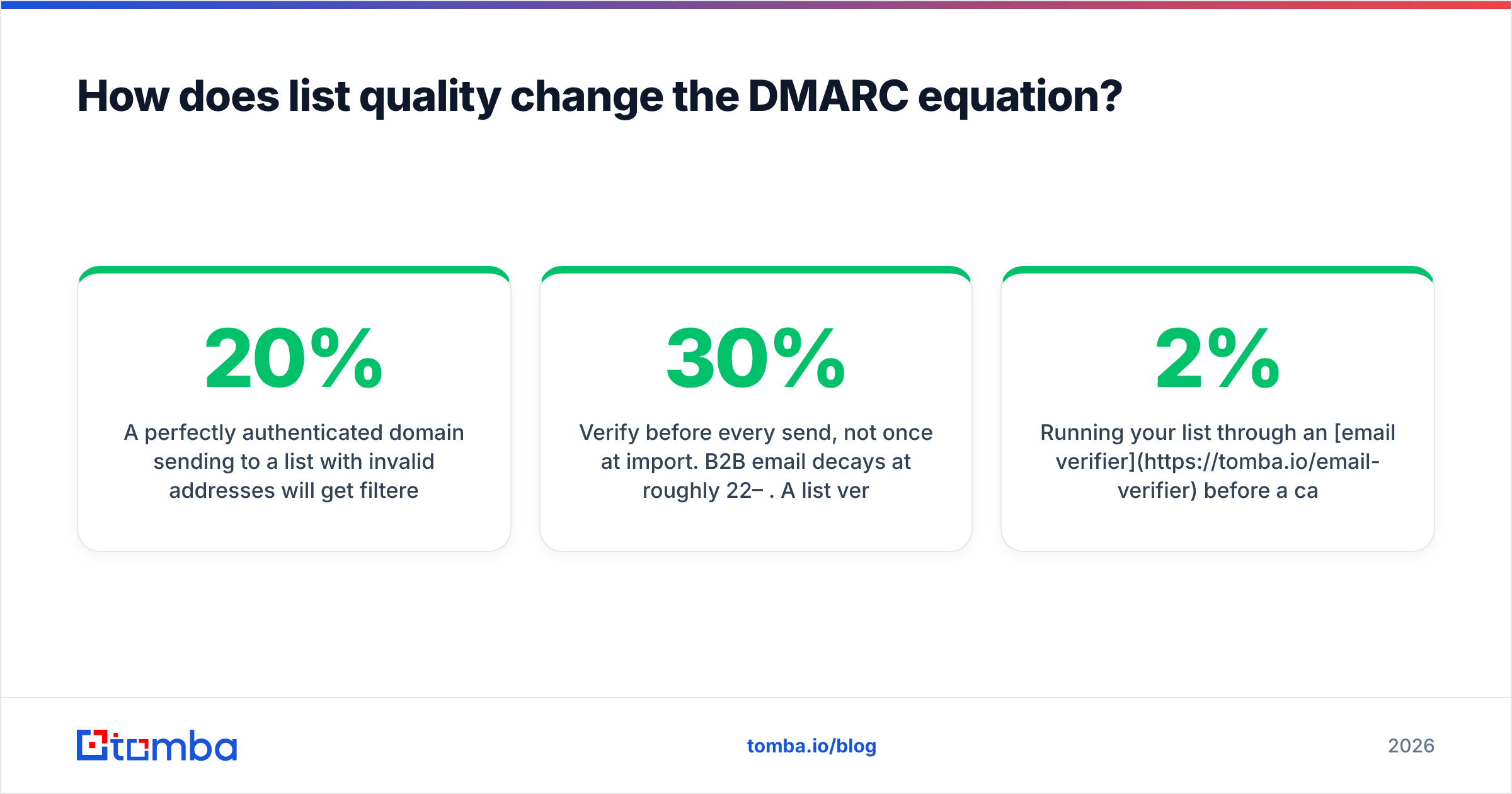
A perfectly authenticated domain sending to a list with 20% invalid addresses will get filtered inside two weeks. An unauthenticated domain sending to a hand-verified list of 200 real people will also get filtered — but for a different reason, and it'll be fixed by a DNS edit. Only one of those problems is solvable in fifteen minutes.
Practical hygiene rules that materially move Gmail placement:
- Verify before every send, not once at import. B2B email decays at roughly 22–30% per year. A list verified in January is meaningfully worse by June.
- Drop role addresses and catch-alls you can't confirm.
info@,sales@, andsupport@generate complaints at multiples of the rate of named mailboxes. A catch-all verifier tells you whether a domain-level accept is real or a black hole. - Cap daily volume per mailbox. Thirty to fifty cold sends per inbox per day, ramped over weeks, keeps you under anomaly thresholds.
- Run bounces through verification, not deletion. Soft bounces are often temporary; hard bounces should be suppressed permanently and never re-imported.
- Check the blacklists before blaming DNS. A blacklist checker rules out the obvious in thirty seconds.
Running your list through an email verifier before a campaign typically pulls bounce rates from double digits to under 2%. That single change protects domain reputation more than moving from p=none to p=reject ever will — though you should do both.
What should you check first when Gmail starts filtering you?#
In order, because order matters:
- Postmaster Tools → Authentication tab. Are SPF, DKIM, and DMARC all near 100%? If not, it's a DNS or DKIM problem — fix that first, nothing else will help.
- Postmaster Tools → Spam rate. Above 0.3%? Stop sending, cut the list to your most engaged segment, and rebuild.
- Domain reputation. "Low" or "Bad" means weeks of remediation, not days. Reduce volume, increase relevance, wait.
- Bounce rate in your sending tool. Above 3%? Your data is the problem. Verify, don't guess.
- Only then look at copy, subject lines, and links.
Most teams start at step 5 because it's the fun part. The signals that actually decide placement live in steps 1 through 4.
Getting the inputs right#
DMARC is a solved problem — a TXT record, a DKIM checkbox, and the patience to read reports for a month before enforcing. What isn't solved for most outbound teams is the data going into the campaign, and that's the variable Gmail weighs hardest.
If you're building lists that need to survive Google's filters, start with contacts that are real. Tomba Email Finder returns verified professional addresses by domain, name, or company, with a confidence score and source attribution on every result — so you know what you're sending to before your domain reputation finds out for you. The free tier covers 25 searches a month; paid plans start at $49/mo, with details on the Tomba pricing page. Fix the DNS, then fix the list. In that order.
Related guides#
Ready to find emails that actually work?
Join 150,000+ professionals who stopped guessing and started sending. Free credits on signup — no credit card required.
Get the Tomba newsletter
Practical outbound tactics and product updates — once every two weeks.
About the author