Domain Blacklisting: How to Check, Fix, and Prevent It in 2026
A blacklisted domain can wipe out your pipeline overnight. Here is how domain blacklisting actually works in 2026, which blocklists matter, how to get delisted fast, and the data hygiene that keeps you off them.
TL;DR
- Domain blacklisting means your sending domain (not just your IP) has been added to a blocklist that mailbox providers and spam filters consult before accepting your mail. Delivery drops fast and quietly.
- The blocklists that actually move the needle in 2026 are Spamhaus DBL, SURBL, URIBL, Barracuda, and SORBS. Most of the other "300+ lists" a checker shows you are noise.
- The single most common cause is not spam content — it's a dirty list. High bounce rates and spam-trap hits are what get domains listed in the first place.
- Delisting takes anywhere from 24 hours (automatic expiry) to two weeks (manual review). You must fix the root cause first, or you'll be relisted within days.
- Prevention is cheaper than remediation: verify before you send, warm up new domains, authenticate with SPF/DKIM/DMARC, and keep complaint rates under 0.1%.
What is domain blacklisting?#
Domain blacklisting is when your sending domain — or a domain that appears inside your email body — gets added to a public or private blocklist that receiving mail servers query in real time. When a message arrives, the receiving server does a DNS lookup against those lists. A hit means the message is rejected outright, silently routed to spam, or throttled to a trickle.
Think of it like a restaurant health inspection posted on the front door. The kitchen might be fine today, but if the notice says "violations found," almost nobody walks in. Blocklists work the same way: the listing itself becomes the reason you're rejected, regardless of what's in the current message.
There are two things people conflate, and the difference matters for how you fix it:
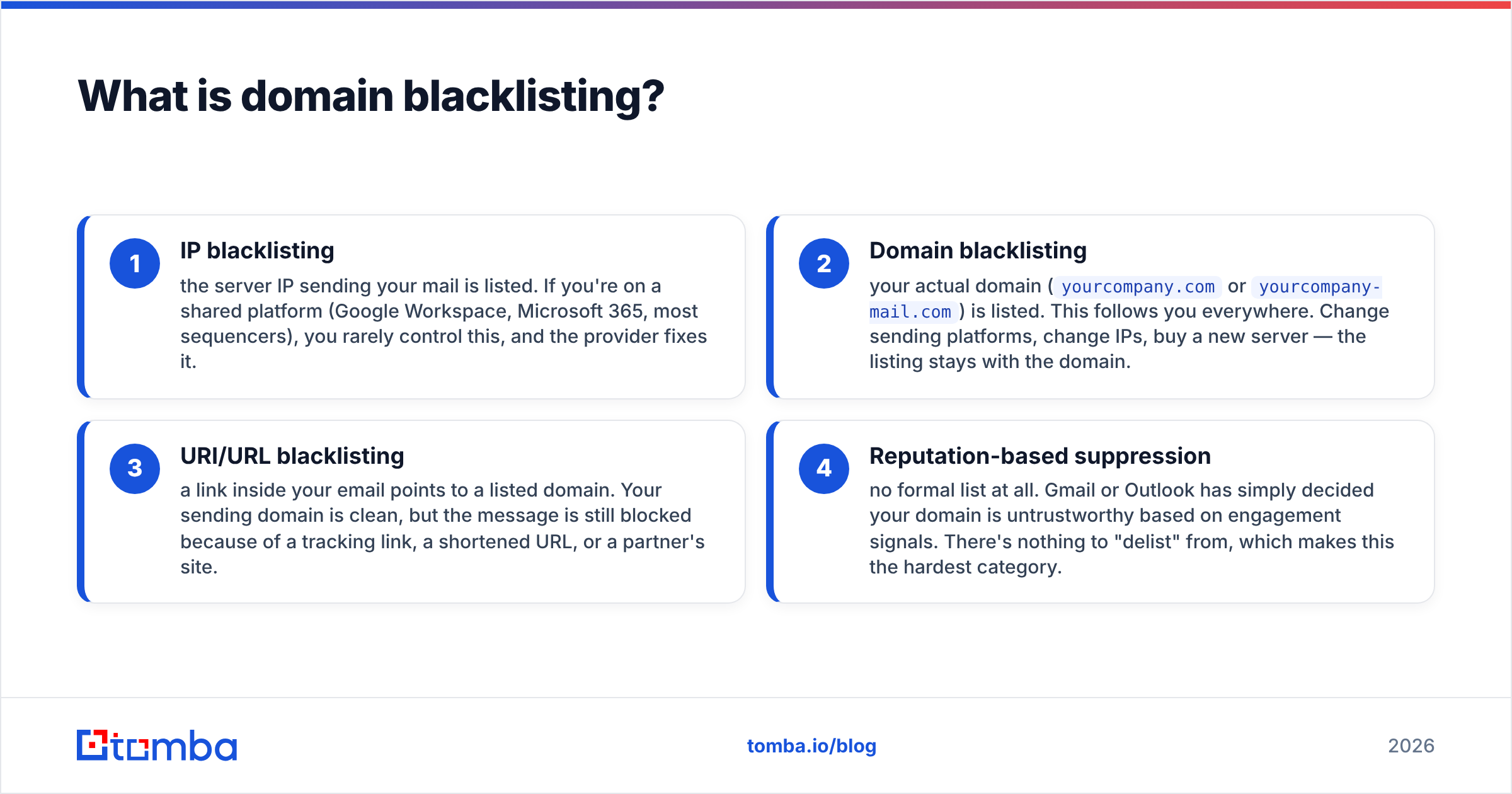
- IP blacklisting — the server IP sending your mail is listed. If you're on a shared platform (Google Workspace, Microsoft 365, most sequencers), you rarely control this, and the provider fixes it.
- Domain blacklisting — your actual domain (
yourcompany.comoryourcompany-mail.com) is listed. This follows you everywhere. Change sending platforms, change IPs, buy a new server — the listing stays with the domain. - URI/URL blacklisting — a link inside your email points to a listed domain. Your sending domain is clean, but the message is still blocked because of a tracking link, a shortened URL, or a partner's site.
- Reputation-based suppression — no formal list at all. Gmail or Outlook has simply decided your domain is untrustworthy based on engagement signals. There's nothing to "delist" from, which makes this the hardest category.
The third one catches teams off guard constantly. You can have perfect sender reputation and still get blocked because you used a link shortener that a hundred spammers also used last week.
Which blacklists actually matter in 2026?#
Run any free blacklist tool and you'll see a checklist of 100+ lists with two red marks on obscure ones. Most of those have near-zero adoption. Here's what actually affects inbox placement.
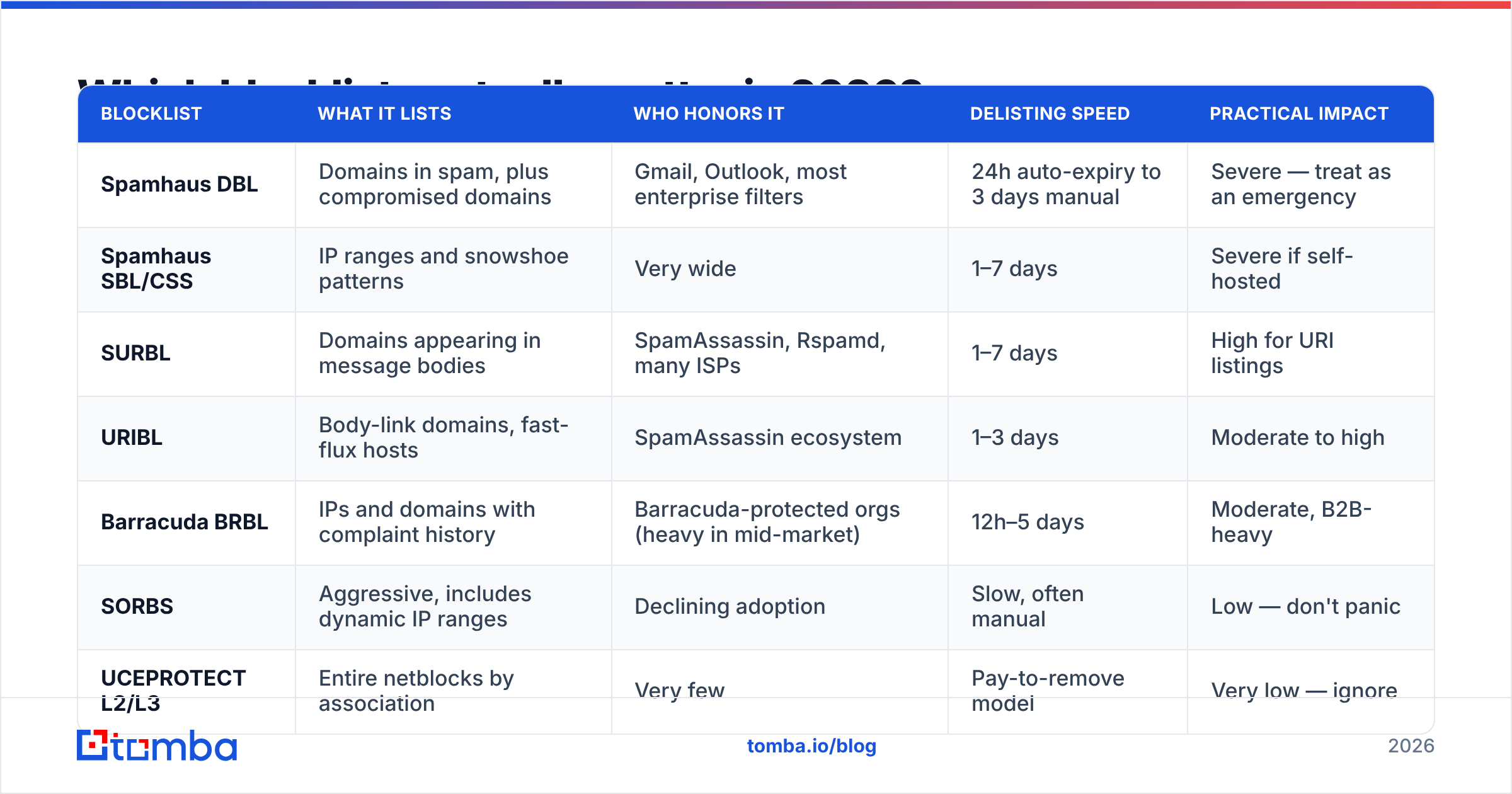
| Blocklist | What it lists | Who honors it | Delisting speed | Practical impact |
|---|---|---|---|---|
| Spamhaus DBL | Domains in spam, plus compromised domains | Gmail, Outlook, most enterprise filters | 24h auto-expiry to 3 days manual | Severe — treat as an emergency |
| Spamhaus SBL/CSS | IP ranges and snowshoe patterns | Very wide | 1–7 days | Severe if self-hosted |
| SURBL | Domains appearing in message bodies | SpamAssassin, Rspamd, many ISPs | 1–7 days | High for URI listings |
| URIBL | Body-link domains, fast-flux hosts | SpamAssassin ecosystem | 1–3 days | Moderate to high |
| Barracuda BRBL | IPs and domains with complaint history | Barracuda-protected orgs (heavy in mid-market) | 12h–5 days | Moderate, B2B-heavy |
| SORBS | Aggressive, includes dynamic IP ranges | Declining adoption | Slow, often manual | Low — don't panic |
| UCEPROTECT L2/L3 | Entire netblocks by association | Very few | Pay-to-remove model | Very low — ignore |
The rule of thumb: if Spamhaus lists you, stop everything and fix it today. If UCEPROTECT Level 3 lists you, it's usually because your hosting provider's neighbor sent spam, and almost no serious receiver honors it.
You can run a first pass with a free blacklist checker to see which of the meaningful lists you're on before you start guessing.

Why did my domain get blacklisted?#
Almost nobody gets listed for the reason they assume. Teams look at their copy first. The copy is rarely the trigger.
Here are the real causes, ordered by how often they're the actual culprit:
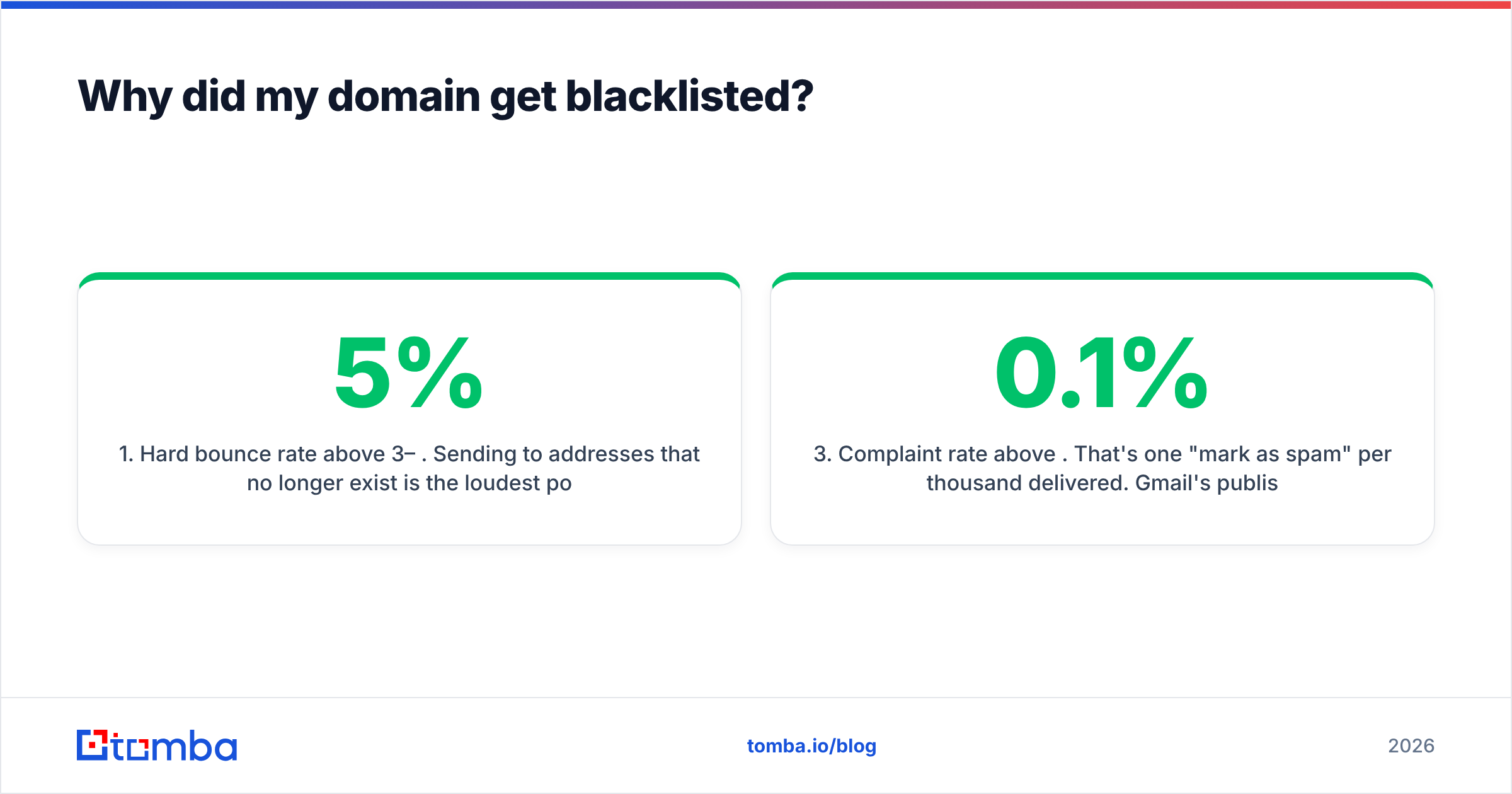
- Hard bounce rate above 3–5%. Sending to addresses that no longer exist is the loudest possible signal that you bought or scraped a list. Mailbox providers track this per domain.
- Spam trap hits. Recycled traps (abandoned addresses reactivated by ISPs) and pristine traps (addresses never used by a human) exist specifically to catch people mailing unverified data. One pristine trap hit can list a domain instantly.
- Complaint rate above 0.1%. That's one "mark as spam" per thousand delivered. Gmail's published threshold is 0.3% as a hard ceiling, but you want to stay under a third of that.
- Sudden volume ramp on a cold domain. Going from 0 to 500 emails/day on a domain registered last month is a textbook snowshoe pattern. Filters don't need content analysis to flag it.
- Broken or missing authentication. No SPF, unaligned DKIM, or a DMARC policy of
p=nonewith failures piling up. Since the 2024 Google and Yahoo bulk-sender requirements tightened, this alone can tank you. - Compromised infrastructure. A hacked WordPress install on the same domain sending pharma spam. This lists domains that never ran an outbound campaign in their life.
Notice that four of the six trace back to data quality. Your list is the input to your reputation, and reputation is what blocklists measure.
How do you check if your domain is blacklisted?#
Do all four of these before you conclude anything, because each one shows a different layer.
- Public blocklist lookup. Query your root domain, your sending subdomain, and your sending IP separately. MXToolbox's blacklist tool covers the common lists in one shot; Spamhaus has its own lookup for authoritative results on DBL and SBL.
- Google Postmaster Tools. Set it up at postmaster.google.com and check the Domain Reputation graph. Gmail doesn't publish a blocklist, but "Low" or "Bad" domain reputation is functionally the same problem and affects roughly a third of most B2B lists.
- Microsoft SNDS and the Smart Network Data Service. Outlook and Office 365 use their own internal reputation. If your Gmail placement is fine and Outlook is a wall, this is where to look.
- Read your bounce messages. SMTP rejections usually name the list. A
554 5.7.1 Service unavailable; Client host blocked using Spamhaustells you more in one line than any dashboard. - Check the domains in your links, not just your sender. Run your tracking domain, your CTA landing page, and any shortener through the same lookups. URI listings are invisible from a sender-domain check.
If your authentication is the suspect, an SPF checker and a quick spam score check will surface misconfigurations faster than reading DNS records by hand.
How do you get delisted?#
Delisting has a strict order of operations. Requesting removal before you've fixed the cause is the most common wasted step — most lists will relist you faster the second time, and some flag repeat requests.
Step 1 — Stop sending from the affected domain. Not "reduce." Stop. Every additional bounce or complaint while listed extends the problem.
Step 2 — Find and fix the root cause. Pull the last 30 days of bounce data. If hard bounces are above 3%, your list is the cause. If complaints are the driver, look at how the contacts were sourced and whether your targeting drifted. If it's a compromised site, patch it and rotate credentials before anything else.
Step 3 — Clean the entire list, not the bounced portion. The addresses that bounced are already gone. The ones that will bounce next week are still in there. Run the full file through email verification and remove invalid, risky, and role-based addresses. Handle catch-all domains separately with a catch-all verifier rather than guessing.
Step 4 — Verify authentication. SPF record present and under 10 DNS lookups. DKIM signing with a 2048-bit key. DMARC published, ideally at p=quarantine with reporting on.
Step 5 — Submit the delisting request. Spamhaus has a removal form on the lookup result page. Barracuda and SORBS have their own. Be specific and short: state the cause, state what you changed, state the date you changed it. Vague "please remove us, we're legitimate" requests get deprioritized.
Step 6 — Restart at 10% of your old volume. Ramp over two to three weeks. Prioritize your most engaged segments first so early signals are positive.
Expect 24 hours for automatic expiry cases and up to two weeks where a human reviews. Paying a "delisting service" is almost never necessary — the free forms are the same ones they use.

How do you prevent domain blacklisting in the first place?#
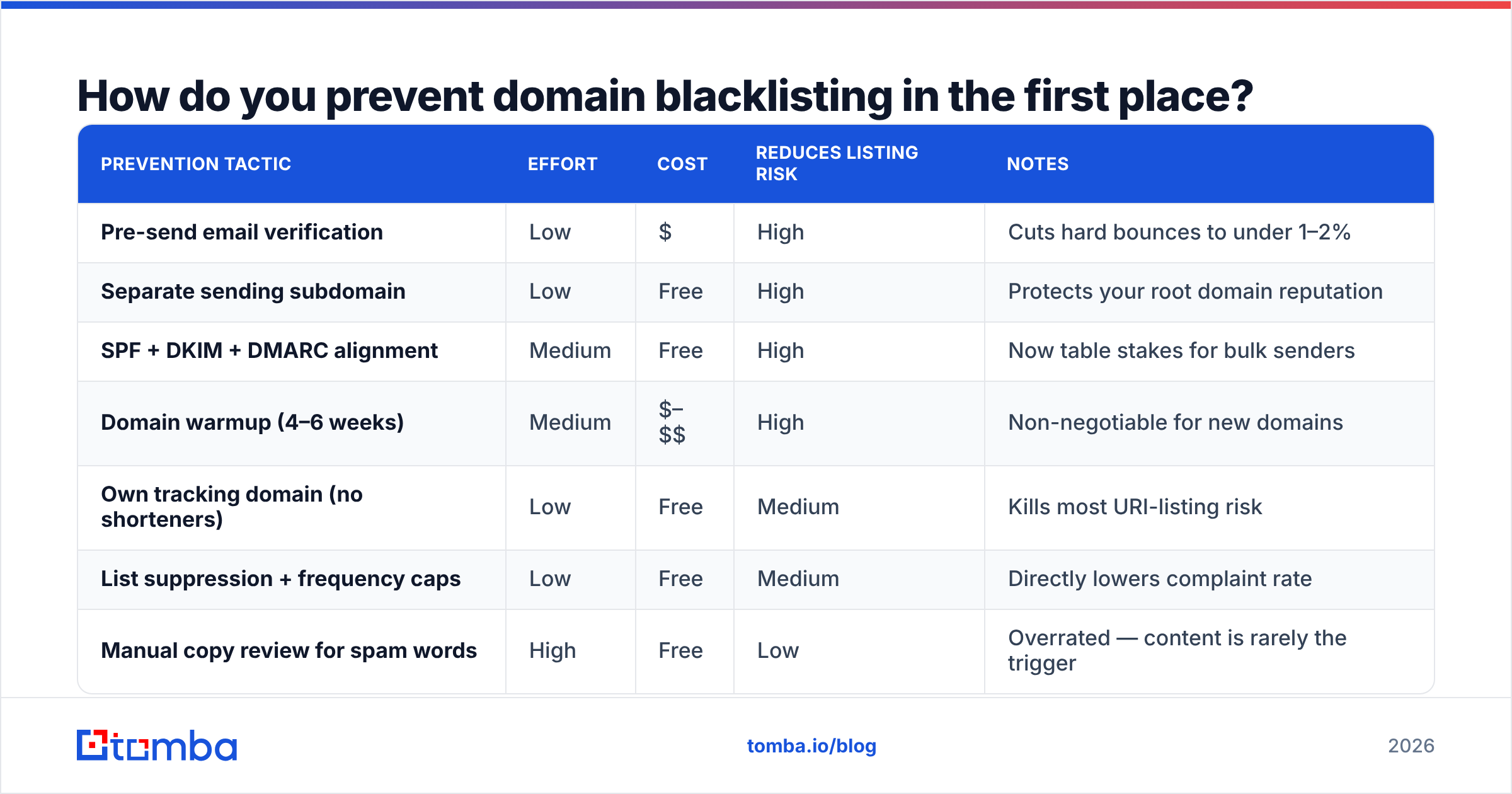
The prevention stack is boring and it works. Here's how the main approaches compare on cost and effect:
| Prevention tactic | Effort | Cost | Reduces listing risk | Notes |
|---|---|---|---|---|
| Pre-send email verification | Low | $ | High | Cuts hard bounces to under 1–2% |
| Separate sending subdomain | Low | Free | High | Protects your root domain reputation |
| SPF + DKIM + DMARC alignment | Medium | Free | High | Now table stakes for bulk senders |
| Domain warmup (4–6 weeks) | Medium | $–$$ | High | Non-negotiable for new domains |
| Own tracking domain (no shorteners) | Low | Free | Medium | Kills most URI-listing risk |
| List suppression + frequency caps | Low | Free | Medium | Directly lowers complaint rate |
| Manual copy review for spam words | High | Free | Low | Overrated — content is rarely the trigger |
A few specifics worth calling out:
- Never send cold outbound from your primary domain. Use
go.yourcompany.comor a separateyourcompany-hq.com. If it burns, your corporate email and invoices don't burn with it. - Warm up properly. A new domain needs four to six weeks of gradually increasing volume before it can absorb real campaigns. Run the numbers with a warmup calculator instead of eyeballing it.
- Verify on ingest, not just before send. Data decays at roughly 22–30% per year as people change jobs. Verifying once at import and never again means your list quality degrades silently.
- Watch your complaint rate weekly. It's a leading indicator. Listings are a lagging one.
- Cap sends per mailbox. 30–50 cold emails per day per inbox is the practical ceiling in 2026. Volume beyond that is what triggers snowshoe heuristics.
For a deeper primer on the mechanics behind all of this, the email deliverability entry covers the underlying signals, and Wikipedia's overview of DNS-based blocklists explains the query protocol itself if you want to understand what receivers are actually doing.
Is a blacklisted domain ever worth abandoning?#
Sometimes, yes — but less often than people think.
Abandon the domain when: it's been listed on Spamhaus DBL three or more times in six months, it was previously owned by a spammer, or Gmail's domain reputation has been "Bad" for 60+ days despite clean sending. Reputation debt at that depth takes longer to repay than a fresh domain takes to warm.
Keep and rehabilitate when: it's a single listing, the cause was identified and fixed, or the domain carries brand or link equity you can't replace. Most first-time listings clear within a week and recover fully within a month of disciplined sending.
Never abandon your root domain over a cold-outbound listing. That's why the subdomain separation matters — you should be able to burn a sending domain without touching the one your customers know.
Where does data quality fit into all of this?#
At the front. Every downstream deliverability tactic — warmup, authentication, throttling, copy — is damage control for a list you should have cleaned first. Blocklists are, functionally, a measurement of how carefully you built your contact data.
If you're sourcing prospects, source them verified. Finding an address and confirming it's deliverable should be one step, not two, and it should happen before the contact ever enters a sequence. The Tomba Email Finder returns verified professional addresses with a confidence score attached, so you're not importing guesses into your CRM and discovering the bounce rate three weeks later. The free tier gives you 25 searches a month to test accuracy against your own known-good contacts; paid plans start at $49/mo on Starter, with full pricing details if you need bulk or API volume.
Clean input, clean reputation, no delisting forms. That's the whole loop.
Related guides#
Ready to find emails that actually work?
Join 150,000+ professionals who stopped guessing and started sending. Free credits on signup — no credit card required.
Get the Tomba newsletter
Practical outbound tactics and product updates — once every two weeks.
About the author