Domain Checking in 2026: The Complete B2B Data Guide
Domain checking is the step most outbound teams skip — and it quietly kills deliverability, wastes credits, and pollutes the CRM. Here's what to check, in what order, and which tools actually do it.
TL;DR
- Domain checking is the pre-flight inspection of a company's web and mail infrastructure — DNS, MX, SPF/DMARC, registration status, and mail behavior — before you spend a credit finding or sending to anyone there.
- Roughly 20-30% of a scraped B2B list points at domains that are parked, expired, merged into a parent brand, or configured to accept everything (catch-all). Contact-level verification cannot fix a broken domain.
- The correct order is domain first, mailbox second. Reversing it burns verification credits on companies that no longer exist.
- Free tools (dig, whois, MXToolbox) answer the technical questions. Commercial tools answer the commercial ones: is this domain still the company's primary, and does anyone actually read mail there?
- Catch-all domains are the hard case — around 15% of business domains — and they require behavioral scoring, not SMTP handshakes.
What is domain checking?#
Domain checking is verifying that a company's domain is alive, correctly configured, and actually receiving mail — before you build a contact list against it.
Think of it like checking that a building still has a street address, a mailbox, and a doorman before you post a hundred letters to individual apartments. Verifying "apartment 4B exists" is meaningless if the building was demolished in 2023.
Technically, domain checking bundles several independent lookups:
- Registration status — is the domain registered, expiring soon, or dropped? A WHOIS/RDAP lookup answers this in milliseconds.
- DNS resolution — do A/AAAA records resolve to a live host, or does the domain resolve to a parking-page IP owned by a registrar?
- MX records — does the domain publish mail exchangers at all? No MX means no mail, full stop. The MX host also tells you the provider (Google Workspace, Microsoft 365, Zoho, a self-hosted Postfix box), which changes how the rest of your checks behave.
- Authentication records — SPF, DKIM selectors, and DMARC policy. These matter less for receiving your mail and more for judging whether the organization is technically mature.
- Catch-all / accept-all behavior — does the mail server accept every recipient regardless of whether the mailbox exists? If so, SMTP-level verification returns a useless "valid" for everything.
- Redirect and canonical status — does
oldbrand.com301 tonewparent.com? That's an acquisition signal and often a dead-mailbox signal. - Reputation and blocklist status — is the domain or its mail IP listed on Spamhaus, SURBL, or similar? Sending to a listed domain is not dangerous to you; being associated with one in a shared-infrastructure sense can be.
Most people conflate steps 3 and 5 and call it "email verification." They are different jobs. The email verifier works at the mailbox level. Domain checking works one layer up, and it's the layer that determines whether the mailbox layer can produce a trustworthy answer at all.
Why does domain checking matter more in 2026 than it did in 2022?#
Three shifts made the domain layer the expensive one to get wrong.
Mailbox providers tightened bulk-sender rules. Google and Yahoo's 2024 bulk-sender requirements pushed spam-complaint thresholds down to 0.3% and made DMARC alignment table stakes. A list full of dead domains generates hard bounces, and hard bounce rate above roughly 2% is the single fastest way to get throttled. Google's own Postmaster Tools documentation is explicit about what a clean sender profile looks like.
Company churn accelerated. Consolidation across SaaS, agencies, and services means a contact list built 14 months ago has a meaningful share of domains that now redirect somewhere else. The person is real. The email pattern was real. The domain is a redirect stub.
SMTP verification got less informative. More providers now respond identically to valid and invalid recipients to frustrate enumeration. Microsoft 365 tenants in particular have grown far less chatty. That pushes the burden back onto domain-level intelligence and historical observation.
The practical consequence: teams that verify contacts without checking domains pay twice. They pay to find emails at dead companies, then pay again to verify them, then pay a third time in sender reputation damage when the bounces land.

How do you actually run a domain check, step by step?#
Here's the order that minimizes wasted spend. Each step is cheap and eliminates work for the next.
- Normalize the domain. Strip
www., protocol, trailing paths, and any tracking parameters. Lowercase it. Deduplicate — a 5,000-row list frequently collapses to 3,200 unique domains, and you only need to check each one once. - Resolve DNS and follow redirects.
curl -sIL https://domain.com | grep -i locationshows the redirect chain. If the final host is a different registrable domain, flag it for review rather than deleting it — you may want the new domain. - Pull MX records.
dig +short MX domain.com. Empty result means no mail infrastructure. Kill the row. A single MX pointing at a parking service (mx.parkingcrew.netand friends) is the same verdict. - Classify the mail provider. Google Workspace hosts show
aspmx.l.google.com; Microsoft shows*.mail.protection.outlook.com. This tells your sending tool what to expect and lets you segment sends by provider. - Test catch-all status. Probe with a random local part that could not plausibly exist. If it's accepted, the domain is catch-all and per-mailbox SMTP checks are unreliable there. Route those to a catch-all verifier that scores based on observed behavior rather than handshake responses.
- Check SPF and DMARC. Not to gate your send, but to bucket the account. A domain with a strict DMARC policy and clean SPF tends to belong to an organization with an IT function — useful firmographic signal. A free SPF checker does this without an API key.
- Only now, find and verify mailboxes. Run domain search against the surviving domains to pull known contacts and the company's dominant email pattern, then verify individual addresses.
Steps 1 through 6 run in under a second per domain when batched, and they typically remove 20-30% of the list before you spend a single find-credit.
What can free tools check, and where do they stop?#
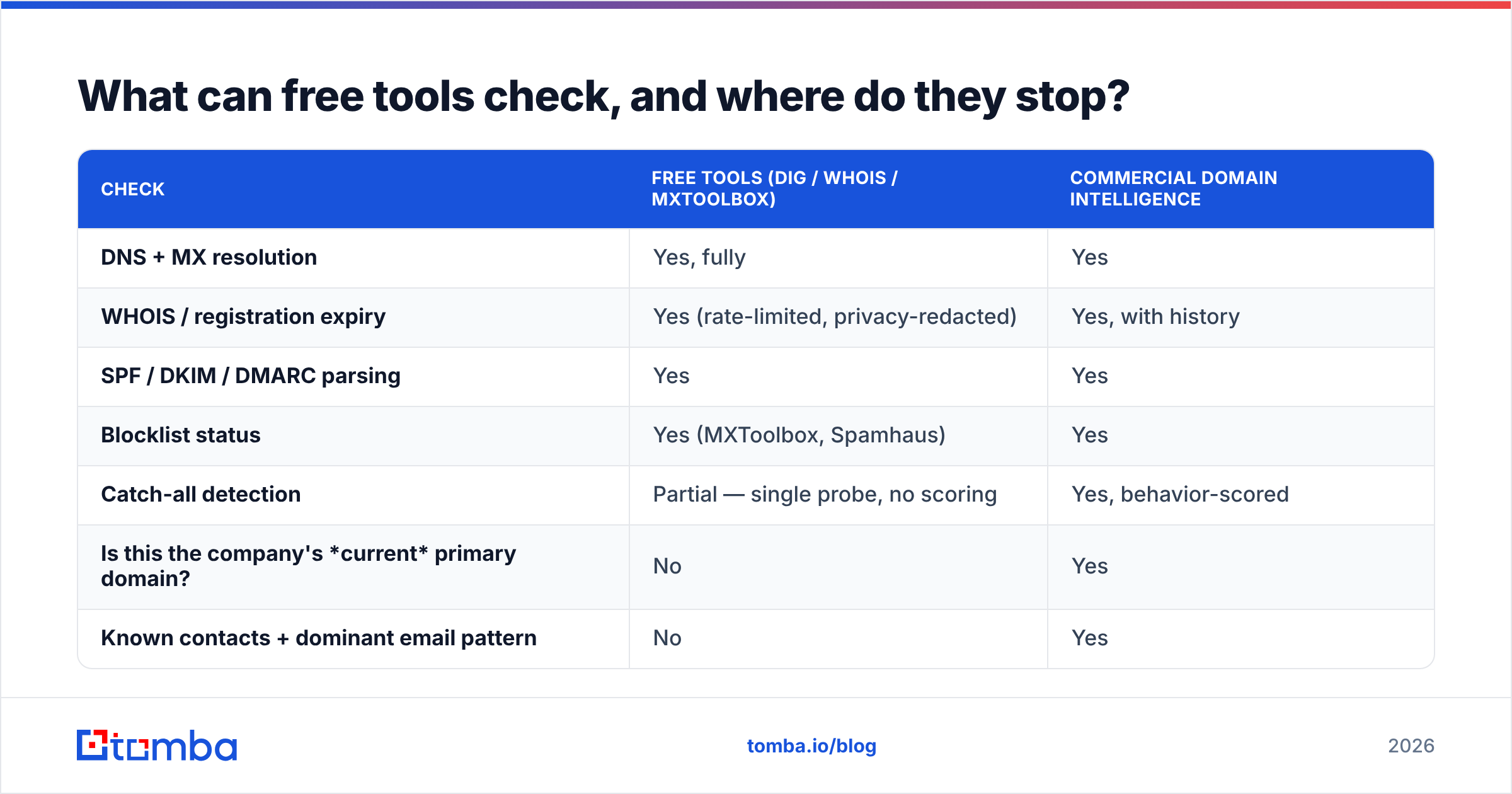
Free tooling covers the technical layer completely. It does not cover the commercial layer at all.
| Check | Free tools (dig / whois / MXToolbox) | Commercial domain intelligence |
|---|---|---|
| DNS + MX resolution | Yes, fully | Yes |
| WHOIS / registration expiry | Yes (rate-limited, privacy-redacted) | Yes, with history |
| SPF / DKIM / DMARC parsing | Yes | Yes |
| Blocklist status | Yes (MXToolbox, Spamhaus) | Yes |
| Catch-all detection | Partial — single probe, no scoring | Yes, behavior-scored |
| Is this the company's current primary domain? | No | Yes |
| Known contacts + dominant email pattern | No | Yes |
| Historical deliverability observations | No | Yes |
| Bulk throughput (10k+ domains) | No — rate limits, manual scripting | Yes, API/batch |
| Firmographic enrichment from domain | No | Yes |
The gap that matters is row 6. dig will happily tell you that acquired-startup.com has valid MX records pointing at Google Workspace — because the parent company kept the tenant alive to forward mail. It cannot tell you that nobody has read that inbox in two years. That answer requires observed data across many senders, which is what commercial providers accumulate.
Which tools handle domain checking, and how do they compare?#
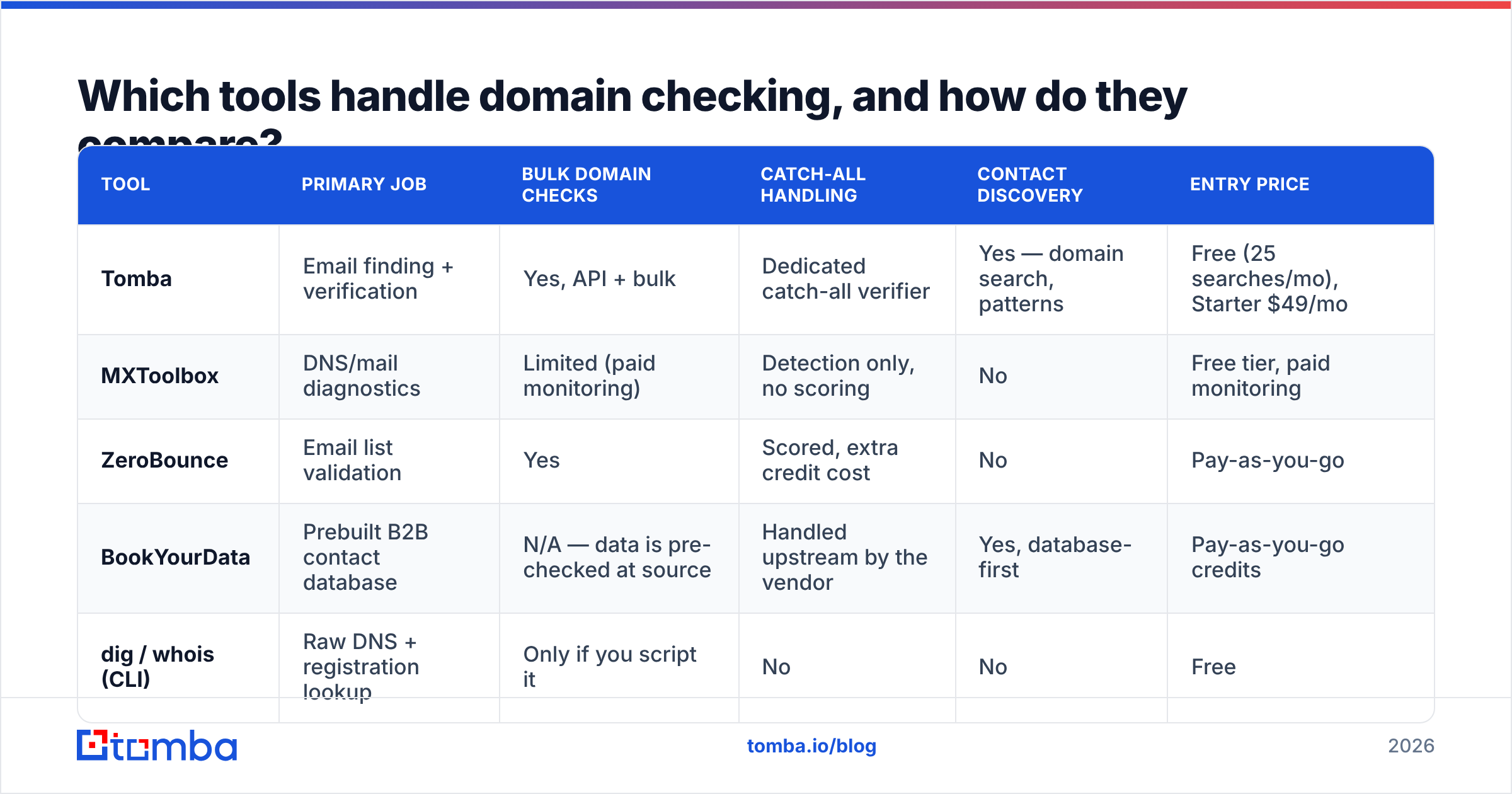
Domain checking sits in an awkward spot: diagnostic tools do it deeply but one domain at a time, and data platforms do it at scale but as a side effect of finding contacts. Here's the honest split.
| Tool | Primary job | Bulk domain checks | Catch-all handling | Contact discovery | Entry price |
|---|---|---|---|---|---|
| Tomba | Email finding + verification | Yes, API + bulk | Dedicated catch-all verifier | Yes — domain search, patterns | Free (25 searches/mo), Starter $49/mo |
| MXToolbox | DNS/mail diagnostics | Limited (paid monitoring) | Detection only, no scoring | No | Free tier, paid monitoring |
| ZeroBounce | Email list validation | Yes | Scored, extra credit cost | No | Pay-as-you-go |
| BookYourData | Prebuilt B2B contact database | N/A — data is pre-checked at source | Handled upstream by the vendor | Yes, database-first | Pay-as-you-go credits |
| dig / whois (CLI) | Raw DNS + registration lookup | Only if you script it | No | No | Free |
A few honest notes on that table.
MXToolbox is the right answer when you have one domain and a deliverability mystery. Its blacklist and MX diagnostics are the industry reference, and the free tier is genuinely useful. It is the wrong answer for 8,000 rows.
BookYourData solves the problem from the other end: instead of checking domains you scraped, you buy contacts from a database where the domain hygiene was already done. If your bottleneck is list-building rather than list-cleaning, that's a legitimately different and often faster path — you skip the check because someone else ran it.
ZeroBounce and similar validators are strong at the mailbox layer and adequate at the domain layer. Catch-all scoring costs extra credits on most validators, which adds up fast on European and enterprise lists where catch-all rates run higher.
Tomba covers the domain-to-contact path in one place: domain search returns the company's known addresses plus the dominant pattern, the email verifier handles mailbox-level checks, and the catch-all verifier scores the ambiguous ones. Pricing runs Free (25 searches/mo), Starter $49/mo, Growth $99/mo, Pro $249/mo — see Tomba pricing for credit allocations. The tradeoff: it's built for finding and validating business contacts, not for diagnosing why your own mail server is misconfigured. For that, MXToolbox remains better.

How should you handle catch-all domains?#
Treat catch-all as its own segment with its own rules, not as a binary pass/fail.
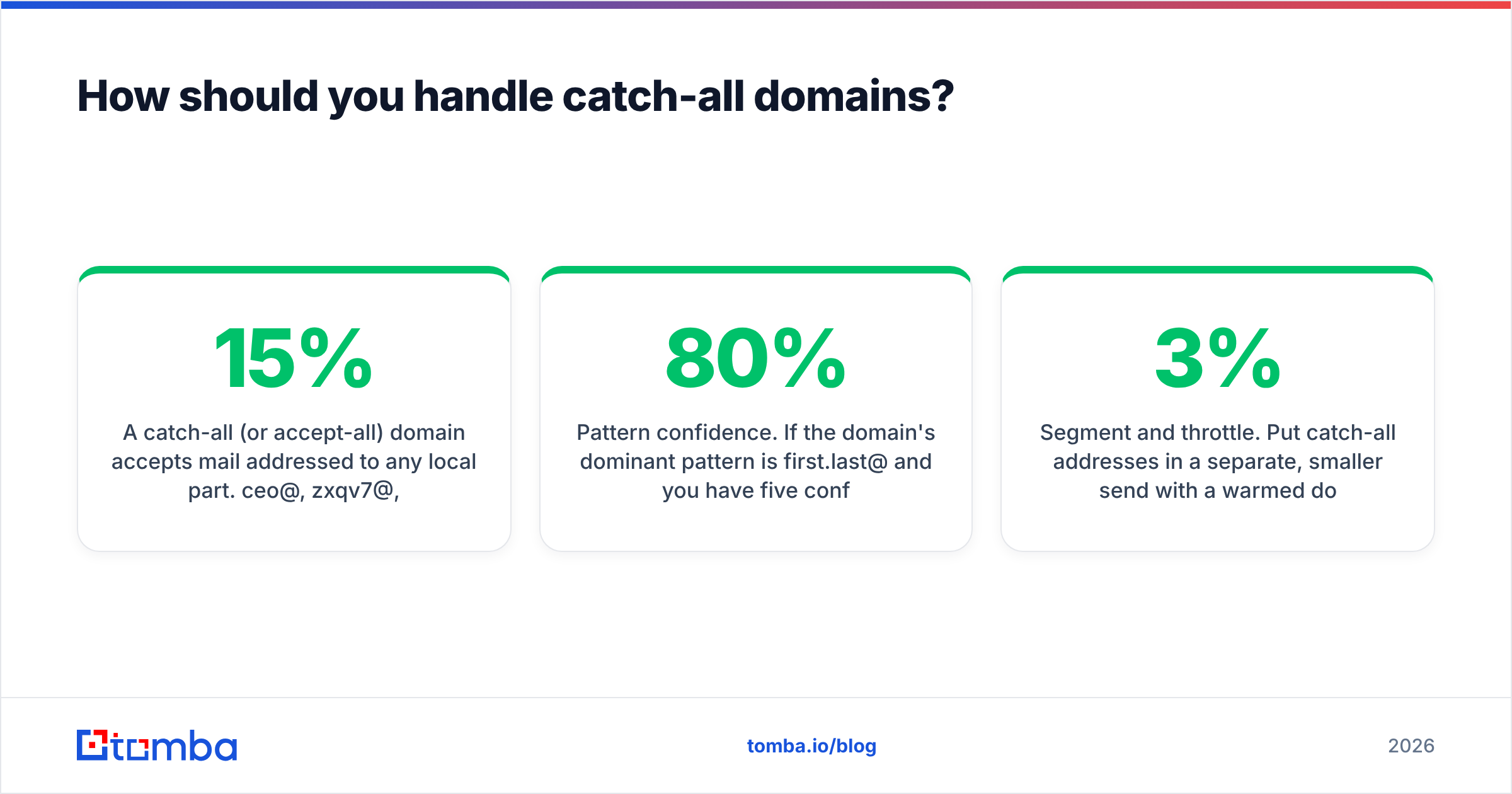
A catch-all (or accept-all) domain accepts mail addressed to any local part. ceo@, zxqv7@, and notarealperson@ all get a 250 OK. Around 15% of business domains are configured this way, concentrated in enterprises, agencies, and European companies where the pattern is more common. The server accepts everything and sorts it internally — or silently drops it.
This breaks SMTP verification entirely. Your validator sends a probe, gets an acceptance, and reports "valid." It has learned nothing.
Three workable approaches, in ascending order of reliability:
- Pattern confidence. If the domain's dominant pattern is
first.last@and you have five confirmed addresses following it, a sixth address in that pattern is probably real. This is inference, not verification — treat it as a 70-80% confidence bet. - Behavioral scoring. Providers that observe bounce outcomes across many senders can score a catch-all address on historical evidence. This is what a catch-all finder does, and it's meaningfully better than a coin flip.
- Segment and throttle. Put catch-all addresses in a separate, smaller send with a warmed domain you're willing to risk. Watch the bounce rate. If it stays under 3%, expand. If it spikes, you've learned the pattern is wrong at a cost of 200 sends instead of 5,000.
What you should not do is dump catch-all addresses into your main sequence alongside verified ones. The bounce risk is real, and mixing them makes the resulting bounce rate impossible to attribute.
What does a good domain-checking workflow look like in practice?#
Wire it into the point where data enters your system, not as a monthly cleanup.
On import. Every list — scraped, purchased, conference badge scan, webinar signup — passes through domain normalization and MX resolution before a row is created in the CRM. This is a 50-line script or a single Tomba API call. Rows that fail get a domain_status field rather than deletion, so you can audit what you dropped.
On enrichment. When you enrich a company record, re-check the domain. A redirect that appeared since last quarter is an acquisition signal your sales team wants to know about, independent of any email concern. Feed it to the data enrichment pipeline as a first-class field.
On a quarterly decay sweep. B2B contact data decays at roughly 20-30% annually, and domain-level decay is a large chunk of that. Re-run MX and redirect checks against every domain in the CRM each quarter. Cheap, fast, and it surfaces dead accounts before a rep wastes a call on one.
Before every campaign. Not a full re-verify — just a domain-level pass on the target segment. If 8% of the segment's domains no longer resolve, you want to know that before the send, not from the bounce report.
The pattern here is that domain checking is cheap enough to run often and expensive enough to skip only once. A single reputation incident from a high-bounce send costs more remediation time than a year of automated checks.
What are the most common domain-checking mistakes?#
Deleting redirects instead of following them. oldco.com redirecting to newco.com is not a dead lead — it's a lead that changed address. Follow the chain, re-target the new domain, keep the contact.
Trusting a single SMTP probe on catch-all domains. Covered above, but it bears repeating because most validators report catch-all acceptances as "valid" by default and users never look at the sub-status.
Checking domains once and never again. A domain that resolved in January can be parked by June. Domain status is a time-stamped observation, not a permanent attribute.
Ignoring the MX provider signal. Knowing a prospect runs Microsoft 365 versus Google Workspace changes both your send strategy and, for many B2B products, your qualification. It's free data sitting in the same lookup you already ran.
Over-indexing on SPF/DMARC as a quality signal. A missing DMARC record tells you the company hasn't prioritized email security. It does not tell you the mailbox is dead. Plenty of profitable mid-market companies have sloppy DNS. Don't filter on it.
Running domain checks after finding emails. The most common and most expensive mistake. You paid a find-credit for every address at a company that doesn't exist. Domain first. Always.
Getting started#
Start with your worst list — the oldest one, or the one with the highest historical bounce rate. Normalize and deduplicate the domains, run MX resolution across them, and count how many come back empty. That number is your baseline, and for most teams it's uncomfortably high the first time.
Then decide whether to script it or buy it. If you're checking a few hundred domains a month, dig in a loop plus MXToolbox for the odd mystery is entirely sufficient. If you're checking thousands, or if you need the commercial layer — is this the current primary domain, who works there, what's the pattern — the free-tool path stops being free once you count engineering hours.
If you want the domain check and the contact discovery in one pass, start with the Tomba Email Finder. Run a domain against it and you get MX validity, catch-all status, the company's dominant email pattern, and known verified contacts in a single call — which is the whole workflow above, collapsed into one step. The free tier gives you 25 searches a month to test it against a domain list you already suspect is rotten, before committing to a plan.
Related guides#
Ready to find emails that actually work?
Join 150,000+ professionals who stopped guessing and started sending. Free credits on signup — no credit card required.
Get the Tomba newsletter
Practical outbound tactics and product updates — once every two weeks.
About the author