Domain Email Search: How to Find Every Email at a Company
Domain email search turns a company website into a verified contact list in seconds. Here's how the pattern detection works, what accuracy you should actually expect, and which tools earn their price in 2026.
TL;DR
- Domain email search takes one input — a company domain — and returns the email addresses tied to it, along with names, roles, and the domain's dominant naming pattern.
- The output quality depends almost entirely on two things: how large the provider's crawled corpus is for that domain, and whether each result was SMTP-verified before it reached you.
- Expect 60–75% coverage on mid-market SaaS domains, far less on sub-20-person companies and heavily gated enterprises. Anyone advertising "98% coverage" is measuring something else.
- Pattern detection (
{first}.{last}@) is the fallback, not the product. A guessed address that nobody verified is a bounce waiting to happen. - Run every domain search output through verification before it touches your sending tool. That single step is the difference between a 1% bounce rate and a burned domain.
What is domain email search?#
Domain email search is a lookup that accepts a company domain — stripe.com, figma.com, your prospect's website — and returns the professional email addresses associated with that domain, usually with the person's name, job title, department, and a confidence score.
Think of it like a phone book for a single office building. You don't know who works there yet. You hand over the street address, and you get back a list of names, floors, and extensions. Some entries are current, some are three years stale, and one or two are the building's general reception line.
That analogy holds technically, too. A domain search engine is drawing on three layers:
- Crawled public sources — press pages, team pages, GitHub commits, conference speaker lists, PDF whitepapers, WHOIS records, job boards. This is where real, observed addresses come from.
- Pattern inference — once the engine has seen
sarah.chen@acme.comanddavid.rao@acme.com, it knowsacme.comuses{first}.{last}@. It can now construct addresses for anyone whose name it knows but whose address it has never seen. - Verification — SMTP handshakes, MX record checks, catch-all detection, and disposable-domain filtering that decide whether a constructed or observed address is actually deliverable today.
Most buyers assume they're paying for layer 1. In practice a large share of results across the whole category come from layer 2, and the value of the tool lives or dies in layer 3.
How does domain email search actually work under the hood?#
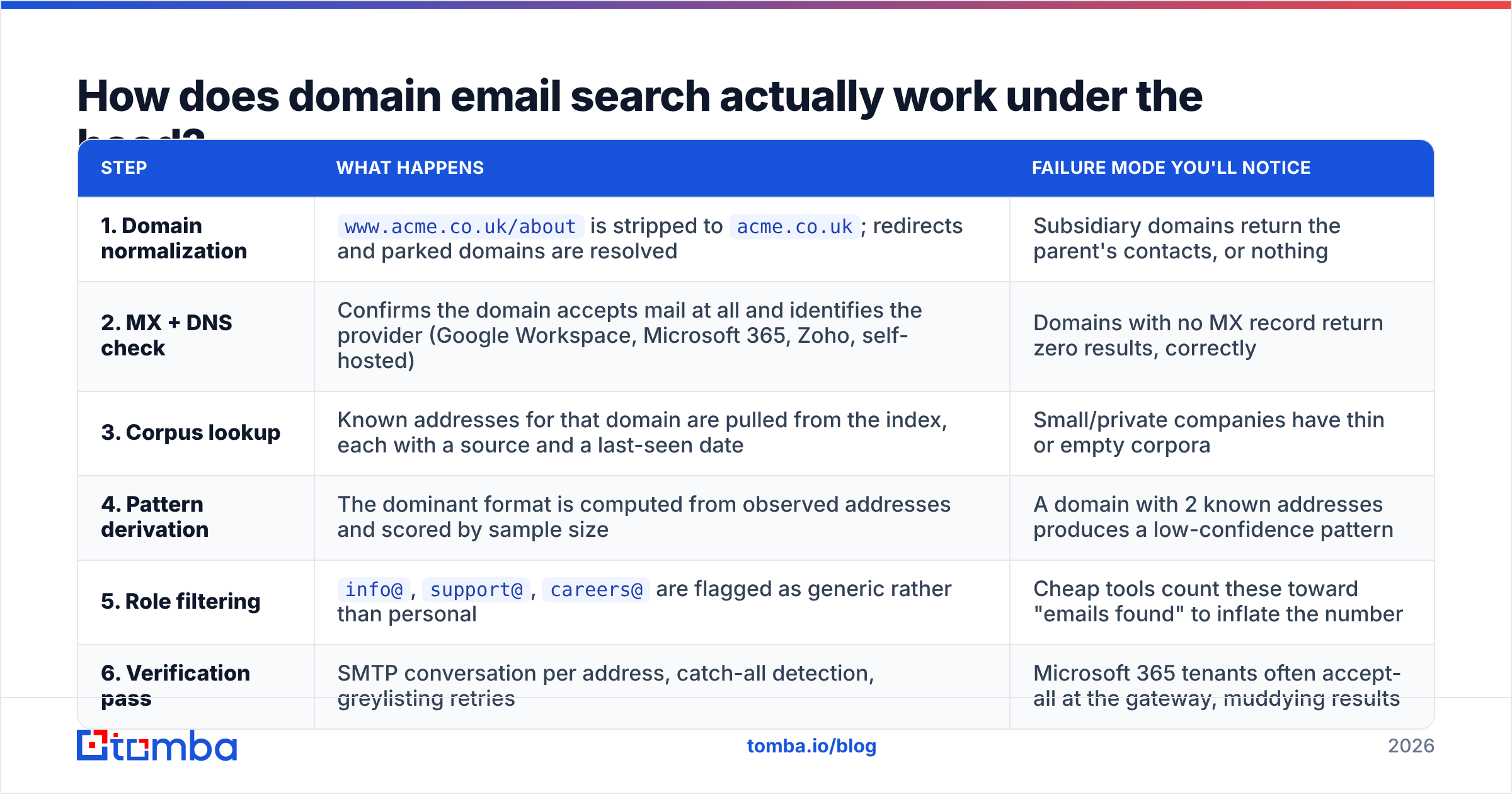
Here's the sequence that runs when you submit a domain:
| Step | What happens | Failure mode you'll notice |
|---|---|---|
| 1. Domain normalization | www.acme.co.uk/about is stripped to acme.co.uk; redirects and parked domains are resolved |
Subsidiary domains return the parent's contacts, or nothing |
| 2. MX + DNS check | Confirms the domain accepts mail at all and identifies the provider (Google Workspace, Microsoft 365, Zoho, self-hosted) | Domains with no MX record return zero results, correctly |
| 3. Corpus lookup | Known addresses for that domain are pulled from the index, each with a source and a last-seen date | Small/private companies have thin or empty corpora |
| 4. Pattern derivation | The dominant format is computed from observed addresses and scored by sample size | A domain with 2 known addresses produces a low-confidence pattern |
| 5. Role filtering | info@, support@, careers@ are flagged as generic rather than personal |
Cheap tools count these toward "emails found" to inflate the number |
| 6. Verification pass | SMTP conversation per address, catch-all detection, greylisting retries | Microsoft 365 tenants often accept-all at the gateway, muddying results |
Step 6 is where providers diverge most. Microsoft has progressively tightened SMTP callout responses, which means a naive verifier now returns "valid" for almost anything at an M365 tenant. Serious providers detect the accept-all behavior and downgrade the result to catch-all / risky instead of quietly calling it valid. If your tool never returns "catch-all" as a status, it isn't detecting catch-alls — it's mislabeling them.

How accurate is domain email search in 2026?#
Set your expectations by company size, not by vendor marketing.
- Enterprise (1,000+ employees): high raw coverage, but heavy catch-all usage and centralized security gateways make verification ambiguous. You'll get plenty of addresses and fewer definitive verdicts.
- Mid-market (50–999): the sweet spot. Team pages exist, patterns are consistent, and mail servers still answer honestly. 60–75% of the org's addressable contacts is a realistic ceiling.
- SMB (10–49): patchy. Often the founder and one or two public-facing staff are indexed; everyone else is invisible.
- Micro (<10): you're getting the generic inbox and maybe the founder. Treat pattern-guessed results here as unverified leads, not contacts.
Two accuracy claims deserve scrutiny. First, "95% accuracy" almost always means of the addresses we return with a valid status, 95% do not hard-bounce — a measure of the verifier, not of coverage. Second, "50M+ contacts" is a corpus-size claim that says nothing about whether your specific target domain is in it. Test both on your own ICP domains during a trial. Five domains you know well will tell you more than any G2 grid.

The honest framing: coverage and precision trade off. A provider can return more addresses per domain by loosening its confidence threshold, which raises bounce risk. Or it can suppress uncertain results, which makes coverage look worse but keeps your sender reputation intact. Ask which side of that dial a tool sits on before you compare raw counts.
Which domain email search tools are worth paying for?#
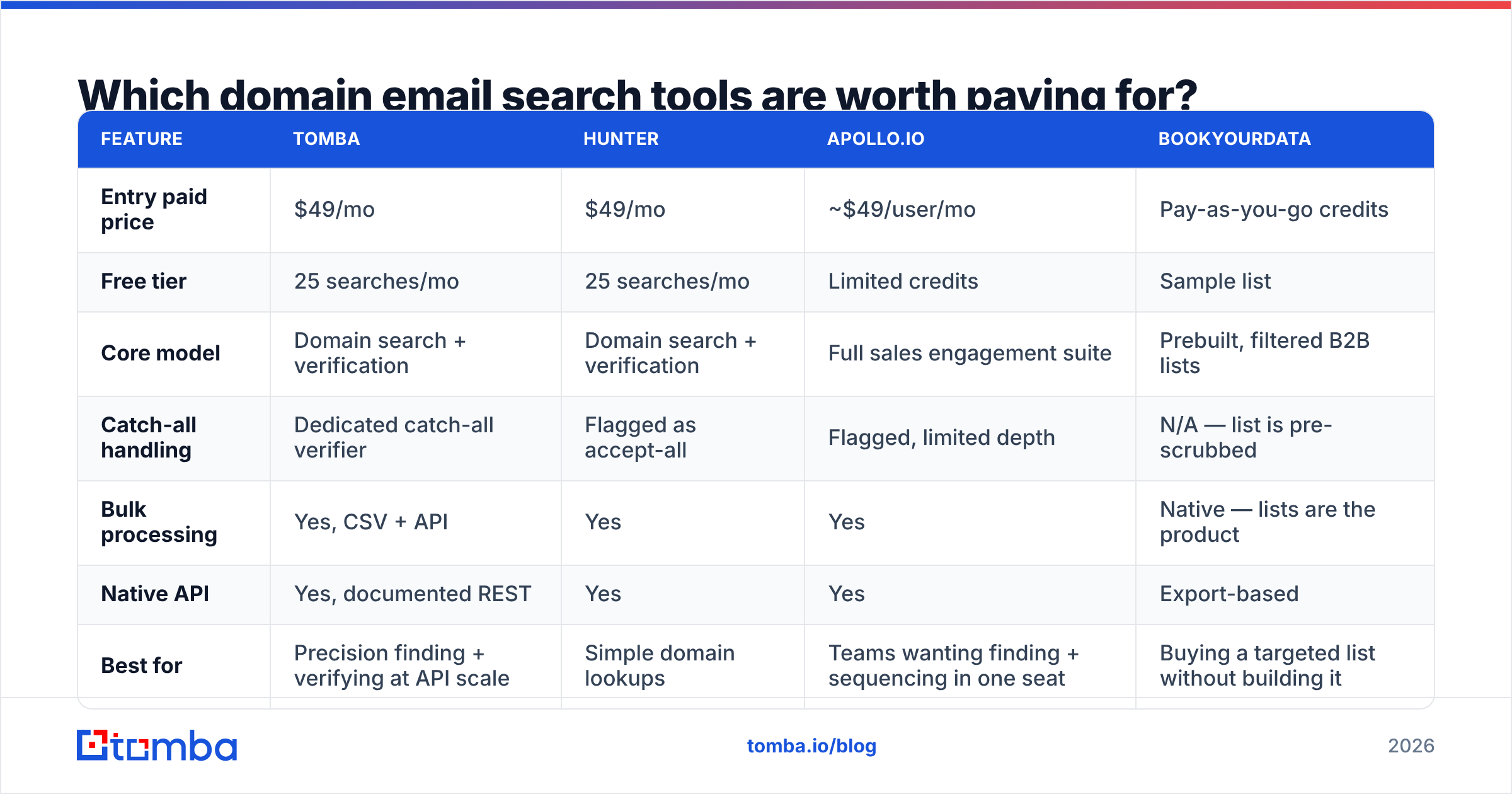
The category splits into three groups: dedicated email-finding platforms, all-in-one sales intelligence suites, and prebuilt list vendors. They solve different problems and pricing reflects that.

| Feature | Tomba | Hunter | Apollo.io | BookYourData |
|---|---|---|---|---|
| Entry paid price | $49/mo | $49/mo | ~$49/user/mo | Pay-as-you-go credits |
| Free tier | 25 searches/mo | 25 searches/mo | Limited credits | Sample list |
| Core model | Domain search + verification | Domain search + verification | Full sales engagement suite | Prebuilt, filtered B2B lists |
| Catch-all handling | Dedicated catch-all verifier | Flagged as accept-all | Flagged, limited depth | N/A — list is pre-scrubbed |
| Bulk processing | Yes, CSV + API | Yes | Yes | Native — lists are the product |
| Native API | Yes, documented REST | Yes | Yes | Export-based |
| Best for | Precision finding + verifying at API scale | Simple domain lookups | Teams wanting finding + sequencing in one seat | Buying a targeted list without building it |
A few honest notes on that table:
Apollo is not really competing on domain search; it's competing on being the single tool your SDRs live in. If you want sequencing, dialer, and CRM sync bundled, the per-seat price is defensible. If you only want addresses, you're paying for a lot of surface area you won't open. Teams that reach that conclusion usually end up looking at an Apollo alternative that bills on lookups instead of seats.
BookYourData solves an adjacent problem well: when you know exactly the segment you want and don't want to run discovery yourself, buying a filtered, pre-verified list is faster than crawling domain by domain. It's a different purchase motion — list acquisition versus on-demand lookup — and plenty of teams run both.
Hunter and Tomba overlap most directly. Both are lookup-first, both start at $49/mo, both expose an API. The practical differences show up in catch-all treatment and in the breadth of adjacent tooling — Tomba ships a separate catch-all verifier and a phone finder alongside the core search, which matters if your outbound motion is multichannel.
How do you run a domain email search without burning your sender reputation?#
The tool gives you addresses. Your process decides whether those addresses cost you anything. Work through this in order:
- Search the domain, then filter out role accounts.
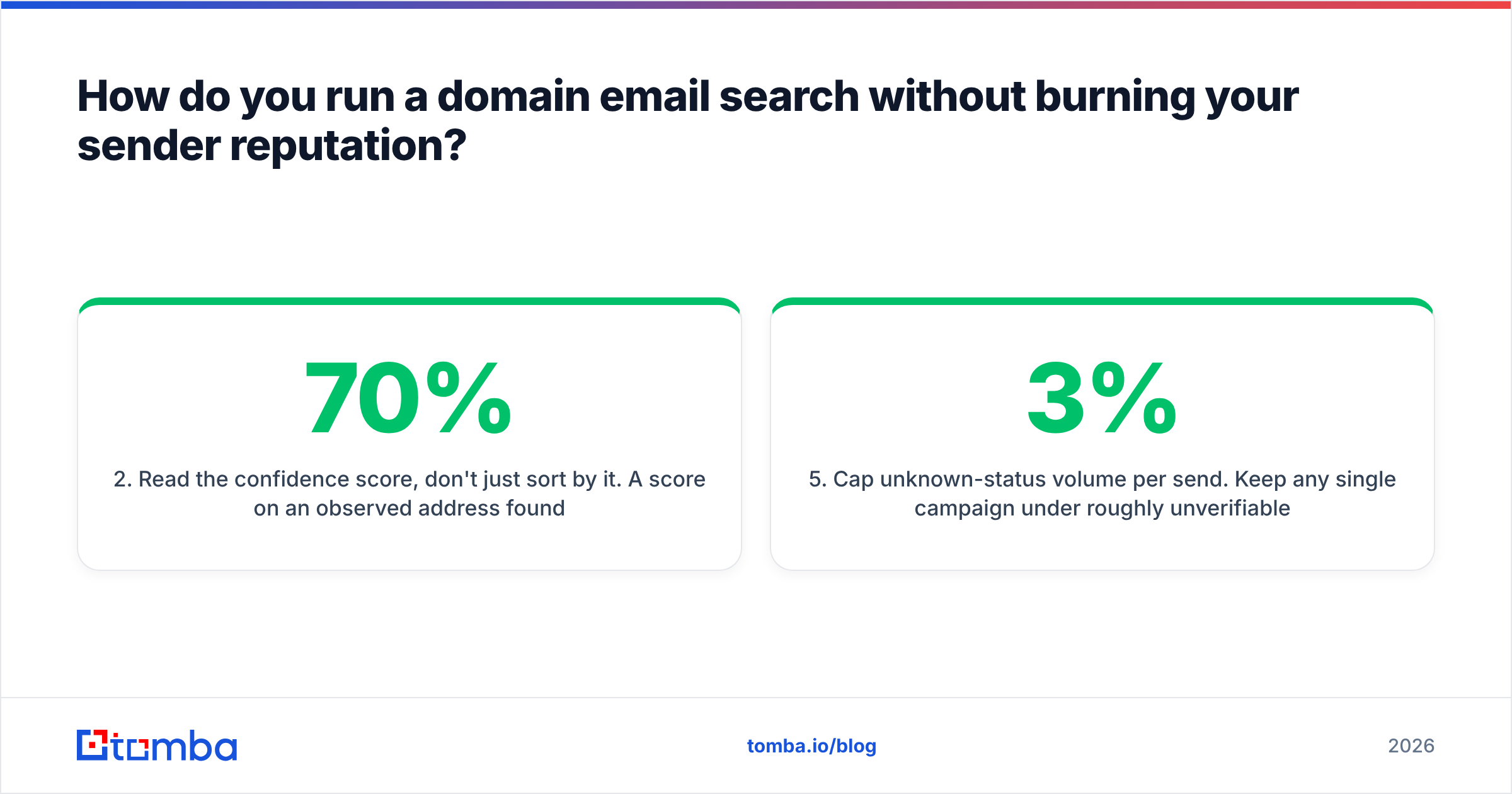
info@,sales@,hello@inflate your list and rarely convert in outbound. Keep them only if your motion genuinely targets shared inboxes. - Read the confidence score, don't just sort by it. A 70% score on an observed address found on a team page is worth more than a 90% score on a pattern-constructed one. Good tools tell you the source; use it.
- Verify everything before export. Even results marked valid at index time can be stale — people leave companies. Re-verify at send time, not at list-build time. An email verifier run costs a fraction of a cent per address and prevents the bounce that costs you a domain.
- Quarantine catch-alls into a separate segment. Don't delete them and don't blend them with clean addresses. Send to them separately, at low volume, from a secondary domain, and measure the bounce rate empirically.
- Cap unknown-status volume per send. Keep any single campaign under roughly 3% unverifiable addresses. Mailbox providers judge you on aggregate bounce rate, so one dirty batch pollutes an otherwise clean sending history.
- Log what bounced and feed it back. Bounced addresses tell you the domain's pattern changed or the person left. Both are signals worth storing in your CRM.
Google and Yahoo's bulk sender requirements made this discipline non-optional — authentication, low complaint rates, and easy unsubscribe are enforced, not suggested. Google's own bulk sender guidelines spell out the thresholds. A sloppy domain search workflow is now one of the fastest ways to fail them, because bounces are the most visible symptom of a list you didn't verify.
If you're doing this at any real volume, keep sender reputation itself under observation — email deliverability is a lagging indicator, and by the time your open rates drop, the damage has been accumulating for weeks.
When should you use domain search versus a single email lookup?#
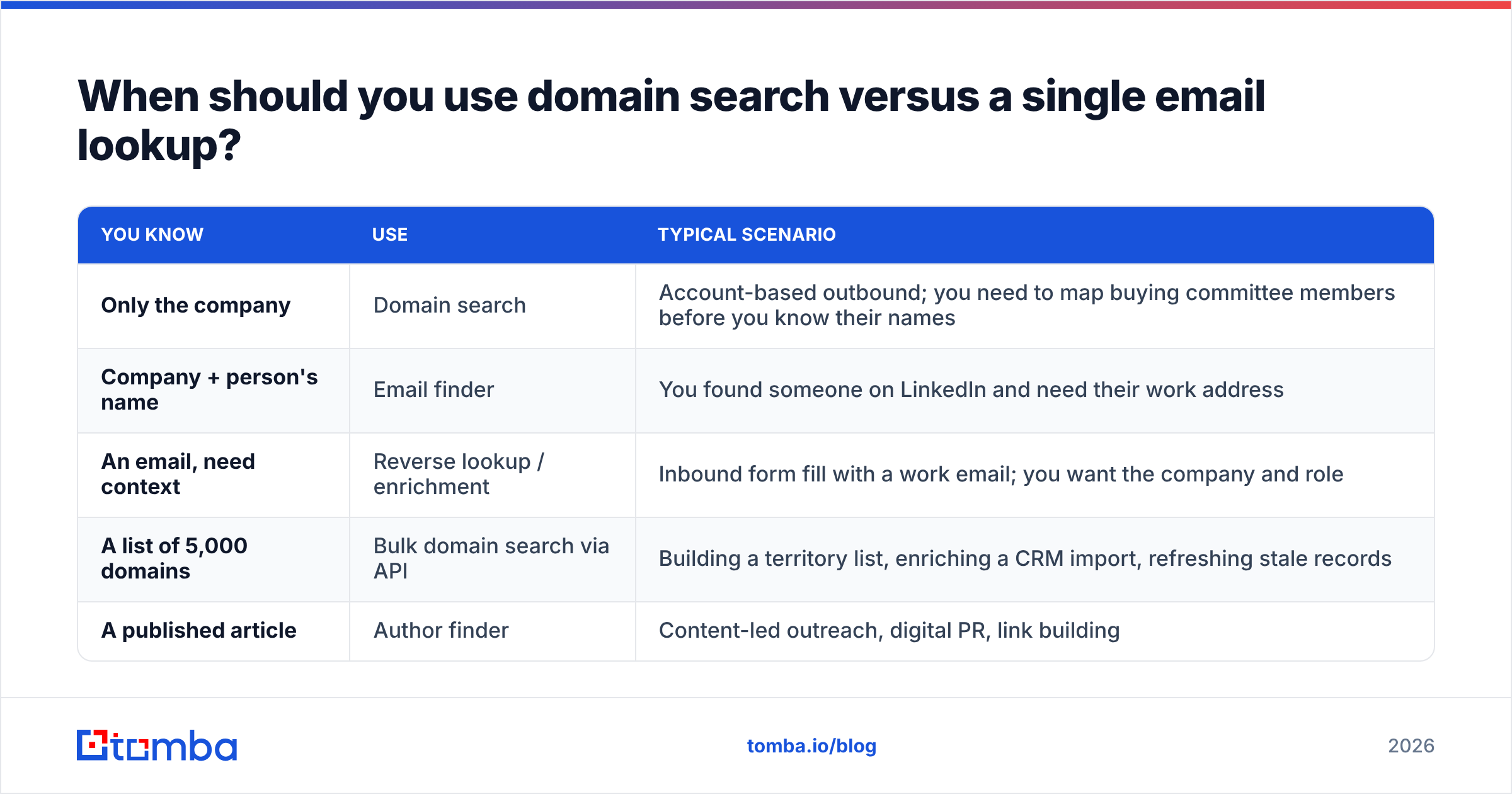
Different jobs. Pick by what you already know.
| You know | Use | Typical scenario |
|---|---|---|
| Only the company | Domain search | Account-based outbound; you need to map buying committee members before you know their names |
| Company + person's name | Email finder | You found someone on LinkedIn and need their work address |
| An email, need context | Reverse lookup / enrichment | Inbound form fill with a work email; you want the company and role |
| A list of 5,000 domains | Bulk domain search via API | Building a territory list, enriching a CRM import, refreshing stale records |
| A published article | Author finder | Content-led outreach, digital PR, link building |
For anything above a few hundred domains, do it programmatically. Pasting domains into a web UI one at a time doesn't scale past an afternoon, and the bulk email finder or a direct Tomba API call handles thousands of domains in a job you can leave running. Most teams end up wiring domain search into the CRM so a new account record triggers a lookup automatically rather than waiting for a rep to remember.
Is domain email search legal and compliant?#
Short answer: yes in most jurisdictions, with conditions that vary by region — and this is not legal advice.
Business email addresses in a B2B context are treated differently from consumer personal data in several frameworks. Under GDPR, processing a work email for B2B outreach can rest on legitimate interest, but that requires a balancing test, a clear privacy notice, and a functioning opt-out. Under CAN-SPAM in the US, the rules are about the message — accurate headers, honest subject lines, a real postal address, working unsubscribe — not about how you sourced the address. CASL in Canada is stricter and generally expects consent or a documented existing business relationship.
Practical compliance hygiene for domain search workflows:
- Keep a record of where each address came from and when. Reputable providers expose the source URL and last-seen date; store both.
- Honor suppression immediately and globally, across every tool that touches the list.
- Don't scrape personal addresses (
@gmail.com,@outlook.com) into B2B campaigns. That's where the legal exposure actually concentrates. - Check the provider's own compliance posture and data sources before you commit. A provider that won't tell you where its data comes from is a provider whose risk you're inheriting. Public vendor reviews on G2 are useful for spotting patterns in how vendors handle removal requests.
What does a good domain email search cost?#
Pricing in this category is a function of lookups, not seats — with the exception of the sales-suite players who charge per user and bundle everything.
At $49/mo you should expect a few thousand searches, API access, and verification included rather than sold separately. Watch for three specific traps:
- Verification billed as a second credit. Finding an address and confirming it's deliverable are two operations at some vendors, which doubles your effective per-contact cost.
- Failed searches consuming credits. If a domain returns nothing, you shouldn't pay for it. Read the credit policy.
- API access gated to the top tier. If you plan to automate, confirm the API is on the plan you're actually buying. Full Tomba pricing runs from a free 25-search tier through Starter at $49/mo, Growth at $99/mo, and Pro at $249/mo, with API access across paid plans.
Run the math on cost-per-verified-contact, not cost-per-credit. A cheaper tool that returns 40% coverage with weak verification costs more per usable contact than a pricier one at 70% with clean statuses.
Getting started#
Pick three domains from your ideal customer profile that you already know well — ideally companies where you know at least one person's real email. Run each through two or three tools on their free tiers. Compare coverage, check whether the addresses you already know came back, and see how each tool labels the catch-alls. That test takes twenty minutes and beats a week of reading review sites.
When you're ready to move from evaluation to volume, start with Tomba Email Finder. It runs domain search, pattern detection, and SMTP verification in one flow, ships a documented API for bulk jobs, and includes a free tier of 25 searches per month so you can test it against your own ICP before spending anything. Feed it a domain, get back a verified list, and keep your sender reputation where it belongs.
Related guides#
Ready to find emails that actually work?
Join 150,000+ professionals who stopped guessing and started sending. Free credits on signup — no credit card required.
Get the Tomba newsletter
Practical outbound tactics and product updates — once every two weeks.
About the author