Domain Health Checker: A Complete 2026 Guide for Senders
A domain health checker scans SPF, DKIM, DMARC, MX, blacklists, and reputation signals in one pass. Here's which checks actually predict inbox placement, which are noise, and how to read the output without guessing.

TL;DR
- A domain health checker is a diagnostic that reads your public DNS records, mail routing, blacklist status, and reputation signals, then tells you which of them will hurt inbox placement.
- Only about six checks actually move the needle: SPF validity, DKIM signing, DMARC policy and alignment, MX correctness, blacklist listings, and domain age plus sending history. Everything else is context.
- Free tools (MXToolbox, Google Postmaster Tools, dmarcian's inspector) cover the DNS layer well. They tell you nothing about whether the addresses you send to are real — which is the single largest driver of bounce-based reputation damage.
- A green domain health report does not mean you will land in the inbox. It means nothing is structurally broken. Placement is decided by recipient behavior on top of that.
- Run a full check before any new sending domain goes live, after every DNS change, and monthly on production domains. Weekly if you are running cold outbound.
What is a domain health checker?#
A domain health checker is a scanner that queries your domain's public records the way a receiving mail server would, and reports what it finds.
Think of it as a pre-flight inspection. A pilot walking the aircraft is not testing whether the flight will be smooth — weather decides that. They are confirming nothing is obviously broken before takeoff. A domain health checker does the same job for email: it cannot promise inbox placement, but it can tell you whether Gmail, Outlook, and Yahoo will reject you at the door for reasons entirely within your control.
Technically, the tool performs a batch of DNS lookups and network probes against a single domain:
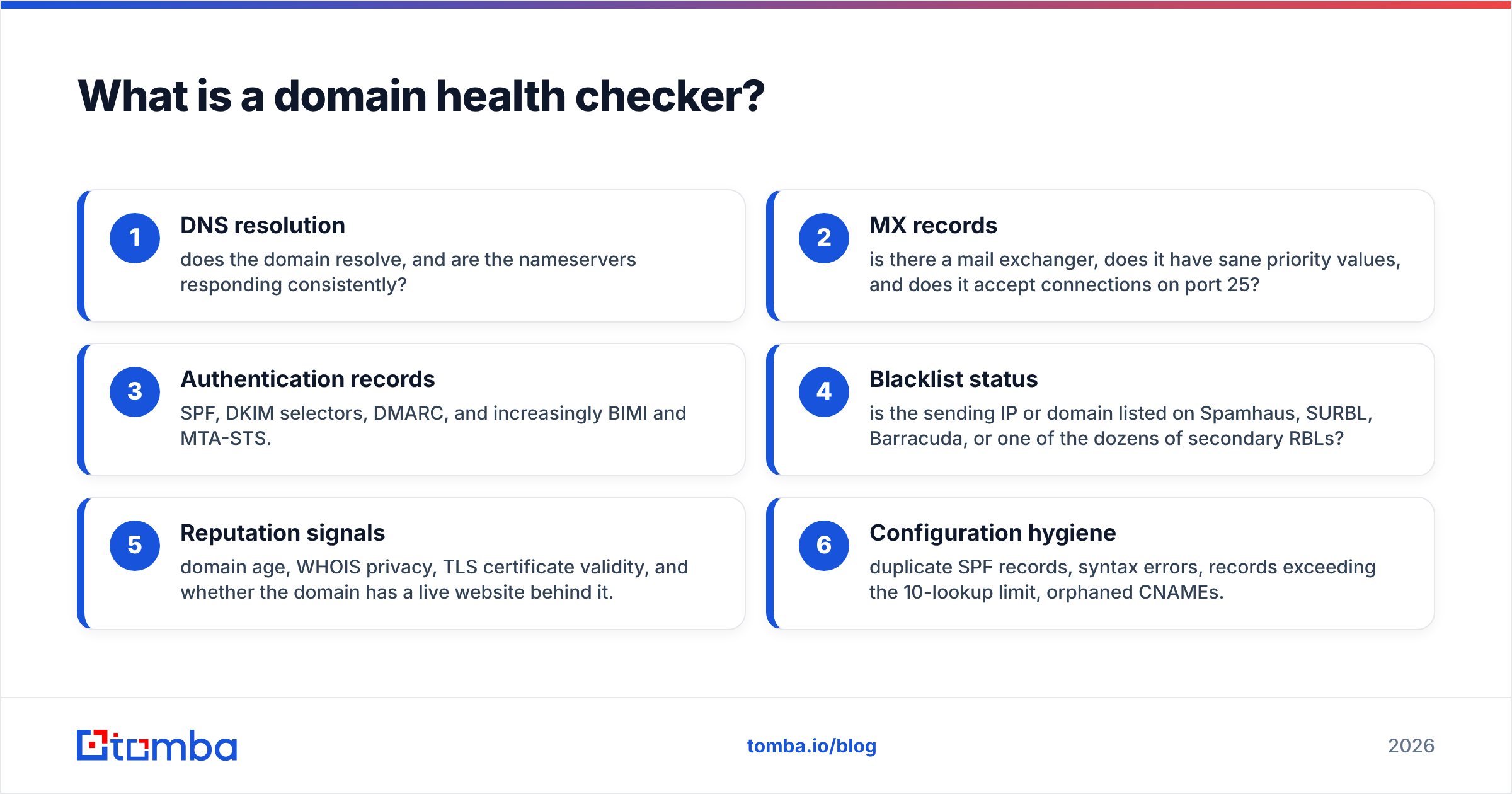
- DNS resolution — does the domain resolve, and are the nameservers responding consistently?
- MX records — is there a mail exchanger, does it have sane priority values, and does it accept connections on port 25?
- Authentication records — SPF, DKIM selectors, DMARC, and increasingly BIMI and MTA-STS.
- Blacklist status — is the sending IP or domain listed on Spamhaus, SURBL, Barracuda, or one of the dozens of secondary RBLs?
- Reputation signals — domain age, WHOIS privacy, TLS certificate validity, and whether the domain has a live website behind it.
- Configuration hygiene — duplicate SPF records, syntax errors, records exceeding the 10-lookup limit, orphaned CNAMEs.
Each of those is a yes/no or a score. Good tools weight them. Bad tools list all forty findings with equal urgency and let you drown.
Which domain health checks actually matter?#
Most reports flag things that will never affect a single delivery. Here is the honest triage.
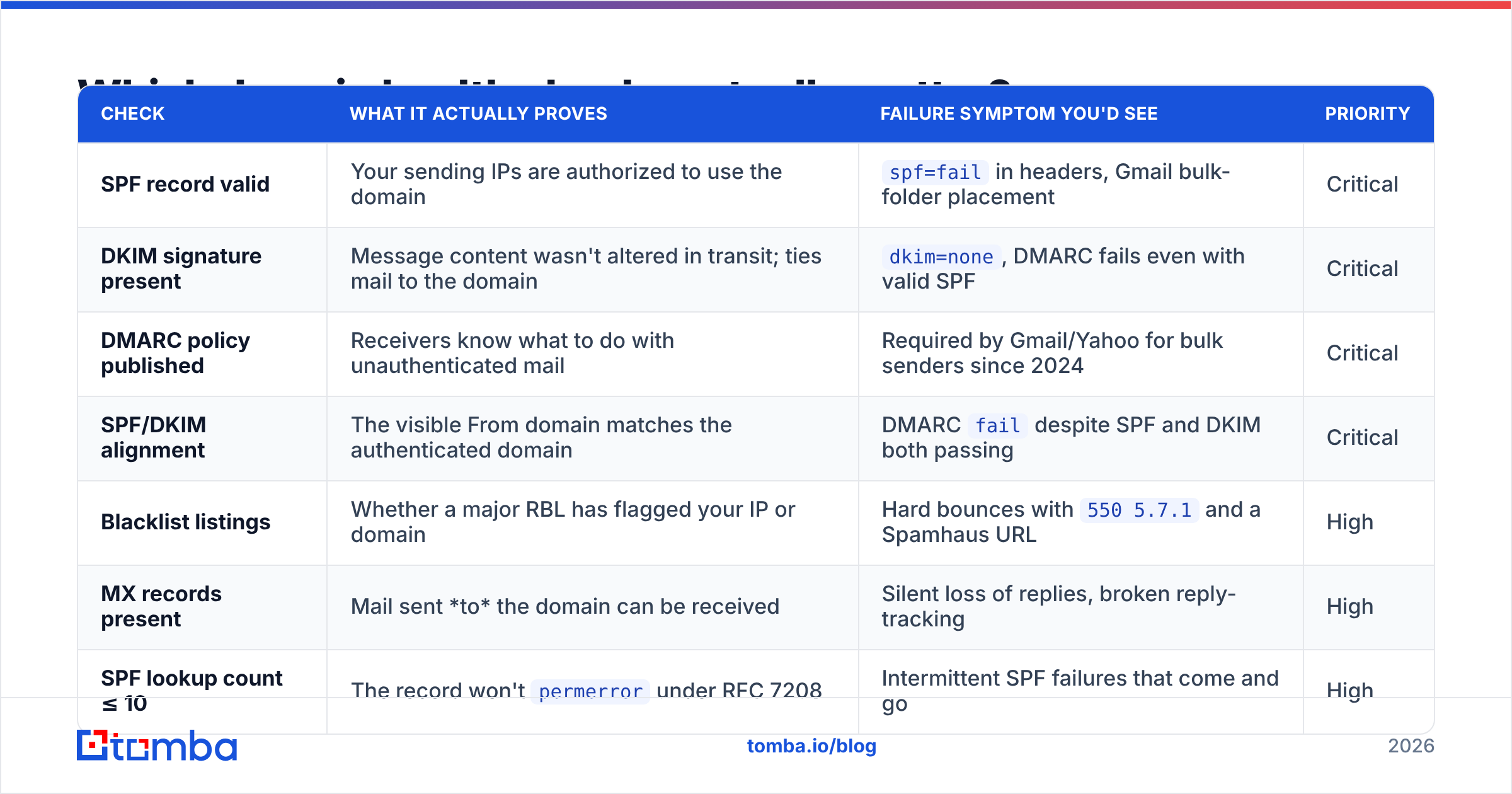
| Check | What it actually proves | Failure symptom you'd see | Priority |
|---|---|---|---|
| SPF record valid | Your sending IPs are authorized to use the domain | spf=fail in headers, Gmail bulk-folder placement |
Critical |
| DKIM signature present | Message content wasn't altered in transit; ties mail to the domain | dkim=none, DMARC fails even with valid SPF |
Critical |
| DMARC policy published | Receivers know what to do with unauthenticated mail | Required by Gmail/Yahoo for bulk senders since 2024 | Critical |
| SPF/DKIM alignment | The visible From domain matches the authenticated domain | DMARC fail despite SPF and DKIM both passing |
Critical |
| Blacklist listings | Whether a major RBL has flagged your IP or domain | Hard bounces with 550 5.7.1 and a Spamhaus URL |
High |
| MX records present | Mail sent to the domain can be received | Silent loss of replies, broken reply-tracking | High |
| SPF lookup count ≤ 10 | The record won't permerror under RFC 7208 |
Intermittent SPF failures that come and go | High |
| Domain age | Whether the domain has sending history to lean on | New domains throttled hard for the first 4–8 weeks | Medium |
| MTA-STS / TLS-RPT | Enforced transport encryption | Rarely affects placement; affects enterprise trust | Medium |
| BIMI record | Logo display in supporting clients | Zero deliverability impact; brand impact only | Low |
| WHOIS privacy | Nothing measurable | Cosmetic flag in most reports | Low |
| DNSSEC | Registrar-level tamper resistance | Not used as a mail placement signal | Low |
The pattern: the first four rows account for the overwhelming majority of self-inflicted deliverability failures. If a report gives you thirty green checks and one red on DMARC alignment, you have a broken domain, not a 97% healthy one.

How do you read an SPF, DKIM, and DMARC result correctly?#
Read them as a chain, not as three independent checkboxes. DMARC only passes if SPF or DKIM passes and the passing mechanism is aligned with the From domain.
The failure that catches most teams: you set up an ESP, the ESP's SPF include is present, SPF passes — but the ESP sends with its own Return-Path on a subdomain it controls. SPF passed for bounce.esp-vendor.net, not for yourcompany.com. Alignment fails, DMARC fails, and your report shows two greens and one red that looks minor. It is not minor.
A working read order:
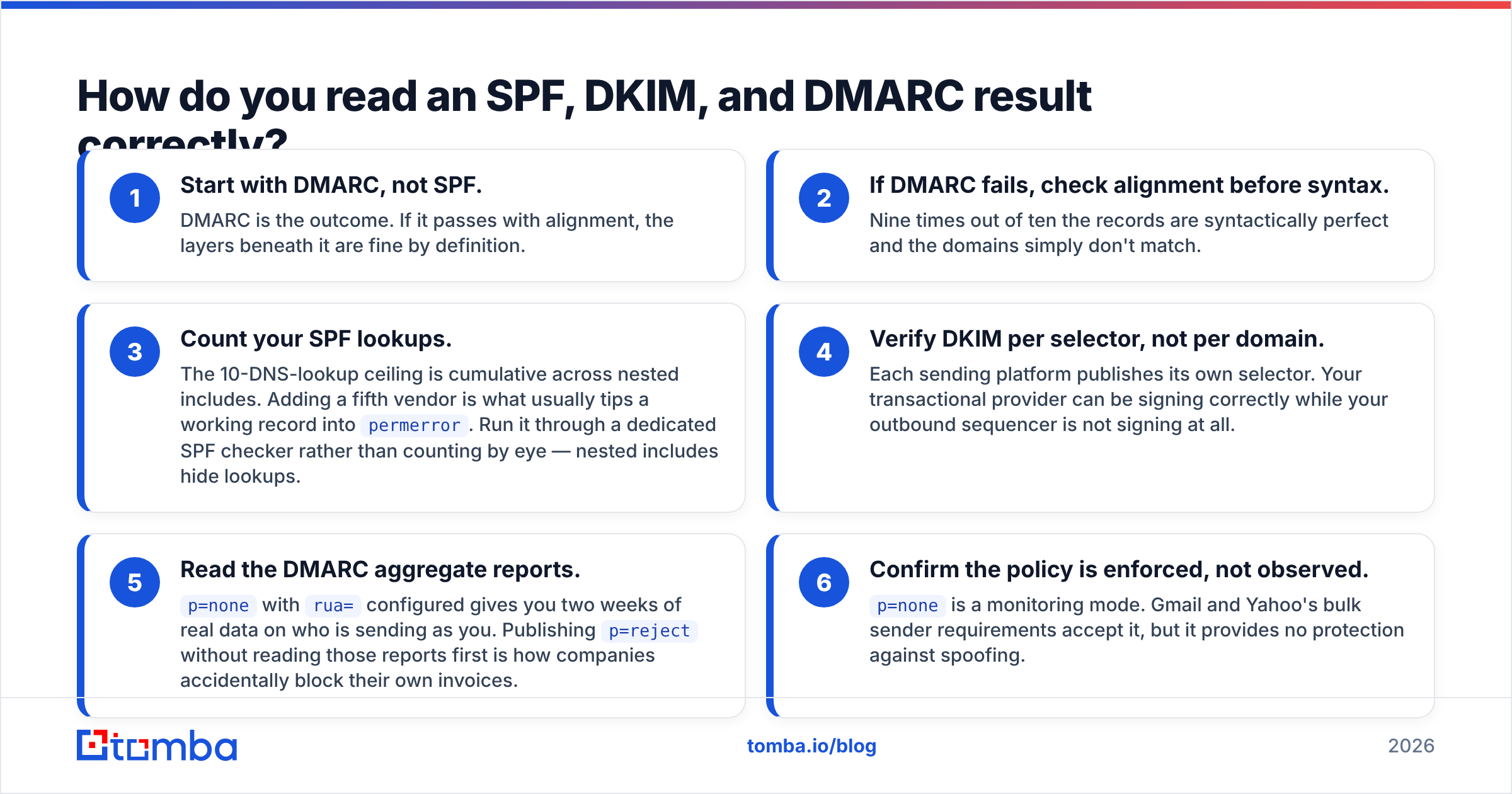
- Start with DMARC, not SPF. DMARC is the outcome. If it passes with alignment, the layers beneath it are fine by definition.
- If DMARC fails, check alignment before syntax. Nine times out of ten the records are syntactically perfect and the domains simply don't match.
- Count your SPF lookups. The 10-DNS-lookup ceiling is cumulative across nested includes. Adding a fifth vendor is what usually tips a working record into
permerror. Run it through a dedicated SPF checker rather than counting by eye — nested includes hide lookups. - Verify DKIM per selector, not per domain. Each sending platform publishes its own selector. Your transactional provider can be signing correctly while your outbound sequencer is not signing at all.
- Read the DMARC aggregate reports.
p=nonewithrua=configured gives you two weeks of real data on who is sending as you. Publishingp=rejectwithout reading those reports first is how companies accidentally block their own invoices. - Confirm the policy is enforced, not observed.
p=noneis a monitoring mode. Gmail and Yahoo's bulk sender requirements accept it, but it provides no protection against spoofing.
The DMARC.org overview is the canonical reference for the alignment rules, and it is short enough to read in one sitting.
What does a domain health checker not tell you?#
This is where most teams misread the tool.
A clean report says your domain is technically permitted to send. It says nothing about:
- Whether your recipients exist. Bounce rate is a reputation input at every major mailbox provider. A perfectly configured domain sending to a list with 18% dead addresses will be throttled within days. DNS checks cannot see this.
- Whether people want your mail. Complaint rate, deletion-without-reading, and reply rate are behavioral. Google Postmaster Tools surfaces some of this; a DNS scanner never will.
- Whether your IP neighbors are trustworthy. On shared IP pools, your sending sits next to other tenants. Your domain can be spotless while the IP is smoking.
- Content-level spam signals. Link shorteners, tracking-pixel density, image-to-text ratio, and spam-trigger phrasing are evaluated at message level, not domain level.
- Volume ramp appropriateness. A brand-new domain going from 0 to 800 sends per day is a red flag regardless of how correct the DNS is.
Put plainly: domain health is necessary but not sufficient. It removes the excuses. It does not deliver the mail.
Which domain health checker should you use in 2026?#
There is no single tool that covers DNS, blacklists, mailbox-provider feedback, and list quality at once. Most teams end up stacking two or three. Here's how the common options compare.
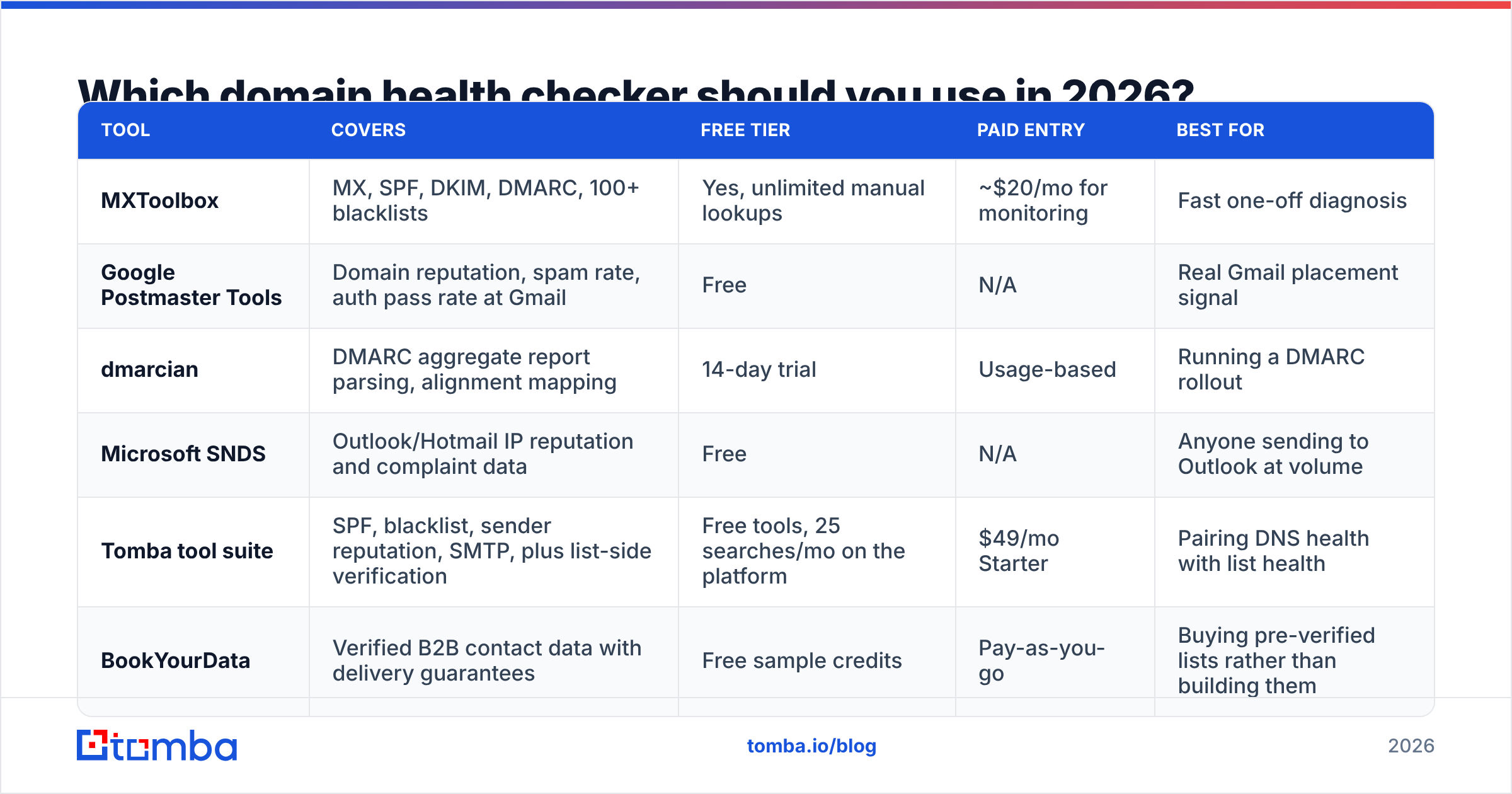
| Tool | Covers | Free tier | Paid entry | Best for |
|---|---|---|---|---|
| MXToolbox | MX, SPF, DKIM, DMARC, 100+ blacklists | Yes, unlimited manual lookups | ~$20/mo for monitoring | Fast one-off diagnosis |
| Google Postmaster Tools | Domain reputation, spam rate, auth pass rate at Gmail | Free | N/A | Real Gmail placement signal |
| dmarcian | DMARC aggregate report parsing, alignment mapping | 14-day trial | Usage-based | Running a DMARC rollout |
| Microsoft SNDS | Outlook/Hotmail IP reputation and complaint data | Free | N/A | Anyone sending to Outlook at volume |
| Tomba tool suite | SPF, blacklist, sender reputation, SMTP, plus list-side verification | Free tools, 25 searches/mo on the platform | $49/mo Starter | Pairing DNS health with list health |
| BookYourData | Verified B2B contact data with delivery guarantees | Free sample credits | Pay-as-you-go | Buying pre-verified lists rather than building them |
MXToolbox remains the default first stop for a raw DNS read — it is fast, free, and exhaustive. Google Postmaster Tools is non-negotiable if Gmail is a meaningful share of your recipients, because it is the only place you see what Gmail actually thinks of you rather than what your DNS implies. Everything else is a question of workflow: dmarcian if you are mid-rollout, SNDS if Outlook matters, and a combined platform if you would rather not juggle five tabs.
For the checks you run most often, Tomba publishes them as standalone free tools — a blacklist checker for RBL status and an email reputation checker for sender-side signals — which is convenient when you are auditing a domain you don't own, like a prospect's or an acquired company's.

How often should you run a domain health check?#
Tie the cadence to change, not to the calendar alone.
Run immediately when:
- You add or remove a sending platform. Every new ESP, sequencer, CRM, or ticketing tool means a new SPF include and a new DKIM selector. This is the number-one cause of silent SPF
permerror. - You change registrars or nameservers. TXT records are the most commonly lost artifact in a DNS migration.
- Bounce rate moves more than two points week over week. Something changed. Rule out DNS before you blame the list.
- You launch a new domain or subdomain. Check before the first send, not after the first 500.
Run on a schedule:
- Weekly if you run cold outbound or send from multiple secondary domains. Blacklist listings appear fast and lift slowly.
- Monthly for a stable production domain with a single ESP.
- Quarterly for parked and defensive domains — a lapsed SPF record on a domain you don't send from is a spoofing invitation. Publish
v=spf1 -allandp=rejecton anything that should never send mail.
How do you fix the most common failures?#
Most red flags map to a short, boring fix.
SPF exceeds 10 lookups. Flatten the record by replacing nested include: statements with resolved IP ranges, or move a vendor to a dedicated subdomain with its own SPF record. Flattening requires maintenance — IPs change — so subdomain delegation is usually the more durable choice.
Two SPF records on one domain. This is an automatic permerror; the spec allows exactly one. Merge the mechanisms into a single TXT record.
DKIM missing for one platform. Log into the platform, generate the selector, publish the CNAME or TXT it gives you, then re-check. Most platforms have a "verify" button that lies about propagation — confirm independently.
DMARC alignment failing. Configure a custom return-path / bounce domain in your ESP so the envelope domain is a subdomain of your From domain. Every major ESP supports this; it is usually a one-time DNS entry.
Blacklist listing. Identify the specific RBL, read its delisting policy, fix the underlying cause (usually a compromised account or a bad list), then request removal. Delisting without fixing the cause gets you relisted within days, often with a longer cooldown.
Clean DNS but rising bounces. The problem is your list, not your domain. Run the list through an email verifier before the next send and suppress everything that comes back invalid or risky. Bounce rate above 2% is where throttling starts at most providers; above 5% you are actively damaging sender reputation that will take weeks to rebuild.
What does a healthy sending setup look like end to end?#
The finished state is unglamorous and stable:
- One SPF record, under 10 lookups, ending in
-allor~all. - DKIM signing on every platform that sends as you, each with its own selector.
- DMARC at
p=quarantineorp=reject, withrua=reporting to an address someone reads. - A custom bounce domain so alignment passes on all sending paths.
- Zero listings on Spamhaus, SURBL, and Barracuda.
- Gmail Postmaster showing "High" or "Medium" domain reputation and spam rate under 0.10%.
- A verified list with bounce rate under 2%.
- A ramp plan for any domain younger than 90 days.
Get those eight right and the technical layer stops being the variable. What remains is targeting, offer, and copy — which is where your effort should be going anyway.
Where accurate contact data fits in#
The last two items on that list are the ones no DNS scanner can help with, and they are the ones that quietly ruin otherwise healthy domains. You can hold a perfect DMARC posture and still get throttled into oblivion by a list built from guessed email patterns.
That is the gap Tomba Email Finder is built to close. It finds verified professional addresses by name, domain, or company, and returns a confidence score with each result — so the contacts entering your sequencer have already been checked against live mail servers instead of assembled from a permutation guess. Free tier covers 25 searches a month; the Starter plan is $49/mo when you need volume, with full pricing details if you're comparing tiers.
Fix your DNS first. Then stop sending to addresses that were never real.
Related guides#
Ready to find emails that actually work?
Join 150,000+ professionals who stopped guessing and started sending. Free credits on signup — no credit card required.
Get the Tomba newsletter
Practical outbound tactics and product updates — once every two weeks.
About the author