Domain Reputation in 2026: How to Measure, Fix, and Protect It
Domain reputation decides whether your cold email lands in the inbox or vanishes into spam. Here's how mailbox providers score it, what quietly destroys it, and the repair sequence that actually works.
TL;DR
- Domain reputation is a rolling score mailbox providers assign to your sending domain based on complaints, bounces, spam-trap hits, engagement, and authentication. It follows the domain everywhere — new IPs won't save you.
- Google Postmaster Tools shows you Gmail's view (Bad / Low / Medium / High). Microsoft SNDS shows Outlook's. If you're not watching both, you're flying blind.
- The three fastest killers: high hard-bounce rates from unverified lists, complaint rates above 0.3%, and sudden volume spikes on a cold domain.
- Repair takes 4–8 weeks minimum. There is no reset button, no "buy a clean domain and continue" shortcut that survives more than a quarter.
- Prevention is cheaper than repair: verify every address before it enters a sequence, authenticate with SPF/DKIM/DMARC, and grow volume in steps, not jumps.
What is domain reputation?#
Domain reputation is the trust score that Gmail, Outlook, Yahoo, and every corporate spam filter assign to the domain in your From: address and your links. Think of it like a credit score for your mail: it takes years of consistent behavior to build, one bad quarter to wreck, and lenders (mailbox providers) check it before every single transaction.
Technically, it's a set of per-domain signals aggregated over a rolling window — usually 7 to 30 days depending on the provider. Every message you send updates it. Every complaint, bounce, deletion-without-open, and "move to spam" click is a data point.
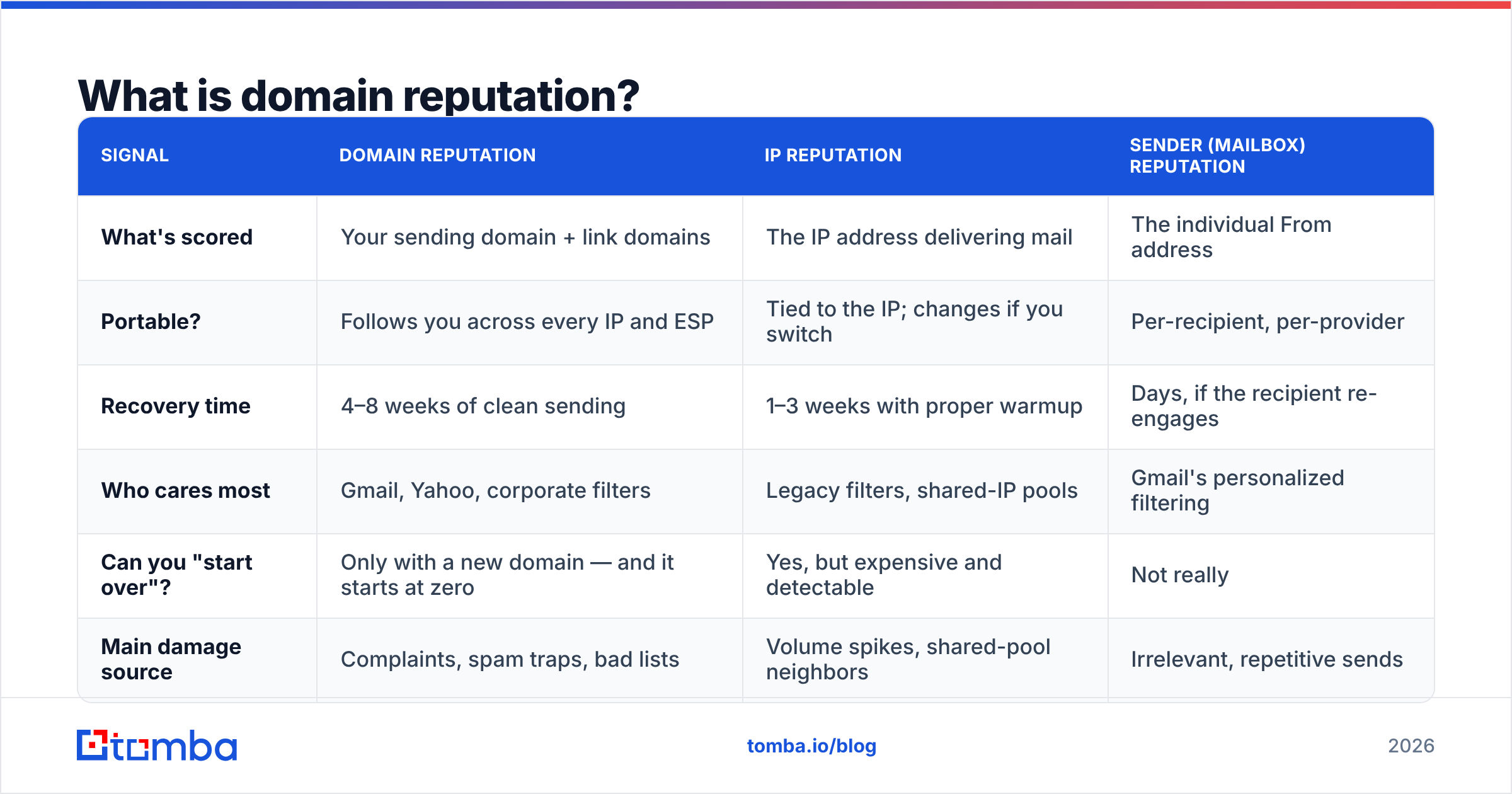
Here's what most senders get wrong: they conflate three different reputations that behave very differently.
| Signal | Domain reputation | IP reputation | Sender (mailbox) reputation |
|---|---|---|---|
| What's scored | Your sending domain + link domains | The IP address delivering mail | The individual From address |
| Portable? | Follows you across every IP and ESP | Tied to the IP; changes if you switch | Per-recipient, per-provider |
| Recovery time | 4–8 weeks of clean sending | 1–3 weeks with proper warmup | Days, if the recipient re-engages |
| Who cares most | Gmail, Yahoo, corporate filters | Legacy filters, shared-IP pools | Gmail's personalized filtering |
| Can you "start over"? | Only with a new domain — and it starts at zero | Yes, but expensive and detectable | Not really |
| Main damage source | Complaints, spam traps, bad lists | Volume spikes, shared-pool neighbors | Irrelevant, repetitive sends |
The practical takeaway: buying a fresh IP fixes almost nothing if your domain is the problem. Since roughly 2021, Gmail has weighted domain signals far more heavily than IP signals for low-to-mid volume senders, and Microsoft has followed. If you send under a few hundred thousand messages a month, your domain is the score that matters.
How do mailbox providers actually score it?#
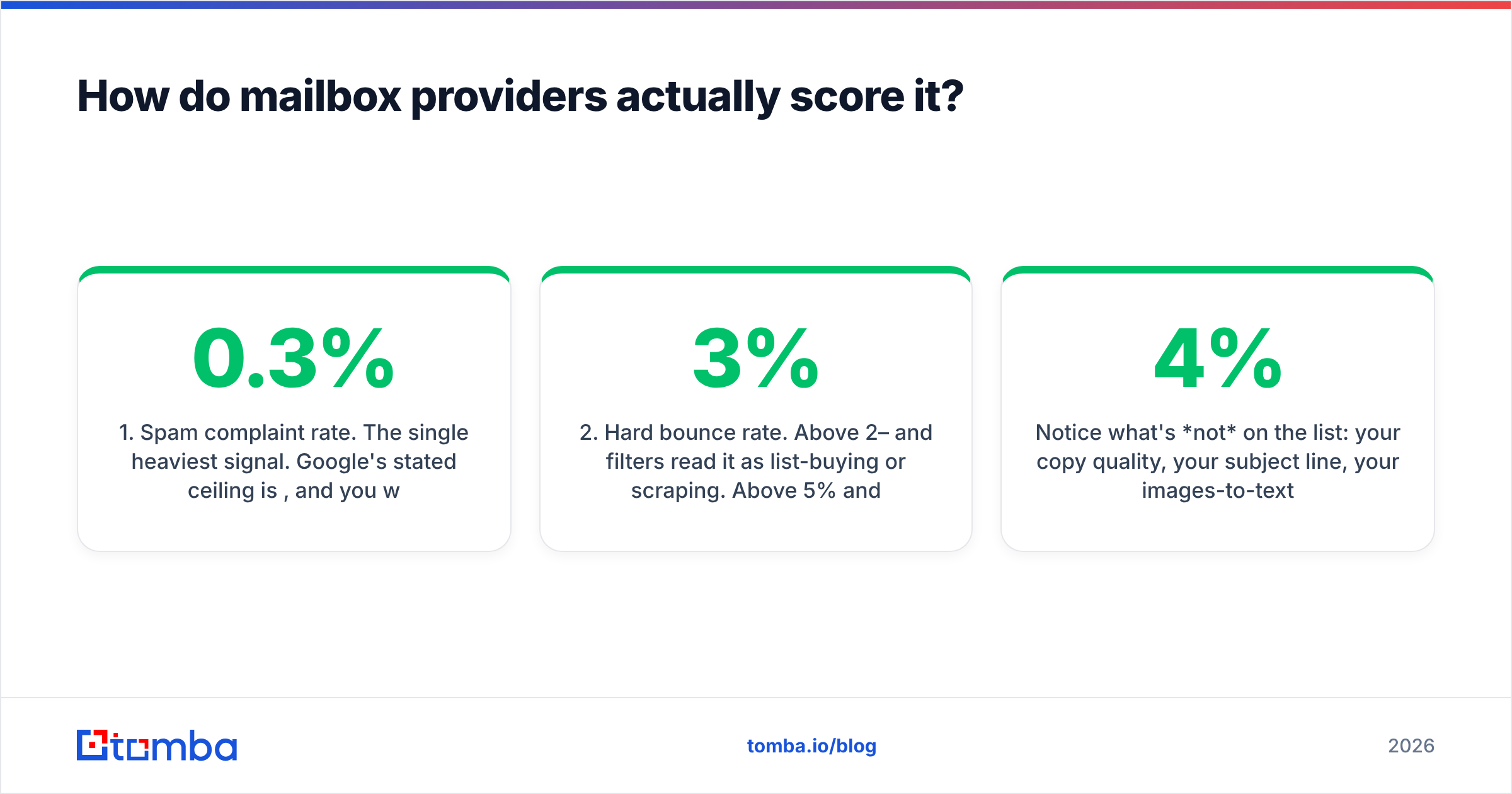
No provider publishes the formula. But the inputs are well documented across Google's bulk sender guidelines, Microsoft's postmaster documentation, and a decade of deliverability postmortems. Here are the six inputs that move the number, ranked by how hard they hit:
- Spam complaint rate. The single heaviest signal. Google's stated ceiling is 0.3%, and you want to live under 0.1%. Three complaints per thousand sends is enough to start a slide. Complaints from Gmail users are weighted hardest because Gmail has the largest sample of your mail.
- Hard bounce rate. Above 2–3% and filters read it as list-buying or scraping. Above 5% and you're being throttled within days. This is the input you have the most direct control over, because it's fixable before you ever hit send.
- Spam trap hits. Pristine traps (addresses that never opted in to anything) and recycled traps (abandoned addresses reactivated as traps) are the reason old lists are radioactive. One pristine trap hit can cost you weeks.
- Engagement signals. Opens are noisy since Apple Mail Privacy Protection, so providers lean on replies, forwards, moves-out-of-spam, and "not spam" clicks. Negative engagement — deleted without reading, archived instantly — drags the score down slowly but persistently.
- Authentication and alignment. SPF, DKIM, and DMARC aren't reputation boosters so much as prerequisites. Missing or misaligned auth caps how high your reputation can climb and makes spoofing damage possible.
- Volume consistency. Sending 50 emails a day for three weeks and then 5,000 on a Tuesday is the classic compromised-account pattern. Filters treat it accordingly.
Notice what's not on the list: your copy quality, your subject line, your images-to-text ratio. Those matter for individual message filtering, but they're second-order compared to the list-hygiene and behavioral signals above. You can write a perfect email and still land in spam if the domain sending it has a 4% bounce rate.
Where can you check your domain reputation?#
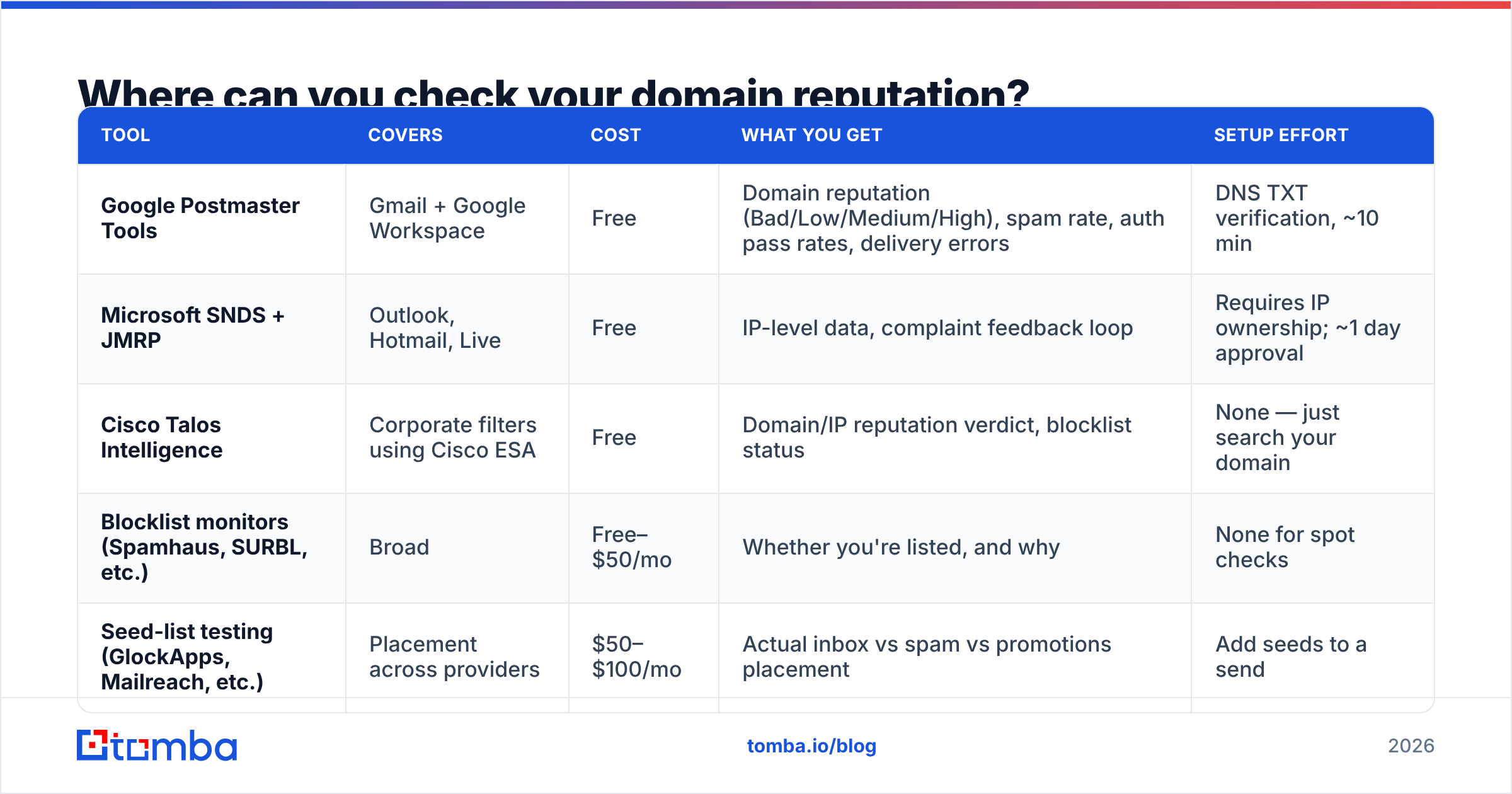
You cannot fix what you cannot see. Four sources cover the majority of B2B inboxes:
| Tool | Covers | Cost | What you get | Setup effort |
|---|---|---|---|---|
| Google Postmaster Tools | Gmail + Google Workspace | Free | Domain reputation (Bad/Low/Medium/High), spam rate, auth pass rates, delivery errors | DNS TXT verification, ~10 min |
| Microsoft SNDS + JMRP | Outlook, Hotmail, Live | Free | IP-level data, complaint feedback loop | Requires IP ownership; ~1 day approval |
| Cisco Talos Intelligence | Corporate filters using Cisco ESA | Free | Domain/IP reputation verdict, blocklist status | None — just search your domain |
| Blocklist monitors (Spamhaus, SURBL, etc.) | Broad | Free–$50/mo | Whether you're listed, and why | None for spot checks |
| Seed-list testing (GlockApps, Mailreach, etc.) | Placement across providers | $50–$100/mo | Actual inbox vs spam vs promotions placement | Add seeds to a send |
Start with Google Postmaster Tools. It requires a minimum daily volume (roughly a few hundred messages to Gmail addresses) before it shows data, which is itself a useful signal: if you're too small to register, your reputation is mostly neutral and your problem is probably content or authentication, not reputation.
Run a quick pass on the free blacklist checker and an SPF checker before you assume the problem is reputational. About a third of "my domain reputation tanked" tickets turn out to be a broken SPF record after someone added a new sending tool.
What destroys domain reputation fastest?#
In rough order of damage-per-incident:
- Sending to an unverified purchased or scraped list. This is the nuclear option. Purchased lists carry recycled spam traps at rates of 1–5%, plus hard bounces that can exceed 20%. A single 5,000-contact send from a bad list can take a healthy domain from High to Bad in under a week.
- Skipping verification on "found" emails. Even well-sourced prospecting data decays at roughly 22–30% per year as people change jobs. A list you built six months ago and never re-verified will bounce hard. This is why an email verifier pass immediately before a campaign — not at collection time — is non-negotiable.
- Ignoring catch-all domains. Catch-all servers accept everything, so they look "valid" to naive verification and then silently bin your mail or bounce it asynchronously. Treat catch-alls as a separate risk tier and cap what percentage of a campaign they represent.
- Sending from your primary corporate domain. If
yourcompany.comis also where invoices, support, and contracts flow, a cold-email reputation hit takes your entire business communication down with it. Use a dedicated lookalike domain (get-yourcompany.com,yourcompany.co) for outbound. - No unsubscribe path. When someone can't leave, they hit "report spam." That's a 1:1 conversion from a mild annoyance into the heaviest negative signal there is.
- Volume ramping too fast on a new domain. New domains have no history, so filters default to suspicion. Going 0 → 500/day in week two reads as an abuse pattern.

How do you repair a damaged domain reputation?#
Assume 4–8 weeks. Anyone promising faster is selling you a new domain, which is a different thing.
Week 0 — Stop the bleeding. Pause every automated sequence on the affected domain. Not "reduce" — pause. Every additional send while the score is Bad reinforces the classification.
Week 0–1 — Diagnose. Pull the last 90 days of send data and compute: hard bounce rate, complaint rate, and reply rate per campaign. Find the campaign that broke it. In nearly every case, one specific list import is responsible. Also verify SPF, DKIM, and DMARC alignment — if DMARC is on p=none, you have no visibility into spoofing that may be damaging you from outside.
Week 1 — Clean the list. Delete, don't re-verify, anything that hard bounced. Then run everything remaining through verification and segment into: valid, risky/catch-all, and unknown. Only the first bucket sends for the next month. A bulk verify run on a 50k list takes minutes and is dramatically cheaper than the four weeks you'd otherwise spend rebuilding.
Week 1–2 — Fix authentication. SPF record under the 10-DNS-lookup limit. DKIM signing with a 2048-bit key. DMARC at p=quarantine minimum with an aggregate report address you actually read. See dmarc.org for the record syntax if you're building it by hand.
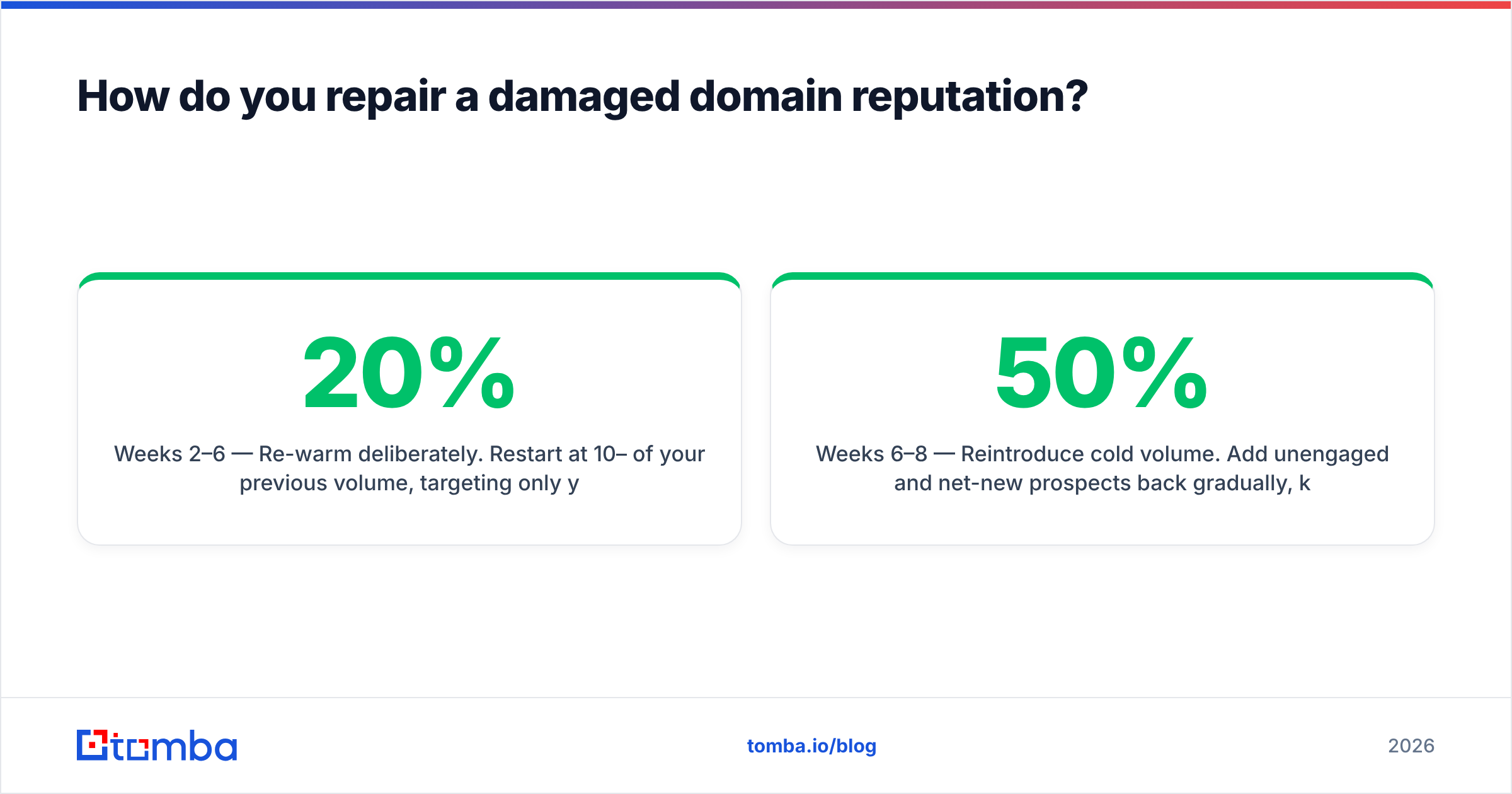
Weeks 2–6 — Re-warm deliberately. Restart at 10–20% of your previous volume, targeting only your most engaged recipients — people who replied in the last 90 days. Increase 20–30% per week only if Postmaster Tools holds steady or improves. If reputation dips, hold at the current volume for a full week before trying again.
Weeks 6–8 — Reintroduce cold volume. Add unengaged and net-new prospects back gradually, keeping them under 50% of daily volume until reputation reads Medium or High for two consecutive weeks.
The discipline that makes this work is boring: never let an unverified address into a sequence again. The whole repair is wasted if week nine reintroduces the same list hygiene that caused the problem.
Should you just buy a new domain instead?#
Sometimes — but understand what you're buying. A new domain has no reputation, which is not the same as a good reputation. You get a neutral starting point and a mandatory 4–6 week warmup before you can send meaningful volume. That's the same timeline as repairing the old one, except you also lose whatever positive history the original domain had.
A new domain makes sense when:
- The original domain is on a major blocklist with a listing history and a refused delisting request.
- You need to isolate outbound from your corporate domain and never set that up properly in the first place.
- You're scaling to genuinely high volume and want domain-level segmentation between cold outbound, product notifications, and transactional mail. This is good architecture regardless of reputation.
It does not make sense as an escape hatch from bad list practices. Rotating through burner domains every eight weeks is a pattern filters detect — shared registration data, identical DNS templates, and correlated sending behavior make domain clusters easy to fingerprint. You'll burn the new one faster than the last.
If you do spin up new sending domains, register them at least 30 days before first use, point them at a real website with real content, and set up authentication on day one.
What does a healthy sending program look like?#
Six habits separate senders whose sender reputation trends up from those constantly firefighting:
- Verify at send time, not collection time. Data decays. A verification pass 24–48 hours before a campaign catches the job changes that happened since you sourced the contact.
- Cap daily volume per mailbox. 30–50 cold sends per mailbox per day for most B2B programs. Scale by adding mailboxes and domains, not by pushing one inbox harder.
- Watch the complaint rate weekly, not quarterly. Set a threshold at 0.1% and treat a breach as a stop-everything event.
- Prune non-engagers ruthlessly. Anyone who hasn't opened, clicked, or replied in three campaigns should exit the sending pool. They contribute nothing but negative engagement signal.
- Keep authentication current. Every time you add a new sending tool, re-check SPF lookups. The 10-lookup limit is the most common silent breakage in outbound stacks.
- Separate mail streams by domain. Transactional, marketing, and cold outbound should never share a sending domain. One bad cold campaign shouldn't put password resets in spam.
None of this is glamorous. All of it compounds. A domain with two years of clean sending survives mistakes that would flatten a three-month-old one.
Where does list quality fit in?#
At the front, and it's the highest-leverage lever you have. Every reputation problem downstream — bounces, traps, complaints — starts with who's on the list. You can't out-copywrite a bad list, and you can't out-warm-up one either.
The workflow that keeps domains healthy is simple: source contacts from a provider that returns verified, source-attributed data; verify again immediately before send; segment catch-alls separately; and never import anything you can't explain the origin of.
If you're building prospect lists and want them to arrive already verified rather than needing a rescue pass, start with the Tomba Email Finder. It returns confidence-scored addresses with source attribution, runs verification inline, and flags catch-all domains before they enter your sequences — which is the difference between a domain reputation you monitor and one you have to repair. The free tier covers 25 searches a month if you want to test the accuracy against your own known-good contacts first; paid plans start at $49/month on Tomba pricing.
Fix the list, and the reputation mostly takes care of itself.
Related guides#
Ready to find emails that actually work?
Join 150,000+ professionals who stopped guessing and started sending. Free credits on signup — no credit card required.
Get the Tomba newsletter
Practical outbound tactics and product updates — once every two weeks.
About the author