Domain Reputation Google Postmaster Tools: 2026 Guide
Your domain reputation Google Postmaster grade — High, Medium, Low, or Bad — decides whether you hit the inbox or spam. Here's how to read it, and how to fix it.

Your domain reputation Google Postmaster Tools grade is the clearest read you get on Gmail inbox placement. This guide covers what each grade means, why it falls so fast, and what actually fixes it.
TL;DR
- Domain reputation in Google Postmaster Tools is Gmail's four-tier verdict on your sending domain: High, Medium, Low, or Bad. It is the best predictor you have for Gmail inbox placement.
- The grade is a trailing 7-to-30-day average, not a live meter. A bad week keeps hurting you for weeks after you fix the cause.
- Spam complaint rate is the dominant input. Gmail's bulk sender rules require you to stay under 0.30% and target below 0.10%.
Two more things worth knowing before you dig in:
- Postmaster shows six dashboards: domain reputation, IP reputation, spam rate, authentication, encryption, and delivery errors. Most senders only read one.
- Recovery from Low takes 2–4 weeks. Recovery from Bad usually takes 4–8 weeks of much lower, high-engagement-only volume. Sometimes a new domain is the cheaper path.
What does the domain reputation Google Postmaster grade mean?#
Domain reputation is Gmail's rolling score of how much its users want mail from your domain. Think of it like a restaurant health grade posted in the window. It sums up months of inspections into one letter, customers decide from it in a second, and you cannot argue it away. You change the kitchen and wait for the next visit.
Technically, Postmaster grades two domains: the one in your DKIM d= signature and the one readers see in your From: line. Gmail builds the grade from user behavior across all mail carrying that domain. Spam button presses, "not spam" rescues, deletes without opens, replies, message moves, and mail sent to addresses that do not exist all feed it.
The four grades:
- High — Gmail trusts you. Very little of your mail is filtered on reputation grounds alone. Content and link filters still apply, but you have the maximum benefit of the doubt.
- Medium — You're known and generally fine. Borderline messages (heavy HTML, unknown link domains, sudden volume jumps) get filtered where a High-reputation domain would pass.
- Low — You're on probation. A meaningful share of your mail goes to spam by default, and content that would sail through at Medium now fails.
- Bad — Effectively blocked. The bulk of your mail lands in spam regardless of how clean the individual message is.
There's also a fifth state nobody expects: no data. Send fewer than a few hundred messages a day to Gmail and Postmaster shows nothing at all. That is neither a good sign nor a bad one. It means you sit below the aggregation threshold Google uses to protect user privacy.

How do you set up Google Postmaster Tools correctly?#
Setup takes ten minutes. Most people do it wrong once, then never look again.
Go to Google Postmaster Tools, add your sending domain, and verify with a TXT record. The critical detail: verify the domain that appears in your DKIM signature, not just your root domain. If you send from mail.yourcompany.com with d=mail.yourcompany.com, verifying yourcompany.com alone gives you an empty dashboard forever.
Add every sending subdomain separately. Most teams run at least three: transactional (notify.), marketing (news.), and cold outbound (outreach. or a separate domain entirely). Each one builds its own reputation. That separation is the entire point. It means a rough cold campaign cannot drag your password-reset emails into spam.
Data appears within 2–3 days of verification and backfills nothing. If you're diagnosing a crisis today and only just verified, you're starting from zero history.
What do the six Postmaster dashboards actually tell you?#
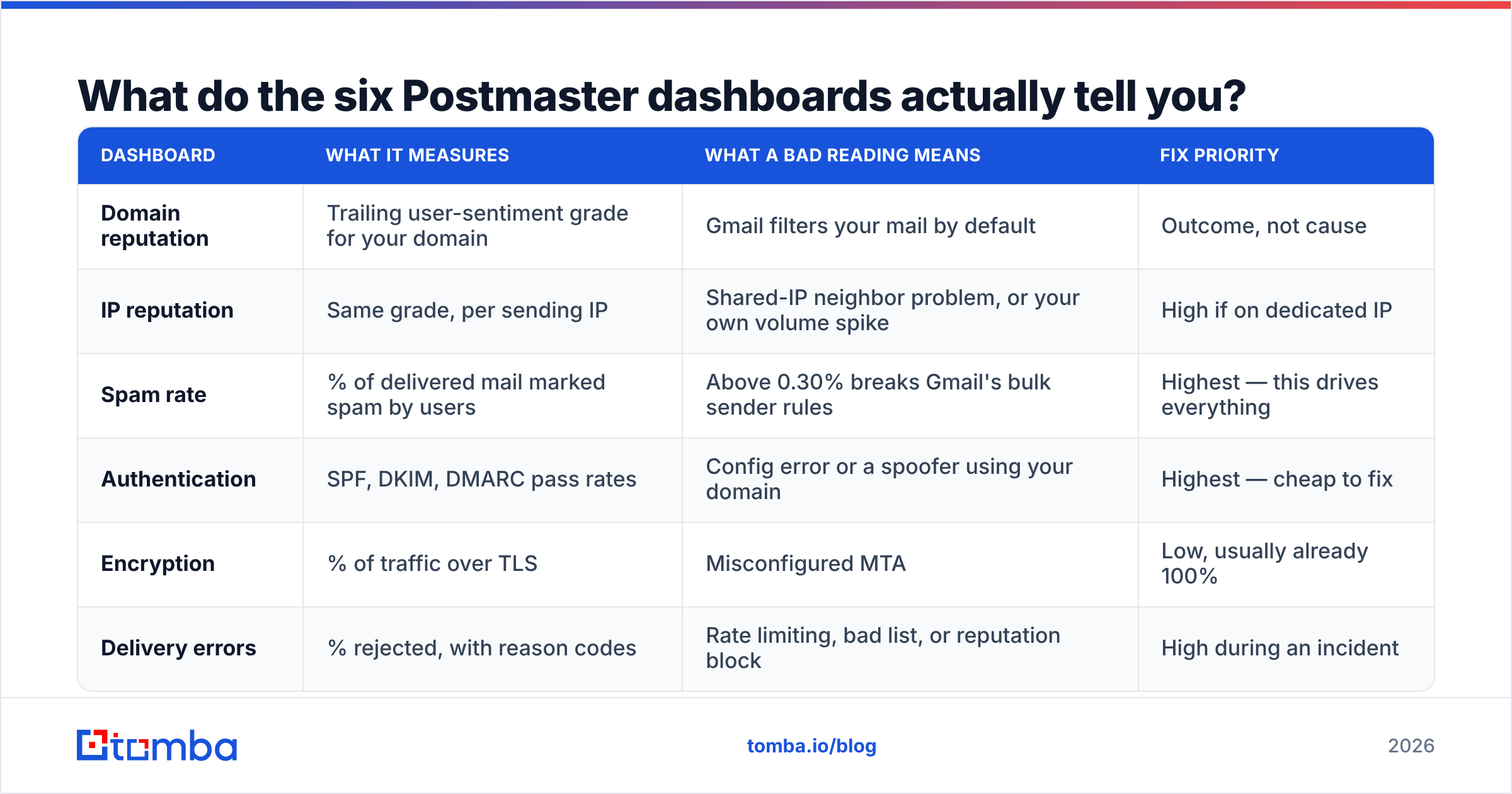
Domain reputation is the headline, but the other five dashboards are where the diagnosis lives.
| Dashboard | What it measures | What a bad reading means | Fix priority |
|---|---|---|---|
| Domain reputation | Trailing user-sentiment grade for your domain | Gmail filters your mail by default | Outcome, not cause |
| IP reputation | Same grade, per sending IP | Shared-IP neighbor problem, or your own volume spike | High if on dedicated IP |
| Spam rate | % of delivered mail marked spam by users | Above 0.30% breaks Gmail's bulk sender rules | Highest — this drives everything |
| Authentication | SPF, DKIM, DMARC pass rates | Config error or a spoofer using your domain | Highest — cheap to fix |
| Encryption | % of traffic over TLS | Misconfigured MTA | Low, usually already 100% |
| Delivery errors | % rejected, with reason codes | Rate limiting, bad list, or reputation block | High during an incident |
Read them in this order during an incident. Authentication first: is it a config break? Then spam rate: is it a content or list problem? Then delivery errors: is Gmail actively rate-limiting? Only then look at the reputation graph, which is the lagging summary of the other three.
Why does domain reputation drop so fast and recover so slowly?#
Because the scoring is asymmetric by design. Gmail punishes evidence of unwanted mail right away. It rewards evidence of wanted mail only through months of repetition.
The mechanics that catch most senders off guard:
- Volume weighting. Reputation isn't per-message. It's per-recipient-signal, weighted by volume. Send 50,000 emails in a day at a 0.5% complaint rate and you generate 250 complaint events in 24 hours. That is enough to move a Medium domain to Low overnight.
- The trailing window. The domain reputation Google Postmaster reports covers roughly the last 7–30 days. You can fix the root cause on Monday and still watch the graph sit at Low all week. Teams panic here and change five more things, which makes the diagnosis impossible.
The next three causes are list-quality problems in disguise:
- Unknown-user rate. Sending to addresses that don't exist reads as a signal you acquired your list badly. This is the most preventable cause of reputation damage. It's why running a list through an email verifier before send is not optional hygiene. It's reputation insurance.
- Engagement decay. Gmail weights recent positive engagement heavily. A list that opened enthusiastically 18 months ago and ignores you now drags your grade down, even with zero complaints.
- Domain age and history. A domain with two years of clean High-reputation sending absorbs a bad campaign far better than one that started sending three weeks ago.
The practical consequence: your reputation is set by your worst segment, not your average one. If 80% of your volume goes to engaged customers and 20% goes to a scraped cold list, Gmail sees one domain and one blended signal.
What spam complaint rate do you actually need to hit?#
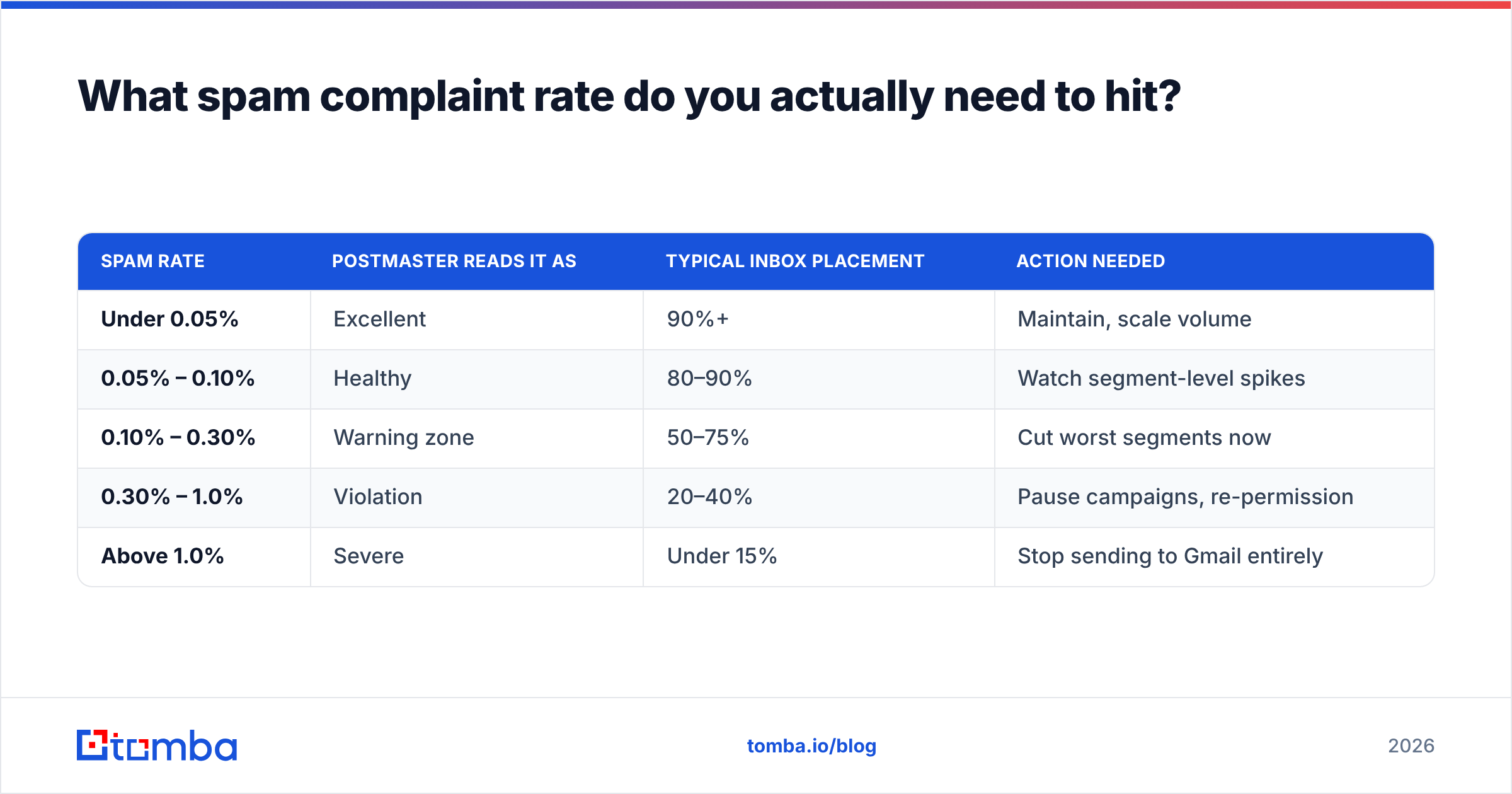
Google's bulk sender requirements set the hard floor: stay below 0.30% spam rate, and Google explicitly recommends staying under 0.10%. Those numbers apply to anyone sending 5,000+ messages per day to Gmail addresses.
Here's what those thresholds look like in practice:
| Spam rate | Postmaster reads it as | Typical inbox placement | Action needed |
|---|---|---|---|
| Under 0.05% | Excellent | 90%+ | Maintain, scale volume |
| 0.05% – 0.10% | Healthy | 80–90% | Watch segment-level spikes |
| 0.10% – 0.30% | Warning zone | 50–75% | Cut worst segments now |
| 0.30% – 1.0% | Violation | 20–40% | Pause campaigns, re-permission |
| Above 1.0% | Severe | Under 15% | Stop sending to Gmail entirely |
One caveat trips people up. Postmaster's spam rate is calculated against delivered mail, not sent mail. If Gmail already routes most of your volume to spam, those messages still count as delivered, and users rarely mark spam-folder mail as spam. Your reported rate can look healthy while your real placement collapses. Cross-check against your ESP's inbox placement data or a seed test before you conclude you're fine.
How do you fix a Low or Bad domain reputation?#
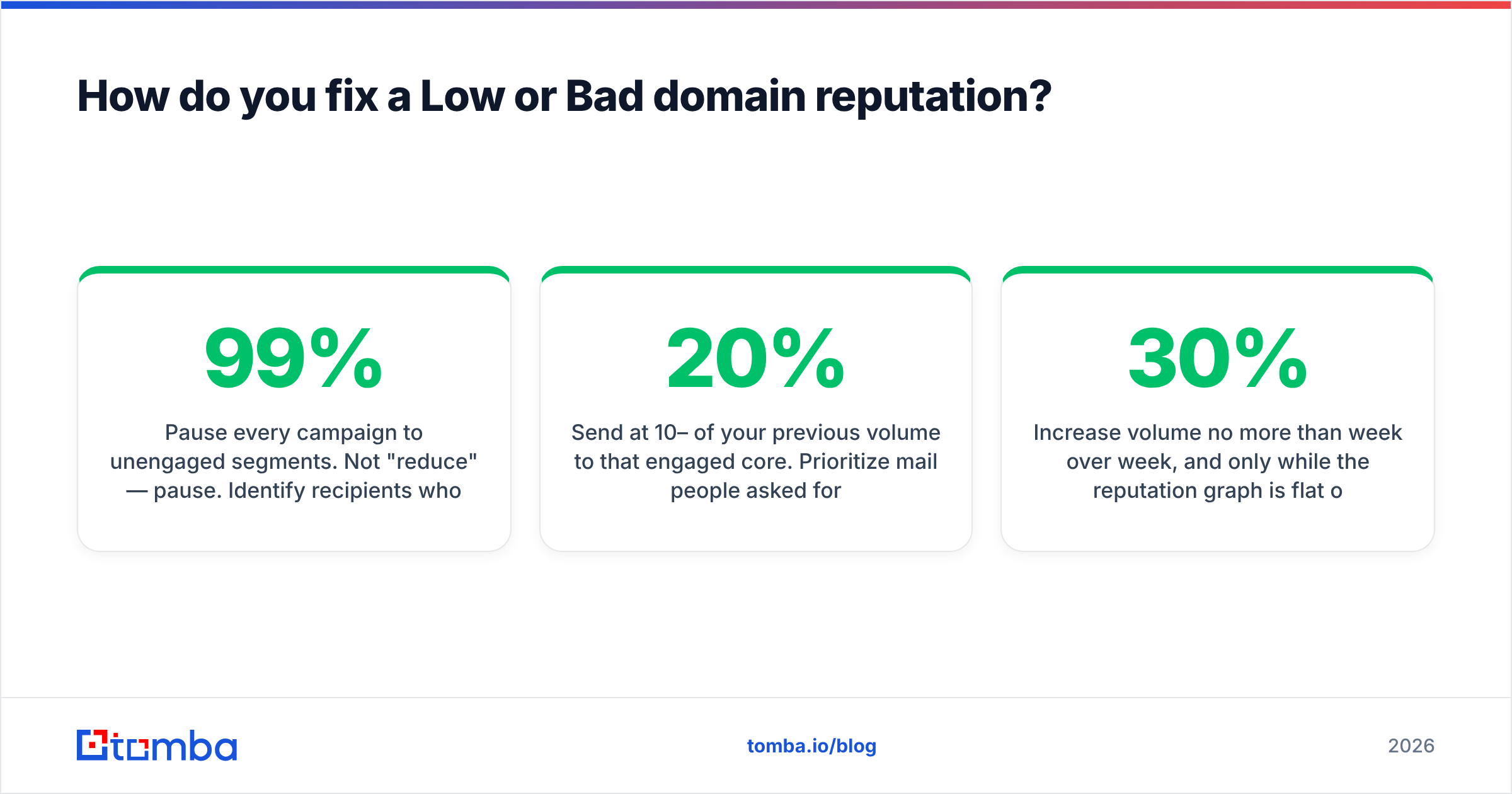
Conclusion first: cut volume hard, send only to your most engaged recipients, fix authentication, and wait 3–6 weeks. There is no faster path, and every tool that promises one is selling you something.
Week 1 — Stop the bleeding.
Pause every campaign to unengaged segments. Not "reduce" — pause. Find the recipients who opened or clicked in the last 30 days and send only to them. Then check that SPF, DKIM, and DMARC all pass at 99%+ in the authentication dashboard. A broken DKIM key on one sending platform is a shockingly common root cause. Check your SPF record for the 10-lookup limit too, since exceeding it fails authentication silently.
Weeks 2–3 — Rebuild positive signal.
Send at 10–20% of your previous volume to that engaged core. Prioritize mail people asked for and reply to: transactional confirmations, requested content, one-to-one follow-ups. Keep HTML light. Avoid link shorteners and unfamiliar tracking domains, which both compound reputation problems. Add a visible unsubscribe and honor it within 48 hours. Gmail's bulk sender rules require one-click unsubscribe for large senders, and an easy unsubscribe beats a spam complaint every time.
Weeks 4–6 — Ramp carefully.
Increase volume no more than 30% week over week, and only while the reputation graph is flat or improving. Re-add lapsed segments in small tranches with a re-permission message. If the grade dips when you add a segment, you've found your problem segment. Remove it permanently rather than "cleaning" it.
Should you just move to a new domain?#
Sometimes, yes — but far less often than the outbound community claims.
Burning a domain and starting fresh makes sense in three cases. Your reputation has been Bad for 60+ days despite corrective action. The domain was used for list practices you can't audit. Or the domain is a dedicated outbound subdomain with no brand value. In those cases, a new subdomain on a clean root, warmed over 4–6 weeks, beats waiting.
It's the wrong move when the damage is to your primary brand domain, when you haven't yet fixed the underlying list-quality problem, or when the grade is Low rather than Bad. Low recovers. Bad on a brand domain is worth fighting for, because the alternative is a permanently split sender identity.
If you do rotate, the actual work is list quality, not domain shopping. Every new domain inherits the same list. Run the list through bulk verification first, strip role accounts and catch-alls you can't confirm, and warm the domain against real engaged recipients rather than a warmup network alone. Warmup pools inflate engagement metrics that Gmail has gotten much better at discounting.
How does Postmaster compare to third-party deliverability tools?#
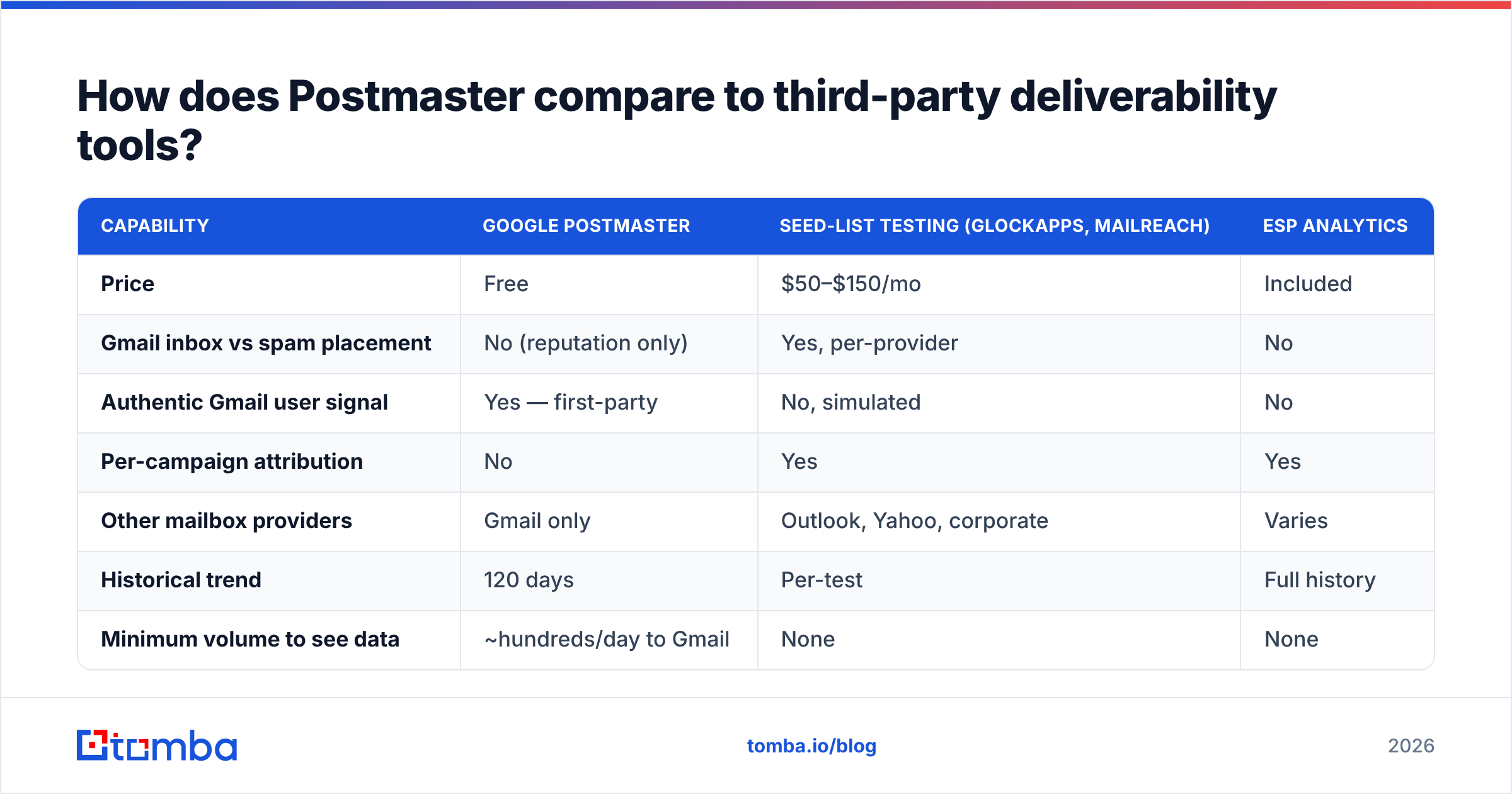
Postmaster is authoritative but coarse. Third-party tools are granular but inferred. You want both.
| Capability | Google Postmaster | Seed-list testing (GlockApps, MailReach) | ESP analytics |
|---|---|---|---|
| Price | Free | $50–$150/mo | Included |
| Gmail inbox vs spam placement | No (reputation only) | Yes, per-provider | No |
| Authentic Gmail user signal | Yes — first-party | No, simulated | No |
| Per-campaign attribution | No | Yes | Yes |
| Other mailbox providers | Gmail only | Outlook, Yahoo, corporate | Varies |
| Historical trend | 120 days | Per-test | Full history |
| Minimum volume to see data | ~hundreds/day to Gmail | None | None |
Use Postmaster as the source of truth for whether Gmail trusts you. Use seed testing to find out which campaign broke things, since Postmaster gives you no per-campaign breakdown. Use your ESP's bounce and complaint logs to find the specific segments driving the numbers.
For Microsoft 365 and Outlook.com, Postmaster tells you nothing. You'll want SNDS and JMRP from Microsoft, which are the rough equivalents.
What sending habits keep domain reputation High?#
The senders who never think about Postmaster share a short list of habits.
- Verify before every send, not quarterly. B2B email data decays around 2–3% per month as people change jobs. A list verified in January is measurably worse by April. Catching invalid addresses before send is the difference between a 0.4% bounce rate and a 4% one.
- Separate your streams by subdomain. Transactional, marketing, and outbound each get their own subdomain. This is the highest-leverage structural decision you can make, and it costs nothing.
- Sunset unengaged recipients on a schedule. No opens in 90 days for marketing, 180 for newsletters. Move them to a re-permission flow, then remove them. Every sender resists this, and every sender who does it sees their grade improve.
Two more habits protect you over the long run:
- Warm new domains against real recipients. Six weeks, starting at 20–30 messages a day, ramping 30% weekly, sending to people who actually reply.
- Watch the graph weekly, not during crises. A slide from High to Medium is a cheap fix. The same slide caught six weeks later at Bad costs you a quarter.
The underlying theme is data quality. Bad reputation is almost never a content problem or an infrastructure problem. It's the downstream symptom of sending to people who didn't want it or don't exist. Everything else is triage.
Where does contact data quality fit into all this?#
At the front. The complaint rate, the unknown-user rate, and the engagement rate that Gmail scores you on are all set before you write a single subject line. They're set by who is on your list.
If you're building outbound lists, sourcing verified, current contacts matters more than any deliverability tactic downstream. That's the case for pairing a real email finder with verification at the point of collection rather than bolting cleanup on later. Tools like BookYourData take a similar position from the prebuilt-database side, and the shared principle holds: pay for accuracy up front or pay for it in reputation later.
Practically: find the address, verify it in the same workflow, drop anything that doesn't resolve cleanly, and only then hand the list to your sending platform. Catch-all domains deserve a separate decision. They accept anything, so a catch-all verifier is the only way to avoid quietly stuffing your list with addresses that will never be read.
Start with a list that won't cost you your reputation#
Your domain reputation Google Postmaster grade is a lagging indicator of list quality. You can spend months tuning send times, rewriting copy, and rotating warmup pools. None of it outruns a list full of stale, guessed, or invalid addresses.
Build the list correctly instead. The Tomba Email Finder returns verified professional addresses with a confidence score attached, so you know what you're sending to before Gmail tells you the hard way. It's free for 25 searches a month, and Tomba pricing starts at $49/mo on Starter with $99/mo Growth and $249/mo Pro tiers for teams running higher volume. Verify first, send second, and your Postmaster graph mostly takes care of itself.
Related guides#
Ready to find emails that actually work?
Join 150,000+ professionals who stopped guessing and started sending. Free credits on signup — no credit card required.
Get the Tomba newsletter
Practical outbound tactics and product updates — once every two weeks.
About the author