Domain Reputation Test: How to Check and Fix Yours in 2026
A domain reputation test takes 15 minutes and explains more about your cold email results than any subject-line tweak. Here's how to run one, read the signals correctly, and fix what's actually broken.
TL;DR
- A domain reputation test is a set of checks — Google Postmaster Tools, Microsoft SNDS, blacklist lookups, DNS authentication, and seed-inbox placement — that together tell you how mailbox providers currently treat mail from your domain.
- No single "reputation score" exists. Anyone selling you one number is aggregating third-party signals and guessing at the rest.
- Google Postmaster Tools is the closest thing to a source of truth for Gmail, and it needs roughly 100 messages/day to a domain before it shows data.
- The three fastest causes of a reputation drop: unverified lists (bounces), missing or broken SPF/DKIM/DMARC, and volume ramping faster than engagement.
- Fixing reputation is slow — 2 to 6 weeks of clean, low-volume, high-engagement sending. Preventing damage costs a few cents per contact in list verification.
What is a domain reputation test?#
A domain reputation test is a diagnostic sweep, not a single tool. Think of it like a blood panel: no one number tells you whether you're healthy, but five markers read together give a clear picture. You're checking what Gmail, Outlook, Yahoo, and the major blocklist operators have observed about mail carrying your domain in the From address and your DKIM signature.
Domain reputation is distinct from IP reputation, and the distinction matters more every year. If you send through a shared pool at a large ESP, your IP reputation is partly other people's problem. Your domain reputation is entirely yours — it follows you across providers, across IPs, and it does not reset when you switch tools. That's why a burned domain is a real asset write-off and a burned shared IP usually isn't.
The signals mailbox providers weigh, roughly in order of impact:
- Bounce rate — hard bounces above 2-3% are read as list-buying or scraping. This is the single fastest way to tank a domain.
- Spam complaint rate — Gmail and Yahoo both enforce a 0.3% ceiling, with 0.1% as the practical target for bulk senders.
- Authentication alignment — SPF, DKIM, and DMARC must pass and align with the From domain. Since February 2024 this is a requirement, not an optimization.
- Engagement signals — opens are noisy post-MPP, but replies, forwards, moves-to-folder, and "not spam" clicks are strong positive markers.
- Volume consistency — a domain that sends 40 emails/day for a month and then 4,000 in one morning looks compromised, because compromised domains behave exactly like that.
- Blocklist presence — Spamhaus DBL, SURBL, and SpamCop listings for your sending or link domains.

How do you actually run a domain reputation test?#
Work through these in order. The whole sweep takes about 15 minutes once you have access set up; the first run takes longer because of DNS verification.
Step 1 — Google Postmaster Tools. Add and verify your domain at Google Postmaster Tools. It reports Domain Reputation on a four-level scale (High, Medium, Low, Bad), plus spam rate, authentication pass rates, and delivery errors. Caveat: the dashboard only populates when you send roughly 100+ messages per day to Gmail addresses. Below that threshold you'll see "no data," which is not the same as "good." Most cold email domains sending 30-50/day will never populate it, which is exactly why you need the other four checks.
Step 2 — Microsoft SNDS and JMRP. Smart Network Data Services is IP-based rather than domain-based, but it's the only window into Outlook/Hotmail filtering you get. Enrol in the Junk Mail Reporting Program at the same time so complaints come back to you instead of silently accumulating.
Step 3 — Blocklist check. Query your sending domain, your root domain, and every link domain you use in email bodies. Tracking domains and URL shorteners get listed constantly and drag the parent domain with them. Run a blacklist checker across the major RBLs, then cross-reference the specific listing with Spamhaus for delisting instructions.
Step 4 — DNS authentication audit. Confirm your SPF record resolves in under 10 DNS lookups, that DKIM is signing with a 2048-bit key, and that DMARC exists with at least p=none and an rua address you actually read. An SPF checker catches the common failure — a record that looks fine but blows the lookup limit because you've added four ESPs over two years and never removed the dead ones.
Step 5 — Seed inbox placement. Send a real campaign email to a seed set of 15-30 addresses spread across Gmail, Outlook, Yahoo, and a corporate Microsoft 365 tenant. Record where it lands. This is the only test that measures the outcome you care about instead of a proxy for it.
Step 6 — Content and header scan. Run the exact email body through a spam checker to catch SpamAssassin rule hits, missing List-Unsubscribe headers, and image-to-text ratios that trip content filters.
Which domain reputation tools should you use?#
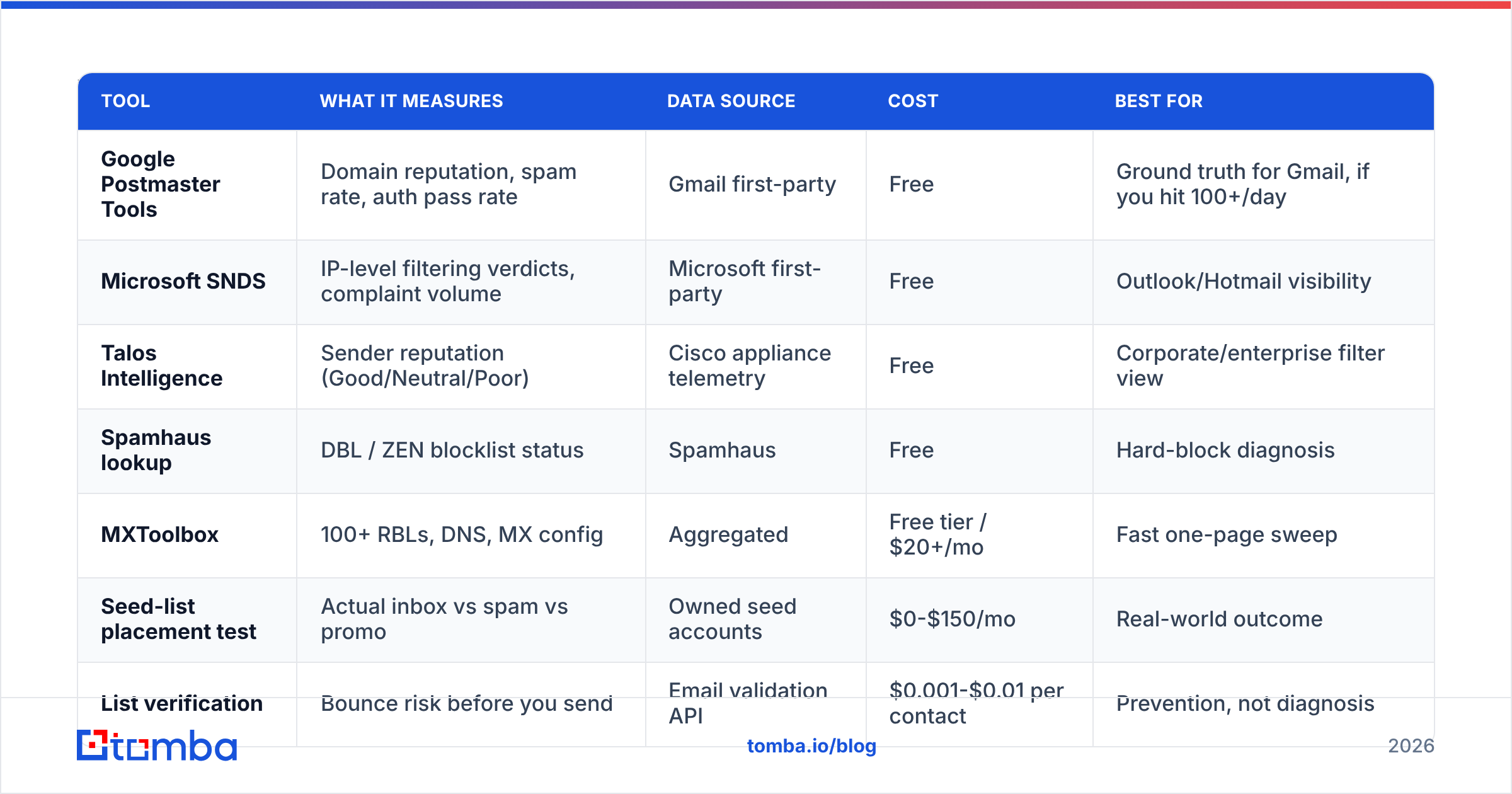
Different tools answer different questions. Here's what each one actually gives you, and what it costs.
| Tool | What it measures | Data source | Cost | Best for |
|---|---|---|---|---|
| Google Postmaster Tools | Domain reputation, spam rate, auth pass rate | Gmail first-party | Free | Ground truth for Gmail, if you hit 100+/day |
| Microsoft SNDS | IP-level filtering verdicts, complaint volume | Microsoft first-party | Free | Outlook/Hotmail visibility |
| Talos Intelligence | Sender reputation (Good/Neutral/Poor) | Cisco appliance telemetry | Free | Corporate/enterprise filter view |
| Spamhaus lookup | DBL / ZEN blocklist status | Spamhaus | Free | Hard-block diagnosis |
| MXToolbox | 100+ RBLs, DNS, MX config | Aggregated | Free tier / $20+/mo | Fast one-page sweep |
| Seed-list placement test | Actual inbox vs spam vs promo | Owned seed accounts | $0-$150/mo | Real-world outcome |
| List verification | Bounce risk before you send | Email validation API | $0.001-$0.01 per contact | Prevention, not diagnosis |
The pattern most teams miss: six of these seven are diagnostic. Only the last one is preventive. You can run the other six every Monday forever and still burn a domain on Tuesday if you're mailing an unverified list.
Why does domain reputation drop even when your copy is good?#
Because copy is the last variable filters weigh, and the first one marketers blame. Here's the actual ranking of what kills a domain, based on how mailbox providers describe their own filtering.
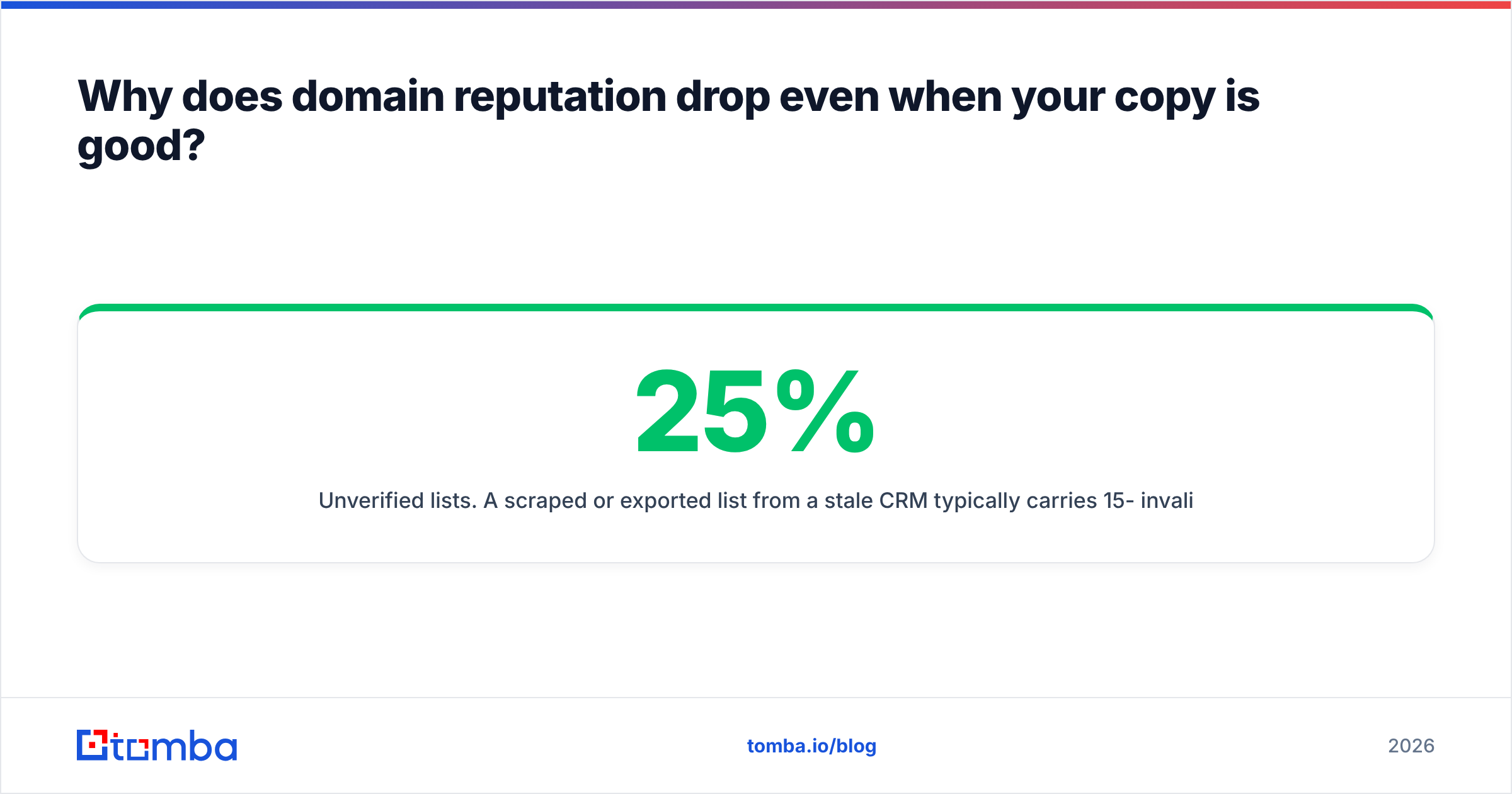
Unverified lists. A scraped or exported list from a stale CRM typically carries 15-25% invalid addresses. At 1,000 sends that's 200 hard bounces in a morning — an unambiguous signal of list acquisition rather than opt-in. Running the list through an email verifier before the first send is the highest-leverage 20 minutes in the whole workflow. Target sub-2% bounce, and treat anything above 5% as a stop-the-send event.
Catch-all domains counted as valid. This one is subtle. Catch-all servers accept every address at SMTP time, so naive verifiers mark them "valid." You then send to jsmith@ when the real address is john.smith@, and the bounce arrives asynchronously — or worse, lands in a spam trap the company operates. A proper catch-all verifier uses pattern confidence and secondary sources instead of trusting the SMTP handshake.
Recycled spam traps. Providers convert abandoned mailboxes into traps after 6-12 months of inactivity. If you're mailing a list you built in 2023, a meaningful slice of it is now trap territory. Age is the risk factor, not source quality at the time of collection.
Volume ramping. A new domain sending 500/day in week one gets throttled regardless of content. The safe curve is roughly 20/day in week one, doubling weekly, holding at 40-50/day per mailbox indefinitely. Add mailboxes to scale, not volume per mailbox.
Link domain contamination. Your sending domain can be spotless while the shortener in your CTA sits on SURBL. Filters evaluate every domain in the message, not just the From.

How do you read the results without panicking?#
Scores are relative and lagging. A "Medium" in Postmaster Tools after two clean weeks is a domain on the way up; the same "Medium" after a spike day is a domain on the way down. Trend beats snapshot every time.
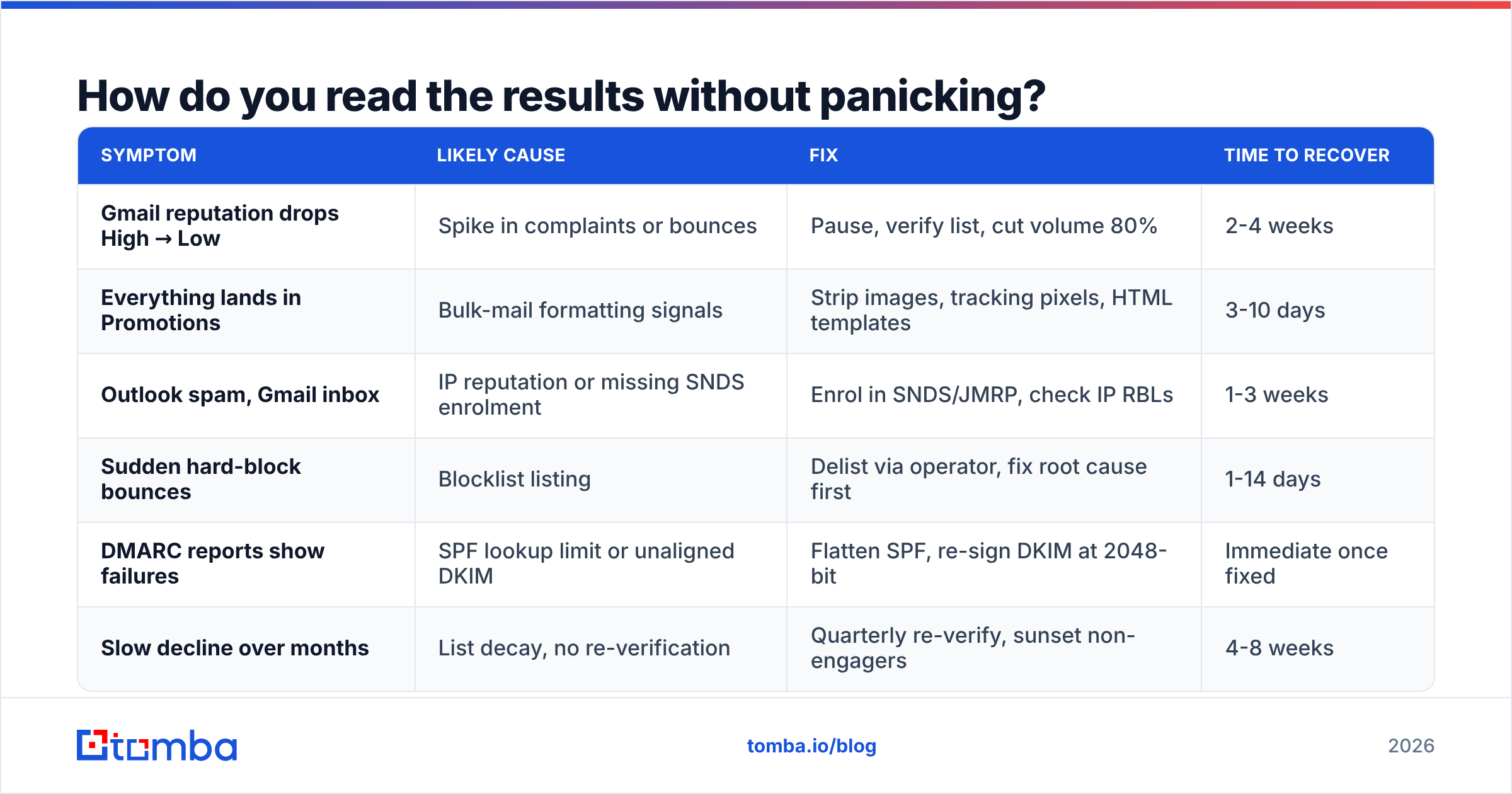
Here's how to triage what you find:
| Symptom | Likely cause | Fix | Time to recover |
|---|---|---|---|
| Gmail reputation drops High → Low | Spike in complaints or bounces | Pause, verify list, cut volume 80% | 2-4 weeks |
| Everything lands in Promotions | Bulk-mail formatting signals | Strip images, tracking pixels, HTML templates | 3-10 days |
| Outlook spam, Gmail inbox | IP reputation or missing SNDS enrolment | Enrol in SNDS/JMRP, check IP RBLs | 1-3 weeks |
| Sudden hard-block bounces | Blocklist listing | Delist via operator, fix root cause first | 1-14 days |
| DMARC reports show failures | SPF lookup limit or unaligned DKIM | Flatten SPF, re-sign DKIM at 2048-bit | Immediate once fixed |
| Slow decline over months | List decay, no re-verification | Quarterly re-verify, sunset non-engagers | 4-8 weeks |
Two rules that save people a lot of wasted effort. First, delist after you fix the cause, not before — Spamhaus relists faster the second time and the operators track repeat offenders. Second, do not switch domains to escape a reputation problem. You'll reproduce the same result on the new domain in six weeks because the input (the list) hasn't changed. Fresh domains buy you time, not immunity.
If you want the vocabulary straight, our glossary entry on sender reputation covers how providers aggregate these signals internally.
How often should you run a domain reputation test?#
Match the cadence to your volume and your risk tolerance:
- Weekly — anyone sending more than 1,000 emails/week. A 5-minute Postmaster + blocklist check on Monday catches problems while they're still cheap.
- Before every new-list send — verification is non-negotiable, and a seed test on a 50-contact sample beats discovering the problem at 5,000.
- Monthly — full sweep including DNS audit, seed placement across four providers, and DMARC report review.
- Quarterly — re-verify your entire active database. B2B contact data decays around 22-30% annually as people change jobs, so a list that was clean in January is measurably dirty by April.
- Immediately — any time reply rate drops more than 30% week-over-week with no change in copy, targeting, or send time. That's a deliverability signal wearing a copywriting disguise.
Automate what you can. If you're managing sending infrastructure programmatically, the email verification API lets you gate every contact at the point of import instead of running batch cleanups after the damage is done. That's the difference between a preventive and a reactive posture, and it's usually a one-afternoon integration.
What about the tools that sell a single "reputation score"?#
Treat them as directional. Vendors like BookYourData, Validity, and the various all-in-one deliverability suites do genuinely useful work — they aggregate blocklist data, seed placement results, and complaint feedback loops into one dashboard, which saves real time. BookYourData in particular pairs verified contact data with sending guidance, which addresses cause and symptom together rather than just reporting the symptom.
What none of them can do is see inside Gmail's classifier. When a tool reports "your reputation is 87/100," that number is a weighted blend of public signals plus the vendor's own seed network. It's a reasonable proxy. It is not a measurement. The moment it disagrees with your actual reply rate, trust the reply rate.
Read vendor reviews on G2 with the same skepticism — deliverability tooling reviews skew heavily toward whoever ran the best onboarding, not whoever measured most accurately.
What should you do in the next hour?#
A concrete sequence, in priority order:
- Verify domain ownership in Google Postmaster Tools. Even if you're below the data threshold today, the historical data starts accruing from the day you verify, not the day you check.
- Run one blocklist sweep across your sending domain, root domain, and link domains.
- Audit SPF, DKIM, DMARC. Fix the lookup count if you're near 10. Set DMARC to
p=nonewith reporting if you have nothing. - Export your active list and check the bounce risk before your next campaign, not after.
- Send one seed test to a 20-address spread and record placement by provider.
- Write down today's numbers. Next week's test is meaningless without a baseline.
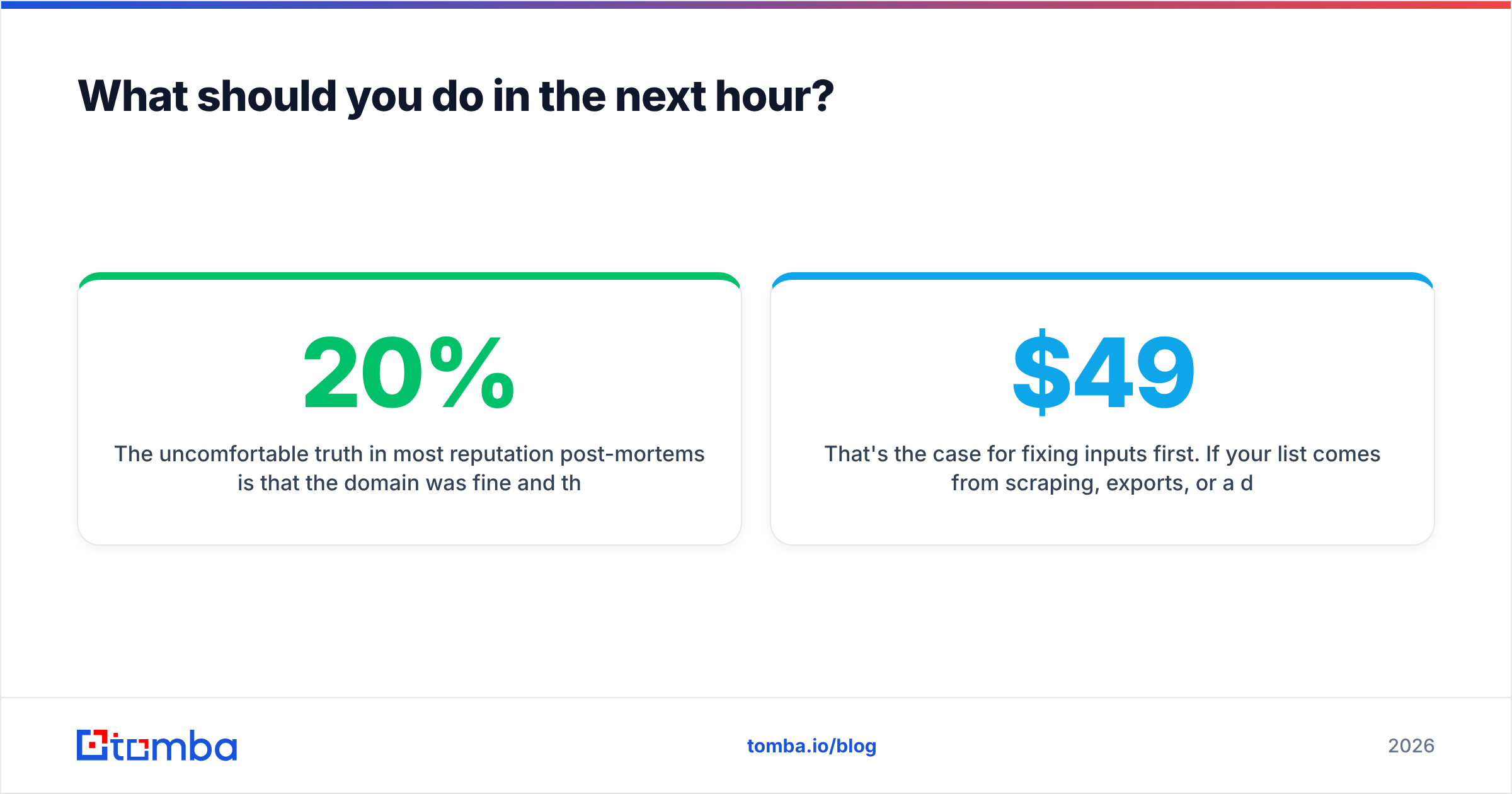
The uncomfortable truth in most reputation post-mortems is that the domain was fine and the data was not. Filters are reacting to bounces and complaints generated by addresses that should never have been mailed. Every hour spent tuning subject lines on a 20%-invalid list is an hour spent optimizing the wrong variable.
That's the case for fixing inputs first. If your list comes from scraping, exports, or a database you inherited, run it through verification before it touches a mailbox — and build new lists from sources that return verified addresses in the first place. The Tomba Email Finder returns confidence-scored professional addresses with the verification step built in, so contacts enter your sequence already validated rather than being cleaned up after they've bounced. The free tier covers 25 searches/month if you want to test accuracy against a list you already trust; paid plans start at $49/mo. Full Tomba pricing is public, with Growth at $99/mo and Pro at $249/mo for teams running higher volume.
Run the test. Then fix the list. In that order.
Related guides#
Ready to find emails that actually work?
Join 150,000+ professionals who stopped guessing and started sending. Free credits on signup — no credit card required.
Get the Tomba newsletter
Practical outbound tactics and product updates — once every two weeks.
About the author