Domain Warm Up for Cold Email: The Complete 2026 Guide
A new domain has no sending history, and mailbox providers treat silence as suspicion. Here is the ramp schedule, the tool comparison, and the metrics that tell you when your domain is actually ready.
TL;DR
- Domain warm-up is the process of building sending reputation on a fresh domain before you run real cold email volume. Budget 3–4 weeks, not 3–4 days.
- Authentication (SPF, DKIM, DMARC) is a prerequisite, not part of warm-up. If those are broken, no ramp schedule saves you.
- Your list quality drives warm-up outcomes more than your ramp curve does. A 6% bounce rate on day 4 undoes three weeks of careful sending.
- Automated warm-up pools still help on brand-new domains, but their marginal value has dropped since Google and Microsoft tightened bulk-sender rules in 2024. Real replies from real humans beat synthetic ones.
- You are done warming when bounce rate is under 2%, spam complaints stay under 0.1%, and reply rate holds steady as volume climbs — not when a calendar says 30 days.
What is domain warm up for cold email?#
Domain warm-up is the deliberate, gradual increase of sending volume from a new domain (or a domain that has been dormant) so mailbox providers can build a reputation profile for it before you send at scale.
Think of it like a credit score. A 19-year-old with no credit history isn't rejected because they're a bad borrower — they're rejected because nobody has any data. Gmail, Outlook, and every spam filter in between treat a brand-new sending domain the same way: unknown, therefore suspicious. Warm-up is how you generate the transaction history.
Technically, what you're building is a reputation record tied to three things: your domain, the sending IP (shared or dedicated), and your authentication alignment. Each provider maintains its own version of this. Google's opinion of your domain doesn't transfer to Microsoft, and neither transfers to a corporate Proofpoint gateway.
Two things warm-up is not:
- It is not a fix for bad targeting. If nobody wants your email, more warm-up days won't change that.
- It is not a substitute for authentication. SPF, DKIM, and DMARC must be live and aligned before day one of the ramp.
Why does a new domain get filtered even with perfect copy?#
Because filters score the sender before they read the message. A cold-start domain hits several negative or neutral signals simultaneously:
- No historical engagement data. No opens, no replies, no "not spam" clicks from any recipient at that provider.
- Recent registration date. Domains registered in the last 30 days are heavily weighted in spam scoring. Buy the domain and let it sit for a couple of weeks before you send anything if you can.
- Volume shape. Zero → 400 emails in one day is a pattern that only spammers and misconfigured servers produce. Legitimate businesses ramp.
- Content-to-reputation mismatch. A sales pitch with links and tracking pixels from an unknown sender is scored very differently than the same pitch from a domain with two years of clean history.
- Bounce and complaint spikes. This is the fastest way to kill a warm domain, and it is entirely within your control.
That last point deserves emphasis, because it's where most warm-up programs quietly fail.

If your list contains 8% invalid addresses, your bounce rate on the first real campaign will be around 8%. Gmail's threshold for concern sits far below that. You can execute a flawless 30-day ramp and destroy the reputation you built in a single Tuesday-morning send. Run every list through an email verifier before it touches a warmed domain — and for anything over a few thousand rows, use a bulk verify pass rather than checking addresses one at a time.
What should you set up before day 1?#
Do all of this before you send a single warm-up message. It takes an afternoon.
- Buy a separate domain for cold outreach. Never warm up or send cold email from your primary company domain. Use a close variant —
getacme.com,acme-hq.com,tryacme.com. If it burns, your main domain and its transactional email are untouched. - Publish SPF, DKIM, and DMARC. All three. DMARC can start at
p=nonefor monitoring, but the record must exist — both Google and Microsoft now require it from bulk senders. Verify the record with an SPF checker rather than trusting your DNS panel's preview. - Set up a real website on the domain. Filters resolve the domain. A parked page or a 404 is a negative signal. A one-page site with a logo, a description, and a contact address is enough.
- Create the mailboxes with full profiles. Real name, real title, a signature with a physical address and an unsubscribe path, and a profile photo. Three to five mailboxes per domain, maximum — spreading 500 sends across ten mailboxes on one domain doesn't hide the domain-level volume.
- Add a custom tracking domain and skip open tracking. Shared tracking domains carry other senders' reputation. Open-tracking pixels correlate with spam classification more than they used to. Track replies, not opens.
- Configure a bounce/unsubscribe handler. One-click unsubscribe (RFC 8058) is mandatory for bulk senders under Google's sender guidelines — and it lowers complaint rates, which matters far more than the handful of unsubscribes it costs you.
How long does domain warm up actually take?#
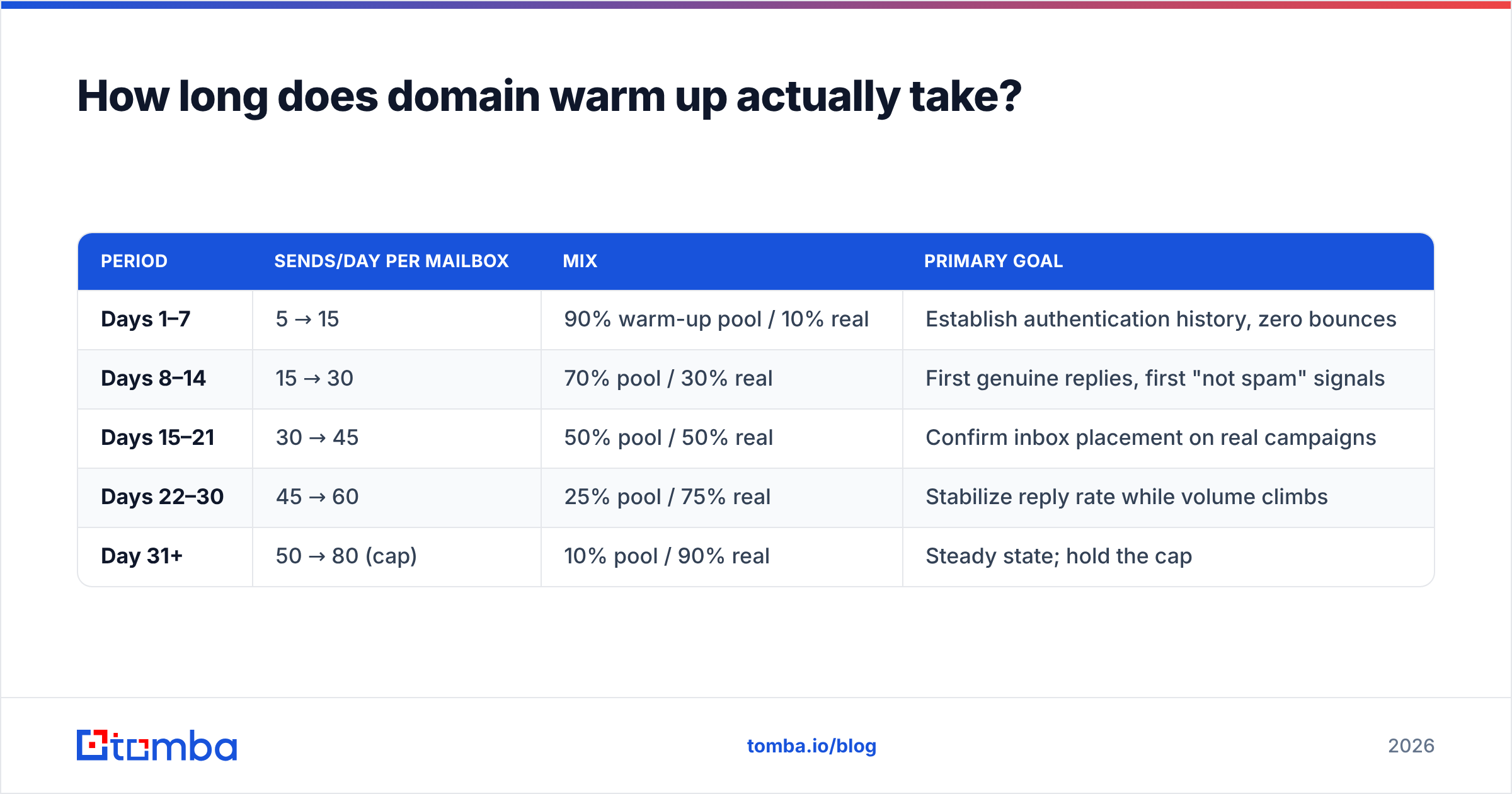
Three to four weeks for a standard B2B outbound domain. Here's a ramp that works in practice, per mailbox:
| Period | Sends/day per mailbox | Mix | Primary goal |
|---|---|---|---|
| Days 1–7 | 5 → 15 | 90% warm-up pool / 10% real | Establish authentication history, zero bounces |
| Days 8–14 | 15 → 30 | 70% pool / 30% real | First genuine replies, first "not spam" signals |
| Days 15–21 | 30 → 45 | 50% pool / 50% real | Confirm inbox placement on real campaigns |
| Days 22–30 | 45 → 60 | 25% pool / 75% real | Stabilize reply rate while volume climbs |
| Day 31+ | 50 → 80 (cap) | 10% pool / 90% real | Steady state; hold the cap |
Two caveats on this table.
First, the numbers are per mailbox, not per domain. Three mailboxes at 50/day is 150 domain-level sends. Providers see the domain.
Second, 80/day per mailbox is a ceiling, not a target to sprint toward. Plenty of teams run 30–40/day per mailbox indefinitely and see better reply rates than teams at 100. If you need more volume, add domains and mailboxes — don't push a single domain harder.
Warm-up length stretches when you're sending to a hard audience. Enterprise recipients behind Mimecast or Proofpoint gateways, government domains, and healthcare orgs all warrant an extra one to two weeks and a slower curve.
Which warm-up tools are worth paying for in 2026?#
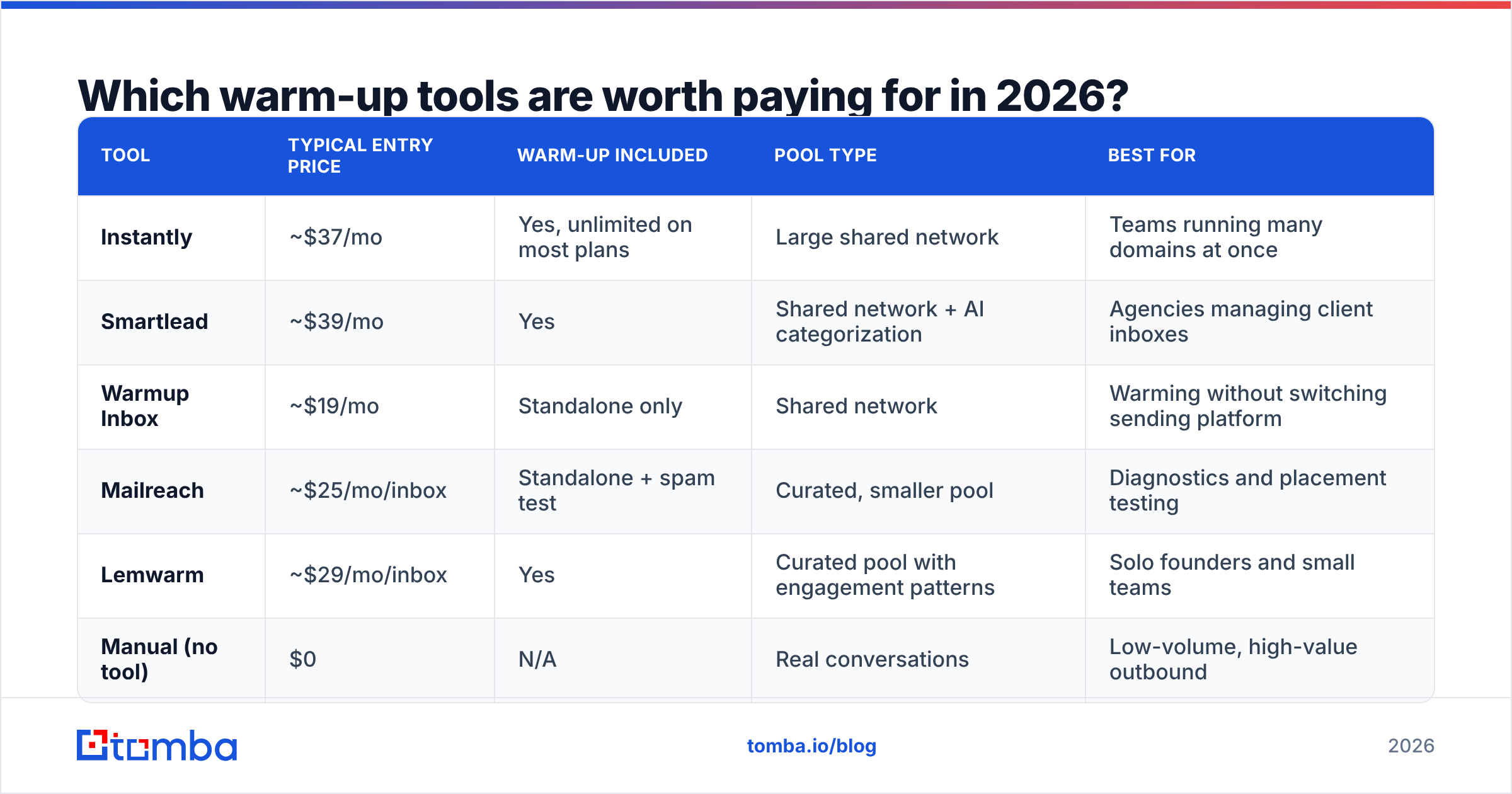
Most cold email platforms bundle warm-up now. The differences are real but smaller than the marketing implies.
| Tool | Typical entry price | Warm-up included | Pool type | Best for |
|---|---|---|---|---|
| Instantly | ~$37/mo | Yes, unlimited on most plans | Large shared network | Teams running many domains at once |
| Smartlead | ~$39/mo | Yes | Shared network + AI categorization | Agencies managing client inboxes |
| Warmup Inbox | ~$19/mo | Standalone only | Shared network | Warming without switching sending platform |
| Mailreach | ~$25/mo/inbox | Standalone + spam test | Curated, smaller pool | Diagnostics and placement testing |
| Lemwarm | ~$29/mo/inbox | Yes | Curated pool with engagement patterns | Solo founders and small teams |
| Manual (no tool) | $0 | N/A | Real conversations | Low-volume, high-value outbound |
The honest read: the manual row is underrated. Twenty genuine one-to-one emails a day to prospects, partners, and your own network — the kind that get real replies — build reputation more reliably than 200 synthetic pool messages that no human ever reads. Pool warm-up is a supplement that gets you off zero, not the whole program.
Also worth knowing: mailbox providers have gotten better at spotting warm-up networks. Rapid open-then-reply-then-move-to-inbox loops between the same few thousand accounts are a detectable pattern. Nobody outside Google knows exactly how heavily it's discounted, but the safe assumption is that pool signals are worth less each year and real engagement is worth the same as always.

What volume and cadence should you settle at?#
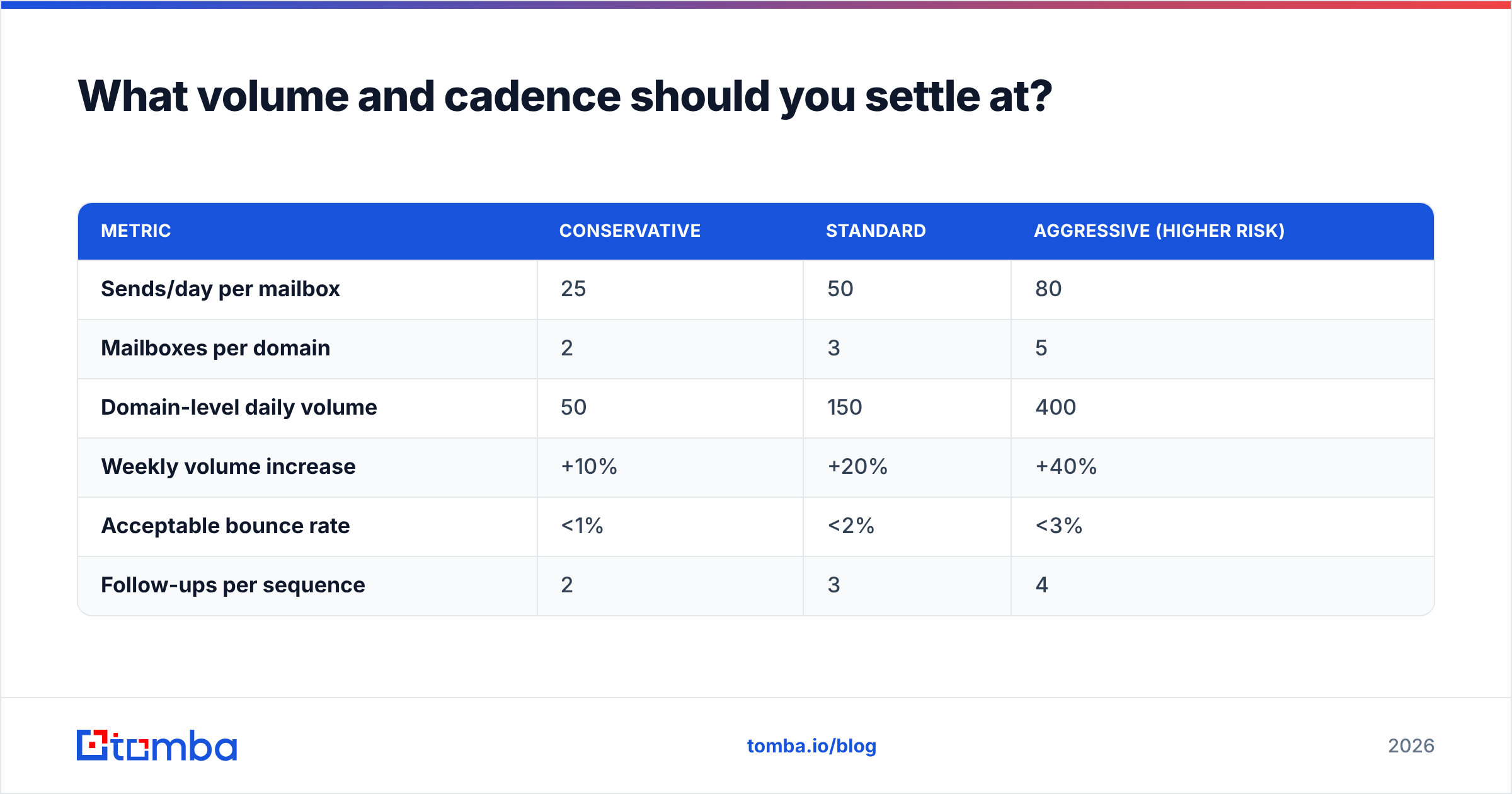
Once the domain is warm, the constraint stops being reputation and starts being list quality and relevance. A sustainable steady state for most B2B teams:
| Metric | Conservative | Standard | Aggressive (higher risk) |
|---|---|---|---|
| Sends/day per mailbox | 25 | 50 | 80 |
| Mailboxes per domain | 2 | 3 | 5 |
| Domain-level daily volume | 50 | 150 | 400 |
| Weekly volume increase | +10% | +20% | +40% |
| Acceptable bounce rate | <1% | <2% | <3% |
| Follow-ups per sequence | 2 | 3 | 4 |
If you're above the "aggressive" column on more than one row at the same time, you're not running outbound — you're running an experiment in how fast a domain can be blacklisted.
How do you know the warm-up actually worked?#
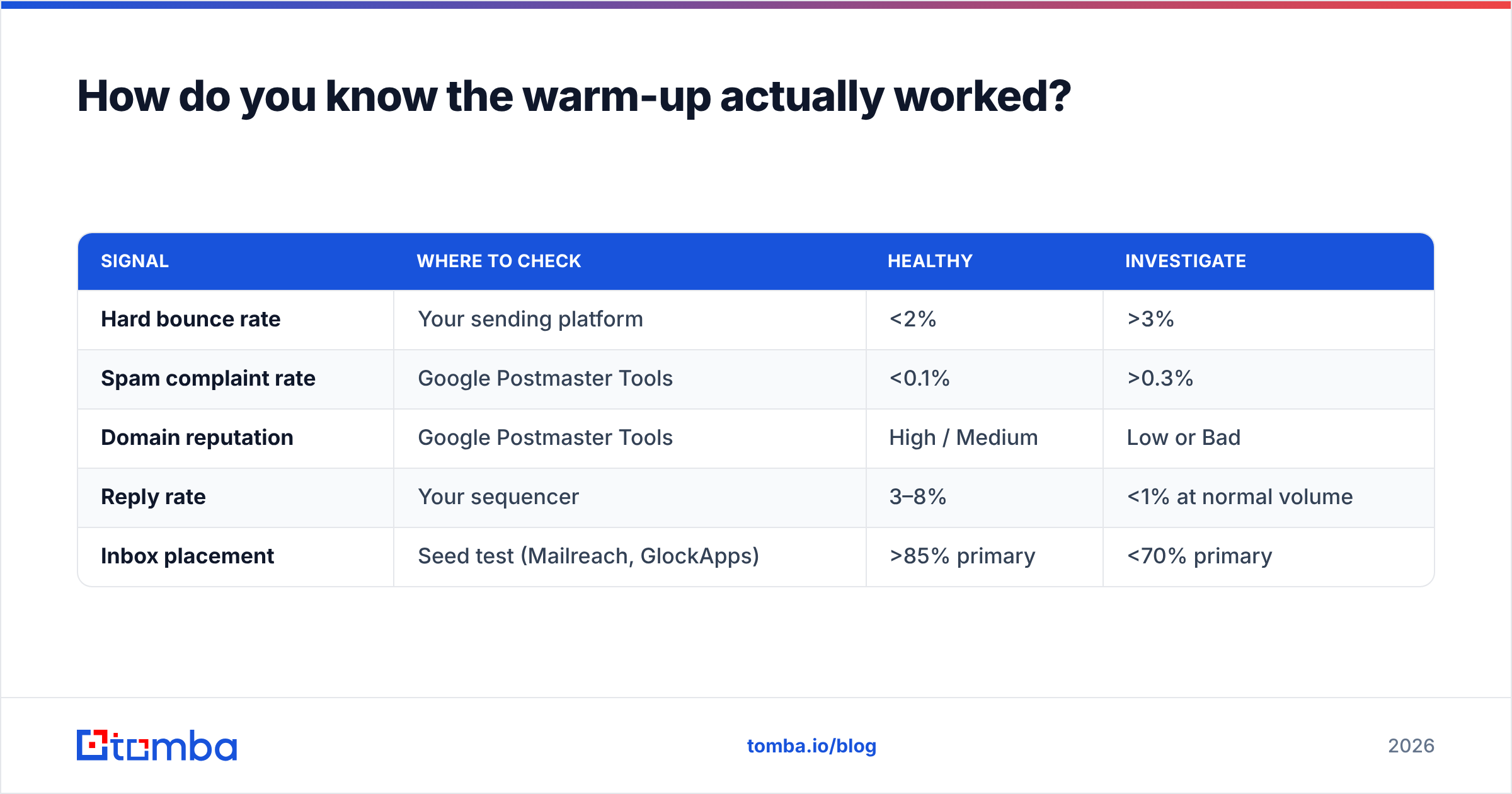
Stop trusting the calendar and start reading five numbers. Check them weekly during warm-up and monthly after.
| Signal | Where to check | Healthy | Investigate |
|---|---|---|---|
| Hard bounce rate | Your sending platform | <2% | >3% |
| Spam complaint rate | Google Postmaster Tools | <0.1% | >0.3% |
| Domain reputation | Google Postmaster Tools | High / Medium | Low or Bad |
| Reply rate | Your sequencer | 3–8% | <1% at normal volume |
| Inbox placement | Seed test (Mailreach, GlockApps) | >85% primary | <70% primary |
Google Postmaster Tools is free and non-negotiable — it's the only place you see Gmail's actual opinion of your domain rather than your guess about it. Microsoft's equivalent is SNDS/JMRP, which is IP-based and mainly useful if you're on a dedicated IP.
One more free check worth running before you scale: paste a live campaign through a spam checker to catch content-level triggers — link-heavy bodies, spammy phrasing, missing plain-text alternative — that reputation alone won't overcome. And if you want a quick sanity check on how many days your specific volume target implies, the warmup calculator will size the ramp for you.
What are the mistakes that kill warmed domains?#
- Sending to a scraped, unverified list on day 22. The single most common failure. Verify first, always.
- Ramping too fast after a good week. Two clean weeks doesn't mean you can triple volume in week three. Providers weight the rate of change, not just the absolute number.
- Using the same copy for 4,000 people. Near-identical bodies across thousands of recipients is a bulk-mail fingerprint. Vary the first line and the specifics.
- Ignoring the reply side. Reputation improves when recipients reply, star, or move you to a folder. A sequence that only generates silence teaches Gmail that your mail is ignorable.
- Letting a domain go cold. Reputation decays. A domain that sits idle for six weeks needs a partial re-warm — usually one week, not four.
- Treating email deliverability as a one-time project. It's a maintenance metric, like uptime. Check it monthly.
Does warm-up matter more than list quality?#
No — and this is the part most guides bury. Warm-up manages a ceiling. List quality determines whether you hit it.
Run the arithmetic. A perfectly warmed domain sending to a list with 10% invalid addresses produces roughly 15 hard bounces on a 150-email day. That is enough to move Google's domain reputation from High to Low inside a week, and recovering takes longer than the original warm-up did. The same domain sending to a list verified to under 1% invalid produces one or two bounces — noise, not a signal.
The practical order of operations: build a clean list, verify it, then warm the domain to carry it. If you're sourcing contacts from company websites or LinkedIn, pull them through a source that returns confidence scores rather than guessed patterns — a permutator that produces first.last@ and hopes for the best is exactly how the 10% invalid list gets built. Tools like Tomba's email finder and domain search return verification status alongside each address, so the bounce risk is filtered out before it ever reaches your warmed mailbox. For third-party benchmarking of the finder/verifier category, G2's lead intelligence grid is a reasonable neutral starting point.
Where should you start this week?#
Buy the domain today, publish SPF/DKIM/DMARC tomorrow, and let the domain age for a week while you build and verify the list. Then start the ramp in the table above. Four weeks from now you'll have a domain that can carry 150 sends a day without flinching — and a list that won't waste it.
If the list side is what's missing, that's where to spend first. Tomba's Email Finder returns verified professional addresses by name, domain, or company, with a confidence score on every result so you know what you're sending to before you send it. The free tier covers 25 searches a month for testing the workflow; paid plans start at $49/mo on Starter and $99/mo on Growth — full Tomba pricing is public. Warm the domain properly, feed it clean data, and the ramp does what it's supposed to do.
Related guides#
Ready to find emails that actually work?
Join 150,000+ professionals who stopped guessing and started sending. Free credits on signup — no credit card required.
Get the Tomba newsletter
Practical outbound tactics and product updates — once every two weeks.
About the author