DoYouMail Pricing, Reviews, Pros and Cons: 2026 Breakdown
DoYouMail sells unlimited sending accounts on dedicated infrastructure for a flat monthly fee. Here is what the plans actually cost, what reviewers praise, where it falls short, and who should pick something else.

TL;DR
- DoYouMail sells cold email infrastructure — unlimited sending mailboxes on dedicated IPs — not a sequencer, not a database, and not a lead source.
- Pricing is flat-rate per month rather than per-mailbox, which is why it undercuts buying dozens of Google Workspace seats. Verify current numbers on the vendor site before you budget; infra pricing moves.
- Reviews cluster around two themes: setup speed (SPF, DKIM, DMARC handled for you) and cost predictability. The recurring complaint is shared-reputation risk on pooled infrastructure and thin reporting.
- The pros-and-cons math only works if your list is clean. Unlimited sending capacity multiplies bounce damage instead of fixing it.
- Best fit: agencies and high-volume outbound teams already running 20+ mailboxes. Poor fit: solo founders sending under 500 emails a month.
What is DoYouMail?#
DoYouMail is cold email sending infrastructure. You point domains at it, it provisions mailboxes, configures authentication records, and hands you SMTP/IMAP credentials that plug into whatever sequencer you already use — Instantly, Smartlead, Reply, Lemlist, or a custom script.
The everyday analogy: most cold email tools are the restaurant — menu, waiters, dining room. DoYouMail is the commercial kitchen you rent out back. It does not talk to your prospects. It makes sure the food gets out the door.
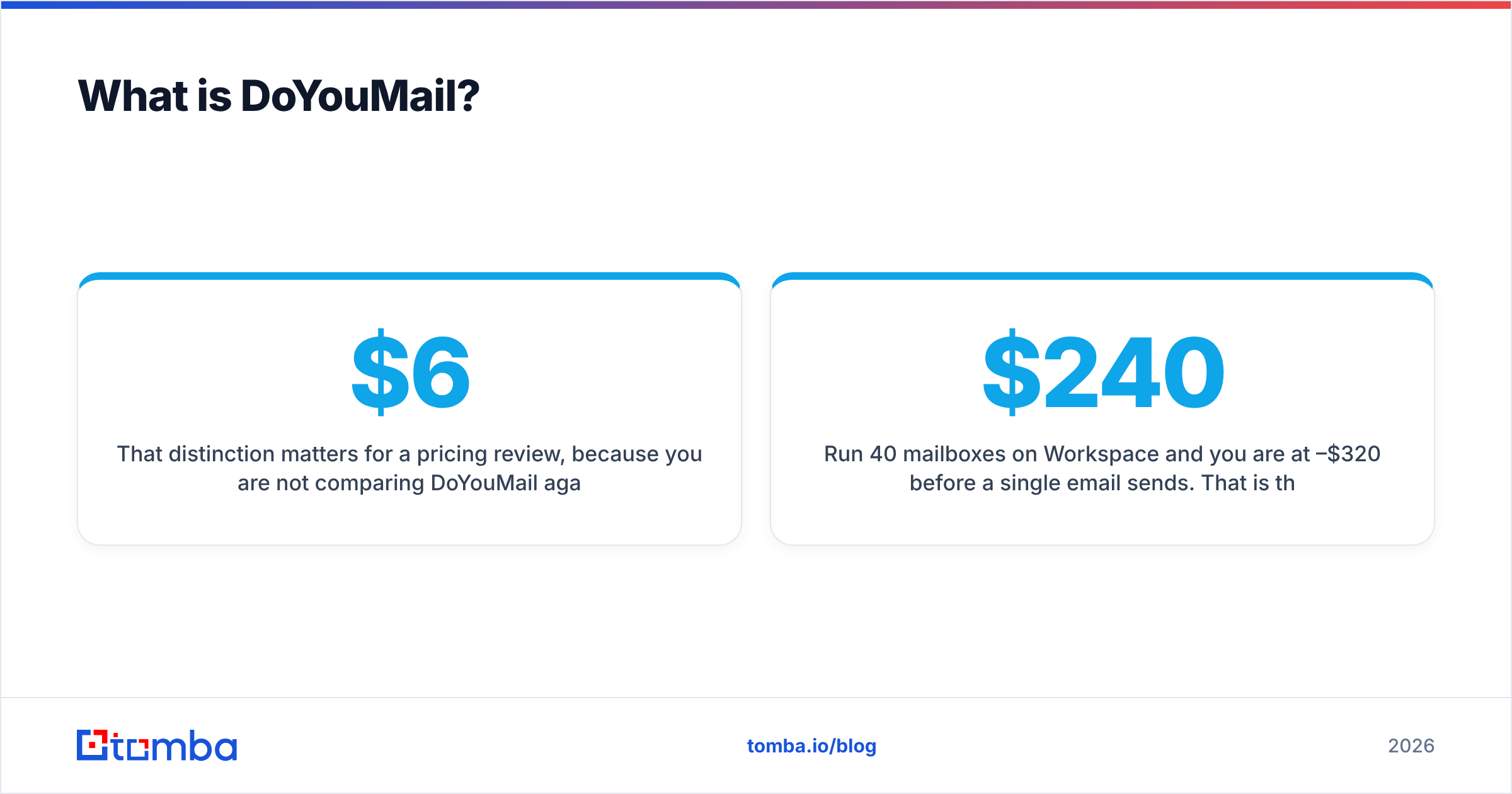
That distinction matters for a pricing review, because you are not comparing DoYouMail against Apollo or Lemlist. You are comparing it against the alternative way of getting sending capacity: buying Google Workspace or Microsoft 365 seats at roughly $6–$8 per mailbox per month, plus the hours you spend on DNS records for each new domain.
Run 40 mailboxes on Workspace and you are at $240–$320/month before a single email sends. That is the number DoYouMail is built to undercut. You can check the current plan structure directly on the official DoYouMail site — infrastructure vendors reprice more often than SaaS, so treat any figure in a blog post (including this one) as a starting point, not a quote.
How much does DoYouMail pricing cost in 2026?#
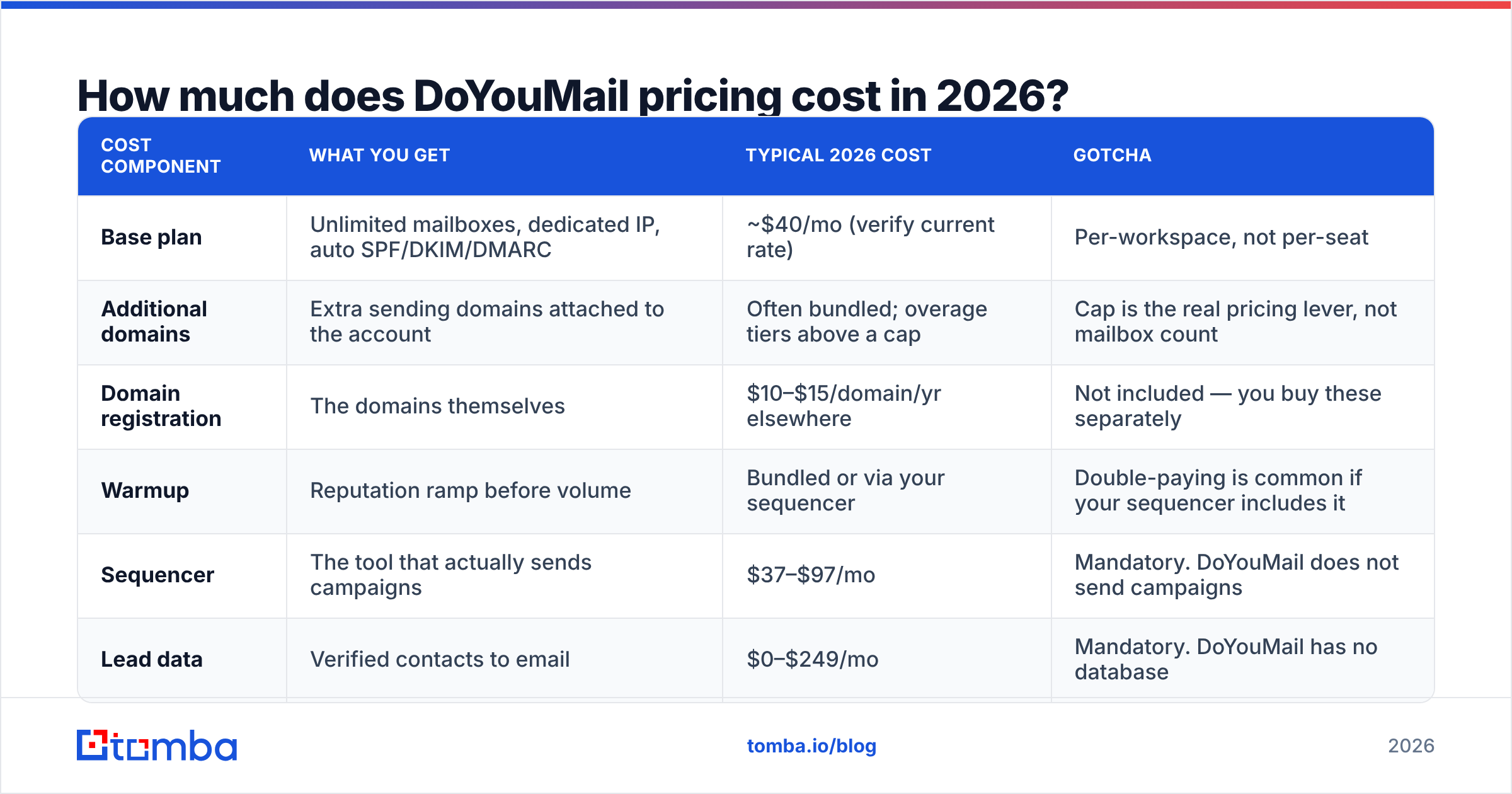
The model is flat monthly fee for unlimited sending accounts, with domains as the variable you scale. Here is the structure as advertised at the time of writing, alongside the realistic all-in cost once you add the things the base fee does not include.
| Cost component | What you get | Typical 2026 cost | Gotcha |
|---|---|---|---|
| Base plan | Unlimited mailboxes, dedicated IP, auto SPF/DKIM/DMARC | ~$40/mo (verify current rate) | Per-workspace, not per-seat |
| Additional domains | Extra sending domains attached to the account | Often bundled; overage tiers above a cap | Cap is the real pricing lever, not mailbox count |
| Domain registration | The domains themselves | $10–$15/domain/yr elsewhere | Not included — you buy these separately |
| Warmup | Reputation ramp before volume | Bundled or via your sequencer | Double-paying is common if your sequencer includes it |
| Sequencer | The tool that actually sends campaigns | $37–$97/mo | Mandatory. DoYouMail does not send campaigns |
| Lead data | Verified contacts to email | $0–$249/mo | Mandatory. DoYouMail has no database |
The honest read: the $40-ish headline is real, but the all-in monthly cost of a working outbound stack that uses DoYouMail lands closer to $150–$400 depending on your sequencer and data source. That is still cheaper than 40 Workspace seats. It is not "$40 and you are outbounding."
What actually drives your bill up#
- Domain count, not mailbox count. The unlimited-mailbox promise is genuine, but domains are the metered resource on most infra vendors. Plan your domain footprint first.
- Registration and renewal. Twenty burner domains at $12/year is $240/year you pay to a registrar, invisible on your DoYouMail invoice.
- The sequencer you still need. Infrastructure without a sending layer does nothing.
- Replacement domains. Burned domains get retired. Budget a churn rate of 10–20% per quarter if you send aggressively.
- List hygiene. Every 100 bad addresses you send to costs you reputation on infrastructure you are paying to protect. Cheap capacity makes this worse, not better.
What do DoYouMail reviews actually say?#
Review volume for infrastructure vendors is thinner than for household-name SaaS — you will find more signal in outbound communities than on G2, where category coverage for pure sending infra is sparse. Reading across public reviews and practitioner threads, the pattern is consistent:
Praised repeatedly:
- Setup time. Users report going from bare domain to sending mailboxes in well under an hour, with authentication records handled automatically. For anyone who has hand-typed DKIM TXT records into Cloudflare for fifteen domains, this is the headline benefit.
- Predictable cost. Flat pricing removes the "do I really need mailbox #41" decision.
- No seat math. Adding a mailbox is free, so you can spread volume thinner across more inboxes — which is the correct deliverability strategy anyway.
Criticized repeatedly:
- Reporting depth. You get sending capacity, not a deliverability analytics suite. Teams end up cross-referencing with Google Postmaster Tools to see what Gmail actually thinks of them.
- Neighbor risk. Any pooled or semi-dedicated infrastructure carries the possibility that another customer's behavior affects the IP range you sit in. Dedicated IPs mitigate this; they do not eliminate range-level reputation effects.
- Support latency. Common to the category — small teams, async support, occasional multi-day waits on non-urgent tickets.
- No hand-holding on strategy. If your emails are bad, nothing here tells you so.
None of this is disqualifying. It is what "infrastructure vendor" means. You are buying plumbing, and plumbing does not review your copy.
What are the pros and cons of DoYouMail?#
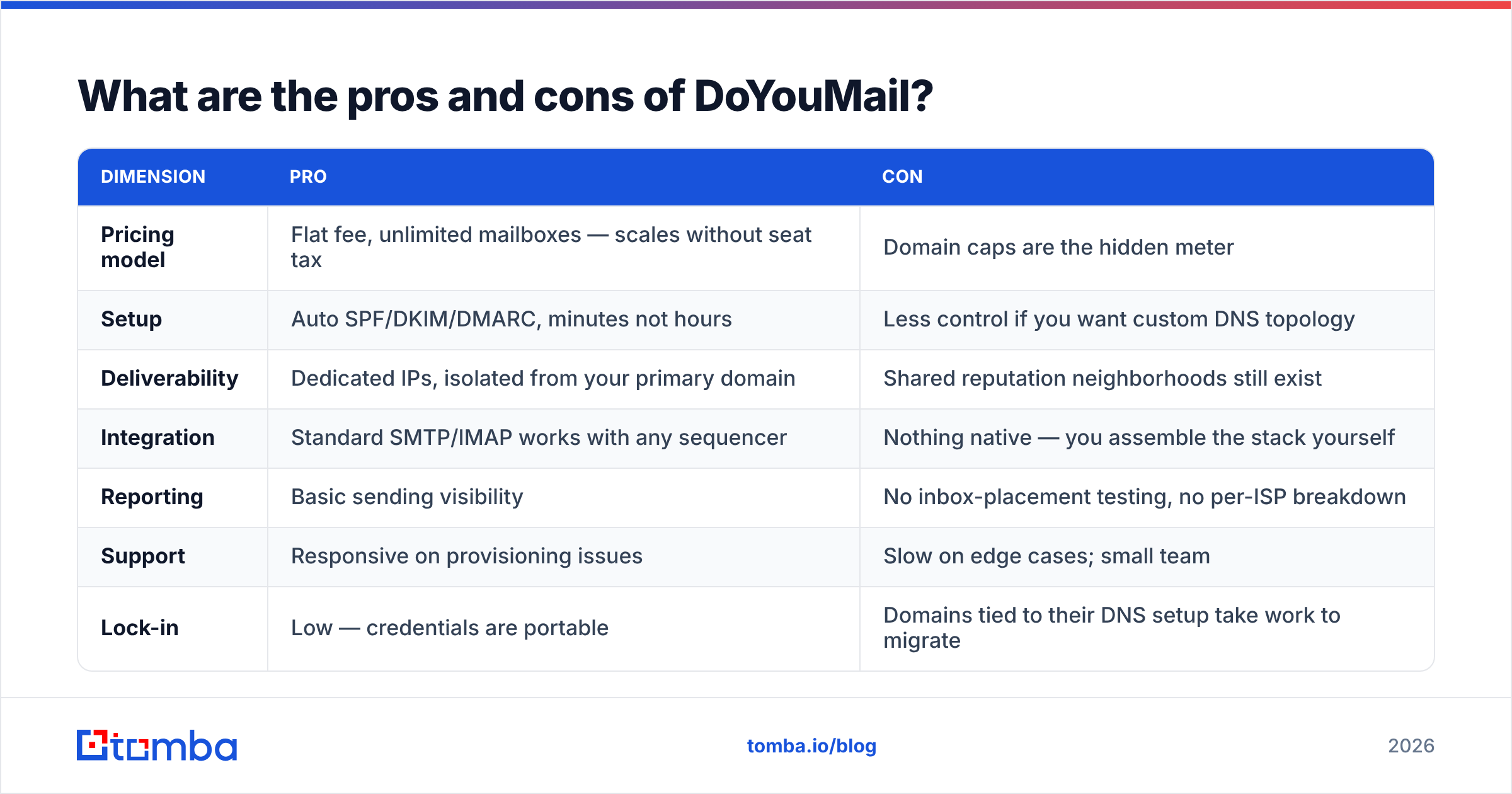
| Dimension | Pro | Con |
|---|---|---|
| Pricing model | Flat fee, unlimited mailboxes — scales without seat tax | Domain caps are the hidden meter |
| Setup | Auto SPF/DKIM/DMARC, minutes not hours | Less control if you want custom DNS topology |
| Deliverability | Dedicated IPs, isolated from your primary domain | Shared reputation neighborhoods still exist |
| Integration | Standard SMTP/IMAP works with any sequencer | Nothing native — you assemble the stack yourself |
| Reporting | Basic sending visibility | No inbox-placement testing, no per-ISP breakdown |
| Support | Responsive on provisioning issues | Slow on edge cases; small team |
| Lock-in | Low — credentials are portable | Domains tied to their DNS setup take work to migrate |
The pros-and-cons verdict in one line: DoYouMail is a good buy if your bottleneck is sending capacity, and a waste of money if your bottleneck is list quality or copy.
Most teams that "need more inboxes" actually need better targeting. Sending 10,000 emails a month to a scraped list at 12% bounce will get you blacklisted on the finest infrastructure money can buy. If your bounce rate is above 3%, fix that before you buy capacity — run the list through an email verifier and see how much of it survives. Teams are routinely surprised that 20–30% of a purchased list is dead.
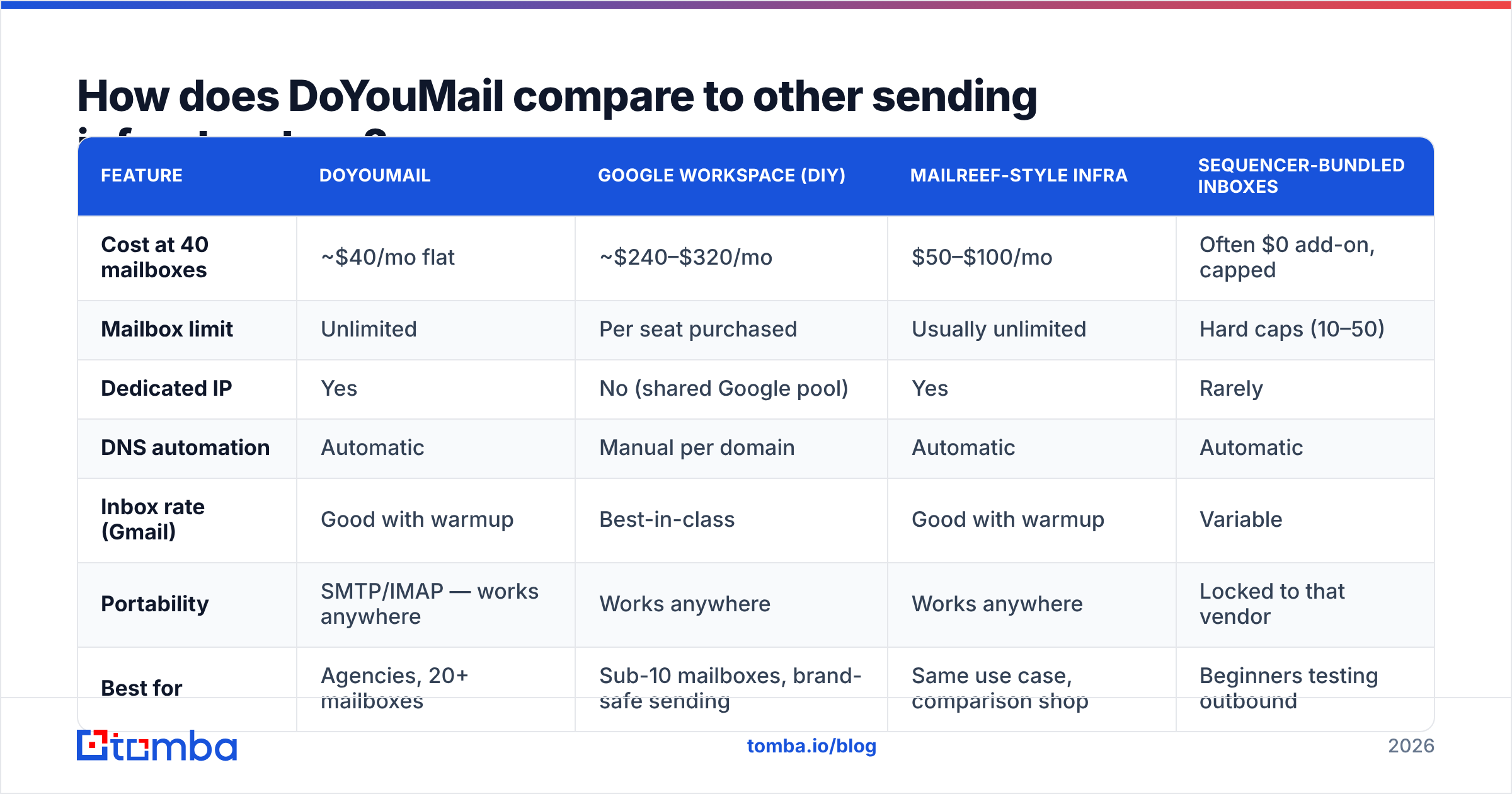
How does DoYouMail compare to other sending infrastructure?#
| Feature | DoYouMail | Google Workspace (DIY) | Mailreef-style infra | Sequencer-bundled inboxes |
|---|---|---|---|---|
| Cost at 40 mailboxes | ~$40/mo flat | ~$240–$320/mo | $50–$100/mo | Often $0 add-on, capped |
| Mailbox limit | Unlimited | Per seat purchased | Usually unlimited | Hard caps (10–50) |
| Dedicated IP | Yes | No (shared Google pool) | Yes | Rarely |
| DNS automation | Automatic | Manual per domain | Automatic | Automatic |
| Inbox rate (Gmail) | Good with warmup | Best-in-class | Good with warmup | Variable |
| Portability | SMTP/IMAP — works anywhere | Works anywhere | Works anywhere | Locked to that vendor |
| Best for | Agencies, 20+ mailboxes | Sub-10 mailboxes, brand-safe sending | Same use case, comparison shop | Beginners testing outbound |
Two honest caveats on this table.
First, Google Workspace still wins on raw inbox placement. Sending from real Workspace mailboxes on real domains, warmed properly, with low volume per inbox, remains the deliverability gold standard. Third-party infrastructure narrows the gap; it does not close it. You are trading a few points of placement for an 80% cost reduction. For most agencies that trade is obviously correct. For a company where every email represents a $200k enterprise deal, it may not be.
Second, any infra vendor's advertised inbox rates are unaudited. Nobody publishes third-party-verified placement data. Test with your own seed list across Gmail, Outlook, and a corporate Microsoft 365 tenant before committing volume.

Is DoYouMail worth it for your team?#
Buy it if:
- You run 20+ sending mailboxes and are currently paying per-seat for them.
- You already have a sequencer you like and just need capacity underneath it.
- You are an agency running multiple clients and want cost per client to stay flat as volume grows.
- You have a verified, permission-defensible list and your bounce rate is already under 3%.
Skip it if:
- You send fewer than 1,000 emails a month. Two Workspace mailboxes cost $16 and place better.
- Your list came from a scraper and has never been verified. Buy data quality first.
- You need one vendor for data, sending, and sequencing. This is a component, not a platform.
- Compliance requires auditable sending logs and DPAs at enterprise depth. Ask hard questions first.
A useful sanity check before you spend anything: run the email warmup calculator against your target monthly volume. It tells you how many mailboxes you actually need at a safe 20–30 sends per inbox per day. Teams routinely discover they need twelve mailboxes, not forty — at which point the unlimited-mailbox pitch stops being the deciding factor and Workspace becomes competitive again.
Does better infrastructure fix bad deliverability?#
Partly. Infrastructure controls the technical half of email deliverability: authentication records, IP reputation, domain age, sending pattern. That half matters, and DoYouMail handles it competently.
The other half is entirely on you:
- List accuracy. Hard bounces are the single fastest way to destroy a domain. A 5% bounce rate signals list-buying to every major ISP.
- Engagement. Gmail weighs opens, replies, and "not spam" marks heavily. Relevance beats infrastructure.
- Complaint rate. Above 0.3% and you are in trouble regardless of IP.
- Content signals. Link-heavy, image-heavy, tracking-pixel-heavy emails get filtered on any IP.
- Volume ramp. New domains sending 500/day on week one get flagged no matter who hosts them.
Points 1 and 3 are data problems, not infrastructure problems. This is where the spending order matters: verify the list, then buy capacity. Reversing that order is the most common and most expensive mistake in outbound.
If you are building the list from scratch rather than buying it, a domain-first workflow beats scraping. Pull the company list, run domain search to surface the real people and email patterns at each account, verify, then load into your sequencer. It is slower per contact and dramatically cheaper per reply.
What should you check before signing up?#
- Ask what "unlimited" means at your domain count. Get the cap in writing.
- Ask whether IPs are truly dedicated or shared within a range, and how neighbors are vetted.
- Test placement yourself with seed accounts on Gmail, Outlook.com, and a corporate M365 tenant.
- Confirm the sequencer connects cleanly — some tools throttle third-party SMTP.
- Check the exit path. How hard is it to move domains off their DNS if you leave in six months?
- Confirm billing granularity. Monthly vs annual commitment, and what happens to domains if you downgrade.
The verdict on DoYouMail pricing, reviews, pros and cons#
DoYouMail is a competent, fairly priced piece of cold email plumbing. The flat-fee, unlimited-mailbox model is genuinely cheaper than per-seat Workspace once you cross roughly 10–15 mailboxes, and the automated DNS setup saves real hours. The cons — thin reporting, shared-neighborhood risk, no data or sequencing — are category-normal rather than vendor-specific failings.
What it will not do is make a bad list perform. Cheap sending capacity is a multiplier: it amplifies whatever your list quality already is, in both directions.
So start where the leverage is. Build your target list with the Tomba Email Finder, which returns professional addresses by domain, name, or company with a confidence score attached, then verify before a single send. Tomba's free tier covers 25 searches a month, Starter is $49/mo and Growth $99/mo — see Tomba pricing for the full breakdown. Get the list right first, and the infrastructure decision becomes a simple cost comparison instead of a rescue mission.
Related guides#
Ready to find emails that actually work?
Join 150,000+ professionals who stopped guessing and started sending. Free credits on signup — no credit card required.
Get the Tomba newsletter
Practical outbound tactics and product updates — once every two weeks.
About the author