Drip Campaign Best Practices: A 2026 Playbook That Converts
Most drip campaigns die at step three — not because the copy is bad, but because the trigger, timing, and data underneath them are wrong. Here's the structure that still works in 2026.
TL;DR
- A drip campaign is a pre-built sequence of messages released on a trigger — not a newsletter and not a one-off blast. The trigger matters more than the copy.
- Most sequences collapse between email 3 and email 5 because every message repeats the same ask. Change the ask, not the adjectives.
- Behavior-triggered drips beat pure time-based drips on reply rate, but time-based drips beat nothing at all — start simple, add branches later.
- Deliverability is a data problem before it's a copy problem. A 4% bounce rate will sink a perfectly written 6-step sequence.
- Measure per-step, not per-campaign. Aggregate open rates hide the exact message where people quit.
What is a drip campaign, and how is it different from a blast?#
A drip campaign is a fixed set of messages sent automatically on a schedule or a trigger, one person at a time, starting from the moment that person enters the sequence.
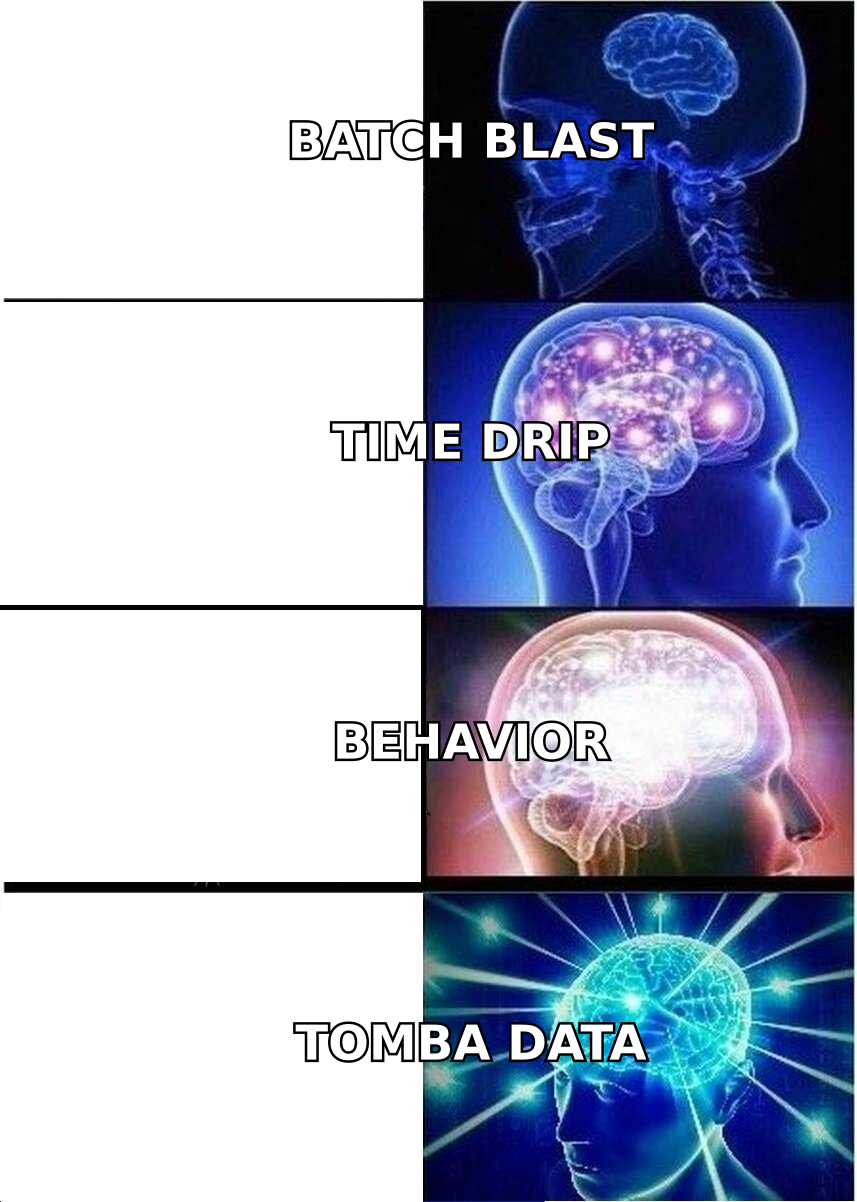
Think of it like a dishwasher versus a fire hose. A blast is the fire hose: everyone gets the same message at the same minute regardless of when they showed up or what they did. A drip is the dishwasher: each item goes through the same cycle, but the cycle starts when that item is loaded. Person A gets email 1 on Tuesday; person B, who signed up Thursday, gets email 1 on Thursday. Same sequence, different clocks.
That single design difference is why drips outperform broadcasts on almost every metric that matters. The message arrives in context — right after a demo request, right after a trial expires, right after someone downloaded the pricing page — instead of arriving on whatever day your marketing calendar said "send newsletter."
Three terms get muddled constantly, so pin them down:
- Drip campaign — pre-written, fixed order, triggered per contact. Low branching. "Welcome series," "trial expiry," "cold outbound sequence."
- Nurture campaign — usually a drip, but scored and segmented, with content that escalates toward sales-readiness. Often feeds a marketing qualified lead handoff.
- Lifecycle automation — a branching state machine. Contacts move between many drips based on rules. This is what most people mean when they say marketing automation, and it's where you end up after your first three drips work.
Start at level one. Teams that try to build the state machine first ship nothing for six weeks and then send a broadcast anyway.
Why do most drip campaigns stop working after step three?#
Because step 4 and step 5 are the same email as step 2 with a different opening line.
Look at almost any underperforming sequence and you'll find this pattern: email 1 introduces the product, email 2 introduces the product with a case study, email 3 introduces the product with urgency, email 4 asks "did you see my last email?", email 5 is the breakup. Five messages, one idea, one ask. The reader learned everything they needed in email 1 and made their decision there.
A sequence that keeps earning attention changes what it's asking for at each step:
- Step 1 — relevance. Prove you know who they are and why you're writing. Ask for nothing bigger than a reply.
- Step 2 — a specific problem. Name one cost they're absorbing right now. No product yet.
- Step 3 — proof. One customer, one number, one sentence. Ask for a 12-minute call.
- Step 4 — a lower-friction ask. A teardown, a benchmark, a template, a Loom. Something they can consume without a calendar invite.
- Step 5 — permission to close the loop. "Should I stop following up?" outperforms "just bumping this" by a wide margin because it's answerable in one word.
- Step 6 (optional) — the re-entry. 60–90 days later, on a new trigger, not the same one.
The rule underneath all six: every message must survive the "so what?" test on its own. If step 4 only makes sense to someone who read steps 1–3, you've written a chapter, not an email.
Which trigger should your drip campaign run on?#
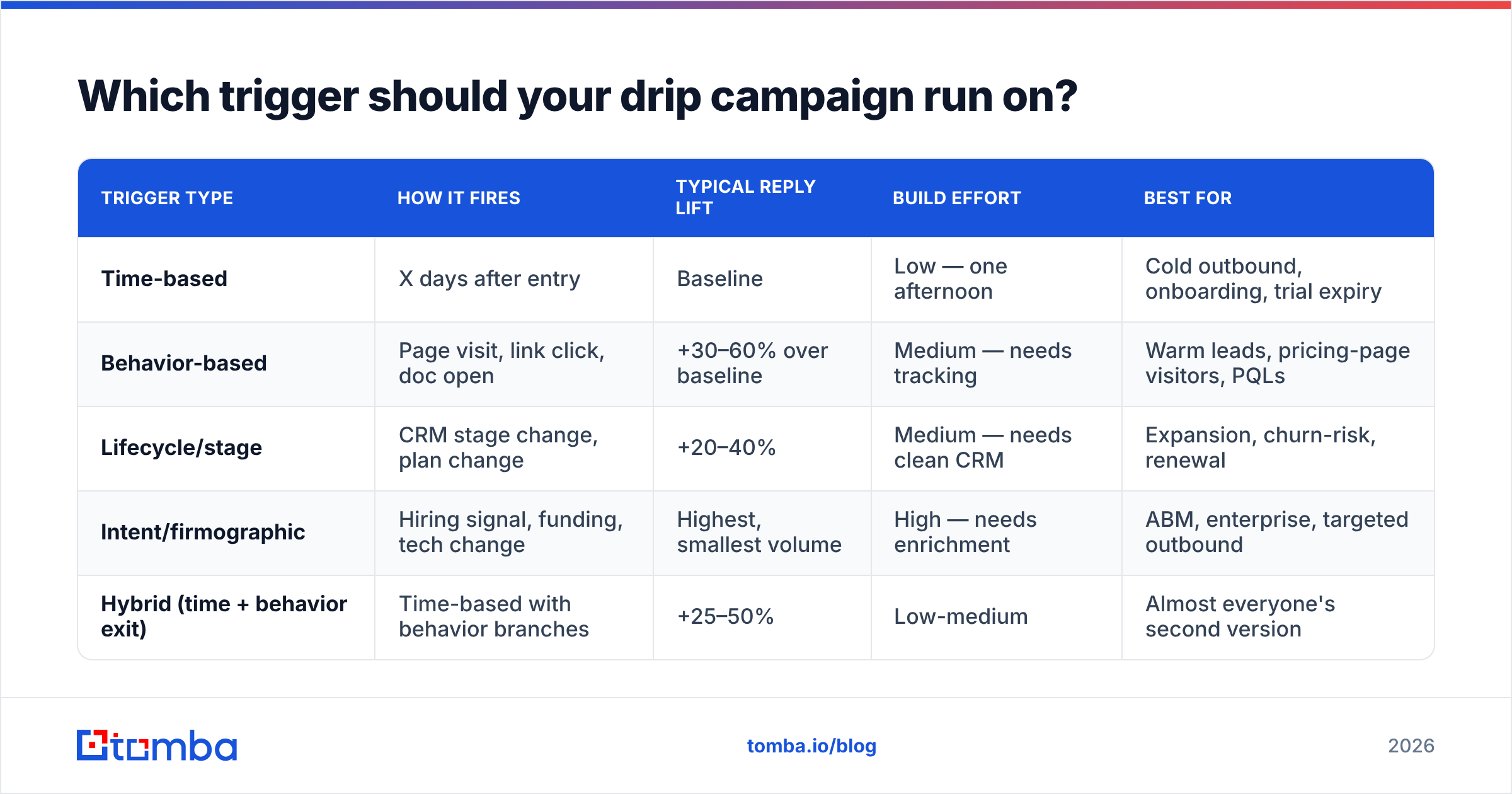
This is the highest-leverage decision in the whole build, and most teams default to time-based because it's the easiest to configure. Here's how the four common trigger types actually compare in B2B use.
| Trigger type | How it fires | Typical reply lift | Build effort | Best for |
|---|---|---|---|---|
| Time-based | X days after entry | Baseline | Low — one afternoon | Cold outbound, onboarding, trial expiry |
| Behavior-based | Page visit, link click, doc open | +30–60% over baseline | Medium — needs tracking | Warm leads, pricing-page visitors, PQLs |
| Lifecycle/stage | CRM stage change, plan change | +20–40% | Medium — needs clean CRM | Expansion, churn-risk, renewal |
| Intent/firmographic | Hiring signal, funding, tech change | Highest, smallest volume | High — needs enrichment | ABM, enterprise, targeted outbound |
| Hybrid (time + behavior exit) | Time-based with behavior branches | +25–50% | Low-medium | Almost everyone's second version |
The honest recommendation: build hybrid on day one. A pure time-based sequence with two behavior rules — pause on reply, branch on pricing-page visit — captures most of the upside of behavioral triggering without the tracking infrastructure. You can add the rest later.
The trigger types that need enrichment (intent, firmographic, lifecycle) are only as good as the record behind them. If your CRM says "Director of Ops" and the person was promoted to VP nine months ago, your "personalized" trigger fires a message that reads worse than a generic one. Run data enrichment on any list older than a quarter before you point a trigger at it.
How many emails, and how far apart?#
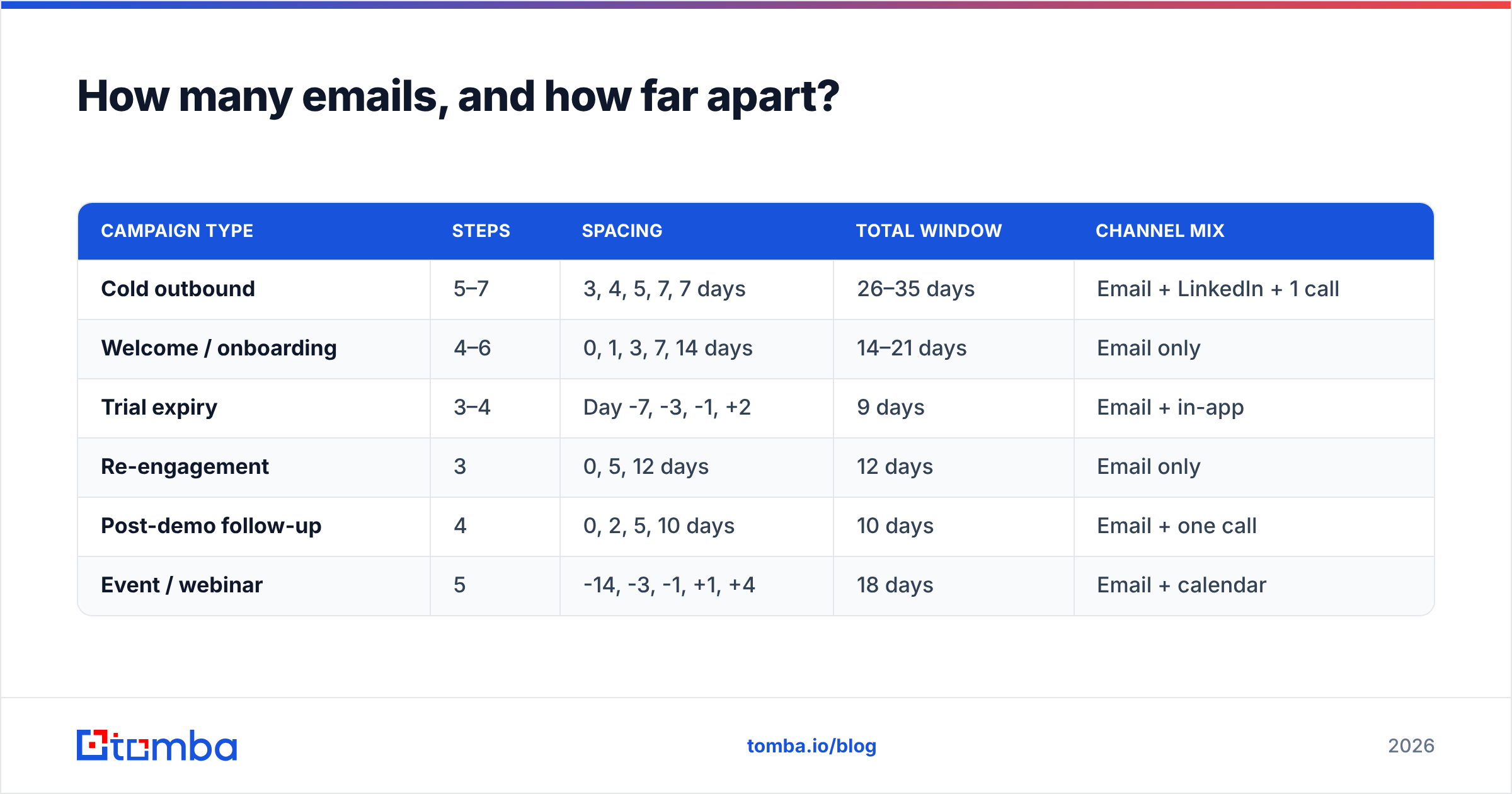
There is no universal number, but there are defensible defaults by campaign type. Anything outside these ranges should be a deliberate choice, not an accident.
| Campaign type | Steps | Spacing | Total window | Channel mix |
|---|---|---|---|---|
| Cold outbound | 5–7 | 3, 4, 5, 7, 7 days | 26–35 days | Email + LinkedIn + 1 call |
| Welcome / onboarding | 4–6 | 0, 1, 3, 7, 14 days | 14–21 days | Email only |
| Trial expiry | 3–4 | Day -7, -3, -1, +2 | 9 days | Email + in-app |
| Re-engagement | 3 | 0, 5, 12 days | 12 days | Email only |
| Post-demo follow-up | 4 | 0, 2, 5, 10 days | 10 days | Email + one call |
| Event / webinar | 5 | -14, -3, -1, +1, +4 | 18 days | Email + calendar |
Two spacing principles worth internalizing:
Front-load tightly, then decay. Attention decays fast after the trigger event. Days 1–5 are worth more than days 20–30. Sequences that space everything evenly at 5 days waste the hottest window.
Never send on the same weekday every time. A contact who ignores you every Tuesday at 9am will keep ignoring you every Tuesday at 9am. Vary the day and the hour across steps — it costs nothing and reliably surfaces a few replies from people whose Tuesday mornings are just permanently underwater.
What makes drip copy actually convert?#
Copy is where most advice gets vague. Here are the specific mechanics, in order of impact:
- One idea per email. If you can't state the email's purpose in five words, it will underperform. "Show them the onboarding cost" is a purpose. "Nurture them" is not.
- Subject lines under 45 characters. Mobile clients truncate past that. Lowercase, no punctuation stunts, no "Re:" fakery — it burns trust the second they open. Run drafts through a subject line tester before you commit them to a sequence you'll send 4,000 times.
- First line is never about you. The preview pane shows subject + sender + roughly the first eight words. Spending them on "I'm reaching out because" is the most expensive habit in outbound.
- Personalization at the segment level beats fake 1:1. "Companies running a 12-person SDR team usually see..." outperforms "Hi {{first_name}}, I loved your post about..." when the post reference is obviously scraped. Segment tightly enough that the generic line is specific.
- One CTA, phrased as a question. Questions get replies. Statements get archived. "Worth a look?" beats "Book time here" in cold sequences roughly every time we've seen it tested.
- Plain text, no images, one link maximum. Every tracking pixel and image block is a small deliverability tax and a large "this is marketing" signal. HubSpot's own email marketing research has been pointing this direction for years, and it holds in B2B.
Write all steps before you launch any of them. Writing step 5 six weeks later, in a different mood, with different context, is how sequences lose their voice halfway through.
How do you keep a drip campaign out of spam?#
Deliverability failures look like copy failures. Your open rate drops, so you rewrite subject lines, and nothing changes — because the messages never reached the inbox.
The order of operations that actually fixes it:
Fix the list first. Bounce rate above 2% is a red flag; above 4% and mailbox providers start throttling you regardless of content. Every list — purchased, scraped, exported from an old CRM, or built last week — should pass through an email verifier before the first send. Catch-all domains deserve special handling: they accept everything at the SMTP layer and tell you nothing, which is why a dedicated catch-all verifier is worth the extra step on enterprise lists.
Fix authentication second. SPF, DKIM, and DMARC are non-negotiable since Google and Yahoo tightened bulk-sender rules. Google's sender guidelines are the source of truth here, and the requirements have only gotten stricter. If you're sending from a domain without DMARC in 2026, you're capped no matter how good the sequence is.
Fix volume third. New domains and new mailboxes need ramping — roughly 20 sends/day in week one, doubling weekly to a ceiling of 40–50 per mailbox per day for cold outbound. Run the numbers with a warmup calculator before you commit to a quota, because "we need 500 sends a day" usually means "we need eight mailboxes," and that's a two-week lead time nobody plans for.
Then fix copy. Spam-trigger words matter far less than people think, but link shorteners, attachment-heavy templates, and HTML-heavy layouts still hurt. If you want to understand why the first three steps outrank this one, the email deliverability fundamentals are worth twenty minutes.
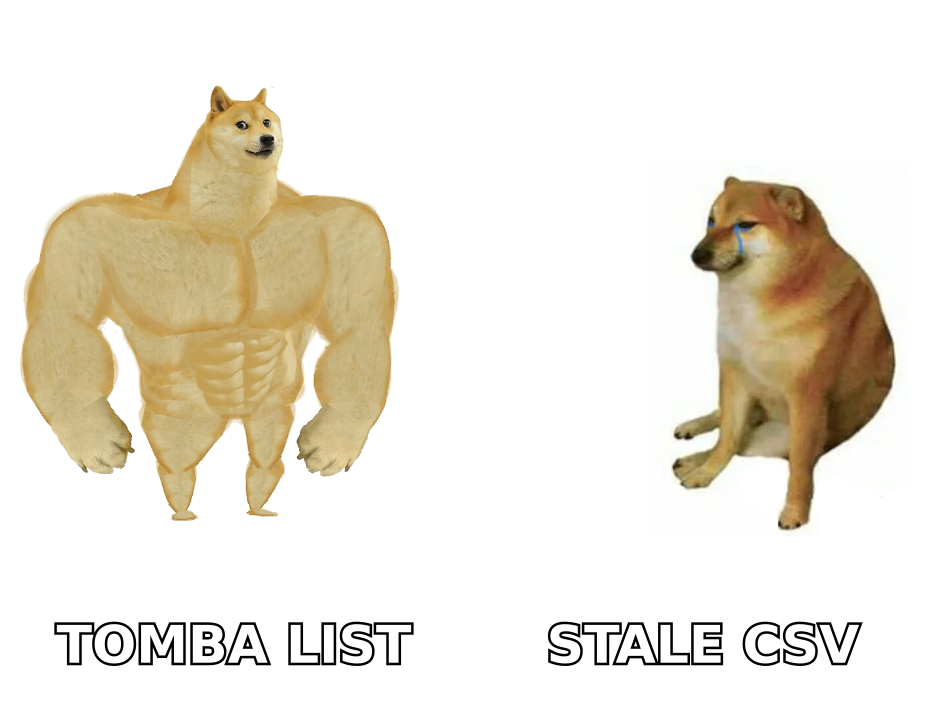
What should you measure, and when?#
Campaign-level metrics lie. A 42% open rate across a 6-step sequence tells you nothing about which step killed it. Track per-step, and track the ratios, not just the counts.
| Metric | Where to read it | Healthy B2B range | What a miss means |
|---|---|---|---|
| Bounce rate | Step 1 only | Under 2% | List quality — verify before sending |
| Open rate | Every step | 35–55% | Subject line or deliverability |
| Reply rate | Every step | 4–10% cold, 15%+ warm | Offer relevance |
| Positive reply share | Every step | 25–40% of replies | Targeting, not copy |
| Step-to-step drop | Between steps | Under 15% decay | That step has no new idea |
| Unsubscribe rate | Cumulative | Under 0.5% | Frequency or segment mismatch |
| Meetings booked | Sequence total | 1–3% of entries | The whole system |
Give a sequence at least 300 contacts and two full cycles before you judge it. Below that, you're reading noise. And when you do change something, change one variable — the subject line of step 2, or the spacing between steps 3 and 4, never both.
The response rate figure most teams quote is a vanity number if it includes autoresponders and out-of-office bounces. Filter those out before you report it upward.
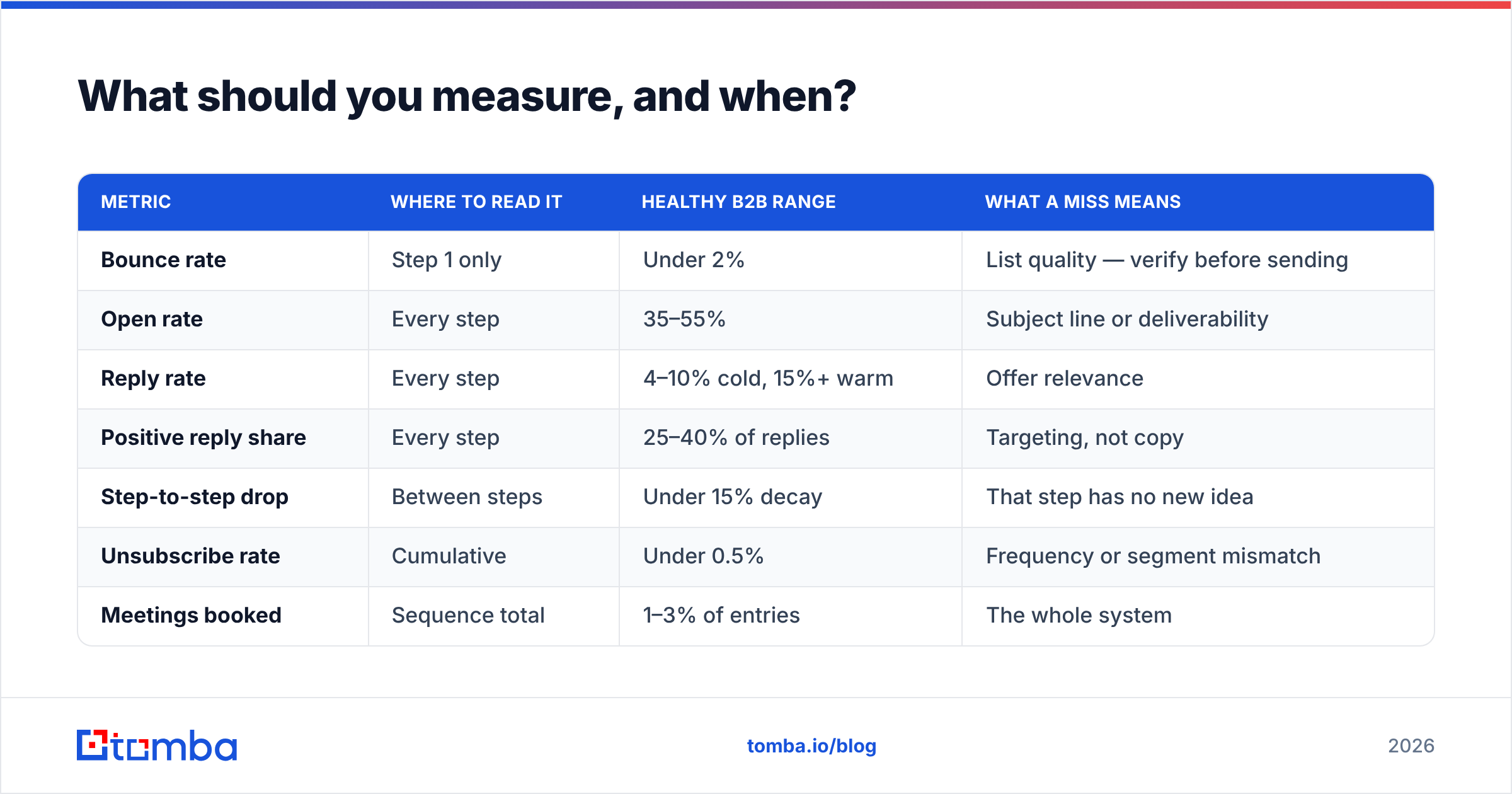
What does the tooling stack look like?#
You need four capabilities. They can come from one platform or four, and the tradeoff is cost versus fit.
| Layer | Job | Entry price | Notes |
|---|---|---|---|
| Contact data | Find and verify the addresses | Tomba: free tier (25 searches/mo), Starter $49/mo, Growth $99/mo | Verification included — no separate vendor needed |
| Sending engine | Sequence, schedule, rotate mailboxes | $30–80/user/mo typical | Check mailbox rotation limits before committing |
| CRM | Store state, trigger on stage change | Included in most sales suites | Drip triggers are only as clean as the CRM |
| Analytics | Per-step reporting | Often bundled | Insist on step-level, not campaign-level |
For most teams under 50 people, the data layer is where quality compounds fastest. A sending platform with a great UI can't fix a list where 30% of the addresses are wrong — but a clean, verified list makes a mediocre sending tool look excellent. Compare Tomba pricing against what you're currently paying for a separate finder and a separate verifier; consolidating those two line items is usually the fastest cost win in the stack.
If your sequences depend on freshness — job changes, new hires, departures — check how often each vendor refreshes and where the records come from. Third-party review sites like G2 are useful for spotting the gap between a vendor's claimed accuracy and what buyers report after 90 days of use.
What are the mistakes that quietly kill good sequences?#
- No exit rule on reply. Someone replies "interested, call me Thursday" and gets your day-14 breakup email. This happens more than anyone admits.
- Sending to unverified contacts to "test" a sequence. You're not testing copy, you're testing your domain reputation, and you'll lose.
- The same sequence for every persona. A VP of Engineering and a Head of RevOps do not share a problem statement. Two sequences, two segments.
- Reusing the same trigger for re-entry. If they ignored the trial-expiry drip, re-entering them into the trial-expiry drip 60 days later is not a new campaign.
- Optimizing open rate. Apple Mail Privacy Protection inflates opens and always will. Optimize replies and meetings.
- Never sunsetting. A drip built 14 months ago referencing a product tier you no longer sell is still sending right now at some companies. Audit quarterly.
Where should you start this week?#
Pick one trigger with existing volume — demo requests, trial signups, or a defined outbound segment. Write all five steps in one sitting. Verify the list. Ramp the mailbox. Launch to 300 contacts. Read the step-to-step drop after two cycles and rewrite the single worst step.
That's a two-week project, not a quarter-long automation initiative, and it will tell you more about your market than another month of planning.
The part you shouldn't improvise is the data underneath it. Every timing rule, trigger, and personalization token in this guide assumes the address is real and the record is current. Start your list with the Tomba Email Finder — find verified professional addresses by name, domain, or company, with verification built into the same workflow instead of bolted on from another vendor. The free tier covers 25 searches a month if you want to sanity-check accuracy on your own segment before you commit to anything.
Related guides#
Ready to find emails that actually work?
Join 150,000+ professionals who stopped guessing and started sending. Free credits on signup — no credit card required.
Get the Tomba newsletter
Practical outbound tactics and product updates — once every two weeks.
About the author