Drip Email Campaign: How to Build One That Converts in 2026
Most drip campaigns fail on timing and data, not copy. Here's the sequence structure, cadence, and tooling that still produce replies in 2026 — plus benchmarks you can hold your team to.
TL;DR
- A drip email campaign is a pre-written sequence sent on a schedule or trigger — it is not a newsletter, and it is not the same thing as a cold outbound sequence.
- The three levers that decide performance are trigger quality, cadence, and list accuracy. Copy is the fourth, not the first.
- B2B drip campaigns that work in 2026 are short (4–7 emails), branch on behavior, and stop the moment someone replies or books.
- Bounce rate above ~3% kills the whole campaign regardless of how good the writing is — verify before you send, not after.
- Measure reply rate and pipeline created per 1,000 contacts, not open rate. Apple Mail Privacy Protection made opens close to useless years ago.
What is a drip email campaign?#
A drip email campaign is a series of emails sent automatically to a contact over time, triggered by a date, an action, or a stage change. Think of it like a slow-release IV instead of a firehose: instead of one big blast to your entire list, each person gets a small, timed dose of relevance based on what they did.
The mechanics are simple. You define an entry condition ("downloaded the pricing PDF"), a list of messages, a delay between each, and exit conditions ("replied", "booked a demo", "unsubscribed"). The automation platform handles the rest. Drip marketing as a concept predates email — it came out of direct mail — but email is where it became cheap enough to run at scale.
Where teams get it wrong is treating "drip" as a synonym for "automated email." A campaign that sends the same five messages to everyone who ever hit your site is a blast on a timer. A real drip campaign changes what it sends based on who the person is and what they just did.
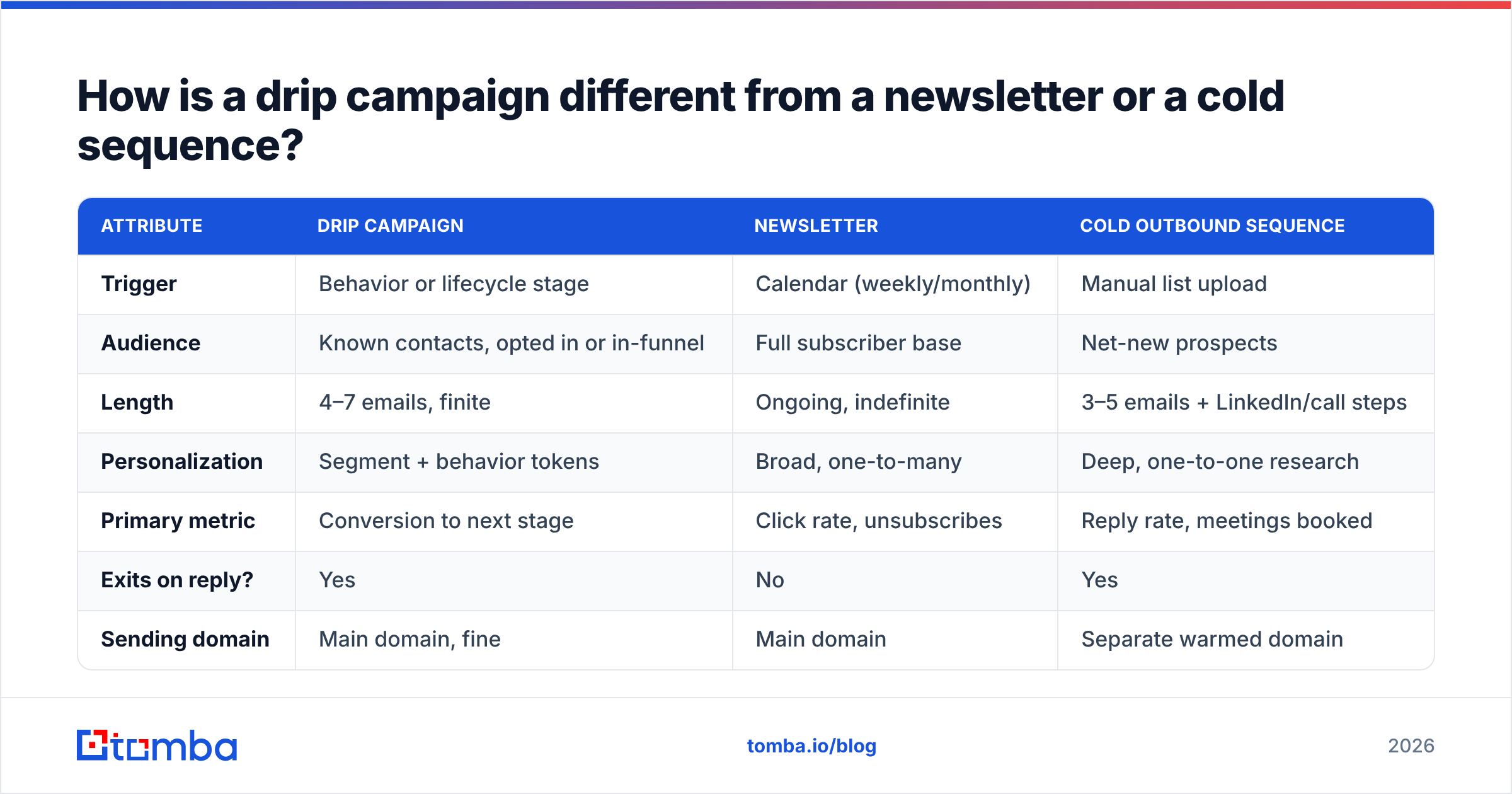
How is a drip campaign different from a newsletter or a cold sequence?#
These three get conflated constantly in RevOps meetings, and the confusion costs money — because they need different lists, different tools, and different success metrics.
| Attribute | Drip campaign | Newsletter | Cold outbound sequence |
|---|---|---|---|
| Trigger | Behavior or lifecycle stage | Calendar (weekly/monthly) | Manual list upload |
| Audience | Known contacts, opted in or in-funnel | Full subscriber base | Net-new prospects |
| Length | 4–7 emails, finite | Ongoing, indefinite | 3–5 emails + LinkedIn/call steps |
| Personalization | Segment + behavior tokens | Broad, one-to-many | Deep, one-to-one research |
| Primary metric | Conversion to next stage | Click rate, unsubscribes | Reply rate, meetings booked |
| Exits on reply? | Yes | No | Yes |
| Sending domain | Main domain, fine | Main domain | Separate warmed domain |
The practical takeaway: run cold sequences from a secondary domain with proper email warmup, and run drip campaigns from your primary domain where your existing reputation helps you. Mixing them is how companies end up with their main domain in spam folders.
What types of drip campaigns actually work in B2B?#
Not every lifecycle moment deserves a sequence. These six carry almost all the measurable return in B2B, ranked roughly by revenue impact per hour of setup:
- Trial-to-paid activation. Triggered on signup, branched on whether the user completed the core action. The one that ignores product usage is the one that converts at 2% instead of 12%.
- Demo no-show / stalled deal revival. Fires 24 hours after a missed meeting, then again at day 4 and day 11. Short, human, no marketing polish. This is the highest-ROI drip most teams have never built.
- Content-to-conversation. Someone downloads a report; three emails later they get a soft offer tied to the exact topic they read about. Works only if the offer matches the content — a security whitepaper reader does not want a "quick 15 min?" about your billing module.
- Onboarding for new customers. Reduces churn in the first 90 days more reliably than any success playbook, because it is consistent. Every customer gets it; nobody gets forgotten because the CSM was on PTO.
- Re-engagement / winback. Sent to contacts with 90+ days of silence. Two emails, one of them a genuine "should I close your file?" Expect a 4–8% reply rate and a healthy list-cleaning side effect.
- Renewal and expansion runway. Starts 60 days before renewal, seeded with usage data. Boring, unglamorous, and it protects revenue you already earned.
If you are building your first drip campaign this quarter, build #2. It requires the least data, touches people who already know you, and pays back within weeks.
How do you build a drip email campaign step by step?#
Step 1 — Define the exit before the entry. What single action ends this campaign? "Books a call." "Activates the integration." If you cannot name it in five words, the sequence has no job and will produce nothing measurable.
Step 2 — Pick a trigger you actually track. A trigger you cannot fire reliably is a wish. Check that the event exists in your CRM or product analytics before you write a word.
Step 3 — Build the list and verify it. This is the step teams skip, and it is the step that decides deliverability. Pull contacts, dedupe them, and run them through an email verifier before the first send. If you are filling gaps in a list — enriching accounts where you only have a name and a company — an email finder closes those holes without guessing at patterns.
Step 4 — Write four emails, not twelve. Each one does one job: earn the open, deliver one idea, make one ask. First email under 90 words. No sequence needs a preamble about how you noticed their recent funding round in three different emails.
Step 5 — Set the delays deliberately. See the cadence table below. Default 3-day spacing is a lazy setting, not a strategy.
Step 6 — Add branching on one behavior. Clicked the pricing link? Route to a different email 3. One branch is enough to start; ten branches is a maintenance project you will abandon.
Step 7 — Instrument it. Reply rate, meetings, pipeline. Tag every send so you can attribute revenue later. If your CRM does not tag it, it did not happen.
Step 8 — Run it for 30 days before touching anything. Statistical noise looks exactly like a copy problem in week one.
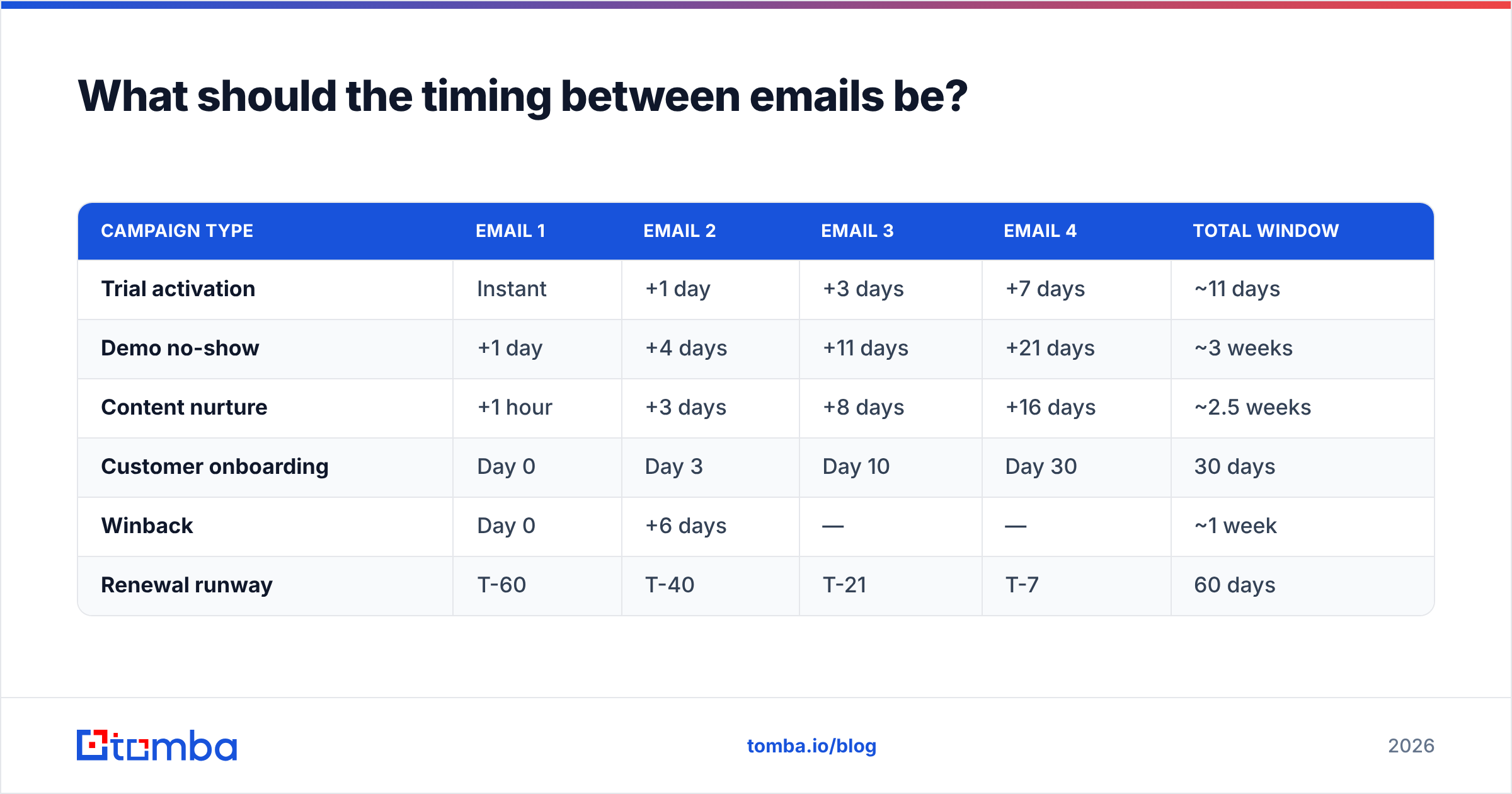
What should the timing between emails be?#
Cadence should match the urgency of the trigger, not a house style. A trial expiring in 14 days and a whitepaper download are not the same clock.
| Campaign type | Email 1 | Email 2 | Email 3 | Email 4 | Total window |
|---|---|---|---|---|---|
| Trial activation | Instant | +1 day | +3 days | +7 days | ~11 days |
| Demo no-show | +1 day | +4 days | +11 days | +21 days | ~3 weeks |
| Content nurture | +1 hour | +3 days | +8 days | +16 days | ~2.5 weeks |
| Customer onboarding | Day 0 | Day 3 | Day 10 | Day 30 | 30 days |
| Winback | Day 0 | +6 days | — | — | ~1 week |
| Renewal runway | T-60 | T-40 | T-21 | T-7 | 60 days |
Two rules that hold across all of them. First, front-load: the gap between email 1 and 2 should always be shorter than the gap between 3 and 4, because attention decays. Second, send during the recipient's working hours in their timezone — a well-timed email in a crowded inbox beats a clever subject line in the middle of the night.
Which tools should you use to run drip campaigns?#
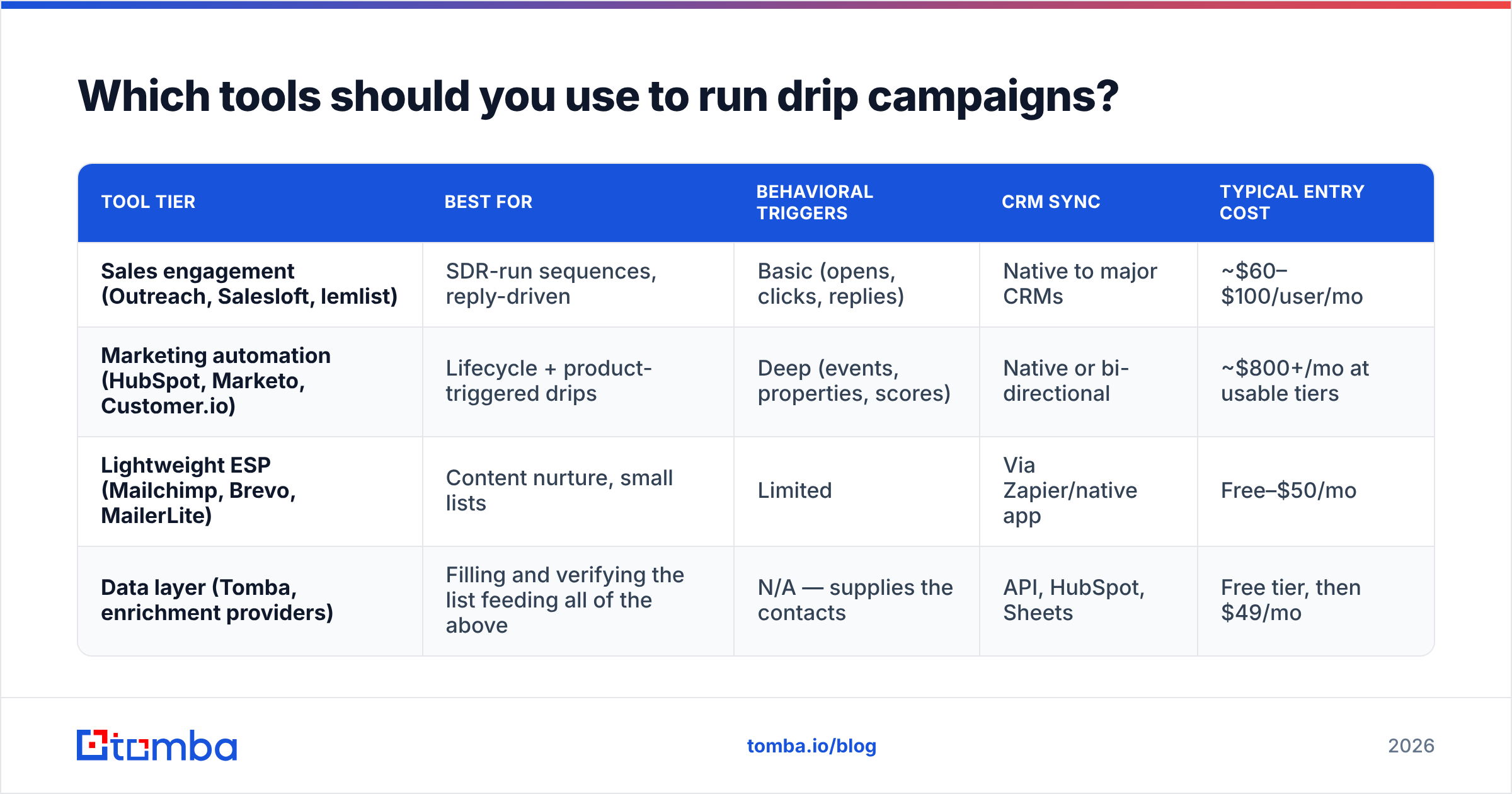
The category splits into three tiers, and the wrong tier is the most common budget leak in a GTM stack. A 12-person startup does not need marketing automation with a five-figure annual floor; an enterprise cannot run lifecycle marketing out of a cold-email tool.
| Tool tier | Best for | Behavioral triggers | CRM sync | Typical entry cost |
|---|---|---|---|---|
| Sales engagement (Outreach, Salesloft, lemlist) | SDR-run sequences, reply-driven | Basic (opens, clicks, replies) | Native to major CRMs | ~$60–$100/user/mo |
| Marketing automation (HubSpot, Marketo, Customer.io) | Lifecycle + product-triggered drips | Deep (events, properties, scores) | Native or bi-directional | ~$800+/mo at usable tiers |
| Lightweight ESP (Mailchimp, Brevo, MailerLite) | Content nurture, small lists | Limited | Via Zapier/native app | Free–$50/mo |
| Data layer (Tomba, enrichment providers) | Filling and verifying the list feeding all of the above | N/A — supplies the contacts | API, HubSpot, Sheets | Free tier, then $49/mo |
Note the last row is not a competitor to the first three — it is the input. You can compare feature grids on G2's marketing automation category all week, but the tool never fixes a bad list. Whichever sender you pick, the data going in determines the ceiling.
Why do most drip email campaigns fail?#
Because they are diagnosed as copy problems when they are almost always data or timing problems. Here is the honest failure ranking from campaigns I have audited:
1. Stale or unverified contact data. A list assembled over 18 months decays at roughly 2–2.5% per month as people change jobs. Send to it untouched and you are looking at a 15–25% bounce rate on the first email. Mailbox providers read that as spam behavior, throttle you, and every subsequent email in the sequence lands in Promotions or worse. The fix costs almost nothing: verify before send, re-verify anything older than 90 days, and use bulk verify on the whole list rather than spot-checking.
2. No exit condition on reply. Someone replies "yes, let's talk" and gets email 3 two days later asking if they saw email 2. This single misconfiguration has probably cost more B2B pipeline than any subject line ever will.
3. Trigger too broad. "Visited the website" is not intent. It is a bot, a job applicant, and your own sales team. Narrow the trigger until the population is small enough that you would be comfortable writing to each person by hand.
4. Sequence too long. Seven emails to someone who has not engaged with any of the first four is not persistence — it is a complaint waiting to happen, and complaint rate feeds directly into sender reputation.
5. Sending infrastructure not warmed. New domain, new IP, 2,000 sends on day one. Nothing in the copy survives that.
Fix these five in order and most campaigns improve without a single word being rewritten. Only then does the copywriting work — and if you want a starting frame, cold email templates give you a structure to adapt rather than a script to paste.
What metrics prove a drip campaign is working?#
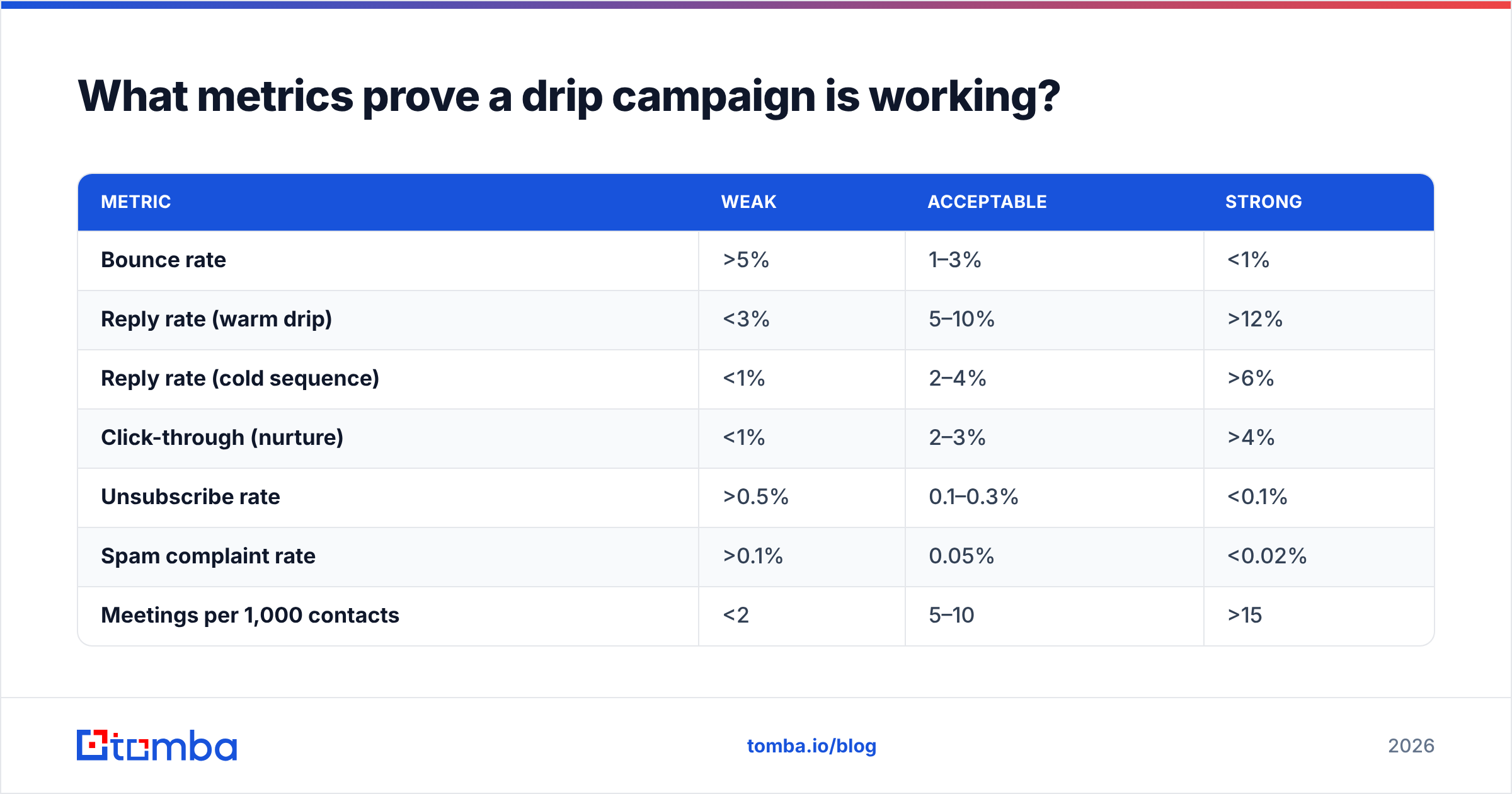
Open rate is the metric everyone reports and nobody should trust. Apple's Mail Privacy Protection pre-loads images, inflating opens for a large share of your audience. Treat it as a directional signal at best.
| Metric | Weak | Acceptable | Strong |
|---|---|---|---|
| Bounce rate | >5% | 1–3% | <1% |
| Reply rate (warm drip) | <3% | 5–10% | >12% |
| Reply rate (cold sequence) | <1% | 2–4% | >6% |
| Click-through (nurture) | <1% | 2–3% | >4% |
| Unsubscribe rate | >0.5% | 0.1–0.3% | <0.1% |
| Spam complaint rate | >0.1% | 0.05% | <0.02% |
| Meetings per 1,000 contacts | <2 | 5–10 | >15 |
The number that matters to your CFO is the last one: meetings — and eventually pipeline — per 1,000 contacts touched. It normalizes across list sizes and makes two campaigns comparable. Track it weekly, and track response rate alongside it so you can tell whether a drop came from deliverability or from the message.
One more discipline: keep a holdout group. Exclude 5–10% of eligible contacts from the campaign entirely. Without it, you cannot distinguish "the drip campaign works" from "these people were going to convert anyway." Marketing teams that skip holdouts spend years defending numbers they cannot prove, a point HubSpot's own marketing research has made repeatedly across its benchmark reports.
How often should you rebuild a drip campaign?#
Quarterly review, annual rebuild. Copy fatigues slower than people think, but three things change faster: your product, your ICP, and inbox filtering rules. Gmail and Yahoo tightened bulk-sender requirements in 2024 — authentication, one-click unsubscribe, complaint thresholds — and enforcement has only gotten stricter since. Check your SPF record, DKIM, and DMARC alignment every time you add a sending tool, because each new platform is a new place for authentication to silently break.
The review itself takes an hour: pull the per-email reply rates, find the step where engagement falls off a cliff, and replace only that email. Rebuilding an entire sequence because email 4 underperforms is how good campaigns get worse.
Where should you start this week?#
Pick one trigger you can fire reliably. Write four emails. Verify the list before the first send. Set an exit on reply. Run it for 30 days with a holdout. That is a complete drip email campaign, and it will outperform the twelve-email branching monster your team has been designing in a Miro board since March.
The part that will quietly decide the outcome is the list. If half your contacts are stale, missing, or wrong, no cadence or subject line rescues the campaign. Use the Tomba Email Finder to fill the gaps in your target accounts and confirm each address before it enters the sequence — the free tier gives you 25 searches a month to test the workflow, and paid plans start at $49/mo on Tomba pricing when you're ready to run it at volume. Clean data in, replies out. Everything else is optimization.
Related guides#
Ready to find emails that actually work?
Join 150,000+ professionals who stopped guessing and started sending. Free credits on signup — no credit card required.
Get the Tomba newsletter
Practical outbound tactics and product updates — once every two weeks.
About the author