9 Drip Email Campaign Examples That Convert in 2026 (With Copy)
Nine drip campaigns you can copy today: trigger logic, send spacing, and the exact subject lines, plus the benchmarks that tell you when a sequence is working or quietly burning your domain.
TL;DR
- A drip campaign is a fixed sequence of emails sent on a schedule or trigger. It is not a newsletter, and it is not a one-off blast.
- The nine examples below cover the sequences that actually earn revenue: lead magnet nurture, trial onboarding, cold outbound, demo no-show, post-webinar, win-back, expansion, renewal, and event follow-up.
- Most drips fail for two boring reasons: the list is dirty, and every email restates the same pitch with a new subject line.
- Four to seven emails is the sweet spot for B2B. Past email seven, incremental replies rarely justify the unsubscribe and spam-complaint cost.
- Measure reply rate and pipeline per 1,000 sends, not open rate. Apple Mail Privacy Protection made opens a vanity number years ago.
What is a drip email campaign?#
A drip campaign is a pre-written series of emails that goes out automatically on a schedule or in response to a specific behavior. Think of it like a slow-cooker versus a microwave: a broadcast blast heats everyone at once and burns half of them, while a drip applies steady low heat to one person at a time until they're ready.
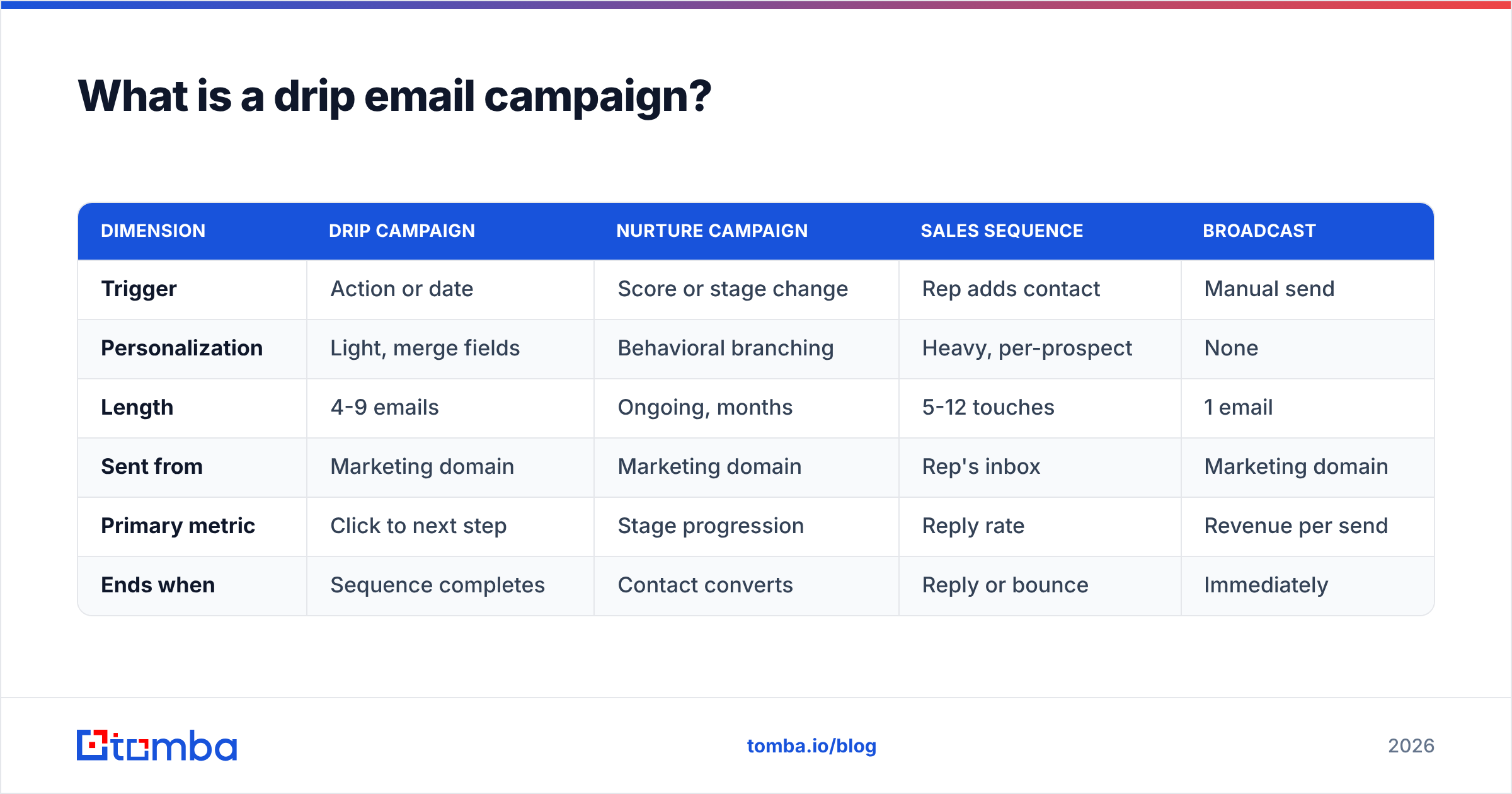
The distinction matters because teams use the words interchangeably and then wonder why their metrics look strange. Here is the actual difference:
| Dimension | Drip campaign | Nurture campaign | Sales sequence | Broadcast |
|---|---|---|---|---|
| Trigger | Action or date | Score or stage change | Rep adds contact | Manual send |
| Personalization | Light, merge fields | Behavioral branching | Heavy, per-prospect | None |
| Length | 4-9 emails | Ongoing, months | 5-12 touches | 1 email |
| Sent from | Marketing domain | Marketing domain | Rep's inbox | Marketing domain |
| Primary metric | Click to next step | Stage progression | Reply rate | Revenue per send |
| Ends when | Sequence completes | Contact converts | Reply or bounce | Immediately |
Drips sit in the middle: more automated than a sales sequence, more targeted than a newsletter. Wikipedia's overview of email marketing covers the broader category, but the operational difference above is what determines which tool you build the campaign in.
Why do most drip campaigns fail?#
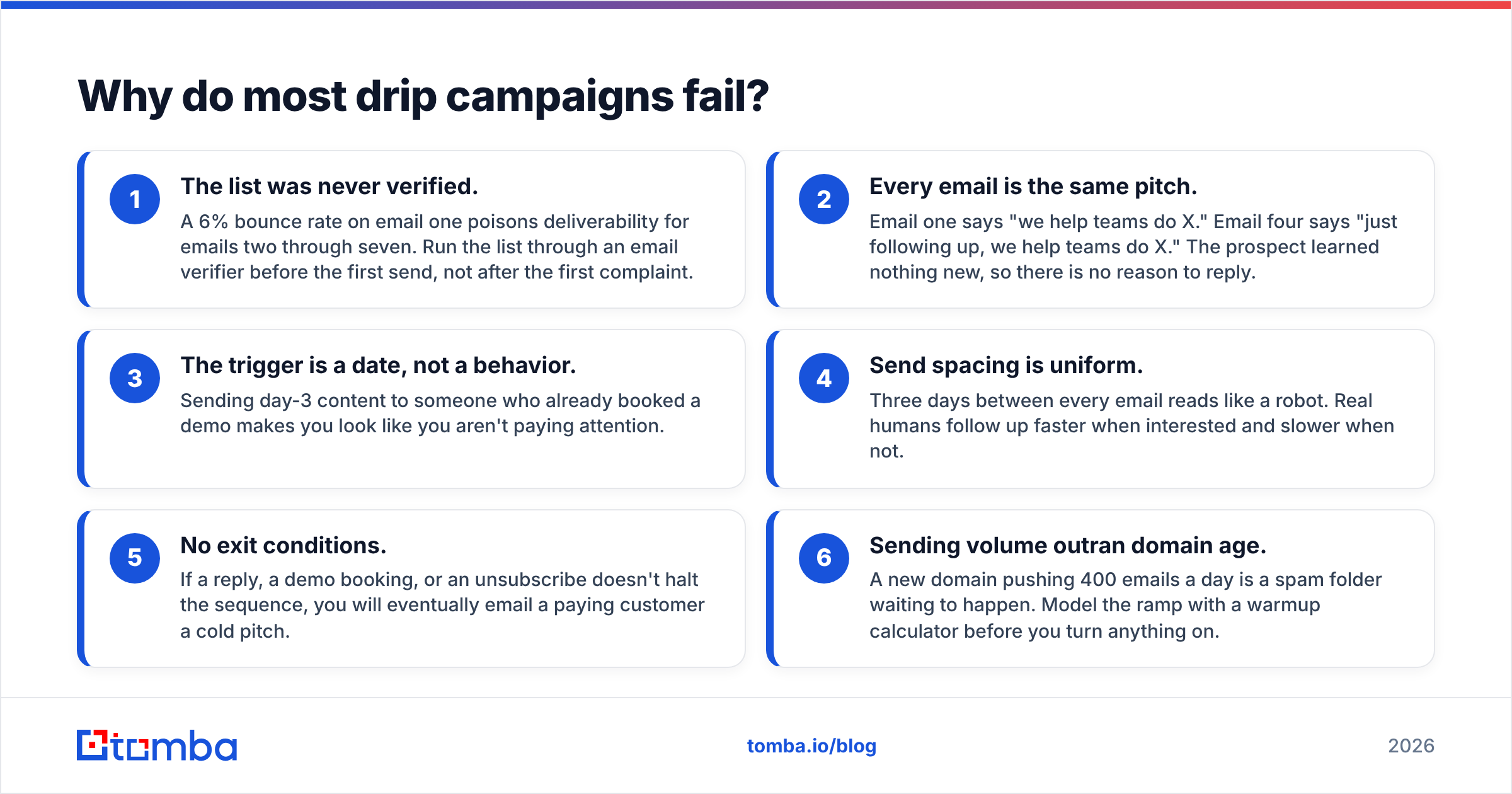
Before the examples, understand the failure modes. Every underperforming drip I have audited fails on at least one of these six:
- The list was never verified. A 6% bounce rate on email one poisons deliverability for emails two through seven. Run the list through an email verifier before the first send, not after the first complaint.
- Every email is the same pitch. Email one says "we help teams do X." Email four says "just following up, we help teams do X." The prospect learned nothing new, so there is no reason to reply.
- The trigger is a date, not a behavior. Sending day-3 content to someone who already booked a demo makes you look like you aren't paying attention.
- Send spacing is uniform. Three days between every email reads like a robot. Real humans follow up faster when interested and slower when not.
- No exit conditions. If a reply, a demo booking, or an unsubscribe doesn't halt the sequence, you will eventually email a paying customer a cold pitch.
- Sending volume outran domain age. A new domain pushing 400 emails a day is a spam folder waiting to happen. Model the ramp with a warmup calculator before you turn anything on.
Which drip email campaign examples actually work?#
Nine sequences below, each with the trigger, the spacing, and copy you can adapt. Subject lines are written lowercase on purpose for the rep-sent ones; they test better than title case in most B2B inboxes.
1. The lead magnet nurture (post-download)#
Trigger: contact downloads a guide, template, or calculator. Length: 5 emails over 12 days.
Email 1 (instant) delivers the asset and nothing else. Email 2 (day 2) asks one question. Email 3 (day 5) gives a related tactic. Email 4 (day 8) shows a customer who used it. Email 5 (day 12) offers the call.
Subject: the part of the guide people skip
Hi Dana,
Most people download the pricing teardown and stop at page 4. Page 9 is the one that changes anything: the discount-approval matrix.
Two teams last quarter cut their average discount by 6 points using just that table. If you want, I'll send the version we use internally, which has the approval thresholds filled in.
Worth a look?
The rule: email 2 through 5 must each contain something not in the downloaded asset. Otherwise you're just reminding people to read a PDF.
2. The free trial onboarding drip#
Trigger: trial account created. Length: 6 emails across the trial window.
Map each email to one activation milestone, not one feature. If your data says users who complete an import in the first 48 hours convert at triple the rate, email 2 exists solely to drive imports.
Subject: you're 1 import away
Your workspace is live but empty, which makes it hard to judge.
Import a CSV (or connect your CRM, 90 seconds) and the dashboard fills with your own numbers instead of demo data. Here's the 2-minute walkthrough.
Stuck on field mapping? Reply and I'll do it for you.
3. The cold outbound drip#
Trigger: contact enters a prospecting list. Length: 5 emails over 18 days, sent from a rep's inbox.
The structure that still works: relevance, proof, angle change, short bump, breakup.
**Email 1 — Subject: your Q3 hiring page
Noticed you're hiring three SDRs in Austin. Usually that means the current team is capped on research time, not dials.
We cut research time per account from 11 minutes to under 2 for a team at a similar stage. Happy to send the before/after breakdown, no call needed.
**Email 4 — Subject: closing the loop
Haven't heard back, which usually means this isn't a priority right now. Totally fine.
Want me to close this out, or check back in Q4?
Cold outbound lives or dies on data. Every wrong first name or dead address costs you two things: that prospect and a slice of your sender reputation. Build the list with a proper email finder rather than guessing patterns.
4. The demo no-show recovery drip#
Trigger: calendar event passes with no attendance. Length: 3 emails over 6 days.
This is the highest-ROI drip almost nobody builds. These people already raised their hand.
Subject: my calendar or yours?
Looks like we missed each other at 2. No problem, calendars are a mess this time of year.
Two options: grab any slot here, or reply with two times that work and I'll send the invite. I've also attached the 6-slide version in case you'd rather skim than meet.
5. The post-webinar drip#
Trigger: registered (split into attended / no-show branches). Length: 4 emails over 10 days.
Attendees get the recording, the deck, and the specific question they asked in chat. No-shows get the recording plus the single best 90-second clip. Branching this drip typically doubles the reply rate versus one generic "thanks for registering" send.
6. The re-engagement (win-back) drip#
Trigger: no opens, clicks, or logins in 90 days. Length: 3 emails over 14 days, then suppress.
Subject: should I stop emailing you?
You signed up in March and haven't opened anything since. That's a fair signal.
If you want to stay on the list, click here and I'll keep sending the monthly teardown. If not, no hard feelings, this is the last one.
Two thirds of your dormant list will not respond. That is the point. Suppressing them protects your sender reputation for the third that does. Mailchimp's benchmark data shows how far engagement rates vary by industry, which is worth checking before you decide your list is dead.
7. The expansion / upsell drip#
Trigger: account hits 80% of a plan limit, or adds its fifth seat. Length: 3 emails over 10 days.
Lead with the usage fact, not the price. "You've used 4,200 of 5,000 credits this month" outperforms "upgrade to Growth" by a wide margin because it's about them.
8. The renewal / churn-prevention drip#
Trigger: 60 days before contract end. Length: 4 emails, front-loaded with value.
Email 1 is a usage recap. Email 2 is a feature they never adopted. Email 3 introduces the renewal conversation. Email 4 confirms terms. If the first renewal email a customer sees is an invoice, you've already lost the negotiation.
9. The event pre- and post-conference drip#
Trigger: target account confirmed attending an event you're at. Length: 2 emails before, 3 after.
Pre-event emails ask for 15 minutes at a specific place and time. Post-event emails reference something only an attendee would know. This drip has the shortest shelf life on the list; run it within 72 hours of the event closing or skip it.
How do these nine drip campaigns compare?#
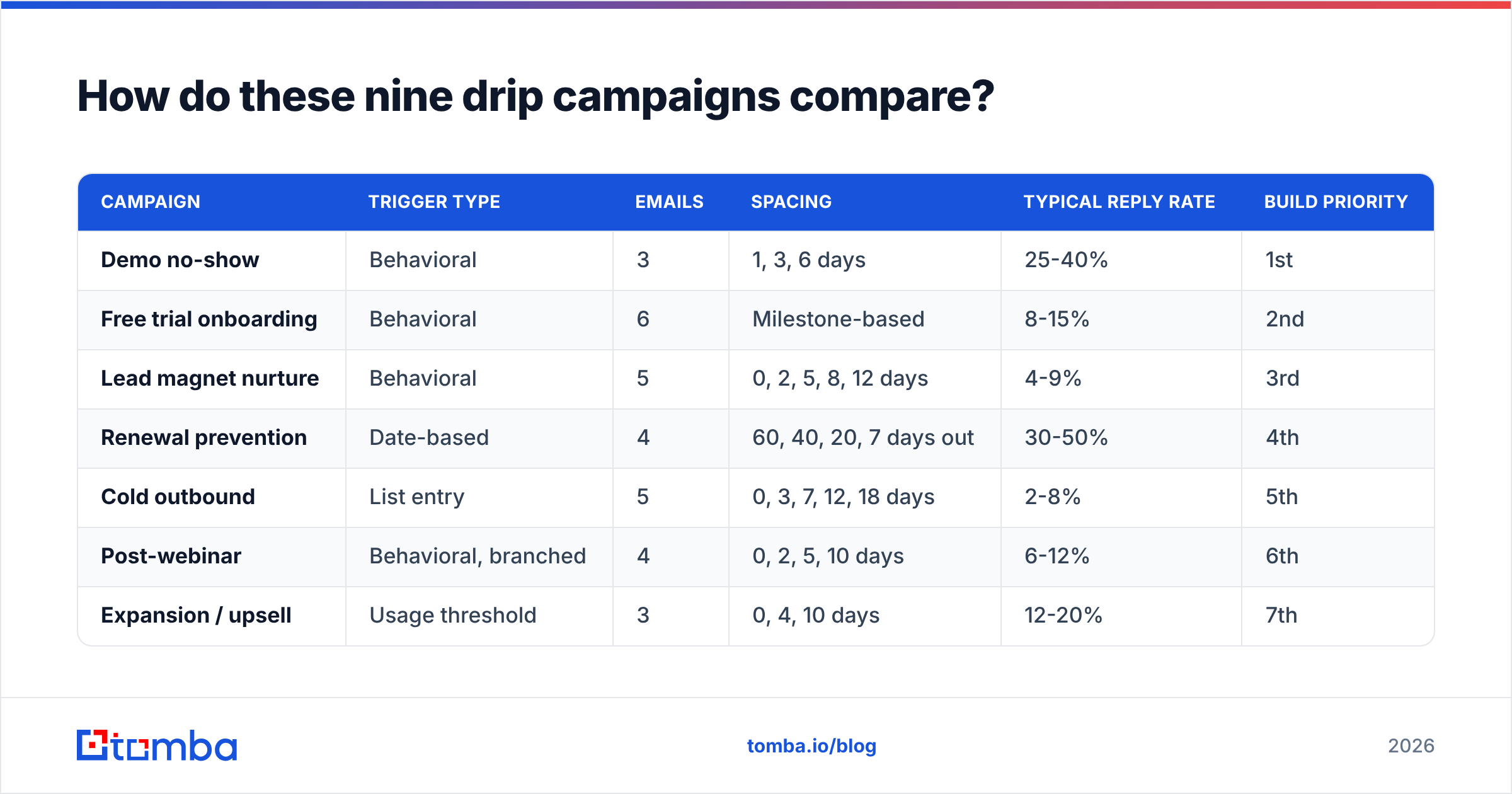
Use this to decide which to build first. Reply-rate ranges reflect typical B2B SaaS performance, and the "build first" column is ordered by effort-to-return.
| Campaign | Trigger type | Emails | Spacing | Typical reply rate | Build priority |
|---|---|---|---|---|---|
| Demo no-show | Behavioral | 3 | 1, 3, 6 days | 25-40% | 1st |
| Free trial onboarding | Behavioral | 6 | Milestone-based | 8-15% | 2nd |
| Lead magnet nurture | Behavioral | 5 | 0, 2, 5, 8, 12 days | 4-9% | 3rd |
| Renewal prevention | Date-based | 4 | 60, 40, 20, 7 days out | 30-50% | 4th |
| Cold outbound | List entry | 5 | 0, 3, 7, 12, 18 days | 2-8% | 5th |
| Post-webinar | Behavioral, branched | 4 | 0, 2, 5, 10 days | 6-12% | 6th |
| Expansion / upsell | Usage threshold | 3 | 0, 4, 10 days | 12-20% | 7th |
| Event follow-up | Date-based | 5 | 2 pre, 3 post | 15-25% | 8th |
| Win-back | Inactivity | 3 | 0, 5, 14 days | 1-4% | 9th |
Two patterns jump out. Behavioral triggers beat date triggers on every line. And the campaigns with the highest reply rates are the ones aimed at people who already engaged, which is why "build more cold outbound" is usually the wrong first move.
How long should a drip campaign be?#
Four to seven emails for B2B. Here's the reasoning rather than the rule.
Reply volume per email drops roughly by half after email three in cold sequences and after email four in nurture sequences. Meanwhile, unsubscribe and complaint rates stay flat or climb. Somewhere between email five and email eight, the marginal reply stops paying for the marginal complaint. The exact crossover depends on your list quality, which is another reason verification matters before you extend a sequence.
The exception is trial onboarding. Those can run to eight or nine emails because each one is tied to a product action the user actually wants to complete. Utility buys patience.
How do you write drip copy that doesn't sound automated?#
Five habits separate drips that get replies from drips that get filtered:
- One idea per email. If you can't state the email's point in six words, split it into two emails.
- Vary the shape. A 40-word bump after a 130-word email creates rhythm. Seven identically structured paragraphs read like a machine because they were written like one.
- Write the subject last. Subject lines written first tend to be about you. Written after the body, they're about the content.
- Cut the first sentence. "I hope this email finds you well" and "I wanted to reach out because" are almost always deletable. Start on the second sentence.
- Name the exit. Telling people how to stop hearing from you increases replies from the people who want to keep hearing from you.
If you want structural starting points rather than blank pages, our library of cold email templates is organized by the same scenarios listed above. HubSpot's marketing statistics hub is also useful for sanity-checking your benchmarks against the broader market before you decide a sequence is underperforming.
How do you measure drip campaign performance?#
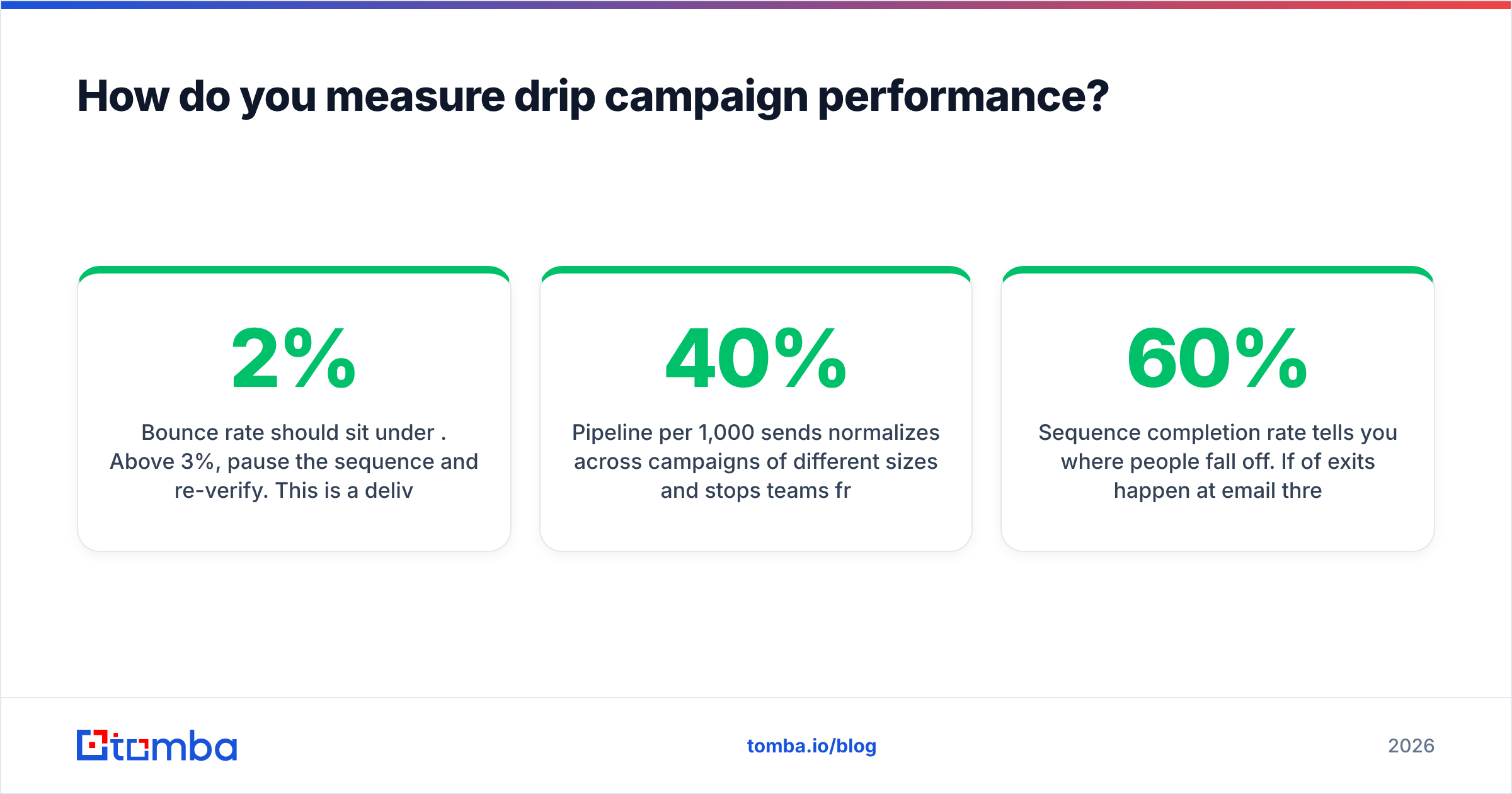
Track four numbers per sequence, per week:
Reply rate is the honest engagement metric. Opens are unreliable since Apple Mail Privacy Protection began pre-fetching images, and click rates are distorted by link scanners in corporate security gateways.
Bounce rate should sit under 2%. Above 3%, pause the sequence and re-verify. This is a deliverability emergency, not a data-hygiene nice-to-have.
Pipeline per 1,000 sends normalizes across campaigns of different sizes and stops teams from celebrating a 40% reply rate on a 25-person list.
Sequence completion rate tells you where people fall off. If 60% of exits happen at email three, email three is the problem, not the offer.
Run this review weekly for the first month of a new drip, then monthly. Most sequences need one structural rewrite around week six, and almost none need the constant subject-line tinkering teams spend their time on.
Where should you start?#
Build the demo no-show drip this week. It takes 30 minutes, targets people who already showed intent, and typically returns more meetings than a month of cold sequence optimization. Then trial onboarding, then lead magnet nurture. Cold outbound is fifth on the list for a reason: it's the most work and the lowest hit rate, and it punishes bad data harder than any other campaign type.
Whichever you build, the sequence is only as good as the addresses feeding it. A drip with brilliant copy sent to a list with a 9% bounce rate will underperform a mediocre drip sent to a clean one, every time. Start with verified, current contacts from the Tomba Email Finder, which finds professional addresses by domain, name, or company and verifies them before they ever hit your sending tool. The free tier covers 25 searches a month so you can test a sequence before committing, and paid Tomba pricing starts at $49/mo when you're ready to scale the list behind your best-performing drip.
Related guides#
Ready to find emails that actually work?
Join 150,000+ professionals who stopped guessing and started sending. Free credits on signup — no credit card required.
Get the Tomba newsletter
Practical outbound tactics and product updates — once every two weeks.
About the author