Easy Email Verification Pricing (2026): Reviews, Pros & Cons
Easy Email Verification sells cheap pay-as-you-go credits, but the sticker price is only half the story. Here is how the pricing really works, what reviewers praise, where it falls short, and how it stacks up against ZeroBounce, Bouncer and Tomba.
TL;DR
- Easy Email Verification is a pay-as-you-go bulk email verification service. You buy credit blocks, upload a list, get a cleaned file back. There is no seat fee and no forced subscription.
- The headline per-email price is genuinely low — in the fraction-of-a-cent band once you buy in volume — which is why budget-conscious list owners like it.
- The real cost shows up elsewhere: catch-all handling, unknown-result rates, thin enrichment, and the fact that verification alone does not get you new contacts.
- If your workflow is "clean a list I already own," it is a reasonable pick. If your workflow is "find contacts, verify them, and push them into a sequence," a combined finder + verifier stack usually costs less in total.
- Always re-check pricing on the vendor's own page before you buy. Verification vendors change tiers frequently, and the numbers below are directional, not contractual.
What is Easy Email Verification?#
Easy Email Verification (easyemailverification.com) is a standalone email list-cleaning service. You give it a list of addresses, it runs syntax checks, DNS and MX lookups, disposable-domain detection, role-account detection and an SMTP-level mailbox probe, then hands back a categorized file: valid, invalid, catch-all/accept-all, unknown.
That is the entire product. It is not a prospecting database, not a sequencer, not a CRM. Think of it as a car wash rather than a dealership — it makes what you already own presentable, but it does not sell you the car.
That narrow scope is the single most important thing to understand before you evaluate the pricing. A $20 credit block is cheap compared to a $99/mo platform, but they are not doing the same job.
How does Easy Email Verification pricing actually work?#
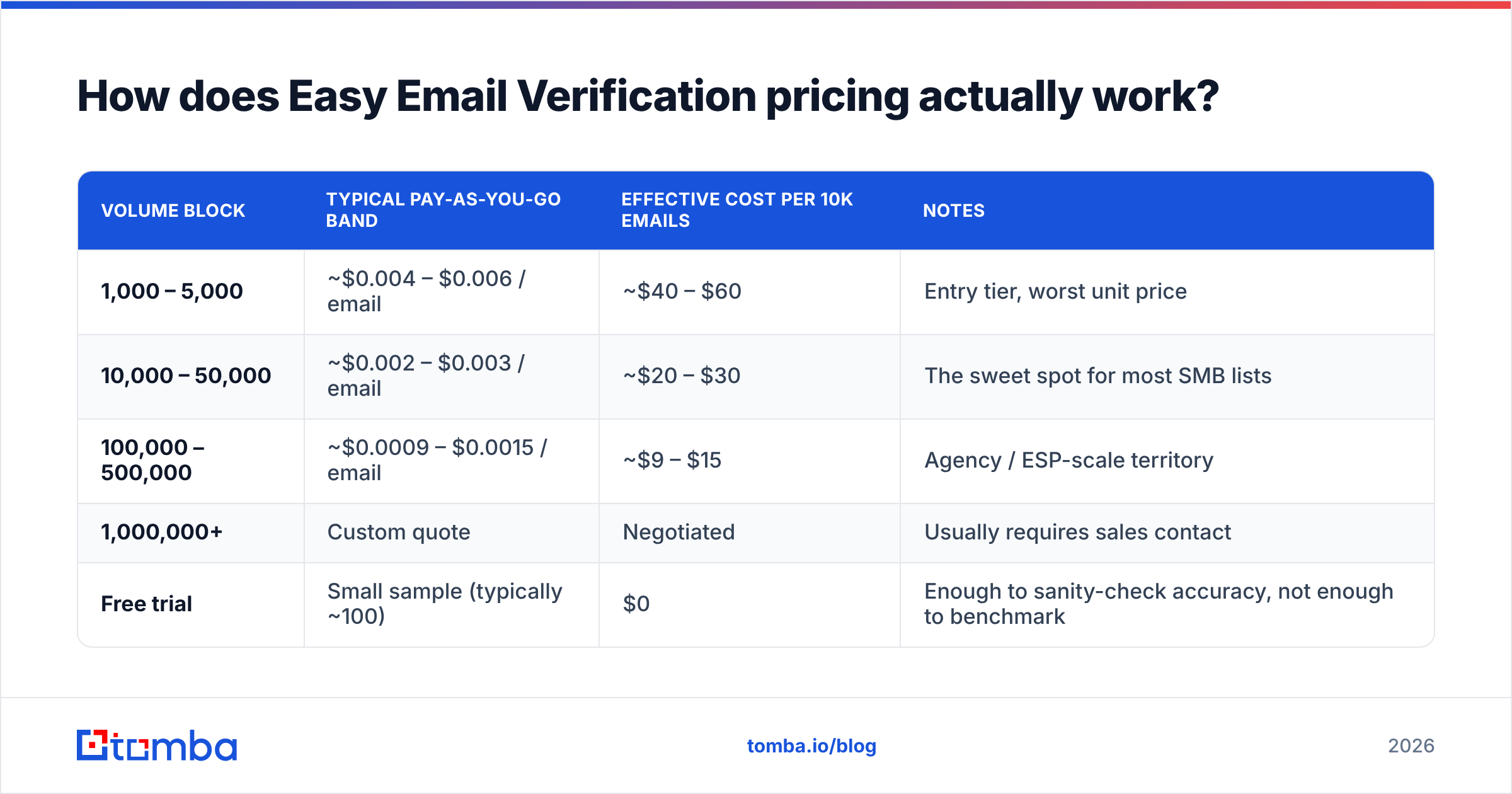
The model is credits, not seats. One credit equals one email checked. You buy a block, the credits sit in your account, and you burn them on uploads or API calls. Per-email cost falls as block size rises — standard volume-discount ladder used across the category.
Here is the shape of the ladder as advertised in this segment. Treat the figures as a band, not a quote:
| Volume block | Typical pay-as-you-go band | Effective cost per 10k emails | Notes |
|---|---|---|---|
| 1,000 – 5,000 | ~$0.004 – $0.006 / email | ~$40 – $60 | Entry tier, worst unit price |
| 10,000 – 50,000 | ~$0.002 – $0.003 / email | ~$20 – $30 | The sweet spot for most SMB lists |
| 100,000 – 500,000 | ~$0.0009 – $0.0015 / email | ~$9 – $15 | Agency / ESP-scale territory |
| 1,000,000+ | Custom quote | Negotiated | Usually requires sales contact |
| Free trial | Small sample (typically ~100) | $0 | Enough to sanity-check accuracy, not enough to benchmark |
Two things make this attractive on paper. First, there is no monthly floor — a founder who cleans one 8,000-row list per quarter pays for exactly that. Second, credits in this model generally do not expire on a 30-day clock the way subscription credits do, which removes the "use it or lose it" pressure that makes SaaS verification feel wasteful.
Two things make it less attractive in practice. The entry tier unit price is roughly 4–6× the volume tier, so small buyers subsidize large ones. And a pure verification credit does nothing for you if the address was never in your database to begin with.

What actually drives your bill: five cost levers#
Before you compare vendors on sticker price, understand what moves your real spend. These five levers matter more than the advertised rate:
- Unknown rate. Every address returned as "unknown" is a credit you spent for zero decision value. A vendor at $0.002/email with a 6% unknown rate costs more per usable answer than one at $0.003 with a 1% unknown rate.
- Catch-all policy. Some vendors bill catch-all results as full credits and give you nothing but a shrug. Others attempt deeper resolution. If 20% of your B2B list sits on accept-all domains — completely normal for Microsoft 365 estates — this line item dominates.
- Duplicate and junk rows. Most people upload raw exports. If 12% of your file is duplicates, malformed strings or already-known bounces, you paid for 12% nothing. Run a remove duplicates pass first; it is free and it directly cuts the invoice.
- Re-verification cadence. B2B data decays roughly 2–2.5% per month as people change jobs. A list verified in January is meaningfully stale by July. Your annual cost is the list size times the number of cleaning cycles, not a one-time charge.
- What you do after verification. A clean list with no phone numbers, no job titles and no company data still needs an enrichment step. That is a second vendor, a second invoice, and a second integration.
Lever five is where most buyers get the math wrong. They compare a $25 verification block against a $49/mo platform and conclude the block is cheaper — while quietly paying a separate scraper, a separate enrichment tool and an hour of manual CSV stitching per week.
What do the reviews actually say?#
Reviews for smaller verification vendors are sparse compared to the ZeroBounce/NeverBounce tier, so read what exists with appropriate caution — a handful of reviews on G2 is a signal, not a verdict.
The recurring positive themes are consistent:
- Price per email. Almost every favorable review leads with cost. That is the product's actual moat.
- No subscription lock-in. Users who clean lists episodically rather than continuously value not paying in dead months.
- Simplicity. Upload, wait, download. Reviewers describe onboarding in minutes, not hours. For a non-technical marketer this genuinely matters.
The recurring criticisms cluster just as tightly:
- Support depth. Small teams mean slower responses on edge cases, particularly around unexpected results on large files.
- Reporting. You get categories, not diagnostics. If you want to know why 9% of a domain bounced, you are on your own.
- Integration surface. Fewer native connectors than the larger platforms, so more of the workflow lands in CSV land.
- Catch-all ambiguity. The single most common complaint across the entire verification category, not unique to this vendor — but present here too.
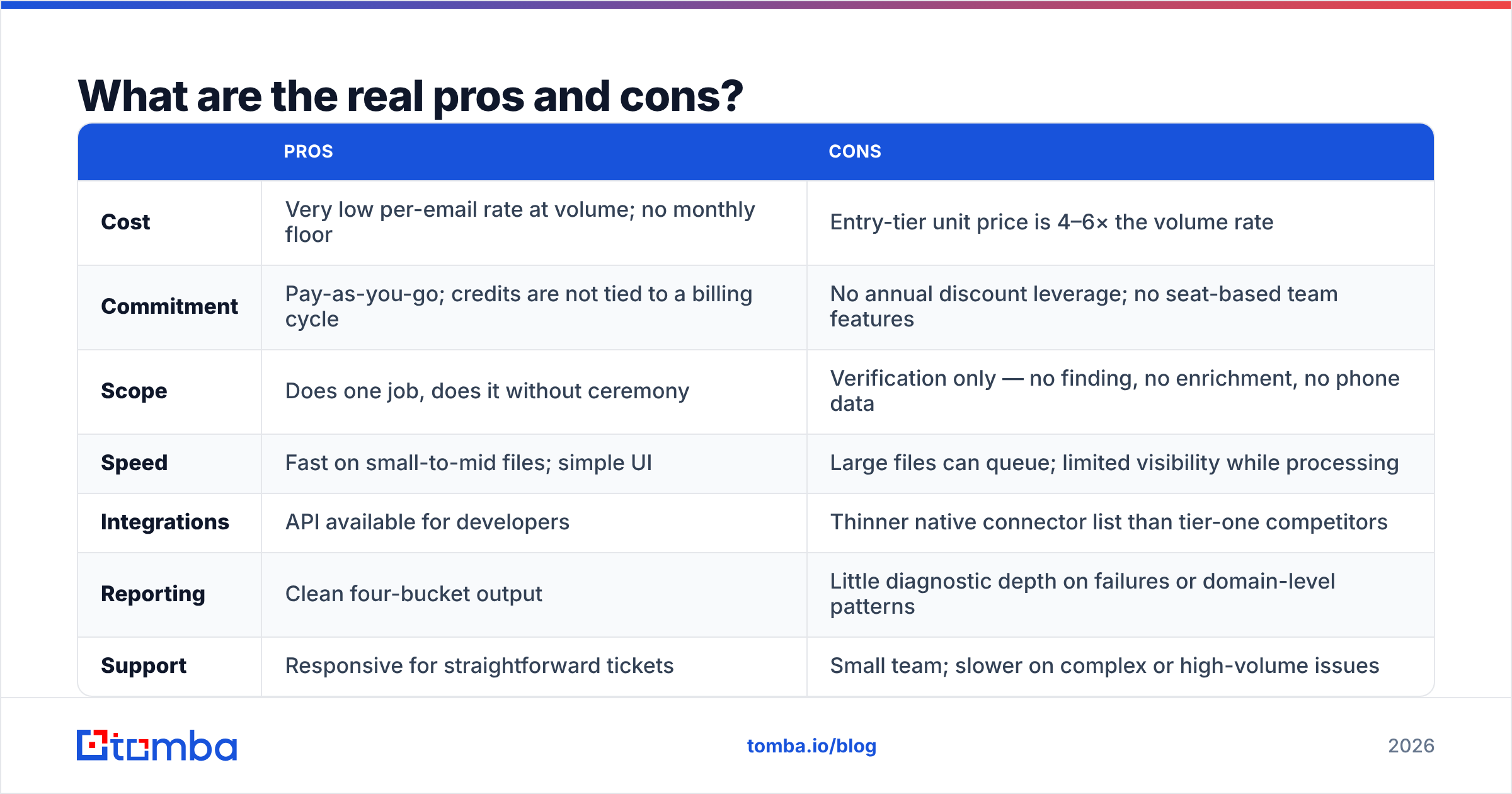
What are the real pros and cons?#
| Pros | Cons | |
|---|---|---|
| Cost | Very low per-email rate at volume; no monthly floor | Entry-tier unit price is 4–6× the volume rate |
| Commitment | Pay-as-you-go; credits are not tied to a billing cycle | No annual discount leverage; no seat-based team features |
| Scope | Does one job, does it without ceremony | Verification only — no finding, no enrichment, no phone data |
| Speed | Fast on small-to-mid files; simple UI | Large files can queue; limited visibility while processing |
| Integrations | API available for developers | Thinner native connector list than tier-one competitors |
| Reporting | Clean four-bucket output | Little diagnostic depth on failures or domain-level patterns |
| Support | Responsive for straightforward tickets | Small team; slower on complex or high-volume issues |
If you read that table and thought "this is a utility, not a platform," you have understood the product correctly. That is not an insult — utilities are useful. It just means the pricing comparison has to be run against your whole stack, not against one line item.
How does the pricing compare to other verification tools?#
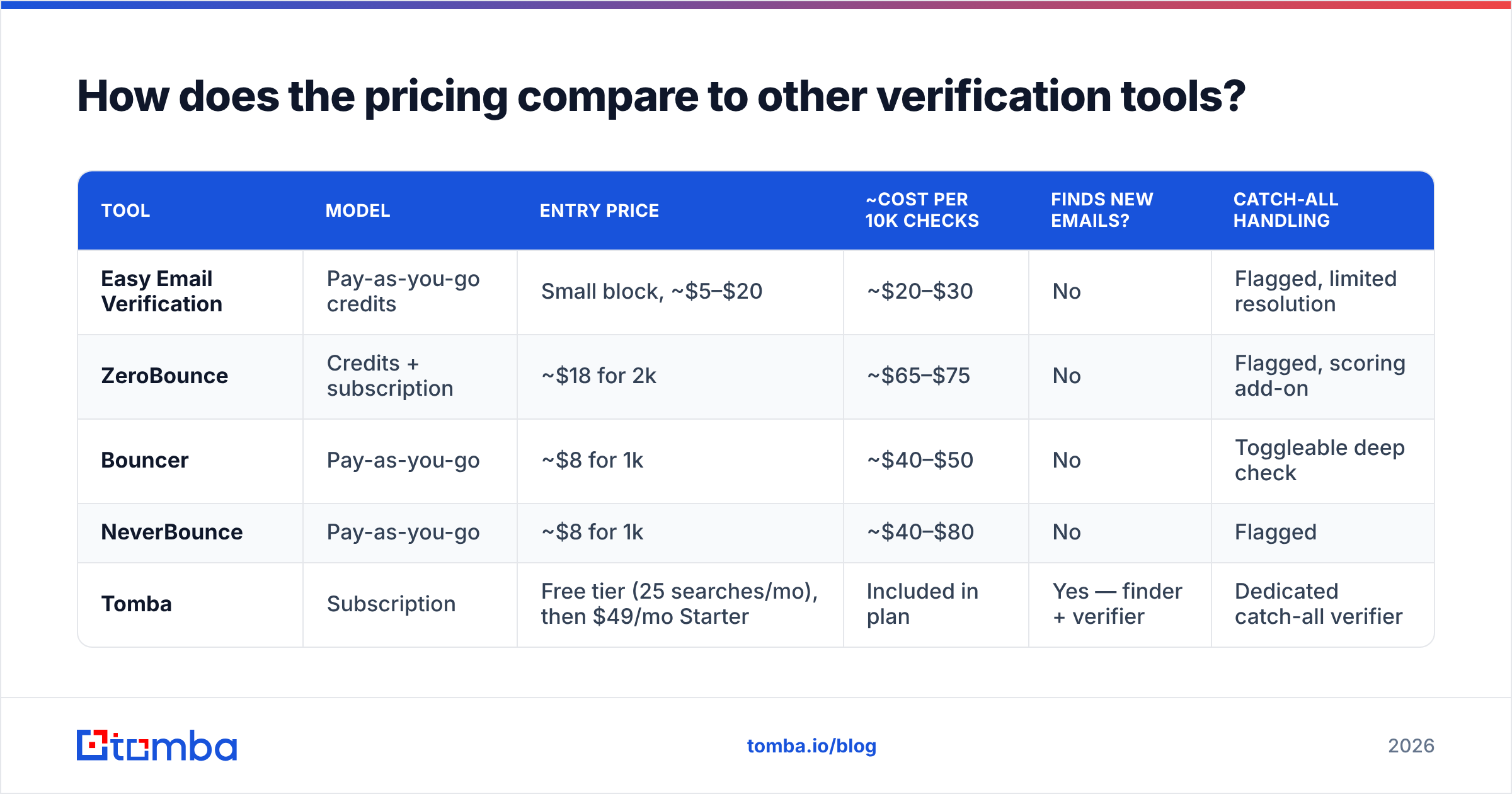
Here is the honest cross-vendor picture. Subscription platforms are priced per month; pay-as-you-go vendors are priced per block. Comparing them requires normalizing to cost per 10,000 checks.

| Tool | Model | Entry price | ~Cost per 10k checks | Finds new emails? | Catch-all handling |
|---|---|---|---|---|---|
| Easy Email Verification | Pay-as-you-go credits | Small block, ~$5–$20 | ~$20–$30 | No | Flagged, limited resolution |
| ZeroBounce | Credits + subscription | ~$18 for 2k | ~$65–$75 | No | Flagged, scoring add-on |
| Bouncer | Pay-as-you-go | ~$8 for 1k | ~$40–$50 | No | Toggleable deep check |
| NeverBounce | Pay-as-you-go | ~$8 for 1k | ~$40–$80 | No | Flagged |
| Tomba | Subscription | Free tier (25 searches/mo), then $49/mo Starter | Included in plan | Yes — finder + verifier | Dedicated catch-all verifier |
The read: on pure per-check price, the pay-as-you-go specialists win, and Easy Email Verification sits at the aggressive end of that group. On cost per completed workflow — find the contact, verify it, enrich it, export it — a combined platform usually wins because you stop paying two or three vendors to move the same row through a pipeline.
That is the actual decision. Not "which verifier is cheapest," but "how many invoices does it take to get from a company name to a deliverable inbox."
Is the accuracy worth the price?#
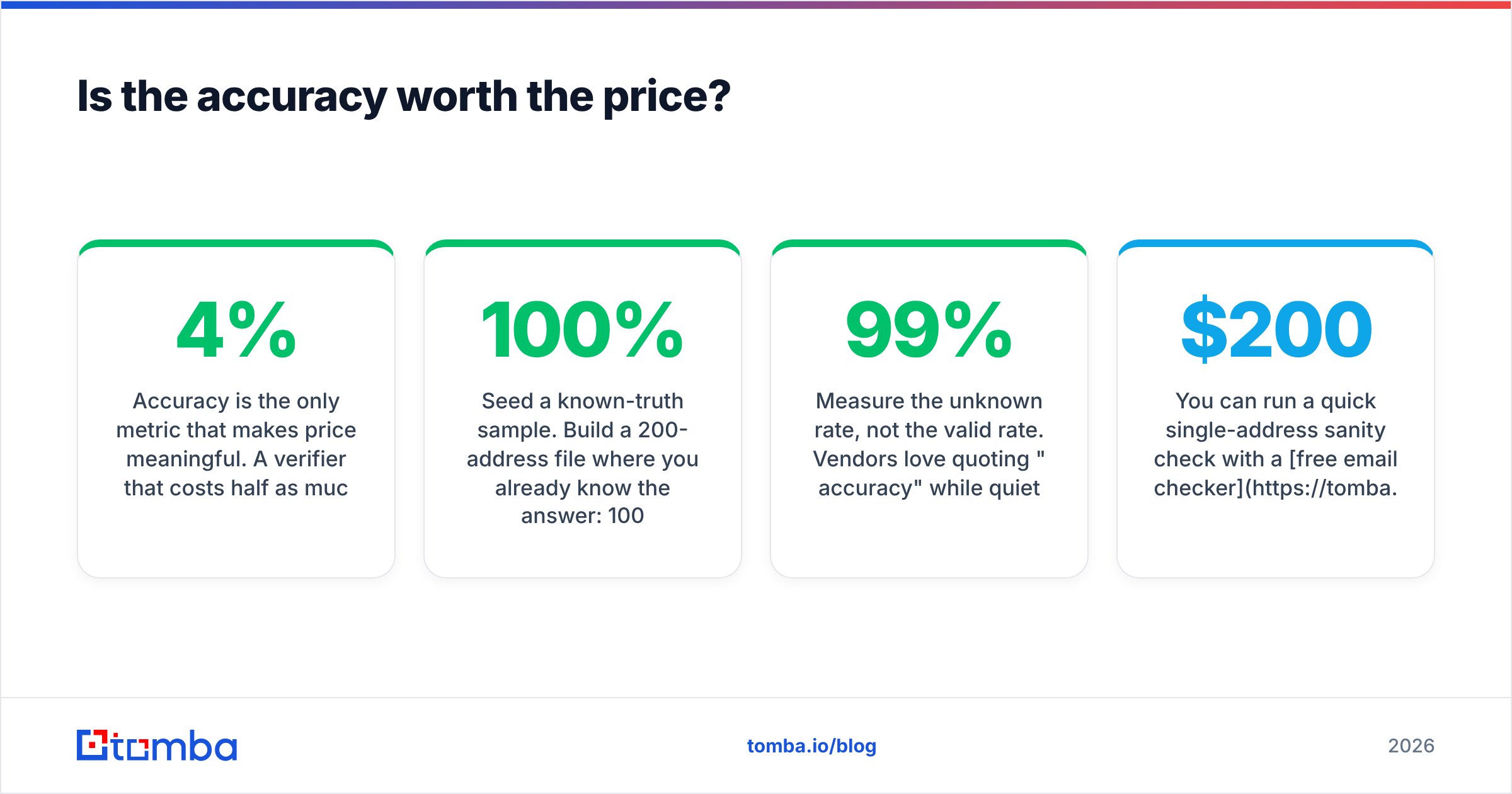
Accuracy is the only metric that makes price meaningful. A verifier that costs half as much and passes 4% more bad addresses is more expensive, because bounces damage sender reputation and reputation damage compounds across every future send.

Three practical ways to test any verifier — including this one — before you commit budget:
- Seed a known-truth sample. Build a 200-address file where you already know the answer: 100 addresses you have successfully emailed in the last 30 days, 50 you know hard-bounced, 50 you invented. A good verifier returns near-100% on the first two groups. Anything that marks your live contacts invalid is disqualifying.
- Measure the unknown rate, not the valid rate. Vendors love quoting "99% accuracy" while quietly returning 8% unknowns. Divide unknowns by total; anything above 3–4% on a normal B2B list means you are paying for indecision.
- Test a Microsoft 365 domain specifically. Accept-all configurations are where verifiers diverge most. Run the same domain through two tools and compare. If both just say "catch-all," neither one earned the credit — that is exactly what a dedicated catch-all verifier exists to resolve.

You can run a quick single-address sanity check with a free email checker before committing to any paid block. It is a five-second test that has saved plenty of people a $200 mistake.
Who should buy it — and who should skip it?#
Buy it if:
- You own a large list you did not build this quarter and need it cleaned once before a campaign.
- You are an agency or ESP passing verification cost through to clients, where per-email rate is the whole negotiation.
- Your prospecting already happens elsewhere and you genuinely only need the cleaning step.
- You clean sporadically and refuse to pay a monthly fee in idle months. This is the strongest case for the product.
Skip it if:
- You need to find addresses, not just check them. Verification cannot create a contact that was never in your CRM.
- Your list is heavy on accept-all corporate domains and you need a real answer rather than a flag.
- You want phone numbers, job titles, company size or tech-stack data alongside the email. That is a data enrichment job, and bolting a second vendor onto a cheap verifier usually erases the savings.
- You run outbound continuously. Continuous outbound means continuous verification, and at that cadence a flat subscription with a bundled verifier is more predictable than credit top-ups.
For teams in that second group, the honest comparison is not verifier-vs-verifier. It is verifier-plus-scraper-plus-enrichment versus one platform. Tomba pricing starts at a free tier with 25 searches per month, then $49/mo Starter, $99/mo Growth and $249/mo Pro — and those plans include the email verifier, domain search, catch-all verification and enrichment in the same credit pool rather than as separate line items.
How do you cut verification spend without switching vendors?#
Whatever tool you land on, these reduce the bill immediately:
- Deduplicate and normalize before upload. Strip whitespace, lowercase everything, remove obvious junk. A 10% reduction in rows is a 10% reduction in cost, guaranteed.
- Suppress known bounces permanently. Keep a global suppression list and filter against it before every upload. Re-verifying an address you already know is dead is pure waste.
- Segment by decay risk. Contacts at high-churn companies need re-verification quarterly; a stable enterprise contact list can go six months. Verifying everything on the same cadence overspends on the stable half.
- Verify at capture, not in batches. Checking an address the moment it enters your system via an email verification API costs one credit and prevents the address from ever polluting a later batch job.
- Buy the block one tier above your estimate. The volume ladder is steep. If you expect 8,000 checks, the 10,000 block is often cheaper in absolute dollars than the 5,000 block plus a top-up.
Point four is the highest-leverage change most teams can make. Batch cleaning is reactive; verifying on capture is preventive, and preventive is always cheaper. HubSpot's own guidance on list hygiene and engagement makes the same argument from the deliverability side.
The verdict#
Easy Email Verification is priced well for what it is: a no-subscription, low-per-email list cleaner for people who already have the list. If that describes you, the value is real and the lack of lock-in is a genuine advantage over subscription-first competitors.
It is priced poorly for what many buyers actually need: a way to go from "I know the company" to "I have a verified inbox and a job title." That is a different job, and paying three vendors to do it in sequence is how a $25 invoice quietly becomes $300 a month.
Run the seed-list test. Count your unknowns. Then compare total workflow cost, not sticker price.
Ready to stop stitching vendors together? If your bottleneck is finding contacts rather than cleaning ones you already own, start with the Tomba Email Finder. Search by domain, name or company, get verified professional addresses back with a confidence score, and run the whole find-verify-enrich loop in one place. The free tier gives you 25 searches a month with no card required — enough to benchmark it against whatever you are paying for verification today.
Related guides#
Ready to find emails that actually work?
Join 150,000+ professionals who stopped guessing and started sending. Free credits on signup — no credit card required.
Get the Tomba newsletter
Practical outbound tactics and product updates — once every two weeks.
About the author