Education Decision Makers: How to Find and Reach K-12 and Higher-Ed Buyers
Superintendents, CTOs, provosts, and procurement directors buy on a calendar most reps ignore. Here's how education decision makers are actually structured, and how to find and reach them without wasting a quarter.
TL;DR
- Education buying is committee-driven: in K-12 the superintendent signs, but the CTO, curriculum director, and business manager decide long before that. In higher ed, the provost, CIO, and department chair split authority three ways.
- Budget cycles beat messaging. Most US districts finalize budgets between March and June for a fiscal year starting July 1 — outreach in September lands after the money is committed.
- Public-sector transparency is your unfair advantage: staff directories, board minutes, and state ed department datasets expose names, roles, and pain points that no private-sector prospector gets.
- Generic
info@district.orgaddresses are where deals go to die. Named, verified addresses for the actual role owner convert; catch-all domains need a separate verification step. - Build the list from public sources, resolve names to verified addresses with a domain-based email finder, then sequence around the fiscal calendar — not around your quarter.
Selling into education looks easy from the outside. Every district has a website, every staff directory is public, and nobody hides behind a gatekeeper the way a Fortune 500 CFO does. Then you send 400 emails, get 11 bounces, 3 out-of-offices from people who left in June, and one reply that says "please submit through our procurement portal."
The problem is not access. It's that education decision makers are organized in a way that doesn't match the org chart software you're used to selling against. This guide maps who actually holds the pen, when they hold it, and how to reach them without burning a domain.
Who are the education decision makers in K-12?#
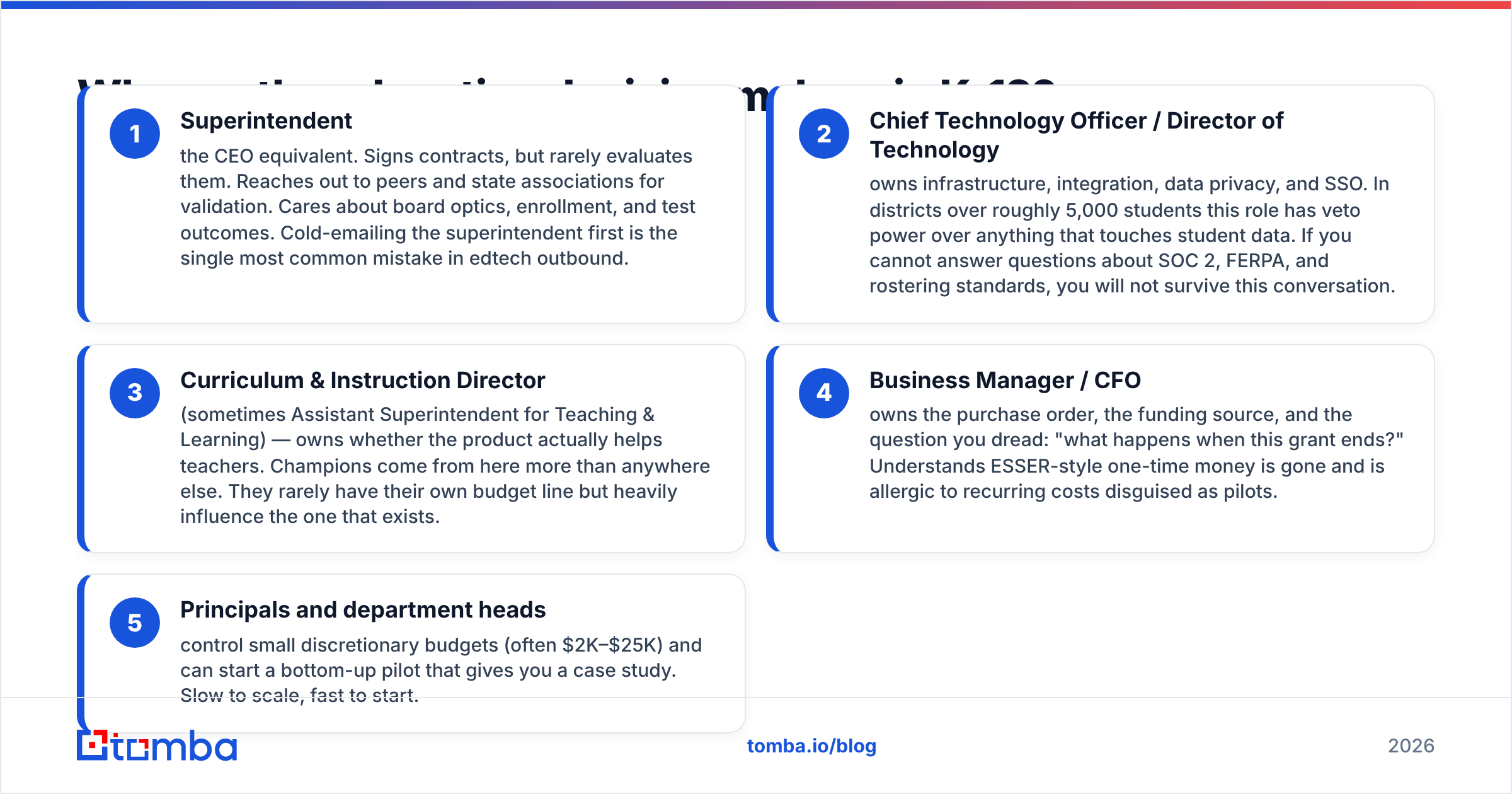
In a US school district, five roles matter, and only one of them signs.
- Superintendent — the CEO equivalent. Signs contracts, but rarely evaluates them. Reaches out to peers and state associations for validation. Cares about board optics, enrollment, and test outcomes. Cold-emailing the superintendent first is the single most common mistake in edtech outbound.
- Chief Technology Officer / Director of Technology — owns infrastructure, integration, data privacy, and SSO. In districts over roughly 5,000 students this role has veto power over anything that touches student data. If you cannot answer questions about SOC 2, FERPA, and rostering standards, you will not survive this conversation.
- Curriculum & Instruction Director (sometimes Assistant Superintendent for Teaching & Learning) — owns whether the product actually helps teachers. Champions come from here more than anywhere else. They rarely have their own budget line but heavily influence the one that exists.
- Business Manager / CFO — owns the purchase order, the funding source, and the question you dread: "what happens when this grant ends?" Understands ESSER-style one-time money is gone and is allergic to recurring costs disguised as pilots.
- Principals and department heads — control small discretionary budgets (often $2K–$25K) and can start a bottom-up pilot that gives you a case study. Slow to scale, fast to start.
The pattern that works: land a champion at level 3 or 5, get validated by level 2, get funded by level 4, get signed by level 1. Any sequence that skips level 2 dies in security review.

How do higher-ed decision makers differ?#
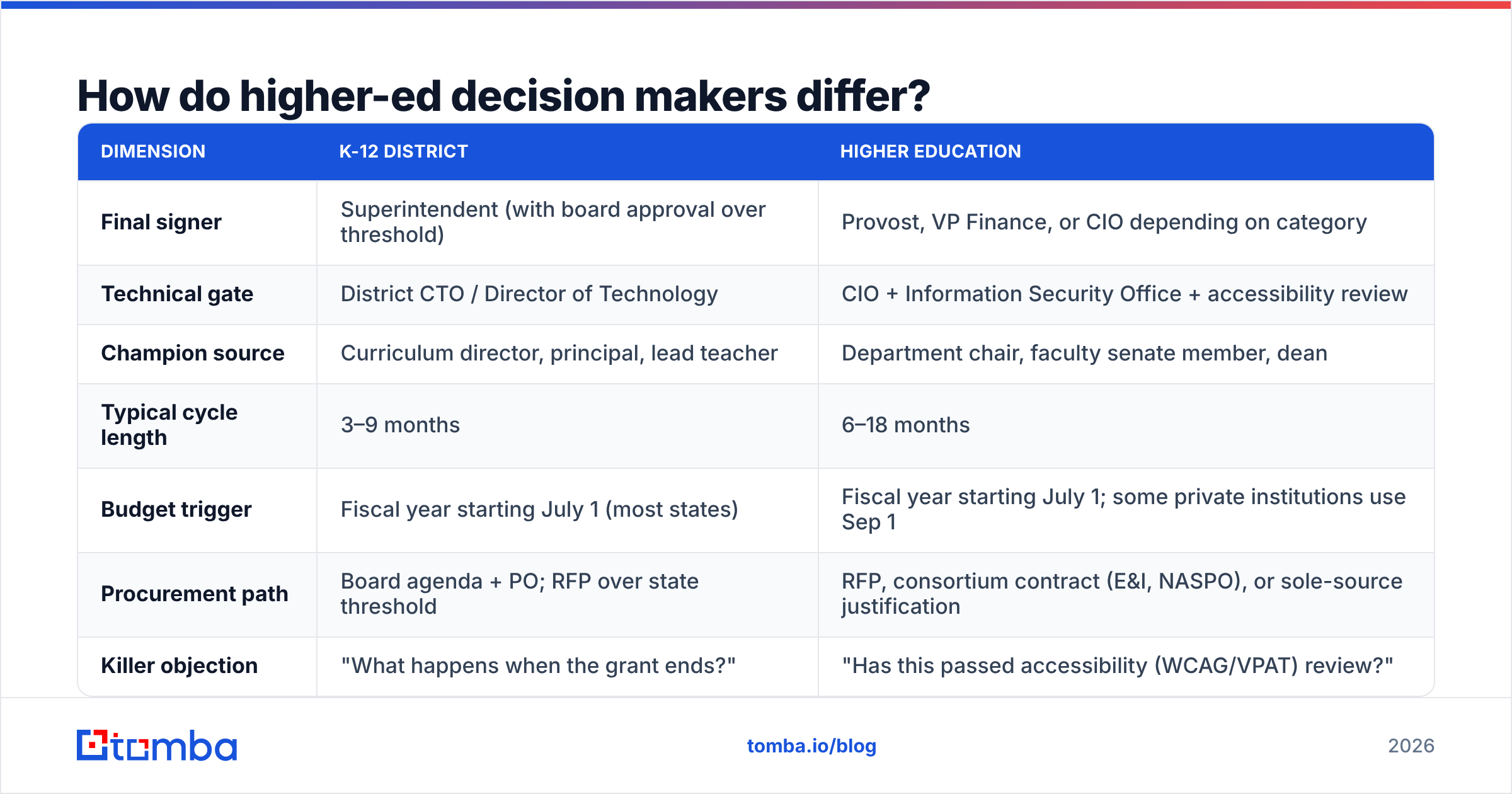
Higher education is not "K-12 with bigger budgets." It's a federated system where three parallel hierarchies each control a slice of the purchase.
| Dimension | K-12 district | Higher education |
|---|---|---|
| Final signer | Superintendent (with board approval over threshold) | Provost, VP Finance, or CIO depending on category |
| Technical gate | District CTO / Director of Technology | CIO + Information Security Office + accessibility review |
| Champion source | Curriculum director, principal, lead teacher | Department chair, faculty senate member, dean |
| Typical cycle length | 3–9 months | 6–18 months |
| Budget trigger | Fiscal year starting July 1 (most states) | Fiscal year starting July 1; some private institutions use Sep 1 |
| Procurement path | Board agenda + PO; RFP over state threshold | RFP, consortium contract (E&I, NASPO), or sole-source justification |
| Killer objection | "What happens when the grant ends?" | "Has this passed accessibility (WCAG/VPAT) review?" |
| Where names live | Staff directory, board minutes | Department pages, faculty listings, org charts |
Two practical consequences. First, in higher ed a VPAT and an accessibility statement are prospecting assets, not legal paperwork — leading with them gets you past the review that stalls most deals. Second, consortium and system-wide contracts mean one win can unlock twenty campuses, so a state system office contact is worth ten individual department chairs.
When should you actually reach out?#
Timing does more damage than messaging in this vertical. Money moves on a calendar, and the calendar is public.
Most US public districts and public institutions run a fiscal year from July 1 to June 30. Working backwards from that:
- January–February — needs assessment and department requests. This is when a curriculum director builds the wish list. Best window for discovery calls and pilot conversations.
- March–May — budget draft, board review, adoption. Your product needs to already be on someone's list. New outreach here can still catch supplemental funds.
- June — purchase orders flush remaining current-year funds. Fast, small deals close here. Also the worst month for reply rates because everyone is closing out the year.
- July–August — new money is live but staff are in start-of-year triage. Implementation conversations, not first touches.
- September–November — the "dead zone" for net-new budget. Good for relationship building, conference follow-up, and seeding next cycle. Bad for expecting signatures.
- December — mid-year budget review; occasional reallocation opportunities.
Roughly 40 states also publish district budget documents and board agendas online. If a district's March board packet includes a line item for "digital literacy curriculum," you have a funded, dated, named opportunity — and you got it for free.
Where do you find education decision makers' contact data?#
Public-sector transparency is the single biggest structural advantage in this vertical. Use it in layers.
Layer 1 — Free authoritative sources. The National Center for Education Statistics publishes the Common Core of Data (every public district and school, with enrollment, locale, and NCES ID) and IPEDS (every Title IV institution). This gives you the universe and the firmographics — district size, urbanicity, student-teacher ratio, revenue per pupil — to segment properly before you touch a single name.
Layer 2 — Names. District staff directories and higher-ed department pages carry the actual humans. Board meeting minutes are underrated: they name the person who presented, the vendor that was approved, and the dollar amount. State education department sites often publish superintendent and CTO rosters for the entire state in one file.
Layer 3 — Verified email addresses. This is where most lists break. A name and a district domain is not a contact. You need the district's actual email pattern, which varies wildly: first.last@, flast@, lastf@, and legacy formats coexist inside the same district after a consolidation. Run the domain through a domain search to see the real patterns in use, then resolve each name individually rather than assuming one format applies district-wide.
Layer 4 — Verification. Education domains bounce harder than commercial ones because of role turnover — a district can lose 15–20% of administrative staff in a single summer. Every list built in May is partially wrong by September. Run an email verification pass immediately before send, not at list-build time.

Accuracy matters more here than in most verticals, because education inboxes sit behind aggressive district-level filtering. A 5% bounce rate that's survivable in SaaS outbound will get your domain flagged by the shared filtering appliance that a whole county uses.
How do you handle catch-all district domains?#
A large share of .k12.xx.us and .edu domains are configured as catch-all — the mail server accepts anything at that domain, so a standard SMTP check returns "valid" for every address you throw at it, including asdfgh@district.org.
This is the trap that inflates list quality scores and then destroys deliverability three weeks later. Three ways to handle it:
- Pattern confidence over SMTP response. If a domain search returns 40 confirmed addresses in
first.last@format and your target resolves to that pattern, you have real evidence — independent of whether the server says yes to everything. - Dedicated catch-all handling. A catch-all verifier uses signals beyond the SMTP handshake to grade catch-all addresses instead of blanket-marking them "risky" and throwing away half your list.
- Segment and throttle. Send catch-all-domain contacts in a separate, smaller batch with a warmed secondary domain. If bounce or complaint signals spike, you've contained the damage.
What does the tooling comparison look like?#
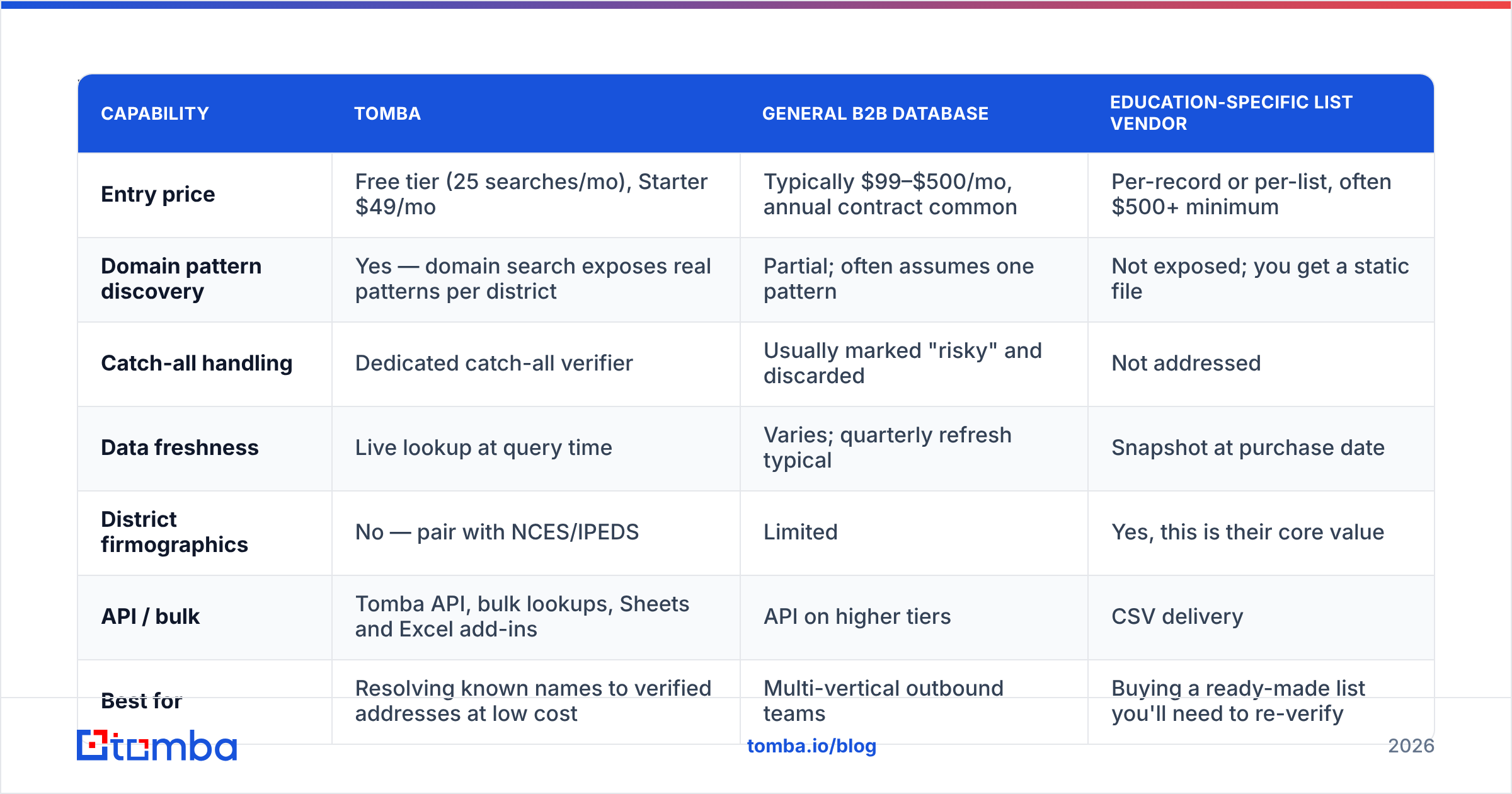
Education prospecting has a specific requirements profile: public-sector domains, high title turnover, catch-all-heavy infrastructure, and a need to pull district firmographics (enrollment, locale, funding) that commercial B2B databases don't carry.
| Capability | Tomba | General B2B database | Education-specific list vendor |
|---|---|---|---|
| Entry price | Free tier (25 searches/mo), Starter $49/mo | Typically $99–$500/mo, annual contract common | Per-record or per-list, often $500+ minimum |
| Domain pattern discovery | Yes — domain search exposes real patterns per district | Partial; often assumes one pattern | Not exposed; you get a static file |
| Catch-all handling | Dedicated catch-all verifier | Usually marked "risky" and discarded | Not addressed |
| Data freshness | Live lookup at query time | Varies; quarterly refresh typical | Snapshot at purchase date |
| District firmographics | No — pair with NCES/IPEDS | Limited | Yes, this is their core value |
| API / bulk | Tomba API, bulk lookups, Sheets and Excel add-ins | API on higher tiers | CSV delivery |
| Best for | Resolving known names to verified addresses at low cost | Multi-vertical outbound teams | Buying a ready-made list you'll need to re-verify |

The honest read: no single tool does all of this. The workflow that actually holds up is free public data for the universe and firmographics, a list vendor if you want a shortcut to titles, and a finder-plus-verifier to turn names into deliverable addresses. Buying a static education list and skipping the verification step is the most expensive shortcut in this vertical — BookYourData and similar providers do supply genuinely useful pre-built education segments, and pairing them with a fresh verification pass before send is how you get the benefit without the bounce risk.
What outreach actually gets replies from education buyers?#
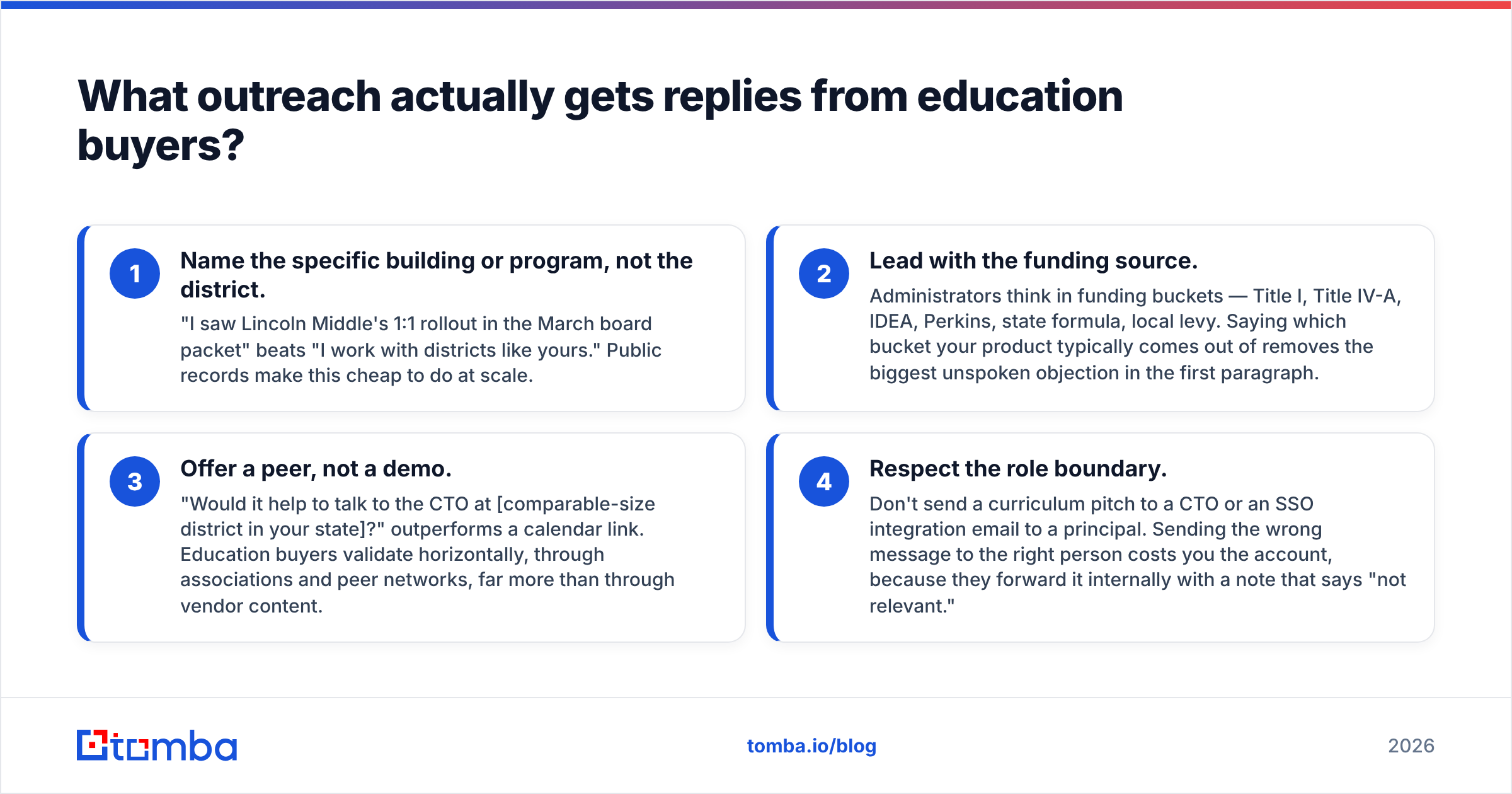
Four things separate the emails that get answered from the ones that get filtered.
- Name the specific building or program, not the district. "I saw Lincoln Middle's 1:1 rollout in the March board packet" beats "I work with districts like yours." Public records make this cheap to do at scale.
- Lead with the funding source. Administrators think in funding buckets — Title I, Title IV-A, IDEA, Perkins, state formula, local levy. Saying which bucket your product typically comes out of removes the biggest unspoken objection in the first paragraph.
- Offer a peer, not a demo. "Would it help to talk to the CTO at [comparable-size district in your state]?" outperforms a calendar link. Education buyers validate horizontally, through associations and peer networks, far more than through vendor content.
- Respect the role boundary. Don't send a curriculum pitch to a CTO or an SSO integration email to a principal. Sending the wrong message to the right person costs you the account, because they forward it internally with a note that says "not relevant."
One more structural note: reply rates in education are typically lower than commercial B2B on first touch, but conversation-to-close rates are higher once you're in. These are long-tenure buyers with real budgets and no incentive to ghost you after a genuine conversation. Set your response rate expectations accordingly, and don't kill a sequence that's producing a small number of high-quality threads.
What compliance rules apply to education outreach?#
Three things to get right before you scale sends.
Student data privacy. FERPA and COPPA govern student records, and roughly 40 states have added their own student data privacy laws on top. You aren't handling student data at the prospecting stage — you're contacting employees at their work addresses — but your product's posture on these laws will be the first question the CTO asks. Have the answer in your first reply, not your fifth.
Public records vs. consent. Staff directory addresses are public employee contact information, and in the US, B2B outreach to a work address under CAN-SPAM is lawful with a clear identity, a physical address, and a working unsubscribe. GDPR changes the calculus for EU institutions — legitimate interest is arguable for work addresses but requires documentation and a real opt-out.
Deliverability hygiene. District and university mail is often filtered at the county, consortium, or system level. One flagged sender can lose you access to hundreds of schools simultaneously. Authenticate properly — SPF, DKIM, DMARC — and keep your bounce rate low. A quick SPF checker run before a campaign takes two minutes and prevents the failure mode where technically valid mail silently lands in quarantine across an entire region. Google's Postmaster Tools guidelines apply here too, since a large share of districts run Google Workspace for Education.
What's the practical build order?#
If you're starting from zero on an education territory, do it in this sequence:
- Define the universe — pull districts or institutions from NCES/IPEDS filtered by enrollment, state, and locale. Export domains.
- Prioritize by funding signal — cross-reference board minutes, state grant awards, and RFP portals for districts with money already earmarked in your category.
- Pull names by role — staff directories for the five K-12 roles above, or the three higher-ed hierarchies. Target 3–5 named contacts per account, not one.
- Resolve and verify — run domains through pattern discovery, resolve names to addresses, verify immediately before send, and handle catch-alls separately.
- Sequence to the calendar — map each account to its fiscal year and schedule the first touch into the January–March needs-assessment window.
- Re-verify every quarter — education turnover in the summer makes any list older than one cycle materially wrong.
Steps 3 and 4 are where most teams lose weeks to manual work. Pulling a directory page, guessing at formats, and eyeballing bounces doesn't scale past a few hundred accounts. Running the domain, resolving the name, and verifying the result in one pass is what turns a 40-hour list build into an afternoon.
Build the list once, and build it right#
Education decision makers are findable. Their names are public, their budgets are published, their meeting notes tell you what they're buying. The bottleneck is turning that public information into addresses that actually deliver — across thousands of district domains with inconsistent formats, aggressive filtering, and 20% annual turnover in administrative roles.
That's the specific job the Tomba Email Finder does: give it a district domain and a name, get back a verified, deliverable address with a confidence score, at a price that doesn't require an annual contract before you've validated the territory. Start on the free tier at 25 searches a month to test a handful of districts, and check Tomba pricing when you're ready to run a full state — Starter is $49/mo and includes the bulk and verification tooling you'll need before your first real send.
Related guides#
Ready to find emails that actually work?
Join 150,000+ professionals who stopped guessing and started sending. Free credits on signup — no credit card required.
Get the Tomba newsletter
Practical outbound tactics and product updates — once every two weeks.
About the author