9 Best EfficientPIM Alternatives in 2026 (Free and Paid)
EfficientPIM is a solid Windows-only personal information manager, but it stalls the moment you need real sync, team access, or live contact data. Here are nine alternatives compared on price, platform, and CRM depth.
TL;DR
- EfficientPIM is a competent Windows desktop personal information manager (notes, contacts, tasks, calendar, passwords) sold mostly as a one-time license — its weak spots are cross-platform sync, collaboration, and anything resembling a real sales pipeline.
- If you want a like-for-like desktop replacement, look at eM Client or Microsoft Outlook + To Do. If you want a workspace, look at Notion, Obsidian, or Evernote. If you want a CRM, look at HubSpot, Zoho, Nimble, or Bitrix24.
- Free tiers exist across almost every option; the real cost difference shows up at 3+ users and at the moment you need mobile parity.
- Migration is mostly a CSV problem: export contacts, tasks, and notes separately, clean duplicates, then import. Budget an afternoon, not a weekend.
- No PIM keeps contact data fresh on its own. Whatever you switch to, pair it with a verification and enrichment layer so your address book doesn't rot at ~25% per year.
What is EfficientPIM, and who still uses it?#
EfficientPIM is a Windows desktop personal information manager from Efficient Software. It bundles what used to be five separate apps — notes, diary, contacts, tasks, calendar, and a password manager — into one tabbed interface with a local database file. There's a free edition, a paid Pro license (roughly a $50 one-time purchase at the time of writing, per the vendor's own site), and companion mobile apps that sync through the vendor's cloud or over a local network.
The people who love it love it for specific reasons: it's fast, it runs offline, the data lives on your own disk, and you pay once instead of forever. In a market where every note-taking app now costs $10/month per seat, that's not nothing.
The people who leave usually leave for equally specific reasons. It's Windows-first. The UI is functionally 2012. Sync is the weakest link. And critically — if you're using it as a de facto CRM for sales contacts, it has no concept of pipeline stages, deal values, email sequences, or data enrichment. It stores what you type. It doesn't tell you when a contact changed jobs.
Why do people look for EfficientPIM alternatives?#
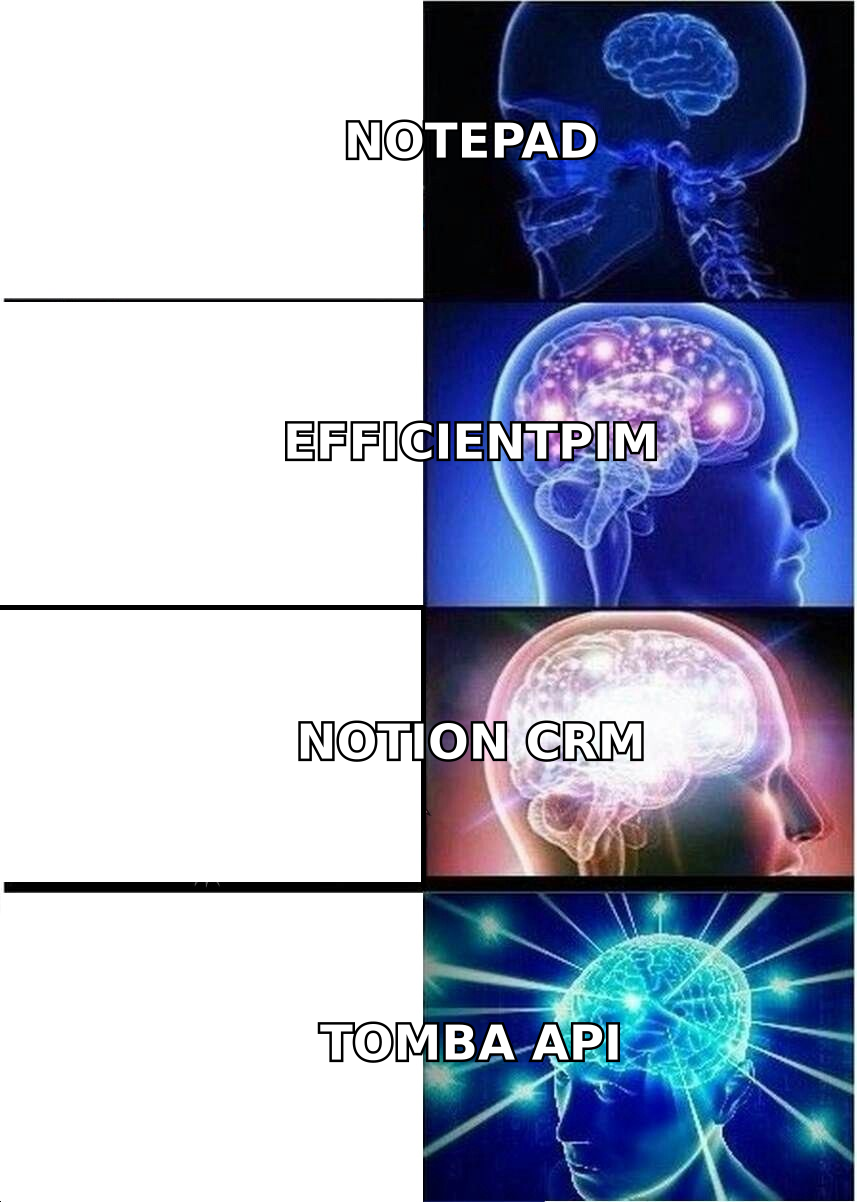
Five patterns come up over and over in migration threads and G2 review comparisons of PIM software:
- Platform lock-in. EfficientPIM is a Windows application. If you buy a Mac, switch to Linux, or work primarily from an iPad, you're stuck running it in a VM or not at all. This is the single most common trigger.
- Sync anxiety. Local-first is great until you need the same task list on two laptops and a phone. Users report friction with conflict resolution and with the network-sync setup, which is fine for a technical user and hostile to everyone else.
- No collaboration layer. A PIM assumes one person. The moment you hire a second salesperson or share an account list, you need shared records, permissions, and an audit trail. EfficientPIM was never designed for that.
- Stale contact data. A local address book is a snapshot. Roughly a quarter of B2B contact records go stale each year as people change roles and companies, and nothing in a desktop PIM flags it. You find out when your email bounces.
- Automation gaps. No native Zapier hooks, no webhooks, no meaningful API. If you want a new contact to trigger anything else — a sequence, a Slack alert, a CRM record — you're copying and pasting.
If none of those five apply to you, honestly: keep using EfficientPIM. It's paid for and it works. Read on only if two or more hit home.
What are the best EfficientPIM alternatives in 2026?#
The mistake most people make is looking for "EfficientPIM but cross-platform." That app mostly doesn't exist, because the all-in-one desktop PIM category shrank while three adjacent categories ate it: mail clients, note workspaces, and lightweight CRMs.
Pick your category first, then your tool.
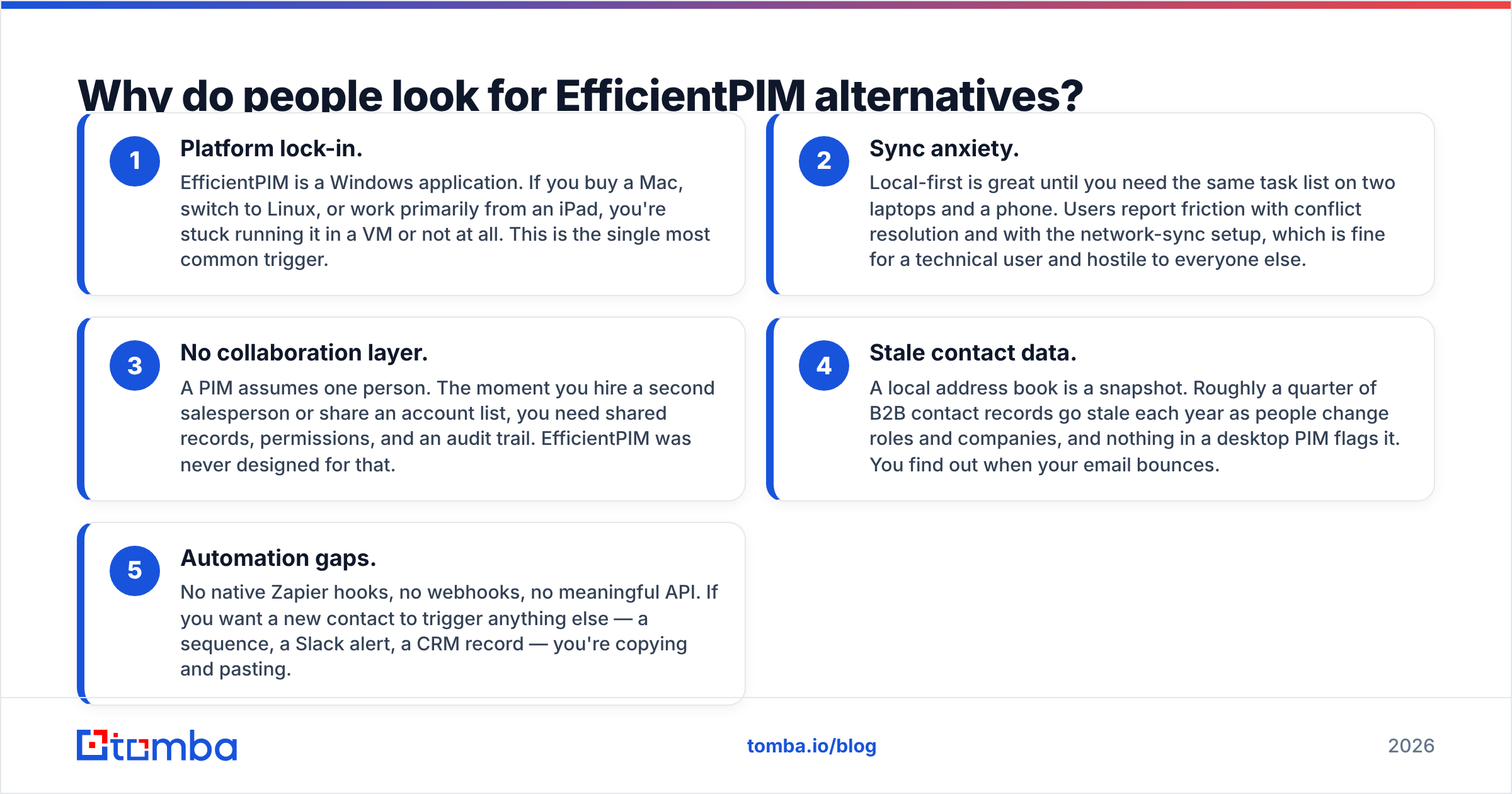
| Tool | Best replacement for | Platforms | Pricing model | Sync quality | Contact/CRM depth |
|---|---|---|---|---|---|
| eM Client | Mail + calendar + contacts | Windows, macOS | Free (limited) or one-time license | Strong (IMAP/CalDAV) | Basic |
| Microsoft Outlook + To Do | The whole PIM bundle | Win, Mac, iOS, Android, web | ~$7-10/user/mo (Microsoft 365) | Excellent | Basic |
| Notion | Notes, tasks, simple CRM | All, incl. web | Free tier; ~$10/user/mo paid | Excellent | Medium (DIY) |
| Obsidian | Notes + diary, local-first | All | Free personal; paid sync add-on | Optional, paid | None |
| Todoist | Tasks and reminders only | All | Free tier; ~$4-6/user/mo | Excellent | None |
| Evernote | Notes + web clipping | All | Free tier; paid plans | Strong | None |
| HubSpot CRM | Contacts as a sales pipeline | All, incl. web | Free CRM; paid tiers scale fast | Excellent | High |
| Zoho CRM | Contacts + full sales suite | All, incl. web | ~$14-20/user/mo | Excellent | High |
| Bitrix24 | Team PIM + CRM + chat | All, incl. web | Free tier up to a team cap | Good | High |
Prices move; check each vendor before you commit. The column that matters most is the last one — it's the axis EfficientPIM never competed on.
Which desktop-first options feel closest to EfficientPIM?#
eM Client is the nearest spiritual successor. It's a real desktop application, it handles mail, calendar, contacts, tasks, and notes in one window, and it still sells a perpetual license alongside subscriptions. It also runs on macOS, which solves the biggest EfficientPIM complaint outright. What you lose: the password manager and the diary module.
Microsoft Outlook plus To Do covers more surface area than any single alternative here — mail, calendar, contacts, tasks, notes via OneNote — and syncs flawlessly across every device. What you lose: the one-time purchase. You're renting now, and the modern Outlook client is heavier than a lean local PIM.
Which note-workspace options make sense?#
Notion is the most common landing spot for ex-PIM users who want structure. Databases give you contacts, tasks, and notes with relations between them, and you can genuinely build a small CRM in an afternoon. The trade-off is that it's a blank canvas — you're the one doing the schema design, and it's offline-hostile compared to a local .db file. Notion's own template gallery has enough CRM starters that you don't have to begin from nothing.
Obsidian is the choice for local-first purists. Plain markdown files on your own disk, no vendor cloud unless you pay for sync, and a plugin ecosystem that covers tasks, calendars, and even lightweight contact tracking. It's the closest thing to EfficientPIM's data-ownership philosophy. It is not a contact manager and won't pretend to be.
Evernote and Todoist are narrower — one for notes and clipping, one for tasks — but if you only ever used two of EfficientPIM's six modules, buying two focused tools beats buying one bloated one.
Which CRM options should you consider instead?#
If you were using EfficientPIM's contact module to track prospects, you weren't using a PIM — you were using an underpowered CRM. Switch categories.
HubSpot CRM has a genuinely usable free tier: unlimited contacts, deal pipelines, email tracking, and a web app that works everywhere. The catch is the upgrade cliff — marketing and sales hubs get expensive quickly, and you'll feel it around the point you want sequences and automation.
Zoho CRM is the value pick. You get pipeline management, workflow automation, and a huge integration surface for a fraction of what enterprise CRMs cost, with the usual Zoho caveat that the UI density takes a week to get used to.
Bitrix24 is the option for small teams that want the PIM feel plus collaboration: contacts, tasks, calendar, chat, and CRM in one workspace, with a free tier generous enough for a five-person shop.
Nimble deserves a mention for a specific use case — it enriches contact records from public social and web sources automatically, which is exactly the thing a local PIM cannot do.
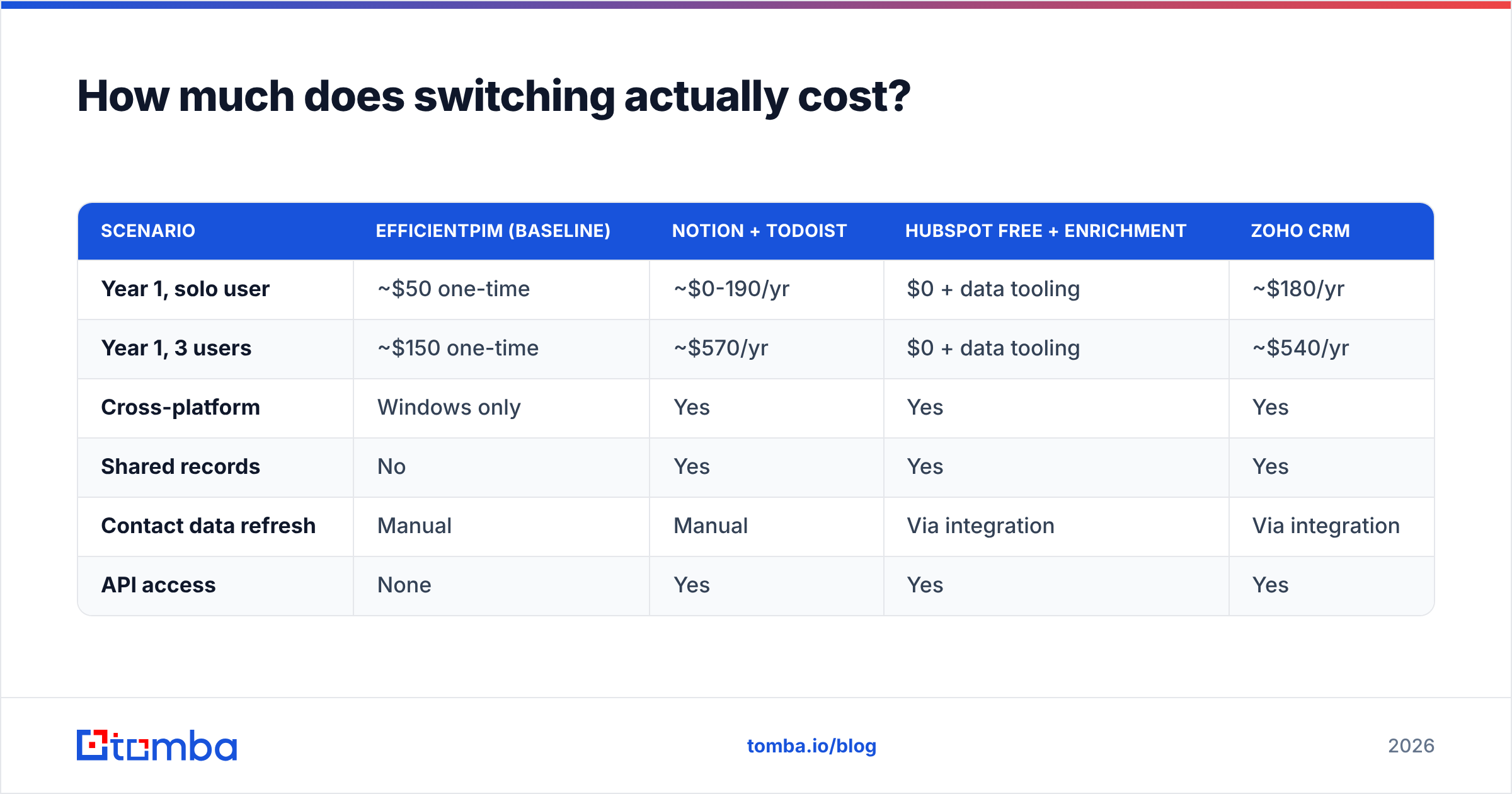
How much does switching actually cost?#
Compare the total, not the sticker.
| Scenario | EfficientPIM (baseline) | Notion + Todoist | HubSpot Free + enrichment | Zoho CRM |
|---|---|---|---|---|
| Year 1, solo user | ~$50 one-time | ~$0-190/yr | $0 + data tooling | ~$180/yr |
| Year 1, 3 users | ~$150 one-time | ~$570/yr | $0 + data tooling | ~$540/yr |
| Cross-platform | Windows only | Yes | Yes | Yes |
| Shared records | No | Yes | Yes | Yes |
| Contact data refresh | Manual | Manual | Via integration | Via integration |
| API access | None | Yes | Yes | Yes |
The honest read: EfficientPIM wins on raw cost forever. It loses on everything that compounds — collaboration, mobility, and data freshness. Whether that trade is worth $500/year depends entirely on whether your contact list is a personal address book or a revenue asset.

How do you migrate off EfficientPIM without losing data?#
Four steps, in this order. Do not skip step three.
- Export each module separately. EfficientPIM exports contacts to CSV and vCard, tasks and notes to CSV or text. Export them one module at a time — a combined dump will be a mess to remap. Back up the database file itself before you touch anything.
- Normalize the columns. Rename headers to match your destination's import template (
First Name,Last Name,Email,Company,Job Title). Most import failures are header mismatches, not data problems. - Deduplicate and verify. Run the list through a dedupe pass — remove duplicates handles this in seconds — then verify every address before it enters the new system. Importing dead emails into a fresh CRM poisons your sender reputation on day one. An email verifier pass here is the highest-ROI ten minutes of the whole migration.
- Import, then enrich. Load the clean file, then backfill missing job titles, company data, and phone numbers rather than leaving half-empty records. Data enrichment turns a name-and-email row into something a salesperson can actually act on.
Keep the old EfficientPIM install for 90 days. You will remember one field you forgot to export.
Why doesn't switching PIMs fix your contact data problem?#
Because the tool was never the problem — the data was.
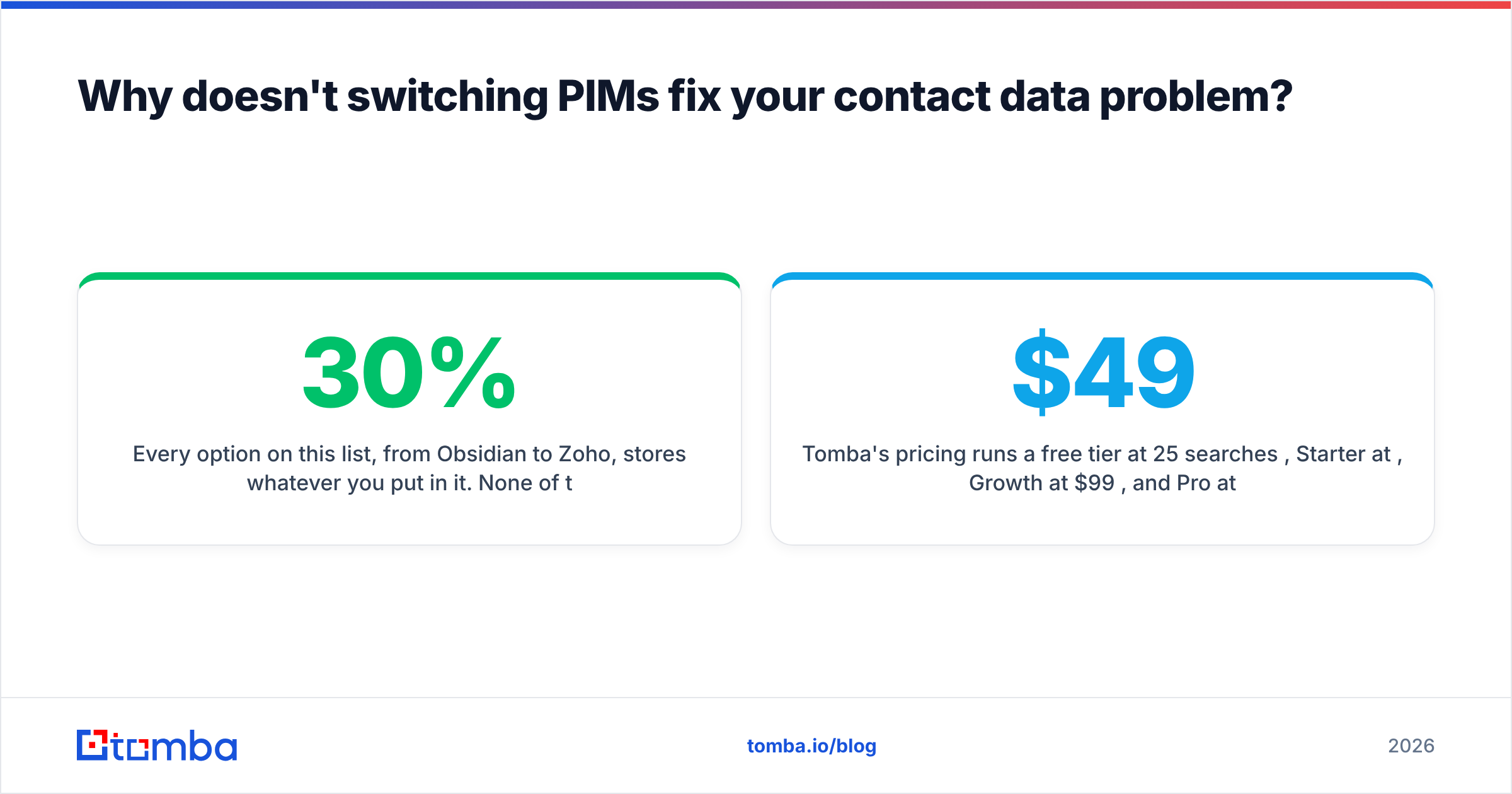
Every option on this list, from Obsidian to Zoho, stores whatever you put in it. None of them go find the CTO's new email address after she moves companies. That's a separate layer, and it's the layer most people skip when they migrate, which is why the shiny new CRM has the same 30% bounce rate as the old PIM six months later.
What that layer looks like in practice:
- Find, don't guess. Use an email finder to resolve a name plus company domain into a verified work address, instead of permutating
first.last@and hoping. - Verify before you send. Every address gets an SMTP-level check before it enters a sequence.
- Enrich on entry. New contact record → automatic company, role, and B2B phone number fill.
- Refresh on a schedule. Re-verify the whole database quarterly. Contacts decay whether or not you look at them.
Tomba's pricing runs a free tier at 25 searches/month, Starter at $49/mo, Growth at $99/mo, and Pro at $249/mo, with an API that plugs into whichever destination you picked above — so the data layer doesn't have to be a manual chore. That's the piece EfficientPIM structurally cannot do, and the reason "which PIM should I switch to" is usually the second-most-important question you're asking.
Which EfficientPIM alternative should you pick?#
Short version, by profile:
- Solo user, Windows, wants a desktop app: eM Client. Closest feel, adds macOS, keeps the perpetual-license option.
- Solo user, multiple devices, notes-heavy: Notion if you want structure, Obsidian if you want your files on your own disk.
- Small team that shares contacts: Bitrix24 or Zoho CRM. Both give you shared records without an enterprise contract.
- Anyone selling something: HubSpot's free CRM plus a data layer. Stop using a personal information manager as a pipeline.
- Anyone who just wants tasks: Todoist. You were over-tooled.
The one recommendation that applies regardless of which box you tick: clean the list before it moves. A migration is the only moment you'll ever have the whole database in one CSV, which makes it the cheapest possible time to verify and enrich it.
Start there — run your exported EfficientPIM contacts through Tomba's Email Finder to fill the gaps and confirm what's still live, then import into whichever alternative you chose. The free tier is enough to test the workflow on a sample before you commit the full list.
Related guides#
Ready to find emails that actually work?
Join 150,000+ professionals who stopped guessing and started sending. Free credits on signup — no credit card required.
Get the Tomba newsletter
Practical outbound tactics and product updates — once every two weeks.
About the author