Email Address Finder Software: 2026 Buyer's Guide
Most email address finder software sells you the same database with a different coat of paint. Here is how accuracy, credit models, and verification actually differ in 2026 — and which tool fits which team.
TL;DR
- Every email address finder software vendor claims "95% accuracy." Almost none define the denominator, which is why your bounce rate rarely matches the marketing page.
- The three specs that actually change your cost per meeting: verified-vs-guessed output, credit rollover policy, and whether catch-all domains are billed as hits.
- Pattern-guessing tools inflate hit rate by returning
firstname.lastname@for anything with an MX record. That's a coin flip billed as data. - For most SMB and mid-market teams, a dedicated finder plus verifier (Tomba, Findymail, Hunter) beats an all-in-one platform on data quality per dollar. All-in-one wins when you need sequencing and intent in the same seat.
- Budget $49–$99/mo for a 1–3 person outbound motion. Above roughly 50,000 lookups a month, negotiate API pricing rather than stacking seats.
What is email address finder software?#
Email address finder software takes an identity — a person's name plus a company, a LinkedIn URL, or just a domain — and returns the work email address associated with it. That's the whole job description. Everything else vendors bundle around it (sequencing, dialers, intent signals) is a different product wearing the same badge.
Think of it like a locksmith versus a hardware store. The locksmith opens your specific door. The hardware store sells you a bin of keys and tells you one of them probably fits. Both technically "provide access." Only one of them respects your time.
Under the hood, every tool in this category runs some mix of four techniques:
- Crawled public sources — company sites, press releases, GitHub commits, conference pages, WHOIS records, open-source mailing lists. This is where genuinely verified addresses come from, and it's the expensive part to build.
- Pattern inference — the vendor knows
stripe.comusesfirst@, so it constructspatrick@stripe.comand calls it found. Cheap, fast, and the single biggest source of silent bounces. - SMTP validation — the tool opens a conversation with the receiving mail server and asks whether the mailbox exists, without sending anything. Accurate on most domains, blind on catch-all domains that accept everything.
- Contributed and licensed data — email signatures scraped via browser extensions, partner data co-ops, purchased B2B files. Freshness varies wildly; some records are five years stale.
The reason two tools disagree about the same contact is that they weight these four sources differently. A tool that leans on #2 shows you a spectacular hit rate and a terrible bounce rate. A tool that leans on #1 and #3 shows a lower hit rate and email that actually lands. If you only read one number on a pricing page, read the bounce guarantee — not the hit rate.
How accurate is email address finder software in practice?#
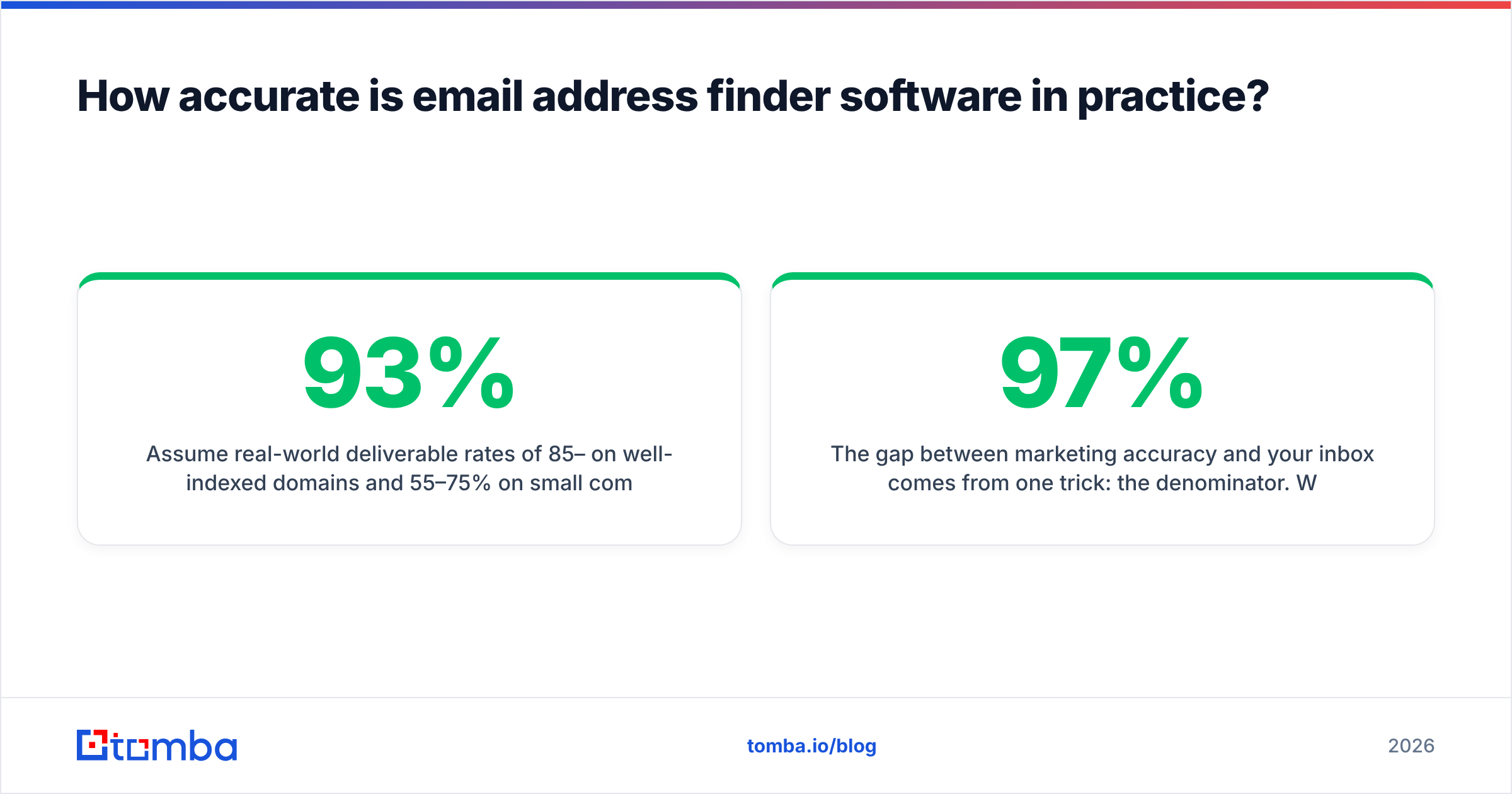
Assume real-world deliverable rates of 85–93% on well-indexed domains and 55–75% on small companies, non-English markets, and anything hosted on a catch-all.
The gap between marketing accuracy and your inbox comes from one trick: the denominator. When a vendor says 97% accuracy, they usually mean "of the emails we chose to return, 97% were valid" — after silently dropping every contact they weren't confident about. That's a defensible metric, but it isn't the number you care about. You care about coverage × accuracy, which is how many of your 1,000 target contacts you can email without torching your sender reputation.

Three failure modes to test for before you commit to an annual plan:
- Catch-all billing. Some domains accept mail to every address, valid or not. A finder can't verify those via SMTP. Ethical tools flag them as "accepts all" and don't charge full price. Others return them as verified and bill you. Run 50 known catch-all domains through any trial and read the labels. Tomba's catch-all verifier exists specifically because this category is where most bounce surprises live.
- Stale-but-valid. The mailbox exists; the person left 14 months ago. SMTP says valid, your reply rate says otherwise. Look for a
last_seenor confidence-decay field in the API response. If a vendor can't tell you when a record was last confirmed, treat every record as unknown age. - Role and alias inflation.
info@,sales@,contact@are trivially findable and nearly worthless for one-to-one outbound. Check whether they count against your credits.
The cheap way to run this test: take 200 contacts you already have confirmed email for from closed deals, strip the emails, and feed the names and domains back through each trial. You now have ground truth. That single afternoon will tell you more than every G2 review combined — and G2's category listings are still worth skimming for support-quality complaints, which trials won't reveal.
Which email address finder software should you compare in 2026?#
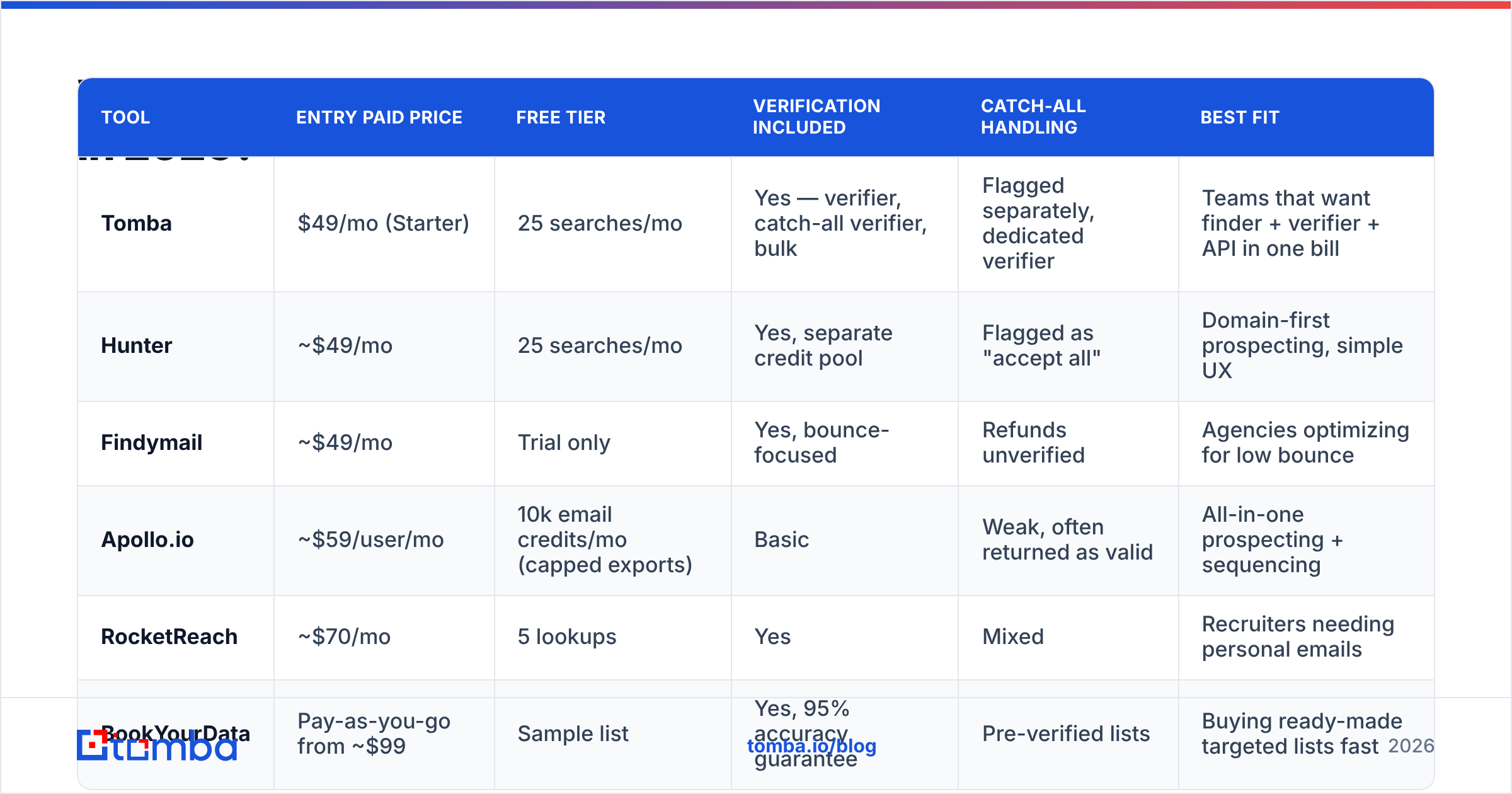
Six tools cover the realistic shortlist for B2B teams. Prices are list monthly rates as of mid-2026; annual billing typically knocks off 20–30% across the board.

| Tool | Entry paid price | Free tier | Verification included | Catch-all handling | Best fit |
|---|---|---|---|---|---|
| Tomba | $49/mo (Starter) | 25 searches/mo | Yes — verifier, catch-all verifier, bulk | Flagged separately, dedicated verifier | Teams that want finder + verifier + API in one bill |
| Hunter | ~$49/mo | 25 searches/mo | Yes, separate credit pool | Flagged as "accept all" | Domain-first prospecting, simple UX |
| Findymail | ~$49/mo | Trial only | Yes, bounce-focused | Refunds unverified | Agencies optimizing for low bounce |
| Apollo.io | ~$59/user/mo | 10k email credits/mo (capped exports) | Basic | Weak, often returned as valid | All-in-one prospecting + sequencing |
| RocketReach | ~$70/mo | 5 lookups | Yes | Mixed | Recruiters needing personal emails |
| BookYourData | Pay-as-you-go from ~$99 | Sample list | Yes, 95% accuracy guarantee | Pre-verified lists | Buying ready-made targeted lists fast |
A few honest reads on that table:
Tomba and Hunter occupy the same shelf — domain search, name-based lookup, verification, API — and either will serve a lean outbound team well. The differentiator is bundling: Tomba's pricing rolls the email verifier, catch-all checks, phone finder, and enrichment into the same plan, where several competitors meter verification on a separate credit pool. If you verify everything you find (you should), that's a real difference in effective cost per usable contact, not a feature-list flex.
Apollo is a different purchase. You're buying a database plus a sequencer plus a CRM-lite, and the email data is a component rather than the product. That's genuinely efficient for a 2-person startup that wants one tool. It's also why teams eventually pair it with a dedicated finder for the 30–40% of contacts Apollo misses or gets wrong. If that's where you are, an Apollo alternative used as a data layer under your existing sequencer is usually cheaper than upgrading Apollo tiers.
BookYourData solves a different problem: you want 5,000 verified contacts matching a filter today, not an API to query over the next six months. Its pay-as-you-go model and accuracy guarantee make it a reasonable complement to a finder rather than a replacement — buy the list, then run your own verification pass before sending.
RocketReach skews toward personal emails and mobile numbers, which matters for recruiting and hurts for compliance-sensitive B2B. Check your legal posture before you build a motion on personal contact data.
What features actually matter versus what's marketing?#
Sort every feature list into these buckets before you demo anything.
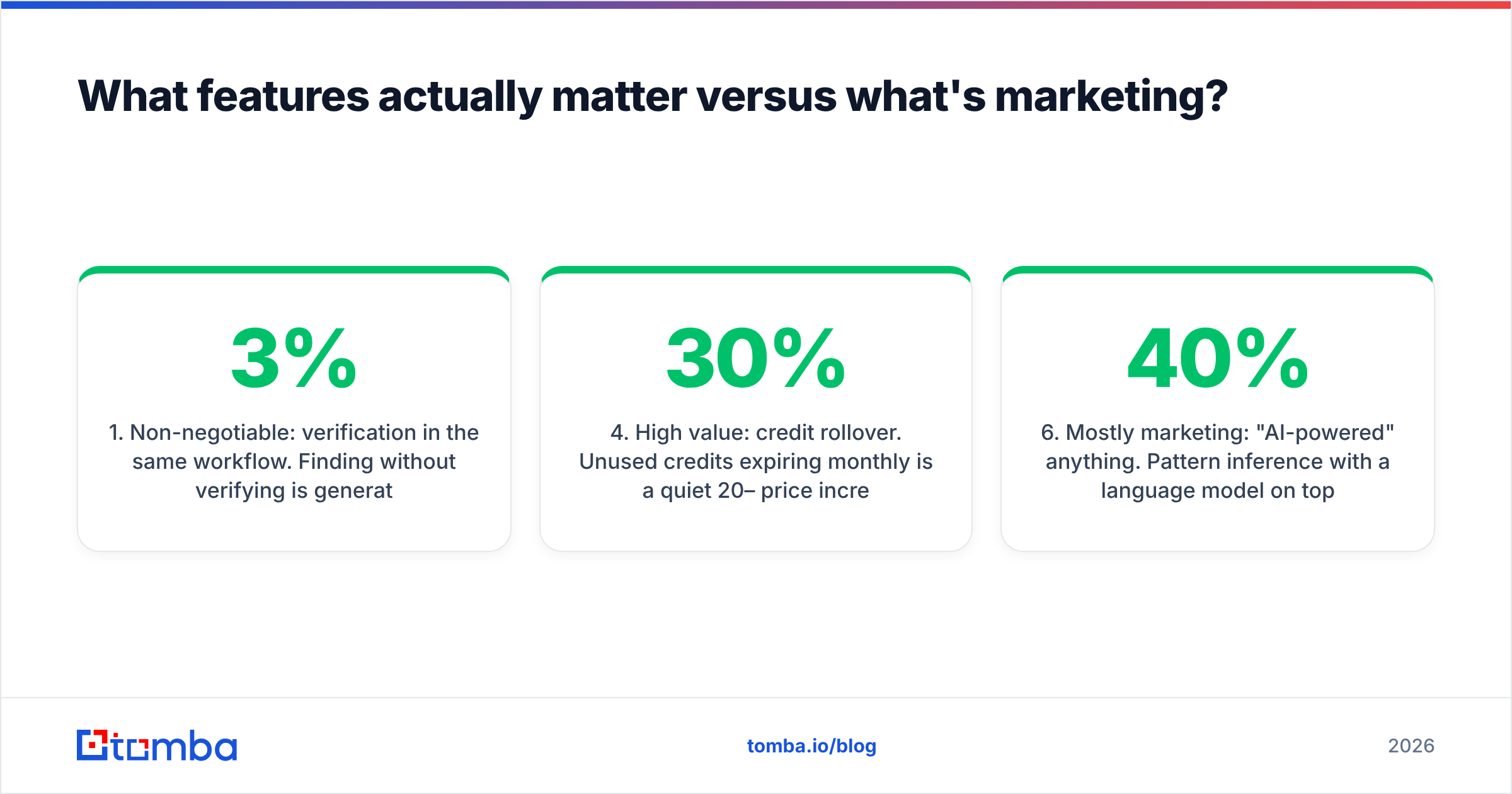
- Non-negotiable: verification in the same workflow. Finding without verifying is generating a bounce list with extra steps. Bounces above 3% start damaging email deliverability at the domain level, and recovering a burned sending domain takes weeks. The finder and verifier should be one motion, not two purchases.
- Non-negotiable: bulk processing. Manual one-at-a-time lookups don't survive contact with a real list. You want CSV in, enriched CSV out, plus a bulk email finder that handles thousands of rows without a browser tab open.
- Non-negotiable if you're technical: a real API. Rate limits published, response schema documented, confidence score exposed as a field you can threshold on. Tomba's email finder API and CLI matter more than any UI feature if you're enriching inside your own pipeline.
- High value: credit rollover. Unused credits expiring monthly is a quiet 20–30% price increase for teams with lumpy prospecting cycles. Ask explicitly. Get it in writing.
- High value: source transparency. The response should tell you where the address came from and when it was last seen. Vendors who publish their data sources are making a checkable claim; vendors who say "proprietary AI" are not.
- Mostly marketing: "AI-powered" anything. Pattern inference with a language model on top is still pattern inference. Also mostly marketing: total database size. A 700-million-record database that's 40% stale is worse than 200 million fresh records, and nobody publishes freshness distribution.
Where extensions and integrations sit: useful, rarely decisive. A Chrome extension speeds up one-off LinkedIn research, and a Google Sheets add-on covers the "I just need this list enriched" case without engineering time. Neither changes data quality. Buy on data, then check whether the surfaces you actually work in are covered.

How much should you pay for email address finder software?#
Price by usable contacts per month, not credits.
Work it backwards. Say you need 40 meetings a quarter at a 3% meeting rate from cold email. That's roughly 1,350 contacts actually reached, so about 1,600 found contacts after bounces and unverifiables, so about 2,200 lookups including misses. Call it 750 lookups a month. Every tool in the table above covers that on its entry tier.
That math has an uncomfortable implication: most teams overbuy. The $299/mo tier exists for teams running 20,000+ lookups a month or needing seat-level admin controls. If you're three people sending 300 emails a week, an entry plan plus disciplined verification will outperform a premium plan used sloppily.
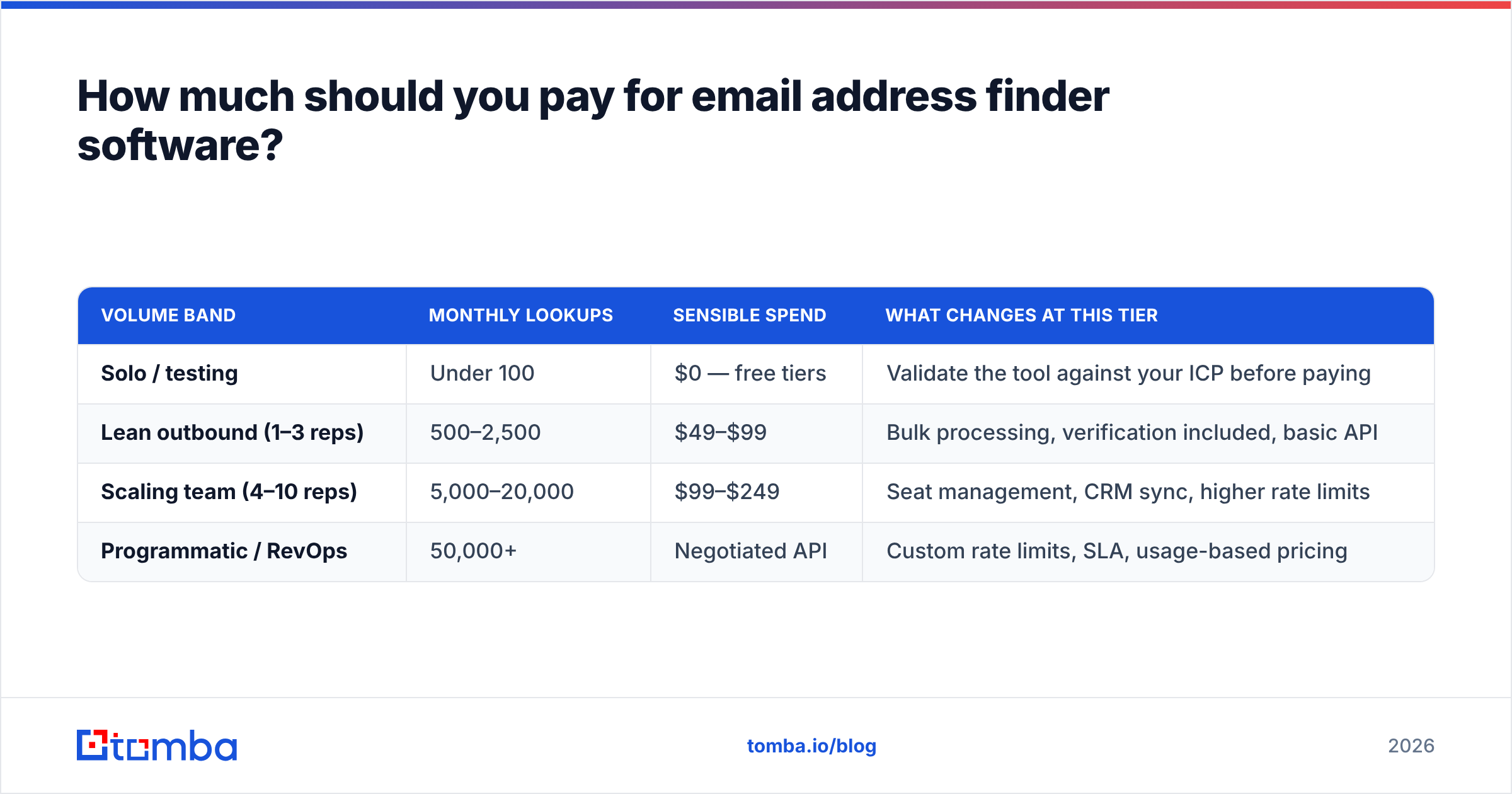
| Volume band | Monthly lookups | Sensible spend | What changes at this tier |
|---|---|---|---|
| Solo / testing | Under 100 | $0 — free tiers | Validate the tool against your ICP before paying |
| Lean outbound (1–3 reps) | 500–2,500 | $49–$99 | Bulk processing, verification included, basic API |
| Scaling team (4–10 reps) | 5,000–20,000 | $99–$249 | Seat management, CRM sync, higher rate limits |
| Programmatic / RevOps | 50,000+ | Negotiated API | Custom rate limits, SLA, usage-based pricing |
Two cost traps worth naming. First, per-seat pricing on data tools punishes you for giving marketing access to the same database sales uses; prefer credit-pooled plans where the whole team draws from one bucket. Second, verification sold separately roughly doubles your effective per-contact cost once you're verifying properly — which is exactly why bundled plans read as more expensive on the pricing page and land cheaper on the invoice.
For a reality check on how the broader stack prices data, HubSpot's own breakdown of prospecting costs is a reasonable neutral baseline, and vendor docs like Hunter's API reference let you compare rate limits directly rather than trusting a comparison chart.
How do you actually evaluate a tool in one week?#
A five-day trial protocol that produces a defensible decision:
- Day 1 — build ground truth. Pull 200 contacts from closed-won deals and past sequences where you know the real email. Strip emails, keep names + domains. Include 40 hard cases: non-US companies, sub-50-employee companies, hyphenated names, and known catch-all domains.
- Day 2 — run all shortlisted trials on the identical file. Same input, same day. Record found/not-found, confidence score, and any catch-all flags.
- Day 3 — score three metrics separately. Coverage (% returned), precision (% of returned that match ground truth), and honesty (did it flag uncertainty, or return guesses as verified?). The third metric is the one nobody measures and the one that predicts your bounce rate.
- Day 4 — test the integration you'll live in. API response time and schema, or the HubSpot integration, or the spreadsheet add-on. A tool that wins on data and loses on workflow won't get used.
- Day 5 — email support with a hard question. Ask how they handle catch-all billing and record freshness. The answer quality, and the response time, tell you what year two looks like.
Skip the demo call until after day 3. Sales engineers are very good at making any dataset look excellent on a curated example account.
Where does this category go next?#
Two shifts are already visible in 2026. First, finders are becoming enrichment endpoints rather than destinations — the value moves from the UI to the API and to agent-accessible interfaces like MCP servers, where a research agent resolves contacts mid-workflow instead of a human running searches. Second, verification is consolidating into the finder, because separating them was always a pricing decision rather than a technical one, and buyers noticed.
What won't change: the accuracy ceiling is set by public data availability, not by model quality. No vendor can verify a mailbox on a catch-all domain that refuses to confirm anything. Any tool promising 99% coverage across all company sizes is describing pattern guessing with confidence.
Practical stance: pick on measured precision against your own ICP, insist that verification is bundled, and keep the contract short enough that you can move when someone's data goes stale.
Start with your own ground-truth test. The Tomba Email Finder includes 25 free searches a month with no card — enough to run your 200-contact benchmark against the hard cases that break other tools, with catch-all flagging and verification in the same workflow rather than as a second invoice. Paid plans start at $49/mo, and you can also start from a company with domain search when you have the account but not the names.
Related guides#
Ready to find emails that actually work?
Join 150,000+ professionals who stopped guessing and started sending. Free credits on signup — no credit card required.
Get the Tomba newsletter
Practical outbound tactics and product updates — once every two weeks.
About the author