Email Address for Verification: The Complete 2026 Guide
Two very different problems hide behind the same search: getting an inbox that can receive verification codes, and checking whether a lead's address is real. Here's how both work, what the result codes mean, and what verification actually costs in 2026.
TL;DR
- "Email address for verification" means one of two things: an inbox you use to receive signup or 2FA codes, or a lead's address you need to check before sending. This guide covers both, starting with how to tell which problem you have.
- Verification is a layered process: syntax, DNS and MX lookup, disposable and role detection, then an SMTP handshake. Only the last step touches the receiving server.
- Result codes matter more than a single "valid/invalid" flag. Treat
accept_all(catch-all) andunknownas separate risk buckets, not as failures. - Bulk verification pricing in 2026 clusters around $0.001–$0.008 per email depending on volume. Tomba bundles finding and verifying into one credit pool starting at $49/mo, with 25 free searches to test accuracy first.
- The single biggest deliverability win is boring: verify every list within 30 days of sending and re-verify anything older than 90 days.
Do you need an inbox for codes, or a check on a lead's address?#
Start here, because the two intents lead to completely different tools.
Intent 1 — you need an email address that can receive a verification message. You're signing up for a service, confirming a domain, testing your own signup flow, or registering a client account and you need an inbox that reliably accepts the confirmation link. Your concern is deliverability into your own inbox and whether the service will accept the address type you use.
Intent 2 — you have an address and need to know if it's real. You built a prospect list, imported a CRM export, or ran an email finder and now you need to know which addresses will bounce. Your concern is sender reputation and bounce rate.
Most people searching this phrase land in Intent 2 within a week of Intent 1, because the first thing that breaks in outbound is bounce rate. The rest of this guide covers Intent 2 in depth, with a dedicated section on Intent 1 further down.
What does email verification actually check?#
Verification is not one test. It's a pipeline, and each stage kills a different failure mode. Understanding the order tells you why a tool sometimes returns unknown instead of a clean yes or no.
- Syntax validation. RFC-compliant structure check: exactly one
@, no illegal characters, no double dots, local part under 64 characters, total length under 254. Catches typos likename@@company.comand truncated exports. Costs nothing and rejects roughly 1–3% of a messy list. - Domain and DNS resolution. Does
company.comresolve at all? Dead domains from a two-year-old list fail here. This is also where you catch typo domains likegmial.comandhotmial.com. - MX record lookup. A domain can resolve and still have no mail server. No MX record means no mail, full stop. This stage also reveals the mail provider (Google Workspace, Microsoft 365, Zoho, Proofpoint), which changes how the next stage behaves.
- Disposable and temporary address detection. Checks the domain against a maintained list of throwaway providers. Critical for inbound signups; less relevant for B2B prospecting, where disposable addresses are rare.
- Role and alias detection. Flags
info@,sales@,support@,noreply@,admin@. These are technically valid and often deliverable, but they route to shared inboxes with terrible reply rates and higher spam-complaint risk. - SMTP handshake. The tool opens a connection to the MX server, issues
MAIL FROMandRCPT TO, reads the response code, then disconnects before sending anything. A250means the mailbox exists. A550means it doesn't. This technique is documented as callback verification, and it's the only stage that produces mailbox-level certainty.
The catch: a growing share of mail servers refuse to answer honestly at stage 6. Greylisting, rate limiting, and catch-all configuration all produce ambiguous results. That's why result codes exist.
What do the verification result codes mean?#
Any verifier worth paying for returns a status, not a boolean. Here's how to read the common ones and what to actually do with each bucket.
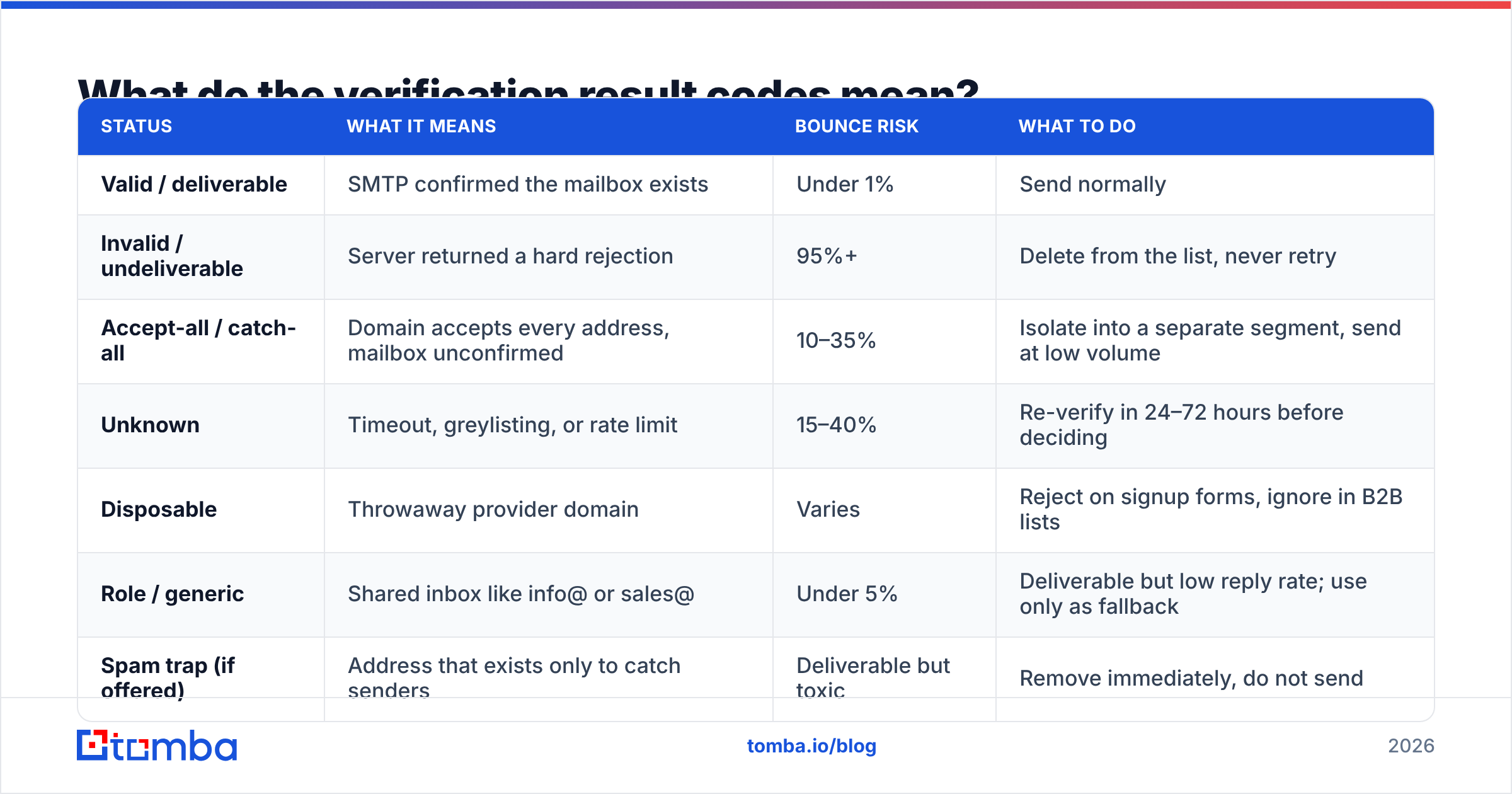
| Status | What it means | Bounce risk | What to do |
|---|---|---|---|
| Valid / deliverable | SMTP confirmed the mailbox exists | Under 1% | Send normally |
| Invalid / undeliverable | Server returned a hard rejection | 95%+ | Delete from the list, never retry |
| Accept-all / catch-all | Domain accepts every address, mailbox unconfirmed | 10–35% | Isolate into a separate segment, send at low volume |
| Unknown | Timeout, greylisting, or rate limit | 15–40% | Re-verify in 24–72 hours before deciding |
| Disposable | Throwaway provider domain | Varies | Reject on signup forms, ignore in B2B lists |
| Role / generic | Shared inbox like info@ or sales@ | Under 5% | Deliverable but low reply rate; use only as fallback |
| Spam trap (if offered) | Address that exists only to catch senders | Deliverable but toxic | Remove immediately, do not send |
The unknown bucket is where cheap tools quietly hurt you. Some vendors bill unknown results as verified and let you assume they're safe. Others silently reclassify them as valid to make their accuracy number look better. Always check how a vendor counts credits for unknown before you commit to an annual plan.
Why does verifying before you send matter so much in 2026?#
Because the mailbox providers stopped being polite about it.
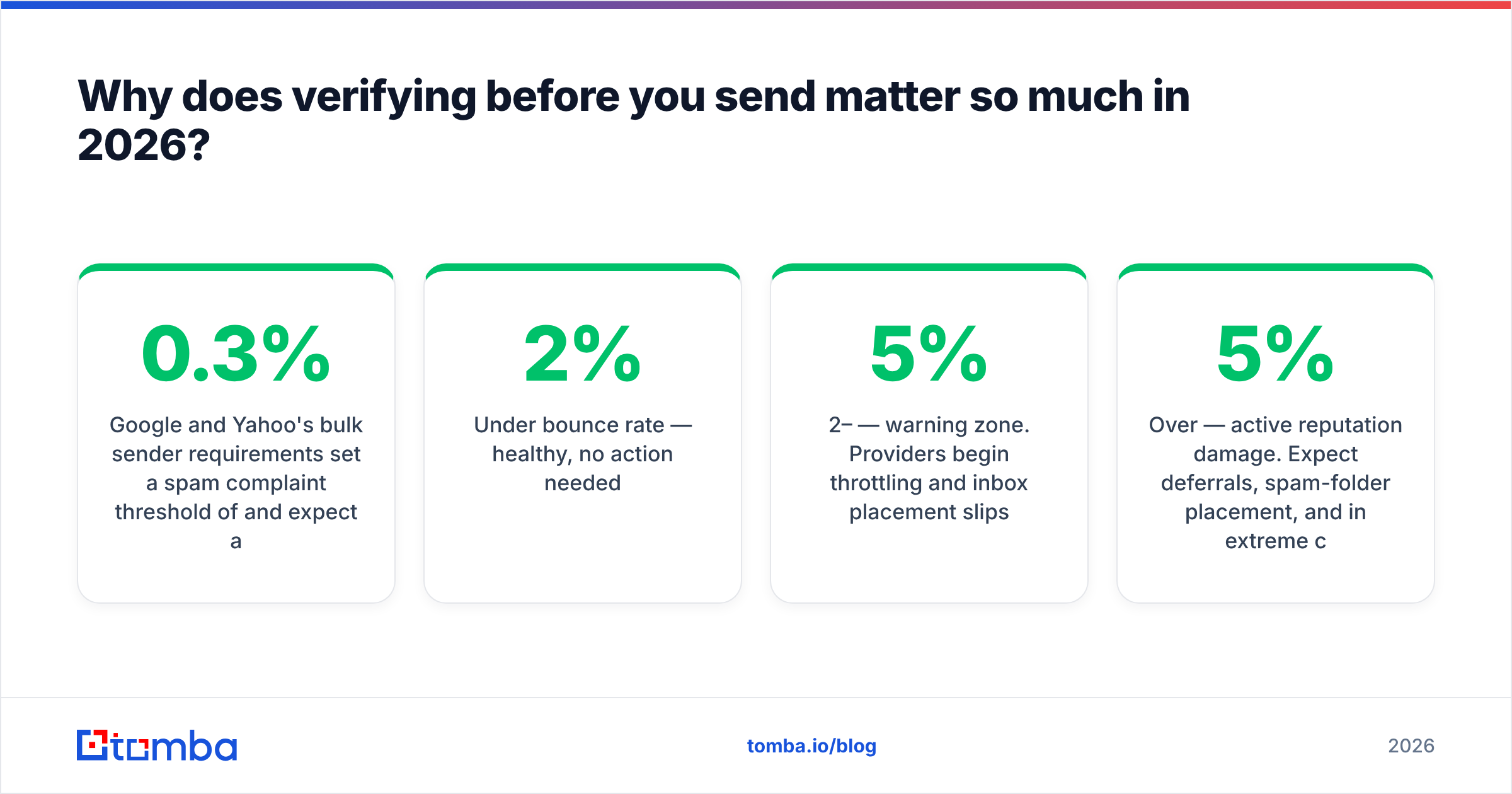
Google and Yahoo's bulk sender requirements set a spam complaint threshold of 0.3% and expect authenticated, low-bounce sending as the baseline. Google's own bulk sender guidelines are explicit that repeated invalid recipients count against you. Microsoft tightened enforcement on consumer domains through 2025. The practical effect: your bounce rate is no longer a cost-of-doing-business metric, it's a gate.
Rough thresholds worth internalizing:
- Under 2% bounce rate — healthy, no action needed.
- 2–5% — warning zone. Providers begin throttling and inbox placement slips.
- Over 5% — active reputation damage. Expect deferrals, spam-folder placement, and in extreme cases suspension from your sending platform.
One 5,000-contact campaign at a 12% bounce rate does more damage to sender reputation than three months of careful sending repairs. And reputation damage is asymmetric: it drops fast and recovers slowly, usually over four to eight weeks of clean sending.

How do the main verification approaches compare?#
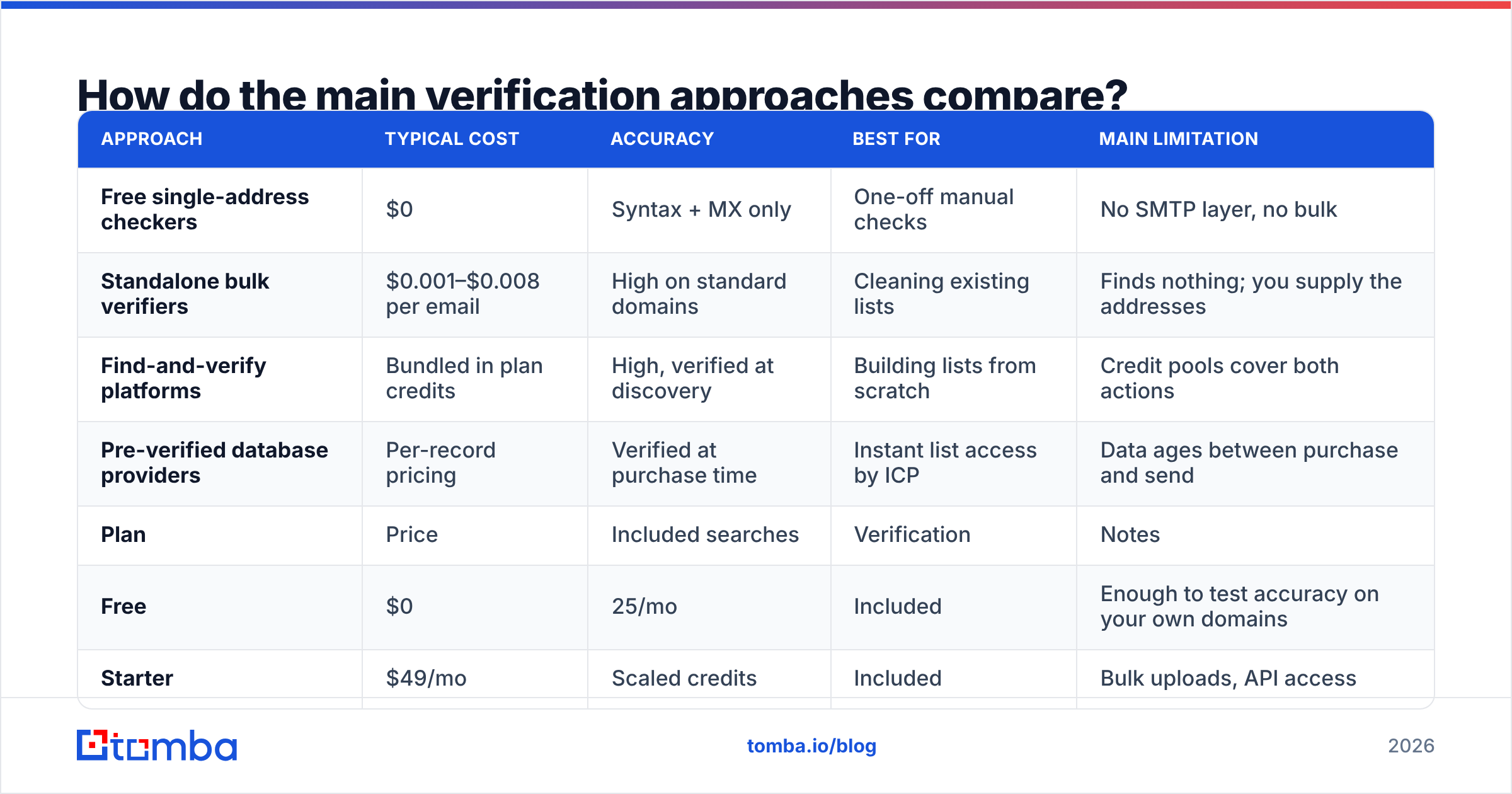
There are four ways to get an address verified, and they trade off cost against certainty differently.
| Approach | Typical cost | Accuracy | Best for | Main limitation |
|---|---|---|---|---|
| Free single-address checkers | $0 | Syntax + MX only | One-off manual checks | No SMTP layer, no bulk |
| Standalone bulk verifiers | $0.001–$0.008 per email | High on standard domains | Cleaning existing lists | Finds nothing; you supply the addresses |
| Find-and-verify platforms | Bundled in plan credits | High, verified at discovery | Building lists from scratch | Credit pools cover both actions |
| Pre-verified database providers | Per-record pricing | Verified at purchase time | Instant list access by ICP | Data ages between purchase and send |
Where the named tools sit. Standalone verifiers like ZeroBounce, NeverBounce, and Bouncer specialise in the cleaning step and price per email, with per-unit cost dropping sharply above 100k volume. BookYourData sits in the fourth row: it sells pre-verified B2B records with a bounce guarantee, which is genuinely the fastest path from zero to a targeted list and a solid choice when you don't want to run discovery yourself. Tomba sits in row three: verification is built into the same credit pool as finding, so an address discovered through domain search arrives with a confidence score already attached.
Here's how Tomba's plan structure lines up against the per-email model:
| Plan | Price | Included searches | Verification | Notes |
|---|---|---|---|---|
| Free | $0 | 25/mo | Included | Enough to test accuracy on your own domains |
| Starter | $49/mo | Scaled credits | Included | Bulk uploads, API access |
| Growth | $99/mo | Higher pool | Included | Team seats, higher rate limits |
| Pro | $249/mo | Large pool | Included | Priority throughput |
| Enterprise | Custom | Custom | Included | SLA, dedicated support |
Full tier limits are on the Tomba pricing page. The strategic point isn't the number, it's the bundling: if you're paying one vendor to find addresses and another to verify them, you're paying twice for one workflow and reconciling two exports.
For a vendor-neutral read on the category, G2's email verification grid is the least biased public comparison available, since it's scored on user reviews rather than vendor claims.
Is a free email verification tool good enough?#
For a handful of addresses, yes. For a campaign list, no.
Free checkers almost always stop at stages 1 through 3 of the pipeline: syntax, DNS, MX. That's genuinely useful for catching a typo before you email a prospect you met at a conference, and a free email checker handles that case in seconds. What free tools skip is the SMTP handshake, which is the only stage that confirms a mailbox rather than a domain.
The gap matters more than it sounds. sarah.chen@microsoft.com passes every free check ever written. Microsoft's domain resolves, has MX records, isn't disposable, and the syntax is perfect. Whether Sarah Chen still works there is a question only the SMTP layer can answer, and that's precisely the address that bounces.
Use free tools for spot checks. Use a real email verifier for anything you'll send at volume.
How do you handle catch-all domains?#
Catch-all domains are the hardest bucket, and they're common: a large share of mid-market and enterprise domains are configured to accept mail at any address rather than reject unknown recipients. On some ICPs, 30–40% of your list can land here.
Your options, in order of increasing effort:
- Skip them entirely. Safest, and wasteful. You'll discard a lot of legitimate contacts at real companies.
- Segment and throttle. Send catch-all addresses in small batches from a separate subdomain so any bounce damage stays contained.
- Cross-reference the pattern. If ten confirmed addresses at
company.comall usefirst.last@, an eleventh address matching the same pattern is far more likely to be real. A company email pattern check makes this fast. - Run a dedicated catch-all check. Some tools apply provider-specific probing to resolve mailboxes behind a catch-all wall. A catch-all verifier gets you a probabilistic answer where a standard SMTP check returns nothing.
Whatever you pick, don't let catch-all addresses sit anonymously inside your "valid" segment. That's how a list that reports 98% valid produces an 11% bounce rate.
What if you actually need an inbox to receive verification codes?#
Back to Intent 1. If your goal is receiving a confirmation link or a 2FA code, three rules cover almost every case.
- Use a real, permanent mailbox for anything you'll need again. Account recovery, billing, and domain verification all depend on retaining access. Disposable inboxes lose you the account.
- Expect disposable domains to be rejected. Most serious B2B platforms screen signups against disposable lists, exactly as described in stage 4 above. Temporary mail works for throwaway forum accounts and fails for anything with a payment method attached.
- Use aliases, not new accounts, for testing. Gmail's
+tagsyntax and Google Workspace aliases give you unlimited distinct addresses that all land in one inbox you control. If you're testing your own signup flow, an email permutator helps you generate the pattern variations you want to test against.
If verification messages aren't arriving at an address you do control, the problem is usually authentication on the sending side, not the address. Check the sending domain's SPF record first — misaligned SPF is the single most common cause of confirmation emails vanishing.
What does a good verification workflow look like?#
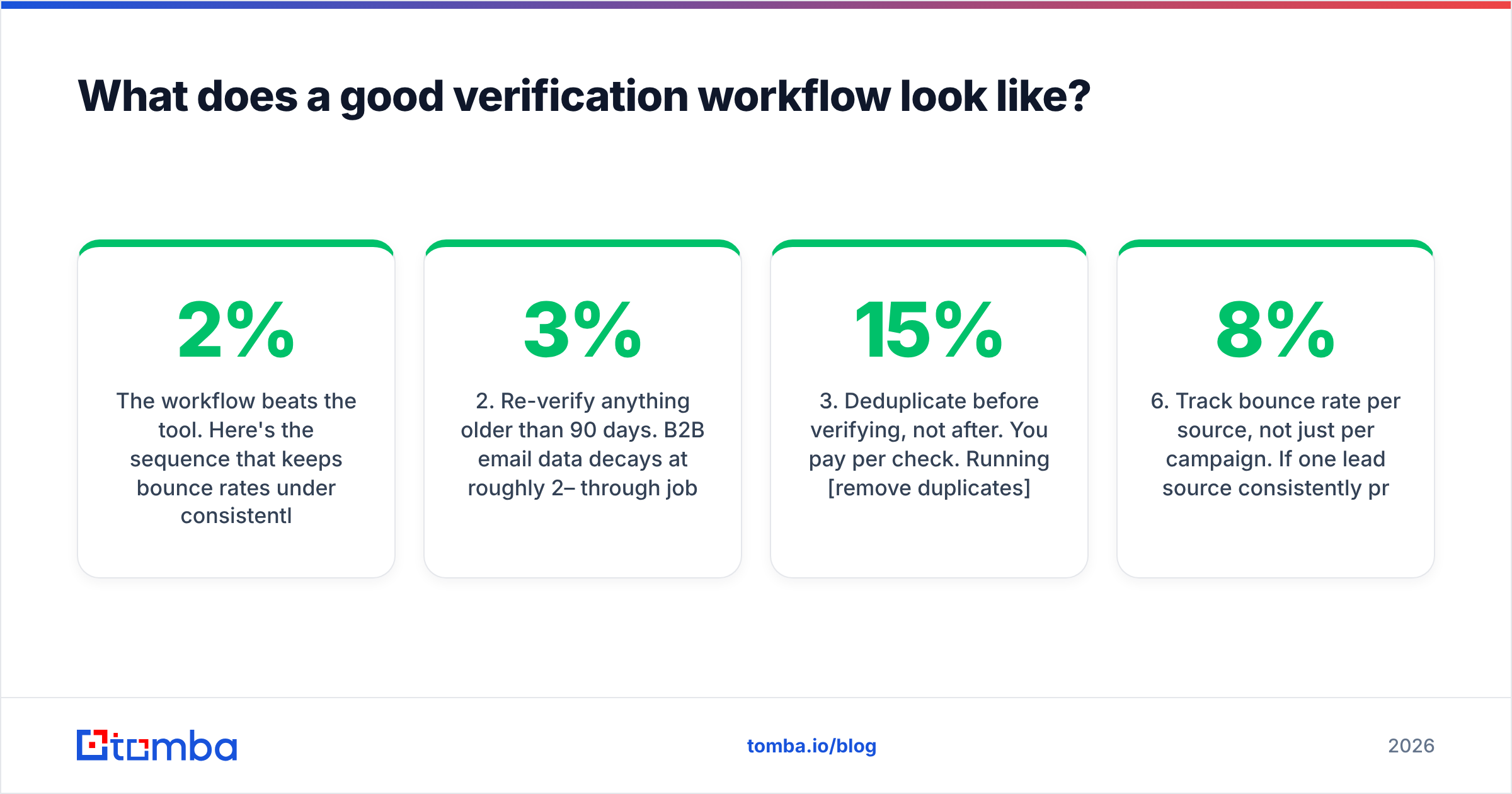
The workflow beats the tool. Here's the sequence that keeps bounce rates under 2% consistently.
- Verify at the point of discovery, not at the point of send. An address verified the day you found it and sent three weeks later is a different risk profile than one verified the morning of the campaign. Verify at both ends if the gap exceeds 30 days.
- Re-verify anything older than 90 days. B2B email data decays at roughly 2–3% per month through job changes alone. A six-month-old list is 15% stale before you send a single message.
- Deduplicate before verifying, not after. You pay per check. Running remove duplicates first can cut 5–15% off the credit bill on merged exports.
- Segment by status, then send in that order. Valid first, role addresses second, catch-all last and throttled. If early metrics look bad, you find out on the safe segment.
- Automate the boring part. For recurring lists, wire verification into the pipeline through the Tomba API or a bulk email finder job rather than exporting CSVs by hand. Manual steps are where staleness creeps back in.
- Track bounce rate per source, not just per campaign. If one lead source consistently produces 8% bounces after verification, the problem is the source, and no amount of cleaning fixes it.
How accurate is email verification, really?#
Honest answer: high on standard domains, genuinely uncertain on some, and no vendor claim above 99% survives contact with a real list.
Accuracy depends almost entirely on the receiving infrastructure. Google Workspace and Microsoft 365 domains verify cleanly at very high rates. Domains behind aggressive security gateways, or configured as catch-all, return ambiguous results regardless of which vendor you use, because the server itself is designed not to leak mailbox existence.
That's why the useful comparison is not "who claims the highest accuracy" but "who tells you when they don't know." A verifier that returns 5% unknown and is right about the other 95% is more valuable than one that returns 0% unknown by guessing. When you evaluate vendors, run the same 500-address sample through each, then compare their unknown and catch-all rates alongside their bounce results. The one that's honest about ambiguity is the one that protects your domain.
Tomba publishes its approach on the data sources page, which is worth reading against any vendor's marketing number before you commit.
Where to start#
If you're cleaning a list you already have, run a sample through a verifier and read the status distribution before you buy volume. If you're building the list in the first place, skip the two-tool shuffle: find and verify in one pass so every address enters your CRM with a confidence score already attached.
The Tomba Email Finder does exactly that — search by domain, name, or company, and every result comes back verified against the same pipeline described above. The free tier gives you 25 searches a month, which is enough to test accuracy on domains where you already know the answer. Start there, check the results against reality, and only then decide what to pay.
Related guides#
Ready to find emails that actually work?
Join 150,000+ professionals who stopped guessing and started sending. Free credits on signup — no credit card required.
Get the Tomba newsletter
Practical outbound tactics and product updates — once every two weeks.
About the author