Email Address Lookup: How It Works and Which Tools Win in 2026
Email address lookup looks like magic and fails like plumbing. Here's how the pattern-matching, SMTP checks, and catch-all traps actually work — plus which tools hold up in 2026 and what they really cost.
TL;DR
- An email address lookup takes what you already know — a name, a domain, a LinkedIn profile, a company — and returns the professional email address attached to it, with a confidence score.
- Nobody has a magic list of every inbox on earth. Every vendor runs the same three-layer stack: crawled/contributed data, pattern inference, and SMTP-level validation. The difference is how honest they are about layer three.
- Realistic accuracy in 2026: 90–97% deliverable on standard corporate domains, 50–75% on catch-all domains unless the vendor has a dedicated catch-all engine.
- Cost is not per-lead, it's per-useful-lead. A "cheap" tool that returns 60% guesses is more expensive than a $49/mo plan that returns verified hits.
- Best move: lookup and verification in one pass, then re-verify anything older than 90 days before you send.
What is an email address lookup?#
An email address lookup is the process of resolving a person or a company into a working email address using data you already have.
Think of it like a phone directory that was never printed. The information exists — it's scattered across company websites, press releases, GitHub commits, conference pages, DNS records, and mail servers — but nobody bound it into a single book. A lookup tool is the librarian that runs around the building, cross-references twelve half-complete indexes, and hands you one answer with a note saying how sure it is.
Technically, "email address lookup" is an umbrella term covering four distinct jobs that people constantly conflate:
- Person-to-email — you have "Maya Okonkwo" and "stripe.com" and you want her work inbox. This is the classic email finder use case.
- Domain-to-emails — you have
acme.comand want every public contact at that company, sorted by department and seniority. That's domain search. - Email-to-person — you have
m.okonkwo@stripe.comand want to know who that is, their title, and their company. That's reverse email lookup. - Email-to-validity — you have an address and you only want to know whether sending to it will bounce. That's verification, and it's a different engine entirely.
Most confusion in this category — and most wasted money — comes from buying a tool that's excellent at job 2 when your actual problem is job 1 or job 4.
How does an email address lookup actually work?#
Under the hood, every credible provider runs the same pipeline. Understanding it tells you exactly where accuracy leaks out.
Step 1 — Pattern detection. The tool identifies the company's email format. Roughly 70% of B2B domains use one of five patterns: first.last@, first@, flast@, firstl@, or f.last@. If the tool already holds 40 confirmed addresses at acme.com and 38 of them are first.last@, the pattern is settled. You can inspect this yourself with a company email pattern checker before you spend a single credit.
Step 2 — Candidate generation. Name plus pattern produces candidates. This is pure string math — an email permutator does the same thing for free. Generation is trivial; it proves nothing.
Step 3 — Source corroboration. The tool checks whether the candidate appears in real-world data: crawled web pages, WHOIS records, public commits, PDFs, job boards, contributed CRM data, or partner databases. A candidate seen in the wild jumps from "plausible" to "sourced." Vendors that publish their data sources are easier to trust here than vendors that say "proprietary AI."
Step 4 — SMTP validation. The tool opens a conversation with the recipient's mail server and asks, essentially, "would you accept mail for this address?" — the RCPT TO handshake defined in SMTP. A clean accept means the mailbox exists. A hard reject means it doesn't.
Step 5 — Catch-all handling. Here's where the whole category breaks. A catch-all domain accepts mail for every address, real or not, so SMTP tells you nothing. Roughly a fifth of corporate domains are configured this way. Weak tools mark these "valid" and let you find out the truth from your bounce report. Serious tools flag them and route them through a separate catch-all verifier that uses behavioral and historical signals instead of a naive handshake.
Step 6 — Confidence scoring. The output is a percentage. Treat anything below 85 as a hypothesis, not a contact.
Which lookup methods are legitimate, and which are junk?#
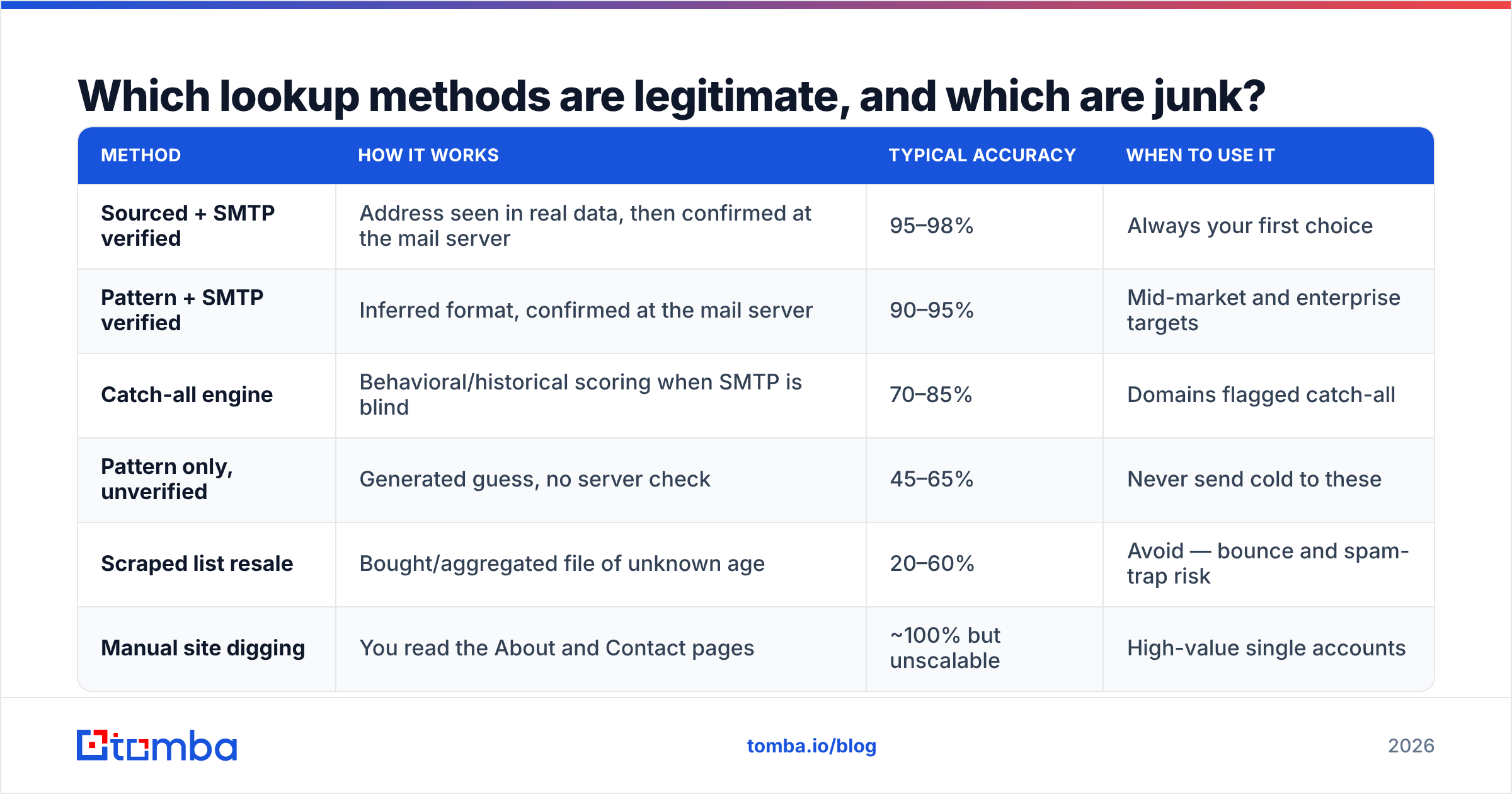
Not all lookup techniques are equal. Ranked from most to least reliable:
| Method | How it works | Typical accuracy | When to use it |
|---|---|---|---|
| Sourced + SMTP verified | Address seen in real data, then confirmed at the mail server | 95–98% | Always your first choice |
| Pattern + SMTP verified | Inferred format, confirmed at the mail server | 90–95% | Mid-market and enterprise targets |
| Catch-all engine | Behavioral/historical scoring when SMTP is blind | 70–85% | Domains flagged catch-all |
| Pattern only, unverified | Generated guess, no server check | 45–65% | Never send cold to these |
| Scraped list resale | Bought/aggregated file of unknown age | 20–60% | Avoid — bounce and spam-trap risk |
| Manual site digging | You read the About and Contact pages | ~100% but unscalable | High-value single accounts |
The dangerous row is row four. Free "email finder" widgets and cheap Chrome extensions overwhelmingly live there — they run steps 1 and 2 of the pipeline, skip steps 3 through 5, and print a green checkmark anyway. That's how teams end up with a 30% bounce rate and a burned sending domain.
How accurate is email address lookup in 2026?#
The honest answer: accuracy is a range, not a number, and it depends far more on your target list than on the vendor's marketing.

What moves the number:
- Company size. A 4,000-person software firm with a public engineering blog is easy. A 6-person agency on a Squarespace site with a
hello@inbox is hard — often there is no personal address to find. - Region. North American and Western European B2B coverage is dense. APAC and LATAM SMB coverage is materially thinner across every vendor, including the big ones.
- Role. Marketing, sales, and engineering leaders leave public footprints. Finance, legal, and HR contacts are quieter and score lower.
- Domain configuration. Catch-all and aggressive greylisting kill SMTP certainty regardless of how good the underlying data is.
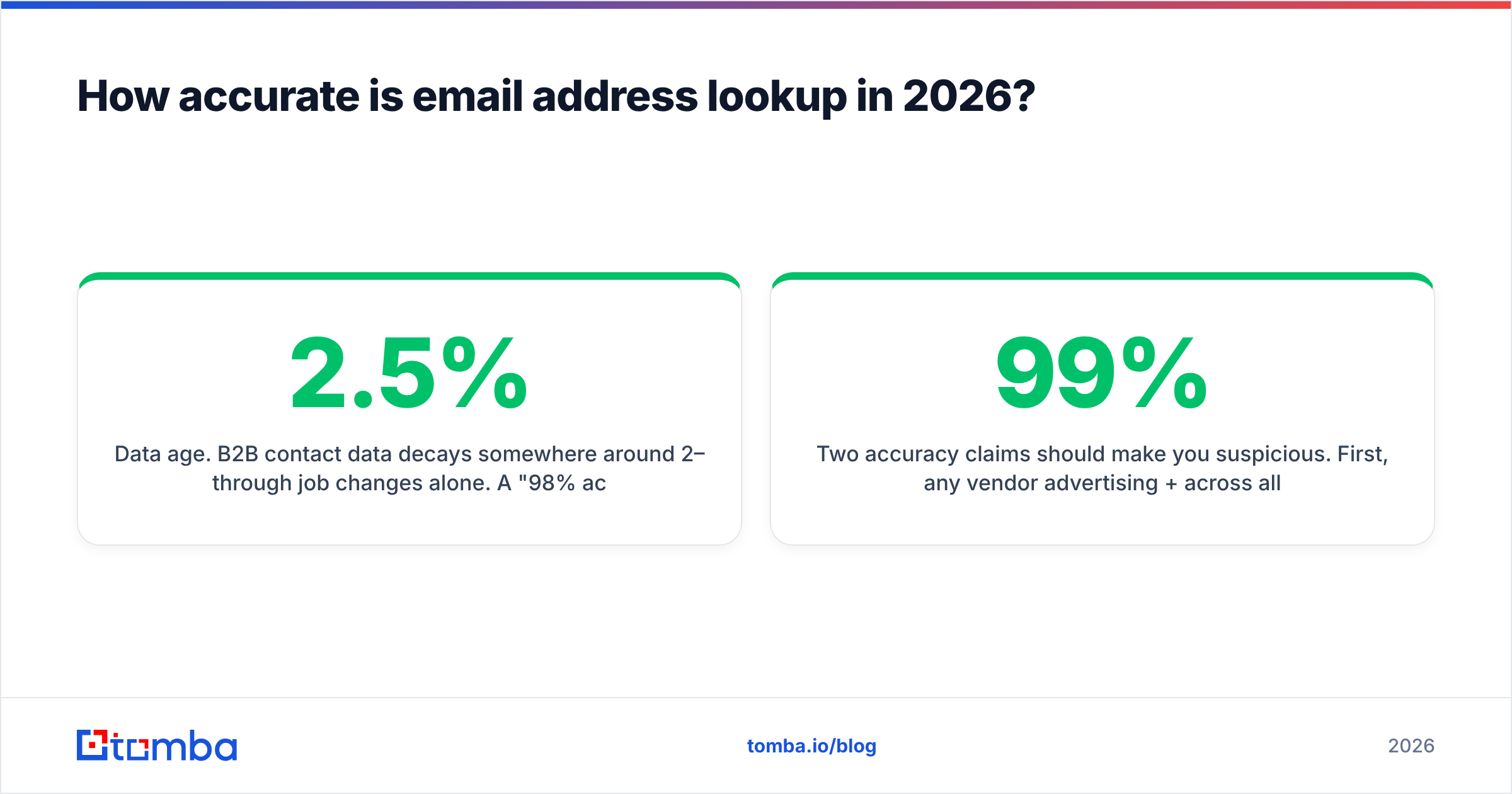
- Data age. B2B contact data decays somewhere around 2–2.5% per month through job changes alone. A "98% accurate" record captured eighteen months ago is not 98% accurate today.
Two accuracy claims should make you suspicious. First, any vendor advertising 99%+ across all domains — that's mathematically impossible once catch-alls are in the mix. Second, any vendor reporting accuracy without defining it. "Accurate" can mean syntactically valid, server-accepted, or actually reaches a human who works there. Only the third one matters, and it's the hardest to claim.
The practical safeguard is cheap: run every finder output through an email verifier as a separate pass, and re-verify quarterly. Vendors that bundle both under one credit pool make this painless.
Which email address lookup tools are worth paying for in 2026?#
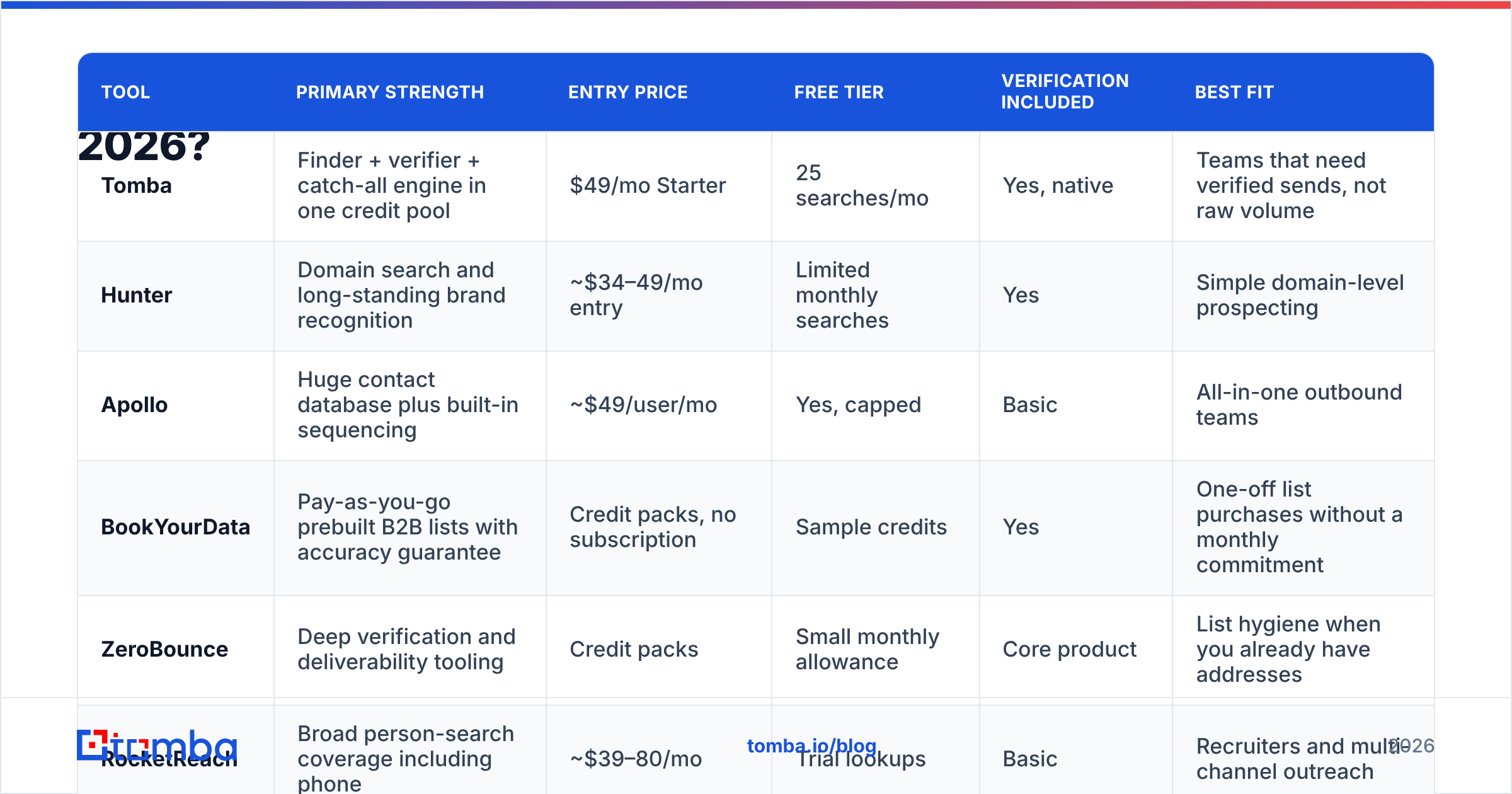
The market splits into three groups: finder-first tools (accuracy on individual lookups), database-first platforms (volume and filtering), and verification specialists (hygiene only). Buy for the job you actually have.

| Tool | Primary strength | Entry price | Free tier | Verification included | Best fit |
|---|---|---|---|---|---|
| Tomba | Finder + verifier + catch-all engine in one credit pool | $49/mo Starter | 25 searches/mo | Yes, native | Teams that need verified sends, not raw volume |
| Hunter | Domain search and long-standing brand recognition | ~$34–49/mo entry | Limited monthly searches | Yes | Simple domain-level prospecting |
| Apollo | Huge contact database plus built-in sequencing | ~$49/user/mo | Yes, capped | Basic | All-in-one outbound teams |
| BookYourData | Pay-as-you-go prebuilt B2B lists with accuracy guarantee | Credit packs, no subscription | Sample credits | Yes | One-off list purchases without a monthly commitment |
| ZeroBounce | Deep verification and deliverability tooling | Credit packs | Small monthly allowance | Core product | List hygiene when you already have addresses |
| RocketReach | Broad person-search coverage including phone | ~$39–80/mo | Trial lookups | Basic | Recruiters and multi-channel outreach |
Pricing on every vendor here changes without notice — confirm on the official pages (hunter.io, bookyourdata.com, Tomba pricing) and cross-check real user reports on G2 before you commit annually.
A few buying notes that don't fit in a table:
- Credit models matter more than headline price. Ask whether a failed lookup consumes a credit. Some vendors charge for "we couldn't find it," which quietly doubles your effective cost. Tomba's plans — Free (25 searches/mo), Starter $49/mo, Growth $99/mo, Pro $249/mo, Enterprise custom — pool finding and verification, so you're not buying the same lead twice.
- Seat-based pricing punishes small teams. A $49/user platform costs $245/mo for five reps. A workspace-priced tool doesn't.
- API access on the entry tier is the real differentiator. If lookup is going to live inside your product or your enrichment pipeline, an email finder API you can hit from day one beats an enterprise-gated one.
- Check the export path. If the tool can't push to your CRM through a HubSpot integration or Zapier, someone on your team becomes a human CSV router.

Is reverse email lookup a different thing?#
Yes, and the direction reverses the difficulty.
A forward lookup asks "what is this person's address?" A reverse lookup asks "who owns this address?" You'd run one when an inbound form fill arrives with only an email, when you're qualifying a signup, when you're de-anonymizing a support ticket, or when you're checking whether j.smith@bigco.com is the VP or an intern before you route the deal.
Reverse lookups tend to succeed more often on corporate domains than free-mail ones, for an obvious reason: maya.okonkwo@acme.com encodes both the person and the employer in the string itself, while mayao1987@gmail.com encodes nothing. Expect solid enrichment on business addresses and thin results on personal ones — that's a structural limit, not a vendor failure.
The adjacent play is inbound: instead of looking up people you've chosen, identify the companies already visiting your site with website visitor reveal, then run forward lookups on the right roles at those accounts. Warmer list, same tooling.
How do you run a bulk email address lookup without torching your domain?#
Bulk is where good intent turns into a deliverability incident. The failure mode is always the same: someone uploads 20,000 names, gets 14,000 addresses back, and sends to all of them on Tuesday.
Do this instead:
- Deduplicate before you spend. Run the input list through remove duplicates first. Paying twice for the same contact is the most common invisible cost in this category.
- Look up in batch, verify in the same pass. Use a bulk email finder that returns a status per row, not just an address per row.
- Segment by confidence, not by campaign. Sends to 95%+ scores go out normally. The 85–95% band goes to a smaller test batch. Below 85% and catch-alls get held or routed to LinkedIn instead of email.
- Cap volume per domain per day. Fifty cold sends to the same company in one morning looks exactly like an attack to their mail filter.
- Check your own house first. Confirm your SPF record, DKIM, and DMARC are aligned, and check your sender reputation before volume goes up — not after replies stop.
- Re-verify on a 90-day cycle. Job changes are relentless. A list you verified in January is measurably worse in April.
The economics of skipping step 3 are brutal. Mailbox providers read bounce rate as a spam signal, and once your email deliverability drops, it drags every campaign down — including the ones sent to perfectly valid addresses. Recovering a burned domain takes weeks. Verifying a list takes minutes.
Is email address lookup legal?#
Broadly yes for B2B, with real conditions — and this is general orientation, not legal advice.
In the United States, CAN-SPAM regulates how you send, not how you obtained the address: accurate headers, a real physical address, an honest subject line, and a working opt-out that you honor promptly. Buying or finding a business address is not itself the violation; deceptive sending is.
Under GDPR, a work email tied to an identifiable person is personal data. Cold B2B outreach is usually pursued under legitimate interest, which requires a documented balancing test, a genuine business relevance between your offer and the recipient's role, clear identification of who you are, easy opt-out, and honoring deletion requests. Several member states layer additional consent rules on top, and enforcement varies. Blasting 50,000 EU contacts about something unrelated to their job is not a legitimate interest — it's a fine waiting for a complaint.
Practical compliance hygiene: keep a suppression list and actually respect it, log where each contact came from, don't scrape personal inboxes, and never send to role addresses you found in a spam-trap-heavy source. Tools that record provenance per record make an audit answerable instead of terrifying.
What lookup workflow actually converts?#
The tool is 20% of the outcome. Sequence is the rest.
Start narrow: define the account list before you define the contact list. Ten well-chosen accounts with three verified contacts each outperform a thousand scraped rows, every time. Then run domain search on those accounts to see the org shape and the email pattern, pick specific roles rather than "anyone in marketing," and only then spend credits on individual lookups.
Verify in the same motion. Enrich with title, seniority, and company size using data enrichment so your first line can reference something true. Push straight into the CRM — no intermediate spreadsheet, because spreadsheets are where data goes to get stale. Then measure the one metric that reflects data quality rather than copy quality: bounce rate. If bounces are under 2%, your lookup stack is healthy and any reply-rate problem is a messaging problem. If bounces are above 5%, stop rewriting subject lines — fix the data.
One more habit worth building: track why lookups fail. If 30% of your misses are catch-all domains, buy a better catch-all engine. If 30% are companies with no personal addresses at all, your ICP skews too small for email-first outbound and you need a phone or LinkedIn motion instead. The failure pattern tells you what to fix.
Where to start#
If you need one thing to be reliable, make it the lookup-plus-verify step — everything downstream inherits its error rate.
Run your next 25 target contacts through the Tomba Email Finder on the free tier and check the results against reality: how many came back sourced rather than guessed, how many were flagged catch-all instead of silently marked valid, and what your bounce rate looks like on the send. If the numbers hold, Starter at $49/mo covers a working outbound motion, and the API, CLI, Sheets add-on, and Chrome extension all draw from the same credit pool — so the lookup lives wherever your workflow already is. If the numbers don't hold, you've learned that for free, which is the entire point of testing on 25 leads instead of 25,000.
Related guides#
Ready to find emails that actually work?
Join 150,000+ professionals who stopped guessing and started sending. Free credits on signup — no credit card required.
Get the Tomba newsletter
Practical outbound tactics and product updates — once every two weeks.
About the author