Email Address Pattern: How to Find Any Company Format
Roughly 8 patterns cover the vast majority of B2B work emails. Learn how to identify a company's email address pattern, score your guesses, and verify before you send.
TL;DR
- About eight formats cover the overwhelming majority of corporate email addresses.
first.last@company.comalone accounts for roughly a third of B2B domains. - Pattern detection is a two-step job: infer the format from known addresses at the domain, then verify the specific address before sending. Skipping step two is how you burn a sending domain.
- Permutation tools generate candidates; they do not confirm them. Guessing plus an SMTP check is a fallback, not a strategy.
- Sub-domains, acquisitions, and regional entities break patterns constantly — a single company can run three formats at once.
- Catch-all domains accept everything, which means an SMTP "valid" response tells you nothing. Treat catch-alls as a separate workflow.
What is an email address pattern?#
An email address pattern is the rule a company uses to build the local part of its work email addresses — everything before the @. If you know that Stripe uses first@stripe.com and you know a new hire's first name, you can construct their address without ever seeing it.
Think of it like street addresses in a planned neighborhood. Once you learn that odd numbers run on the north side and even numbers on the south, you can find house 47 without walking the whole block. Companies do the same thing with email: IT provisions accounts from a template, and that template rarely changes for existing employees.
Technically, the local part is governed by RFC 5321 and RFC 5322, which permit a wide character set. In practice, corporate IT collapses that freedom into a handful of predictable shapes because help desks hate exceptions.
Which email address patterns do companies actually use?#
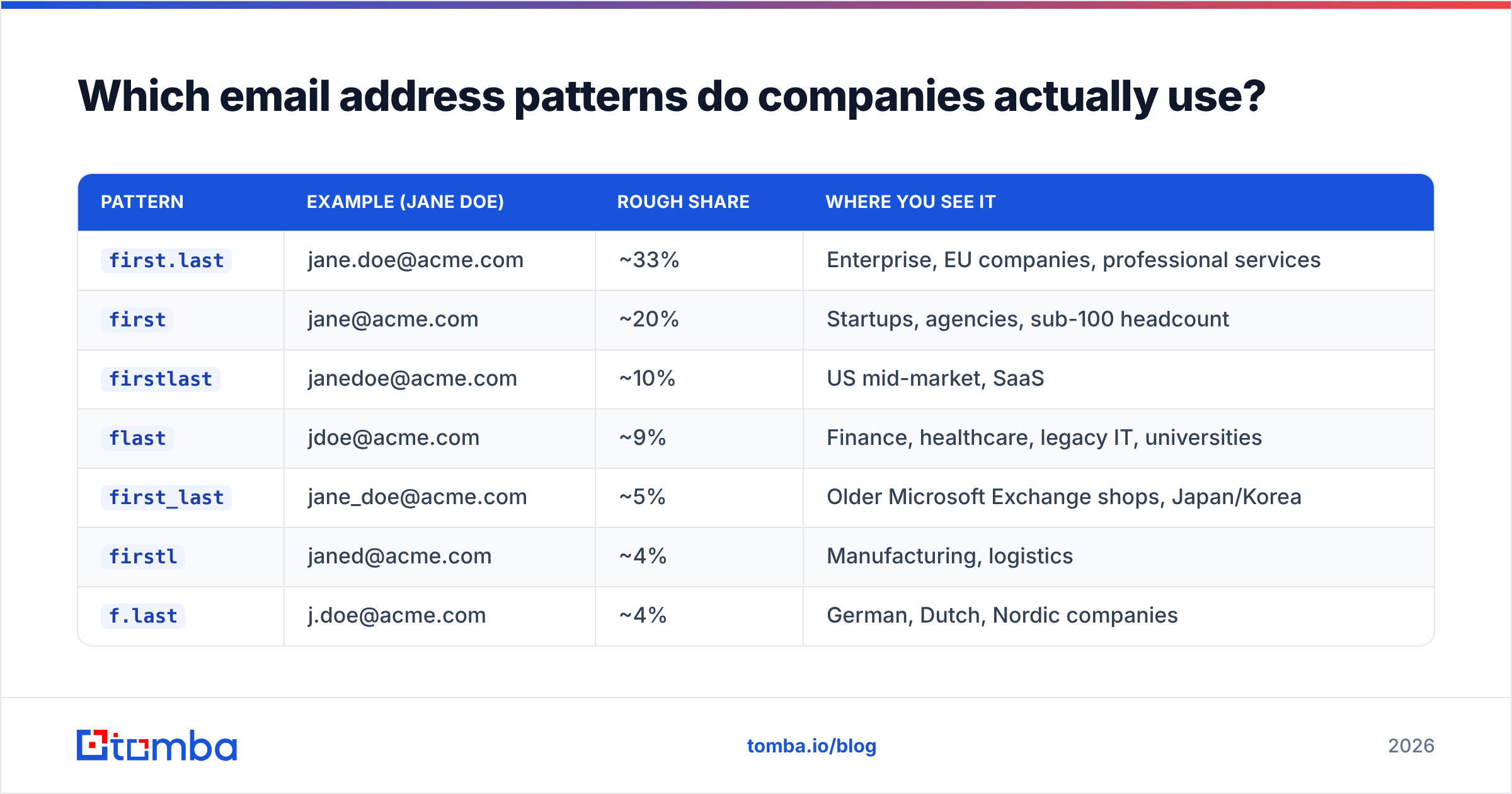
Here are the formats you will encounter, ranked roughly by how often they show up across B2B domains. Percentages below are directional industry estimates from published email-finder datasets, not a single audited census — treat them as priors for scoring guesses, not facts to quote.
| Pattern | Example (Jane Doe) | Rough share | Where you see it |
|---|---|---|---|
first.last |
jane.doe@acme.com | ~33% | Enterprise, EU companies, professional services |
first |
jane@acme.com | ~20% | Startups, agencies, sub-100 headcount |
firstlast |
janedoe@acme.com | ~10% | US mid-market, SaaS |
flast |
jdoe@acme.com | ~9% | Finance, healthcare, legacy IT, universities |
first_last |
jane_doe@acme.com | ~5% | Older Microsoft Exchange shops, Japan/Korea |
firstl |
janed@acme.com | ~4% | Manufacturing, logistics |
f.last |
j.doe@acme.com | ~4% | German, Dutch, Nordic companies |
lastfirst / last.first |
doejane@acme.com | ~2% | APAC, some public sector |
The remaining slice is genuinely chaotic: employee IDs (e449281@), initials-only (jd@), department aliases, and hashed handles from HR systems. You will not guess those. You will find them or you will skip that contact.
Two structural details matter more than the exact percentages:
- Headcount predicts the pattern. Companies under 50 people default to
first@. Above about 500, collisions forcefirst.lastorflast. - Region predicts the separator. Dots dominate Europe. Concatenation and single-letter initials dominate the US. Underscores cluster in legacy Exchange installs and parts of Asia.
- Industry predicts the conservatism. Banks, hospitals, and government bodies stick with
flastbecause their directory conventions were set decades ago and never revisited. - Acquisitions fracture everything. A company that bought three competitors often runs the original patterns on redirected domains for years.

How do you identify a company's email address pattern?#
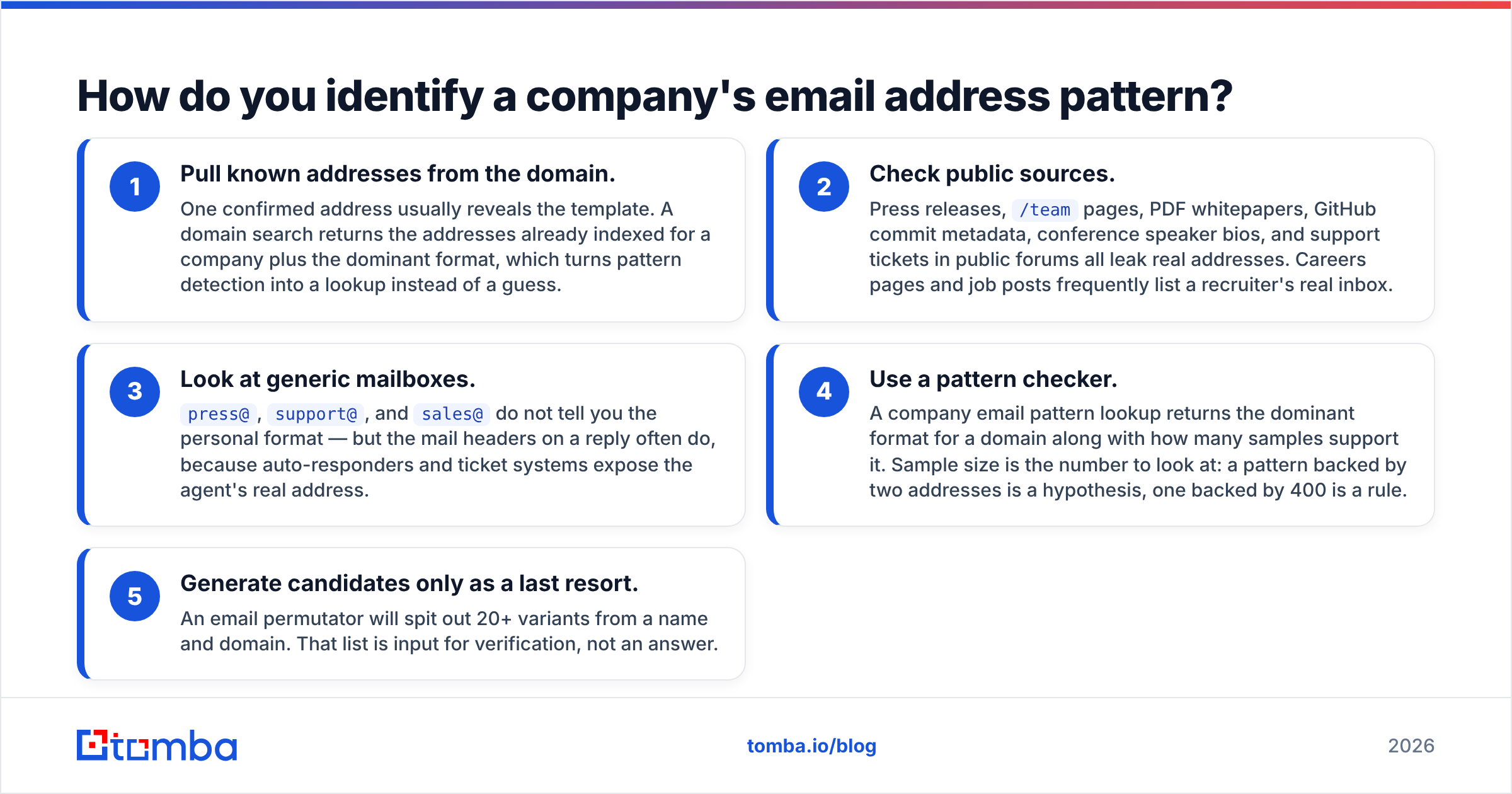
Work from evidence outward. Here is the order that costs you the least time:
- Pull known addresses from the domain. One confirmed address usually reveals the template. A domain search returns the addresses already indexed for a company plus the dominant format, which turns pattern detection into a lookup instead of a guess.
- Check public sources. Press releases,
/teampages, PDF whitepapers, GitHub commit metadata, conference speaker bios, and support tickets in public forums all leak real addresses. Careers pages and job posts frequently list a recruiter's real inbox. - Look at generic mailboxes.
press@,support@, andsales@do not tell you the personal format — but the mail headers on a reply often do, because auto-responders and ticket systems expose the agent's real address. - Use a pattern checker. A company email pattern lookup returns the dominant format for a domain along with how many samples support it. Sample size is the number to look at: a pattern backed by two addresses is a hypothesis, one backed by 400 is a rule.
- Generate candidates only as a last resort. An email permutator will spit out 20+ variants from a name and domain. That list is input for verification, not an answer.
The failure mode to avoid: treating one confirmed address as proof of the whole domain. If jane.doe@acme.com bounces nothing and bob.smith@acme.com hard-bounces, you have not disproved the pattern — you may have found a contractor, an alias, or someone who left in March.
Is pattern guessing better than an email finder?#
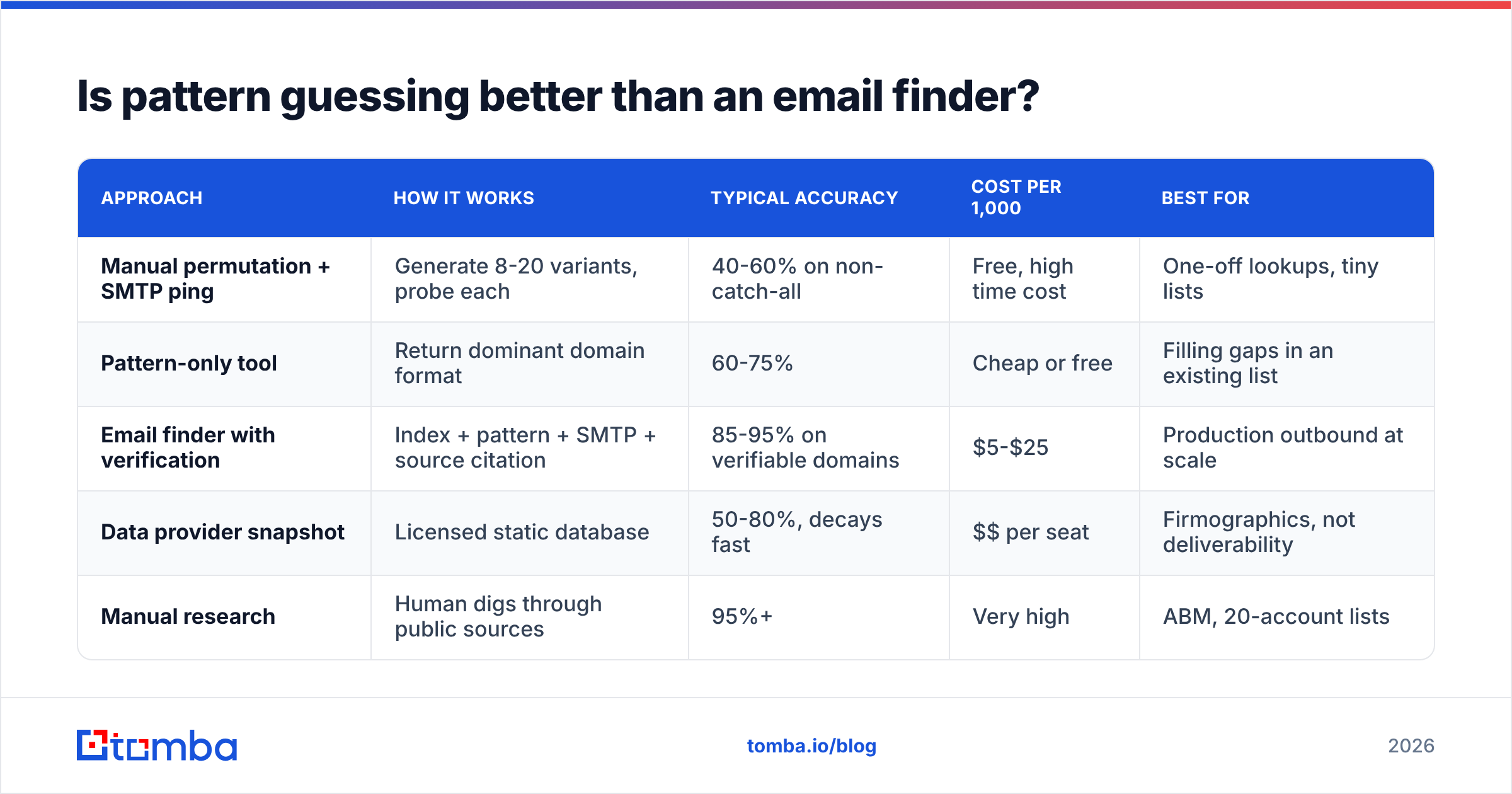
No, and the gap is wider than most teams assume. Guessing produces candidates. An email finder produces candidates plus evidence.
| Approach | How it works | Typical accuracy | Cost per 1,000 | Best for |
|---|---|---|---|---|
| Manual permutation + SMTP ping | Generate 8-20 variants, probe each | 40-60% on non-catch-all | Free, high time cost | One-off lookups, tiny lists |
| Pattern-only tool | Return dominant domain format | 60-75% | Cheap or free | Filling gaps in an existing list |
| Email finder with verification | Index + pattern + SMTP + source citation | 85-95% on verifiable domains | $5-$25 | Production outbound at scale |
| Data provider snapshot | Licensed static database | 50-80%, decays fast | $$ per seat | Firmographics, not deliverability |
| Manual research | Human digs through public sources | 95%+ | Very high | ABM, 20-account lists |
Two things drive the accuracy spread. First, an indexed finder has seen the address in the wild, so it is reporting an observation, not a construction. Second, verification catches the addresses that fit the pattern perfectly but no longer exist — the roughly 2-3% monthly churn in B2B contact data that pattern logic is blind to by design.
Tomba pricing starts with a free tier at 25 searches per month, then $49/mo for Starter, $99/mo for Growth, and $249/mo for Pro. That free tier is enough to sanity-check whether your assumed pattern for a target account matches reality before you commit budget.
For a broader tool landscape, G2's email-finder category and Capterra both carry verified user reviews with accuracy complaints in the free text — worth reading before you standardize on any vendor. Peers like BookYourData take a database-first approach, which suits teams that want pre-built lists by title and geography rather than per-contact lookups; both models are legitimate, they just optimize for different workflows.

Why does the pattern break on some domains?#
Because "one company, one domain, one format" is a fiction that survives only in small companies. The common breakers:
- Collisions. Two John Smiths force the second one to
john.smith2@orjsmith2@. Larger the company, likelier the suffix. - Sub-domains and regional entities.
@uk.company.com,@company.co.uk, and@company.commay all be live with different formats behind them. - Acquisitions. The acquired team keeps its old pattern on a forwarding domain. You will find both formats resolving.
- Executive exceptions. Founders and C-suite often keep
first@from the early days while everyone else moved tofirst.last@. - Contractors and agencies. Often provisioned on a separate OU with a different template, sometimes prefixed (
ext.jane.doe@). - Catch-all configuration. The MX accepts every local part. Your SMTP check returns "deliverable" for
asdkjhasd@company.com. This is the single most common source of false confidence. - Aliases vs. mailboxes.
jane@may forward tojane.doe@. Both "work," but only one appears in the recipient's From header — and reply-tracking tools sometimes miss the mismatch.
Catch-alls deserve their own workflow. Roughly 15-20% of B2B domains are configured this way, and a plain SMTP handshake cannot distinguish a real mailbox from a wildcard. A dedicated catch-all verifier uses additional signals — historical engagement, pattern confidence, provider-specific behavior — to grade the address instead of rubber-stamping it. If your list is heavy on catch-alls and your tool reports 98% valid, your tool is lying to you by omission.
How do you verify a pattern guess without hurting deliverability?#
Guessing is cheap. Bouncing is not. Every hard bounce is a signal to the receiving provider that you do not know who you are emailing, and enough of them will damage your sender reputation in ways that take weeks to repair.
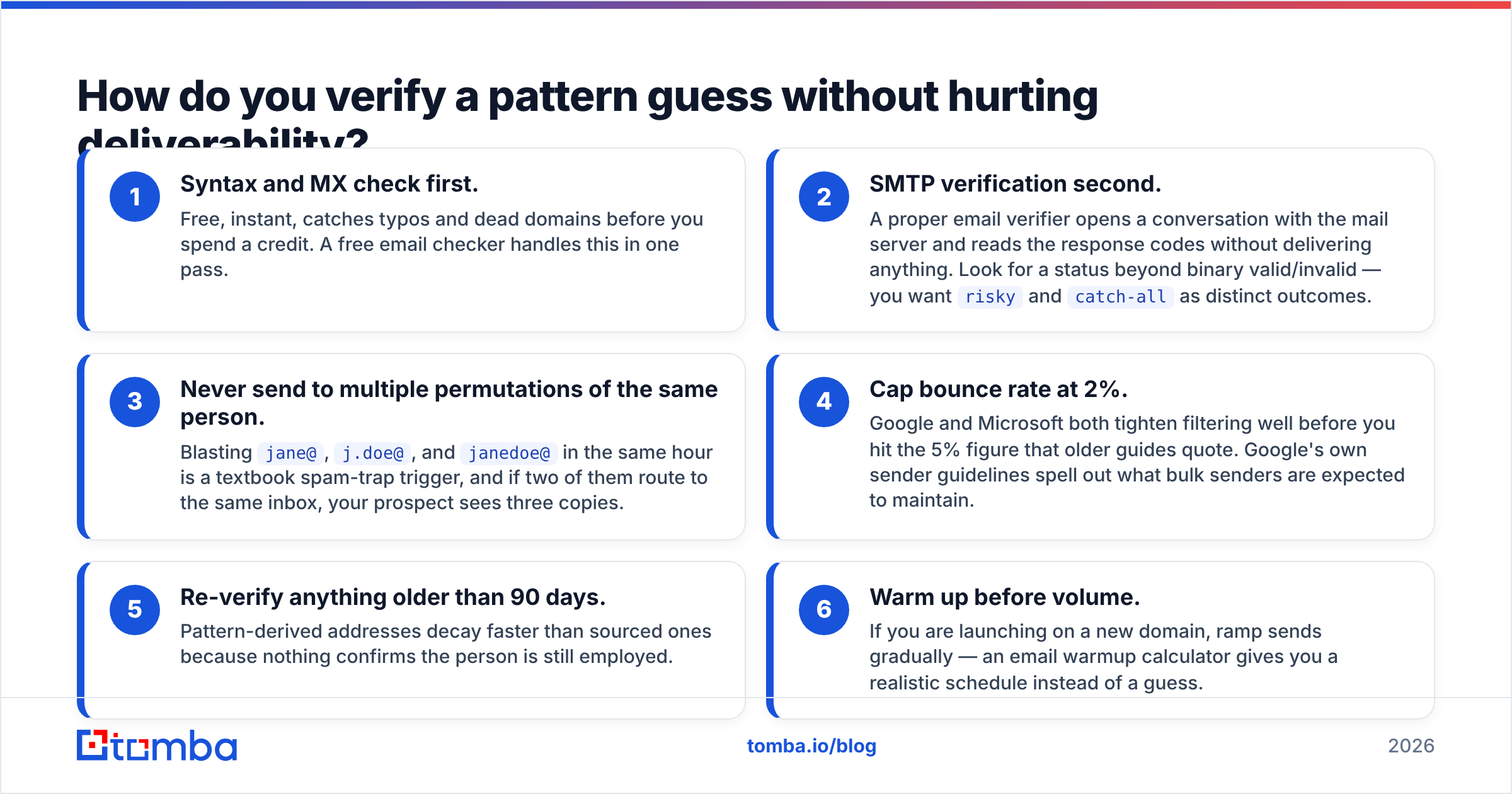
The safe sequence:
- Syntax and MX check first. Free, instant, catches typos and dead domains before you spend a credit. A free email checker handles this in one pass.
- SMTP verification second. A proper email verifier opens a conversation with the mail server and reads the response codes without delivering anything. Look for a status beyond binary valid/invalid — you want
riskyandcatch-allas distinct outcomes. - Never send to multiple permutations of the same person. Blasting
jane@,j.doe@, andjanedoe@in the same hour is a textbook spam-trap trigger, and if two of them route to the same inbox, your prospect sees three copies. - Cap bounce rate at 2%. Google and Microsoft both tighten filtering well before you hit the 5% figure that older guides quote. Google's own sender guidelines spell out what bulk senders are expected to maintain.
- Re-verify anything older than 90 days. Pattern-derived addresses decay faster than sourced ones because nothing confirms the person is still employed.
- Warm up before volume. If you are launching on a new domain, ramp sends gradually — an email warmup calculator gives you a realistic schedule instead of a guess.
For lists rather than single lookups, run detection and verification in one job. A bulk email finder processes a CSV of names plus domains and returns the resolved address with a confidence score per row, which is materially different from running a permutator over 5,000 rows and hoping.
What does a good pattern workflow look like end to end?#
Assume you have 400 target contacts, first and last names, and company domains.
Step one — group by domain. Sort the list so every company's contacts sit together. You resolve the pattern once per domain, not once per person. This alone cuts your credit spend substantially on lists with multiple contacts per account.
Step two — resolve each domain's pattern. Run domain search on the unique domains. You will get three buckets: high-confidence pattern with many samples, low-confidence pattern with one or two, and nothing at all.
Step three — apply and verify. For high-confidence domains, construct addresses and verify them. For low-confidence domains, verify the candidates individually. For empty domains, either research manually or drop them — a made-up address on an unknown pattern is a bounce with extra steps.
Step four — segment by verification status. Valid addresses go to your main sequence. Catch-alls go to a low-volume, high-personalization track on a separate sending domain so any damage is contained. Risky and invalid get dropped or routed to LinkedIn instead.
Step five — instrument the feedback loop. Log which patterns bounced per domain. After two months you will have a private dataset far more accurate than any generic percentage table, including this one. Push the resolved addresses into your CRM with the confidence score attached so reps can see what they are working with, and use data enrichment to fill in title, seniority, and company data at the same time.
If your workflow is code, the Tomba API exposes finder, verifier, and domain-search endpoints so pattern resolution becomes a function call inside your own pipeline rather than a manual CSV round trip. For spreadsheet-based teams, the Google Sheets add-on runs the same logic inline against a column of names.
What are the mistakes that cost the most?#
- Trusting one sample. A single confirmed address on a 5,000-person company proves almost nothing. Weight by sample size or don't weight at all.
- Ignoring middle names and compound surnames. "Maria del Carmen Rodriguez Lopez" has at least six plausible constructions. Latin American and Spanish contacts break naive permutators constantly.
- Stripping accents wrong.
müllerbecomesmuellerat some German companies andmullerat others. Both may resolve; only one is the real mailbox. - Treating catch-all as valid. Covered above, still the number one cause of inflated verification numbers.
- Sending on the guess. Verification costs a fraction of a cent. A damaged domain costs weeks of pipeline. The math is not close.
- Never re-checking. Companies migrate mail providers and change formats. Cache your pattern data with a TTL, not forever.
Get the pattern right before you send#
Pattern logic gets you a shortlist. Evidence gets you a send. The teams with 90%+ deliverability are not better guessers — they resolve the domain format from real indexed addresses, verify the specific mailbox, and segment catch-alls into their own track before a single email leaves the queue.
Start with the Tomba Email Finder — enter a name and a domain and it returns the address with the pattern it matched, the sources that support it, and a verification status in the same response. The free tier covers 25 searches a month, which is enough to test your assumptions on a handful of target accounts before you scale the workflow to a full list.
Related guides#
Ready to find emails that actually work?
Join 150,000+ professionals who stopped guessing and started sending. Free credits on signup — no credit card required.
Get the Tomba newsletter
Practical outbound tactics and product updates — once every two weeks.
About the author