Email Address Verifier Online: The 2026 Accuracy Guide
Most online email verifiers agree on the easy 80% of a list and disagree wildly on the rest. Here's how verification actually works, what the marketing pages hide, and how to pick one.
TL;DR
- An email address verifier online runs four escalating checks — syntax, domain/MX, mailbox (SMTP), and risk scoring. Free tools usually stop at check two and call it "valid."
- The gap between verifiers isn't on obvious addresses. It's on catch-all domains, role accounts, and recently-departed employees — which is exactly where your bounce rate comes from.
- "99% accuracy" is a claim about the vendor's confident subset, not your whole list. Always ask what percentage got marked unknown.
- Verify before every send, not once at import. B2B contact data decays roughly 2-3% per month as people change jobs.
- Budget rule: verification should cost you well under $0.001 per address at any real volume. If it doesn't, you're overpaying for a commodity.
What Does an Email Address Verifier Online Actually Check?#
Think of email verification like checking whether a letter will arrive: first you confirm the address is written in a valid format, then that the street exists, then that someone actually lives at that house number, and finally whether that resident tends to file complaints. Each step costs more and tells you more.
Technically, a verifier runs these layers in order:
- Syntax validation — Does the string conform to RFC 5322? Catches
john@@company, trailing dots, illegal characters, and the two-thirds of typos that come from manual entry. Costs nothing, catches maybe 3% of a messy list. - Domain and MX record lookup — Does the domain resolve, and does it publish mail exchanger records? A domain with no MX record cannot receive mail, period. This kills expired domains and typo'd TLDs (
gmial.com). - SMTP mailbox probe — The verifier opens a connection to the receiving mail server and issues
RCPT TOwithout ever sending a message. A clean 250 response means the mailbox exists. A 550 means it doesn't. This is where real verification happens. - Risk and disposable classification — Is this a temporary inbox (Mailinator, 10MinuteMail)? A role account (
info@,sales@,abuse@)? A known spam trap or complainer? Technically deliverable, commercially poisonous. - Catch-all detection — Does the domain accept mail for every address, including
qwertyasdf@domain.com? If so, the SMTP probe tells you nothing, and honest verifiers say so instead of guessing.
That fifth layer is the whole ballgame, and we'll come back to it.
Why Do Two Verifiers Give Different Results on the Same List?#
Because they disagree about what to do when they don't know.
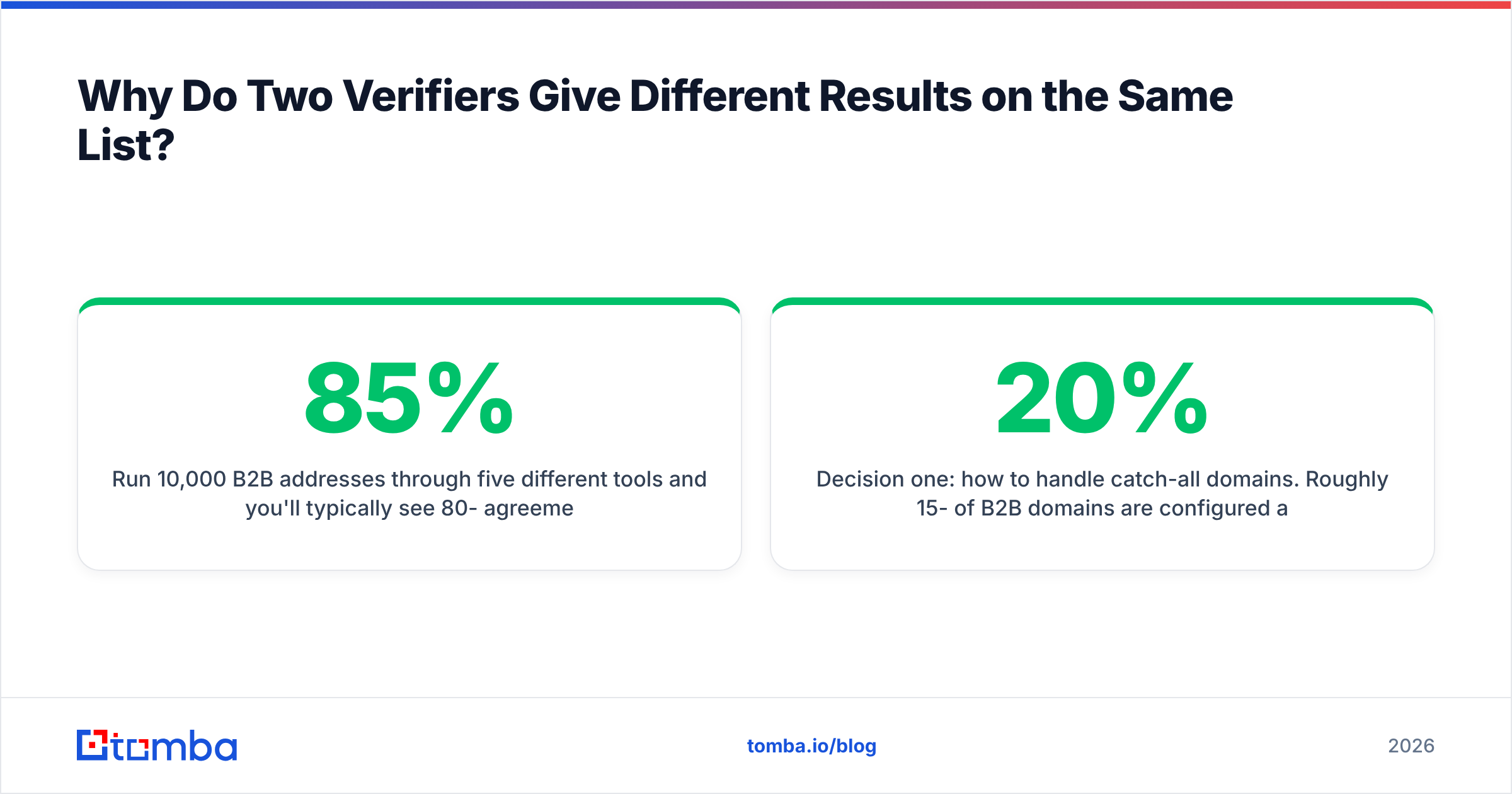
Run 10,000 B2B addresses through five different tools and you'll typically see 80-85% agreement — the clean Gmail addresses and obvious dead domains. The variance lives in the remaining 15%, and it comes down to three design decisions each vendor makes differently.
Decision one: how to handle catch-all domains. Roughly 15-20% of B2B domains are configured as catch-all, and the share is higher in enterprise and among companies running aggressive anti-harvesting setups. A permissive verifier marks every catch-all address "valid" and hands you a beautiful 98% pass rate. A conservative one marks them "unknown" and your pass rate reads 79%. The second tool didn't perform worse — it told you the truth. This is why a dedicated catch-all verifier exists as a separate step rather than being folded silently into a green checkmark.
Decision two: how hard to push SMTP. Major providers rate-limit and tarpit verification traffic. Microsoft 365 in particular returns misleading responses to unauthenticated probes. Vendors with large IP pools and slower, distributed probing get better signal on Outlook-hosted domains than tools racing to return a result in 400ms.
Decision three: what historical data backs the guess. When SMTP is inconclusive, a verifier can fall back on observed patterns — has this exact address appeared in a crawled signature, a press release, a public repo? Vendors with a large behavioural corpus resolve more "unknowns" correctly. Vendors without one either guess or abstain.

Are Free Online Email Verifiers Good Enough?#
For spot checks, yes. For a list you're about to send to, no — and the reason is structural, not stingy.
Free browser-based checkers almost always stop at syntax plus MX. They're fast because they never open an SMTP connection, which means they cannot distinguish sarah.chen@acme.com (real, still employed) from sarah.chen@acme.com (left in 2024, mailbox deleted, domain still perfectly healthy). Both come back green. You find out the difference from your bounce report.
Where free tools genuinely earn their place:
- Single-address sanity checks before an important manual outreach. A free email checker is the right tool for "is this one address I just copied off a website plausible?"
- Pre-cleaning garbage out of a scraped list before you spend paid credits — strip the syntax failures and dead domains for free, then verify what remains.
- Format inference when you know a person and a company but not the pattern. An email permutator generates the candidates; a paid verifier picks the winner.
What free tools cannot do: tell you whether a mailbox is currently accepting mail, flag spam traps, score catch-all domains, or process 40,000 rows without collapsing.
How Do the Main Online Email Verifiers Compare in 2026?#
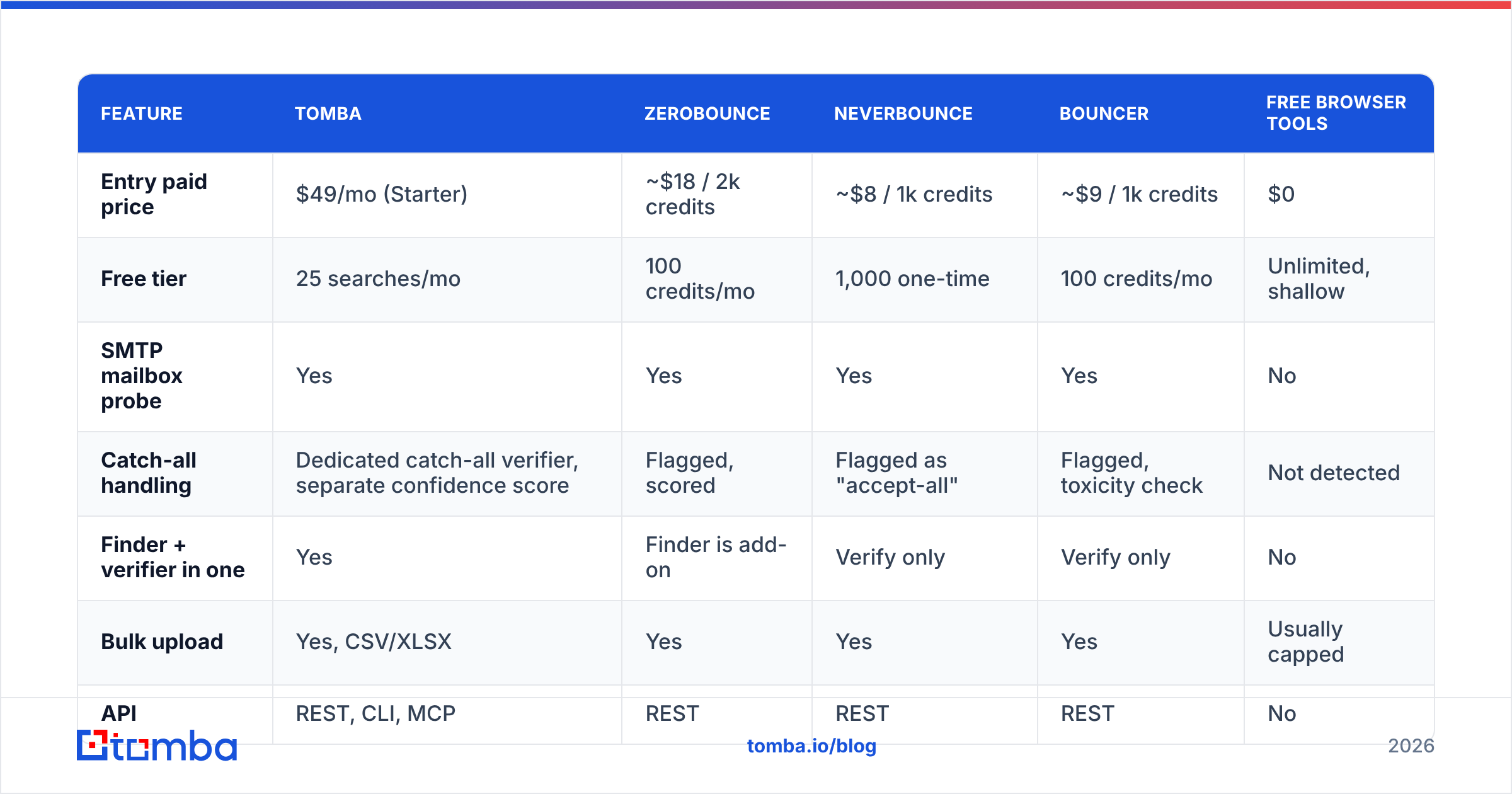
Pricing below is per-verification at entry volume, rounded, based on published list prices. Verify current numbers before you commit — this market re-prices constantly.
| Feature | Tomba | ZeroBounce | NeverBounce | Bouncer | Free browser tools |
|---|---|---|---|---|---|
| Entry paid price | $49/mo (Starter) | ~$18 / 2k credits | ~$8 / 1k credits | ~$9 / 1k credits | $0 |
| Free tier | 25 searches/mo | 100 credits/mo | 1,000 one-time | 100 credits/mo | Unlimited, shallow |
| SMTP mailbox probe | Yes | Yes | Yes | Yes | No |
| Catch-all handling | Dedicated catch-all verifier, separate confidence score | Flagged, scored | Flagged as "accept-all" | Flagged, toxicity check | Not detected |
| Finder + verifier in one | Yes | Finder is add-on | Verify only | Verify only | No |
| Bulk upload | Yes, CSV/XLSX | Yes | Yes | Yes | Usually capped |
| API | REST, CLI, MCP | REST | REST | REST | No |
| Spreadsheet add-ons | Sheets, Excel, Airtable | Sheets | Limited | Sheets | No |
| Best fit | Teams that find and verify | High-volume ESP list hygiene | Cheapest pure bulk clean | EU-focused compliance buyers | One-off checks |

The strategic split matters more than the per-credit price. Pure verifiers (NeverBounce, Bouncer) are built for cleaning a list you already own — newsletter hygiene, CRM decay, post-import scrubbing. Combined platforms handle the earlier step too: you don't have the address yet, and you need to find it and confirm it in one pass. If you're building outbound lists from scratch, paying two vendors for two halves of one job is friction you don't need. If you already have 200,000 subscribers and just need bounce protection before a campaign, a dedicated cleaner is often cheaper per unit.
One more axis nobody advertises: what happens to your data. Uploading a customer list to a verifier means handing over PII. Check the DPA, the retention window, and whether the vendor uses your uploads to enrich its own database. Some do. G2's email verification category is a reasonable starting point for reading what actual buyers say about support and billing surprises, which is where most complaints cluster.
What Does "99% Accuracy" Actually Mean?#
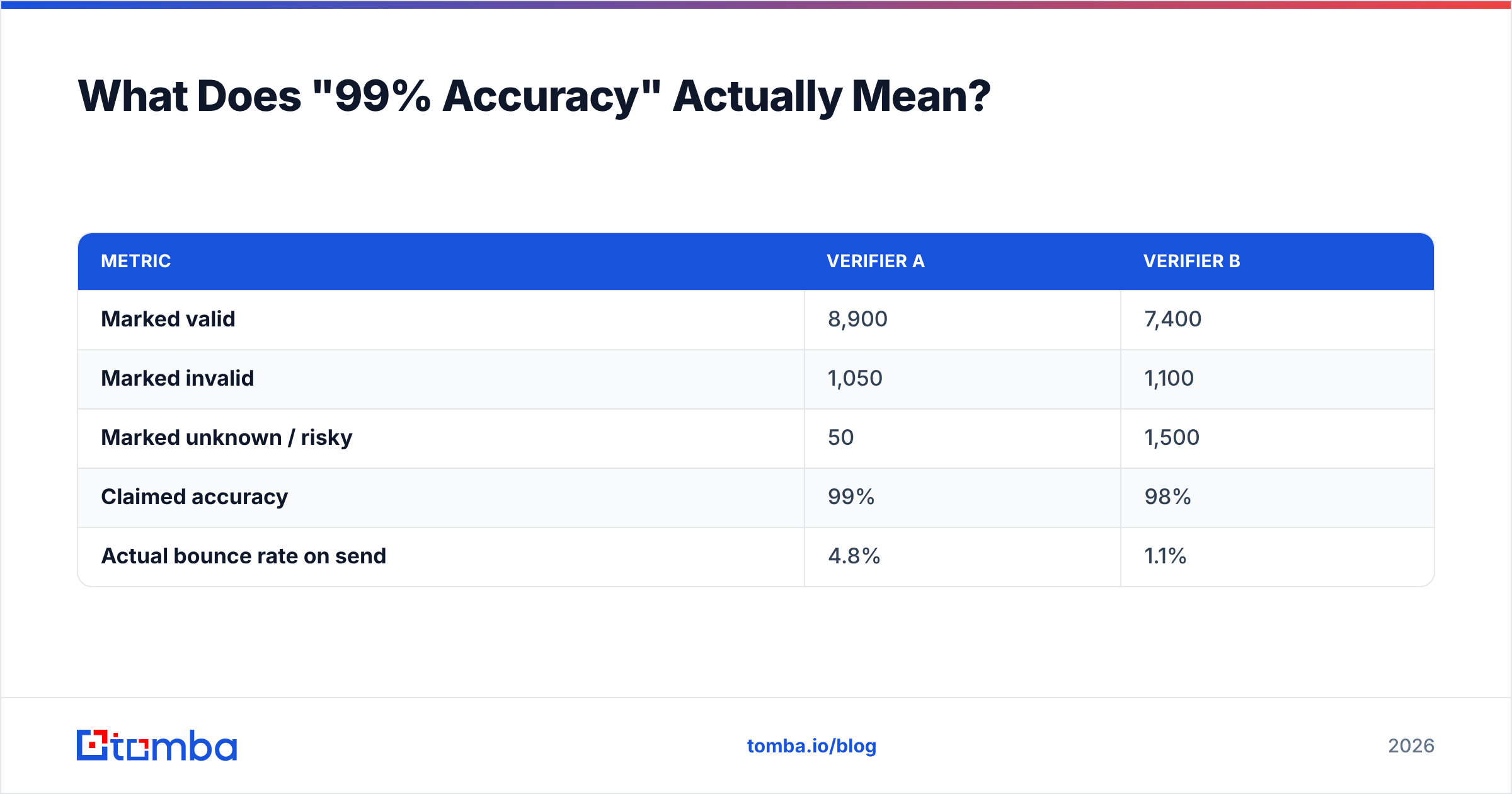
It means: of the addresses we were willing to give a confident verdict on, 99% of those verdicts were correct. It says nothing about how many addresses got a confident verdict.
Here's the arithmetic that vendors don't put on the pricing page. Two tools process the same 10,000-address list:
| Metric | Verifier A | Verifier B |
|---|---|---|
| Marked valid | 8,900 | 7,400 |
| Marked invalid | 1,050 | 1,100 |
| Marked unknown / risky | 50 | 1,500 |
| Claimed accuracy | 99% | 98% |
| Actual bounce rate on send | 4.8% | 1.1% |
Verifier A resolved almost everything and was "99% accurate" on the calls it made — but it made confident calls on catch-all domains it couldn't actually see into. Verifier B abstained on 1,500 addresses, looked worse on paper, and produced a send that Google and Microsoft didn't punish.
So the number to ask for is coverage plus bounce outcome, not accuracy. Concretely, before you buy:
- Run the same 500-address sample through 2-3 tools. Use your own real list, not the vendor's demo. Include a mix of Gmail, Microsoft 365, and small self-hosted domains.
- Count the unknowns. A tool with 0% unknowns on a B2B list is either extraordinary or lying, and it's not extraordinary.
- Seed 10 known-dead addresses — colleagues who left, mailboxes you deleted. A verifier that passes those is useless.
- Check the invalids you disagree with. Manually confirm 20 addresses the tool rejected. False negatives cost you real pipeline and never show up in any report.
- Send to 200 verified addresses and measure. The only metric that pays your salary is the actual bounce rate, and it takes one afternoon to get.
When Should You Verify — Once, or Every Time?#
Every time, and the reason is decay.
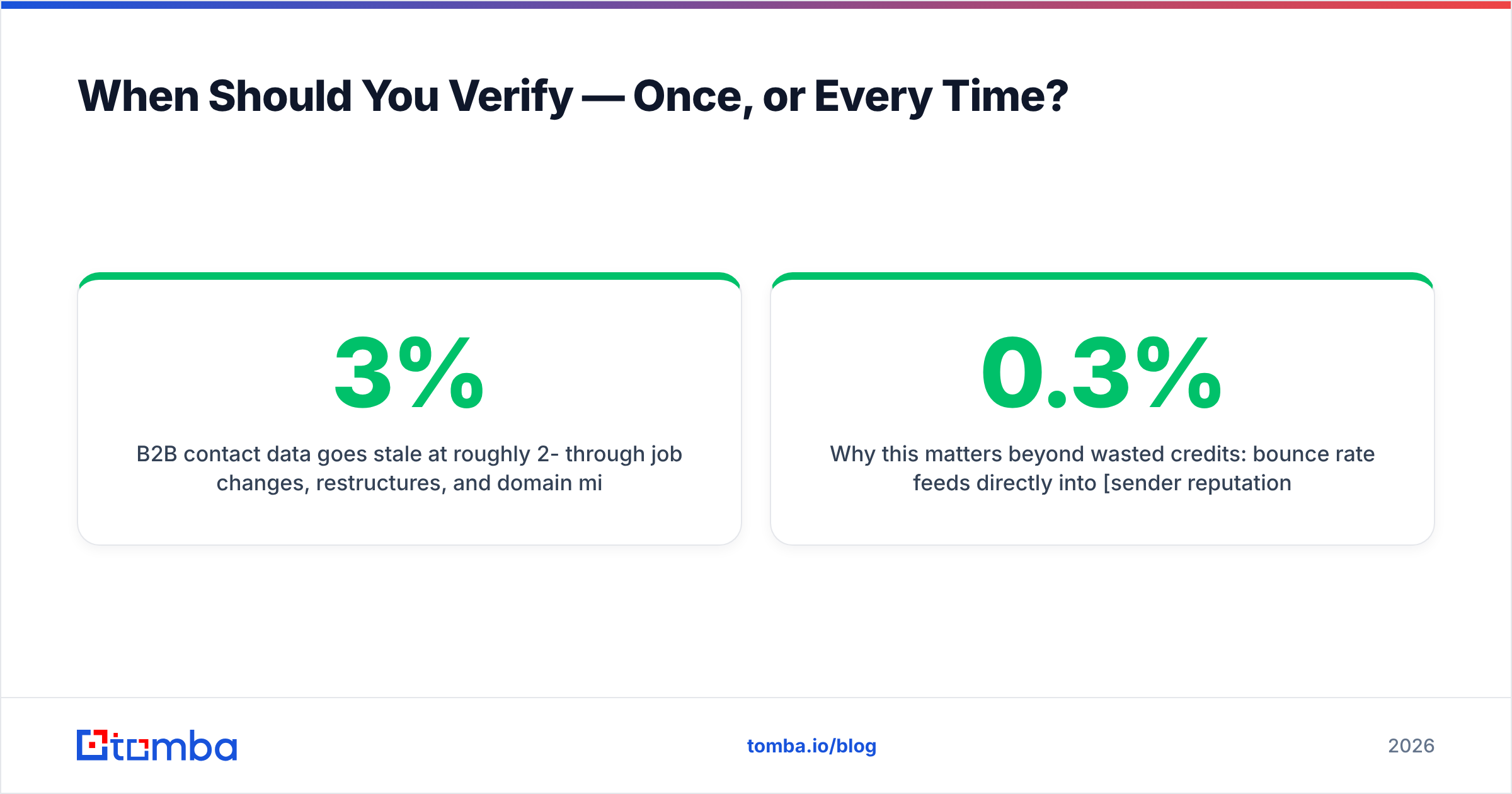
B2B contact data goes stale at roughly 2-3% per month through job changes, restructures, and domain migrations. That compounds: a list verified in January is meaningfully wrong by June, and about a quarter obsolete within a year. Verification is not a one-time import step; it's a pre-flight check.
A workable cadence looks like this:
- At acquisition — verify the moment an address enters your system, whether from a form, a scrape, or a purchase. Bad data that gets in is bad data that gets sent to.
- Before every cold campaign — re-verify the segment, always. This is the single highest-ROF habit in outbound, and the one most teams skip because the list "was clean last month."
- Quarterly on your active CRM — a bulk verify pass over your working records catches the churn before a sales rep wastes a sequence on a departed VP.
- On hard bounce, immediately — suppress permanently. Retrying a hard bounce is the fastest way to teach a mailbox provider that you don't read your own feedback.
- Annually on dormant segments — or better, just suppress anyone who hasn't engaged in 12 months. Verification confirms a mailbox exists; it can't tell you the human behind it still wants your email.
Why this matters beyond wasted credits: bounce rate feeds directly into sender reputation. Google's bulk sender guidelines are explicit that you should keep spam complaints under 0.3% and maintain valid recipient lists — and Microsoft has tightened enforcement in the same direction. Sustained bounces above roughly 2% start throttling your inbox placement for every recipient, including the ones who wanted to hear from you. Verification isn't a cost centre; it's insurance on your whole sending domain.
What Verification Can't Fix#
Be clear-eyed about the boundary. A verifier confirms a mailbox will accept mail. It does not confirm:
- That the person is the right buyer.
ceo@accepting mail says nothing about whether the CEO reads it. - That you'll land in the primary inbox. That's authentication, warmup, and content — check your SPF with an SPF checker and your copy with a spam checker, because verification does nothing for either.
- That the address is legally usable. GDPR and CAN-SPAM care about lawful basis and consent, not deliverability. A verified address you have no right to email is still a liability.
- That a catch-all address is real. Even the best catch-all scoring is probabilistic. Treat those addresses as a lower-confidence tier and don't lead your campaign with them.
- That an engaged human exists. Abandoned-but-active mailboxes verify perfectly forever.
Teams that treat verification as the whole deliverability strategy end up confused when a "100% verified" list underperforms. Verification is the floor, not the ceiling. HubSpot's research on email engagement is a useful reminder that relevance moves reply rates far more than list hygiene ever will — hygiene just stops you from being blocked before relevance gets a chance.
How Should You Choose, Practically?#
Pick by which problem you actually have.
You have a list and need it clean. Buy the cheapest credible bulk verifier with a real SMTP layer and honest catch-all flagging. Test on 500 rows first. Don't pay for a finder you won't use.
You need to build lists and verify them. Use a combined platform. The workflow — domain search to map a company's addresses, email finder to resolve a specific person, verification to confirm before send — belongs in one tool with one credit pool. Splitting it across two vendors doubles your integration work and your reconciliation headaches.
You're automating at scale. Ranking API quality above UI polish is correct. Look for a documented REST API with clear rate limits, webhook support for bulk jobs, and native hooks into whatever you already run — Sheets, Airtable, HubSpot, or a script. An email verification API that returns a confidence score rather than a naked boolean gives your own logic something to work with.
You're price-sensitive and low-volume. Stack free tiers deliberately. Most vendors give 25-100 free checks monthly; at 50 sends a week that's genuinely sufficient. Just don't build a business process on a free tier you'll outgrow in month three — the migration costs more than the credits saved. Check Tomba pricing and compare on cost-per-verified-address at your projected volume, not at the tier boundary the vendor chose to advertise.
The Bottom Line#
An email address verifier online is a commodity at the syntax and MX layers and a genuine differentiator at the SMTP and catch-all layers. Choose on how a tool handles uncertainty, not on the accuracy percentage on its homepage. Test with your own data. Measure the bounce rate, not the pass rate. And re-verify before every send, because your list is decaying whether you check it or not.
If you're building outbound lists rather than just cleaning inherited ones, start with the Tomba Email Finder — find the address by domain, name, or company, verify it in the same pass, and skip the two-vendor tax. The free tier gives you 25 searches a month to test against your own list before you spend anything; Starter is $49/mo when you're ready to run real volume.
Related guides#
Ready to find emails that actually work?
Join 150,000+ professionals who stopped guessing and started sending. Free credits on signup — no credit card required.
Get the Tomba newsletter
Practical outbound tactics and product updates — once every two weeks.
About the author