How to Find Email Addresses in 2026: 9 Ways That Work
Nine practical ways to find email addresses in 2026 — manual tricks, pattern logic, finder tools, and APIs — with honest accuracy notes and the verification step most people skip.
TL;DR
There is no single trick that works everywhere. To find email addresses in 2026 you need a stack: pattern logic first, a finder database second, verification always last.
Free manual methods still work — site footers, GitHub commits, WHOIS, X and LinkedIn bios. But they cap out at roughly 10-20 contacts an hour. That is fine for 5 targets and useless for 500.
Pattern guessing returns a plausible address about 60-70% of the time at mid-size companies, and much less at large ones with mixed conventions. Guessing without verifying is how you burn a domain.
Paid finders differ less on "do they find it" than on what happens when they don't — whether you get charged for a guess, a null, or a catch-all shrug.
The step nearly everyone skips: verify before you send. A 3% bounce rate is the line where Google and Microsoft start to throttle you.
What does "find email addresses" actually mean in 2026?#
It means one of three very different jobs. Mixing them up is why people pick the wrong tool.
Job one is targeted lookup. You know exactly who you want — a named VP at a named company — and you need one address. Accuracy matters more than speed. You will happily spend four minutes on it.
Job two is list building. You have a segment (Series B fintech, 50-200 employees, US) and you need 400 addresses that mostly work. Coverage and cost per valid contact matter more than any single hit.
Job three is enrichment. You already have rows — form fills, CRM records, event scans — with a name and a company but no email. You need to fill the gap programmatically. Here the API and the match rate on partial data are everything.
The same word covers all three. The tooling does not. A Chrome extension is great at job one and painful at job three. A bulk uploader is the reverse.
Why do most email searches fail?#
Because the data underneath is messier than the interfaces suggest.
Companies use more than one convention. Acquisitions bring legacy domains along. A 2,000-person company can run
first.last@,flast@, andfirst@at the same time, split by which entity hired you.Catch-all domains lie. A catch-all server accepts every address you throw at it, so a standard SMTP check returns "valid" for
asdfgh@company.com. Roughly 15-20% of B2B domains are set up this way. They are the single biggest source of false confidence.Role addresses look like people.
sales@,info@, andcareers@get returned by scrapers and pollute lists. They rarely reach a decision-maker. Most route to a shared inbox with an aggressive spam filter.Data decays fast. B2B contact data goes stale at roughly 25-30% per year as people change jobs. A database that was excellent in 2024 is mediocre in 2026 unless it is re-crawled constantly.
Providers stopped answering honestly. Microsoft 365 in particular has tightened SMTP responses, so verification services now lean on inference rather than a clean yes or no.
None of this is fatal. It just means the workflow has to assume failure and route around it.
What are the 9 ways to find email addresses?#
Ranked roughly from free-and-slow to paid-and-fast. Most serious workflows use three or four of these together.
Read the website properly. Not just
/contact— check the press kit, the investor page, and job listings, where hiring managers often put their address. The privacy policy names a real DPO with a real inbox surprisingly often. Terrible for scale, very good for one important target.Search the open web with operators. Try
site:company.com "@company.com"plus a name, or"first.last@company.com"in quotes. Also try the domain in GitHub commit history —git logmetadata leaks corporate addresses constantly for anyone technical.Mine social bios and posts. People still put addresses in X bios, LinkedIn "contact info" panels, conference speaker pages, and Substack about sections. A LinkedIn finder automates the profile-to-address step when you work from a list of profiles.
Check WHOIS and DNS records. Privacy proxies killed most of this for consumer domains. Smaller B2B sites and older registrations still expose an admin contact. Free, instant, works maybe one time in six.
Derive the pattern, then generate. Find one known address at the company, work out the convention, and apply it to your target's name. An email permutator produces every plausible variant. A company email pattern check tells you which convention dominates. Never send to a permutation you have not verified.
Use a domain search. Point a tool at
company.comand get back every address it has seen on that domain, usually with department and seniority labels. This is the fastest way to sanity-check a pattern. It often surfaces the person you wanted plus two better-placed alternatives.Use a name-plus-domain email finder. The workhorse. You supply "Dana Whitfield" and "company.com", and the tool returns the address with a confidence score. This is what most people mean by an email finder, and it is the highest-yield single method for job one.
Buy from a static B2B database. Filter by industry, headcount, geography, and title, then export. Providers like BookYourData built their reputation here. For broad ICP sweeps, a curated database beats one-by-one lookups on cost per contact. The tradeoff is freshness — you are buying a snapshot.
Automate it through an API. For enrichment at volume, skip the UI. An email finder API or a spreadsheet add-in for Google Sheets turns a 6,000-row backlog into a scheduled job instead of a week of clicking.

How accurate is each method, honestly?#
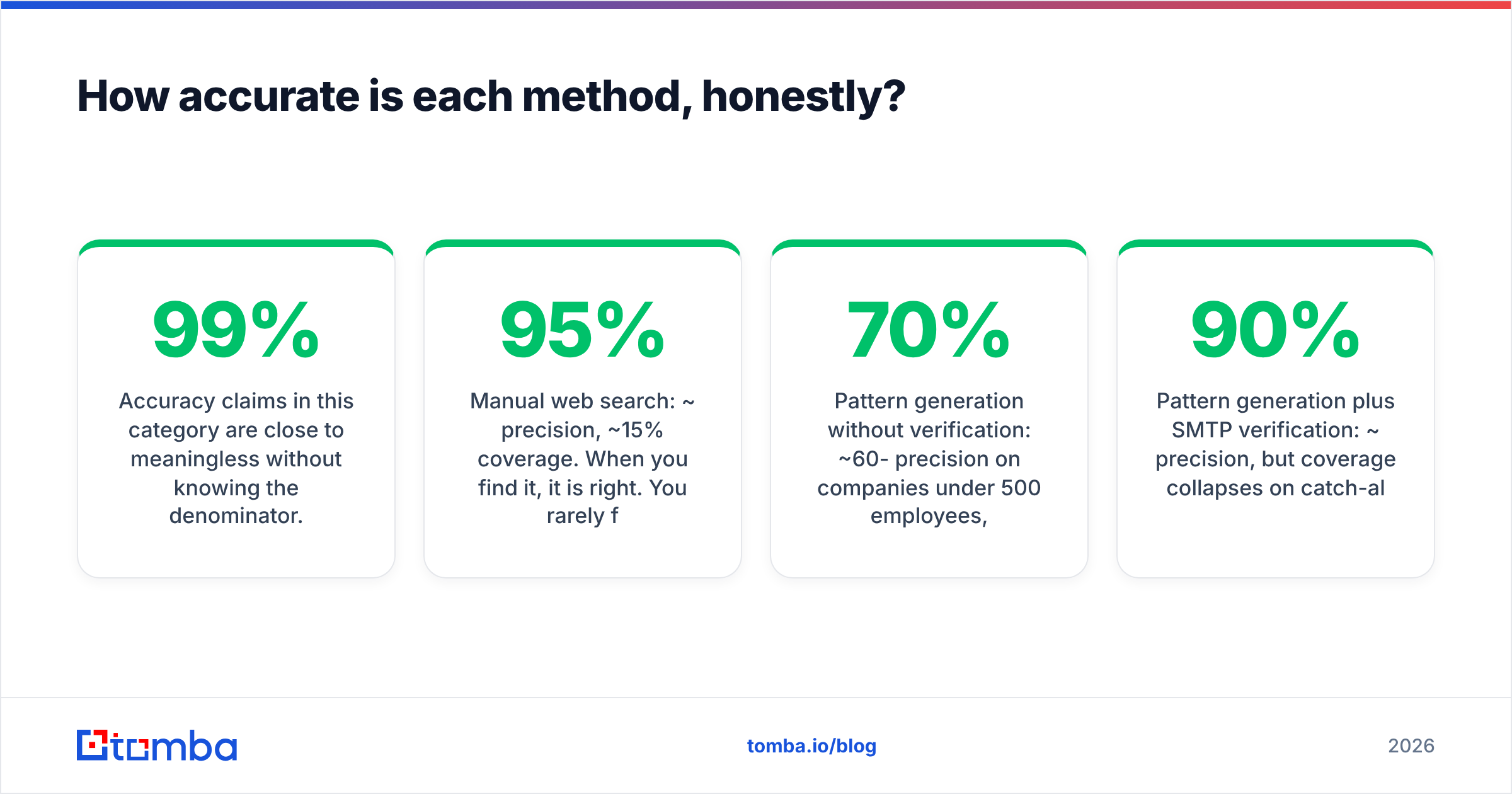
Accuracy claims here are close to meaningless without the denominator. A vendor that advertises "99% accuracy" usually means this: of the addresses we chose to return, 99% pass our own verifier.
That is not the number you care about. You care about coverage × precision — how many of your real targets came back, and how many of those actually accept mail.

Rough field expectations for 2026, on a normal B2B list of small and mid-market companies:
Manual web search: ~95% precision, ~15% coverage. When you find it, it is right. You rarely find it.
Pattern generation without verification: ~60-70% precision at companies under 500 employees, dropping to ~40% above 5,000.
Pattern generation plus SMTP verification: ~90% precision. Coverage collapses on catch-all domains, where verification cannot resolve.
Commercial finder on a name plus domain: 70-85% coverage with 90-95% precision on returned results. The spread between vendors is mostly coverage, not precision.
Static database export: high coverage inside its niche. Precision depends entirely on the last refresh date.
The practical takeaway: never trust a single source. Run the finder first. When it returns nothing, fall back to pattern plus verification rather than skipping the contact. That two-step recovers a meaningful slice of the misses.
Which tools should you compare?#
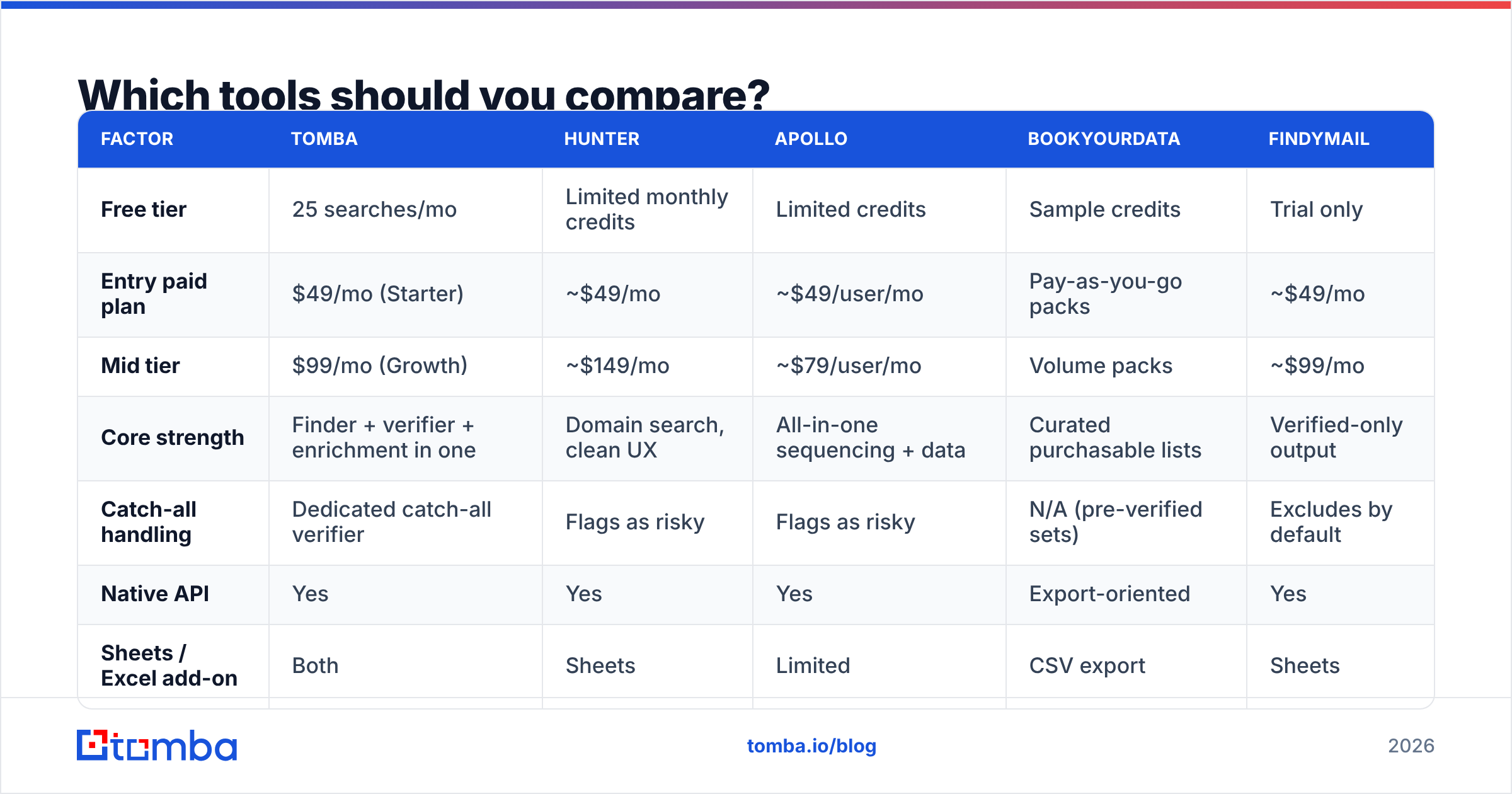
Entry-level pricing as published at time of writing — always check the vendor page before you commit, since this category re-prices constantly.
| Factor | Tomba | Hunter | Apollo | BookYourData | Findymail |
|---|---|---|---|---|---|
| Free tier | 25 searches/mo | Limited monthly credits | Limited credits | Sample credits | Trial only |
| Entry paid plan | $49/mo (Starter) | ~$49/mo | ~$49/user/mo | Pay-as-you-go packs | ~$49/mo |
| Mid tier | $99/mo (Growth) | ~$149/mo | ~$79/user/mo | Volume packs | ~$99/mo |
| Core strength | Finder + verifier + enrichment in one | Domain search, clean UX | All-in-one sequencing + data | Curated purchasable lists | Verified-only output |
| Catch-all handling | Dedicated catch-all verifier | Flags as risky | Flags as risky | N/A (pre-verified sets) | Excludes by default |
| Native API | Yes | Yes | Yes | Export-oriented | Yes |
| Sheets / Excel add-on | Both | Sheets | Limited | CSV export | Sheets |
| Best for | Lookup + verify + enrich in one stack | Simple domain-first research | Teams wanting data plus outreach | Buying a defined ICP list outright | Deliverability-obsessed senders |

Read that table as "different jobs," not "better and worse."
If your bottleneck is a defined ICP you can describe in filters, a purchasable list from a curated provider is genuinely faster than looking up 900 people one at a time. If your bottleneck is that inbound leads arrive with a name and a company and nothing else, an enrichment API wins. If you send high volume and live in fear of bounce rate, a finder that refuses to return anything it cannot verify is worth the lower coverage.
Independent reviews on G2's lead intelligence category are useful for spotting support and billing complaints that never appear on vendor sites. That is what I would read them for, not the star averages.
How do you verify an email address before sending?#
This is the step that separates a working outbound program from a domain you have to abandon. The sequence:
Syntax and domain check. Does the address parse, does the domain resolve, does it have MX records? Free, instant, kills obvious junk. The free email checker covers this in a second.
Mailbox-level check. An email verifier opens an SMTP conversation and asks whether the specific mailbox exists, without sending anything.
Catch-all resolution. When the domain accepts everything, a plain verifier gives up. A catch-all verifier adds other signals — past engagement, pattern confidence, provider behaviour — to give you a usable risk grade instead of a shrug.
Duplicate and role filtering. Strip
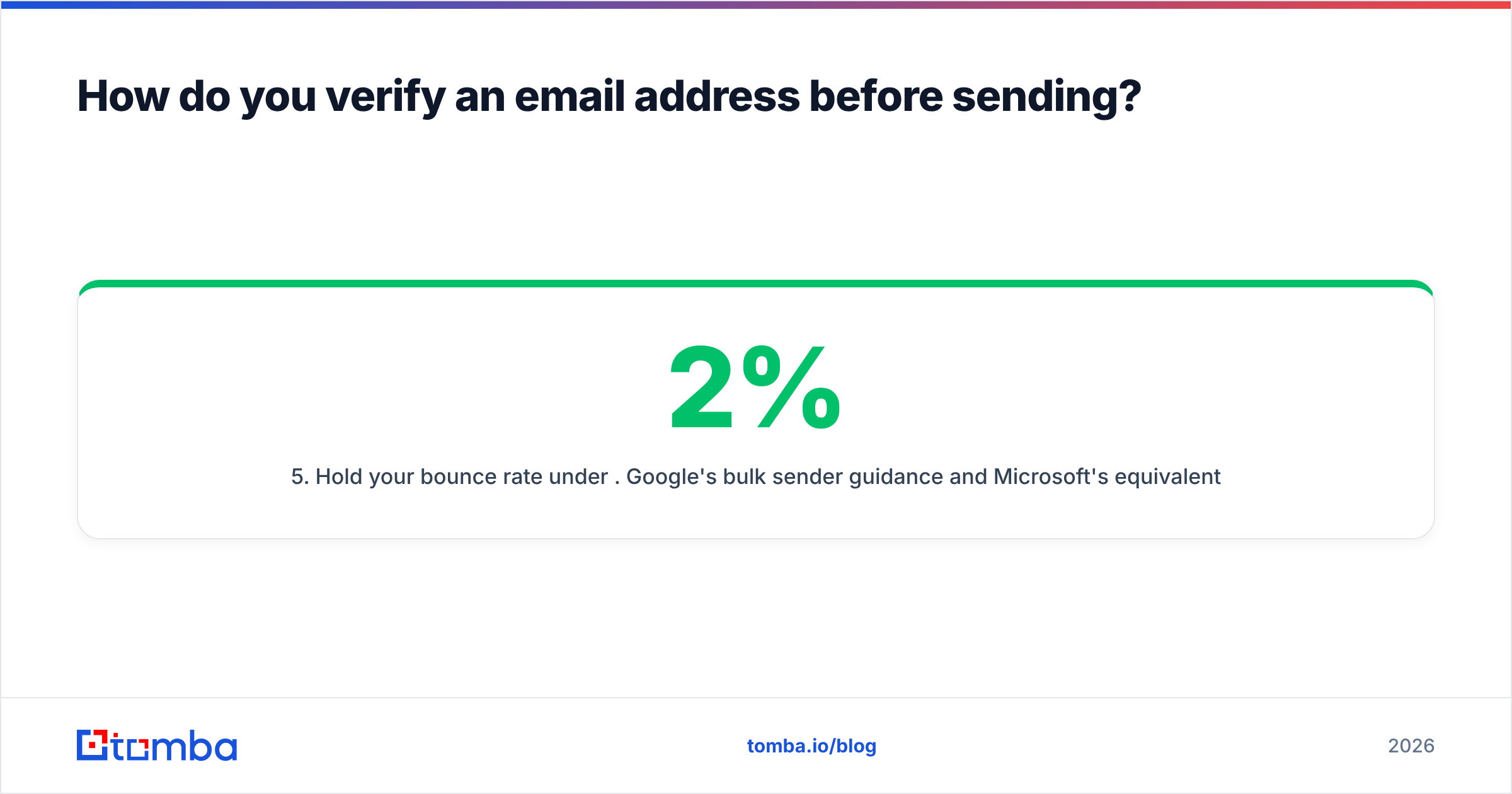
info@,noreply@, and near-duplicates. Remove duplicates before import, not after. Deduping inside a sequencer is much more painful.Hold your bounce rate under 2%. Google's bulk sender guidance and Microsoft's equivalent both treat sustained bounces as a spam signal. Two percent is the safe ceiling, 3% is where throttling starts, and 5% puts you in reputation-repair territory.
Is it legal to find someone's email address?#
Short answer: finding a business email address is legal in most places. What you do next is the regulated part.
Under GDPR, a work address like dana@company.com is personal data. Processing it for B2B outreach is generally defensible under legitimate interest. You have to document the assessment, say where you got the data on first contact, honour opt-outs immediately, and keep the message relevant to the person's professional role. Sending to a personal Gmail you dug up is a very different risk profile.
Under CAN-SPAM in the US, cold B2B email is legal without prior consent, as long as headers are accurate, the subject line is not deceptive, you include a physical address, and you honour unsubscribes within 10 business days.
CASL in Canada is stricter — closer to opt-in — with a narrow business-relationship exemption. PECR in the UK is lighter for corporate subscribers than for sole traders.
Practical rules that keep you clear either way: business addresses only, one-click opt-out in every message, delete on request, and never send to addresses taken from a source that prohibited scraping in its terms. HubSpot's sales resources cover the messaging side of compliant outreach well. For the technical detail of what an address even is, Wikipedia's email address entry is a better reference than most vendor blogs.
What does it actually cost per usable contact?#
Divide the plan price by the number of contacts that survive verification, not by the credits you were sold.
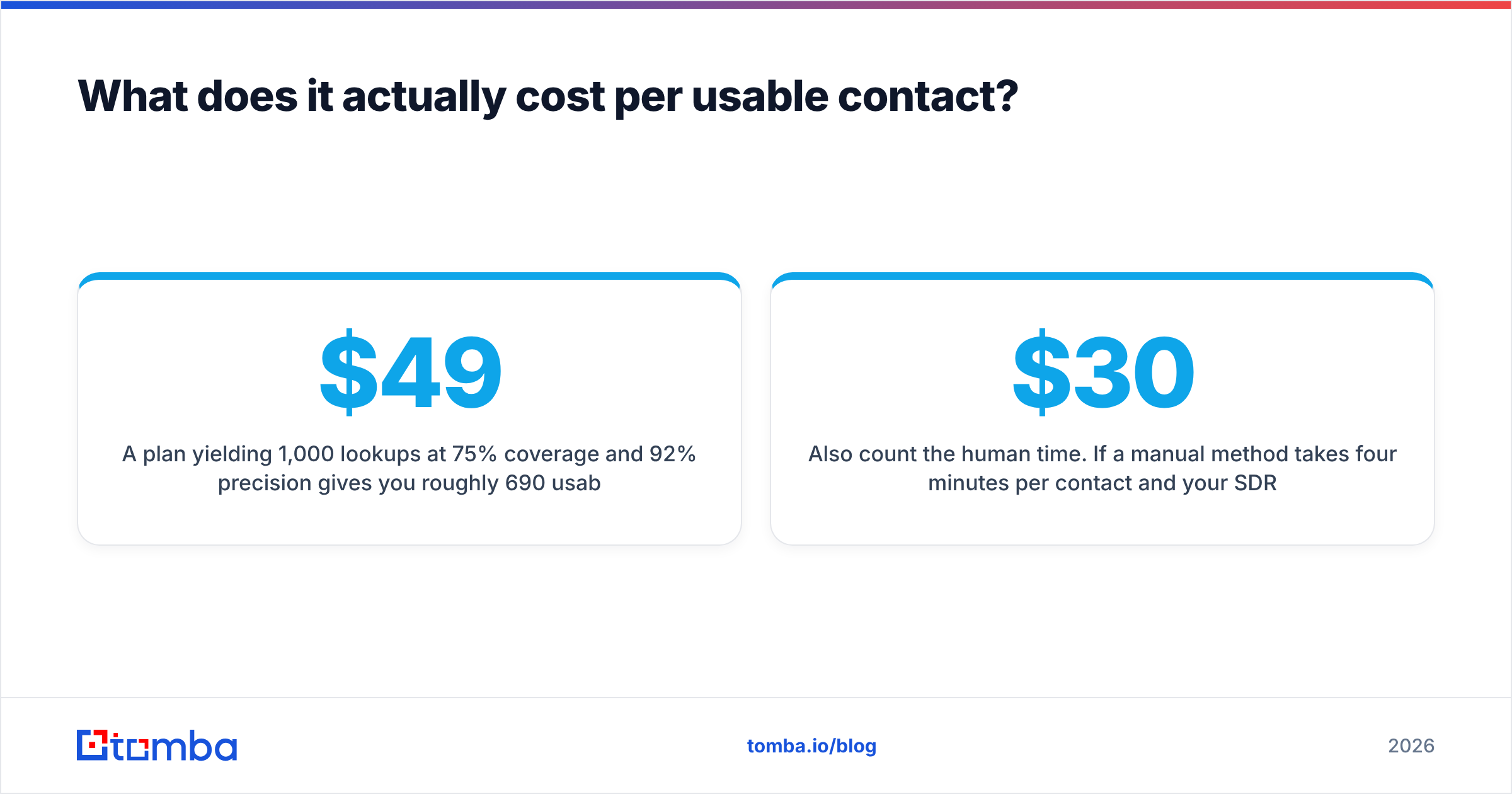
A $49/mo plan yielding 1,000 lookups at 75% coverage and 92% precision gives you roughly 690 usable addresses — about 7 cents each. The same plan at 50% coverage gives you 460, at 10.6 cents each. That gap is the whole ballgame, and it is why "credits included" comparisons mislead.
Ask two questions of any vendor: are you charged for a null result, and are you charged for a guess you would not send to? Vendors that only bill on verified returns look more expensive per credit and are usually cheaper per usable contact.
Also count the human time. If a manual method takes four minutes per contact and your SDR costs $30/hour, each manual address costs $2 in labour — roughly 25× the tool price. Manual research is worth it for your top 20 accounts and indefensible for the next 200.
See Tomba pricing for how the tiers map to volume: Free covers 25 searches a month for spot checks, Starter at $49/mo suits a single rep, Growth at $99/mo fits a small team, and Pro at $249/mo covers agency-scale bulk work.
What does a workflow that actually holds up look like?#
Put together, the reliable 2026 sequence to find email addresses is short.
Start from a segment, not a name list — use domain search to map who exists at each target company before you decide who to contact. Run named targets through the finder. For every miss, generate permutations from the detected pattern and verify them.
Push everything through the verifier, resolve catch-alls separately, and drop anything graded risky. Enrich the survivors with title, seniority, and phone numbers so your sequence has something to personalise on. Re-verify anything older than 90 days before it goes into a new campaign.
That is four tools and one loop. It is boring, and it is why some teams hold sub-1% bounce rates on cold lists while others get throttled in week two.
Ready to stop guessing? Start with the Tomba Email Finder — supply a name and a domain, get a verified address with a confidence score, and fall back to pattern detection automatically when the direct lookup comes up empty. The free tier gives you 25 searches a month to test coverage against contacts you already know, which is the only benchmark that matters. If it holds up on your list, Starter at $49/mo scales it without changing the workflow.
Related guides#
Ready to find emails that actually work?
Join 150,000+ professionals who stopped guessing and started sending. Free credits on signup — no credit card required.
Get the Tomba newsletter
Practical outbound tactics and product updates — once every two weeks.
About the author