Email Append Services Cost in 2026: Real Pricing Breakdown
Append vendors quote per record, but you pay per usable email. Here is what email append actually costs in 2026, which fees get buried in the SOW, and how to run the math before you sign.
TL;DR
- Email append services cost between $0.05 and $0.50 per matched record in 2026. The spread is driven by match-rate guarantees, verification depth, and whether you buy self-serve credits or a signed enterprise contract.
- The quoted price is almost never the real price. Divide total spend by usable, verified emails — that number is typically 2x to 4x higher than the per-record rate on the invoice.
- Batch (CSV) append still carries setup fees, minimum orders, and 2–5 day turnarounds. API-based enrichment has largely eliminated all three for lists under ~100,000 records.
- Watch for five buried costs: minimum order value, "processed record" billing, verification sold separately, annual-only terms, and re-append fees when the file decays.
- If your list is under 50,000 records, credit-based tools (Tomba starts at $49/mo, free tier included) usually beat a traditional append vendor on total cost per usable email.
What is an email append service, and what are you actually paying for?#
An email append service takes a file of contacts you already have — names, job titles, company domains, postal addresses, phone numbers — and returns the business email address for each one. Think of it like a locksmith cutting keys from a photograph of the lock: you supply the identifying detail, they supply the working credential.
You are paying for four separate things, which is exactly why quotes are hard to compare:
- Match — the vendor finds a candidate email for the record. This is the only thing most price sheets actually bill for.
- Verification — the candidate is checked with SMTP, MX, and catch-all logic so it does not bounce. Frequently sold as a line item, not bundled.
- Recency — how recently the record was seen in the wild. A 2021 email at a company with 40% annual churn is worth close to nothing.
- Coverage of your specific segment — a vendor with deep US SaaS coverage may match 65% of your list and 15% of your EU manufacturing list at the same price.
When a rep says "$0.15 per record," ask which of those four you are buying. Most of the time the answer is only the first one.
How much do email append services cost in 2026?#
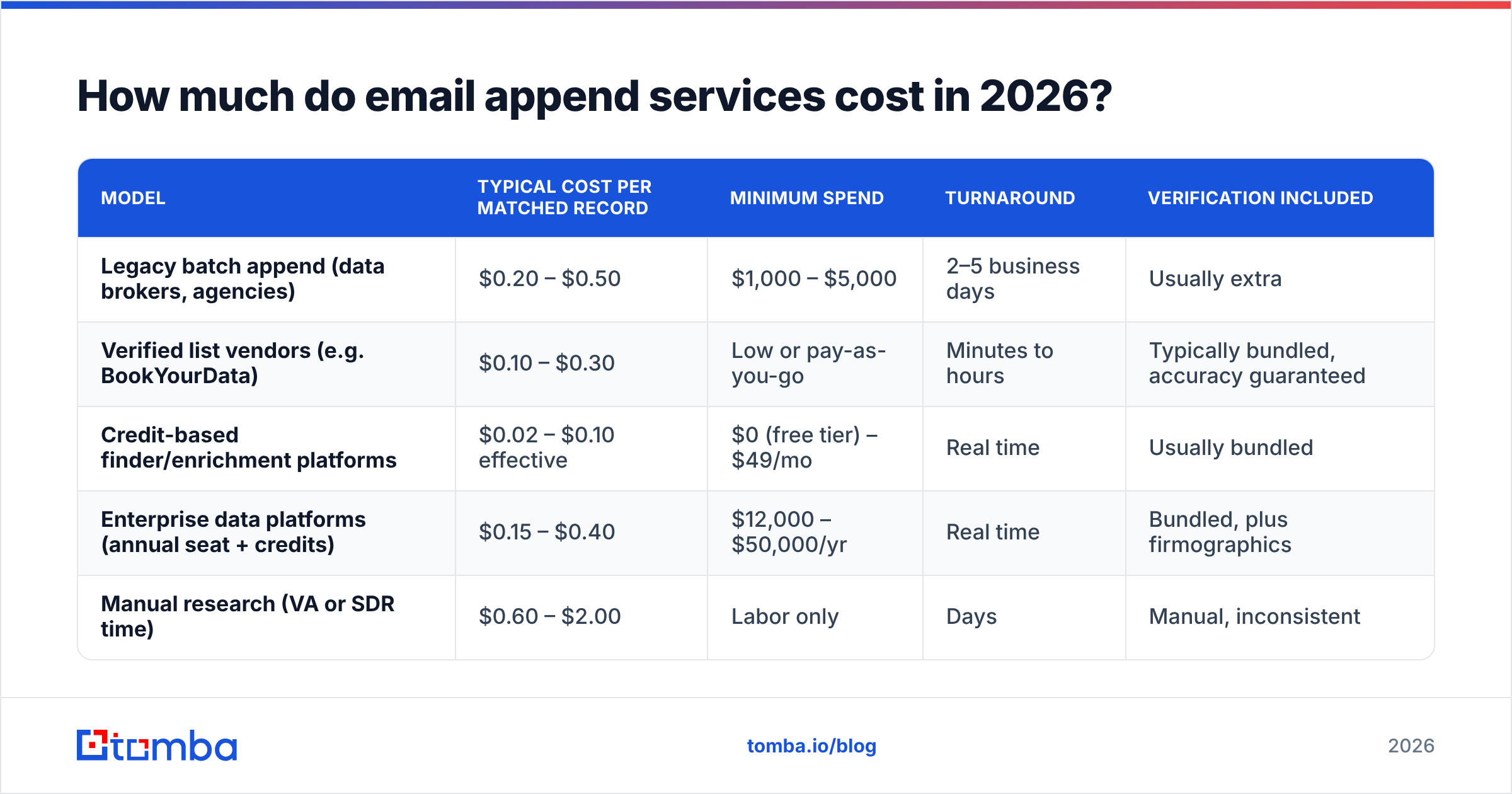
Here is the pricing landscape as it looks today, grouped by delivery model rather than by brand. Figures reflect commonly published rates and self-serve list prices; enterprise quotes always vary by volume and segment.
| Model | Typical cost per matched record | Minimum spend | Turnaround | Verification included |
|---|---|---|---|---|
| Legacy batch append (data brokers, agencies) | $0.20 – $0.50 | $1,000 – $5,000 | 2–5 business days | Usually extra |
| Verified list vendors (e.g. BookYourData) | $0.10 – $0.30 | Low or pay-as-you-go | Minutes to hours | Typically bundled, accuracy guaranteed |
| Credit-based finder/enrichment platforms | $0.02 – $0.10 effective | $0 (free tier) – $49/mo | Real time | Usually bundled |
| Enterprise data platforms (annual seat + credits) | $0.15 – $0.40 | $12,000 – $50,000/yr | Real time | Bundled, plus firmographics |
| Manual research (VA or SDR time) | $0.60 – $2.00 | Labor only | Days | Manual, inconsistent |
Two observations worth more than the table itself.
First, the cheapest per-record rate and the cheapest per-usable-email rate are rarely the same vendor. A $0.08 vendor with a 30% match rate costs you $0.27 per usable contact. A $0.20 vendor at 70% costs $0.29. They are effectively tied, and the second one saved you a re-run.
Second, minimum spend is the real gatekeeper for small teams. If you need 3,000 emails and the floor is $2,500, your effective rate is $0.83 regardless of what the rate card says. Self-serve platforms with a free tier and a $49 entry plan exist precisely to kill that floor — see Tomba pricing for how credit tiers replace minimum orders.
Why do email append quotes vary by 10x?#
Six variables explain nearly all of the spread. Ask about each one before you compare two numbers.
- Match-rate definition. Some vendors count a returned pattern guess (first.last@domain) as a match. Others only count a record that passed SMTP verification. The first definition inflates match rate by 20–30 points and quietly transfers the bounce risk to you.
- Billing basis. "Per record processed" means you pay for the 55% of your file that came back empty. "Per record matched" means you don't. This single clause can double your invoice.
- Segment difficulty. SMB, non-English, healthcare, government, and sub-10-employee companies all cost more to match. Enterprise US tech is the cheapest data in the market because everyone has it.
- Freshness SLA. A vendor promising "verified within 30 days" runs continuous re-verification and prices it in. A vendor with no SLA is selling you a static snapshot that decays roughly 2–3% per month as people change jobs.
- Contract shape. Annual commitments buy 30–50% off list, then punish you with unused credits at renewal. Monthly credits cost more per unit and waste nothing.
- Delivery surface. CSV in, CSV out is the cheapest to build and the most expensive to operate — someone on your team burns hours per cycle. API and CRM-native delivery cost slightly more per record and remove that labor entirely.
What hidden costs do append vendors leave out of the quote?#
The quote covers matching. Your budget has to cover the rest.
Verification sold separately. Plenty of append vendors return unverified candidates and then offer verification at $0.003–$0.01 per email as an add-on. If you skip it, you pay in bounce rate instead — and bounces above 2% start damaging sender reputation in ways that cost far more than the add-on. Run everything through an email verifier before it touches a sequence, regardless of who supplied it.
Setup and file-preparation fees. $250–$1,500 is common on legacy batch work, sometimes described as "data standardization." You are paying someone to fix the column headers on your own CSV.
Re-append cycles. Your appended file is a depreciating asset. At 2.5% monthly decay, a file appended in January is roughly 26% wrong by December. Vendors know this; some charge full price to re-append the same records twelve months later. Negotiate a refresh rate up front or budget for a second full run.
Deduplication waste. If your CRM has 12,000 records and 2,100 are duplicates, a per-processed-record vendor bills for all 12,000. Deduplicate first — remove duplicates is a five-minute job that can shave 15% off an invoice.
Internal labor. Two hours of RevOps time per append cycle at a loaded rate of $60/hr is $120 per run. On a monthly cadence that is $1,440/yr in invisible cost that never appears in a vendor comparison spreadsheet.
How do you calculate the true cost per usable email?#
Use this formula, not the rate card:
True cost = Total spend ÷ (Records × Match rate × Verified-valid rate)
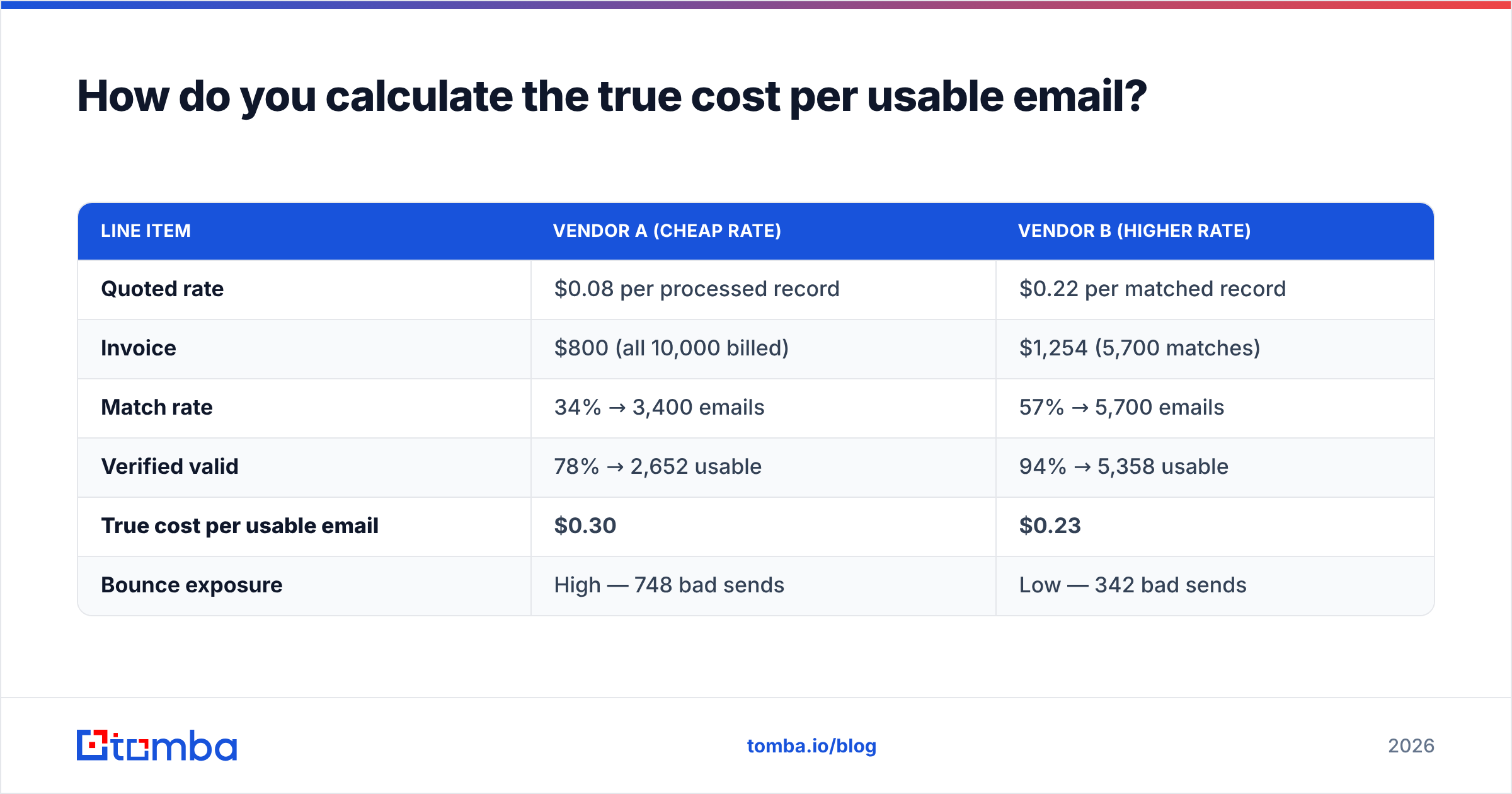
Worked example on a 10,000-record file:
| Line item | Vendor A (cheap rate) | Vendor B (higher rate) |
|---|---|---|
| Quoted rate | $0.08 per processed record | $0.22 per matched record |
| Invoice | $800 (all 10,000 billed) | $1,254 (5,700 matches) |
| Match rate | 34% → 3,400 emails | 57% → 5,700 emails |
| Verified valid | 78% → 2,652 usable | 94% → 5,358 usable |
| True cost per usable email | $0.30 | $0.23 |
| Bounce exposure | High — 748 bad sends | Low — 342 bad sends |
Vendor A looked 64% cheaper and ended up 30% more expensive, before counting the reputation damage from 748 extra bounces. This is the single most common procurement mistake in append buying, and it happens because match rate and validity live on a different page of the proposal than price.
If you only take one habit from this post: make every vendor run a 1,000-record paid pilot on your actual file and compute the number above yourself. Vendors that refuse a pilot are telling you something about their match rate.

Is batch append or API enrichment cheaper?#
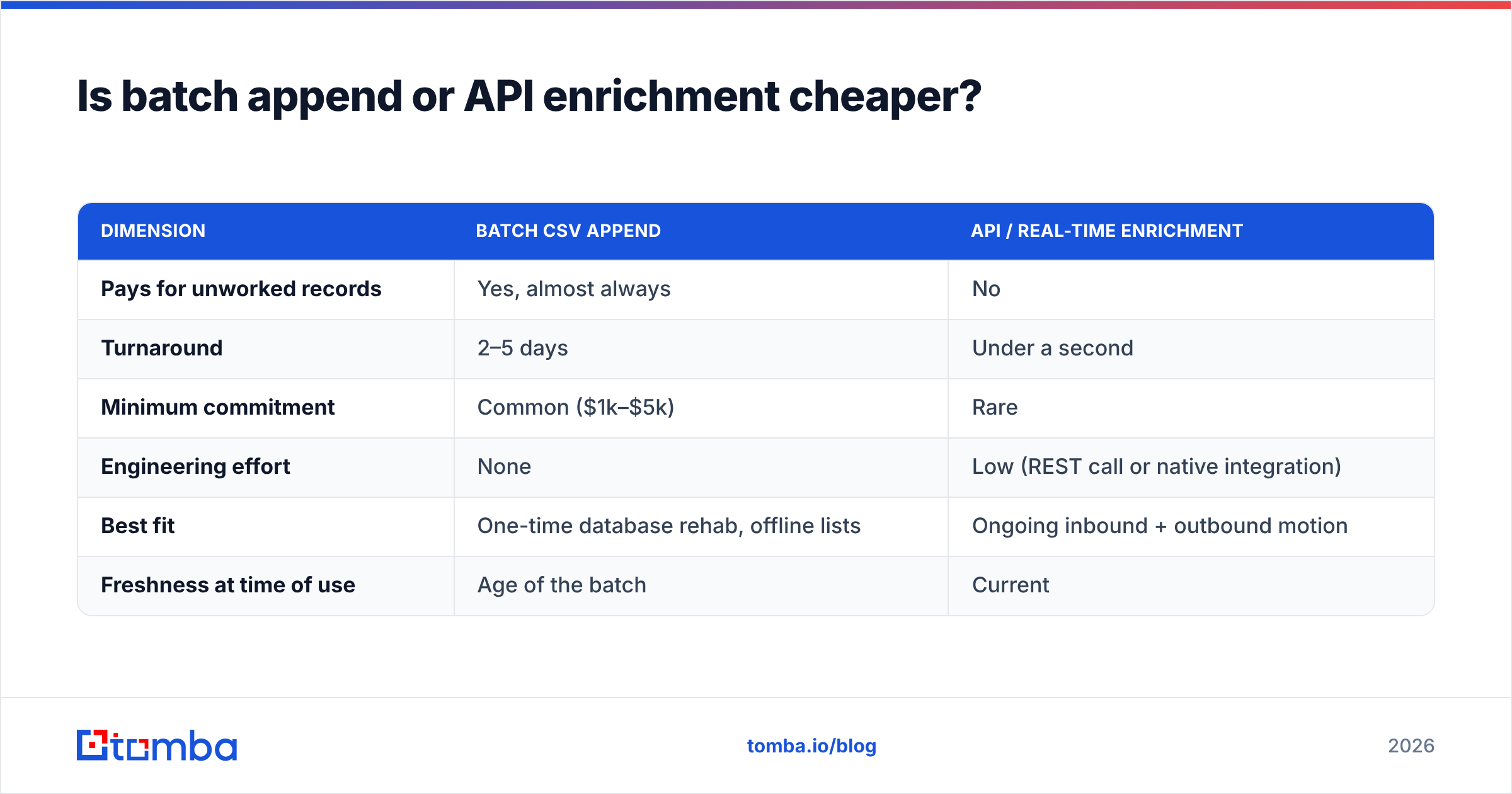
For most teams in 2026, API enrichment wins on total cost — but not for the reason vendors advertise.
Per-record, the two models are close. The difference is waste. Batch append forces you to buy a block: you send 20,000 records because that hits the minimum, even though only 4,000 are in an active segment. API enrichment lets you append on demand — at form fill, at CRM record creation, at the moment an SDR opens the account — so you only pay for records you actually work.
| Dimension | Batch CSV append | API / real-time enrichment |
|---|---|---|
| Pays for unworked records | Yes, almost always | No |
| Turnaround | 2–5 days | Under a second |
| Minimum commitment | Common ($1k–$5k) | Rare |
| Engineering effort | None | Low (REST call or native integration) |
| Best fit | One-time database rehab, offline lists | Ongoing inbound + outbound motion |
| Freshness at time of use | Age of the batch | Current |
The practical answer is usually both: one batch pass to rehabilitate the existing database, then an email finder API or a native CRM connection to keep new records enriched from that point forward. HubSpot's own guidance on CRM data hygiene makes the same argument — enrichment at the point of entry beats periodic cleanup, because bad records cost you in routing, scoring, and forecasting long before anyone emails them. Their CRM documentation is a reasonable free reference for how the ingest side should be structured.
Is email append legal, and does it hurt deliverability?#
Two separate questions, both worth budgeting for.
Legally, appending business email addresses to records you already hold is generally permissible in the US under CAN-SPAM, which regulates the content and opt-out mechanics of commercial email rather than how you obtained the address. In the EU and UK, GDPR and PECR make it materially harder: you need a lawful basis, and "we bought it" is not one on its own. Legitimate interest can work for B2B outreach with proper documentation, but that is a conversation for your counsel, not your data vendor. Ask any append provider to show you their sourcing documentation and their data processing agreement — a serious vendor publishes both, as with a public breakdown of data sources.
On deliverability, appended data is riskier than opt-in data for one structural reason: appended addresses have never interacted with you. Mailbox providers weigh engagement heavily, so a cold appended list produces lower opens, higher spam complaints, and a faster reputation slide than your house list. That is not an argument against appending — it is an argument for these three controls:
- Verify 100% of appended records before the first send, and exclude every risky and unknown result rather than gambling on them.
- Handle catch-all domains separately. They pass basic checks and still bounce; a dedicated catch-all verifier is the difference between a 1% and a 6% bounce rate on enterprise-heavy files.
- Ramp volume. Do not push 8,000 freshly appended contacts through a domain that sends 200 emails a day. Stage it over weeks.
You can also sanity-check the vendor category itself on independent review sites — the G2 data enrichment category is useful mainly for spotting complaints about billing and match rates that never make it into a sales call.
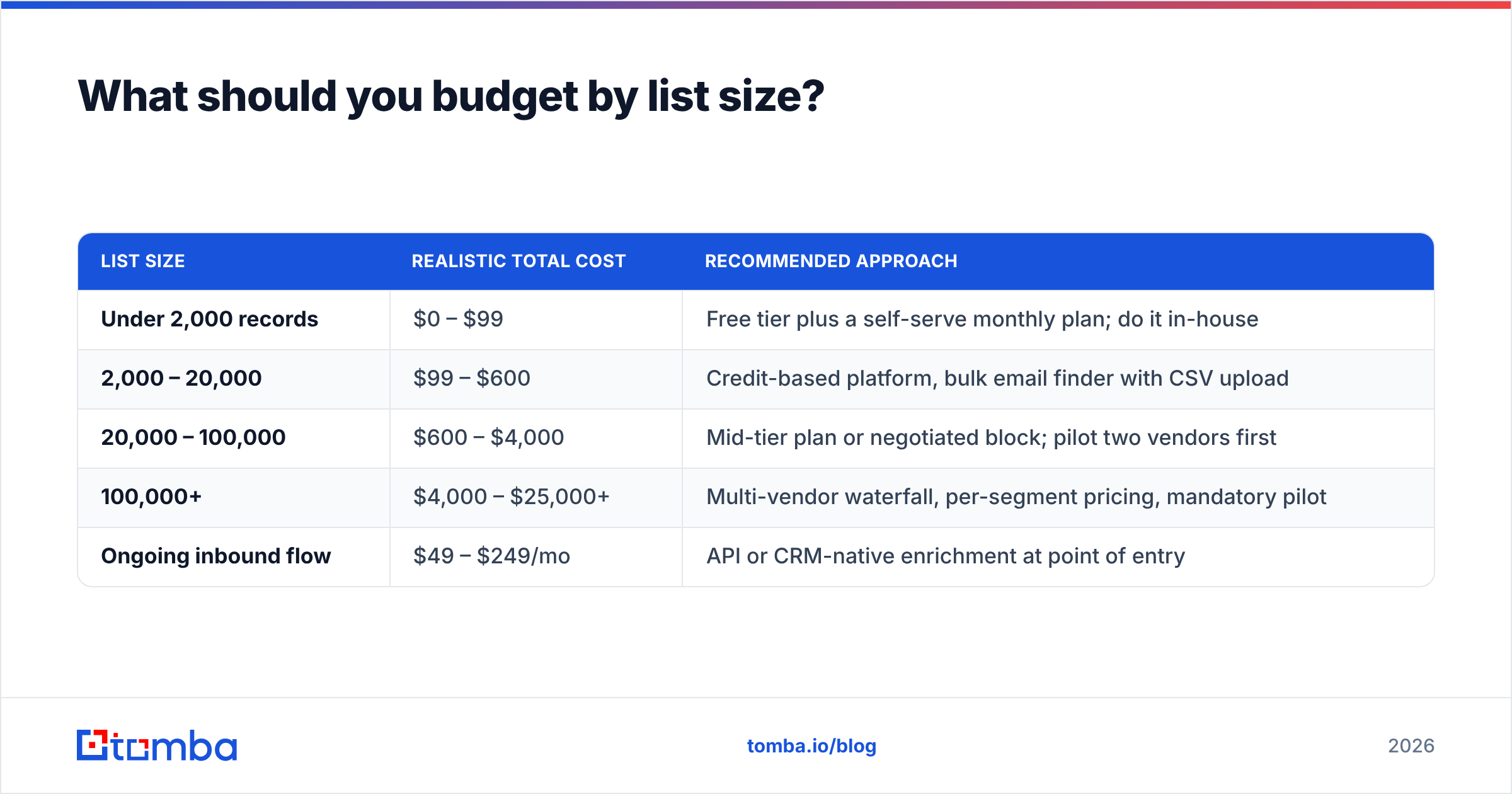
What should you budget by list size?#
Rough planning numbers, assuming you want verified output and you are not signing an annual enterprise deal:
| List size | Realistic total cost | Recommended approach |
|---|---|---|
| Under 2,000 records | $0 – $99 | Free tier plus a self-serve monthly plan; do it in-house |
| 2,000 – 20,000 | $99 – $600 | Credit-based platform, bulk email finder with CSV upload |
| 20,000 – 100,000 | $600 – $4,000 | Mid-tier plan or negotiated block; pilot two vendors first |
| 100,000+ | $4,000 – $25,000+ | Multi-vendor waterfall, per-segment pricing, mandatory pilot |
| Ongoing inbound flow | $49 – $249/mo | API or CRM-native enrichment at point of entry |
The waterfall approach matters above roughly 100,000 records: run your file through vendor one, then send only the unmatched remainder to vendor two. No single provider matches everything, and paying a premium vendor only for the records a cheap vendor missed is how large teams keep effective cost per email under $0.15. The same logic works at small scale, manually — try the free tier of two tools on the same 500 rows and keep the union.
What questions should you ask before signing?#
Copy these into your vendor call:
- Do you bill per record processed or per record matched?
- Is your published match rate based on returned candidates or SMTP-verified addresses?
- Will you run a paid 1,000-record pilot on my file, with no commitment?
- Is verification included, and do you separate catch-all from valid?
- What is your refresh policy and price for records I appended 12 months ago?
- What is the minimum order, and does it reset monthly or annually?
- Can you show sourcing documentation and a DPA?
- What is your match rate specifically for my top segment — by country, company size, and industry?
If a vendor will not answer 1, 2, and 3 in writing, the price is irrelevant. Those three clauses determine whether your $0.15 quote becomes $0.18 or $0.60.
Ready to run the numbers on your own file?#
Stop buying append by the rate card and start buying it by cost per usable email. Upload a sample of your CRM to the Tomba Email Finder, append it against domain and name inputs, verify the output, and compute the formula from this post yourself. The free tier covers 25 searches a month — enough to benchmark a vendor quote before you commit to it — and paid plans start at $49/mo with no minimum order, no setup fee, and no annual lock-in. Then take that number into your next vendor call and ask them to beat it.
Related guides#
Ready to find emails that actually work?
Join 150,000+ professionals who stopped guessing and started sending. Free credits on signup — no credit card required.
Get the Tomba newsletter
Practical outbound tactics and product updates — once every two weeks.
About the author