Email Authentication in 2026: SPF, DKIM, and DMARC Explained
SPF, DKIM, and DMARC are no longer optional at Gmail, Outlook, or Yahoo. Here is how each protocol works, how they fail, and the exact setup order that keeps your cold email out of spam.
TL;DR
- Email authentication is how a receiving mail server proves your message actually came from your domain. Three records do the work: SPF, DKIM, and DMARC.
- Since Google and Yahoo tightened bulk-sender rules in 2024, sending more than ~5,000 messages a day to their users without SPF, DKIM, and a DMARC record gets you rejected outright, not just filtered.
- SPF authorizes sending IPs. DKIM signs the message cryptographically. DMARC ties either one back to the visible From domain and tells receivers what to do on failure.
- The most common real-world failures are not missing records. They are SPF lookup overflow, forwarded mail breaking alignment, and a DMARC policy stuck on
p=noneforever. - Authentication earns you the right to be delivered. It does not fix a dirty list, and bounce-driven reputation damage will still sink you.
What is email authentication?#
Email authentication is a set of DNS-published rules that let a receiving server answer one question: is this sender allowed to use this domain?
Think of it like a courier delivering a signed package. SPF is the guard list at the gate ("only these trucks may deliver for Acme"). DKIM is the tamper-proof seal on the box (proof the contents were not altered in transit and that Acme applied the seal). DMARC is the company's standing instruction at reception ("if the truck is not on the list and the seal is broken, refuse the package and send me a report").
SMTP, the protocol that moves email, was designed in 1982 with no sender verification at all. Anyone can type any address into the From: header. Every authentication protocol since is a patch bolted onto that original trust assumption, which is why you need three of them instead of one.
The practical consequence for anyone doing outbound: authentication is a gate, not a boost. Passing it does not make you trusted. Failing it makes you invisible.
How do SPF, DKIM, and DMARC actually differ?#
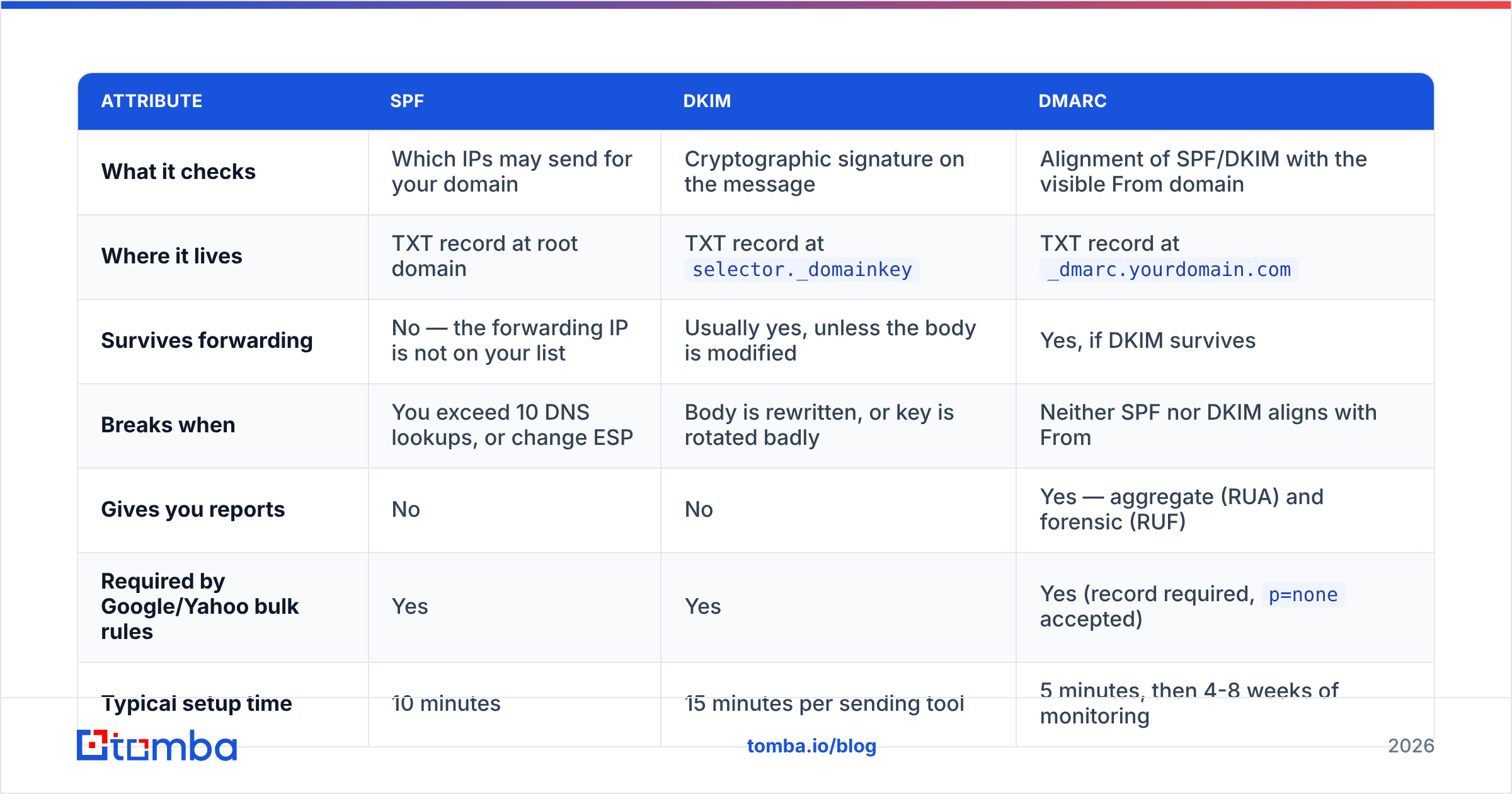
Each protocol answers a different question, and each has a distinct failure mode. Confusing them is how people end up with three green records and mail still landing in spam.
| Attribute | SPF | DKIM | DMARC |
|---|---|---|---|
| What it checks | Which IPs may send for your domain | Cryptographic signature on the message | Alignment of SPF/DKIM with the visible From domain |
| Where it lives | TXT record at root domain | TXT record at selector._domainkey |
TXT record at _dmarc.yourdomain.com |
| Survives forwarding | No — the forwarding IP is not on your list | Usually yes, unless the body is modified | Yes, if DKIM survives |
| Breaks when | You exceed 10 DNS lookups, or change ESP | Body is rewritten, or key is rotated badly | Neither SPF nor DKIM aligns with From |
| Gives you reports | No | No | Yes — aggregate (RUA) and forensic (RUF) |
| Required by Google/Yahoo bulk rules | Yes | Yes | Yes (record required, p=none accepted) |
| Typical setup time | 10 minutes | 15 minutes per sending tool | 5 minutes, then 4-8 weeks of monitoring |
Two details in that table cause most of the pain.
First, SPF's 10-lookup limit. Every include: in your SPF record triggers a DNS query, and nested includes count too. Stack your ESP, your CRM, your invoicing tool, your support desk, and your marketing platform, and you silently blow past ten lookups. The record then returns permerror, which most receivers treat as a failure. Nothing in your DNS panel warns you.
Second, alignment. This is the concept DMARC adds and the one people skip. A message can pass SPF for mail.sendingtool.com while the From header says you@yourcompany.com. SPF passed. DMARC still fails, because the authenticated domain and the domain your recipient sees do not match. Alignment is the whole point of DMARC, and it is why "SPF is green" is not the same as "authenticated."

Why did email authentication become mandatory in 2026?#
Because the two largest inbox providers stopped treating it as a recommendation.
In February 2024, Google and Yahoo rolled out matching requirements for bulk senders: SPF and DKIM on the sending domain, a published DMARC record, a one-click unsubscribe header on marketing mail, and a spam complaint rate held under 0.3%. Google's own bulk sender guidelines spell out the thresholds. Microsoft followed for Outlook.com in 2025 with the same baseline.
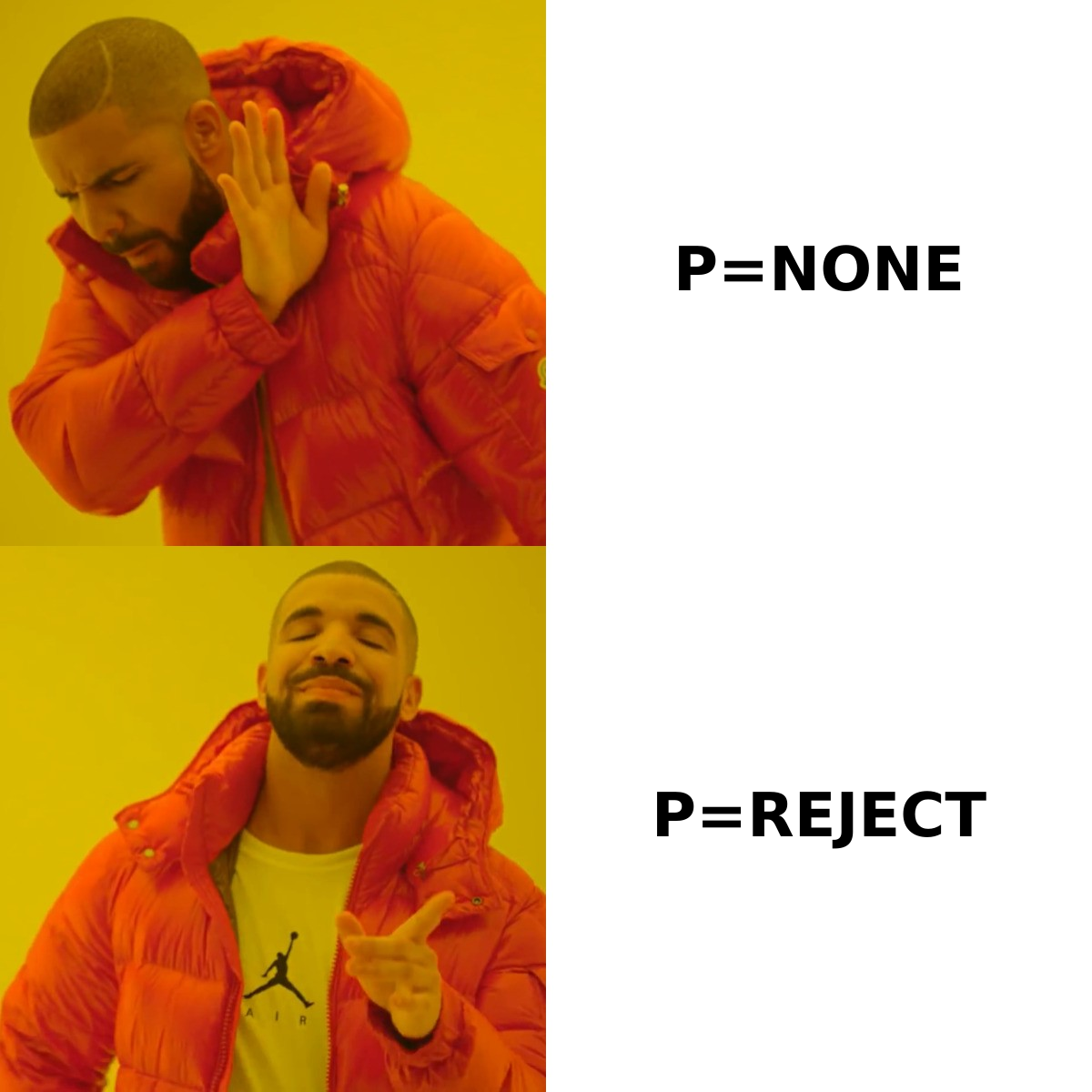
The enforcement curve since then has moved in one direction. What began as "temporary failure, please fix" turned into hard 550 rejections. Meanwhile the acceptable DMARC policy floor keeps rising: a record with p=none satisfies the letter of the rules today, but providers increasingly weight domains publishing p=quarantine or p=reject more favorably, and some enterprise receivers now reject unaligned mail from lookalike domains regardless of your policy.
For outbound teams, three things changed in practice:
- Subdomain strategy became standard. Sending cold outreach from
mail.yourcompany.cominstead of your corporate root domain isolates reputation. A bad campaign no longer poisons your invoices and password resets. - Cold email domains need the same rigor as transactional. The old trick of spinning up a throwaway domain and blasting it before anyone noticed does not survive DMARC-era filtering. Unauthenticated new domains get near-zero placement.
- Volume ramping matters more. Authentication proves identity. It says nothing about whether a brand-new domain suddenly sending 2,000 emails a day looks legitimate. Use an email warmup calculator to plan the ramp rather than guessing.
How do you set up SPF, DKIM, and DMARC correctly?#
Order matters. Publishing DMARC before SPF and DKIM are verified means you either learn nothing (p=none with no reporting address) or block your own mail (p=reject before alignment is fixed).
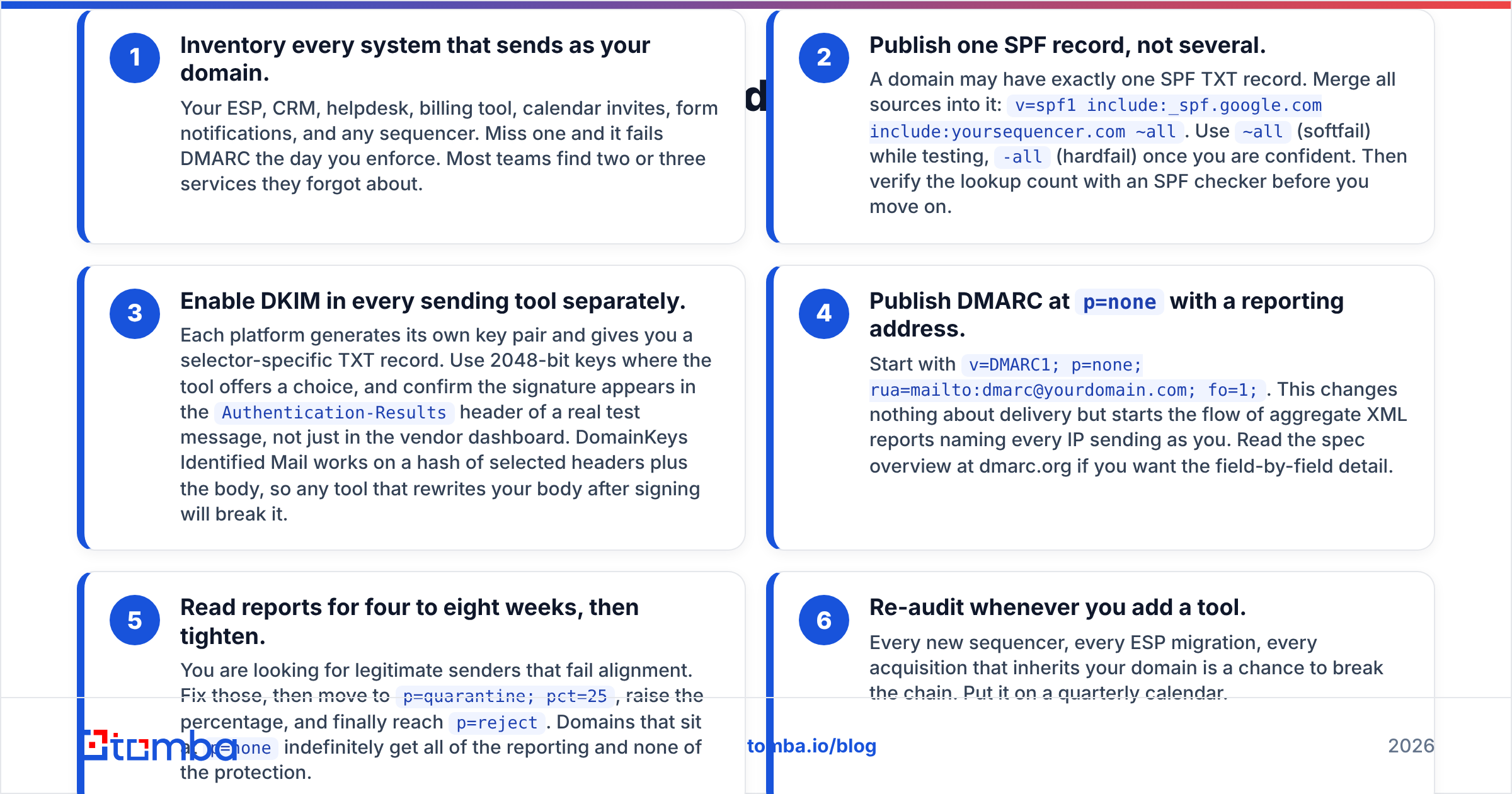
- Inventory every system that sends as your domain. Your ESP, CRM, helpdesk, billing tool, calendar invites, form notifications, and any sequencer. Miss one and it fails DMARC the day you enforce. Most teams find two or three services they forgot about.
- Publish one SPF record, not several. A domain may have exactly one SPF TXT record. Merge all sources into it:
v=spf1 include:_spf.google.com include:yoursequencer.com ~all. Use~all(softfail) while testing,-all(hardfail) once you are confident. Then verify the lookup count with an SPF checker before you move on. - Enable DKIM in every sending tool separately. Each platform generates its own key pair and gives you a selector-specific TXT record. Use 2048-bit keys where the tool offers a choice, and confirm the signature appears in the
Authentication-Resultsheader of a real test message, not just in the vendor dashboard. DomainKeys Identified Mail works on a hash of selected headers plus the body, so any tool that rewrites your body after signing will break it. - Publish DMARC at
p=nonewith a reporting address. Start withv=DMARC1; p=none; rua=mailto:dmarc@yourdomain.com; fo=1;. This changes nothing about delivery but starts the flow of aggregate XML reports naming every IP sending as you. Read the spec overview at dmarc.org if you want the field-by-field detail. - Read reports for four to eight weeks, then tighten. You are looking for legitimate senders that fail alignment. Fix those, then move to
p=quarantine; pct=25, raise the percentage, and finally reachp=reject. Domains that sit atp=noneindefinitely get all of the reporting and none of the protection. - Re-audit whenever you add a tool. Every new sequencer, every ESP migration, every acquisition that inherits your domain is a chance to break the chain. Put it on a quarterly calendar.
What DMARC policy should you use?#
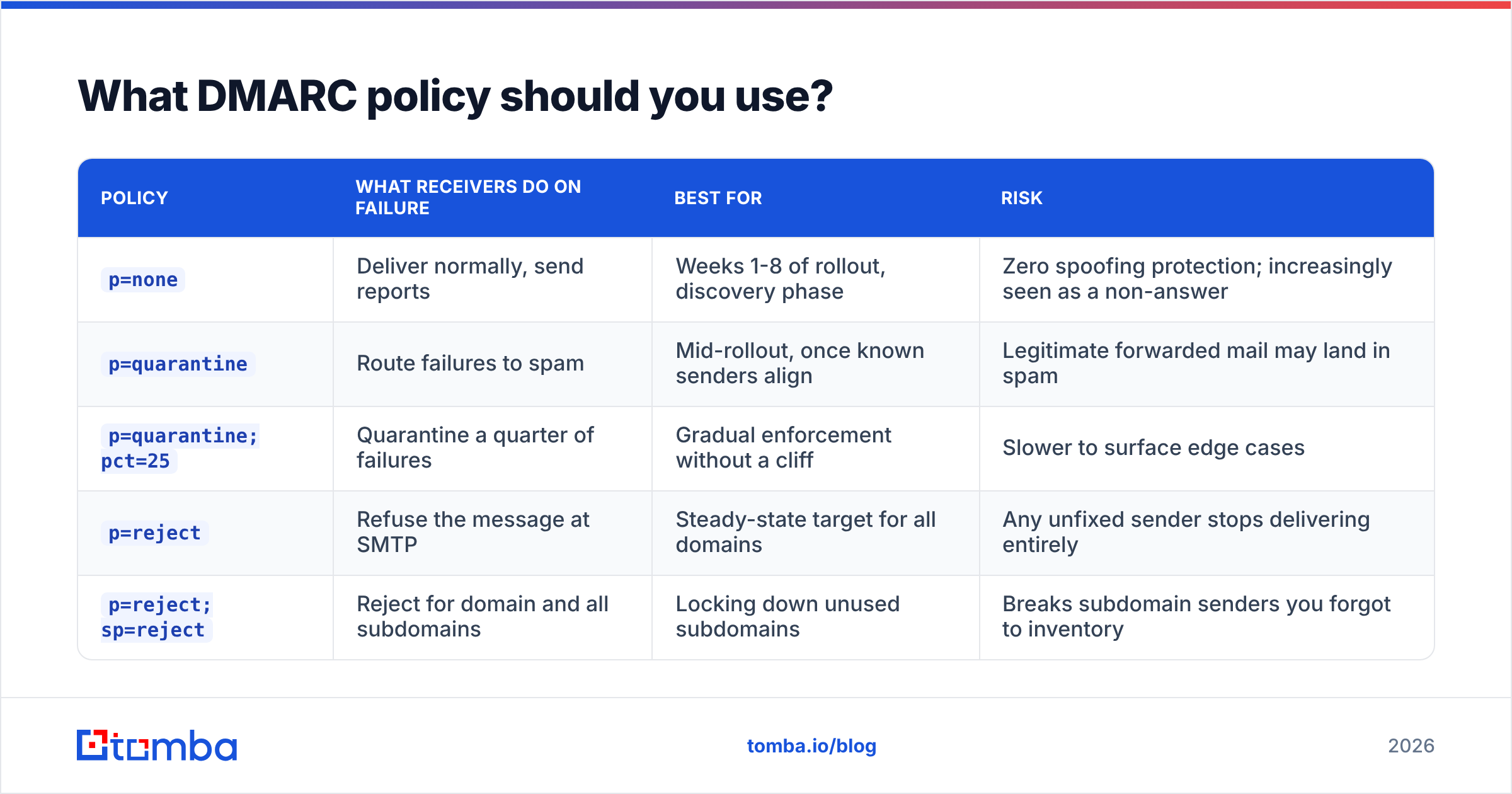
| Policy | What receivers do on failure | Best for | Risk |
|---|---|---|---|
p=none |
Deliver normally, send reports | Weeks 1-8 of rollout, discovery phase | Zero spoofing protection; increasingly seen as a non-answer |
p=quarantine |
Route failures to spam | Mid-rollout, once known senders align | Legitimate forwarded mail may land in spam |
p=quarantine; pct=25 |
Quarantine a quarter of failures | Gradual enforcement without a cliff | Slower to surface edge cases |
p=reject |
Refuse the message at SMTP | Steady-state target for all domains | Any unfixed sender stops delivering entirely |
p=reject; sp=reject |
Reject for domain and all subdomains | Locking down unused subdomains | Breaks subdomain senders you forgot to inventory |
The honest recommendation: p=reject on your root domain, p=reject on subdomains you do not send from, and a separate authenticated subdomain for outbound campaigns. That structure keeps brand-critical mail protected while giving cold outreach its own reputation to build or burn.
What breaks email authentication most often?#
The records are the easy part. Here is what actually goes wrong in production.
SPF lookup overflow. You added a fifth tool and crossed ten DNS lookups. Everything returns permerror. Fix: flatten includes where the vendor publishes stable IPs, or drop tools that no longer send. Nested includes are the silent killer — a single include: can hide four more.
Forwarding. A recipient auto-forwards your message to another address. The forwarding server's IP is not in your SPF record, so SPF fails at the second hop. DKIM usually survives, which is exactly why DMARC accepts either mechanism. If you rely on SPF alone, forwarded mail fails. This is the single strongest argument for getting DKIM right.
Mailing lists. Discussion lists that append footers modify the body, invalidating the DKIM signature. ARC (Authenticated Received Chain) exists to preserve the original result across such hops, and Google honors it, but adoption is uneven.
Multiple SPF records. Someone added a second TXT record instead of editing the first. Two SPF records is a permanent error under the spec. Some DNS panels will happily let you do it.
Key rotation without overlap. You rotate a DKIM key and remove the old public key immediately. Messages already in flight, signed with the old selector, now fail. Keep both selectors published for at least 72 hours.
Trailing whitespace and copy-paste breaks. DKIM public keys are long. A line break inserted by your DNS provider's text field can silently invalidate the record. Always verify with a live test send.
Does email authentication fix deliverability on its own?#
No, and this is where most teams misdiagnose their problem.
Authentication is identity verification. Reputation is behavior. You can be perfectly authenticated and still land in spam, because the receiving filter now knows exactly whose mail to distrust. Getting SPF, DKIM, and DMARC right makes your reputation legible; it does not make it good.
The behavioral inputs that actually decide placement:
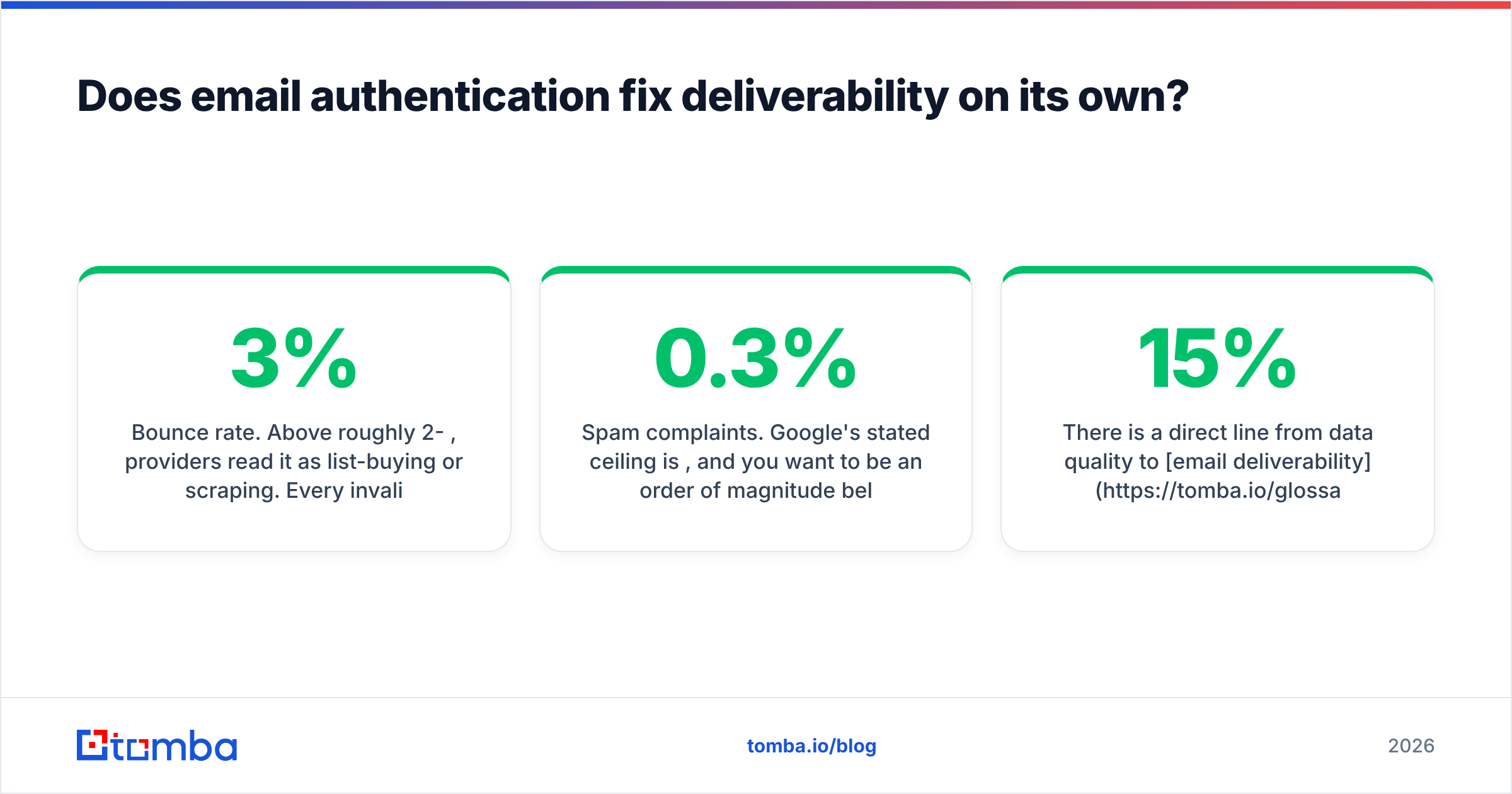
- Bounce rate. Above roughly 2-3%, providers read it as list-buying or scraping. Every invalid address you send to is a vote against you. Run addresses through an email verifier before the first send, not after the first bounce report.
- Spam complaints. Google's stated ceiling is 0.3%, and you want to be an order of magnitude below it. One irrelevant blast can take weeks to recover from.
- Engagement. Opens are noisy now that Apple Mail Privacy Protection prefetches images, but replies and manual "not spam" actions still carry weight.
- Sending consistency. 50 emails Monday and 3,000 Tuesday looks like a compromised account, authenticated or not.
- Content signals. Link shorteners, mismatched display domains, and single-image emails still trigger filters independently of your DNS records.
There is a direct line from data quality to email deliverability, and it runs through bounces. A list where 15% of addresses are dead will damage your sender reputation faster than a missing DKIM key ever could, because the bounce spike is a behavioral signal and receivers weight it heavily. Catch-all domains complicate this further: they accept everything at SMTP time, so a standard verifier returns "unknown." A dedicated catch-all verifier uses pattern and source evidence to score those addresses rather than leaving you to gamble on them.
How do you monitor email authentication after setup?#
Set it and forget it does not work here, because your DNS is only as current as your last tool migration.
Read your DMARC aggregate reports. They arrive as gzipped XML, one per receiver per day. Raw XML is unreadable at volume, so either use a DMARC reporting service or parse them into a spreadsheet. What you are looking for: source IPs you do not recognize (spoofing, or a forgotten tool), and legitimate sources failing alignment.
Check the headers of real delivered mail. Send to a Gmail account you control, open the original message, and read Authentication-Results. You want spf=pass, dkim=pass, and dmarc=pass with header.from matching your domain. This catches problems dashboards miss.
Watch Google Postmaster Tools. Domain reputation, spam rate, and authentication pass rates in one place, straight from the largest receiver. If your reputation drops from High to Medium, you have days not weeks to react.
Test blocklist status periodically. Authentication is independent of blocklisting; you can pass everything and still be on Spamhaus. A blacklist checker run monthly on your sending IPs and domains catches this early.
Re-run an SPF and DKIM audit after every stack change. New CRM, new sequencer, new ESP tier: assume the chain broke until you have proven otherwise with a test send.
Where does authentication fit in an outbound stack?#
Think of it as three layers, each dependent on the one below.
- Infrastructure layer — SPF, DKIM, DMARC, a dedicated sending subdomain, and a warmed IP or shared pool. Non-negotiable, one-time-plus-maintenance cost.
- Data layer — verified addresses, deduplicated lists, accurate role and seniority data. This is the layer that determines your bounce rate and therefore your reputation trajectory.
- Message layer — relevance, personalization, and cadence. The layer everyone obsesses over, and the only one that cannot compensate for failures below it.
Teams routinely invest heavily in layer three while layer two leaks. If a quarter of your contacts were scraped 18 months ago and never re-checked, no amount of authentication or copywriting rescues the campaign. Job changes alone invalidate roughly 2-3% of B2B contact data every month.
Get the data layer right before you blame the DNS#
Fix your records first: one SPF record under ten lookups, DKIM verified in a live header, DMARC moving toward p=reject on a schedule you actually keep. That is a one-afternoon project plus a monitoring habit.
Then fix what authentication cannot. If your list is the problem, no record will save it. Tomba Email Finder returns verified professional addresses with a confidence score and the sources behind each one, so the addresses entering your sequencer are ones that will accept mail instead of bouncing it. The free tier covers 25 searches a month if you want to test accuracy against a list you already know, and paid plans start at $49/mo on Starter with Growth at $99/mo — see Tomba pricing for the full breakdown.
Authenticated sender, clean list, relevant message. In that order.
Related guides#
Ready to find emails that actually work?
Join 150,000+ professionals who stopped guessing and started sending. Free credits on signup — no credit card required.
Get the Tomba newsletter
Practical outbound tactics and product updates — once every two weeks.
About the author