Email Authentication Checker: How to Verify SPF, DKIM, DMARC
SPF, DKIM, and DMARC decide whether your cold email lands or vanishes. Here is how to read an email authentication checker's output, fix the failures it finds, and stop guessing about your domain setup.
TL;DR
- An email authentication checker inspects your domain's SPF, DKIM, DMARC, and (increasingly) BIMI and MTA-STS records, then tells you whether receiving mailbox providers can prove you sent the message.
- The three records do different jobs: SPF authorizes sending IPs, DKIM cryptographically signs the message, DMARC tells receivers what to do when the first two fail — and whether the visible From domain matches.
- Most "passing" domains still fail alignment. A green SPF check with an unaligned envelope sender is the single most common false positive in free checkers.
- Fix order matters: SPF → DKIM → DMARC
p=none→ monitor 2–4 weeks →p=quarantine→p=reject. Skipping to reject breaks your invoicing tool, your ATS, and your newsletter. - Authentication gets you eligible for the inbox. It does not get you into the inbox. Clean lists, low bounce rates, and verified addresses still decide the rest.
What is an email authentication checker?#
An email authentication checker is a diagnostic tool that queries your domain's public DNS records and, optionally, parses a real message's headers to confirm three things: that the sending server was authorized, that the message content was signed and unmodified, and that the domain owner's policy was applied.
Think of it like a bouncer checking three things at a club door. SPF is the guest list — is this IP allowed to send for this domain? DKIM is the wristband — was it issued by the venue and is it unbroken? DMARC is the written house rule the bouncer follows when the guest list and the wristband disagree.
Technically, a checker performs DNS TXT lookups against your domain root and specific selectors, evaluates the SPF include chain against the 10-lookup limit, validates the DKIM public key length and syntax, parses the DMARC policy string, and reports alignment between the Return-Path domain, the d= DKIM domain, and the header From domain.
That last part — alignment — is where most tools and most senders get sloppy.
Which records does an authentication checker actually test?#
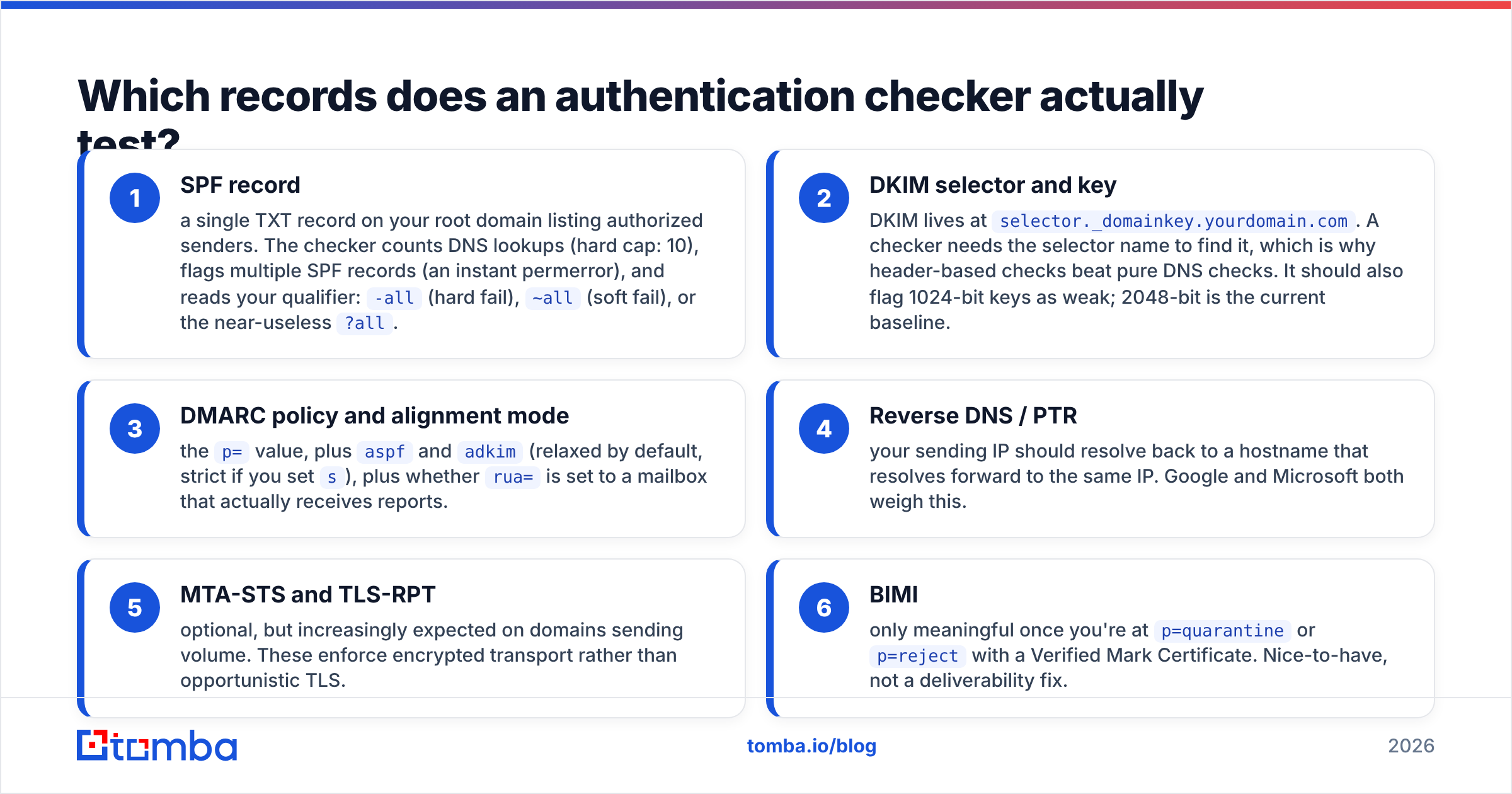
Here is what a complete check covers, and what a shallow one skips:
- SPF record — a single TXT record on your root domain listing authorized senders. The checker counts DNS lookups (hard cap: 10), flags multiple SPF records (an instant permerror), and reads your qualifier:
-all(hard fail),~all(soft fail), or the near-useless?all. - DKIM selector and key — DKIM lives at
selector._domainkey.yourdomain.com. A checker needs the selector name to find it, which is why header-based checks beat pure DNS checks. It should also flag 1024-bit keys as weak; 2048-bit is the current baseline. - DMARC policy and alignment mode — the
p=value, plusaspfandadkim(relaxed by default, strict if you sets), plus whetherrua=is set to a mailbox that actually receives reports. - Reverse DNS / PTR — your sending IP should resolve back to a hostname that resolves forward to the same IP. Google and Microsoft both weigh this.
- MTA-STS and TLS-RPT — optional, but increasingly expected on domains sending volume. These enforce encrypted transport rather than opportunistic TLS.
- BIMI — only meaningful once you're at
p=quarantineorp=rejectwith a Verified Mark Certificate. Nice-to-have, not a deliverability fix.
If a tool only returns "SPF: found, DKIM: found, DMARC: found," it has told you almost nothing useful.

Why do domains pass SPF and still land in spam?#
Because SPF authenticates the envelope sender, not the address your recipient sees.
Suppose you send through a marketing platform. The envelope Return-Path is bounces@mail.platform.com, and the platform's SPF record authorizes its own IPs — so SPF passes. But your header From says you@yourcompany.com. Those two domains don't match, so SPF alignment fails. If DKIM isn't signing with your domain either, DMARC fails outright, even though a naive checker showed two green ticks.
This is the failure mode behind most "but I set up SPF!" complaints. The fix is to configure a custom return-path or bounce subdomain (e.g. bounce.yourcompany.com) with your sending platform, and to enable DKIM signing with d=yourcompany.com rather than the platform's shared domain.
Google's own sender requirements made this non-negotiable for bulk senders: SPF or DKIM must be present and aligned, and anyone sending more than 5,000 messages a day to Gmail needs DMARC. Microsoft followed with similar enforcement for Outlook.com in 2025.
The second reason passing domains still land in spam: authentication is a gate, not a ranking signal. Once you're through it, engagement and complaint rates take over. A perfectly authenticated domain blasting a list scraped six months ago will still tank. Which is why the checker step belongs next to list hygiene — run an email verifier across your list before you send, not after your reputation cracks.
How do free and paid email authentication checkers compare?#
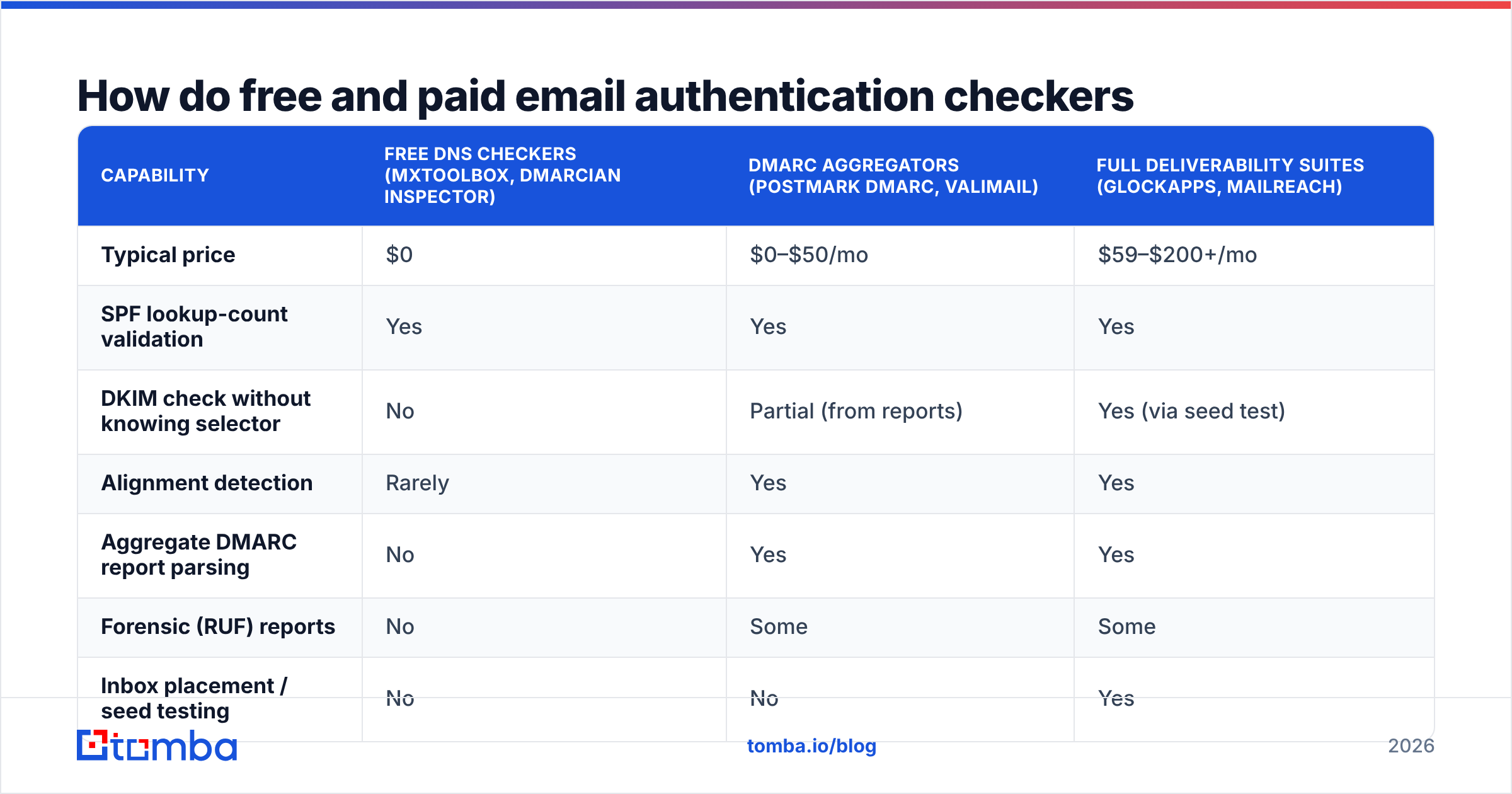
The category splits into three tiers: free one-off DNS lookups, DMARC report aggregators, and full deliverability suites. They solve different problems, and paying for the wrong tier is a common waste.
| Capability | Free DNS checkers (MXToolbox, dmarcian Inspector) | DMARC aggregators (Postmark DMARC, Valimail) | Full deliverability suites (GlockApps, Mailreach) |
|---|---|---|---|
| Typical price | $0 | $0–$50/mo | $59–$200+/mo |
| SPF lookup-count validation | Yes | Yes | Yes |
| DKIM check without knowing selector | No | Partial (from reports) | Yes (via seed test) |
| Alignment detection | Rarely | Yes | Yes |
| Aggregate DMARC report parsing | No | Yes | Yes |
| Forensic (RUF) reports | No | Some | Some |
| Inbox placement / seed testing | No | No | Yes |
| Blacklist monitoring | One-off lookup | No | Continuous |
| Best for | One-time setup sanity check | Ongoing policy rollout | Pre-campaign send testing |
The practical sequence: use a free checker to fix syntax, an aggregator to safely move from p=none to p=reject, and a seed-test suite only when you're actively troubleshooting placement on a live campaign.
You can also cover pieces of this in-house. An SPF checker handles record syntax and lookup counts, a blacklist checker catches IP and domain listings, and a spam checker scores content before you commit a send. None of those replace DMARC aggregate reporting — nothing free does — but they close the syntax-error gap that causes most outright failures.
What does a broken record actually look like?#
Concrete examples beat definitions. Here are the four failures a checker reports most often.
Too many DNS lookups. Every include: in your SPF record costs at least one lookup, and nested includes cascade. A record like this looks harmless:
v=spf1 include:_spf.google.com include:sendgrid.net include:spf.protection.outlook.com include:mail.zendesk.com include:_spf.salesforce.com ~allThose five includes expand to 14 actual lookups. Everything past the tenth is ignored, and strict receivers return permerror — which DMARC treats as a fail. The fix is SPF flattening or dropping senders you no longer use. Audit the list; most companies are authorizing three tools they cancelled last year.
Two SPF records. DNS allows multiple TXT records, but the SPF spec allows exactly one. Someone adds a second when onboarding a new tool, and both stop working. Merge them into one record with multiple include: statements.
DKIM key truncated in DNS. TXT records cap at 255 characters per string. A 2048-bit key exceeds that, so it must be split into concatenated quoted strings. Some DNS providers do this automatically; some don't, and your key silently fails to validate.
DMARC with no reporting address. v=DMARC1; p=none is technically valid and completely pointless. Without rua=mailto:..., you get no data, so you never learn which of your fifteen sending services are misaligned — which means you can never safely raise the policy. Always set rua.
Policy raised too fast. Jumping from nothing to p=reject in one afternoon reliably breaks the systems nobody remembers: the ATS emailing candidates as your domain, the accounting tool sending invoices, the forwarding rule a partner set up in 2019. Two to four weeks at p=none with reports flowing is the minimum before you tighten.

How do you fix authentication in the right order?#
Sequence matters because each layer depends on the one below it.
Step 1 — Inventory every sending source. List every system that sends as your domain: mailbox provider, marketing platform, CRM, helpdesk, billing, ATS, transactional API, e-signature tool. You cannot write a correct SPF record from memory, and you will miss two.
Step 2 — Publish one SPF record. One TXT record, under 10 lookups, ending in ~all while you validate and -all once you're confident. Do not include IPs you can't account for.
Step 3 — Enable DKIM per sending source, signed with your domain. Each platform gives you a selector and a public key (or a CNAME to theirs). Verify each one resolves. Confirm d= in the signed header matches your organizational domain, not the vendor's.
Step 4 — Publish DMARC at p=none with rua. Point reports at a mailbox or an aggregator. Read them for two to four weeks. Look for sources you don't recognize — that's either shadow IT or spoofing, and both matter.
Step 5 — Fix what the reports show, then raise the policy. Move to p=quarantine; pct=25, watch, increase the percentage, then go to p=reject. Add sp=reject for subdomains once the root is stable.
Step 6 — Re-check after any vendor change. Every new tool that sends as you is a new authentication surface. Add the re-check to your onboarding checklist for SaaS tools.
The email deliverability fundamentals and your sender reputation both sit downstream of this. Authentication is the price of admission; reputation is what you build afterward.
Does authentication fix cold email deliverability on its own?#
No — and this is where a lot of outbound teams misdiagnose the problem.
Authentication answers "is this sender who they claim to be?" It says nothing about whether recipients want the mail. Gmail and Outlook weigh complaint rate, bounce rate, spam-folder rescues, reply rate, and deletion-without-open. A domain with flawless SPF/DKIM/DMARC and a 12% bounce rate is still headed for the spam folder, because high bounces read as list-buying.
The lever with the biggest return, once authentication is clean, is bounce reduction. That means verifying addresses before they enter a sequence, not sending to a "probably right" guess from a permutation tool. A pattern-guessed address that bounces costs you far more in reputation than the credit you saved.
Warmup is the second lever — ramping volume gradually on a new domain rather than sending 500 messages on day three. An email warmup calculator gives you a defensible ramp schedule instead of a guess.
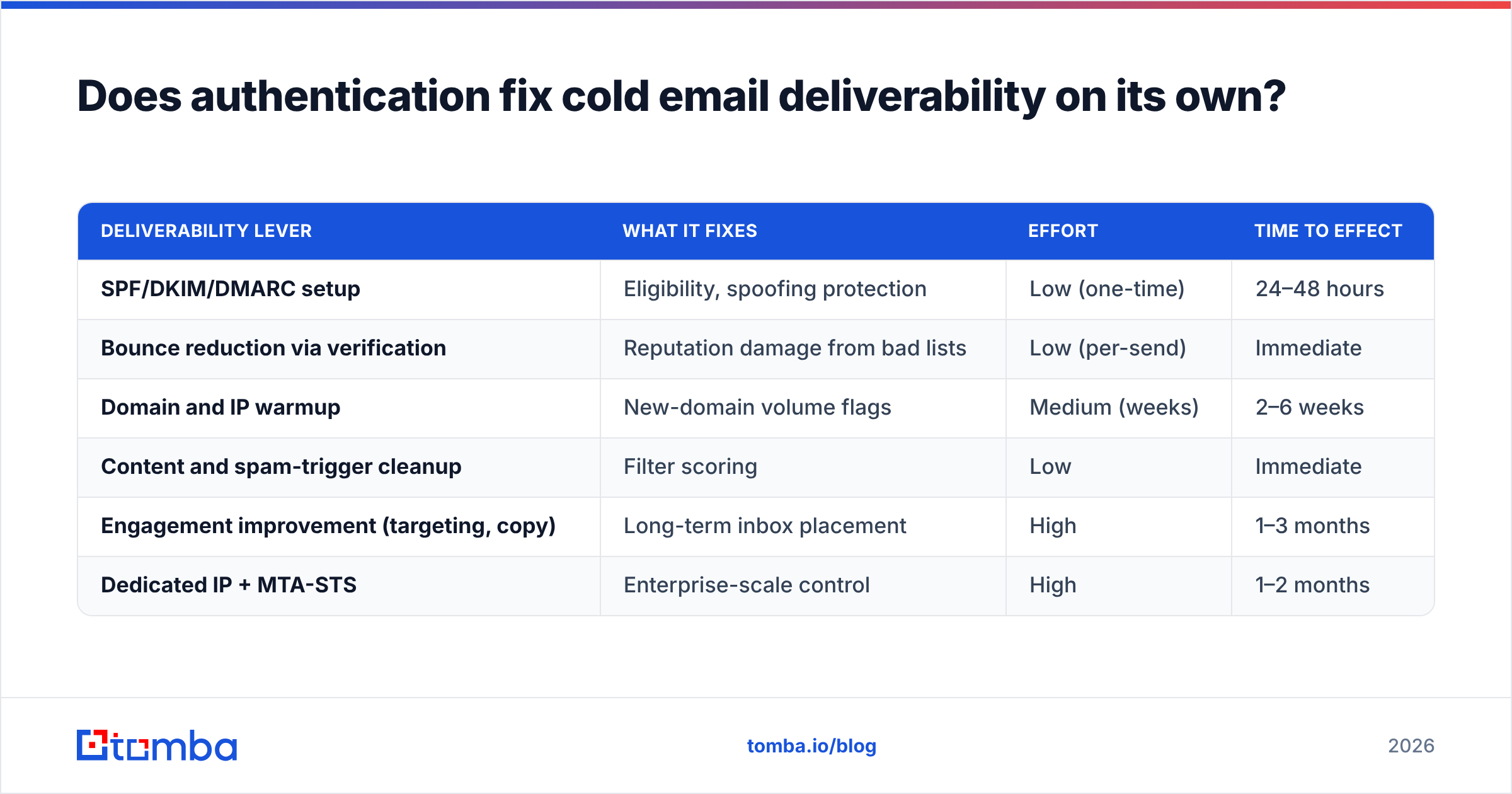
| Deliverability lever | What it fixes | Effort | Time to effect |
|---|---|---|---|
| SPF/DKIM/DMARC setup | Eligibility, spoofing protection | Low (one-time) | 24–48 hours |
| Bounce reduction via verification | Reputation damage from bad lists | Low (per-send) | Immediate |
| Domain and IP warmup | New-domain volume flags | Medium (weeks) | 2–6 weeks |
| Content and spam-trigger cleanup | Filter scoring | Low | Immediate |
| Engagement improvement (targeting, copy) | Long-term inbox placement | High | 1–3 months |
| Dedicated IP + MTA-STS | Enterprise-scale control | High | 1–2 months |
Reputable data vendors reinforce the same ordering. BookYourData, for instance, sells pre-verified B2B contact lists precisely because bounce rates — not DNS records — are what most senders get wrong at scale. Whichever route you take, the principle holds: authenticate first, then protect the reputation you just made eligible.
What should you check monthly?#
Authentication drifts. Vendors rotate keys, someone adds a tool, a DNS migration drops a record. A short recurring audit catches it before a campaign does.
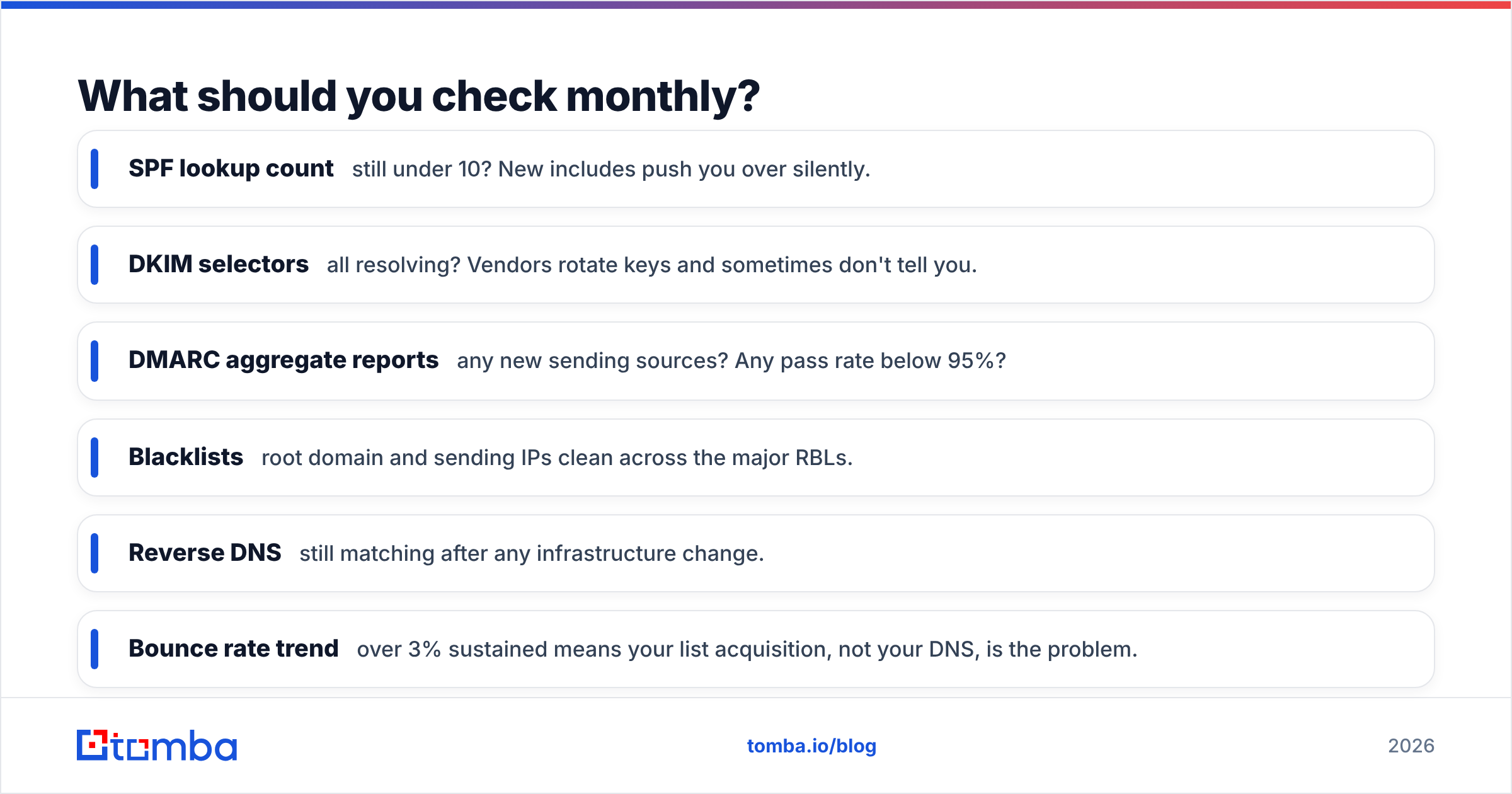
- SPF lookup count — still under 10? New includes push you over silently.
- DKIM selectors — all resolving? Vendors rotate keys and sometimes don't tell you.
- DMARC aggregate reports — any new sending sources? Any pass rate below 95%?
- Blacklists — root domain and sending IPs clean across the major RBLs.
- Reverse DNS — still matching after any infrastructure change.
- Bounce rate trend — over 3% sustained means your list acquisition, not your DNS, is the problem.
Put it on a calendar. Fifteen minutes a month beats a week of emergency work after a campaign gets throttled.
Where does contact data fit into all this?#
Authentication and data quality are the two halves of deliverability, and teams almost always fix only one.
The cleanest domain in the world can't survive a list where a quarter of the addresses were guessed. Conversely, a perfect list sent from an unauthenticated domain gets filtered before anyone reads it. You need both: DNS records that prove who you are, and addresses that resolve to real people.
That's the practical bridge. Once your SPF, DKIM, and DMARC are green and aligned, the next bottleneck is whether the addresses in your sequence actually exist — and that's a data problem, not a DNS one.
Start with the address, not the send. Tomba's Email Finder returns professional email addresses by domain, name, or company with a confidence score and SMTP-level validation attached, so bad addresses never reach your sequence and never dent the reputation you just built. The free tier gives you 25 searches a month to test accuracy against contacts you already know; paid plans start at $49/mo on Starter and scale to Growth at $99/mo — see full Tomba pricing for credit volumes. Fix your DNS this week, then fix your list. In that order.
Related guides#
Ready to find emails that actually work?
Join 150,000+ professionals who stopped guessing and started sending. Free credits on signup — no credit card required.
Get the Tomba newsletter
Practical outbound tactics and product updates — once every two weeks.
About the author