Email Automation Drip Campaign: The 2026 Playbook for B2B
Most B2B drip sequences die at email two — bad data, bad timing, or a trigger that never fires. Here's how to structure, time, and measure a drip campaign that still books meetings in 2026.
TL;DR
- A drip campaign is a fixed, time-based sequence that fires automatically after a trigger. A sequence is not a newsletter, and it is not a one-off blast.
- The failure point is almost never the copy. It's the list: stale contacts, unverified addresses, and triggers that fire on the wrong signal.
- Five to seven emails over 21–30 days is the working range for B2B. Anything past ten touches in a month reads as pressure, not persistence.
- Verify every address before the first send. A 5% bounce rate is the line where inbox providers start throttling you.
- Measure reply rate and meetings booked per 100 contacts. Open rate has been unreliable since Apple Mail Privacy Protection started pre-fetching images.
What is an email automation drip campaign?#
An email automation drip campaign is a pre-written series of emails that sends on a schedule after a contact does something — downloads a guide, starts a trial, hits a pricing page, gets added to a list. The "drip" part is literal: instead of dumping your entire pitch into one email, you release it in measured doses over days or weeks.
Think of it like watering a plant. You don't empty a bucket on a seedling once a month and call it hydration. You give it a small, predictable amount on a schedule, and you stop when it's clearly thriving or clearly dead.
The automation part means the system decides when to send based on rules you set once, not on someone remembering to follow up on a Tuesday. That's the entire value proposition: consistency at a volume a human rep cannot sustain manually.
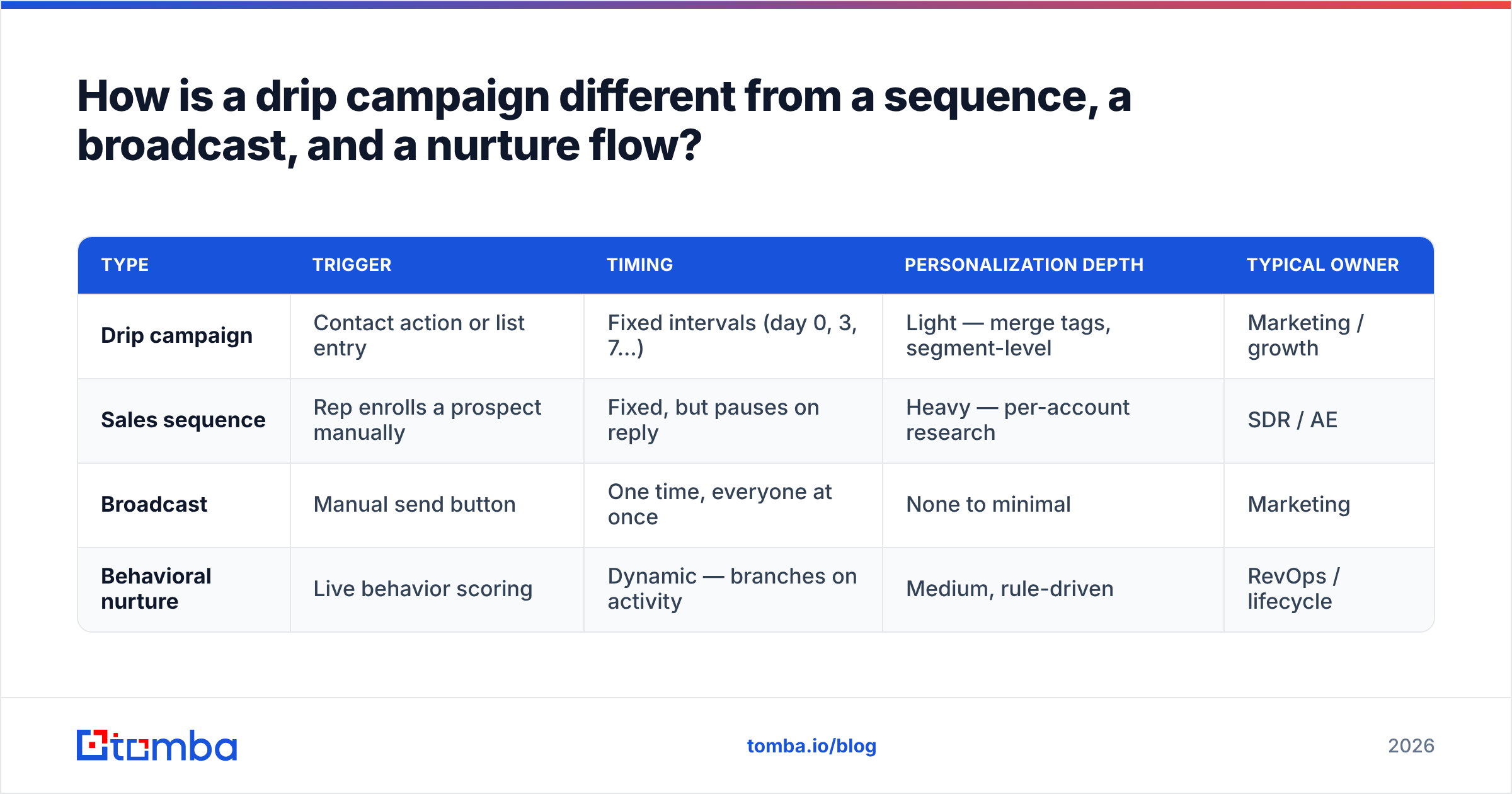
How is a drip campaign different from a sequence, a broadcast, and a nurture flow?#
These four terms get used interchangeably and they should not be. The differences change which tool you buy and how you measure results.
| Type | Trigger | Timing | Personalization depth | Typical owner |
|---|---|---|---|---|
| Drip campaign | Contact action or list entry | Fixed intervals (day 0, 3, 7…) | Light — merge tags, segment-level | Marketing / growth |
| Sales sequence | Rep enrolls a prospect manually | Fixed, but pauses on reply | Heavy — per-account research | SDR / AE |
| Broadcast | Manual send button | One time, everyone at once | None to minimal | Marketing |
| Behavioral nurture | Live behavior scoring | Dynamic — branches on activity | Medium, rule-driven | RevOps / lifecycle |
The practical takeaway: a drip is the cheapest automation to build and the easiest to break. It has no branching intelligence, so it will happily send email four about "since you downloaded our guide" to someone who already became a customer on day two. Suppression rules matter more in drips than in any other format.
What does an email automation drip campaign actually need to work?#
Six components. Miss any one and the campaign underperforms in a way that's hard to diagnose from the dashboard.
- A trigger that means something. "Filled out a form" is a real signal. "Was imported from a CSV in March" is not. If your trigger has no time relationship to intent, your open rates will tell you so within two sends.
- Verified contact data. Every invalid address is a hard bounce, and hard bounces compound into sender reputation damage. Run the list through an email verifier before the campaign goes live, not after.
- A tight, boring schedule. Day 0, day 3, day 7, day 14, day 24 is a defensible spine. Resist the urge to compress it because a quarter is ending.
- One goal per email. Each message asks for exactly one thing: a reply, a click, a booked slot. Two CTAs in a drip email means neither gets clicked.
- Exit conditions. Reply, meeting booked, unsubscribe, purchase, or "marked as customer in CRM" must all stop the drip immediately. This is the single most-skipped configuration step.
- A measurement window. Decide before launch how long you'll run it before judging — typically two full cycles, or roughly 60 days for a 30-day drip.
How many emails should a drip campaign have, and how far apart?#
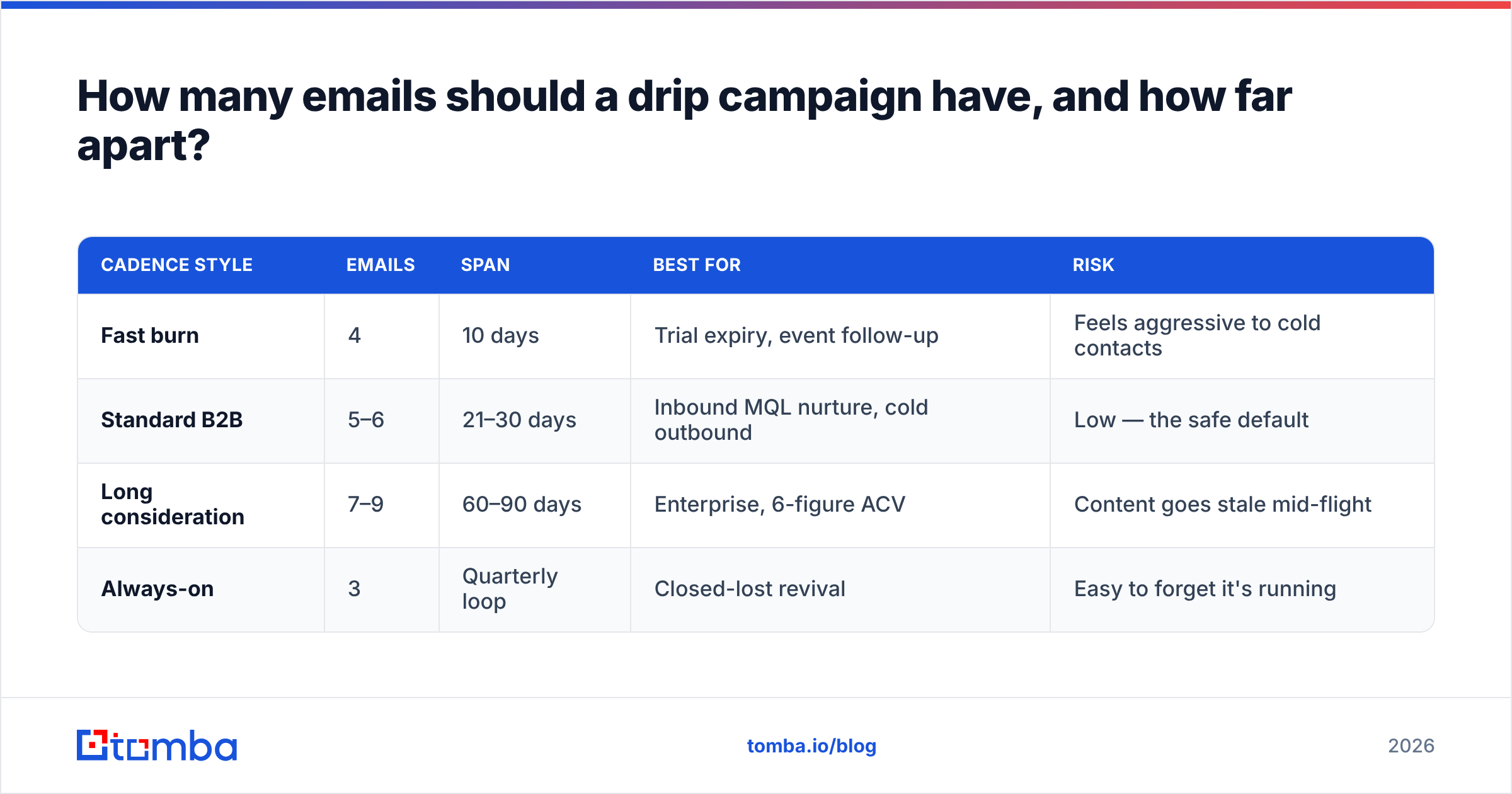
Five to seven, spread across 21 to 30 days. That range holds up across most B2B categories with considered purchases and multiple stakeholders.
The logic is simple. The first email catches people who were already thinking about the problem. Emails two and three catch people who were busy. Emails four through six catch people whose situation changed — a new quarter, a new hire, a broken vendor relationship. Past that, incremental replies fall off a cliff while unsubscribes keep climbing at a steady rate.
| Cadence style | Emails | Span | Best for | Risk |
|---|---|---|---|---|
| Fast burn | 4 | 10 days | Trial expiry, event follow-up | Feels aggressive to cold contacts |
| Standard B2B | 5–6 | 21–30 days | Inbound MQL nurture, cold outbound | Low — the safe default |
| Long consideration | 7–9 | 60–90 days | Enterprise, 6-figure ACV | Content goes stale mid-flight |
| Always-on | 3 | Quarterly loop | Closed-lost revival | Easy to forget it's running |
Space the first two emails closer together (2–3 days) and widen the gaps as you go. A prospect who ignored four emails is unlikely to be moved by a fifth arriving 48 hours later, but might respond to one arriving three weeks later when their budget cycle turns over.
Which triggers should start a drip campaign?#
Rank your triggers by how directly they signal intent, then build a drip for the top three. Do not build twelve drips at launch.
High-intent triggers worth automating first: pricing page visit twice in seven days, demo request that never got booked, trial started but zero core actions taken, and closed-lost with "timing" as the reason and 90+ days elapsed.
Medium-intent triggers worth automating second: content download, webinar registration, newsletter signup with a work domain, and job-change detection on a former champion.
Low-intent triggers you should probably not drip at all: a conference badge scan with no conversation, a scraped list with no relationship to your ICP, and anyone whose address you inferred but never confirmed. If you're prospecting into companies where you only have the domain, start with a proper domain search to pull real, pattern-matched addresses rather than guessing at firstname@ and hoping.
Which tools handle drip automation best in 2026?#
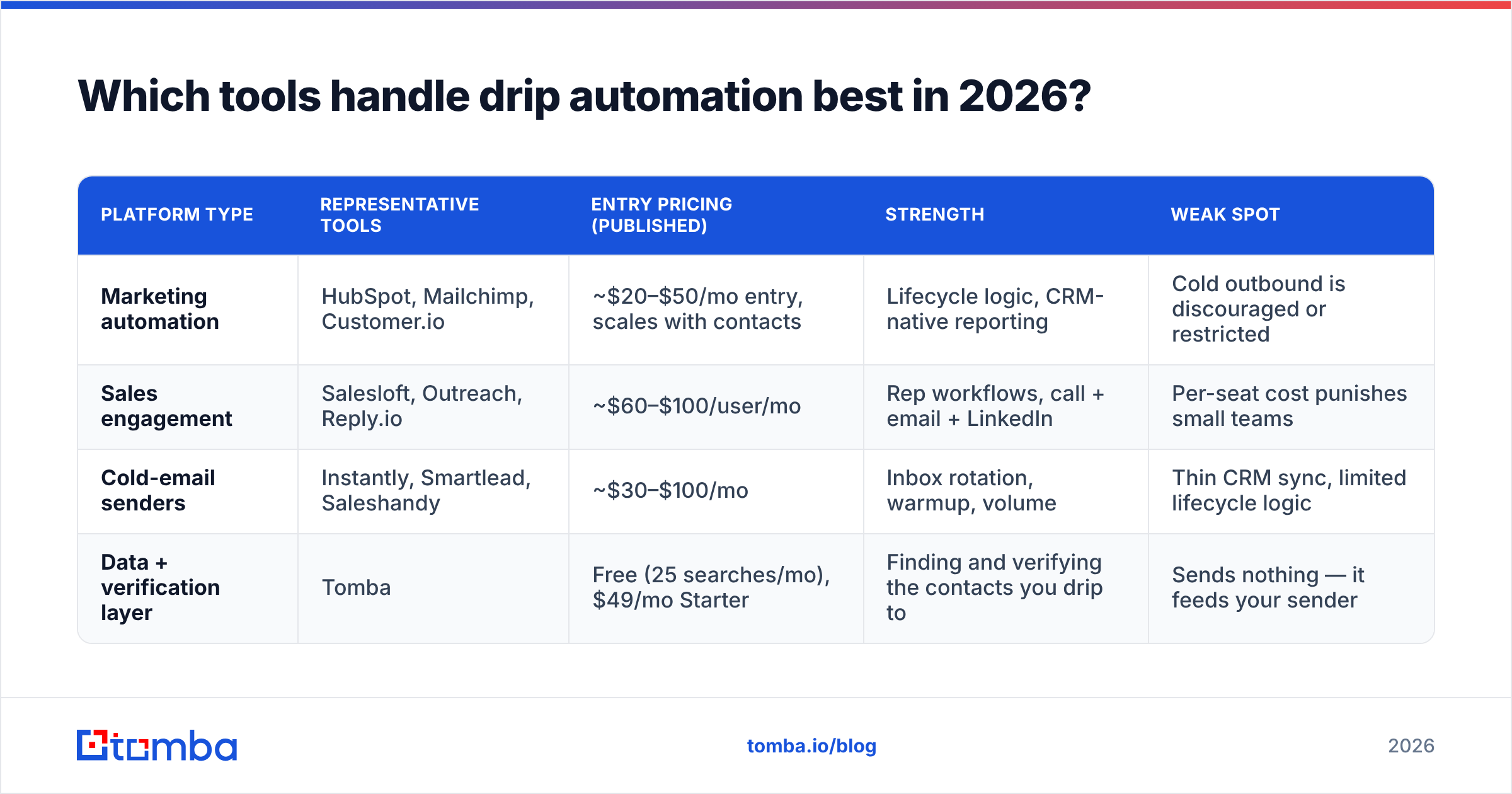
The market splits into three camps: marketing automation platforms built around forms and lifecycle stages, sales engagement platforms built around rep-owned sequences, and lightweight cold-outbound senders built around inbox rotation and volume.
| Platform type | Representative tools | Entry pricing (published) | Strength | Weak spot |
|---|---|---|---|---|
| Marketing automation | HubSpot, Mailchimp, Customer.io | ~$20–$50/mo entry, scales with contacts | Lifecycle logic, CRM-native reporting | Cold outbound is discouraged or restricted |
| Sales engagement | Salesloft, Outreach, Reply.io | ~$60–$100/user/mo | Rep workflows, call + email + LinkedIn | Per-seat cost punishes small teams |
| Cold-email senders | Instantly, Smartlead, Saleshandy | ~$30–$100/mo | Inbox rotation, warmup, volume | Thin CRM sync, limited lifecycle logic |
| Data + verification layer | Tomba | Free (25 searches/mo), $49/mo Starter | Finding and verifying the contacts you drip to | Sends nothing — it feeds your sender |
That last row matters because it's the layer teams skip. Sending tools do not fix bad addresses; they amplify them. Whatever you choose to send with, the contact data going in determines whether the campaign is a growth channel or a reputation liability. Check current Tomba pricing if you're sizing a verification budget alongside a sending tool — Starter is $49/mo, Growth $99/mo, Pro $249/mo.
If you want third-party feature grids across these categories, G2's marketing automation category is the least biased public comparison available, and HubSpot's own workflow documentation is a decent reference for how enrollment and suppression logic is supposed to behave, even if you never buy it.
Why do drip campaigns bounce, and how do you stop it?#
Because the list was built once and never cleaned. B2B contact data decays at roughly 2–3% per month — people change jobs, companies get acquired, domains get consolidated. A list you verified in January is meaningfully wrong by July.
Here's the mechanic that catches people out. Mailbox providers evaluate you on aggregate behavior, not per-message quality. Once your hard bounce rate crosses about 2%, filtering gets stricter. Past 5%, you're in throttling territory, and your good emails to your good contacts start landing in spam. One dirty drip campaign degrades every other campaign you run from the same domain. Google's bulk sender guidelines spell out the thresholds they enforce.
Three habits that prevent it:
- Verify at ingest and again before launch. Two checkpoints, not one. Addresses collected 60 days ago need re-checking.
- Handle catch-all domains explicitly. Catch-all servers accept everything, so standard verification returns "unknown." A dedicated catch-all verifier is the only way to separate real mailboxes from black holes on those domains.
- Warm the sending domain before volume. If you're on a new domain or a new inbox, ramp over 3–4 weeks. A warmup calculator will give you a daily ramp schedule instead of a guess.
Good email deliverability is not a setting you enable. It's the residue of consistently clean sending.
What metrics tell you a drip campaign is working?#
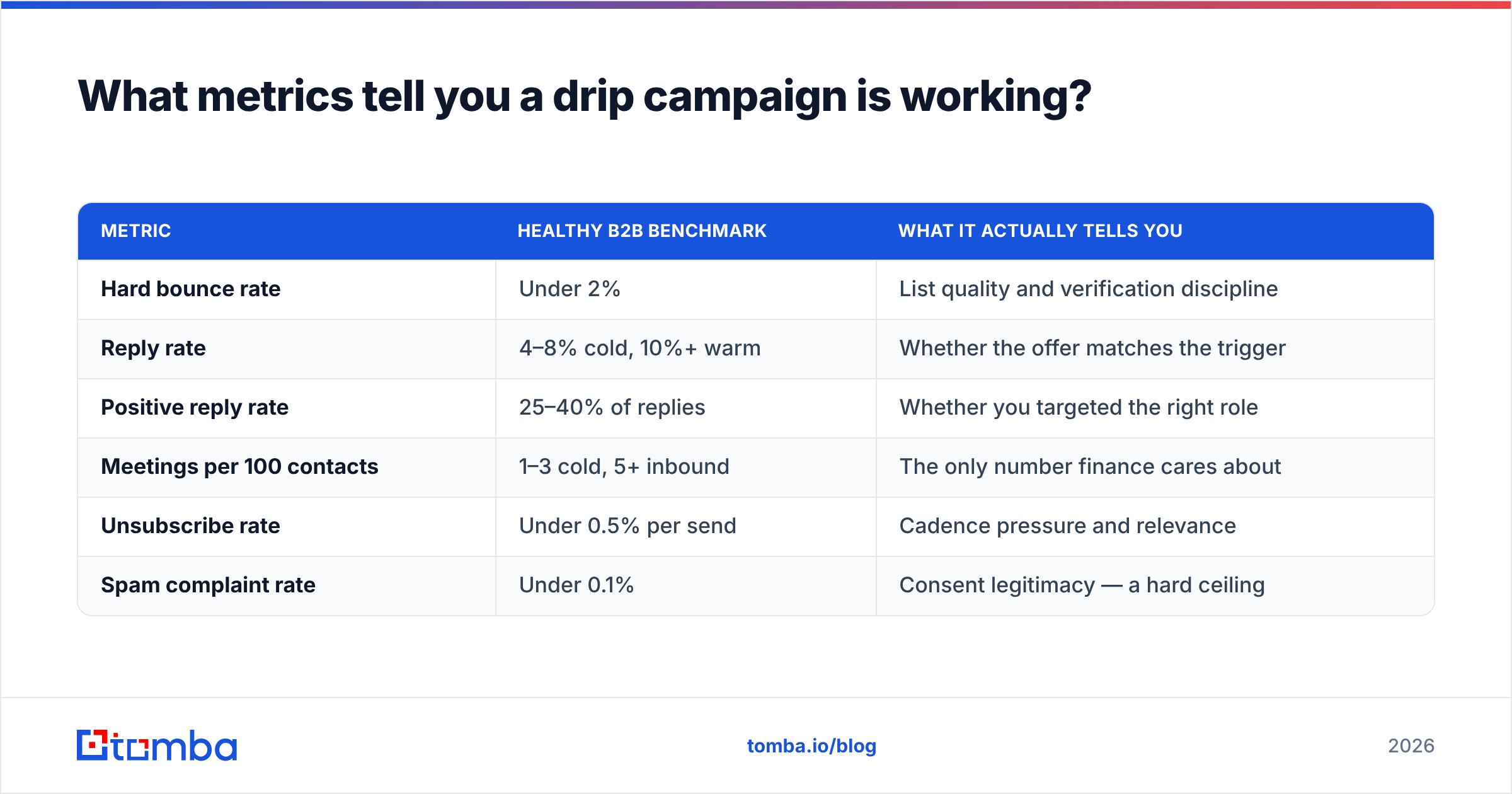
Stop reporting open rate as a primary metric. Apple Mail Privacy Protection pre-loads images for a large share of consumer and mixed inboxes, which inflates opens without any human reading anything. Treat opens as a directional signal at best.
| Metric | Healthy B2B benchmark | What it actually tells you |
|---|---|---|
| Hard bounce rate | Under 2% | List quality and verification discipline |
| Reply rate | 4–8% cold, 10%+ warm | Whether the offer matches the trigger |
| Positive reply rate | 25–40% of replies | Whether you targeted the right role |
| Meetings per 100 contacts | 1–3 cold, 5+ inbound | The only number finance cares about |
| Unsubscribe rate | Under 0.5% per send | Cadence pressure and relevance |
| Spam complaint rate | Under 0.1% | Consent legitimacy — a hard ceiling |
If reply rate is fine but positive reply rate is terrible, your targeting is wrong — you're reaching people who answer but can't buy. If bounce rate is fine and reply rate is near zero, your subject lines and first lines are the problem. The metrics diagnose different failures; don't average them into a single "performance" number.
What does a working five-email B2B drip look like?#
Day 0 — The specific observation. One sentence on what you noticed about their company (hiring, funding, a stack change, the guide they downloaded), one sentence on the problem it usually creates, one question. Under 90 words. No attachments, no calendar link.
Day 3 — The proof. A single relevant customer outcome with a real number. Same thread, same subject line. Ask if it's worth 15 minutes.
Day 8 — The lateral. Send something useful with zero ask attached — a benchmark, a teardown, a checklist. This is the email that most often generates the first reply, because it's the only one that doesn't cost the recipient anything.
Day 16 — The reframe. Approach the same problem from a different angle or a different stakeholder's perspective. If you pitched the VP of Sales on pipeline, pitch RevOps on data hygiene.
Day 26 — The clean close. "I'll assume the timing's wrong and stop here — want me to check back next quarter?" This gets a surprising number of "actually, yes" replies, and it exits the contact gracefully either way.
Every email in that sequence depends on knowing who you're writing to. If your list is a pile of company domains with no named contacts, the drip has nothing to personalize around. Pull named contacts and roles first, then write.
What are the mistakes that kill most drip campaigns?#
- No suppression on reply. Someone answers email two and still receives emails three, four, and five. Instant credibility loss.
- Sending from the primary domain at cold volume. Use a separate sending domain for cold outbound. Protect the domain your invoices and support tickets come from.
- Personalizing the wrong variable.
{{first_name}}in the subject line does nothing. A specific detail in the first sentence does everything. - Building nine drips before validating one. Ship one, run it 60 days, then clone the structure.
- Never refreshing the copy. A drip that ran unchanged for 18 months is quoting statistics nobody believes anymore.
- Treating unsubscribes as failure. They're free list hygiene. Complaints are the metric to fear.
Where should you start?#
Start with the list, not the copy. A mediocre five-email drip sent to 500 verified, correctly-targeted contacts will out-perform a brilliant nine-email drip sent to 5,000 addresses you guessed at — and it won't cost you your sender reputation to find out.
Build the contact layer first: identify the accounts, find the named decision-makers, verify every address, then load them into whatever sending tool your stack already runs on. The Tomba Email Finder handles the first three steps in one pass — search by domain, company, or name, get verified professional addresses with confidence scores, and export straight into your sequencing platform. The free tier gives you 25 searches a month to test whether your targeting assumptions hold before you commit budget to a campaign built on them.
Related guides#
Ready to find emails that actually work?
Join 150,000+ professionals who stopped guessing and started sending. Free credits on signup — no credit card required.
Get the Tomba newsletter
Practical outbound tactics and product updates — once every two weeks.
About the author