Email Automation Services in 2026: What They Cost and Who Needs Them
Email automation services promise pipeline on autopilot. Here's what the four categories actually do, what they really cost per month, and where most teams overpay.
TL;DR
- "Email automation services" is a bucket term covering four distinct product categories: marketing automation, cold outreach sequencers, transactional/API sending, and done-for-you agencies. They are not interchangeable, and buying the wrong one is the most common budget leak in B2B.
- Realistic all-in cost for a 5-rep outbound team in 2026: $400–$900/mo across a sequencer, inbox infrastructure, warmup, and a data source. Agencies start around $3,000/mo retainer.
- Automation amplifies whatever you feed it. A sequencer sending to a 32% invalid list produces bounces at scale, not meetings at scale.
- The highest-ROI line item is usually the smallest one: verified contact data. A $49/mo data layer routinely rescues a $500/mo sending stack.
- Build in-house if you have a repeatable ICP and someone who owns the channel. Hire an agency if you need pipeline in 60 days and have no operator.
What are email automation services?#
Email automation services are tools or agencies that send email on your behalf based on rules, triggers, or schedules instead of a human hitting send each time. That's the whole definition. Everything else — deliverability features, AI copy, CRM sync — is packaging around that core.
Think of it like a commercial kitchen. Automation is the equipment: the ovens, the ticket rail, the timers. It makes a good kitchen faster and a bad kitchen fail faster. Nobody blames the oven when the ingredients were spoiled.
The confusion starts because four very different products all market themselves under the same phrase:
- Marketing automation platforms — HubSpot, Mailchimp, Klaviyo, ActiveCampaign. Built for opted-in lists, nurture flows, behavioral triggers, and newsletters. High deliverability out of the box because you're mailing people who asked.
- Cold outreach sequencers — Instantly, Smartlead, Saleshandy, Reply.io, Outreach, Salesloft. Built for people who have not opted in. Multi-inbox rotation, warmup, throttling, reply detection.
- Transactional and API sending — Postmark, SendGrid, Amazon SES, Resend. Receipts, password resets, alerts. Triggered by your application, not by a marketer.
- Done-for-you agencies — a human team runs the whole stack for you: infrastructure, lists, copy, replies, booked meetings handed to your AEs.
Most buyers searching for email automation services actually want #2 or #4 and end up demoing #1, which is why so many trials end in confusion. A marketing automation platform will happily take your money and then suspend your account when you upload a cold prospect list — because that's a terms-of-service violation on nearly every ESP.

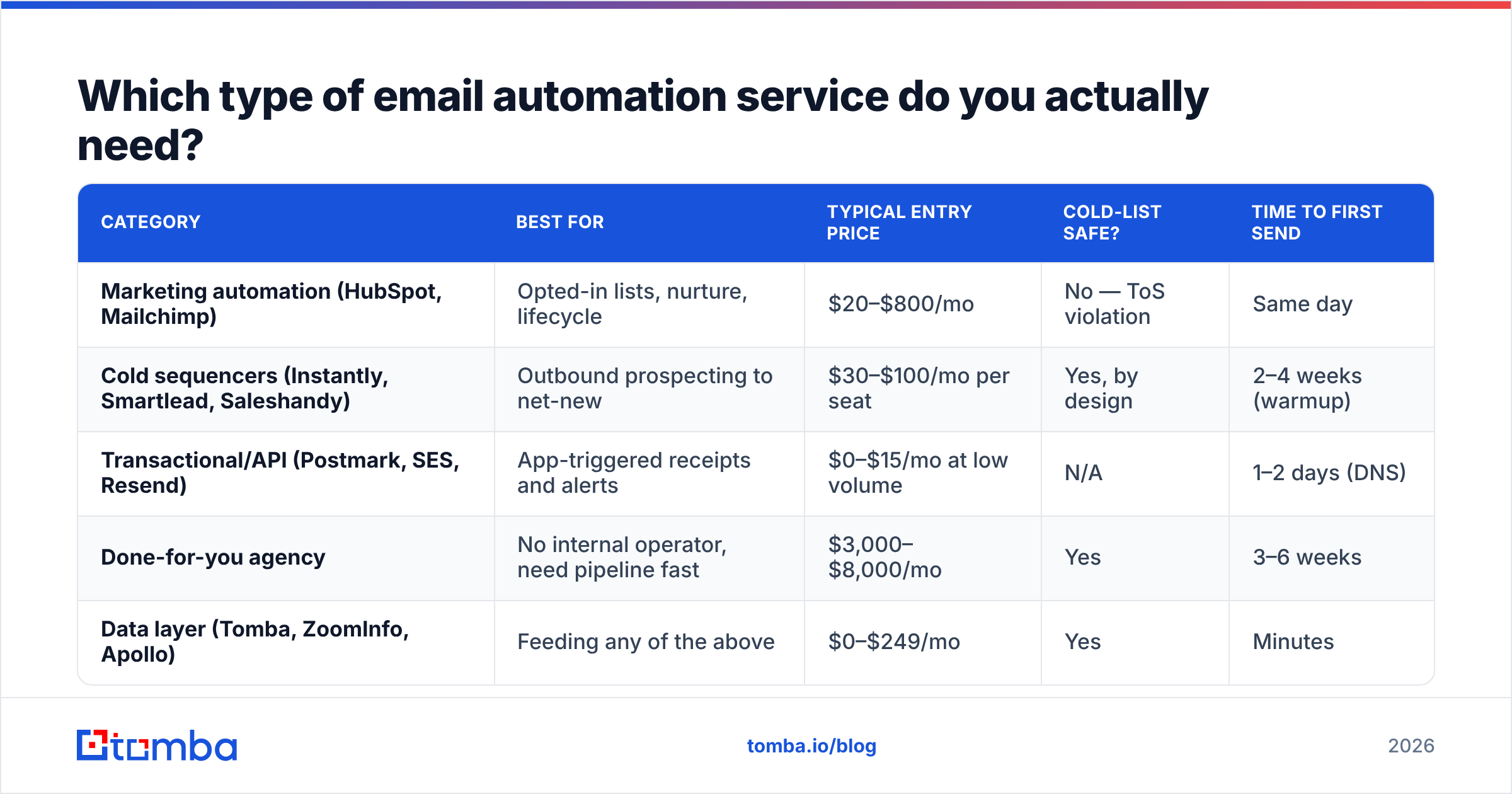
Which type of email automation service do you actually need?#
Match the tool to the permission level of your list. That single variable decides almost everything.
| Category | Best for | Typical entry price | Cold-list safe? | Time to first send |
|---|---|---|---|---|
| Marketing automation (HubSpot, Mailchimp) | Opted-in lists, nurture, lifecycle | $20–$800/mo | No — ToS violation | Same day |
| Cold sequencers (Instantly, Smartlead, Saleshandy) | Outbound prospecting to net-new | $30–$100/mo per seat | Yes, by design | 2–4 weeks (warmup) |
| Transactional/API (Postmark, SES, Resend) | App-triggered receipts and alerts | $0–$15/mo at low volume | N/A | 1–2 days (DNS) |
| Done-for-you agency | No internal operator, need pipeline fast | $3,000–$8,000/mo | Yes | 3–6 weeks |
| Data layer (Tomba, ZoomInfo, Apollo) | Feeding any of the above | $0–$249/mo | Yes | Minutes |
A quick decision rule set:
- Your list opted in and you're nurturing them — marketing automation. Don't over-engineer it.
- Your list has never heard of you — cold sequencer plus separate sending domains. Never mix this traffic with your corporate domain.
- Your app needs to send — transactional API. Do not run product emails through a marketing tool; a marketing suspension would take down your password resets.
- You have budget but no operator — agency, with a clause that you own the domains and the data at the end.
- You have an operator but no list — fix data first. Tooling on top of a bad list is a faster way to burn a domain.
How much do email automation services really cost in 2026?#
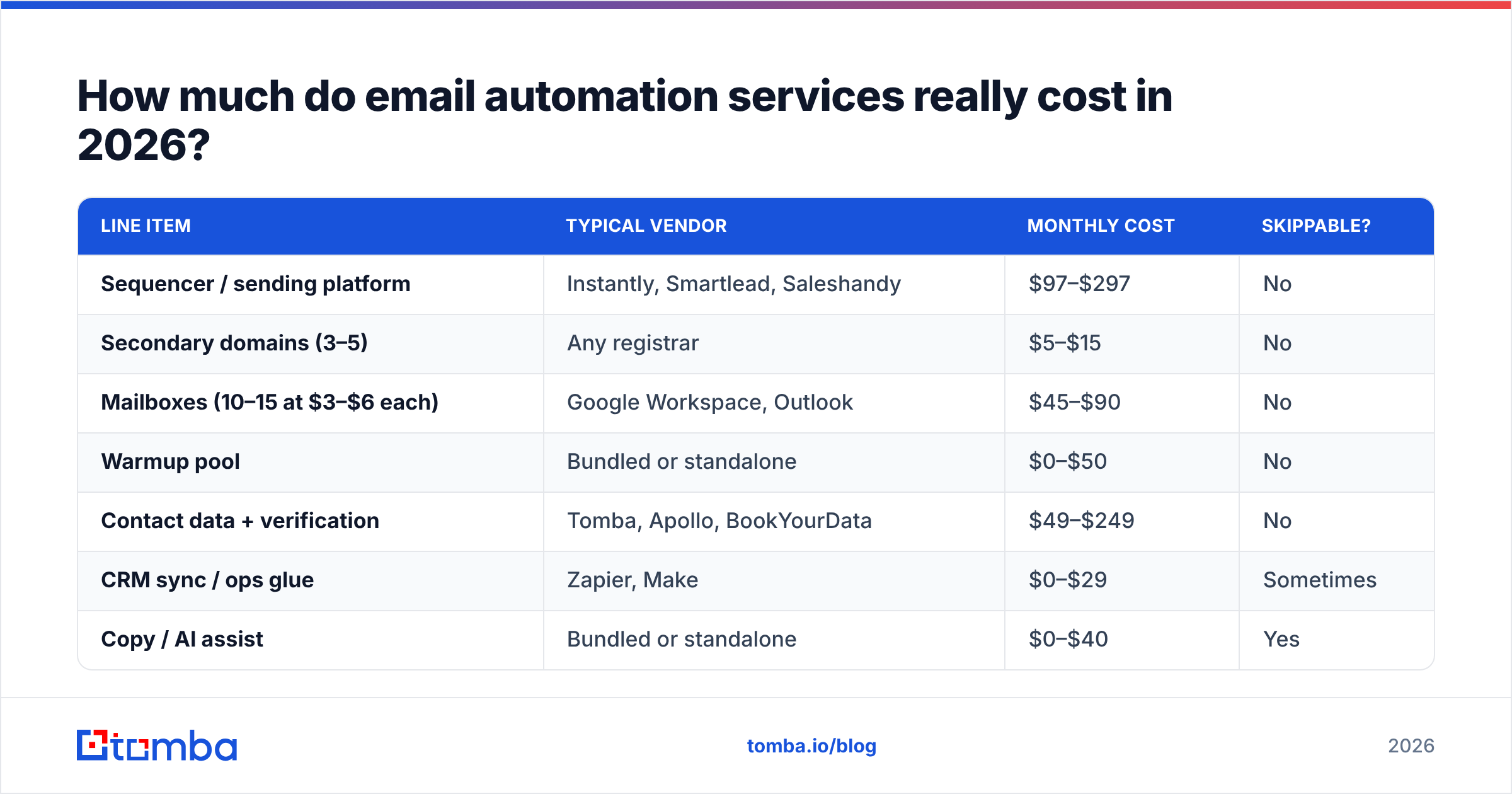
The sticker price on the sequencer is rarely more than a third of the true monthly cost. Here's what a five-person outbound team actually pays.
| Line item | Typical vendor | Monthly cost | Skippable? |
|---|---|---|---|
| Sequencer / sending platform | Instantly, Smartlead, Saleshandy | $97–$297 | No |
| Secondary domains (3–5) | Any registrar | $5–$15 | No |
| Mailboxes (10–15 at $3–$6 each) | Google Workspace, Outlook | $45–$90 | No |
| Warmup pool | Bundled or standalone | $0–$50 | No |
| Contact data + verification | Tomba, Apollo, BookYourData | $49–$249 | No |
| CRM sync / ops glue | Zapier, Make | $0–$29 | Sometimes |
| Copy / AI assist | Bundled or standalone | $0–$40 | Yes |
| Realistic all-in | $400–$900/mo |
Two numbers people get wrong:
Mailbox count. Safe volume in 2026 is roughly 20–30 cold sends per mailbox per day after warmup. If you want 300 sends/day, that's 10–15 mailboxes, not two. Budget for the seats.
Data credits. Sequencer pricing is per seat; data pricing is per lookup. A team prospecting 2,000 new contacts a month burns credits fast. Tomba's pricing runs Free (25 searches/mo), Starter at $49/mo, Growth at $99/mo, and Pro at $249/mo — which is the tier most 5-rep teams settle on once they stop trying to stretch a free plan across a quota.
Agencies price differently: $3,000–$8,000/mo retainer, sometimes with a per-meeting component. The math only works if a booked meeting is worth more than roughly $400 to you. For a $30k ACV product with a 20% close rate, it usually is. For a $99/mo SaaS, it almost never is.
Why do most email automation setups underperform?#
Because the automation is fine and the inputs are not. In audits of underperforming outbound stacks, the failure order is consistent:
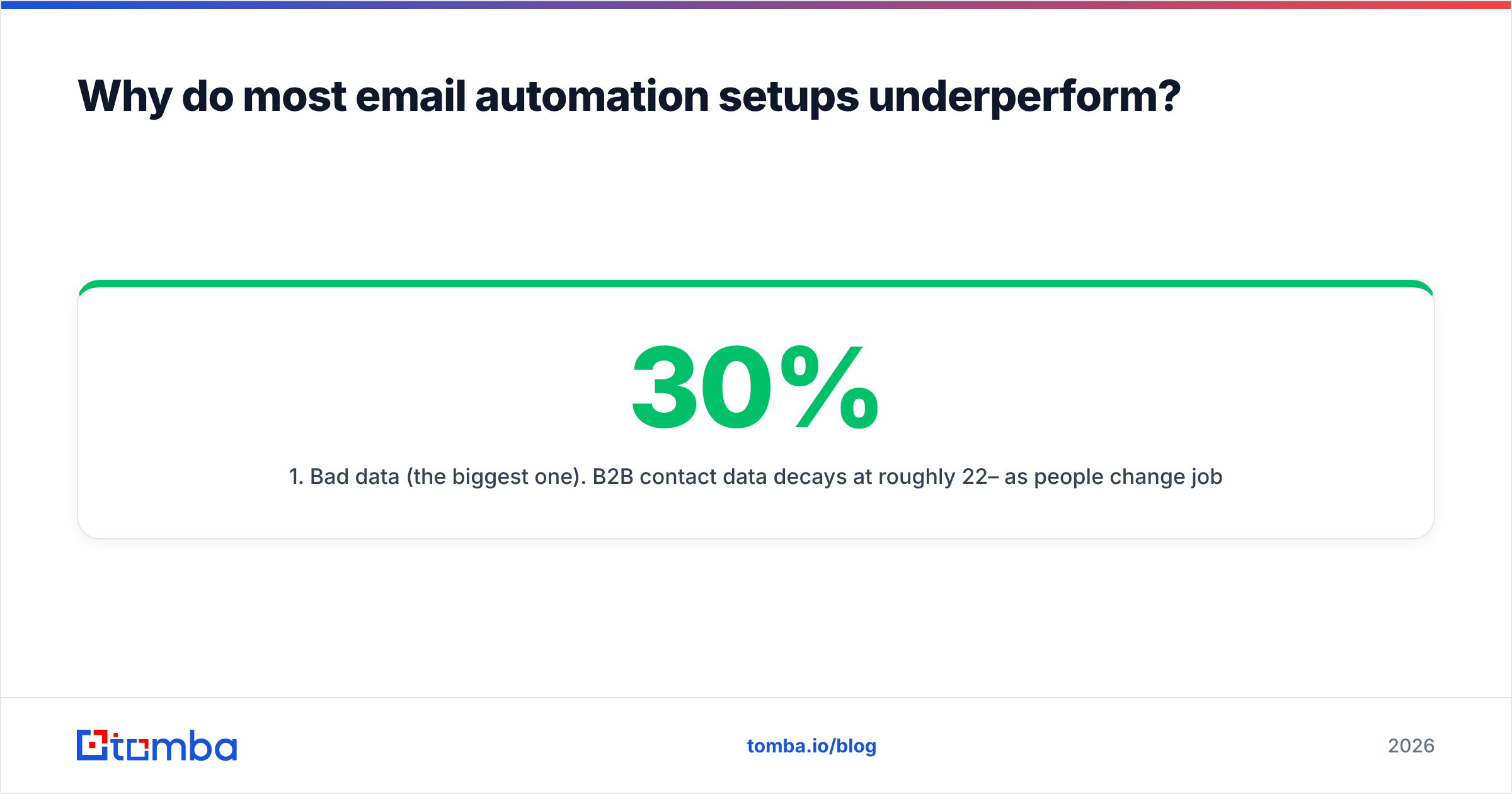
- Bad data (the biggest one). B2B contact data decays at roughly 22–30% per year as people change jobs. A list scraped 14 months ago is a bounce factory. Bounce rates above 3% start damaging sender reputation; above 5% and mailbox providers begin routing you to spam wholesale.
- No warmup, or warmup that ran two weeks. New domains need 3–4 weeks of gradually increasing legitimate-looking volume. Skipping it is the single fastest way to torch a domain.
- Authentication gaps. Missing or misconfigured SPF, DKIM, and DMARC. Google and Yahoo's bulk sender requirements made DMARC effectively mandatory, and a surprising number of stacks still fail an SPF record check.
- Volume before message-market fit. Teams scale from 50 to 500 sends/day on a sequence that never got a reply at 50. Automation multiplied a bad message.
- No reply routing. Positive replies sit unanswered for 48 hours because nobody owns the shared inbox.
Fix them in that order. There is no point A/B testing subject lines while a third of your list bounces.
You can pressure-test the plumbing for free before you spend anything on volume: run your domain through an SPF checker, check whether you're on any blocklists with a blacklist checker, and score a draft with a spam checker.
Should you build in-house or hire an agency?#
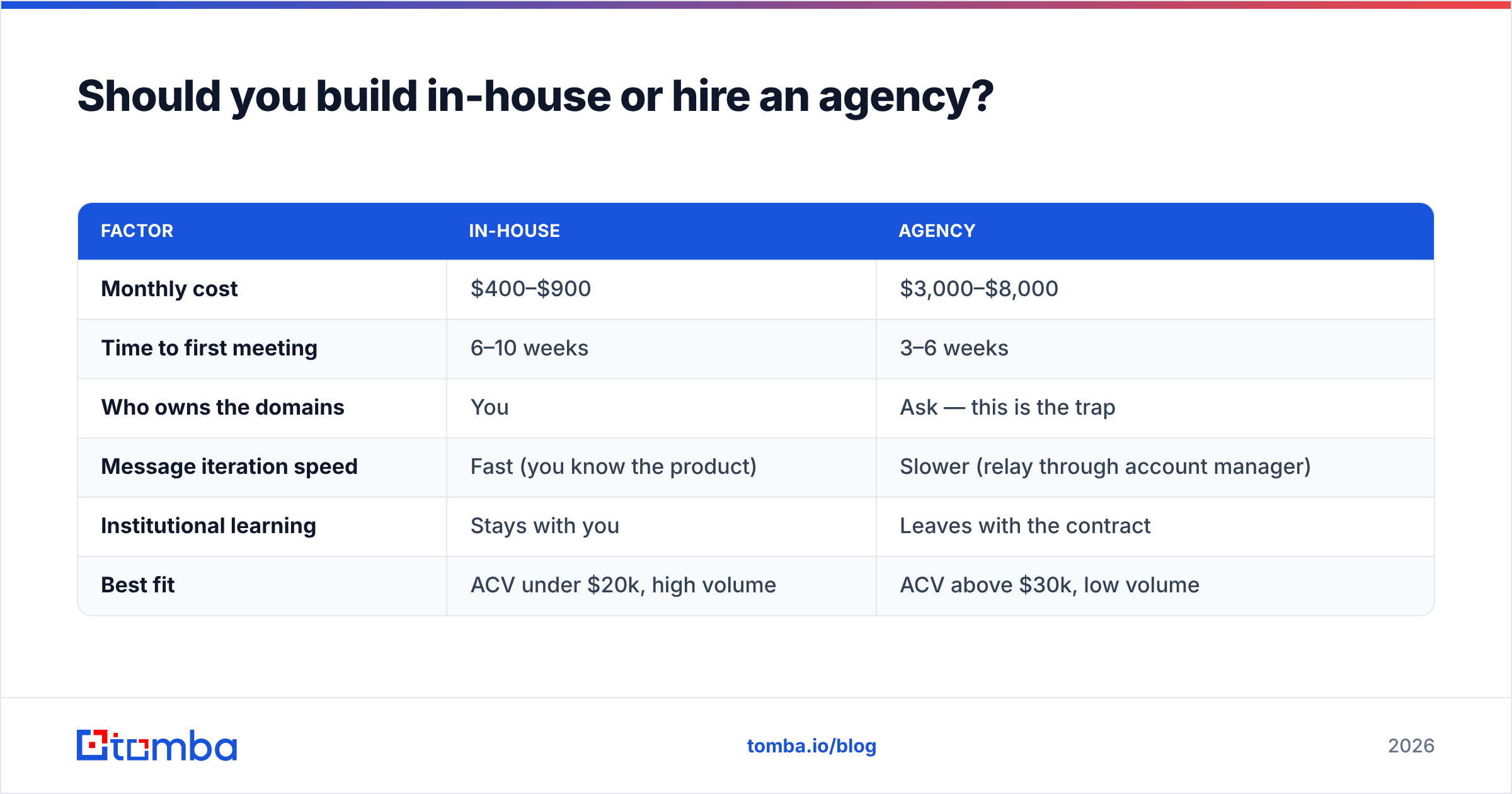
Build in-house if you have a defined ICP, a person who owns the channel for at least 10 hours a week, and a product where you understand why people buy. The stack is $400–$900/mo and you keep the domains, the data, and the learnings.
Hire an agency if you need pipeline inside a quarter and have nobody to run it. You're paying roughly 4–8x the tooling cost for an operator, existing infrastructure, and a playbook that's been tested on other accounts.
| Factor | In-house | Agency |
|---|---|---|
| Monthly cost | $400–$900 | $3,000–$8,000 |
| Time to first meeting | 6–10 weeks | 3–6 weeks |
| Who owns the domains | You | Ask — this is the trap |
| Message iteration speed | Fast (you know the product) | Slower (relay through account manager) |
| Institutional learning | Stays with you | Leaves with the contract |
| Best fit | ACV under $20k, high volume | ACV above $30k, low volume |
If you go the agency route, put three things in the contract: you own the sending domains, you receive the full contact list on exit, and reporting includes bounce and spam-complaint rates — not just meetings booked. Agencies that resist the third item are usually hiding a deliverability problem that becomes yours later.

What should you look for when comparing vendors?#
Ignore the feature grid on the pricing page. These six things predict outcomes:
- Sending limits per mailbox, not per account. A plan advertising "unlimited emails" still throttles per inbox, and the per-inbox number is what governs your real capacity.
- Native verification, or a clean handoff to one. If contacts flow in unverified, you'll pay for the bounces in reputation. Route new contacts through an email verifier before they enter a sequence, not after.
- Reply detection quality. Out-of-office and auto-responder misclassification is the difference between a clean pipeline report and a fictional one.
- API access on the plan you'll actually buy. Many vendors gate the Tomba API-equivalent behind a tier three levels up. Check before you commit annually.
- Catch-all handling. Roughly 15–20% of B2B domains are catch-alls. Tools that mark every catch-all "risky" are throwing away real contacts; tools that mark them all "valid" are lying to you. A dedicated catch-all verifier resolves the difference.
- Data provenance. Ask where the contacts come from. Vendors like Tomba publish their data sources; others won't say, which matters for GDPR posture as much as accuracy.
For a broader vendor landscape, G2's marketing automation category and HubSpot's own automation documentation are useful neutral reference points — G2 for the review distribution, HubSpot for how a mature platform actually models triggers and branching logic.
How do you set up an email automation stack that works?#
A realistic 30-day sequence, assuming you're starting from zero:
Week 1 — infrastructure. Buy 3–5 secondary domains that resemble your primary (yourcompany.co, getyourcompany.com). Create 3 mailboxes per domain. Configure SPF, DKIM, and DMARC on every one. Never send cold mail from your primary domain — if it gets flagged, your invoices and support replies go to spam too.
Week 2 — warmup and list build. Start warmup on every mailbox at low volume. Meanwhile, build your first 500-contact list. Use domain search to pull contacts by company domain, then verify every address before it touches a sequence. Expect to discard 10–20% — that's the system working.
Week 3 — copy and sequence. Write one sequence: 3 emails, 4-day gaps, one clear ask. No images, no tracking pixels on the first touch, no more than one link. Plain text outperforms designed templates in cold outbound by a wide margin.
Week 4 — send small, read the data. Start at 20 sends/day/mailbox. Watch bounce rate (target under 2%), reply rate (target above 5%), and positive reply rate (target above 1%). Do not scale volume until the reply rate clears the bar. Scaling a 0.5% reply rate to 500/day just produces more silence.
Then iterate on one variable at a time. Subject line for two weeks. Then opening line. Then the ask. Changing three things at once tells you nothing.
Does AI change the calculation in 2026?#
Partly. AI is genuinely good at two jobs in this stack and mediocre at a third.
It's good at research summarization — pulling a relevant hook from a prospect's recent funding round, job posting, or LinkedIn activity so your first line isn't generic. It's good at reply triage — classifying inbound replies as interested, not-now, or unsubscribe so your rep only reads the ones that matter.
It's mediocre at writing the whole email. Fully AI-generated cold email has a recognizable cadence, and recipients have learned it. The pattern that still works is AI-assisted personalization on a human-written frame: you write the structure and the ask, AI fills the variable research line. Tools like a cold email AI assistant are best used that way — for the variable slot, not the whole message.
What AI has not changed at all: deliverability physics, list decay rates, or the fact that a wrong email address bounces regardless of how well-written the copy inside it is.
Where should you start?#
Start with the input, not the engine. Before you subscribe to a sequencer, take 100 contacts from your target account list and verify them. If more than 15% come back invalid, your data problem is bigger than your tooling problem and no automation platform will fix it.
Tomba's Email Finder covers the part of the stack that everything else depends on — finding the right professional address by name, company, or domain, and verifying it before it enters a sequence. The free tier gives you 25 searches a month to test accuracy against contacts you can independently confirm, and Starter at $49/mo covers most solo operators and early-stage teams. Run your own accuracy test before you commit to anything, including this one. Any vendor confident in their data will encourage exactly that.
Related guides#
Ready to find emails that actually work?
Join 150,000+ professionals who stopped guessing and started sending. Free credits on signup — no credit card required.
Get the Tomba newsletter
Practical outbound tactics and product updates — once every two weeks.
About the author