Email Automation Software in 2026: A Practical Buyer's Guide
Email automation software can send 10,000 messages a week — and burn your domain doing it. Here's what these tools actually automate, what they cost, and how to pick one that survives 2026 inbox rules.
TL;DR
- Email automation software handles sending, sequencing, timing, reply detection, and inbox rotation. It does not handle list quality, targeting, or copy — and those three decide whether the automation works at all.
- The market splits into three categories: marketing automation (HubSpot, Mailchimp), cold outbound sequencers (Instantly, Smartlead, Saleshandy), and full sales engagement platforms (Outreach, Salesloft). Buying the wrong category is the most expensive mistake here.
- Realistic all-in cost for a 2-person outbound team in 2026: $150–$400/month once you add data, verification, and inboxes. The sequencer itself is usually the cheapest line item.
- Google and Microsoft's bulk-sender rules made list hygiene non-negotiable. A 3% spam-complaint rate can kill a sending domain in weeks regardless of which tool you use.
- Start with 30–50 sends per inbox per day, verified addresses only, and one clear offer. Scale volume last, not first.
What is email automation software?#
Email automation software is any tool that sends email on a trigger or a schedule instead of one-at-a-time from your mailbox. Think of it as cruise control for your outreach: it holds the speed you set, but it does not choose the destination and it will happily drive you into a wall.
Concretely, these platforms do five things:
- Sequencing — a series of messages (usually 3–6) sent over 2–4 weeks, with the sequence stopping automatically when a prospect replies.
- Scheduling and throttling — spreading sends across business hours in the recipient's timezone, with randomized delays so the pattern does not look machine-generated.
- Personalization at merge-field level — swapping in first name, company, role, or a custom line you wrote or generated per prospect.
- Inbox rotation — spreading volume across several sending accounts and domains so no single mailbox exceeds a safe daily cap.
- Reply and outcome tracking — classifying replies as interested, not interested, out-of-office, or bounce, and pushing the result back to your CRM.
What it does not do: find the right people, get their real email address, or write something worth reading. Those are inputs. Automation multiplies whatever you feed it — including garbage.
Which type of email automation software do you actually need?#
Most bad purchases in this category come from mismatching the tool to the motion. There are three distinct product types and they are not interchangeable.
Marketing automation platforms are built for people who opted in. They handle newsletters, nurture flows, lifecycle campaigns, and behavior triggers on a shared sending infrastructure. HubSpot, Mailchimp, Klaviyo, and ActiveCampaign live here. See HubSpot's own breakdown of marketing automation for the canonical version of this category. These platforms will suspend you for cold outreach — their shared IPs cannot absorb the complaint rate.
Cold outbound sequencers are built for people who have never heard of you. They connect to your own Google Workspace or Microsoft 365 mailboxes, rotate across dozens of them, warm them up, and optimize for reply rate rather than open rate. Instantly, Smartlead, Saleshandy, Lemlist, and Reply.io sit here.
Sales engagement platforms wrap sequencing inside a broader rep workflow: dialer, task queues, call recording, manager analytics, forecasting hooks. Outreach and Salesloft dominate this tier and price accordingly. They are worth it when you have 15+ reps and a manager who needs pipeline visibility, and overkill when you have three.

If you are a founder or a two-person team doing outbound, you want category two. If you are emailing your existing customer base about a feature launch, you want category one. Buying an $18,000/year engagement platform to send 400 cold emails a month is the most common overspend in B2B sales tooling.
How do the main email automation software options compare in 2026?#
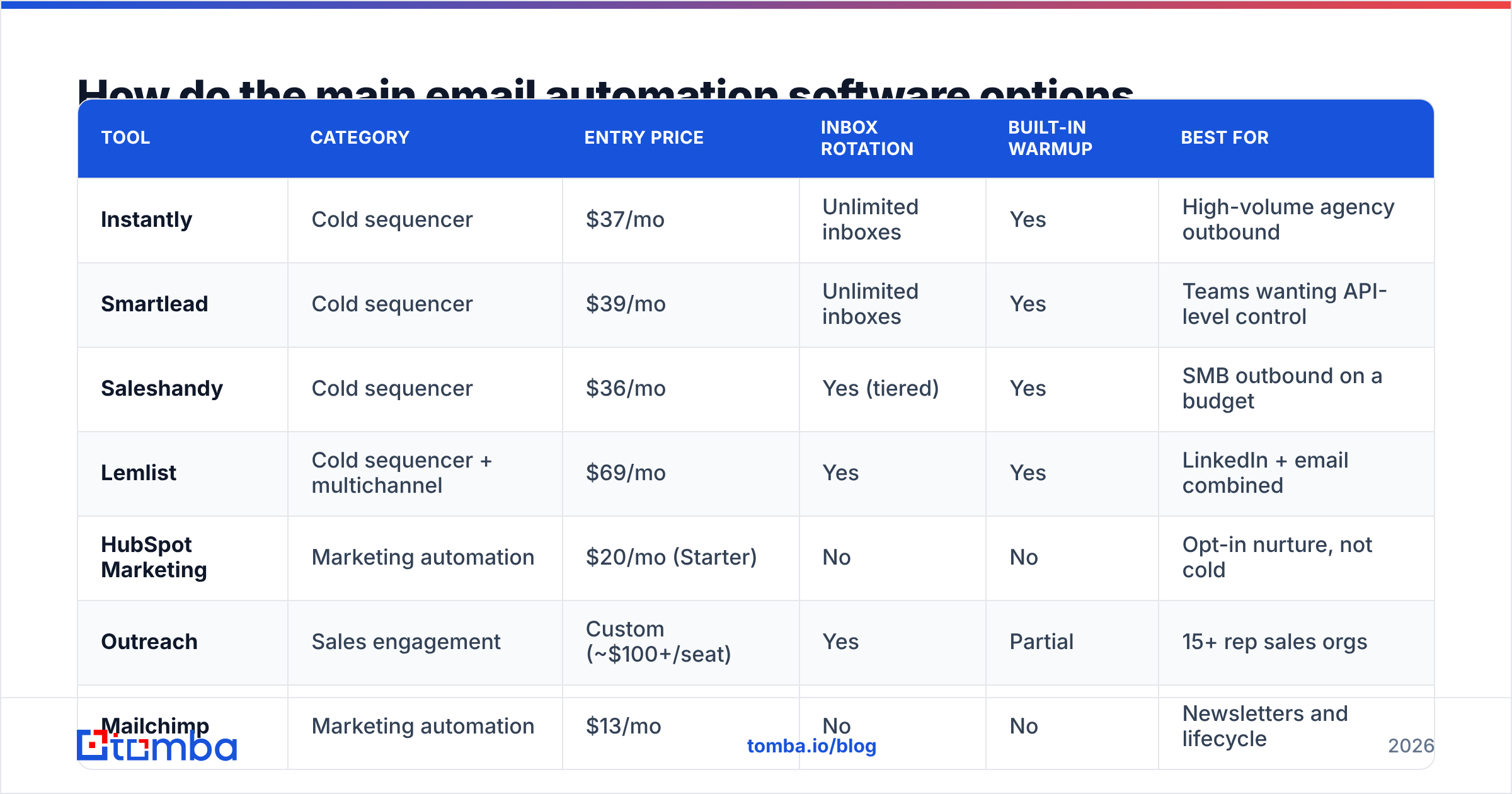
Pricing below reflects publicly listed entry tiers as of mid-2026. Always confirm on the vendor's own page — this category re-prices frequently.
| Tool | Category | Entry price | Inbox rotation | Built-in warmup | Best for |
|---|---|---|---|---|---|
| Instantly | Cold sequencer | $37/mo | Unlimited inboxes | Yes | High-volume agency outbound |
| Smartlead | Cold sequencer | $39/mo | Unlimited inboxes | Yes | Teams wanting API-level control |
| Saleshandy | Cold sequencer | $36/mo | Yes (tiered) | Yes | SMB outbound on a budget |
| Lemlist | Cold sequencer + multichannel | $69/mo | Yes | Yes | LinkedIn + email combined |
| HubSpot Marketing | Marketing automation | $20/mo (Starter) | No | No | Opt-in nurture, not cold |
| Outreach | Sales engagement | Custom (~$100+/seat) | Yes | Partial | 15+ rep sales orgs |
| Mailchimp | Marketing automation | $13/mo | No | No | Newsletters and lifecycle |
Two things stand out. First, the cold sequencers cluster tightly around $37–$70/month — feature parity in this tier is high enough that switching costs matter more than the feature list. Second, none of these tools include contact data or verification. That is a separate budget line, and it is usually larger than the sequencer.
For a broader view of how buyers rate these platforms, G2's email marketing category aggregates thousands of verified reviews with filters by company size — more useful than any vendor comparison page, including this one.
What does email automation software actually cost per month?#
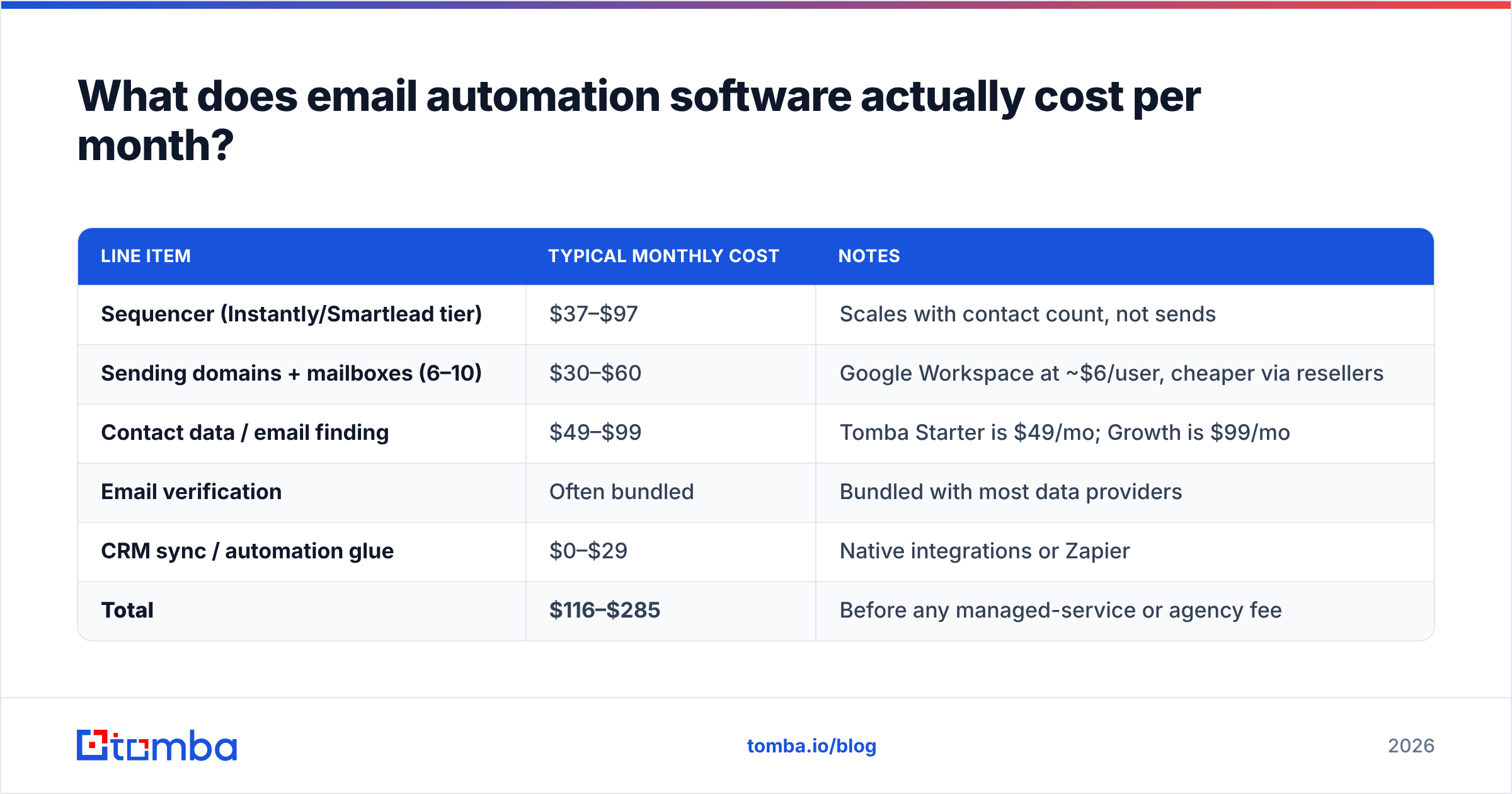
Sticker price is misleading. Here is what a realistic two-person outbound stack costs in 2026:
| Line item | Typical monthly cost | Notes |
|---|---|---|
| Sequencer (Instantly/Smartlead tier) | $37–$97 | Scales with contact count, not sends |
| Sending domains + mailboxes (6–10) | $30–$60 | Google Workspace at ~$6/user, cheaper via resellers |
| Contact data / email finding | $49–$99 | Tomba Starter is $49/mo; Growth is $99/mo |
| Email verification | Often bundled | Bundled with most data providers |
| CRM sync / automation glue | $0–$29 | Native integrations or Zapier |
| Total | $116–$285 | Before any managed-service or agency fee |
Two cost traps to watch. Sequencers usually price on active contacts uploaded, not emails sent — a 50,000-row list you never message still moves you up a tier. And most warmup features that were free in 2023 are now separate paid add-ons at $20–$30 per inbox pool.
Why do automated sequences land in spam?#
Because volume without hygiene is indistinguishable from spam, and the mailbox providers stopped giving benefit of the doubt.
Google's bulk sender requirements set a hard ceiling: keep spam complaints under 0.30%, authenticate with SPF and DKIM, publish DMARC, and honor one-click unsubscribe. Microsoft rolled out equivalent enforcement for Outlook.com. These apply to anyone sending meaningful volume to consumer domains, and the enforcement logic bleeds into how corporate filters score you.
The failure chain in automated outbound is predictable:
- You upload an unverified list. 15–25% of scraped or aged B2B addresses are dead.
- Bounces spike above 5%. The provider reads this as a sender who does not know their own recipients.
- Reputation drops. Messages start landing in Promotions, then Spam.
- Complaints compound. Spam-folder mail that gets manually reported drives your complaint rate past 0.3%.
- The domain is finished. Recovery takes 6–10 weeks of near-zero sending, and often never fully happens.
The single highest-leverage fix is upstream of the sequencer: verify every address before it enters the tool. Running a list through an email verifier takes minutes and typically strips 10–20% of a purchased or scraped list. That one step does more for email deliverability than any subject-line tweak.

Catch-all domains deserve a separate note. Roughly 20–30% of B2B domains accept everything at the SMTP layer, so a standard verifier returns "unknown" rather than valid or invalid. Dropping them wastes real prospects; sending to them blind inflates bounces. A dedicated catch-all verifier resolves most of that gray zone before it becomes a deliverability problem.
How do you set up email automation software without burning your domain?#
A conservative ramp beats a fast one every time. The math is not close: a domain that survives 12 months at 50 sends/day delivers far more meetings than one that hits 300/day and dies in week five.
Week 0 — infrastructure. Buy 2–3 secondary domains that are close variants of your primary (never send cold from your main domain). Create 3 mailboxes per domain. Configure SPF, DKIM, and DMARC on each. Do not skip DMARC; it is now effectively mandatory.
Weeks 1–3 — warmup. Run each new mailbox through automated warmup at increasing volume. Most tools handle this natively. Do not send a single cold email during this window. A warmup calculator will tell you how long your target volume actually needs.
Week 4 — first cohort. Load 200–300 verified contacts. Send 20–30 per inbox per day. One sequence, one offer, four steps. Measure bounce rate before anything else — if it is above 2%, your data source is the problem, not your copy.
Weeks 5–8 — scale carefully. Add 10 sends per inbox per week until you reach 50/day/inbox. That is the practical ceiling for cold outbound on Google Workspace. Past that, add inboxes, never volume per inbox.
Ongoing — re-verify. B2B contact data decays at roughly 2–2.5% per month as people change jobs. A list verified in January is meaningfully worse by June. Re-run anything older than 90 days through bulk verification before reusing it.
Where does the data come from, and does it matter?#
It matters more than the sequencer choice. Two teams running identical copy through identical tools will see 3x different reply rates purely on list quality.
You have three sourcing options:
- Static databases. Prebuilt contact lists you filter and download. Fast, high coverage, but data ages between refreshes. Providers like BookYourData are strong here when you need volume immediately and are willing to verify on ingest.
- Real-time finders. Tools that resolve an email at query time from name + domain, so you get a fresh result rather than a cached one. Lower waste, better for targeted lists.
- Enrichment on your own records. You already have company names or LinkedIn URLs and need addresses, titles, or phone numbers appended. This is where data enrichment fits.
Most functional stacks use two of the three. A common pattern: pull a target account list from a database, then resolve individual contacts in real time so the addresses are current at send time rather than at export time.
When should you not automate email at all?#
Automation has a floor and a ceiling, and both are real.
Do not automate when your total addressable list is under 100 people. At that size, manual research plus individually written emails will outperform any sequence, and the setup cost of infrastructure and warmup is not recoverable.
Do not automate post-demo follow-up with an active buyer. A templated nudge after a real conversation reads as indifference and it is obvious to the recipient.
Do not automate when you cannot articulate the offer in one sentence. Sequences amplify clarity and amplify confusion equally. If four rewrites have not produced a clear value statement, the tool will not save you.
Do automate the repeatable middle: first-touch outreach to a defined ICP, nurture for leads who went quiet, event follow-up, and re-engagement of closed-lost accounts after a trigger event. That is where the leverage is real.
What should you look for when comparing tools?#
Ignore feature-count marketing and check these five things in a trial:
- Bounce handling. Does the tool auto-pause a sequence when bounce rate crosses a threshold? Several do not, and that gap is what kills domains.
- Reply classification accuracy. Test it with 20 real replies. Out-of-office misclassified as "interested" wastes hours a week.
- CRM write-back depth. One-way sync is common and nearly useless. You want activity, status, and outcome flowing both directions.
- API and export. Can you get your data out? Sequencer lock-in is a real switching cost when pricing changes.
- Sending caps per inbox. Some tools default to aggressive limits. Override them downward on day one.
Getting the inputs right#
Email automation software is a distribution layer. It solves the mechanics of sending — reliably, at scale, without you touching a keyboard. It does not solve who you send to or whether the address exists, and no amount of tooling in that layer will compensate for a list that is 20% dead on arrival.
Fix the input first. The Tomba Email Finder resolves professional addresses by name and domain in real time, with verification built into the same call, so what enters your sequencer is current rather than cached. The free tier covers 25 searches a month if you want to test accuracy against a list you already have; Starter is $49/mo and Growth is $99/mo when you are ready to run volume. Verify first, then automate — in that order, every time.
Related guides#
Ready to find emails that actually work?
Join 150,000+ professionals who stopped guessing and started sending. Free credits on signup — no credit card required.
Get the Tomba newsletter
Practical outbound tactics and product updates — once every two weeks.
About the author