Email Availability Checker: How to Verify Any Address in 2026
An email availability checker answers two very different questions — is this address free to register, or is it real and deliverable? Confusing the two burns your domain. Here's how each works.
TL;DR
- "Email availability checker" means two completely different things: is this username free to register (signup context) and does this mailbox actually exist and accept mail (outreach context). Pick the wrong tool and you either get a false "available" or a hard bounce.
- Availability checks against a provider (Gmail, Outlook, a company domain) are unreliable by design — providers deliberately obscure whether an address exists to block enumeration attacks.
- Deliverability checks — MX lookup, SMTP handshake, catch-all detection, role/disposable flags — are what actually protect your sender reputation before a cold campaign.
- Catch-all domains answer
250 OKto everything. Any checker that reports them as "valid" without flagging catch-all status is lying to you by omission. - For B2B outreach, use a verifier with confidence scoring and catch-all handling rather than a free single-lookup widget. Tomba starts free at 25 searches/month, then $49/mo.
What is an email availability checker?#
An email availability checker is a tool that tells you whether a specific email address can be used — but "used" splits into two jobs that get confused constantly.
Think of it like checking a hotel room. "Is room 412 available?" means one thing to a guest booking a stay (can I have it?) and another to a maintenance tech (does that room exist and is anyone in it?). Same question, opposite answers, completely different tools.
Job 1 — Registration availability. You want hello@yourbrand.com or yourname@gmail.com and need to know if the username is already taken before you create the account. This is a claim question.
Job 2 — Existence and deliverability. You have sarah.chen@acme.com from a scraped list or a guess, and you need to know if mail sent there will land in a real inbox. This is a validity question, and it is what 90% of business searches for "email availability checker" actually want.
The confusion matters because tools built for Job 1 give useless answers for Job 2. A Gmail signup form that says "this username is taken" has told you an address exists — but it will not tell you if a corporate address on acme.com exists, and it will never tell you whether that mailbox is full, dormant, or a catch-all sink.

Why do availability checks fail on corporate domains?#
Because mail servers are configured to lie, and that behavior is a feature.
In the early 2000s, SMTP servers happily answered VRFY sarah@acme.com with a clean yes or no. Spammers turned that into a directory-harvest attack: run 50,000 first-name-last-name combinations against a domain, keep the hits, sell the list. Every serious mail platform responded by disabling VRFY and, in many cases, accepting all recipients at the handshake stage and bouncing later — or never.
That leaves an availability checker with a handful of imperfect signals:
- MX record lookup — Does the domain have mail servers at all? A domain with no MX record cannot receive mail. This is a hard, reliable disqualifier and costs one DNS query.
- SMTP handshake (RCPT TO) — Open a connection, name the recipient, read the response code.
550usually means no such user;250means maybe. This is the workhorse check, and it's where accuracy is won or lost. - Catch-all detection — Send
RCPT TOfor a random string likezx91qk@acme.com. If that also returns250, the domain accepts everything and the individual result is meaningless on its own. - Pattern inference — Does
acme.comusefirst.last@,flast@, orfirst@? Knowing the dominant pattern lets a tool score a candidate address as probable rather than unknown. Run a domain through a company email pattern check before you guess. - Cross-source confirmation — Has this exact address appeared in a public signature, a git commit, a conference speaker page, a press release? Corroboration from independent sources beats any single SMTP ping.
- Risk flags — Is it a role account (
info@,sales@), a disposable domain (mailinator.com), or a known spam trap? All three are deliverable and all three are bad for you.
A checker that only does steps 1 and 2 will hand you a green checkmark on a catch-all domain and you will find out the truth three days into a campaign, after your bounce rate crosses 5% and Google throttles you.
Availability checker vs email verifier vs email finder: what's the difference?#
These three tools get marketed interchangeably, which is how people end up paying for the wrong one.
| Availability checker | Email verifier | Email finder | |
|---|---|---|---|
| Question answered | Is this username free / taken? | Will mail to this address deliver? | What is this person's address? |
| Input | Username + domain | Full email address | Name + domain, or domain alone |
| Primary method | Provider signup API, WHOIS, SMTP | MX + SMTP + catch-all + risk flags | Pattern inference + source corroboration + verification |
| Typical use case | Registering a brand handle or new mailbox | Cleaning a list before a campaign | Building a prospect list from scratch |
| Catch-all handling | Usually none | Explicit flag, sometimes deep-verify | Confidence score attached to result |
| Bulk support | Rare | Standard (CSV/API) | Standard (CSV/API) |
| Who needs it | Founders, IT admins, domain buyers | Email marketers, SDR ops | SDRs, recruiters, PR, link builders |
| Cost shape | Free / bundled with registrar | Per-verification credits | Per-search credits |
The practical read: if you are about to send outbound, you want a verifier and a finder, not an availability checker. If you are standing up a new domain and want careers@ before HR asks for it, an availability check against your own mail provider is the right two-minute job.
For the outreach path, Tomba splits these deliberately — the email finder resolves a name and domain into an address, and the email verifier grades that address before it enters a sequence.
How accurate is an email availability checker in 2026?#
Accuracy depends almost entirely on the destination provider, not on the tool's marketing page.
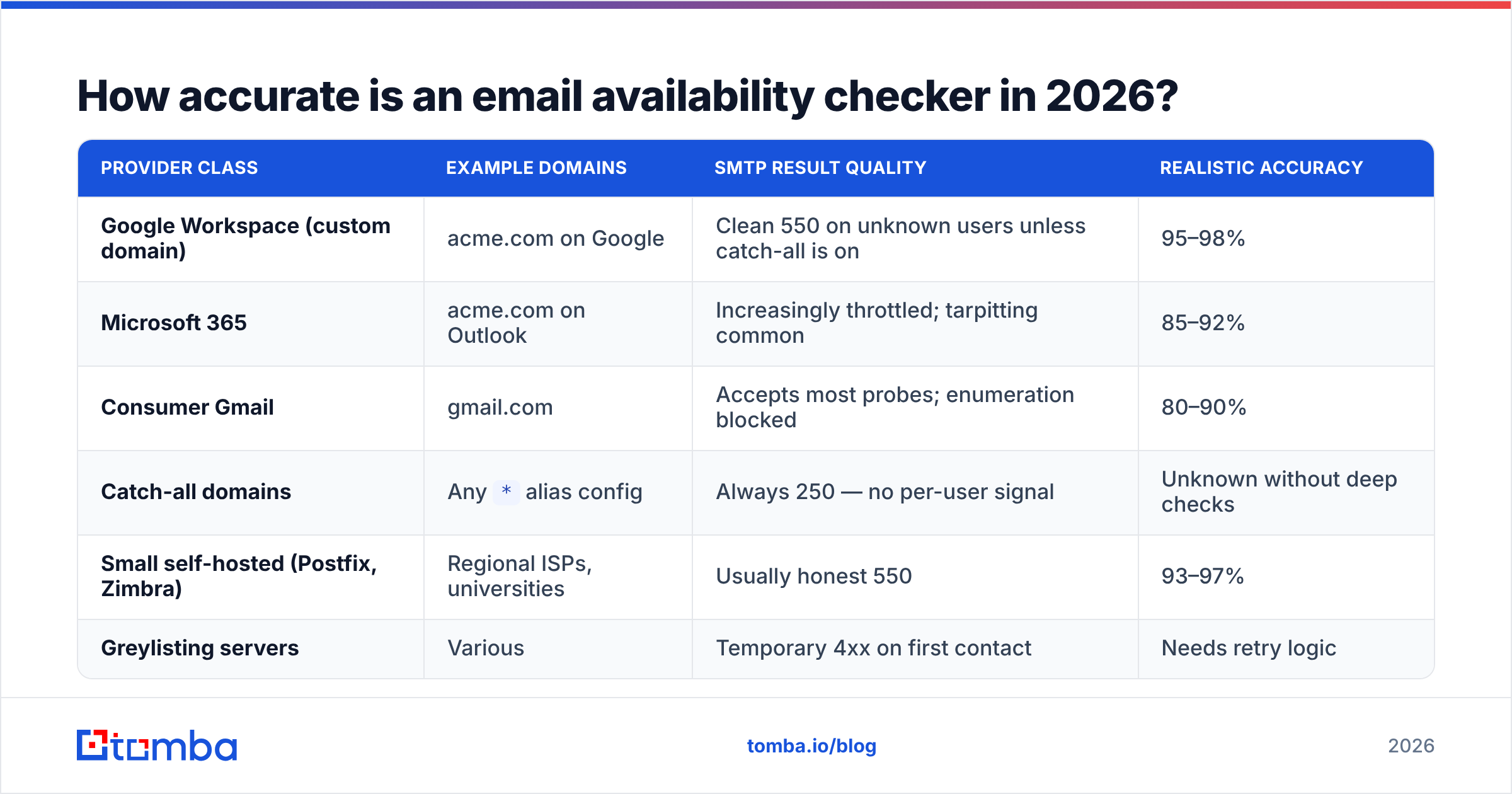
Here's the realistic breakdown by provider class, based on how each responds to SMTP probes:
| Provider class | Example domains | SMTP result quality | Realistic accuracy |
|---|---|---|---|
| Google Workspace (custom domain) | acme.com on Google | Clean 550 on unknown users unless catch-all is on | 95–98% |
| Microsoft 365 | acme.com on Outlook | Increasingly throttled; tarpitting common | 85–92% |
| Consumer Gmail | gmail.com | Accepts most probes; enumeration blocked | 80–90% |
| Catch-all domains | Any * alias config |
Always 250 — no per-user signal | Unknown without deep checks |
| Small self-hosted (Postfix, Zimbra) | Regional ISPs, universities | Usually honest 550 | 93–97% |
| Greylisting servers | Various | Temporary 4xx on first contact | Needs retry logic |
Two things follow from that table.
First, anyone quoting a single blanket accuracy number is averaging over wildly different conditions. A 99% claim usually means "99% of the addresses we returned a verdict on" — with unknowns and catch-alls quietly excluded from the denominator. Ask what the unknown rate is; that number is more honest than the accuracy number.
Second, catch-all is not an edge case. A meaningful share of B2B domains run catch-all, and the share is higher among enterprises with aggressive anti-harvesting posture. If your verifier drops those into "valid," your list is contaminated. If it drops them into "invalid," you're throwing away real buyers. The correct handling is a distinct third state plus a confidence score — which is why catch-all verification exists as a separate step rather than a checkbox.

What does a good result actually look like?#
A useful checker returns a status and the evidence behind it. Compare a thin result to a complete one:
Thin (avoid):
sarah.chen@acme.com → VALIDComplete (what you want):
sarah.chen@acme.com
  status:        deliverable
  score:         96
  mx_found:      true
  smtp_check:    passed (250)
  catch_all:     false
  disposable:    false
  role_account:  false
  free_provider: false
  pattern:       {first}.{last}
  sources:       2 (company site, GitHub commit)
The second output lets you make a decision. Score 96 with two independent sources and a confirmed non-catch-all domain goes straight into a sequence. Score 62 on a catch-all domain with zero corroborating sources goes into a nurture list or gets a LinkedIn touch first — not a cold email that risks a bounce.
Set your own thresholds and hold to them. A workable default for cold outbound: send to anything scoring 90+, manually review 70–89, discard below 70, and route catch-alls to a separate low-volume test batch before committing budget.
Which tools should you actually use?#
The honest answer depends on which of the two jobs you have.
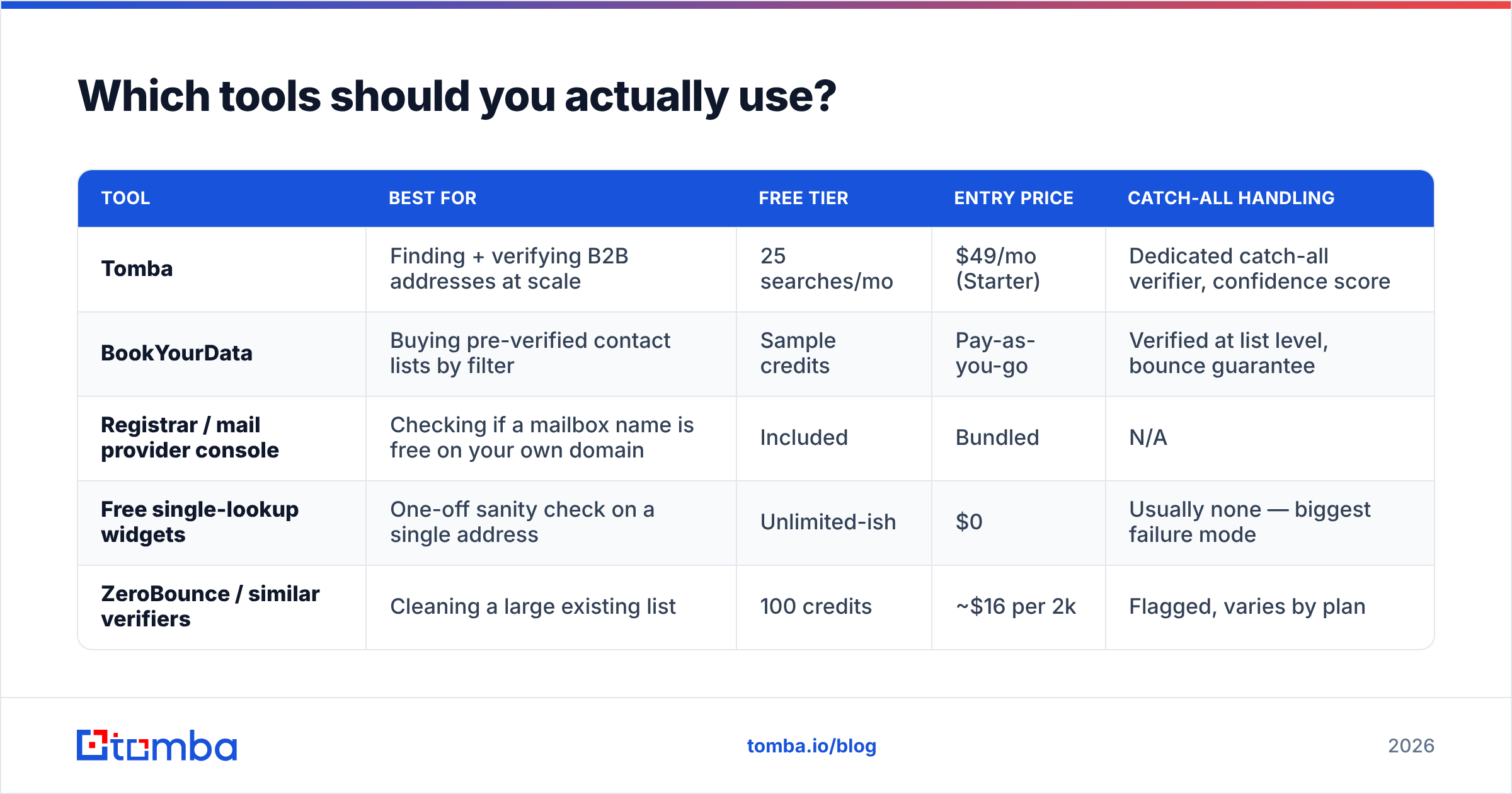
| Tool | Best for | Free tier | Entry price | Catch-all handling |
|---|---|---|---|---|
| Tomba | Finding + verifying B2B addresses at scale | 25 searches/mo | $49/mo (Starter) | Dedicated catch-all verifier, confidence score |
| BookYourData | Buying pre-verified contact lists by filter | Sample credits | Pay-as-you-go | Verified at list level, bounce guarantee |
| Registrar / mail provider console | Checking if a mailbox name is free on your own domain | Included | Bundled | N/A |
| Free single-lookup widgets | One-off sanity check on a single address | Unlimited-ish | $0 | Usually none — biggest failure mode |
| ZeroBounce / similar verifiers | Cleaning a large existing list | 100 credits | ~$16 per 2k | Flagged, varies by plan |
BookYourData is worth calling out for a different shape of problem: if you'd rather buy a filtered, pre-verified list than build one, that's a legitimate path and a different purchase than a per-lookup checker. Tomba's angle is the opposite — you start from a name, a domain, or a LinkedIn profile you already care about and resolve it.
Tomba's pricing runs Free (25 searches/month), Starter $49/mo, Growth $99/mo, Pro $249/mo, and Enterprise custom. Full Tomba pricing breaks down credit allocation per tier.
For volume work, skip the UI entirely. The email verification API returns the full status object above in a single call, and bulk verify handles CSV uploads when you've inherited a list of unknown provenance.
How do you check availability without wrecking your sender reputation?#
The trap: some people "test" whether an address exists by just sending an email to it. That is the single worst method available.
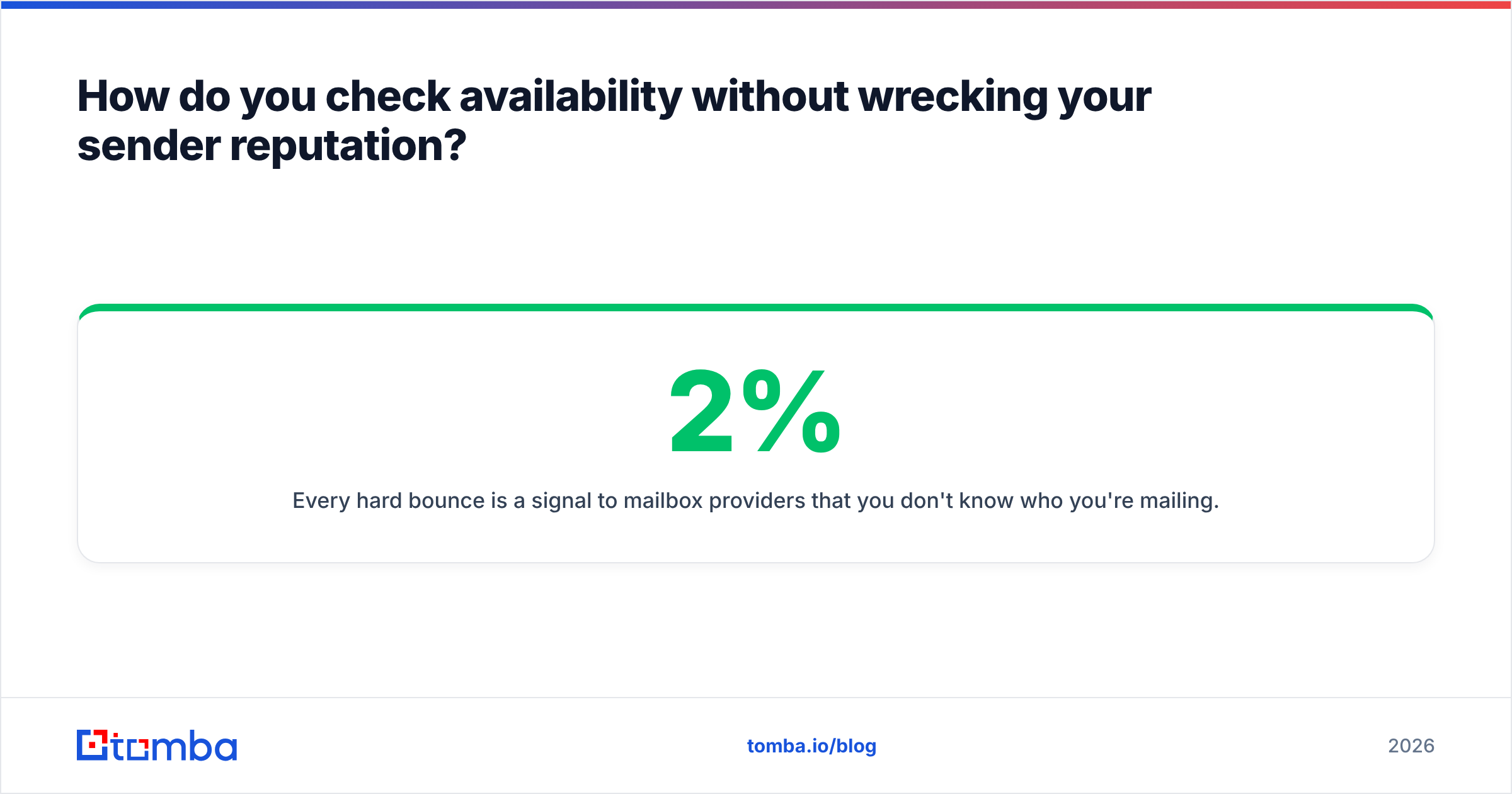
Every hard bounce is a signal to mailbox providers that you don't know who you're mailing. Bounce rates above roughly 2% start affecting placement; above 5% you're in throttling territory, and above 10% providers begin treating your domain as a list-buyer. Recovering sender reputation takes weeks of low-volume, high-engagement sending — far more expensive than verification credits.
Do this instead:
- Verify before import, not after. Clean the list before it touches your sending platform, so bad addresses never get a chance to bounce.
- Re-verify anything older than 90 days. B2B data decays fast — people change jobs constantly, and an address verified in January is a coin flip by June.
- Segment by confidence, not just by persona. High-confidence addresses can take full-volume sequences; medium-confidence gets a small test batch first.
- Check your own domain's health separately. Availability of their mailbox is irrelevant if your SPF is broken. Run an SPF checker and a blacklist checker on your sending domain before every major campaign.
- Warm new domains before volume. A brand-new sending domain with a clean list still gets filtered. Ramp gradually.
- Keep a suppression list forever. Every invalid, every hard bounce, every unsubscribe — permanently excluded, across all tools.
Google's own sender guidelines put an explicit ceiling on spam complaints and expect senders to maintain valid recipient lists; Microsoft's Smart Network Data Services exposes similar reputation data for Outlook destinations. Neither provider distinguishes between "I bought a bad list" and "I guessed at addresses" — the bounce data looks identical from their side.
When is a free availability checker good enough?#
Free tools are fine in three situations, and misleading everywhere else.
Good enough for: a single address you're about to email manually, a quick syntax and MX sanity check, or confirming a domain has mail configured at all. A free email checker covers all three in seconds with no account.
Not good enough for: any list over a few dozen addresses, any domain that might be catch-all, any campaign where a bounce costs you a sending domain, or any workflow where you need the result in a CRM rather than in a browser tab. Free tools also tend to skip risk flags entirely, so role accounts and disposables sail straight through into your sequence.
The break-even is straightforward. If a bad send costs you more than a verification credit — and for cold outbound it always does — verification pays for itself in the first campaign.
Where should you start?#
Start by naming your job. If you're registering a mailbox, your mail provider's admin console answers the availability question in ten seconds and costs nothing. If you're building an outbound list, you need find-then-verify, and you need catch-all handling that doesn't quietly round to "valid."
For the second job, Tomba Email Finder resolves names and domains into addresses with a confidence score and source attribution attached, then hands off to verification before anything reaches your sequencer. The free tier gives you 25 searches a month to test the accuracy on domains you already know the answers for — which is exactly how you should evaluate any tool in this category. Verify a sample where you have ground truth, count the misses, then decide.
Related guides#
Ready to find emails that actually work?
Join 150,000+ professionals who stopped guessing and started sending. Free credits on signup — no credit card required.
Get the Tomba newsletter
Practical outbound tactics and product updates — once every two weeks.
About the author