Email Blacklist Explained: How to Check, Fix, and Prevent
Most senders learn they're blacklisted only after replies flatline. Here's how email blacklists actually work, which ones matter, how to check every major list in minutes, and how to get delisted fast.
TL;DR
- An email blacklist (technically a DNSBL or blocklist) is a real-time database of IPs and domains that mailbox providers query before accepting your message. Getting listed doesn't send you to spam — it usually gets you rejected outright.
- Only a handful of lists actually move the needle: Spamhaus SBL/XBL/DBL, Barracuda, SORBS, SpamCop, and UCEPROTECT L1. The other 100+ lists you'll see in a scan report are mostly noise.
- The three causes behind most listings are stale or scraped lists, a sudden volume spike on a cold IP, and spamtrap hits. All three are preventable at the data layer.
- Delisting takes anywhere from 24 hours (automatic expiry) to two weeks (manual review). You only get one clean shot at a removal request, so fix the root cause before you submit.
- Prevention beats remediation: verify every address before send, warm your domain slowly, authenticate with SPF/DKIM/DMARC, and keep your complaint rate under 0.1%.
Your open rate didn't drop. Your emails stopped arriving. That's the signature of an email blacklist, and it's a different problem from the spam folder — one that's more brutal in the short term and easier to fix in the long term. This guide covers what blacklists are, which ones matter, how to check whether you're on one, and the delisting process for each of the major operators.
What is an email blacklist?#
An email blacklist is a public database of IP addresses and domains that have been flagged as sources of spam. When a mailbox provider receives a connection from your mail server, it does a DNS lookup against one or more of these lists before it decides whether to accept your message. The lookup takes milliseconds and happens on every single inbound connection.
Think of it like a bouncer with a clipboard. Your sender reputation is the argument you make at the door; the blacklist is a name on the "do not admit" sheet. Reputation is negotiable and gradual. A blacklist entry is binary — you're on it or you're not, and while you're on it, the conversation is over before it starts.
The technical name for most of these systems is DNSBL (DNS-based Blackhole List), and the mechanism was standardized decades ago in what's now RFC 5782. Two flavors exist:
- IP blacklists — flag the sending server's IP address. If you're on a shared IP with a bad neighbor, you inherit their problem. This is the most common listing type for SMTP relays and self-hosted mail servers.
- Domain blacklists (URIBLs) — flag the domain in your From address, your links, or your tracking domain. These follow you across IPs, so switching sending infrastructure doesn't help.
- Hybrid reputation systems — Google, Microsoft, and Yahoo run internal blocklists that aren't publicly queryable. You never "check" these; you infer them from bounce codes and Google Postmaster Tools.
- Private enterprise lists — corporate mail filters (Proofpoint, Mimecast, Cisco ESA) maintain proprietary blocks. A single aggressive prospect marking you as spam can trigger a company-wide block on your domain.
The distinction matters because your remediation path is completely different for each. An IP listing may resolve by rotating infrastructure. A domain listing will not.

Which email blacklists actually matter in 2026?#
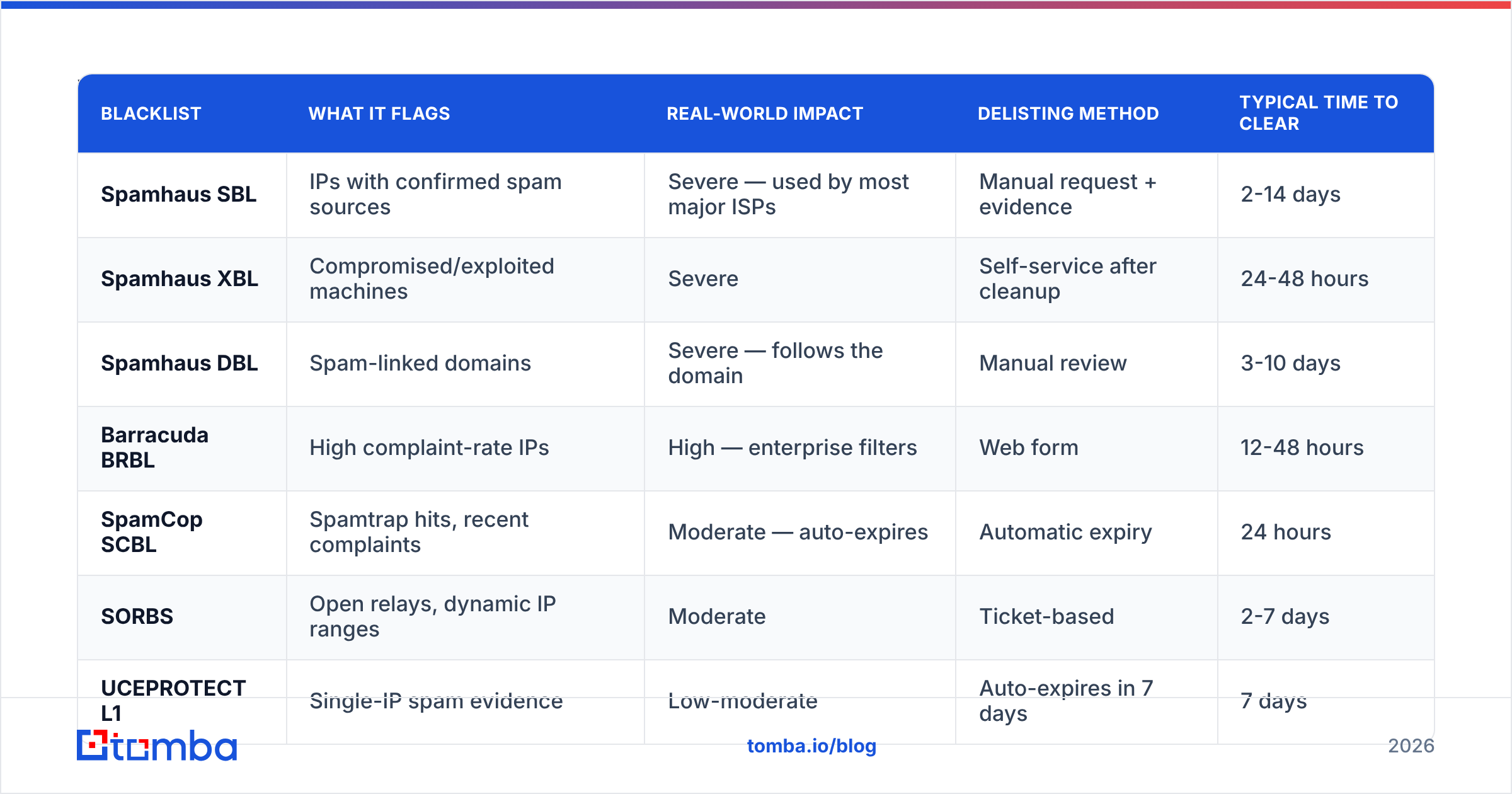
Run any free scanner and you'll get back a report checking 100+ lists. Most of them have zero adoption. Three or four red marks against obscure operators are cosmetically alarming and functionally irrelevant. Here's what actually affects delivery:
| Blacklist | What it flags | Real-world impact | Delisting method | Typical time to clear |
|---|---|---|---|---|
| Spamhaus SBL | IPs with confirmed spam sources | Severe — used by most major ISPs | Manual request + evidence | 2-14 days |
| Spamhaus XBL | Compromised/exploited machines | Severe | Self-service after cleanup | 24-48 hours |
| Spamhaus DBL | Spam-linked domains | Severe — follows the domain | Manual review | 3-10 days |
| Barracuda BRBL | High complaint-rate IPs | High — enterprise filters | Web form | 12-48 hours |
| SpamCop SCBL | Spamtrap hits, recent complaints | Moderate — auto-expires | Automatic expiry | 24 hours |
| SORBS | Open relays, dynamic IP ranges | Moderate | Ticket-based | 2-7 days |
| UCEPROTECT L1 | Single-IP spam evidence | Low-moderate | Auto-expires in 7 days | 7 days |
| UCEPROTECT L2/L3 | Entire ASN/netblock | Very low — widely ignored | Not worth pursuing | N/A |
The one to treat as an emergency is Spamhaus. Their lists are queried by a very large share of the world's mail infrastructure, and an SBL listing effectively takes you offline for B2B email. A UCEPROTECT Level 3 listing, by contrast, means someone else in your hosting provider's IP range misbehaved and the list operator blocked 65,000 addresses in response. Almost nobody enforces it. Don't panic, and definitely don't pay their "express delisting" fee.
How do you know if you're on an email blacklist?#
Three signals, in order of how early they appear:
Bounce codes are the fastest tell. Read the actual SMTP response, not your sending tool's summary. A blacklist rejection is explicit and usually names the list:
550 5.7.1 Service unavailable; Client host [203.0.113.42]
blocked using zen.spamhaus.org;
https://check.spamhaus.org/query/ip/203.0.113.42
That's not a soft bounce or a full mailbox. That's a door closing.
Delivery rate collapse by provider. If Gmail placement holds steady but Outlook and corporate domains fall off a cliff, you're looking at an enterprise filter block, not a public DNSBL. If everything drops at once, check the public lists first.
Active monitoring. Don't wait for the collapse. Run a blacklist checker against your sending IP and your root domain weekly, and check your SPF alignment with an SPF checker any time you add a new sending platform. Broken authentication is a leading indicator of a listing that hasn't happened yet.
One caveat on scanners: check both the IP and the domain, and check the domain in your links, not just your From address. If you use a shared click-tracking domain from an outreach platform, you're sharing a reputation with every other user on it — including the ones sending garbage.
Why did you get blacklisted?#
Listings are almost never random. Run through these in order — the diagnosis determines the fix, and list operators will ask you to describe the root cause in your removal request.
- Spamtrap hits. These are addresses that were once real but have been recycled by the provider into pure detection traps, or addresses that were never real and exist only in scraped datasets. Sending to even a few pristine traps triggers an immediate listing. This is the number one cause of Spamhaus SBL entries for legitimate senders and it comes almost entirely from old lists and purchased data.
- Volume spikes on a cold IP. Going from 50 emails a day to 3,000 in a week reads as botnet behavior. Providers don't grade on intent. A gradual ramp over 4-6 weeks is the difference between "new sender" and "compromised host."
- Complaint rate above threshold. Anything over 0.1% (one complaint per thousand delivered) puts you in the danger zone. Over 0.3% and you should assume a listing is coming. Missing or hidden unsubscribe links inflate this number dramatically — people who can't opt out will hit the spam button instead.
- High hard-bounce rate. Above 3-5% bounces signals a list you didn't validate. Providers read it as evidence you're guessing at addresses, which is exactly what a spammer does.
- Broken or missing authentication. No SPF record, no DKIM signature, or a DMARC policy that doesn't align. In 2026 this isn't optional — bulk-sender requirements from Google and Yahoo made authentication table stakes, and unauthenticated mail is treated as suspicious by default.
- A compromised account or open relay. If a mailbox password leaked or your server accepts unauthenticated relay, someone else is sending from your infrastructure. XBL listings are usually this. Fix the security hole first; delisting without it just gets you re-listed within hours.
The uncomfortable pattern: five of these six trace back to data quality or sending discipline, not to your copy. You cannot write your way out of a bad list.
How do you get removed from an email blacklist?#
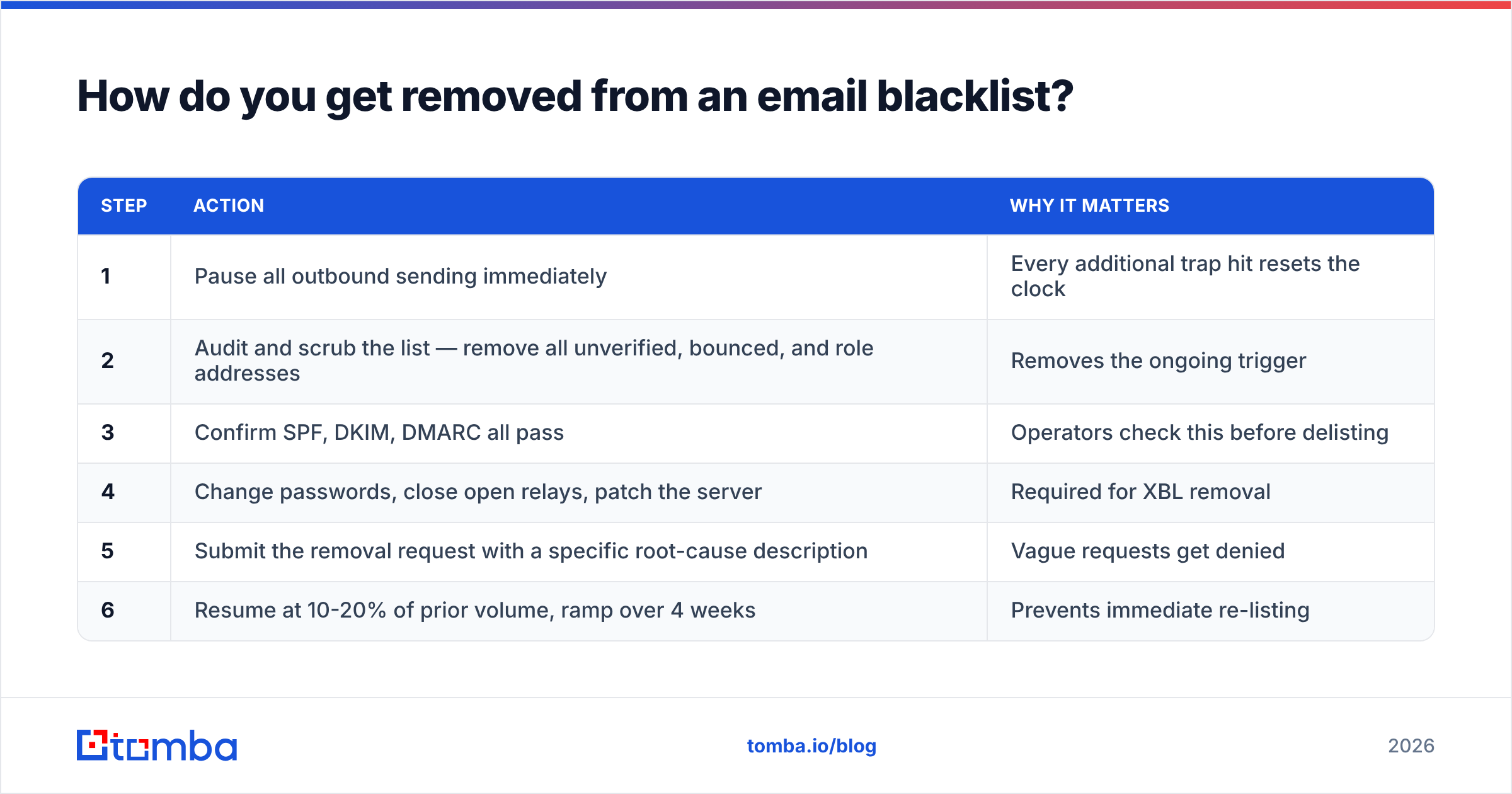
Fix the cause first. Every major operator either checks your infrastructure before granting removal or re-lists you within days if the behavior continues. Spamhaus in particular will note repeat listings on your record, and a second removal request is meaningfully harder than the first.
The remediation sequence:
| Step | Action | Why it matters |
|---|---|---|
| 1 | Pause all outbound sending immediately | Every additional trap hit resets the clock |
| 2 | Audit and scrub the list — remove all unverified, bounced, and role addresses | Removes the ongoing trigger |
| 3 | Confirm SPF, DKIM, DMARC all pass | Operators check this before delisting |
| 4 | Change passwords, close open relays, patch the server | Required for XBL removal |
| 5 | Submit the removal request with a specific root-cause description | Vague requests get denied |
| 6 | Resume at 10-20% of prior volume, ramp over 4 weeks | Prevents immediate re-listing |
When you write the removal request, be concrete. "We identified that a list imported in March 2026 from a third-party vendor contained unverified addresses. We have deleted 8,400 records, implemented pre-send verification, and now send only to double-opt-in and individually verified contacts." That gets approved. "Please remove us, we are not spammers" does not.
A note on timing: SpamCop and UCEPROTECT L1 expire automatically. If you're only on those and you've stopped the offending behavior, do nothing and wait. Submitting requests to auto-expiring lists wastes your time and theirs.

Is a blacklist the same thing as landing in spam?#
No, and confusing the two sends people down the wrong repair path.
| Email blacklist | Spam folder placement | |
|---|---|---|
| What happens | Message rejected at SMTP, never delivered | Message delivered, filed in Junk |
| What you see | Hard bounce with a 550 code | Zero opens, no bounce |
| Cause | IP/domain flagged in a public or private list | Content, engagement, or reputation signals |
| Fix timeline | Days, once cause is fixed | Weeks of engagement rebuilding |
| Detectable | Yes — public lookup | No — requires seed testing |
If you're seeing bounces, it's a listing. If you're seeing silence with clean delivery stats, it's filtering — and that's a email deliverability and sender reputation problem, not a blacklist problem. Running delisting requests against a filtering issue accomplishes nothing.
How do you stay off email blacklists for good?#
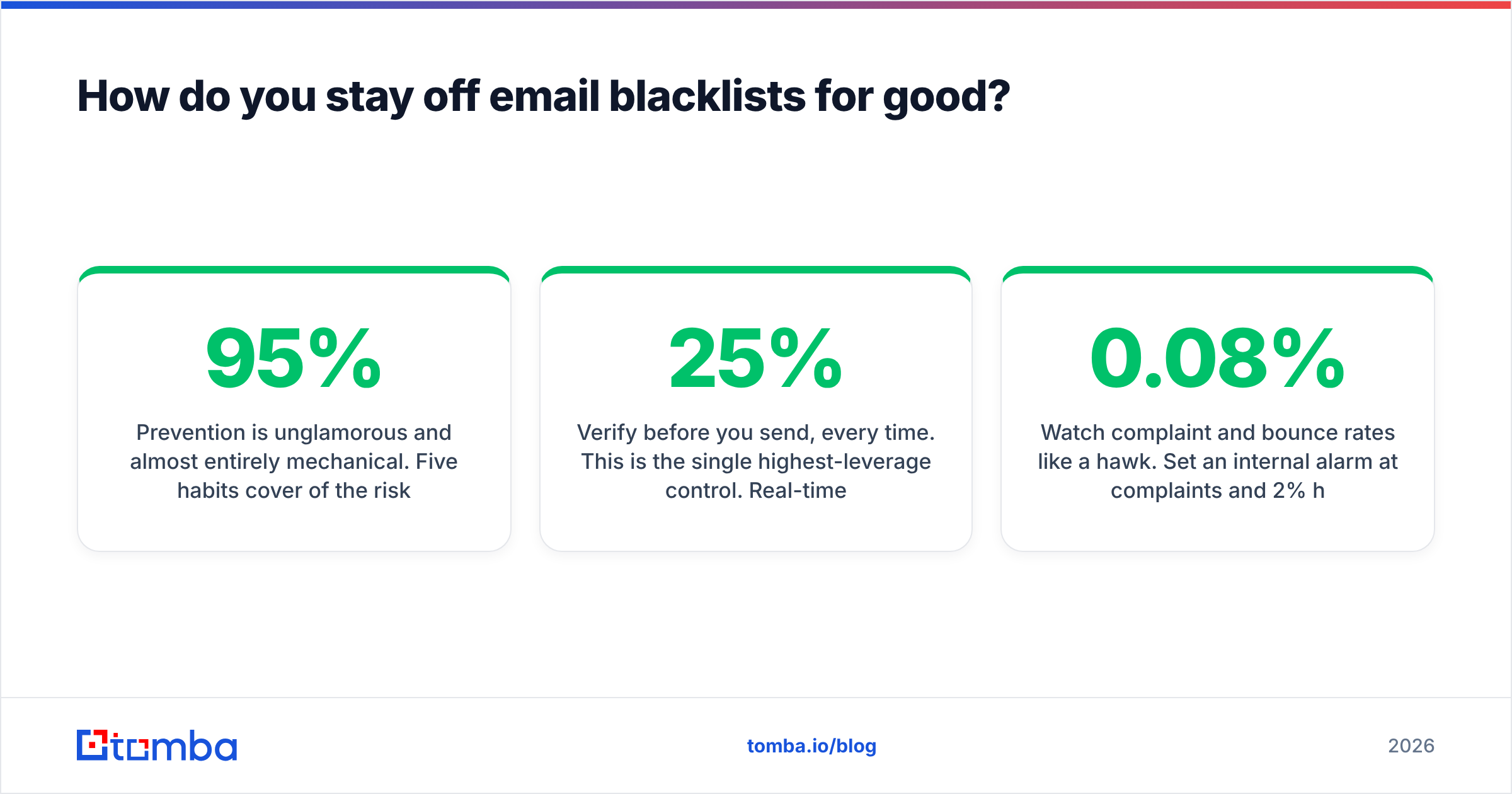
Prevention is unglamorous and almost entirely mechanical. Five habits cover 95% of the risk:
Verify before you send, every time. This is the single highest-leverage control. Real-time verification catches invalid syntax, dead mailboxes, disposable domains, and known trap patterns before they ever reach your sending queue. A list that's six months old is typically 15-25% decayed — people change jobs, companies fold, mailboxes get retired and recycled into traps. Run your list through an email verifier before every campaign, not just at import.
Source addresses rather than guessing them. Permutation tools that generate firstname.lastname@company.com and fire off a send are trap-generating machines. Finding a verified address at a real domain — through a domain search or a pattern-validated lookup — is a categorically different risk profile from guessing at formats and letting the bounce rate sort it out.
Warm up new domains and IPs slowly. Start at 20-30 emails a day and roughly double weekly. A separate sending domain (not your primary corporate domain) contains the blast radius if something goes wrong.
Authenticate everything. SPF, DKIM, and a DMARC policy at least at p=none with reporting enabled so you can see who's spoofing you. Check alignment after every infrastructure change.
Watch complaint and bounce rates like a hawk. Set an internal alarm at 0.08% complaints and 2% hard bounces. Those are the levels where you still have room to correct; by the time you're at the official thresholds, the damage is already logged.
For teams sending at volume, the practical control point is the list-building step. If unverified addresses can't enter your CRM in the first place, most of the downstream deliverability work disappears. Pair pre-send verification with a source of contact data that's validated at collection — Tomba's data sources and verification pipeline exist specifically to keep guessed addresses out of the sending queue.
What's the fastest way to audit your setup right now?#
Fifteen minutes, in this order:
- Look up your sending IP and root domain against Spamhaus, Barracuda, and SpamCop.
- Pull the last 500 bounces and grep the SMTP responses for "blocked," "blacklist," or a list URL.
- Check SPF, DKIM, and DMARC records resolve and align.
- Check your complaint rate in Google Postmaster Tools for the last 30 days.
- Take a random 200-address sample from your active list and run it through verification. If more than 5% come back invalid or risky, your whole list needs a scrub before the next send.
That last step is the one people skip, and it's the one that predicts the next listing.
Stop guessing at addresses before they cost you your domain reputation. The Tomba Email Finder returns verified, source-attributed professional emails instead of permutated guesses — with a confidence score on every result so you know what's safe to send. Start free with 25 searches a month, or move to the Starter plan at $49/mo when your outbound volume justifies it; full Tomba pricing is public, and every tier includes verification. Clean data in, no blacklist out.
Related guides#
Ready to find emails that actually work?
Join 150,000+ professionals who stopped guessing and started sending. Free credits on signup — no credit card required.
Get the Tomba newsletter
Practical outbound tactics and product updates — once every two weeks.
About the author