Email Blast Template: 7 Proven Examples for 2026 Campaigns
Most email blasts fail before anyone reads the subject line. Here are 7 email blast templates that still land in 2026, plus the segmentation and list-hygiene rules that make them work.
TL;DR
- An email blast template is a reusable message skeleton sent to a large segment at once. It works for announcements and offers, and fails badly for anything that needs personalization.
- The template matters less than the list. A 3% bounce rate will sink a perfectly written blast before the copy gets a chance.
- The seven templates below cover product launches, webinars, re-engagement, seasonal offers, newsletters, event invites, and shutdown/change notices.
- Keep blasts under 200 words, with one call to action, one link destination, and a plain-text fallback.
- Segment before you send. A 5,000-person blast split into four segments consistently beats one 5,000-person send on clicks and unsubscribes.
What is an email blast template?#
An email blast template is a pre-written, reusable email structure you send to a large list at roughly the same time. Think of it like a restaurant's set menu: the kitchen prepped the same dish for everyone tonight, and the only thing that changes per table is the name on the ticket.
That's the honest definition, and it explains both the appeal and the risk. Blasts are efficient because you write once and reach thousands. They're risky because everyone gets the same thing, so anything that feels irrelevant gets marked as spam by someone.
The term "email blast" carries baggage from the 2010s, when marketers really did buy lists and spray them. In 2026 the practice survives, but the rules changed. Google and Yahoo's bulk-sender requirements (effective since February 2024, tightened since) mean any sender pushing over 5,000 messages a day to Gmail needs authenticated domains, one-click unsubscribe, and a spam complaint rate under 0.3%. A sloppy blast now costs you your entire sending domain, not just one campaign.
So the modern email blast is really a segmented broadcast: same core template, sent to a defined audience that opted in, with light personalization at the top.
Why do most email blasts fail?#
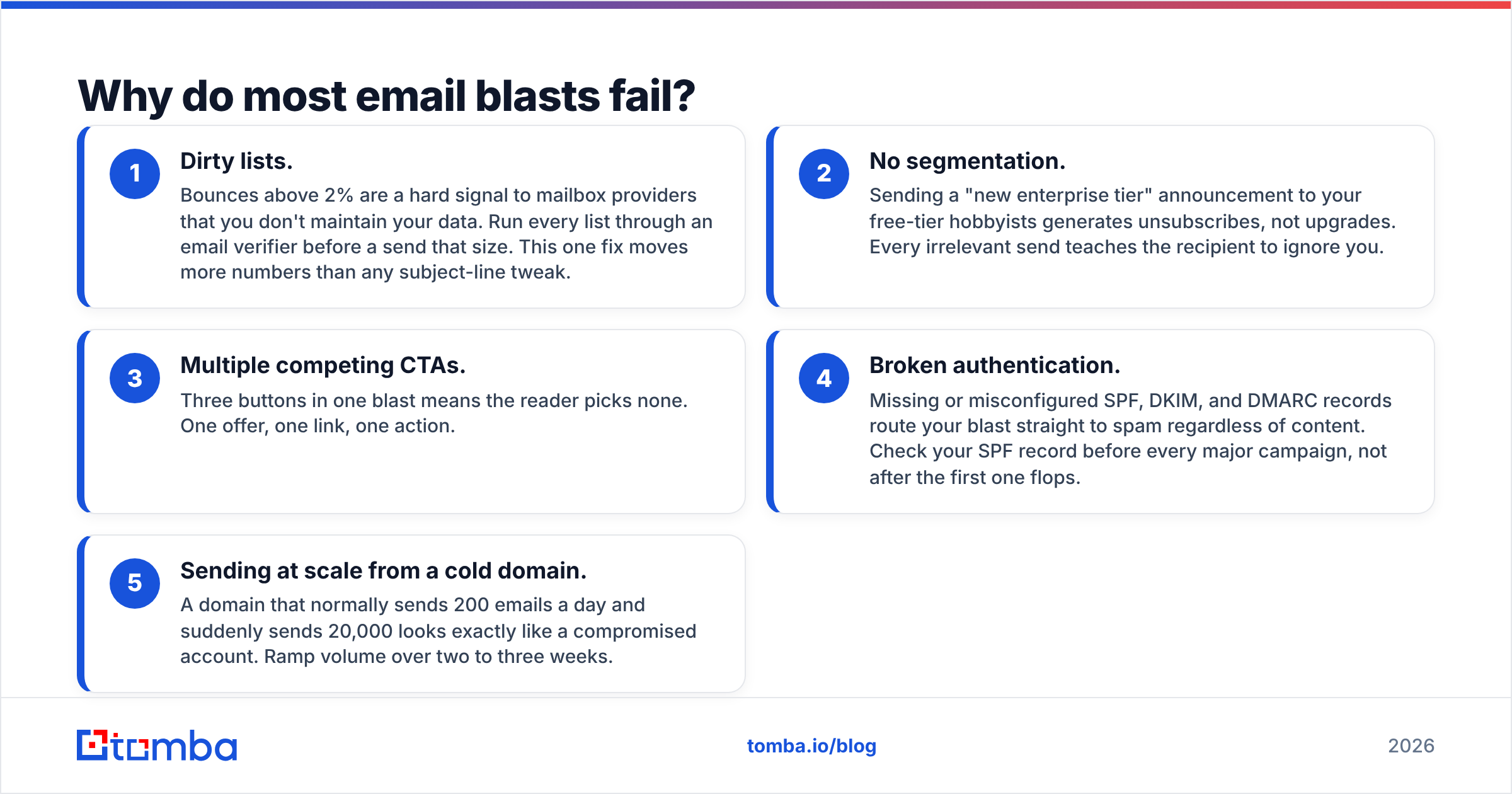
Almost never because of the copy. Here are the five failure modes I see repeatedly, in order of how much damage they do:
- Dirty lists. Bounces above 2% are a hard signal to mailbox providers that you don't maintain your data. Run every list through an email verifier before a send that size. This one fix moves more numbers than any subject-line tweak.
- No segmentation. Sending a "new enterprise tier" announcement to your free-tier hobbyists generates unsubscribes, not upgrades. Every irrelevant send teaches the recipient to ignore you.
- Multiple competing CTAs. Three buttons in one blast means the reader picks none. One offer, one link, one action.
- Broken authentication. Missing or misconfigured SPF, DKIM, and DMARC records route your blast straight to spam regardless of content. Check your SPF record before every major campaign, not after the first one flops.
- Sending at scale from a cold domain. A domain that normally sends 200 emails a day and suddenly sends 20,000 looks exactly like a compromised account. Ramp volume over two to three weeks.
Notice that four of those five are infrastructure and data problems. The template is the last 20% of the work.
What does a high-performing email blast template look like?#
Every blast that performs shares the same six-part anatomy. Use this as your skeleton and fill it per campaign:
- Subject line, 30-50 characters. Specific noun plus a benefit or a number. "Your March invoice is ready" beats "Important update from us." Test variants with a subject line tester before committing 10,000 sends to a guess.
- Preheader, 40-90 characters. This is the second subject line. Never let it default to "View this email in your browser."
- First line, no fluff. State why this email exists in one sentence. If the reader stops here, they should still know what happened.
- Body, 60-120 words. Three short paragraphs maximum. Assume mobile: 46% of opens happen on phones, where a 400-word block is a wall.
- One CTA. A single button or a single inline link, repeated at most twice pointing to the same destination.
- Footer with real unsubscribe. One-click list-unsubscribe header plus a visible link. Hiding it raises complaint rates, which is far worse than losing a subscriber.
Blast vs. segmented campaign vs. cold outreach: which do you need?#
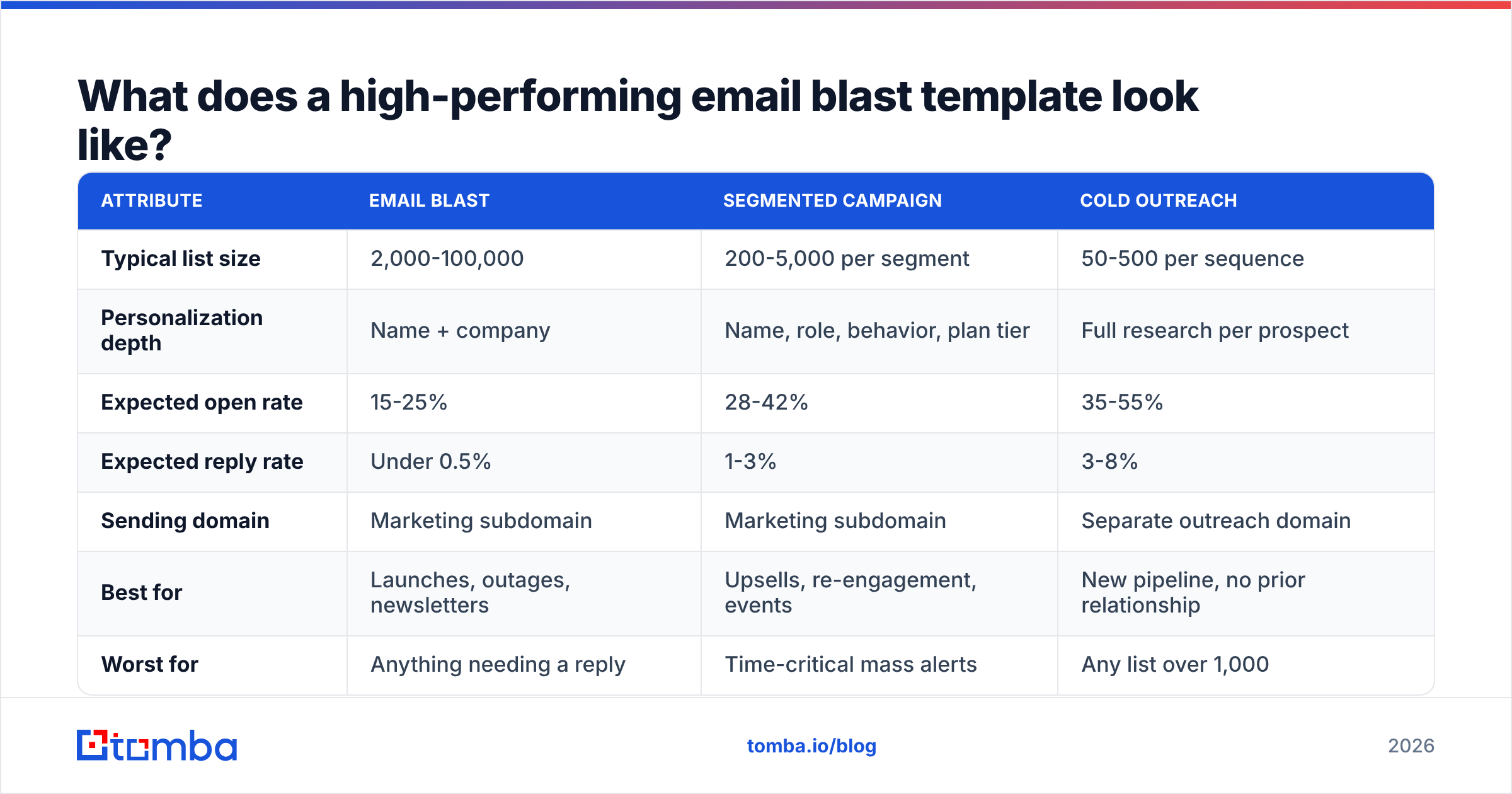
| Attribute | Email blast | Segmented campaign | Cold outreach |
|---|---|---|---|
| Typical list size | 2,000-100,000 | 200-5,000 per segment | 50-500 per sequence |
| Personalization depth | Name + company | Name, role, behavior, plan tier | Full research per prospect |
| Expected open rate | 15-25% | 28-42% | 35-55% |
| Expected reply rate | Under 0.5% | 1-3% | 3-8% |
| Sending domain | Marketing subdomain | Marketing subdomain | Separate outreach domain |
| Best for | Launches, outages, newsletters | Upsells, re-engagement, events | New pipeline, no prior relationship |
| Worst for | Anything needing a reply | Time-critical mass alerts | Any list over 1,000 |
| Consent required | Explicit opt-in | Explicit opt-in | Legitimate interest (region-dependent) |
The takeaway: blasts are a broadcast tool, not a pipeline tool. If your goal is booked meetings, you want the third column and a real email finder feeding it, not a bigger list.
What are the 7 email blast templates worth copying?#
Each of these is a starting point. Replace bracketed fields, cut anything that doesn't apply, and keep the total under 200 words.
1. Product launch blast#
Subject: [Product] is live — [one-line benefit]
Preheader: Available on all plans starting today.
Hi [First name],
[Product/feature] shipped this morning. It [does specific thing] so you can [specific outcome], without [old painful step].
Three things changed:
- [Concrete change 1]
- [Concrete change 2]
- [Concrete change 3]
It's on by default for [plan tier]. Nothing to install.
[See what's new →]
— [Name], [Role]
Why it works: it leads with the change, not with company excitement. Nobody outside your building cares that you're "thrilled to announce."
2. Webinar / event invite blast#
Subject: [Day], [time]: [topic] with [speaker]
Preheader: 30 minutes, live Q&A, recording sent after.
Hi [First name],
We're running a live session on [topic] on [date] at [time + timezone].
[Speaker name], [credential], will cover:
- [Question the audience actually has]
- [Second question]
- [Third question]
It's 30 minutes plus Q&A. Can't make it? Register anyway and we'll send the recording.
[Save my seat →]
Why it works: naming the date in the subject filters for people who are free, and the "register anyway" line typically lifts signups 15-20%.
3. Re-engagement blast#
Subject: Should we stop emailing you?
Preheader: One click either way. No hard feelings.
Hi [First name],
You haven't opened anything from us since [month]. That's a fair signal, so here's the direct question: do you want to keep hearing from us?
[Keep me subscribed →]
If we don't hear back by [date], we'll remove you from the list ourselves. Your data stays yours either way.
Why it works: it's the only blast where a low response rate is still a win. Sunsetting dead contacts protects your email deliverability for every future send.
4. Seasonal / offer blast#
Subject: [X]% off [product] through [date]
Preheader: Applies to annual plans. Ends [day].
Hi [First name],
Through [end date], [product] is [X]% off on annual billing. That's [$ amount] saved versus monthly.
Use code [CODE] at checkout. It applies automatically at the link below.
[Claim the discount →]
Ends [date] at midnight [timezone]. No extensions this time.
Why it works: exact numbers, exact deadline, exact mechanism. Vague "big savings inside" language reads as spam to both filters and humans.
5. Newsletter blast#
Subject: [Number] [things] on [topic] — [Month] edition
Preheader: [Most interesting item in 6 words].
Hi [First name],
Three things worth your time this month:
1. [Headline]. [One sentence of why it matters.] [Read →]
2. [Headline]. [One sentence.] [Read →]
3. [Headline]. [One sentence.] [Read →]
That's it. See you in [next month].
Why it works: predictable structure trains subscribers to open. Multiple links are acceptable here because they all serve the same intent — reading.
6. Change / policy notice blast#
Subject: Changes to [pricing/terms/API] on [date]
Preheader: What changes, who's affected, what you need to do.
Hi [First name],
On [date], [specific change] takes effect.
Who this affects: [segment].
What changes: [one sentence].
What you need to do: [action, or "nothing"].
Full details are in [the changelog]. Reply to this email if something here doesn't add up — a human reads it.
Why it works: the three-header format is scannable in four seconds. Policy blasts that bury the change in paragraph three generate support tickets.
7. Post-event follow-up blast#
Subject: Recording + slides from [event name]
Preheader: Plus the three questions we ran out of time for.
Hi [First name],
Thanks for joining [event]. Everything is here:
- Recording: [link]
- Slides: [link]
- The three questions we didn't get to: [link]
If [topic] is on your roadmap this quarter, [book 15 minutes] and we'll walk through your setup specifically.
— [Name]
Why it works: the value is delivered before the ask, and the ask is scoped to a real segment (people who attended).
Which email blast tools fit which list size?#
Template quality is portable across platforms. What isn't portable is deliverability infrastructure, segmentation depth, and how the tool charges you.
| Tool | Starting price | Free tier | Best for | Weak point |
|---|---|---|---|---|
| Mailchimp | ~$13/mo | 500 contacts, 1,000 sends/mo | Newsletters, small ecommerce | Costs scale steeply past 10k contacts |
| HubSpot Marketing | ~$20/mo (Starter) | 2,000 sends/mo | Blasts tied to CRM data | Advanced segmentation sits in higher tiers |
| Brevo | ~$9/mo | 300 emails/day | Transactional plus marketing in one | Template editor is basic |
| Klaviyo | ~$20/mo | 250 contacts | Ecommerce behavioral blasts | Overkill for B2B announcements |
| Tomba (list layer) | $49/mo Starter | 25 searches/mo | Building and cleaning the list itself | Not a sending platform |
Tomba sits in a different row on purpose. It doesn't send your blast — it makes sure the addresses in it are real. If you're comparing sending platforms head to head, G2's email marketing category has current user-weighted rankings, and HubSpot's own email marketing guide is a solid neutral primer on campaign mechanics.
How do you keep an email blast out of spam?#
Run this checklist before every send over 1,000 recipients. It takes about 20 minutes and prevents the failure that no template can rescue.
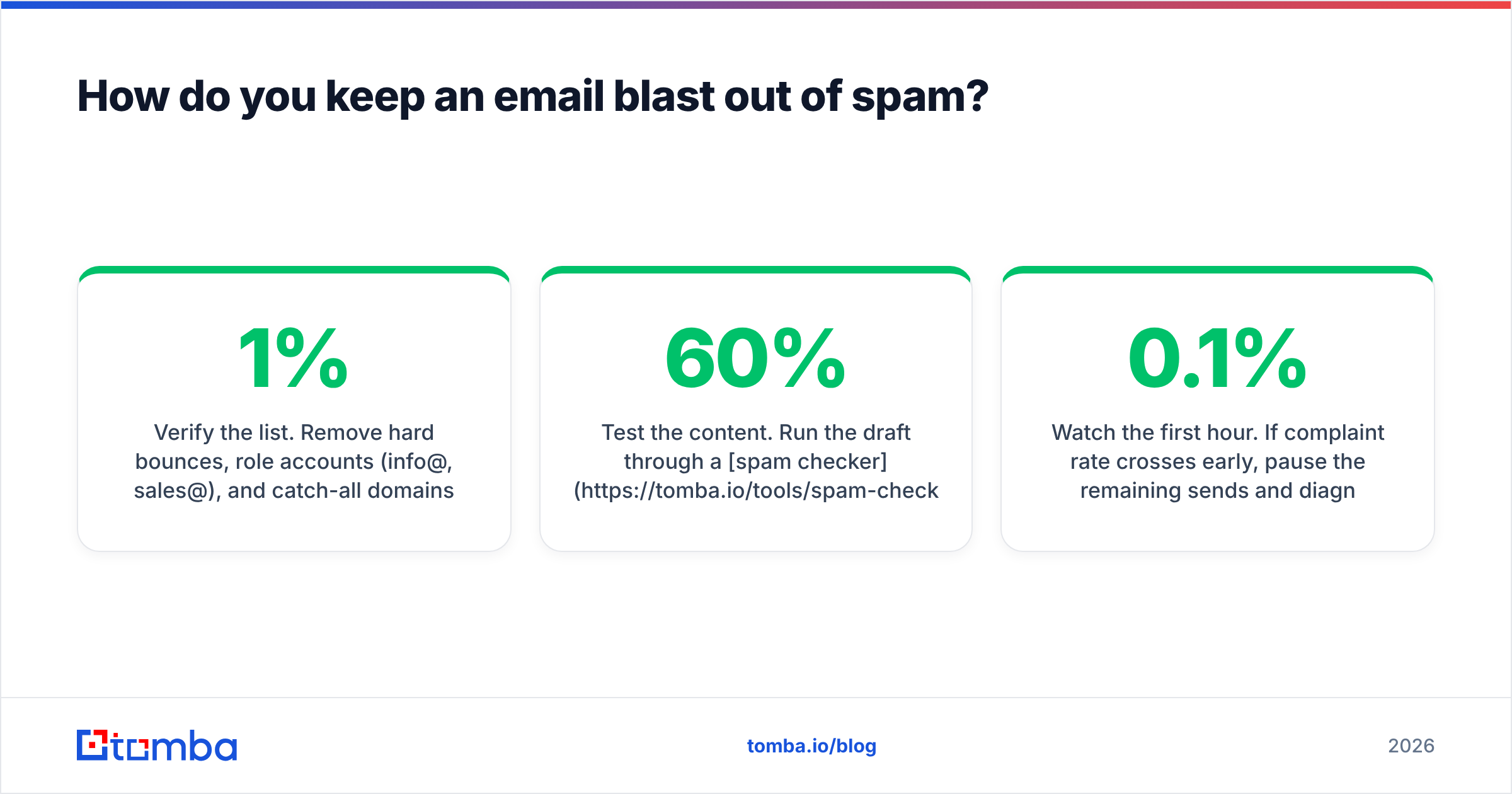
- Verify the list. Remove hard bounces, role accounts (info@, sales@), and catch-all domains you can't confirm. Target under 1% bounce.
- Check authentication. SPF, DKIM, and DMARC all passing on the sending domain. A DMARC policy of
p=noneis the minimum;p=quarantineis better. - Test the content. Run the draft through a spam checker to catch trigger phrases, excessive links, and image-to-text imbalance. Aim for at least 60% text.
- Include one-click unsubscribe. Both the List-Unsubscribe header and a visible footer link. Non-negotiable for bulk senders under current Gmail and Yahoo rules.
- Send a seed test. Mail yourself at Gmail, Outlook, and one corporate domain. Check inbox placement, not just delivery.
- Throttle the send. Spread a 20,000-recipient blast over 4-6 hours rather than firing it in one burst.
- Watch the first hour. If complaint rate crosses 0.1% early, pause the remaining sends and diagnose.
For a fuller technical breakdown of authentication, Wikipedia's DMARC entry is accurate and vendor-neutral.
How often should you send an email blast?#
Match cadence to the template type rather than picking one number for everything:
- Newsletters: weekly or monthly, on a fixed day. Consistency beats frequency.
- Product launches: as they happen, but no more than twice a month or the word "launch" stops meaning anything.
- Offers: four to six per year maximum for B2B, more for ecommerce.
- Re-engagement: quarterly, and always followed by actually removing the non-responders.
- Policy notices: only when something genuinely changed.
The failure pattern is a company that sends nothing for five months, then blasts three times in one week because a quarter is ending. That spike is exactly what filters are built to catch.
Where should the list come from?#
This is where most blast programs quietly break the law or their reputation. Purchased lists are the fastest route to a burned domain — the addresses are stale, seeded with spam traps, and never consented to hearing from you.
Better sources, in order of quality:
- Your own opt-ins. Signups, trials, downloads, event registrations. Highest engagement, lowest risk.
- Enriched first-party records. You have the company and the name from a form; fill in the verified work email with data enrichment rather than guessing.
- Targeted, verified prospecting. For genuine cold outreach (not blasts), find specific decision-makers by company domain and verify each one before adding them to a sequence.
- Purchased lists. Don't. If you must evaluate this route, established providers like BookYourData at least offer verified, compliance-screened B2B data, which is a materially different product from a $50 CSV of scraped addresses — but even then, treat it as a prospecting source for one-to-one outreach, never as a broadcast list.
Ready to fix the list behind your template?#
The best email blast template in the world still bounces if a third of the addresses are dead. Start by cleaning what you have and filling in what's missing: use the Tomba Email Finder to locate verified professional addresses by domain, name, or company, then run your full list through verification before your next send. The free tier gives you 25 searches a month to test the accuracy yourself; paid plans start at $49/mo, and you can see the full breakdown on the Tomba pricing page.
Fix the data first. The template will do its job after that.
Related guides#
Ready to find emails that actually work?
Join 150,000+ professionals who stopped guessing and started sending. Free credits on signup — no credit card required.
Get the Tomba newsletter
Practical outbound tactics and product updates — once every two weeks.
About the author