Email Bounce Back Checker: How to Test Before You Send
A bounce back checker tells you which addresses will fail before your campaign burns your domain. Here's how the checks actually work, what they miss, and which tool fits your list size.
TL;DR
- An email bounce back checker is a pre-send tool that simulates delivery to an address and tells you whether it would hard bounce, soft bounce, or land — without actually sending a message.
- The core mechanism is an SMTP handshake (MX lookup → connect →
RCPT TO) that stops short ofDATA, so nothing hits the recipient's inbox. - Checkers reliably catch syntax errors, dead domains, and unknown mailboxes. They cannot resolve catch-all domains, greylisted servers, or Microsoft 365 tenants that accept everything at the edge.
- Keep hard bounces under 2%. Above 5%, Google and Microsoft start throttling your domain, and recovery takes weeks — not hours.
- Verification is a spend-to-save trade: a $49/mo plan that removes 800 bad addresses from a 10,000-row list is cheaper than one blocked sending domain.
What is an email bounce back checker?#
An email bounce back checker is a tool that predicts whether an email address will bounce before you send to it. Think of it like calling a hotel to confirm a guest is still registered before you mail them a package — you get the answer without the package ever leaving your desk.
The term gets used interchangeably with "email verifier" and "email validator," and functionally they describe the same category. The distinction people draw is one of framing: a verifier answers "is this address real?" and a bounce back checker answers "will this address damage my send?" Same plumbing, different question.
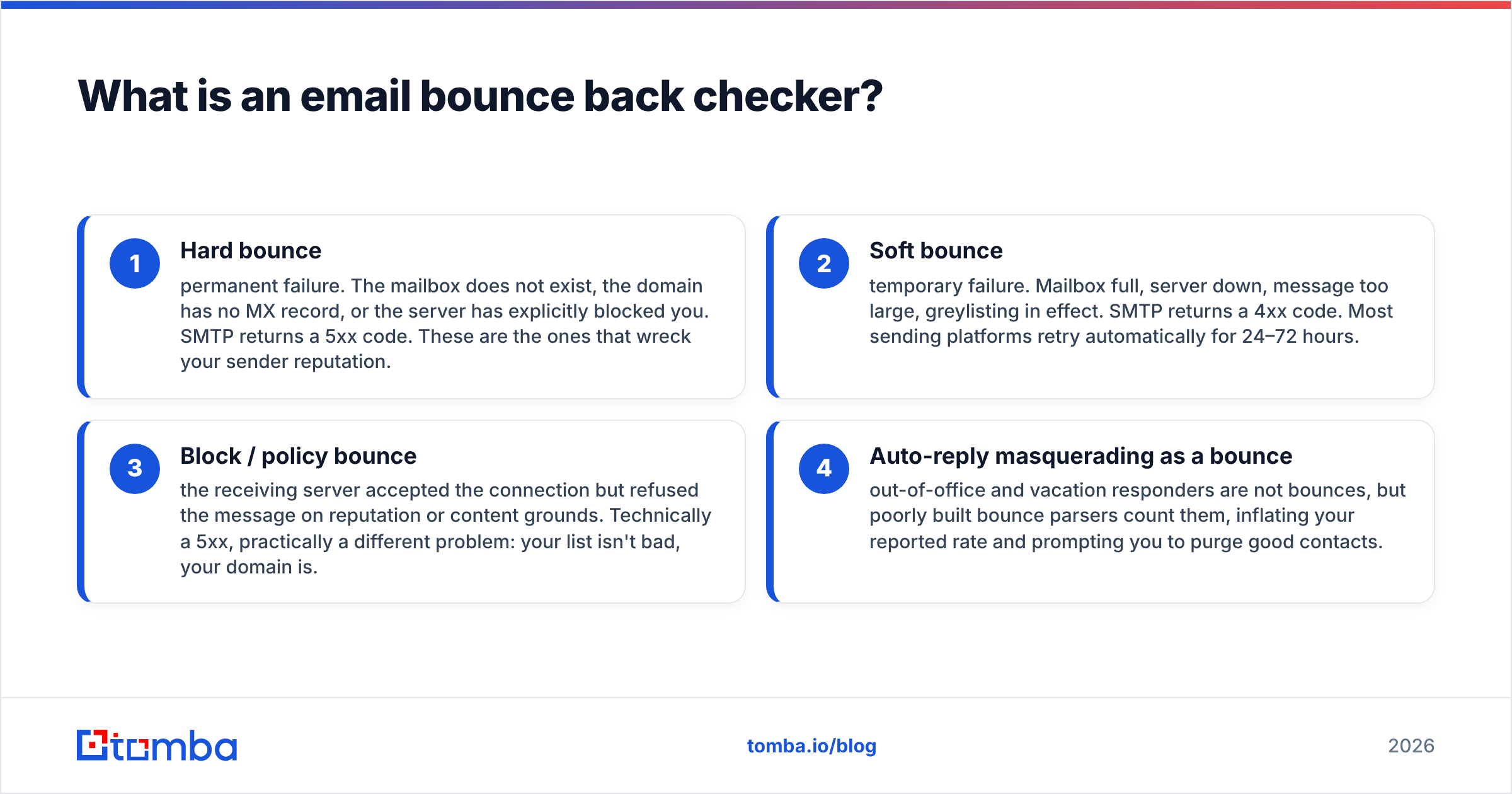
A bounce happens when a receiving mail server rejects your message. Two flavors matter:
- Hard bounce — permanent failure. The mailbox does not exist, the domain has no MX record, or the server has explicitly blocked you. SMTP returns a 5xx code. These are the ones that wreck your sender reputation.
- Soft bounce — temporary failure. Mailbox full, server down, message too large, greylisting in effect. SMTP returns a 4xx code. Most sending platforms retry automatically for 24–72 hours.
- Block / policy bounce — the receiving server accepted the connection but refused the message on reputation or content grounds. Technically a 5xx, practically a different problem: your list isn't bad, your domain is.
- Auto-reply masquerading as a bounce — out-of-office and vacation responders are not bounces, but poorly built bounce parsers count them, inflating your reported rate and prompting you to purge good contacts.
A pre-send checker only addresses category 1, and partially category 2. That limitation is the single most important thing to understand before you buy one.
How does a bounce back checker actually test an address?#
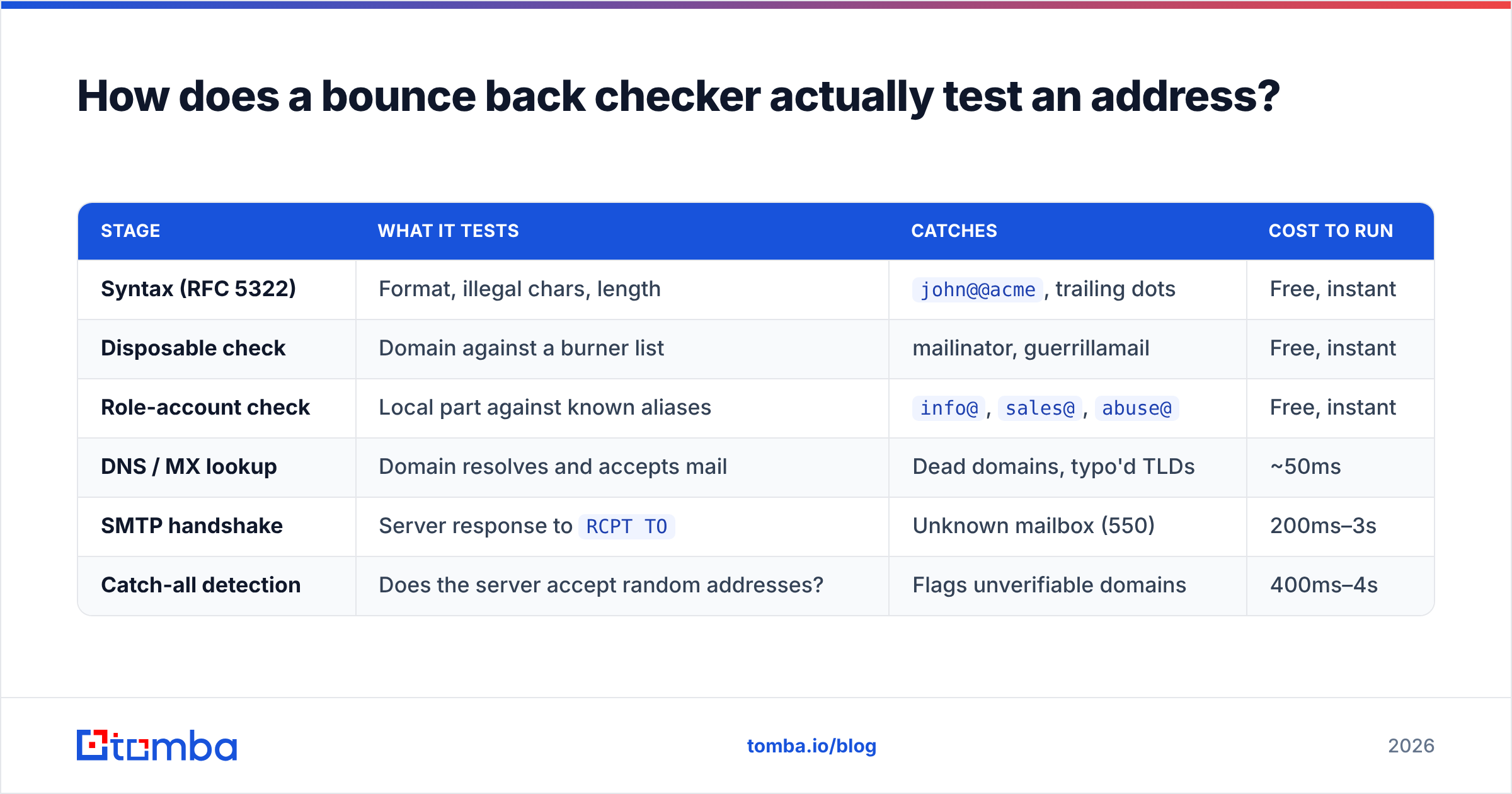
It runs a chain of increasingly expensive checks and short-circuits as soon as it has a verdict. Cheap checks first, network calls last.
| Stage | What it tests | Catches | Cost to run |
|---|---|---|---|
| Syntax (RFC 5322) | Format, illegal chars, length | john@@acme, trailing dots |
Free, instant |
| Disposable check | Domain against a burner list | mailinator, guerrillamail | Free, instant |
| Role-account check | Local part against known aliases | info@, sales@, abuse@ |
Free, instant |
| DNS / MX lookup | Domain resolves and accepts mail | Dead domains, typo'd TLDs | ~50ms |
| SMTP handshake | Server response to RCPT TO |
Unknown mailbox (550) | 200ms–3s |
| Catch-all detection | Does the server accept random addresses? | Flags unverifiable domains | 400ms–4s |
The SMTP handshake is where the real signal lives. The checker looks up the MX record for the domain, opens a connection on port 25, and walks through the protocol: HELO, MAIL FROM, then RCPT TO: <target@domain.com>. If the server replies 250 OK, the mailbox exists. If it replies 550 5.1.1 User unknown, it does not. The checker then sends QUIT before ever issuing DATA — no message body is transmitted, so the recipient sees nothing.
That's the clean case. In practice, a large share of business domains do not behave this way.
Why do bounce checkers fail on catch-all domains?#
Because a catch-all server accepts every RCPT TO it receives, including asdkjh8273@company.com. The 250 OK is meaningless — it tells you the server is configured to swallow everything and sort it out later (or never).
Roughly 20–25% of B2B domains run catch-all or accept-all configurations, and the share is higher among enterprises using Microsoft 365 with Exchange Online Protection at the edge. Most verifiers return these as "accept-all," "risky," or "unknown," and then leave you to decide.
Your options for that bucket:
- Drop them. Safest, and you lose real contacts — often the enterprise accounts you most want.
- Send anyway, isolated. Put catch-alls on a separate sending domain so bounces don't contaminate your primary.
- Use a deeper catch-all check. Some vendors run additional signals — historical engagement data, pattern confidence, secondary MX probes — to give catch-alls a graded score instead of a shrug. Tomba's catch-all verifier is built specifically for this bucket, and it's the reason the "unknown" pile shrinks rather than gets discarded.
The honest framing: no tool resolves catch-alls with certainty, because the information does not exist at the SMTP layer. What good tools do is rank them, so you send to the top 40% and skip the rest.
Two more blockers worth knowing. Greylisting servers return a temporary 4xx to unknown senders on first contact, expecting a retry — a one-shot verifier reads that as inconclusive. And port 25 blocking by cloud providers means some verification infrastructure can't complete handshakes at all, which is why vendors running on residential or dedicated IP pools tend to report cleaner results than those on generic cloud IPs.
What bounce rate should you actually target?#
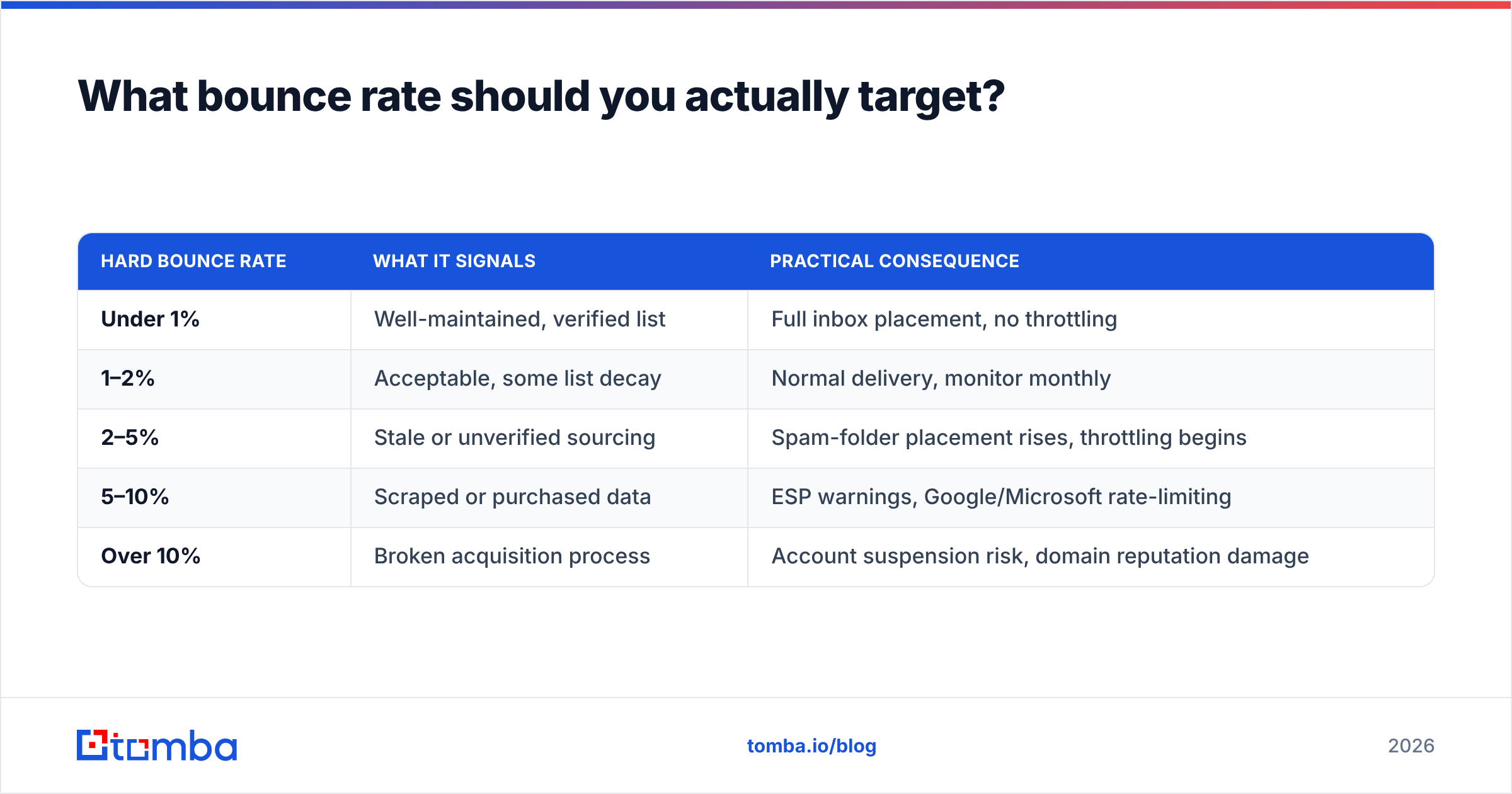
Under 2% hard bounces. That's not a nice-to-have — it's the operational threshold where mailbox providers stop treating you as a normal sender.
| Hard bounce rate | What it signals | Practical consequence |
|---|---|---|
| Under 1% | Well-maintained, verified list | Full inbox placement, no throttling |
| 1–2% | Acceptable, some list decay | Normal delivery, monitor monthly |
| 2–5% | Stale or unverified sourcing | Spam-folder placement rises, throttling begins |
| 5–10% | Scraped or purchased data | ESP warnings, Google/Microsoft rate-limiting |
| Over 10% | Broken acquisition process | Account suspension risk, domain reputation damage |
Google's bulk sender guidelines formalized a lot of this in 2024, and enforcement has only tightened since. Microsoft followed with its own high-volume sender requirements. Both now treat repeated invalid-recipient attempts as a spam signal in their own right, not just a symptom.
The compounding problem: B2B email data decays at roughly 22–30% per year through job changes alone. A list you verified in January is measurably worse by July. This is why one-time cleaning is a strategy that expires — you need verification at the point of import, plus a quarterly re-check on anything you haven't emailed recently.

Which email bounce back checker should you use in 2026?#
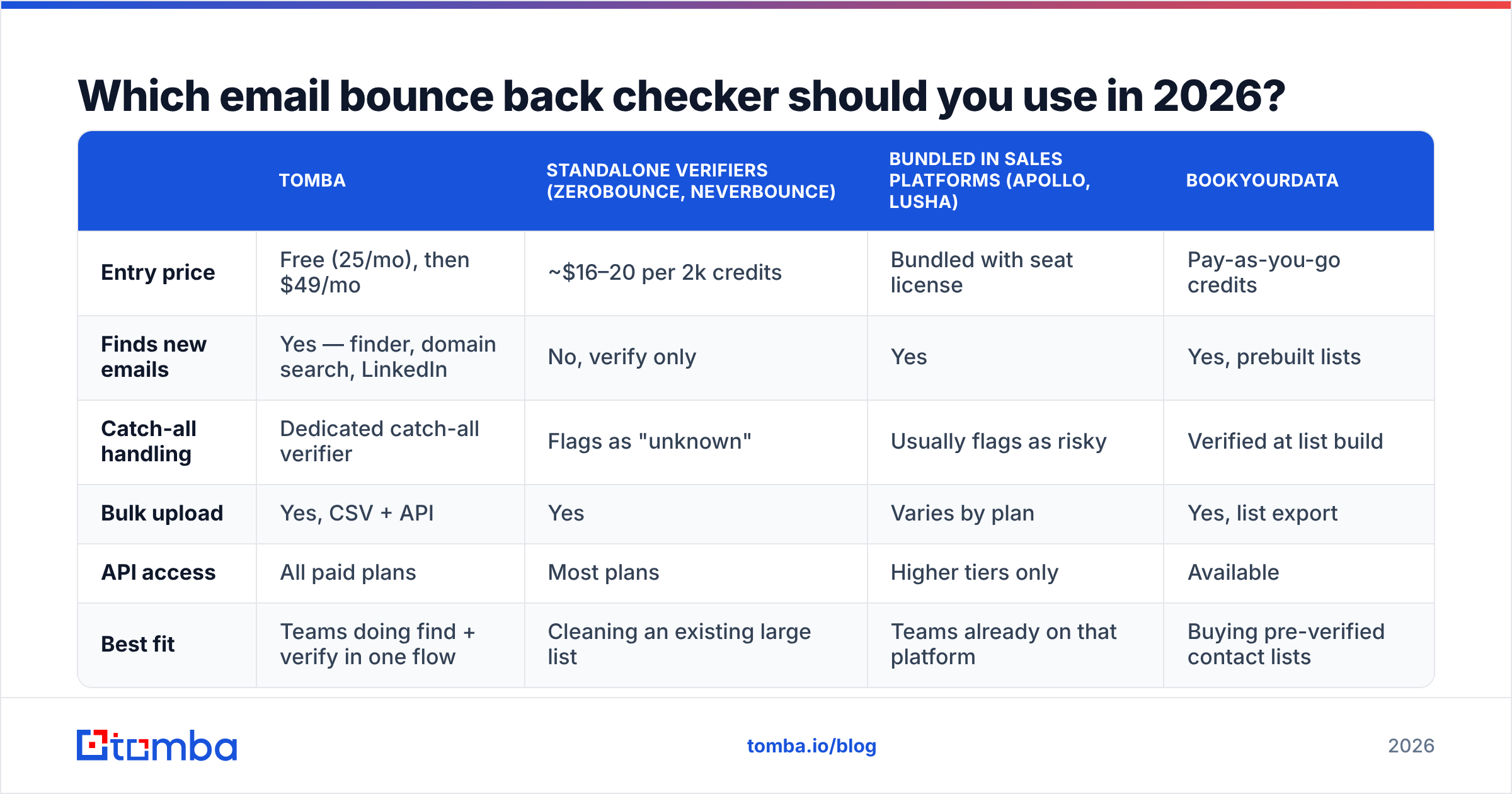
Depends on three things: whether you need to find addresses or only check them, your monthly volume, and whether you need an API.

Accuracy claims from vendors are self-reported and rarely audited, so treat published percentages as directional. What you can test yourself: run 200 known-good addresses and 200 known-dead addresses through a free tier and count the misses in both directions. False negatives (good addresses flagged invalid) cost you pipeline; false positives (dead addresses flagged valid) cost you reputation.
| Tomba | Standalone verifiers (ZeroBounce, NeverBounce) | Bundled in sales platforms (Apollo, Lusha) | BookYourData | |
|---|---|---|---|---|
| Entry price | Free (25/mo), then $49/mo | ~$16–20 per 2k credits | Bundled with seat license | Pay-as-you-go credits |
| Finds new emails | Yes — finder, domain search, LinkedIn | No, verify only | Yes | Yes, prebuilt lists |
| Catch-all handling | Dedicated catch-all verifier | Flags as "unknown" | Usually flags as risky | Verified at list build |
| Bulk upload | Yes, CSV + API | Yes | Varies by plan | Yes, list export |
| API access | All paid plans | Most plans | Higher tiers only | Available |
| Best fit | Teams doing find + verify in one flow | Cleaning an existing large list | Teams already on that platform | Buying pre-verified contact lists |
A few notes on that table. Standalone verifiers are excellent at exactly one job and often cheaper per credit if all you have is a 200,000-row CSV to scrub. BookYourData takes a different approach — selling contacts that are verified at the point of list construction, which suits teams who'd rather buy a clean list than build and clean one. Bundled verification inside sales-engagement platforms is convenient but usually the weakest of the three on catch-alls, because verification isn't the product.

Where a combined finder-plus-verifier makes sense is when your workflow is sourcing, not cleaning. If you're pulling contacts from domain search or LinkedIn and verifying them in the same pass, paying two vendors and moving CSVs between them adds friction for no accuracy gain. Tomba pricing starts free at 25 searches per month, with Starter at $49/mo, Growth at $99/mo, and Pro at $249/mo — verification credits are included rather than metered separately.
How do you set up bounce checking in your actual workflow?#
Verification fails when it's a one-off cleanup project instead of a standing gate. Three insertion points cover most of it:
- At capture. Validate form submissions in real time via API before the record ever reaches your CRM. A typo'd address caught at signup never becomes a bounce. This is the highest-ROI integration and the one most teams skip.
- At import. Every purchased, scraped, or event-sourced list gets bulk-verified before merge. Use a bulk email finder run or a batch API job. Non-negotiable for any list you didn't build yourself.
- On a schedule. Re-verify contacts with no engagement in 90+ days. Job changes are silent — nobody emails you to say their address died.
- After every send. Parse the actual bounce messages and feed hard bounces back as suppressions immediately. Your ESP does some of this; it does not sync back to your source-of-truth database unless you wire it.
Two practical guardrails. First, suppress rather than delete — a deleted contact gets re-imported next quarter and bounces again. Second, watch your bounce rate per sending domain, not just per campaign; a single bad segment can drag an otherwise healthy domain into throttling, and the campaign-level view hides it.
If you want to check individual addresses ad hoc before committing to a plan, a free email checker handles one-offs, and the email verifier covers batch work. For anything programmatic — real-time form validation, CRM enrichment on write, nightly re-verification jobs — the Tomba API is the right entry point.
What does a bounce checker not solve?#
Deliverability. This is the most common and most expensive misunderstanding in outbound.
A clean list gets your message accepted by the receiving server. It does not decide whether the message lands in the inbox or the spam folder. That's determined by authentication (SPF, DKIM, DMARC), domain age and warmup, sending volume ramp, content quality, and engagement history. You can verify a list to 99.5% and still see 4% inbox placement if your domain is cold and your DMARC policy is missing.
Order of operations that actually works:
- Authenticate first — SPF, DKIM, DMARC aligned and passing. Check with an SPF checker before anything else.
- Warm the domain — gradual volume ramp over 3–4 weeks on a new sending domain.
- Verify the list — bounce checking sits here, not first.
- Monitor with Google Postmaster Tools and your ESP's reputation dashboard.
- Segment by engagement and prune non-openers on a schedule.
Independent reviews on G2 consistently show the same pattern in user feedback: teams that treat verification as one layer of a deliverability program get results, and teams that treat it as the whole program don't. Worth reading actual reviews rather than vendor comparison pages — including the vendors' own, and including this one.
Getting started#
If your list is already built and you only need it scrubbed, a standalone verifier will do the job at the lowest per-credit cost. If you're building lists — sourcing contacts by domain, name, or company and needing them verified before they hit your sequencer — consolidating both steps saves more time than it saves money.
That's the case for Tomba Email Finder: find the address and get the deliverability verdict in the same call, with catch-all handling that grades rather than discards. Start on the free tier at 25 searches a month, run your own accuracy test against addresses you already know are good and bad, and only upgrade once the numbers hold up. Any vendor unwilling to let you test that way is telling you something.
Related guides#
Ready to find emails that actually work?
Join 150,000+ professionals who stopped guessing and started sending. Free credits on signup — no credit card required.
Get the Tomba newsletter
Practical outbound tactics and product updates — once every two weeks.
About the author