Email Bounce Codes Explained: SMTP Errors and Fixes
A 550 is not a 421, and treating them the same is why your bounce rate never drops. Here's how to read every SMTP bounce code and what to actually do about each one.
TL;DR
- Every bounce carries a three-digit SMTP reply code plus an enhanced status code (like
550 5.1.1). The first digit tells you whether to retry; the enhanced code tells you why. - 4xx = soft bounce (temporary, retry). 5xx = hard bounce (permanent, remove immediately). Anything you retry more than a handful of times against a 5xx is actively damaging your sender reputation.
- The three codes that account for most B2B bounces:
550 5.1.1(no such user),550 5.7.1(policy/blocklist rejection), and421 4.7.0(rate limited). - Bounce rate above 2% puts you in Gmail and Yahoo's penalty zone; above 5% and most ESPs will suspend your account.
- The only reliable fix is upstream: verify before you send. Cleaning up after the bounce is triage, not treatment.
What Are Email Bounce Codes?#
An email bounce code is the numeric response a receiving mail server sends back when it refuses to accept or deliver your message. Think of it like a returned package: the courier does not just hand it back blank, it comes with a sticker — "address unknown," "recipient moved," "package too large," "delivery attempted, retry tomorrow." The sticker tells you whether to fix the address, resize the box, or just wait.
SMTP defines two layers of code, and most people only read the first.
The basic reply code (RFC 5321) is three digits, and only the first digit really matters for your decision:
- 2xx — Success. The receiving server accepted the message.
250 OKis what you want. - 4xx — Transient failure (soft bounce). Something temporary went wrong. The sending server will queue and retry, usually for 24–72 hours.
- 5xx — Permanent failure (hard bounce). The server will never accept this message. Retrying is pointless and, at volume, harmful.
The enhanced status code (RFC 3463) is the X.Y.Z part — 5.1.1, 4.7.0, 5.2.2. The first digit repeats the class (4 or 5), the second digit is the subject (1 = address, 2 = mailbox, 4 = network, 5 = protocol, 7 = security/policy), and the third is the detail. This is where the actual diagnosis lives.
So 550 5.1.1 reads as: permanent failure, address problem, the address does not exist. And 421 4.7.0 reads as: temporary failure, security/policy, you are being throttled.
What Is the Difference Between a Hard Bounce and a Soft Bounce?#
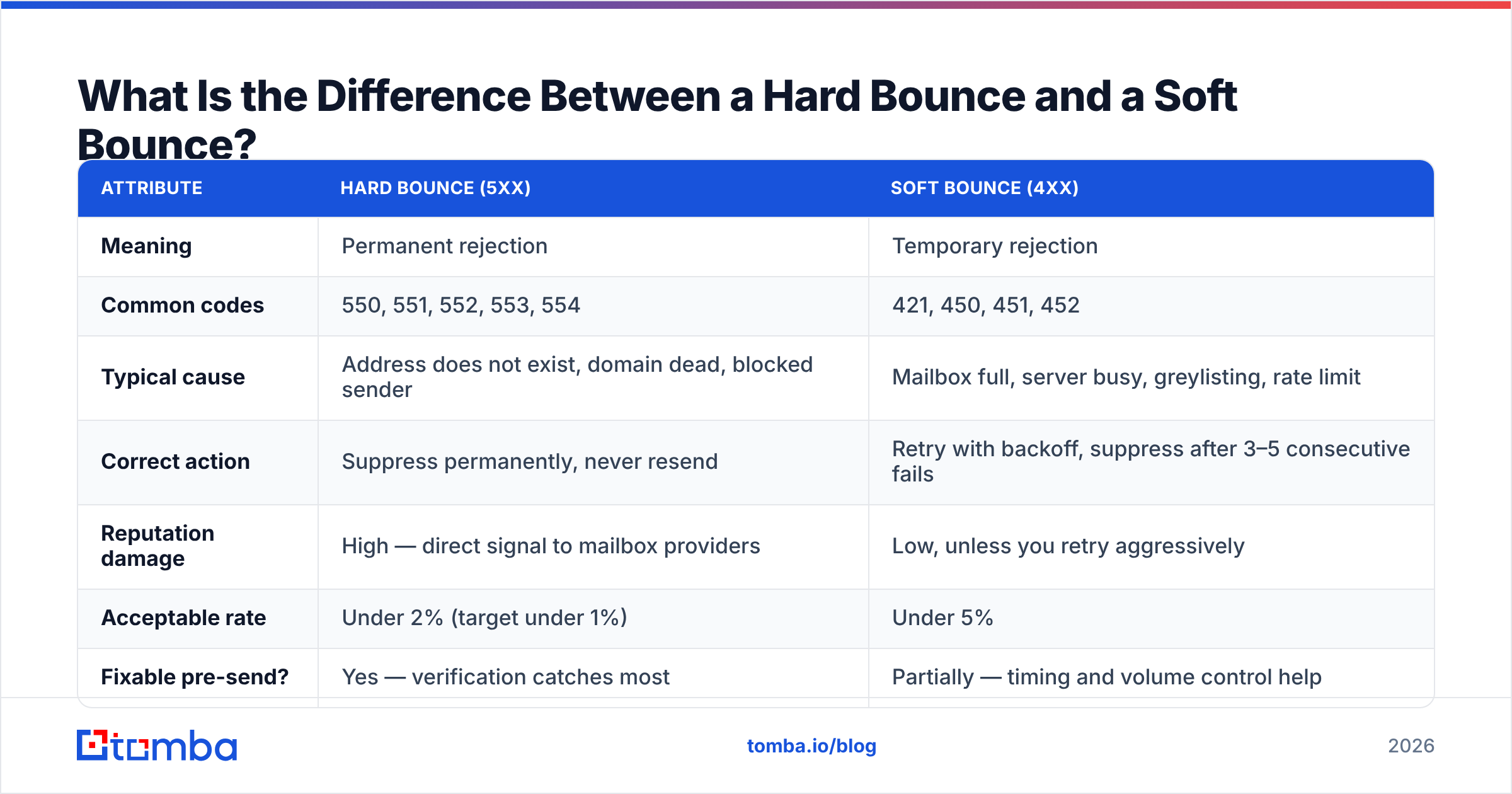
The distinction drives every downstream decision — suppression, retry logic, list hygiene, and whether your domain survives the quarter.
| Attribute | Hard bounce (5xx) | Soft bounce (4xx) |
|---|---|---|
| Meaning | Permanent rejection | Temporary rejection |
| Common codes | 550, 551, 552, 553, 554 | 421, 450, 451, 452 |
| Typical cause | Address does not exist, domain dead, blocked sender | Mailbox full, server busy, greylisting, rate limit |
| Correct action | Suppress permanently, never resend | Retry with backoff, suppress after 3–5 consecutive fails |
| Reputation damage | High — direct signal to mailbox providers | Low, unless you retry aggressively |
| Acceptable rate | Under 2% (target under 1%) | Under 5% |
| Fixable pre-send? | Yes — verification catches most | Partially — timing and volume control help |
The trap is that some soft bounces are hard bounces wearing a disguise. Greylisting (450 4.7.1) is a legitimate anti-spam tactic where a server rejects a first-time sender and expects a retry — that one you should retry. But 450 from a server that has rejected you seventeen times in a row is telling you something about your reputation, not your timing. Track consecutive soft bounces per address and per domain, and promote to suppression after three to five.
Which Email Bounce Codes Actually Matter?#
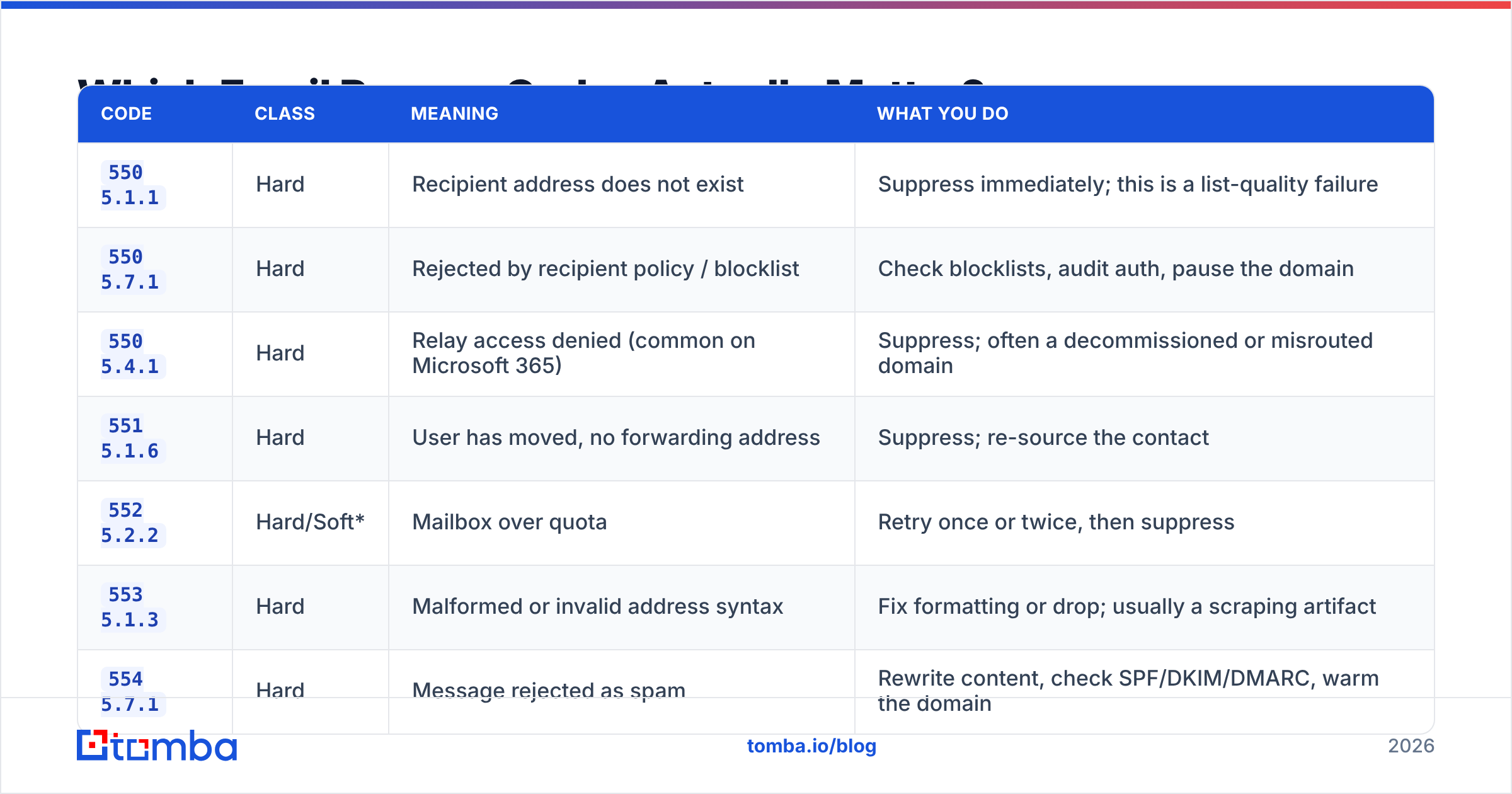
There are dozens of codes in the specs. In practice, roughly eight of them cover the overwhelming majority of B2B outbound bounces.
| Code | Class | Meaning | What you do |
|---|---|---|---|
550 5.1.1 |
Hard | Recipient address does not exist | Suppress immediately; this is a list-quality failure |
550 5.7.1 |
Hard | Rejected by recipient policy / blocklist | Check blocklists, audit auth, pause the domain |
550 5.4.1 |
Hard | Relay access denied (common on Microsoft 365) | Suppress; often a decommissioned or misrouted domain |
551 5.1.6 |
Hard | User has moved, no forwarding address | Suppress; re-source the contact |
552 5.2.2 |
Hard/Soft* | Mailbox over quota | Retry once or twice, then suppress |
553 5.1.3 |
Hard | Malformed or invalid address syntax | Fix formatting or drop; usually a scraping artifact |
554 5.7.1 |
Hard | Message rejected as spam | Rewrite content, check SPF/DKIM/DMARC, warm the domain |
421 4.7.0 |
Soft | Too many connections / rate limited | Slow send rate, retry with exponential backoff |
450 4.2.1 |
Soft | Mailbox temporarily unavailable | Retry over 24–48h |
451 4.3.0 |
Soft | Local processing error at receiver | Retry; not your problem unless persistent |
*Some providers return 552 as a hard 5xx even though the underlying condition (full mailbox) is temporary. Treat it as soft for two attempts, then suppress.
One more wrinkle: Google and Microsoft both append human-readable text and their own reference URLs to bounce messages. A Gmail rejection often looks like 550-5.7.26 Unauthenticated email from example.com is not accepted due to domain's DMARC policy. That text is more diagnostic than the number — read it. Google publishes the full list of its SMTP error codes in the Gmail sender guidelines, and Microsoft maintains an equivalent reference for Exchange Online.
Why Does Your Bounce Rate Matter So Much in 2026?#
Because mailbox providers now use bounce rate as a primary trust signal, and the thresholds have hardened.
Since the Google and Yahoo bulk-sender requirements took effect in 2024, senders pushing more than 5,000 messages a day to those domains must authenticate with SPF, DKIM, and DMARC, offer one-click unsubscribe, and keep spam complaints under 0.3%. Bounce rate is not published as a hard threshold in those rules, but it feeds directly into the reputation model that decides whether your mail lands in the inbox, the spam folder, or nowhere at all.
Practical benchmarks that hold up in B2B outbound:
- Under 1% — healthy. Your list hygiene and email deliverability practices are working.
- 1–2% — acceptable but drifting. Audit your data sources.
- 2–5% — actively hurting you. Mailbox providers are downgrading your sender reputation with every send.
- Above 5% — most sending platforms (Instantly, Smartlead, Mailchimp, Klaviyo) will throttle, warn, or suspend the account.
The compounding problem is that bounces do not just fail — they poison the sends around them. A 6% bounce rate on Monday means your Tuesday campaign to good addresses lands in spam. You are not losing 6% of your pipeline; you are losing a chunk of the other 94% too.
How Do You Diagnose a Bounce Code Correctly?#
Work through it in this order. Most teams skip step one and start rewriting subject lines, which fixes nothing.
- Read the enhanced code and the free text, not just the 3-digit number.
550alone tells you almost nothing.550 5.7.1and550 5.1.1demand completely different responses — one is a reputation crisis, the other is a data-quality issue. - Check whether the bounce is address-specific or domain-wide. If ten addresses at one company all bounce
550 5.1.1, the pattern is probably a wrong email format, not ten dead people. Run the domain through a domain search to confirm the actual pattern in use. - Check authentication before blaming content. Run an SPF checker and confirm your DKIM signature and DMARC policy align. A large share of
550 5.7.xand554rejections are auth failures, not spam-filter judgments. - Check blocklists. If you are seeing
550 5.7.1across many unrelated domains simultaneously, your sending IP or domain is probably listed. A blacklist checker against Spamhaus, SORBS, and Barracuda takes 30 seconds. - Check volume and ramp. A wall of
421 4.7.0is not a list problem. You are sending too fast for a warm-up stage your domain has not reached. - Then, and only then, look at content. Spam-trigger words matter far less than authentication and list quality, despite what most blog posts imply.
How Do You Prevent Bounces Before They Happen?#
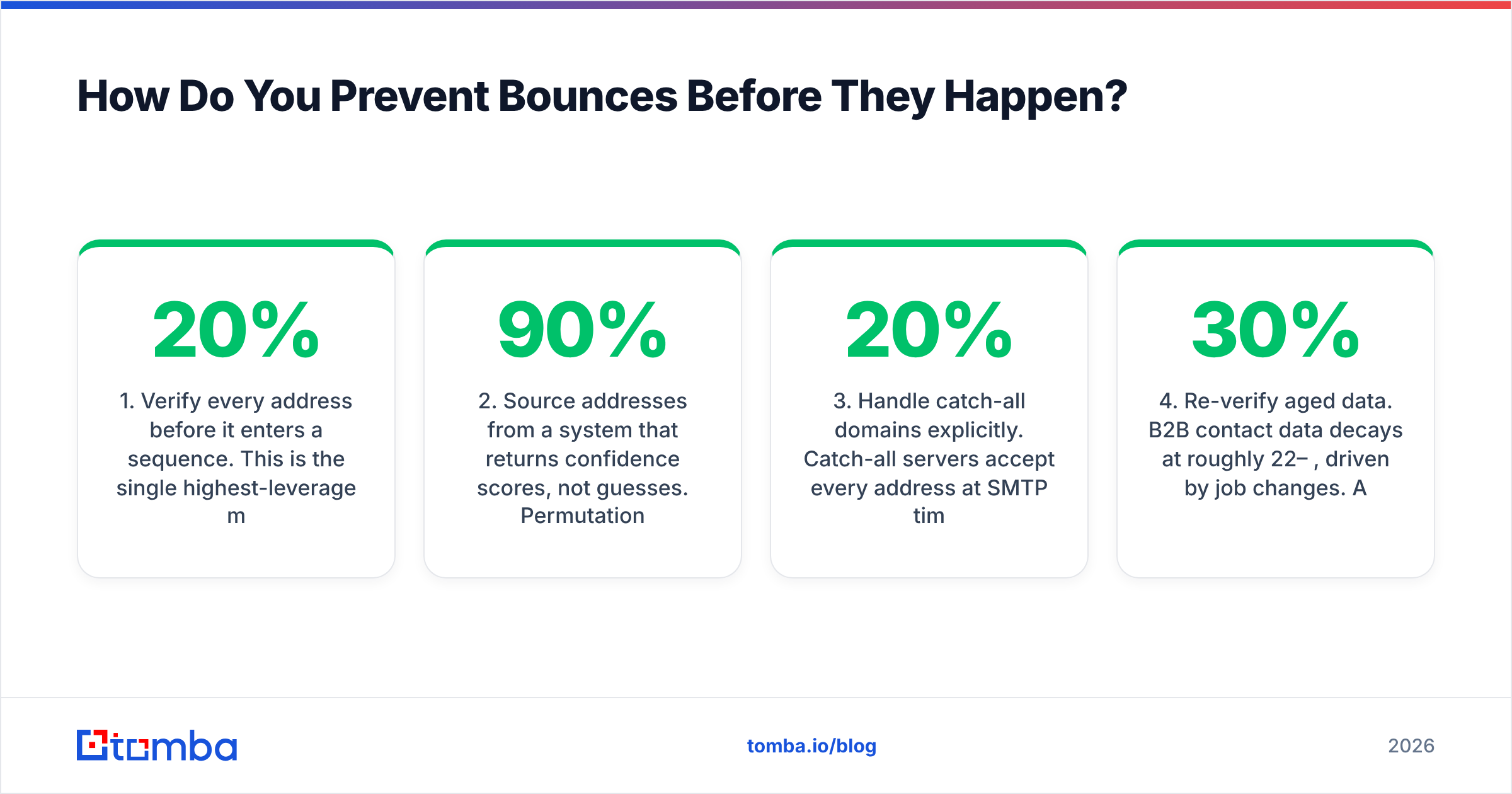
Every bounce is a decision you made weeks earlier. The prevention stack, in order of impact:
1. Verify every address before it enters a sequence. This is the single highest-leverage move and it is not close. A real-time email verifier performs syntax validation, MX record lookup, and SMTP handshake checks to confirm a mailbox exists before you burn reputation finding out the hard way. Verification typically removes 8–20% of a scraped or purchased list — those are the 550 5.1.1 bounces you never see.
2. Source addresses from a system that returns confidence scores, not guesses. Permutation tools that generate first.last@domain.com and hope for the best are the primary source of 553 5.1.3 and 550 5.1.1 bounces. A proper email finder cross-references public sources and pattern data, then returns a confidence score you can threshold on. Anything under 90% should go through verification or get dropped.
3. Handle catch-all domains explicitly. Catch-all servers accept every address at SMTP time, then bounce asynchronously — or silently discard. Standard verification returns "unknown" here. A dedicated catch-all verifier applies additional signals to separate real mailboxes from accept-everything black holes. Roughly 15–20% of B2B domains are catch-all, so ignoring this bucket means either sending blind or discarding a fifth of your TAM.
4. Re-verify aged data. B2B contact data decays at roughly 22–30% per year, driven by job changes. A list verified in January is measurably worse by July. Re-verify anything older than 90 days before reuse, and run bulk verify on your CRM export quarterly.
5. Warm the domain and control ramp. New domains sending 500 cold emails on day one will collect 421 and 554 codes regardless of list quality. Ramp over 4–6 weeks and cap daily volume per mailbox.
6. Segment suppression properly. Hard bounces go on a permanent global suppression list. Soft bounces go on a per-campaign counter that promotes to suppression after three consecutive failures. Never let a suppressed address re-enter through a new list import — dedupe on the way in.
How Do Verification Tools Compare on Bounce Prevention?#
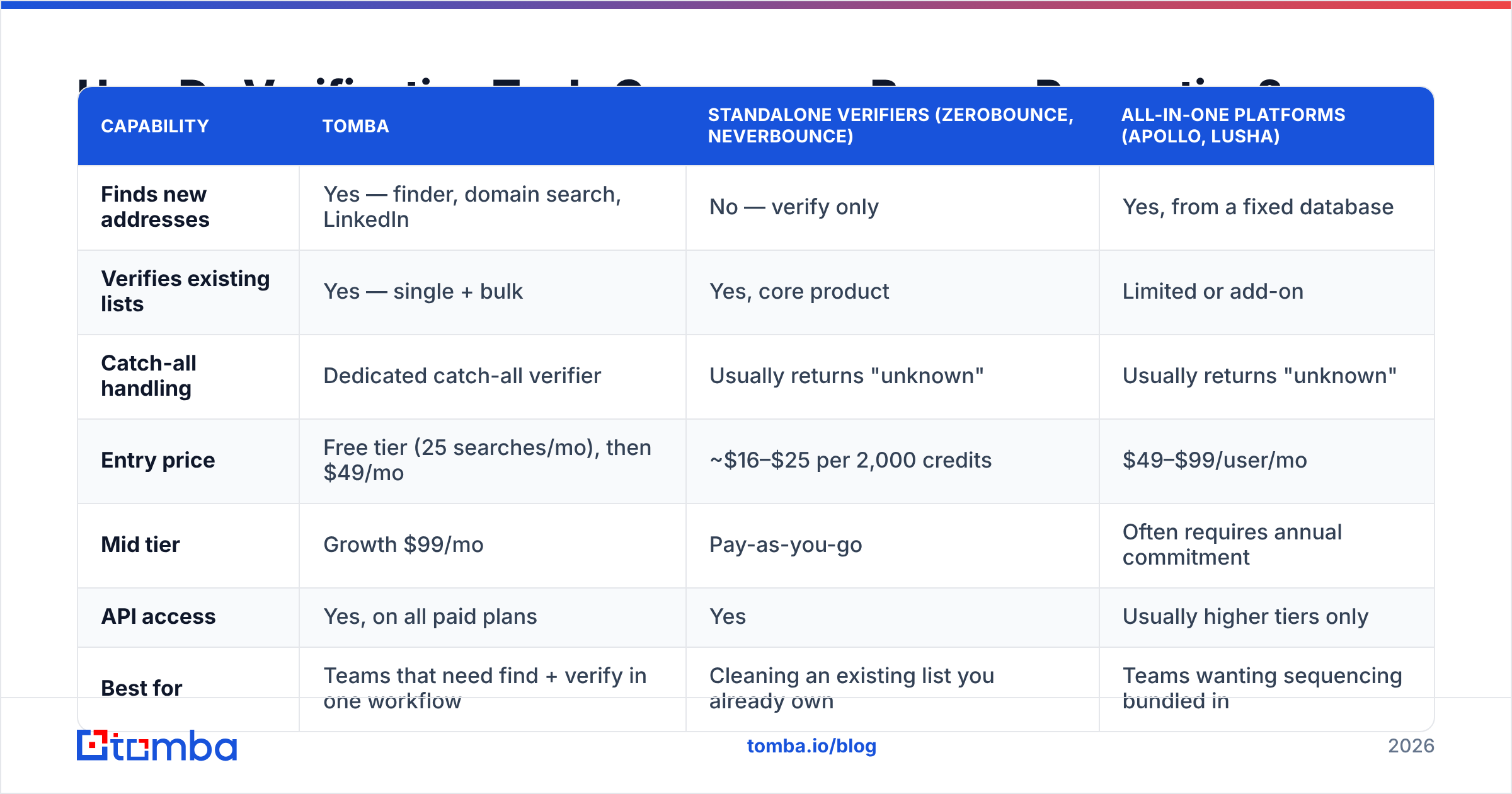
The verification market splits into three rough categories, and the right choice depends on whether you need finding, verifying, or both.
| Capability | Tomba | Standalone verifiers (ZeroBounce, NeverBounce) | All-in-one platforms (Apollo, Lusha) |
|---|---|---|---|
| Finds new addresses | Yes — finder, domain search, LinkedIn | No — verify only | Yes, from a fixed database |
| Verifies existing lists | Yes — single + bulk | Yes, core product | Limited or add-on |
| Catch-all handling | Dedicated catch-all verifier | Usually returns "unknown" | Usually returns "unknown" |
| Entry price | Free tier (25 searches/mo), then $49/mo | ~$16–$25 per 2,000 credits | $49–$99/user/mo |
| Mid tier | Growth $99/mo | Pay-as-you-go | Often requires annual commitment |
| API access | Yes, on all paid plans | Yes | Usually higher tiers only |
| Best for | Teams that need find + verify in one workflow | Cleaning an existing list you already own | Teams wanting sequencing bundled in |
If you already have a list and only need to clean it, a standalone verifier is fine and often cheaper per credit. If you are building lists and sending from them, splitting finding and verification across two vendors introduces a gap — addresses found on Monday and verified on Thursday drift in between. Doing both in one pipeline closes that window. You can compare Tomba pricing against per-credit verifier costs directly; the break-even usually lands around 3,000–5,000 contacts a month.
For teams evaluating providers, both G2 and Capterra maintain current category comparisons with verified reviews, which is a more reliable signal than vendor-published accuracy claims.
What Should Your Bounce Handling Workflow Look Like?#
A concrete, repeatable process beats reacting to each bounce individually:
- Ingest — Parse the bounce webhook from your sending platform. Extract the SMTP code, enhanced code, and the free-text reason. Store all three; the text is often the only thing that explains a generic
550. - Classify — Map to hard / soft / policy. Policy bounces (
5.7.x) are their own class: they are not list problems and suppressing the address does not fix them. - Act — Hard → permanent suppression. Soft → retry with backoff, increment a counter. Policy → alert a human, pause the sending domain.
- Root-cause weekly — Group bounces by receiving domain and by source. If one lead source produces 4x the bounce rate of others, kill the source, not the campaign.
- Re-verify quarterly — Run the full CRM through bulk verification. Suppress the dead, enrich the stale, and update the records that moved.
The teams with sub-1% bounce rates are not lucky. They verify at the point of capture, they classify bounces automatically, and they treat a rising bounce rate as a data-sourcing alarm rather than a sending problem.
Start Fixing Bounces at the Source#
You cannot fix a 550 5.1.1 after the fact — the send already happened, the reputation hit already landed. The only durable fix is to never send to that address in the first place.
Tomba's Email Finder returns confidence-scored professional addresses from a domain, name, or company, with verification built into the same workflow so found addresses are checked before they reach your sequencer. The free tier gives you 25 searches a month to test accuracy against your own known-good contacts, and Starter runs $49/mo when you are ready to scale. Run it against a list you already know the answers to — that is the only benchmark that matters.
Related guides#
Ready to find emails that actually work?
Join 150,000+ professionals who stopped guessing and started sending. Free credits on signup — no credit card required.
Get the Tomba newsletter
Practical outbound tactics and product updates — once every two weeks.
About the author