Email Bounce Reasons: 12 Causes and How to Fix Them
Bounces are not random. Every bounce code maps to a specific cause you can diagnose and fix. Here are the 12 email bounce reasons that actually matter, what each SMTP code means, and the fix order that protects your sender reputation.
TL;DR
- A bounce is not a failure signal — it's a diagnostic. The SMTP response code tells you exactly which of roughly 12 causes fired.
- Hard bounces (bad recipient, dead domain) burn sender reputation immediately. Soft bounces (full mailbox, greylisting, throttling) are usually temporary and retryable.
- Keep your bounce rate under 2%. Above 5%, Google and Microsoft start throttling you; above 10%, most ESPs suspend the account.
- Roughly 70% of bounces on cold lists trace back to one thing: contacts that were never verified before send. Verification is cheaper than reputation repair.
- The fix order matters — clean the list first, then authentication, then sending volume, then content. Reversing that order wastes weeks.
What Is an Email Bounce, Exactly?#
An email bounce is a rejection notice. Your sending server hands the message to the recipient's mail server, that server refuses it, and you get back a Non-Delivery Report (NDR) with a numeric code and a human-readable string.
Think of it like a returned parcel. The courier tag tells you why: wrong address, nobody home, box full, or the recipient refused delivery. Same package, four completely different problems — and four completely different fixes. Treating every returned parcel as "bad address" is how people delete good contacts and keep sending to broken ones.
The code structure comes from SMTP status codes. The first digit is what matters most:
- 4xx — transient failure. The server is saying "not right now." Your ESP will retry, usually for 24–72 hours.
- 5xx — permanent failure. The server is saying "never." Retrying wastes reputation.
Everything else — the enhanced status code (5.1.1, 4.2.2, 5.7.1) and the vendor string — narrows the cause.
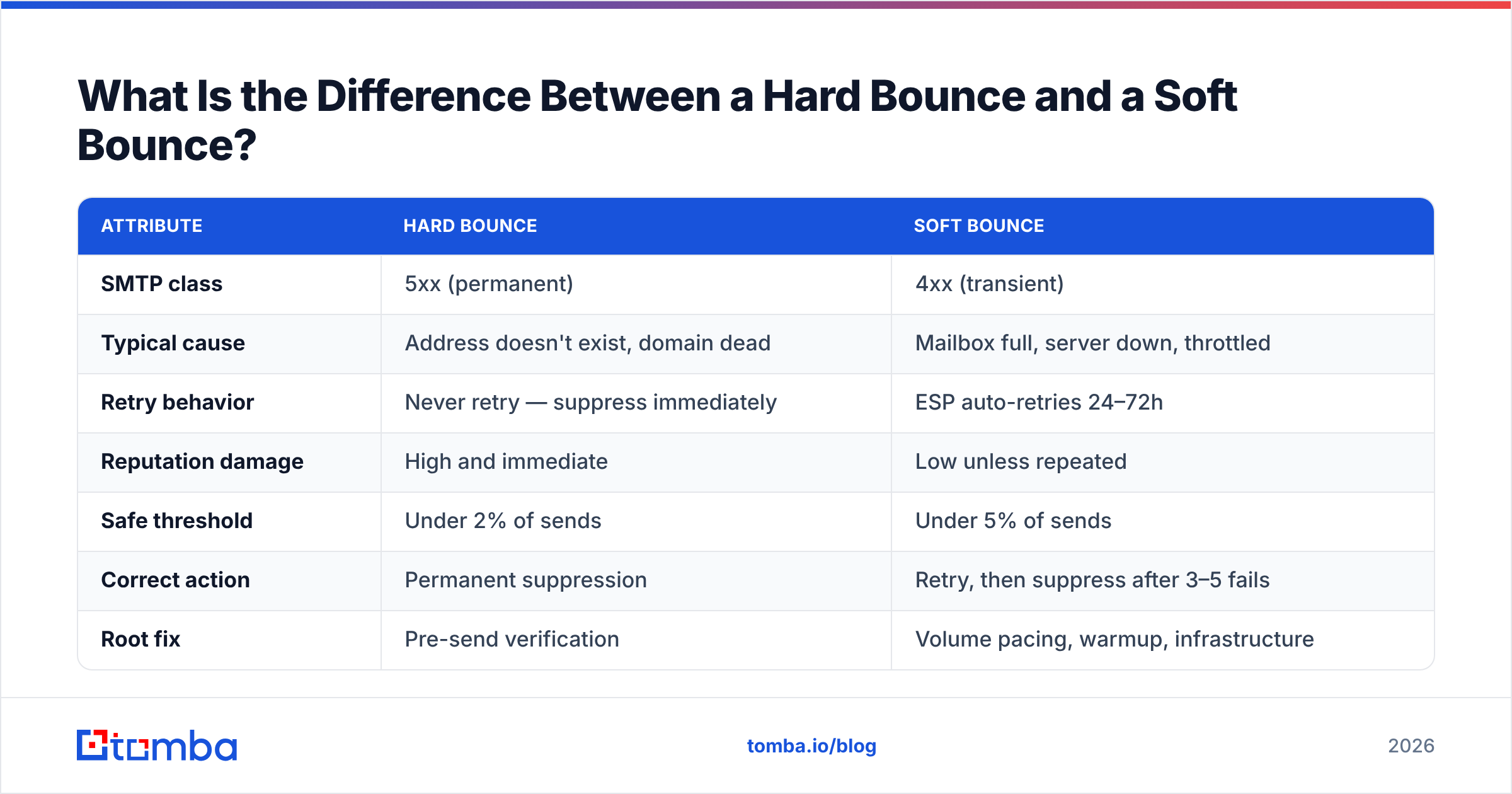
What Is the Difference Between a Hard Bounce and a Soft Bounce?#
| Attribute | Hard bounce | Soft bounce |
|---|---|---|
| SMTP class | 5xx (permanent) | 4xx (transient) |
| Typical cause | Address doesn't exist, domain dead | Mailbox full, server down, throttled |
| Retry behavior | Never retry — suppress immediately | ESP auto-retries 24–72h |
| Reputation damage | High and immediate | Low unless repeated |
| Safe threshold | Under 2% of sends | Under 5% of sends |
| Correct action | Permanent suppression | Retry, then suppress after 3–5 fails |
| Root fix | Pre-send verification | Volume pacing, warmup, infrastructure |
The practical rule: a hard bounce means the list was wrong. A soft bounce means the sending was wrong. You fix those with different tools, and confusing them is the single most common mistake in bounce triage.
One nuance that trips people up — some providers return a soft-looking 4xx for what is actually a permanent problem, because they don't want to leak whether an address exists. Microsoft 365 and many corporate gateways do this deliberately. If the same address soft-bounces five sends in a row, treat it as hard and suppress it.
What Are the 12 Most Common Email Bounce Reasons?#
Here is the full list, ordered by how often they show up in real B2B outbound data, with the code you'll see and the fix.
1. Recipient address does not exist (550 5.1.1) The dominant hard bounce. The mailbox was deleted, the person left, or the address was guessed from a pattern and guessed wrong. Fix: verify before you send. There is no post-hoc remedy.
2. Domain does not exist or has no MX record (550 5.1.2) The company folded, rebranded, or the domain expired. An MX lookup catches this in milliseconds — no SMTP handshake required.
3. Mailbox full (452 4.2.2) Soft. Common with abandoned personal accounts and dormant role addresses. Retry for 72 hours; if it persists across two campaigns, suppress.
4. Message blocked by spam filter or policy (550 5.7.1) Your content, links, or sending domain tripped a rule. This is not a list problem — it's a reputation or content problem. Check your sender reputation and run the message through a spam checker before blaming the data.
5. Authentication failure — SPF, DKIM, or DMARC (550 5.7.26) Since the 2024 Google and Yahoo bulk-sender requirements, missing or misaligned auth is a hard rejection at many providers, not a spam-folder demotion. Verify your SPF record alignment first — it's the most commonly broken of the three.
6. Greylisting (450 4.7.1) The receiving server deliberately rejects first contact from an unknown sender and expects a retry. Legitimate mail servers retry; most spam software doesn't. Nothing to fix — just make sure your sending platform actually retries.
7. Rate limiting / throttling (421 4.7.0) You sent too fast from a domain or IP the receiver doesn't trust yet. Fix with warmup and pacing, not with a different list. Our email warmup calculator will tell you what daily volume your domain age actually supports.
8. IP or domain on a blocklist (554 5.7.1) Spamhaus, Barracuda, or a provider-internal list. Check with a blacklist checker, then request delisting after fixing the underlying cause. Delisting without fixing the cause gets you re-listed in days.
9. Message size exceeds limit (552 5.3.4) Rare in cold outreach, common in attachment-heavy follow-ups. Link to files instead of attaching them.
10. Recipient server temporarily unavailable (451 4.3.0) Nothing you did. Retry handles it.
11. Auto-reply and out-of-office loops misread as bounces Not a real bounce, but many platforms classify OOO replies as soft bounces and start suppressing valid contacts. Audit your bounce classification rules quarterly.
12. Catch-all domain ambiguity A catch-all server accepts everything at SMTP time, then silently drops or bounces later — sometimes days later. This is why catch-all addresses need a catch-all verifier that uses pattern confidence and historical data rather than a simple SMTP ping.
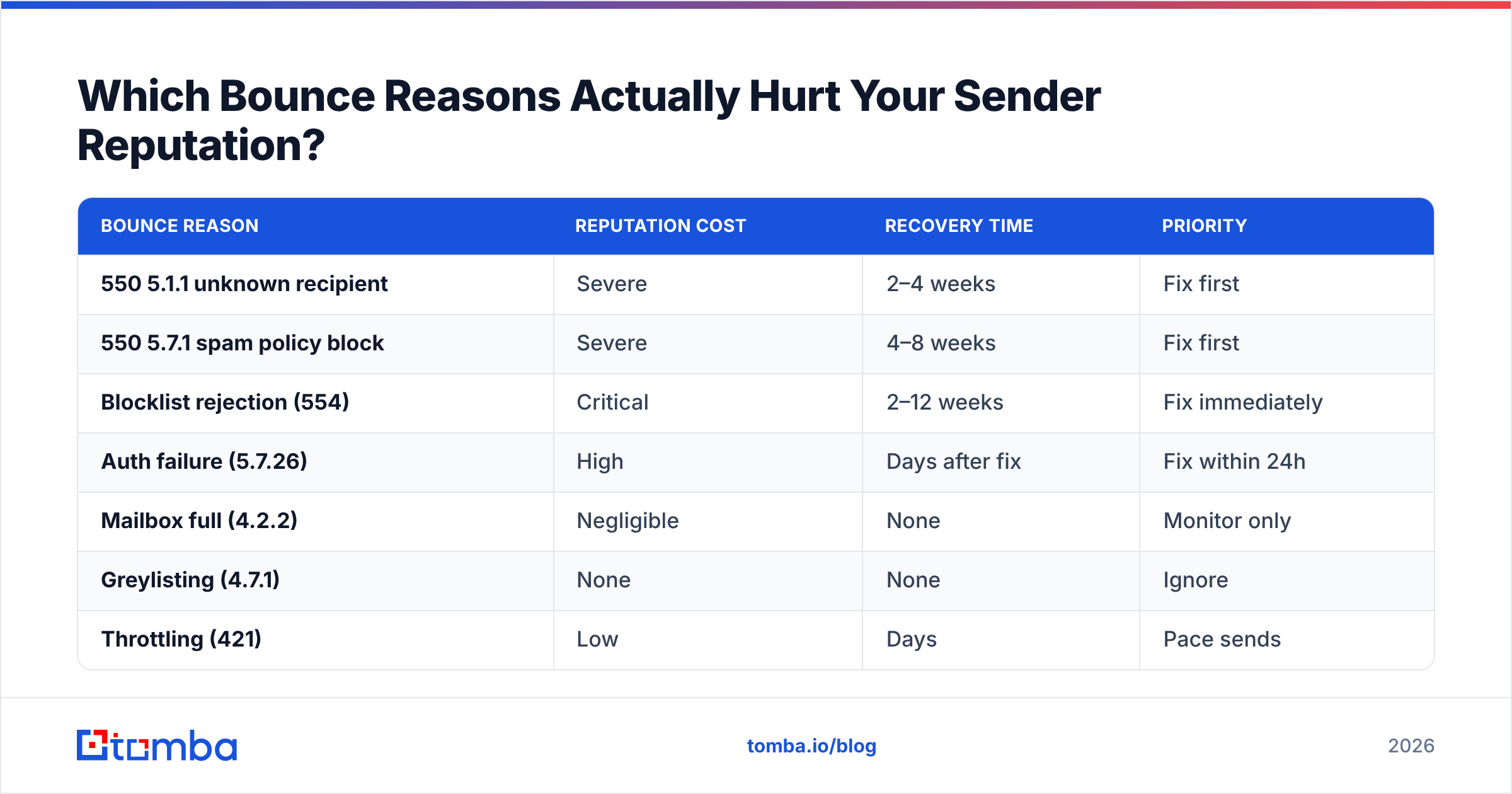
Which Bounce Reasons Actually Hurt Your Sender Reputation?#
Not all bounces cost the same. Mailbox providers weight them differently.
| Bounce reason | Reputation cost | Recovery time | Priority |
|---|---|---|---|
| 550 5.1.1 unknown recipient | Severe | 2–4 weeks | Fix first |
| 550 5.7.1 spam policy block | Severe | 4–8 weeks | Fix first |
| Blocklist rejection (554) | Critical | 2–12 weeks | Fix immediately |
| Auth failure (5.7.26) | High | Days after fix | Fix within 24h |
| Mailbox full (4.2.2) | Negligible | None | Monitor only |
| Greylisting (4.7.1) | None | None | Ignore |
| Throttling (421) | Low | Days | Pace sends |
The asymmetry is the point. A campaign with 8% mailbox-full soft bounces is basically healthy. A campaign with 3% unknown-recipient hard bounces is already damaging your domain, and by the time you notice the inbox placement drop, you're three weeks into a recovery cycle.
Google's own Postmaster Tools documentation is explicit that repeatedly mailing non-existent addresses is treated as a spam signal — it's the clearest fingerprint of a purchased or scraped list.
How Do You Diagnose a Bounce in Under Five Minutes?#
A repeatable triage sequence beats guessing every time.
- Pull the raw NDR, not your ESP's summary. Dashboards collapse distinct causes into one "bounced" bucket. The raw code is in the message headers or your ESP's event export.
- Read the first digit. 4xx → sending-side or transient. 5xx → list-side or policy. This split alone routes 90% of cases correctly.
- Read the enhanced code. 5.1.x is recipient. 5.7.x is policy or authentication. 4.2.x is mailbox state.
- Check whether it's concentrated. If 5xx bounces cluster on one recipient domain, it's a block, not a list problem. If they're spread evenly, your list is dirty.
- Check your own auth before touching the list. Run an SPF and DKIM check on the sending domain. A misaligned record produces bounces that look exactly like bad data.
- Only then, clean the list. Re-verify the affected segment and suppress permanently.
Steps 4 and 5 are the ones people skip, and skipping them is why teams delete thousands of perfectly valid contacts after a single blocked campaign.
Can You Prevent Bounces Before You Send?#
Mostly, yes — hard bounces are almost entirely preventable, and they're the ones that cost you.
Verify at collection, not at campaign time. Real-time verification on your signup form and inside your CRM stops bad data at the door. A free email checker handles one-offs; the email verifier API handles the pipe.
Re-verify anything older than 90 days. B2B data decays at roughly 22–30% per year according to industry consensus from sources like Gartner's data quality research — job changes, company closures, restructures. A list you verified in January is meaningfully dirtier in July.
Stop guessing email patterns. Permutating first.last@domain.com and firing at all six variants is the fastest way to a 20% bounce rate. Use a real email finder that returns a confidence score, or a domain search that returns the addresses a company actually uses.
Segment catch-all domains into their own campaign. They will always carry higher risk. Isolating them keeps a bad catch-all batch from dragging down your main domain's reputation.
Warm up new domains properly. A brand-new domain sending 500 cold emails on day one will bounce and get throttled regardless of list quality.
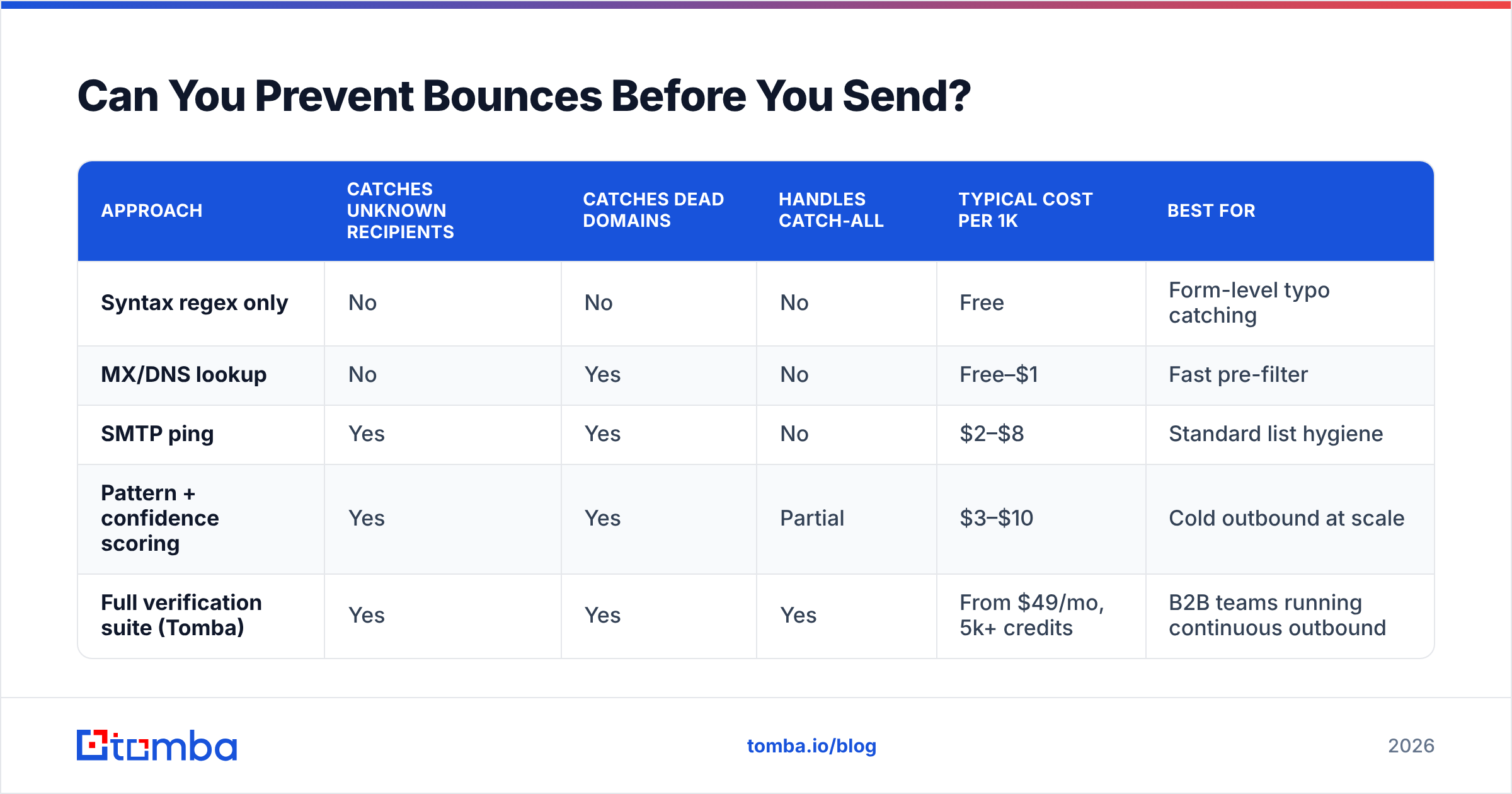
How Do Verification Approaches Compare?#
| Approach | Catches unknown recipients | Catches dead domains | Handles catch-all | Typical cost per 1k | Best for |
|---|---|---|---|---|---|
| Syntax regex only | No | No | No | Free | Form-level typo catching |
| MX/DNS lookup | No | Yes | No | Free–$1 | Fast pre-filter |
| SMTP ping | Yes | Yes | No | $2–$8 | Standard list hygiene |
| Pattern + confidence scoring | Yes | Yes | Partial | $3–$10 | Cold outbound at scale |
| Full verification suite (Tomba) | Yes | Yes | Yes | From $49/mo, 5k+ credits | B2B teams running continuous outbound |
The gap between rows three and five is where most bounce problems live. An SMTP ping tells you a server accepted the handshake; it does not tell you a human reads that mailbox. Confidence scoring plus catch-all logic closes that gap.
For teams evaluating providers, Tomba pricing starts with a free tier at 25 searches per month, then $49/mo Starter, $99/mo Growth, and $249/mo Pro — with verification and finding on the same credit pool, so you're not paying two vendors to clean one list. Peer tools like BookYourData take a database-first approach with verified contacts sold per record, which suits teams that want a pre-built list rather than a search-and-verify workflow. Both are legitimate paths; the choice depends on whether you're building lists continuously or buying them in batches. Independent user feedback on G2's email verification category is a reasonable sanity check before committing.
What Bounce Rate Should You Actually Target?#
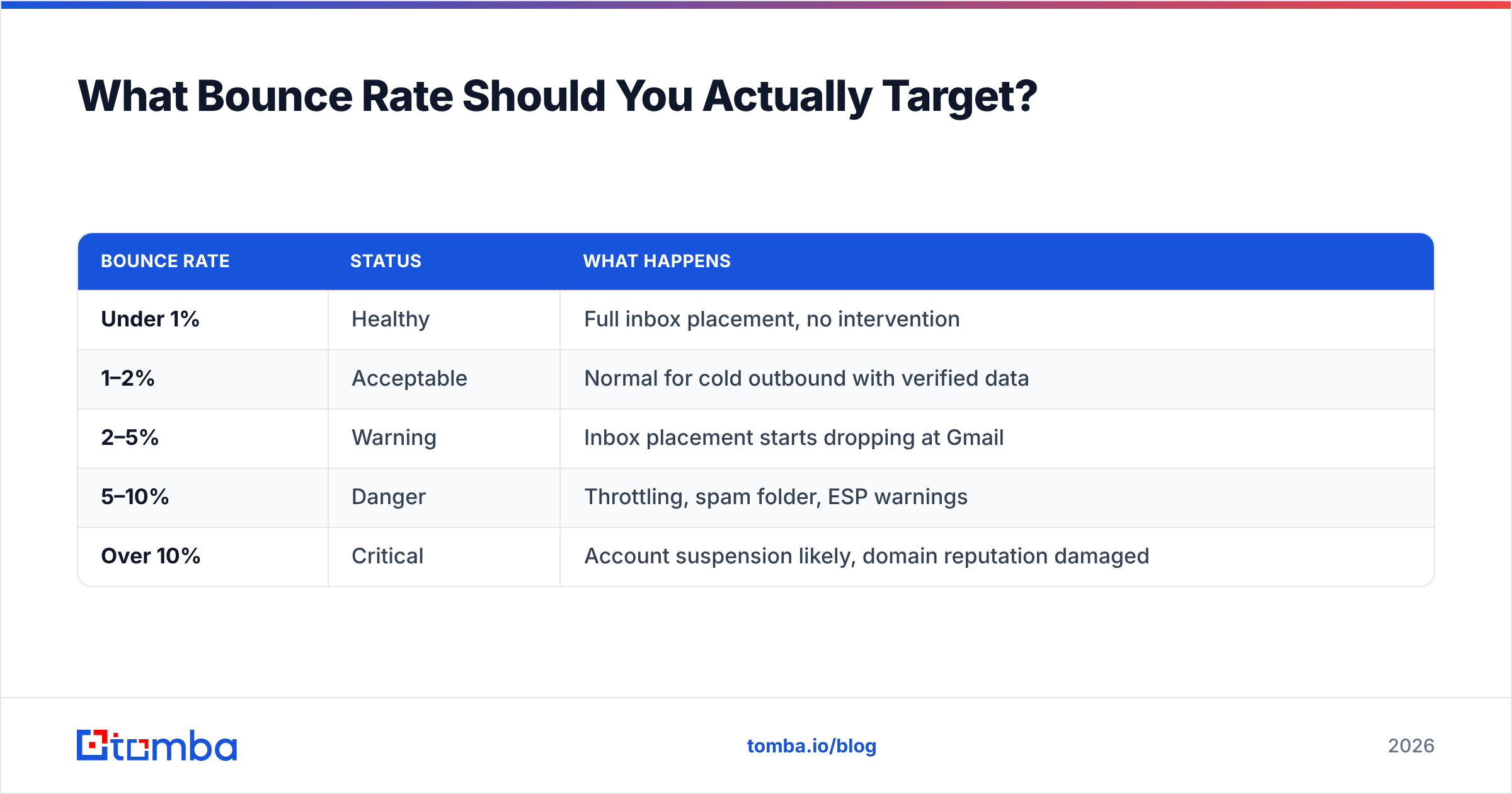
Benchmarks that matter, based on what mailbox providers tolerate:
| Bounce rate | Status | What happens |
|---|---|---|
| Under 1% | Healthy | Full inbox placement, no intervention |
| 1–2% | Acceptable | Normal for cold outbound with verified data |
| 2–5% | Warning | Inbox placement starts dropping at Gmail |
| 5–10% | Danger | Throttling, spam folder, ESP warnings |
| Over 10% | Critical | Account suspension likely, domain reputation damaged |
Measure hard bounce rate separately from total bounce rate. A 6% total bounce rate that is 5.5% mailbox-full is fine. A 3% total that is all unknown-recipient is not.
Track it per sending domain, not per campaign. Reputation attaches to the domain, so a single bad campaign contaminates every other sequence running from the same domain — which is exactly why serious outbound teams isolate risky segments onto separate sending domains.
What Should You Do After a Bad Bounce Event?#
If a campaign just returned 12% bounces, work in this order:
- Pause everything from that domain. Continuing to send while diagnosing compounds the damage.
- Export the bounce log with raw codes. Bucket by enhanced status code.
- Suppress every 5xx permanently. No exceptions, no re-mailing "just to check."
- Fix authentication if any 5.7.x appeared. SPF, DKIM, DMARC alignment.
- Check blocklists. If listed, fix the cause, then request delisting.
- Re-verify the entire remaining list — not just the bounced portion. If 12% failed, the survivors are suspect too.
- Resume at 20% of previous volume and ramp over two weeks.
- Watch open and reply rates, not just bounces. Recovery shows up as restored engagement before it shows up as a clean bounce log.
Most teams do steps 3 and 7 and skip the rest. That's why the same event repeats a month later. The full sequence takes an afternoon and prevents a quarter of degraded email deliverability.
Where Do Bounces and Data Quality Actually Intersect?#
Here's the uncomfortable truth: bounce management is downstream cleanup. The real leverage is upstream, in how contacts enter your system.
If your prospecting workflow is "scrape a list, permutate the patterns, blast it," you will generate hard bounces indefinitely no matter how good your suppression logic gets. If your workflow is "find verified addresses with confidence scores, enrich them, re-verify quarterly," bounces become a rounding error you barely think about.
That's the difference between treating symptoms and treating the cause. Suppression lists are bandages. Verified acquisition is the fix.
For teams running continuous outbound, wire verification into the pipeline rather than running it as a monthly chore — a bulk email finder run before each campaign, or the email verification API called at the moment a lead enters your CRM. Either way, the address is validated before a single message goes out.
Start Sending to Addresses That Actually Exist#
Every bounce reason on this list except two traces back to data you could have validated before hitting send. The 550 5.1.1s, the dead domains, the catch-all ambiguity — all solvable at acquisition time.
The Tomba Email Finder returns professional email addresses with a confidence score attached, backed by the same verification engine that powers the standalone verifier — so the addresses you find are already checked before they reach your sequence. Start on the free tier at 25 searches a month, and if bounce rates on your current list are above 3%, run a sample of 100 contacts through it first. The delta will tell you exactly how much reputation your existing data is costing you.
Related guides#
Ready to find emails that actually work?
Join 150,000+ professionals who stopped guessing and started sending. Free credits on signup — no credit card required.
Get the Tomba newsletter
Practical outbound tactics and product updates — once every two weeks.
About the author