Email Cadence: How to Time Cold Email Follow-Ups in 2026
How many touches, how many days apart, and when to stop? A no-fluff breakdown of the email cadence structures that still earn replies in 2026 — with spacing tables, channel mixes, and the metrics that tell you to kill a sequence.
TL;DR
- An email cadence is the fixed schedule of touches — how many, on which days, through which channels — that you run against a prospect before you stop.
- Most B2B teams over-send and under-space. Four to six emails across 18–24 days beats nine emails in nine days on reply rate and on domain health.
- The gap between touches should widen, not stay flat: 3 days, then 4, then 6, then 8.
- Cadence performance is a data problem before it is a copy problem. Bad addresses inflate your bounce rate, kill your sender reputation, and make good timing irrelevant.
- Kill any cadence step that adds volume without adding a new reason to reply. "Just bumping this" is not a touch.
What is an email cadence?#
An email cadence is a pre-defined schedule of outreach touches aimed at a single prospect: how many messages, spaced how far apart, over how many days, across which channels, with a defined exit.
Think of it like watering a plant. You are not deciding whether to water — you are deciding the interval. Too frequent and you drown the root; too sparse and it dries out between visits. The plant does not care how much you care. It responds to rhythm.
Three things separate a cadence from "sending some follow-ups":
- It is decided before you send touch one. You write all five messages up front, so touch four is not a panicked "circling back."
- It has an exit rule. Every cadence ends — either in a reply, a hard no, or a scheduled stop that moves the contact to a nurture list.
- It is measured as a unit. You judge the whole cadence's reply rate, not just the open rate of the first email.
How is a cadence different from a sequence or a drip campaign?#
The terms get used interchangeably and it costs teams money, because the three have different intents and different failure modes.
| Email cadence | Sales sequence | Drip campaign | |
|---|---|---|---|
| Primary goal | Reach one named prospect | Move an opportunity forward | Educate a list over time |
| Trigger | Rep or list adds contact | Stage change or intent signal | Form fill, download, signup |
| Typical length | 4–7 touches / 18–28 days | 8–14 touches / 30–60 days | 5–20 emails / 3–12 months |
| Channels | Email + phone + LinkedIn | Email + phone + LinkedIn + task | Email only |
| Personalization | High on touch 1, medium after | High throughout | Low (segment-level) |
| Exit condition | Reply, bounce, or day cap | Meeting booked or closed-lost | Unsubscribe or conversion |
| Who owns it | SDR / founder | AE | Marketing |
The practical takeaway: do not run drip-campaign volume on cold contacts. A nurture list has opted in and expects mail. A cold prospect has not, and every extra send is a spam-complaint coin flip.
How many touches should an email cadence have?#
Four to six email touches is the working range for cold B2B outbound in 2026. Below four you leave replies on the table — a meaningful share of positive responses land on touches 3 through 5. Above six you are usually buying a complaint rather than a meeting.
The reason the ceiling dropped is inbox-side, not psychology. Since Google and Microsoft tightened bulk-sender enforcement, complaint rate is a hard gate rather than a soft signal. Ten touches to a cold contact who never opened one of them is the fastest way to trip that gate.
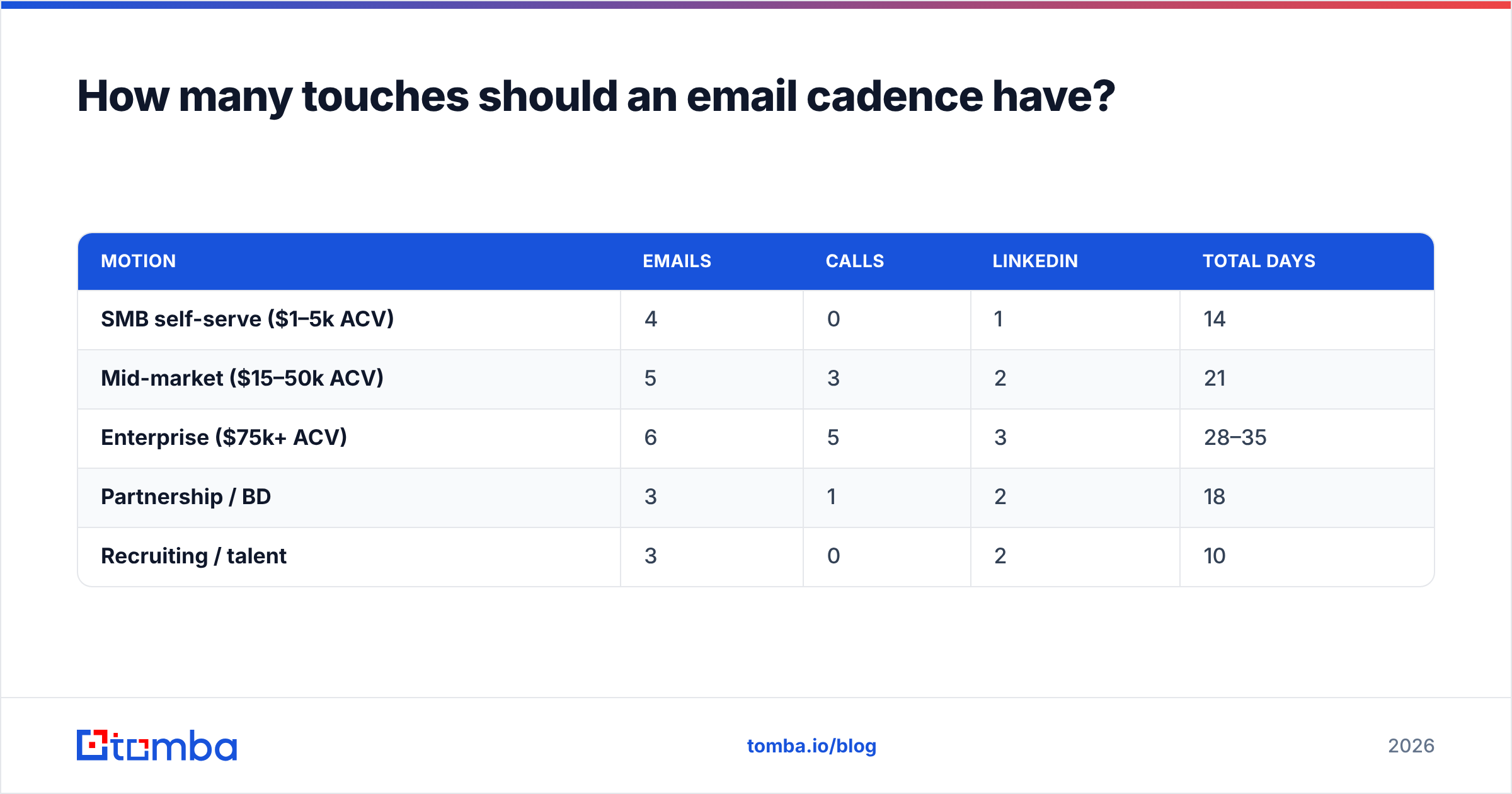
Here is how touch count typically maps to deal type:
| Motion | Emails | Calls | Total days | |
|---|---|---|---|---|
| SMB self-serve ($1–5k ACV) | 4 | 0 | 1 | 14 |
| Mid-market ($15–50k ACV) | 5 | 3 | 2 | 21 |
| Enterprise ($75k+ ACV) | 6 | 5 | 3 | 28–35 |
| Partnership / BD | 3 | 1 | 2 | 18 |
| Recruiting / talent | 3 | 0 | 2 | 10 |
Notice enterprise gets more days, not just more emails. A VP with 300 unread messages is not ignoring you — they are triaging. Longer windows catch more triage cycles.
What is the right spacing between emails?#
Widen the gaps as the cadence progresses. Early touches ride the recency of touch one; later touches need distance so they read as persistence rather than pestering.
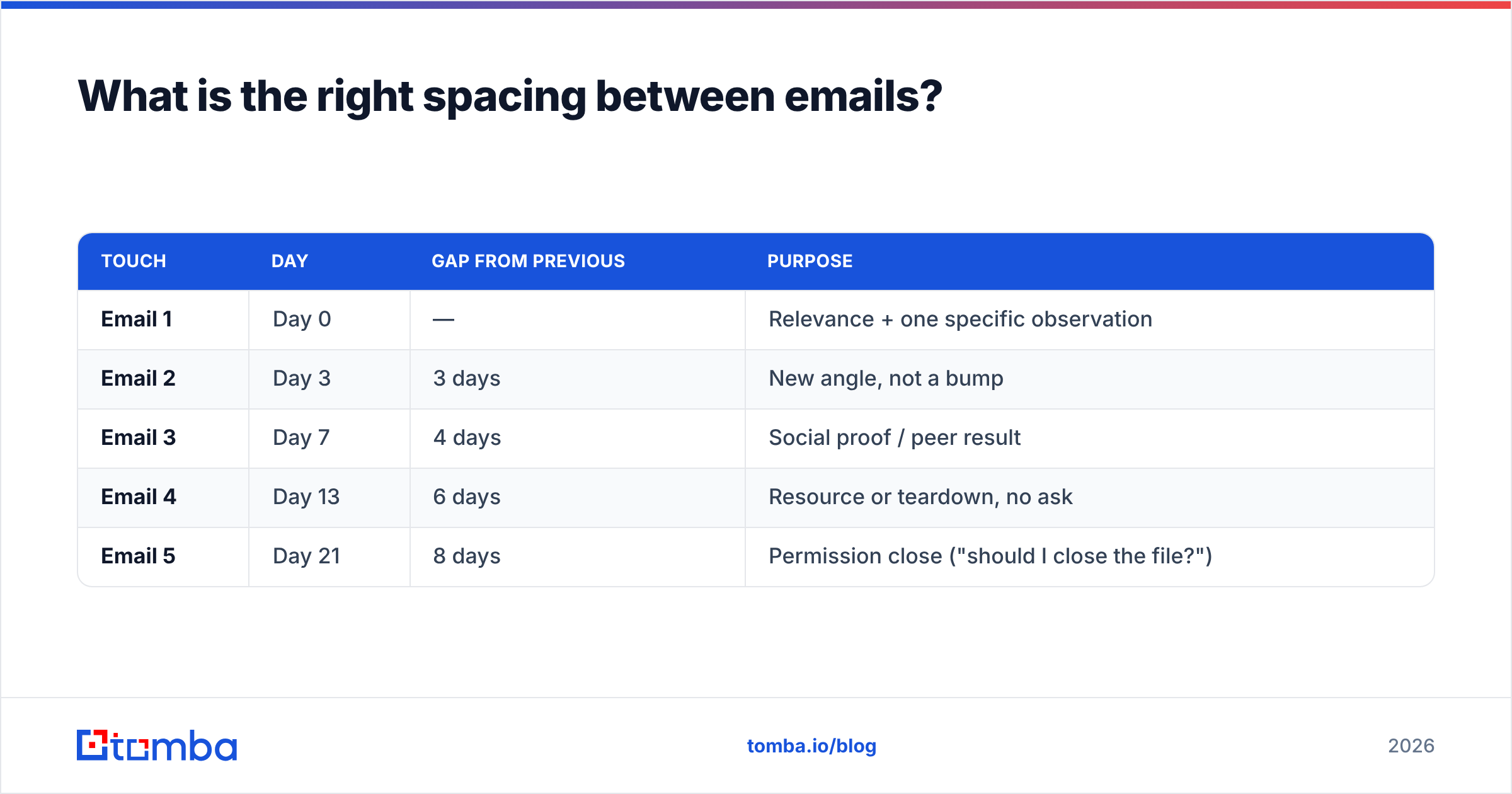
A tested default for a five-email, 21-day cadence:
| Touch | Day | Gap from previous | Purpose |
|---|---|---|---|
| Email 1 | Day 0 | — | Relevance + one specific observation |
| Email 2 | Day 3 | 3 days | New angle, not a bump |
| Email 3 | Day 7 | 4 days | Social proof / peer result |
| Email 4 | Day 13 | 6 days | Resource or teardown, no ask |
| Email 5 | Day 21 | 8 days | Permission close ("should I close the file?") |
Three spacing rules that matter more than the exact numbers:
- Never send two touches on consecutive days. It reads as automation even when it isn't.
- Avoid Monday 8am and Friday 4pm. Monday morning is the triage bloodbath; Friday afternoon is a soft delete.
- Respect the prospect's timezone, not your sending server's. A 9am send from your box that lands at 2am local is a wasted touch.
Time-of-day gains are real but small — a few percentage points on open rate. Spacing and relevance are worth ten times as much. Optimize in that order.
What does a proven 2026 cadence look like, step by step?#
Here is the multichannel version of the 21-day structure. Each step below carries a distinct job — if you cannot name the job, delete the step.
- Day 0 — Email 1 (the observation). Open with one verifiable, specific fact about their business. Not "I saw you're in fintech." Something like "your careers page has three payments-engineer roles open in Berlin." Then one line on why that makes your thing relevant, then one soft ask.
- Day 2 — LinkedIn view + follow. No connection request yet. You are creating passive familiarity before touch two lands.
- Day 3 — Email 2 (new angle). Do not reference email one. Lead with a different pain from the same problem space. Half your replies come from angle-switching, not from repetition.
- Day 5 — Call 1. Voicemail with a 12-second script referencing the emails by subject line so they can search for it.
- Day 7 — Email 3 (peer proof). One named or anonymized comparable company, one number, one sentence of mechanism. "A 40-rep team cut list-building from 6 hours to 40 minutes" beats "we help teams save time."
- Day 13 — Email 4 (give, no ask). Send the teardown, the benchmark, the template. Zero calls to action. This is the touch that most often unlocks a dormant thread.
- Day 21 — Email 5 (permission close). "I'll assume the timing is off and stop here — want me to check back in Q4?" A clean close-out reliably pulls a final 5–8% reply, and a chunk of those are positive.
That is five emails, one call, two LinkedIn actions, 21 days. It fits inside a 50-contact-per-day sending budget on a single warmed mailbox without triggering volume alarms.
Should you add calls and LinkedIn to the cadence?#
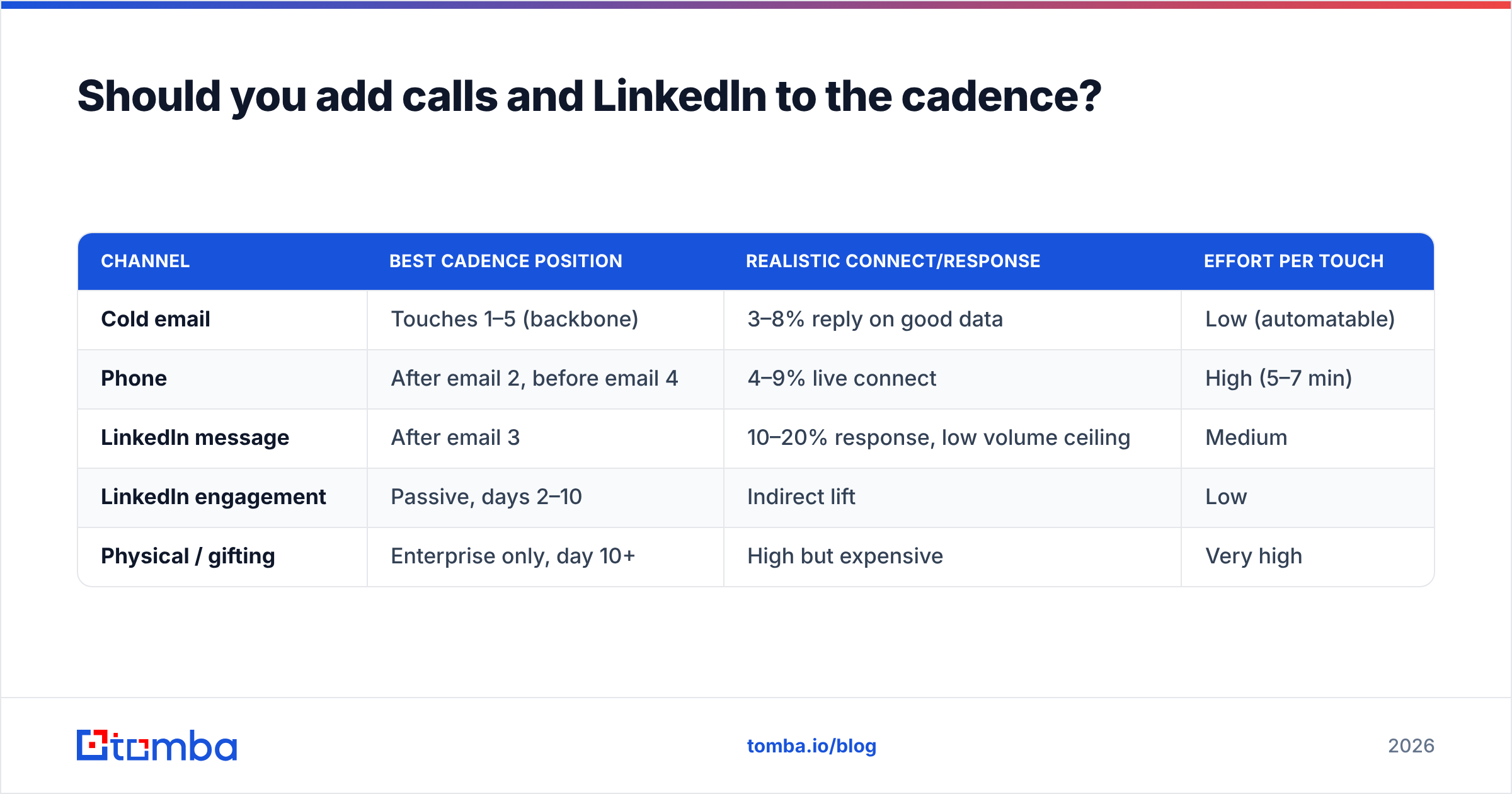
Yes, if you can sustain it — but do not add channels to pad the touch count. Add them to change the medium of the ask.
| Channel | Best cadence position | Realistic connect/response | Effort per touch |
|---|---|---|---|
| Cold email | Touches 1–5 (backbone) | 3–8% reply on good data | Low (automatable) |
| Phone | After email 2, before email 4 | 4–9% live connect | High (5–7 min) |
| LinkedIn message | After email 3 | 10–20% response, low volume ceiling | Medium |
| LinkedIn engagement | Passive, days 2–10 | Indirect lift | Low |
| Physical / gifting | Enterprise only, day 10+ | High but expensive | Very high |
The mistake teams make is treating LinkedIn as a second email channel. It isn't — the volume ceiling is brutal and the connect-request limits get you restricted fast. Use it to warm, not to blast. If LinkedIn is where your ICP actually lives, pull the address first with a LinkedIn finder and run the persistence through email, where you own the channel.
How do you write each touch so the cadence works?#
Cadence structure gets you into the inbox. Copy gets you the reply. Four constraints that hold across industries:
- One idea per email. If your touch has two asks, it has zero.
- Under 90 words for touches 1–3. Mobile preview is roughly 100 characters of subject plus two lines of body. Write for that, not for desktop.
- Subject lines under 45 characters, lowercase, no brackets. "[Case study] How Acme grew 40%" is a marketing email. "quick question re: your Berlin hiring" is a person.
- Never write "just following up." It signals you have nothing new. Every touch must carry information the previous one didn't.
For touch four — the give-with-no-ask — the highest-performing formats are a two-paragraph teardown of something public they own (pricing page, careers page, a recent launch), or a benchmark number from their segment. If you want a starting library, cold email templates are a faster on-ramp than a blank page, provided you rewrite the first line every time.
What breaks an email cadence before the copy ever matters?#
Bad data. A cadence built on a scraped or aging list fails at the transport layer, and no amount of clever sequencing saves it.
Run the math. On a 1,000-contact list with a 12% invalid rate, a five-touch cadence generates roughly 600 bounce events across the run. That is enough to push a fresh domain past the complaint-and-bounce thresholds that mailbox providers enforce, and once you are throttled, your valid contacts stop seeing you too.
The pre-cadence checklist:
- Verify every address before touch one, not after the bounces roll in. An email verifier pass should sit between list build and cadence launch as a hard gate, not an optional step.
- Handle catch-all domains separately. They pass basic syntax checks and still bounce. Route them through a catch-all verifier and give them a shorter, lower-volume cadence.
- Warm the sending domain for at least three weeks before running full volume. Tools like the email warmup calculator give you a ramp schedule instead of a guess.
- Cap daily sends per mailbox at 40–50 for cold traffic. Split across mailboxes rather than pushing one harder.
- Set SPF, DKIM, and DMARC before your first send. Missing authentication is now a delivery blocker, not a best practice. Google and Microsoft both publish their bulk-sender requirements openly — read them rather than relying on your sending tool's defaults.
If your data source is the weak link, that is a sourcing problem, not a cadence problem. Vendors differ meaningfully here: BookYourData is a solid option when you need pre-built, verified lists by title and geography, while a search-and-verify workflow — find email addresses by domain, verify, then load — gives you fresher records for accounts you've already picked.
How do you measure whether a cadence is working?#
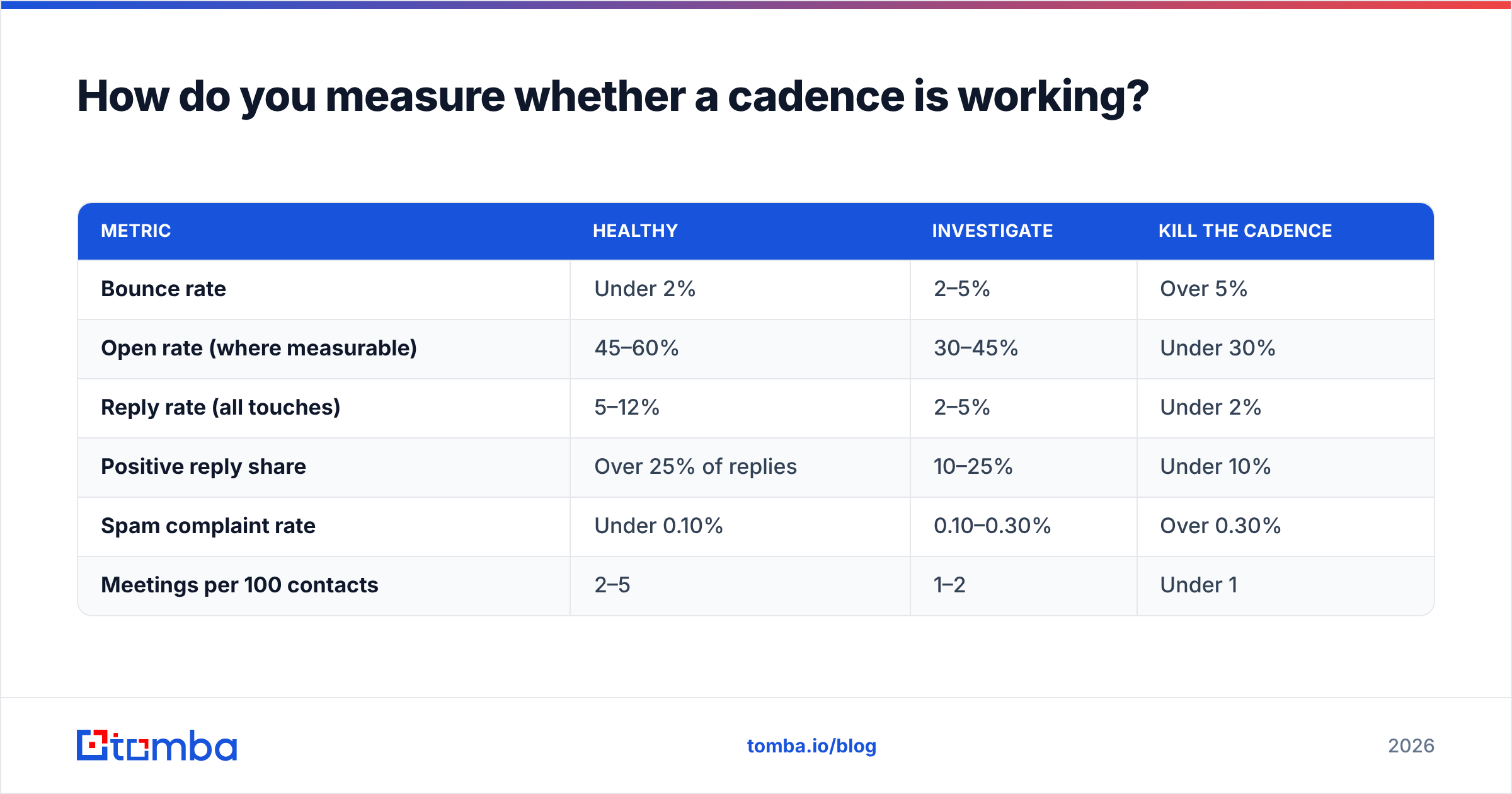
Track the cadence as a unit, then diagnose by touch. These are the thresholds worth acting on:
| Metric | Healthy | Investigate | Kill the cadence |
|---|---|---|---|
| Bounce rate | Under 2% | 2–5% | Over 5% |
| Open rate (where measurable) | 45–60% | 30–45% | Under 30% |
| Reply rate (all touches) | 5–12% | 2–5% | Under 2% |
| Positive reply share | Over 25% of replies | 10–25% | Under 10% |
| Spam complaint rate | Under 0.10% | 0.10–0.30% | Over 0.30% |
| Meetings per 100 contacts | 2–5 | 1–2 | Under 1 |
Open rate is increasingly unreliable — privacy proxies inflate it and Apple Mail fires pixels without a human involved. Treat it as directional only. Response rate and positive-reply share are the numbers that survive contact with reality.
Diagnose by pattern, not by vibe:
- High opens, near-zero replies → your targeting is right and your offer is wrong. Rewrite touches 2 and 3.
- Low opens, low bounces → subject lines or sender reputation. Check placement before you rewrite copy.
- Replies concentrated on touch 1, nothing after → your follow-ups are bumps, not new angles.
- Bounces rising mid-cadence → your list decayed between build and launch. Re-verify.
Run one variable at a time. Changing subject lines, spacing, and the offer simultaneously teaches you nothing, and B2B sample sizes are small enough that noise will happily masquerade as insight. Analyst coverage from Gartner and buyer-review data on G2 are useful for benchmarking category-level norms, but your own cohort data beats any published average.
When should you stop and re-enter a prospect?#
Stop at the day cap. Always. A cadence that runs until someone replies is not a cadence — it's harassment with a spreadsheet.
Re-entry rules that work:
- 90 days minimum before the same contact enters a new cadence.
- Re-enter on a trigger, not a timer where possible: funding round, new role, a competitor mention, a hiring signal.
- Change the angle completely on re-entry. If the first run pitched cost savings, the second pitches speed.
- Cap total lifetime touches at around 12 across all runs, then move the contact to a low-frequency newsletter or drop them.
Teams that treat "no reply" as a permanent no leave pipeline on the table. Teams that treat it as an invitation to keep sending burn a domain. The 90-day trigger-based re-entry sits between those two failure modes. Guidance from vendors like HubSpot has converged on the same shape: fewer touches, better spacing, clearer exits.
Where do you start if you're building your first cadence?#
Build the list, verify it, then write all five emails before you send one. In that order — reversing it is why most first cadences underperform.
For the list step, Tomba's Email Finder covers the whole front half of the workflow: find addresses by domain, name, or company, verify them in the same pass, and export a clean file that won't wreck your bounce rate on touch one. The free tier gives you 25 searches a month to test the workflow on a small segment; Starter is $49/mo and Growth is $99/mo if you need volume — full Tomba pricing is public. Build the list right, and the cadence math starts working for you instead of against you.
Related guides#
Ready to find emails that actually work?
Join 150,000+ professionals who stopped guessing and started sending. Free credits on signup — no credit card required.
Get the Tomba newsletter
Practical outbound tactics and product updates — once every two weeks.
About the author