Email Cadence Meaning: How to Build One That Gets Replies
An email cadence is the timing, spacing, and channel mix behind a sequence of outreach touches. Here's what the term actually means, how many steps work in 2026, and the timing mistakes that quietly kill reply rates.
TL;DR
- An email cadence is the schedule behind a sequence: how many touches you send, how many days sit between them, and which channels join the email steps.
- "Cadence" and "sequence" get used interchangeably. A sequence is the content; the cadence is the rhythm. Most teams obsess over copy and ignore the rhythm.
- Four to seven email touches over 14–28 days is the working range for cold outbound in 2026. Fewer than three leaves replies on the table; more than nine burns the domain.
- Spacing should widen as the cadence progresses (2 days, then 3, then 5, then 7), not stay fixed at "every 2 days."
- A cadence built on unverified contact data fails before the copy ever matters — bounces on step one poison the domain for steps two through seven.
What Does Email Cadence Actually Mean?#
An email cadence is the timing structure of a multi-touch outreach campaign — the number of messages, the gap between them, the total duration, and where non-email touches (calls, LinkedIn, ads) slot in.
Think of it like a doctor's dosing schedule. The prescription tells you what drug you're taking; the cadence tells you how much, how often, and for how long. Same molecule, wrong interval, and it either does nothing or it makes you sick. Cold email works identically: the same four messages sent on days 1, 2, 3, 4 will underperform the exact same four messages sent on days 1, 3, 8, 16 — and one of those versions is far more likely to land you in spam.
Technically, a cadence is defined by five variables:
- Touch count — how many total messages the prospect receives before you stop.
- Interval — days between each touch, which should not be uniform.
- Duration — the full calendar window from first send to breakup email.
- Channel mix — email-only, or email plus calls, LinkedIn, and voicemail.
- Exit conditions — what removes someone from the cadence (reply, meeting booked, unsubscribe, hard bounce).
Change any one of those and you have a different cadence, even with identical copy.
Is a Cadence the Same as a Sequence or a Drip Campaign?#
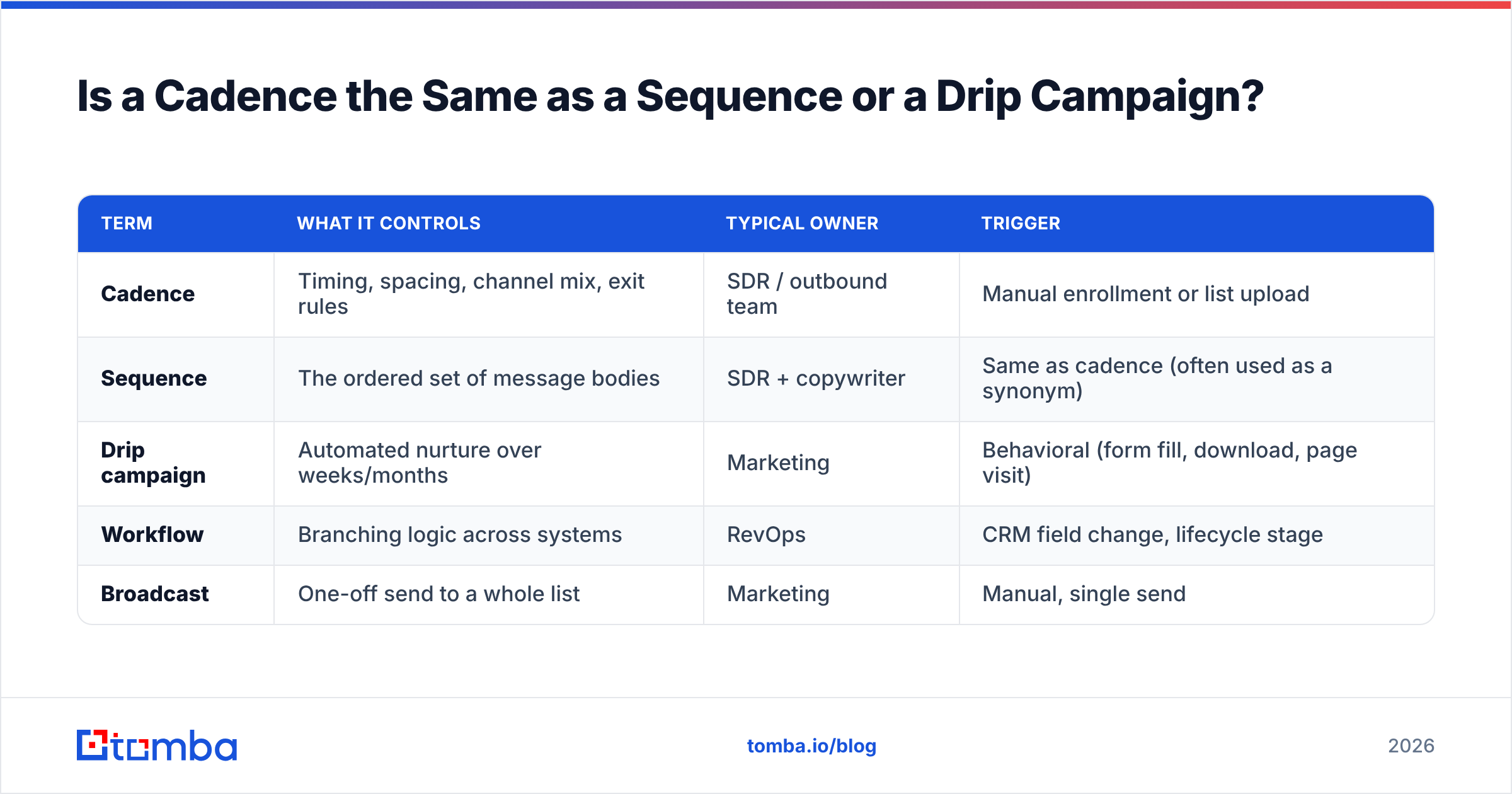
No, and the distinction matters when you're configuring tooling.
| Term | What it controls | Typical owner | Trigger |
|---|---|---|---|
| Cadence | Timing, spacing, channel mix, exit rules | SDR / outbound team | Manual enrollment or list upload |
| Sequence | The ordered set of message bodies | SDR + copywriter | Same as cadence (often used as a synonym) |
| Drip campaign | Automated nurture over weeks/months | Marketing | Behavioral (form fill, download, page visit) |
| Workflow | Branching logic across systems | RevOps | CRM field change, lifecycle stage |
| Broadcast | One-off send to a whole list | Marketing | Manual, single send |
In practice, sales tools like Salesloft and Outreach use "cadence," HubSpot uses "sequence," and marketing automation platforms use "workflow." The vocabulary differs; the mechanics rarely do. What separates a cadence from a drip is intent: cadences are push (you decided this person is worth contacting), drips are pull (they raised a hand first). That difference should change your timing. Push cadences run tight and short. Pull nurtures run loose and long.
How Many Touches Should an Email Cadence Have?#
Four to seven email touches, spread across 14 to 28 days, is where most B2B teams land after testing.
The reasoning is boring but consistent across every dataset that gets published: a meaningful share of positive replies arrive after the first message. Somewhere between 30% and 50% of responses to cold outbound come from follow-ups, not the opener. If you stop at one email, you're deliberately throwing away roughly a third of your pipeline. If you push past nine touches, you start collecting spam complaints faster than meetings, and complaint rate is the metric Google and Microsoft actually punish you for.
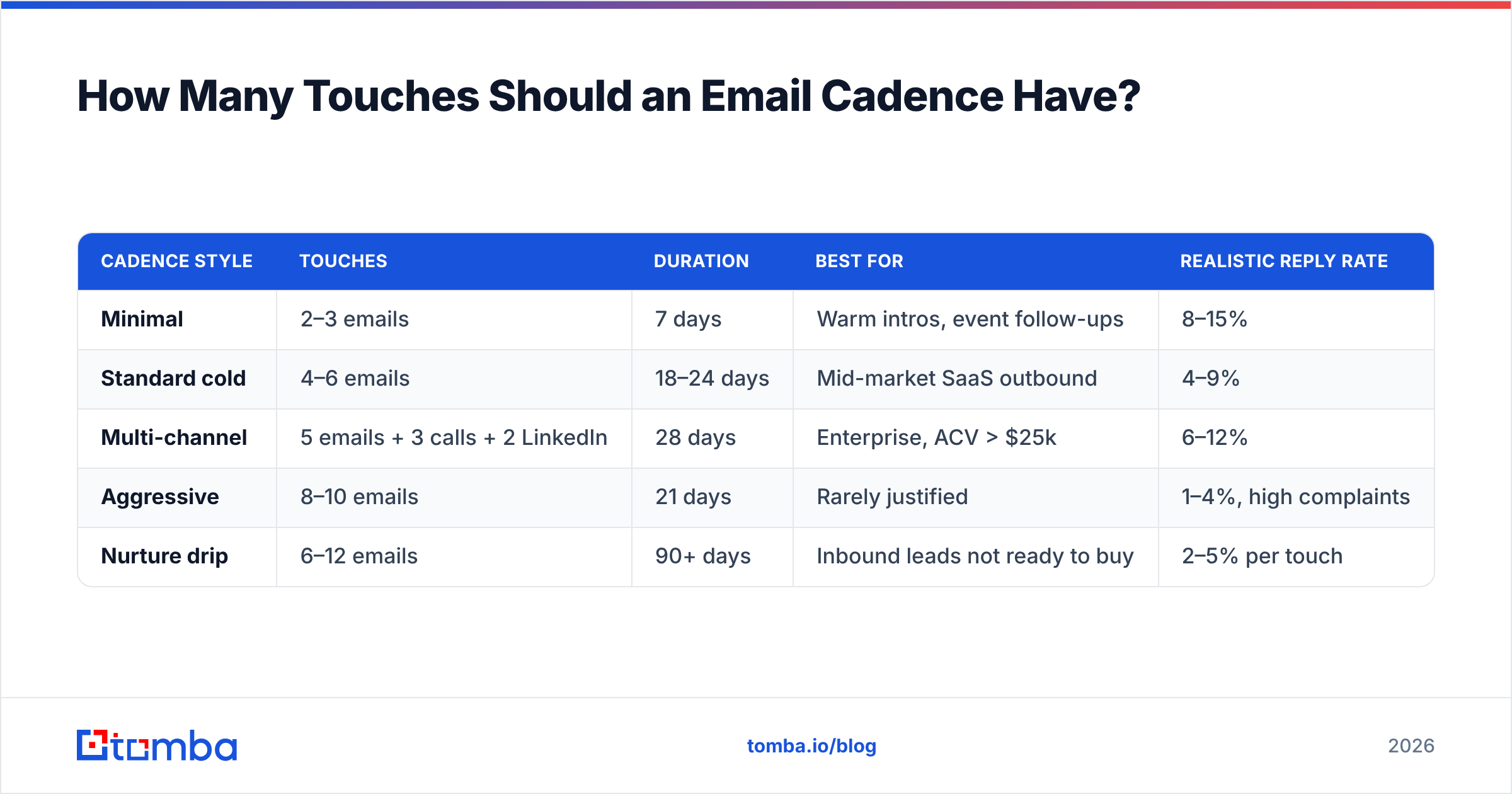
Here's the shape that holds up:
| Cadence style | Touches | Duration | Best for | Realistic reply rate |
|---|---|---|---|---|
| Minimal | 2–3 emails | 7 days | Warm intros, event follow-ups | 8–15% |
| Standard cold | 4–6 emails | 18–24 days | Mid-market SaaS outbound | 4–9% |
| Multi-channel | 5 emails + 3 calls + 2 LinkedIn | 28 days | Enterprise, ACV > $25k | 6–12% |
| Aggressive | 8–10 emails | 21 days | Rarely justified | 1–4%, high complaints |
| Nurture drip | 6–12 emails | 90+ days | Inbound leads not ready to buy | 2–5% per touch |
Note what happens between "standard" and "aggressive." Doubling the touch count doesn't double replies — it inverts them. More volume against the same list produces diminishing returns and rising complaint rates, because the people who wanted to answer already answered by touch five.
What Does Good Cadence Timing Look Like Day by Day?#
Widen the gaps as you go. Fixed intervals are the single most common cadence mistake.
The logic mirrors how follow-up works in any other relationship. If someone doesn't return your text, you don't send the identical text every 48 hours forever — you back off progressively. Prospects read the same signal from your send pattern.
A defensible six-touch cadence:
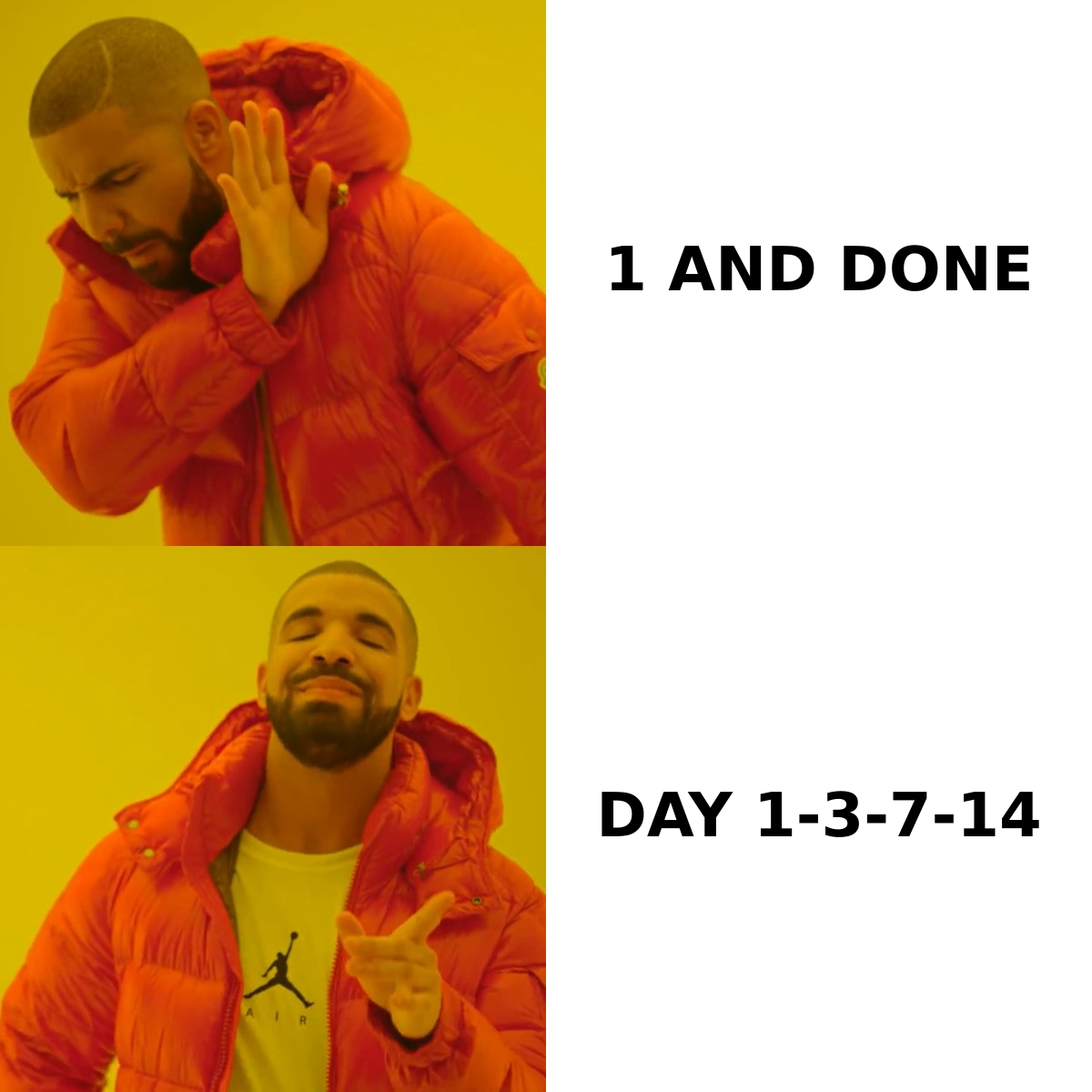
- Day 1 — The opener. One specific observation about their company, one clear ask. Under 90 words. No attachments, no images, no tracking pixel if you can avoid it.
- Day 3 — The reframe. Same offer, different angle. Do not write "just bumping this to the top of your inbox." Add a new piece of value: a benchmark, a comparable customer, a specific number.
- Day 8 — The proof. A short case reference or metric relevant to their segment. This is where you earn the right to keep going.
- Day 15 — The switch. Change the ask entirely. Instead of a meeting, request a referral to the right person or a one-line yes/no. Lower friction converts.
- Day 22 — The teardown. Something they can use whether or not they reply — a spotted gap on their site, a competitor move, a relevant data point.
- Day 28 — The close-out. Two sentences. "I'll stop here. If timing changes, reply and I'll pick it back up." Break-up emails routinely outperform touches three and four for reply volume, largely because they remove the pressure.
Total: 28 days, six touches, average gap of 5.6 days and rising. Contrast that with the "every two days for two weeks" pattern still baked into a lot of default templates — same touch count, half the duration, roughly double the unsubscribe rate.
Send-time detail matters less than people claim, but two rules survive testing: avoid Monday 8–10am (inbox triage hour) and stagger your sends across a window rather than firing 400 emails at 9:00:00. Platform filters read burst patterns as bot behavior.
What Kills a Cadence Before the Copy Matters?#
Bad data. A cadence amplifies whatever list quality you feed it, in both directions.
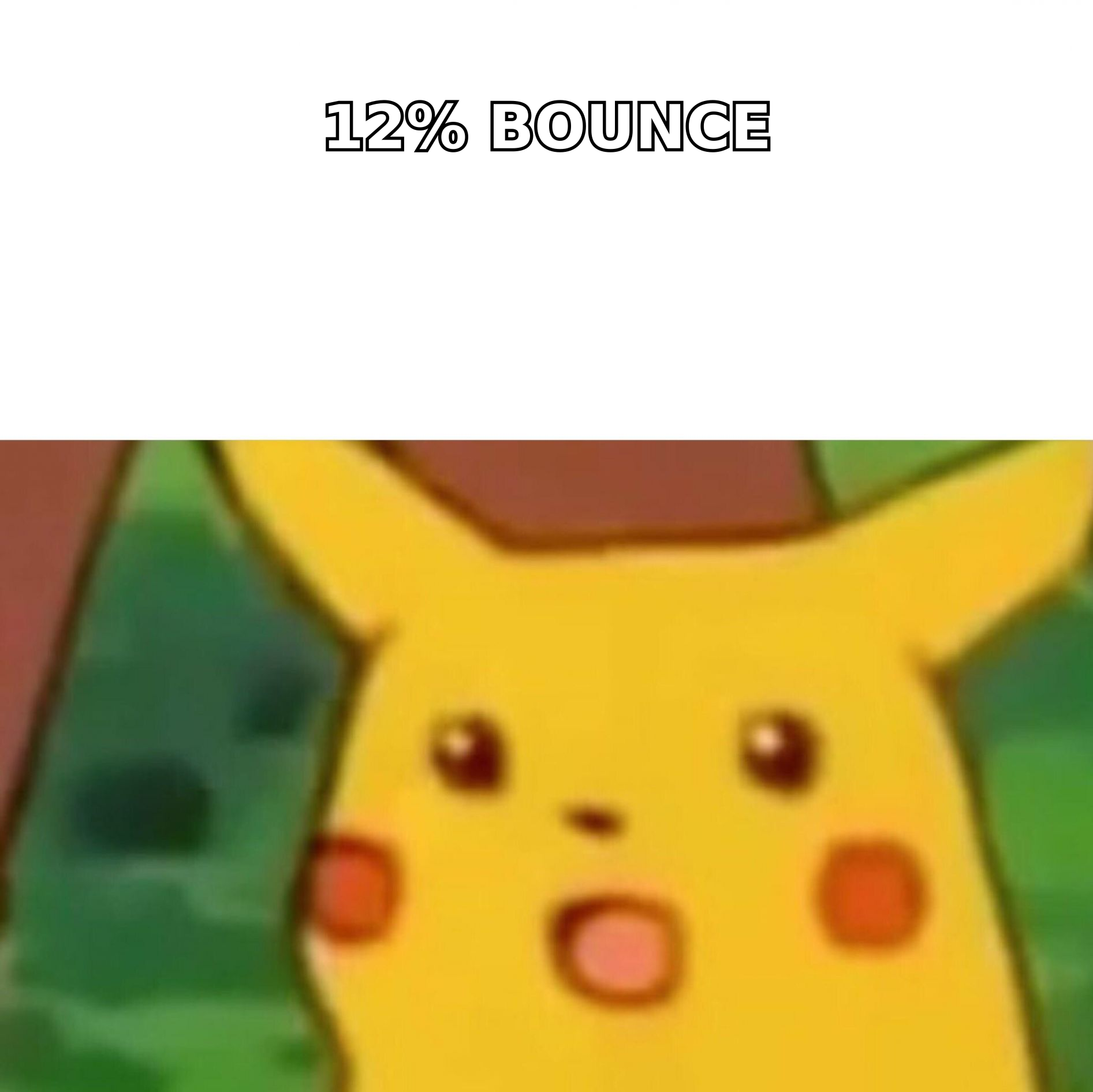
Run the math on a 1,000-contact cadence with a 12% bad-address rate. Touch one generates 120 bounces. Your bounce rate crosses the 2% threshold that mailbox providers treat as a spam signal, your domain reputation drops, and touches two through six — the ones that were going to produce most of your replies — land in spam folders for the 880 valid addresses too. You didn't lose 12% of the campaign. You lost most of it.
This is why list hygiene is a cadence problem, not a data-ops problem:
- Verify before enrollment, not after. Run every address through an email verifier before the first touch fires. Catching a dead address on day 12 is worthless.
- Handle catch-all domains separately. Catch-all servers accept everything, so standard SMTP checks return "valid" for addresses that don't exist. A dedicated catch-all verifier gives you a confidence score instead of a false positive; route low-confidence contacts to a shorter, lower-volume cadence.
- Re-verify anything older than 90 days. B2B contact data decays at roughly 2–2.5% per month through job changes alone. A list you validated in January is measurably worse by April.
- Warm the sending domain first. If you're starting on a fresh domain, ramp volume over 3–4 weeks before running real cadences. An email warmup calculator will tell you how long your target volume actually needs.
- Cap daily sends per mailbox. Around 40–50 cold emails per mailbox per day is the practical ceiling in 2026. Need more volume? Add mailboxes, not send rate.
Google and Yahoo's bulk sender requirements formalized much of this — authenticated sending, one-click unsubscribe, and a complaint rate under 0.3%. The Gmail bulk sender guidelines are the primary source worth reading in full, because they're the rules your cadence is actually graded against.
Should a Cadence Be Email-Only or Multi-Channel?#
Multi-channel, if your deal size justifies the labor.
Adding calls and LinkedIn touches to an email cadence consistently lifts total connect rates, because you're catching people in the channel they actually check. The tradeoff is cost per touch: an email costs seconds, a call costs minutes. That's why the multi-channel row in the table above is gated on ACV.
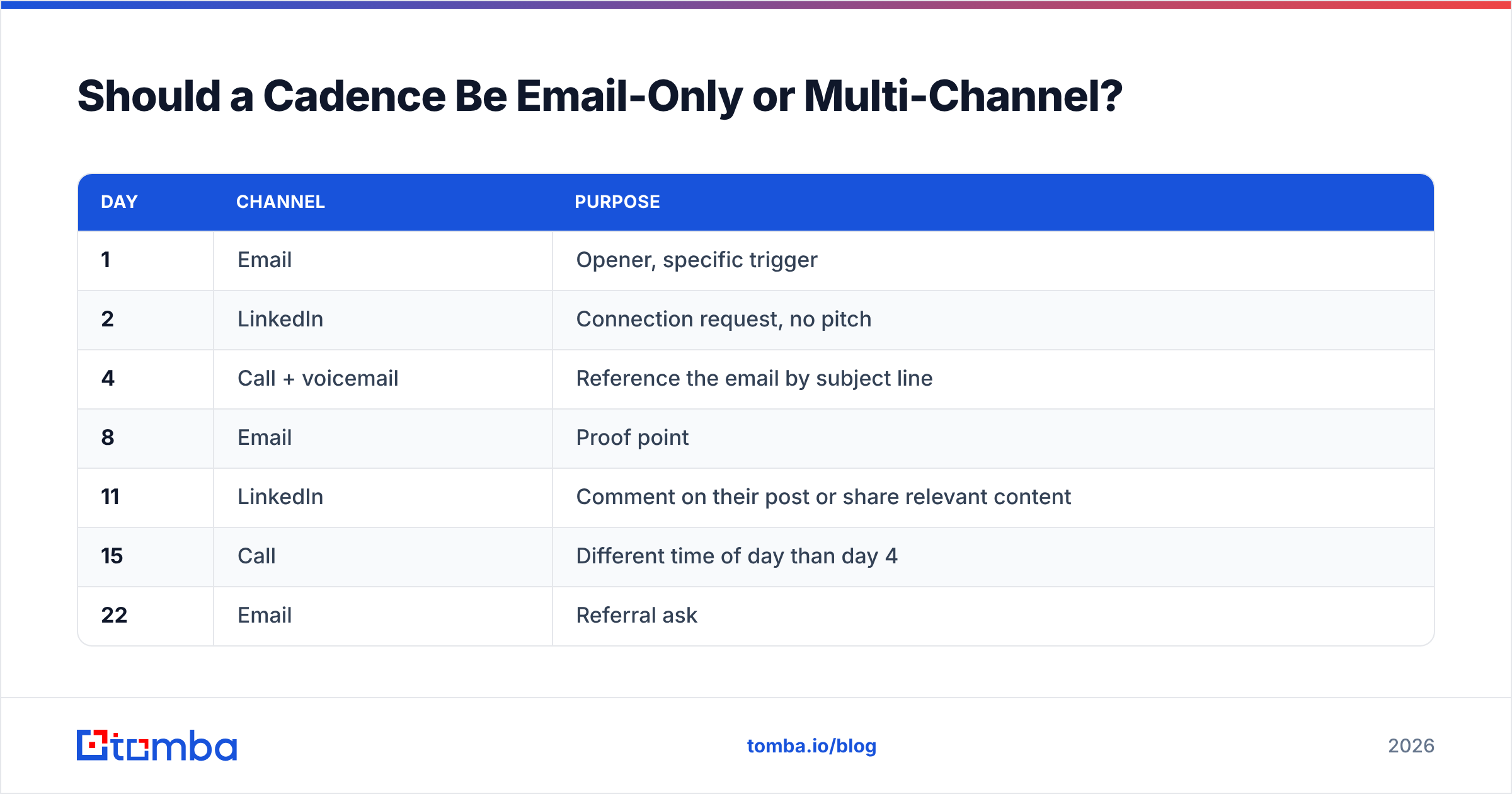
A workable enterprise cadence interleaves channels rather than stacking them:
| Day | Channel | Purpose |
|---|---|---|
| 1 | Opener, specific trigger | |
| 2 | Connection request, no pitch | |
| 4 | Call + voicemail | Reference the email by subject line |
| 8 | Proof point | |
| 11 | Comment on their post or share relevant content | |
| 15 | Call | Different time of day than day 4 |
| 22 | Referral ask | |
| 28 | Break-up |
Two rules make this work. First, never let two channels hit within the same hour — it reads as surveillance, not persistence. Second, reference across channels explicitly ("left you a note last week about X") so the touches feel like one conversation instead of three uncoordinated bots. If you're building the LinkedIn side, LinkedIn outreach has its own connection-limit constraints that will cap your cadence throughput before email does.
Tool-wise, the market is crowded and mostly converged on the same feature set. HubSpot's sequences documentation is a reasonable free reference for the mechanics, and G2's sales engagement category is the least biased way to compare cadence platforms on real review volume rather than vendor claims. For contact sourcing at the front of the cadence, options range from full-suite platforms to focused providers — BookYourData is a solid choice when you want pay-as-you-go verified lists rather than a subscription, while API-first tools fit teams building enrollment into their own systems.
How Do You Measure Whether a Cadence Is Working?#
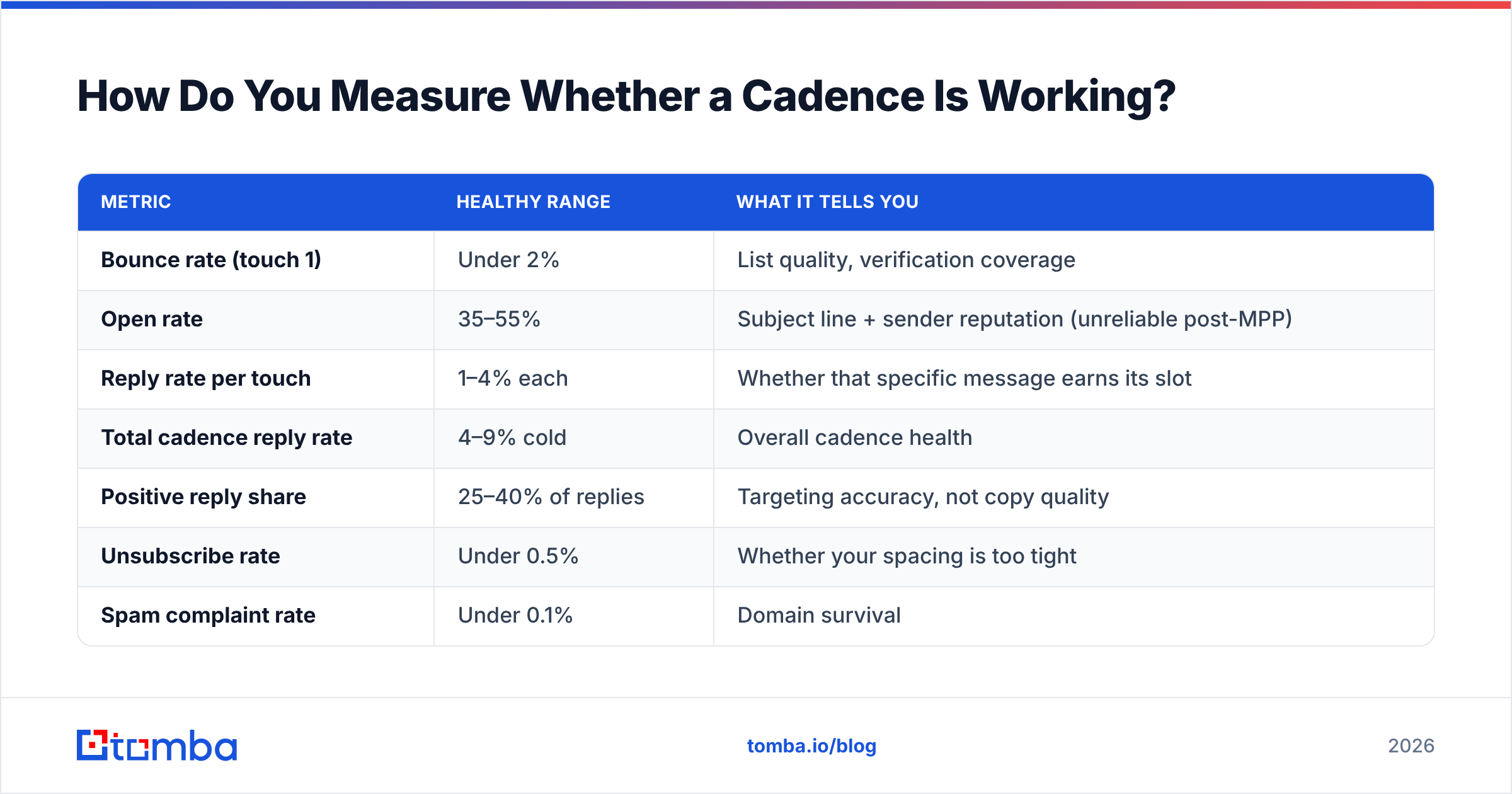
Track per-touch, not per-campaign. Campaign-level reply rate hides which specific step is doing the work.
| Metric | Healthy range | What it tells you |
|---|---|---|
| Bounce rate (touch 1) | Under 2% | List quality, verification coverage |
| Open rate | 35–55% | Subject line + sender reputation (unreliable post-MPP) |
| Reply rate per touch | 1–4% each | Whether that specific message earns its slot |
| Total cadence reply rate | 4–9% cold | Overall cadence health |
| Positive reply share | 25–40% of replies | Targeting accuracy, not copy quality |
| Unsubscribe rate | Under 0.5% | Whether your spacing is too tight |
| Spam complaint rate | Under 0.1% | Domain survival |
The diagnostic pattern: if touch one replies well and touches two through five collapse, your spacing is too tight or your follow-ups are repeating rather than adding. If every touch performs evenly but low, your targeting is off and no amount of cadence tuning fixes it. If replies are healthy but positive-reply share is under 20%, you're reaching real humans who are the wrong humans — an ICP and list-build problem, not a cadence problem.
Kill a cadence variant after 300–500 enrollments, not 50. Reply rates at low volume swing wildly enough that you'll chase noise.
What's the Fastest Way to Build Your First Cadence?#
Start with five email touches over 21 days, verified list, single channel. Add complexity only after you have a baseline.
Concretely: build the list, verify it, write five messages where each one changes the angle rather than repeating the ask, space them at 3-5-7-7 days, cap sends at 40 per mailbox per day, and set exit conditions on any reply. Run 400 contacts through it. Read the per-touch numbers. Then decide whether you need calls, more touches, or a better list — the numbers will tell you which.
The list is where most first cadences quietly break. If you're sourcing contacts by hand or working from an exported list of unknown age, run them through a proper build step first: Tomba's Email Finder resolves verified professional addresses by name and domain, with the free tier covering 25 searches a month if you just want to sanity-check your current list quality before committing. Starter runs $49/mo when you're ready to build cadence volume, and the API drops the same verification step directly into whatever enrollment logic you've already got. Get the addresses right, and your cadence timing finally has something honest to measure.
Related guides#
Ready to find emails that actually work?
Join 150,000+ professionals who stopped guessing and started sending. Free credits on signup — no credit card required.
Get the Tomba newsletter
Practical outbound tactics and product updates — once every two weeks.
About the author