Email Cadence Software in 2026: How to Pick the Right Tool
Cadence tools all promise more replies. Most just send faster. Here's how email cadence software actually works, what separates the tiers, and which one fits your team size and motion.
TL;DR
- Email cadence software schedules a multi-touch sequence — email, call tasks, LinkedIn steps — and pauses it automatically when a prospect replies. That last part is the whole product.
- The market splits into three tiers: lightweight senders ($30–60/user/mo), full engagement platforms ($100–165/user/mo), and all-in-one data + sending suites. Most teams overbuy.
- Cadence length matters less than cadence spacing and data quality. A 5-touch sequence to verified contacts beats a 14-touch sequence to a scraped list every time.
- Deliverability is now the binding constraint, not send volume. Google and Yahoo's bulk-sender rules made inbox placement the bottleneck.
- Before you compare vendors, fix your list. A cadence tool amplifies whatever data you feed it — including the bad parts.
What is email cadence software?#
Email cadence software automates a predefined sequence of outreach touches over a set number of days, then stops the sequence the moment a prospect replies, books a meeting, or unsubscribes.
Think of it like a dishwasher's cycle. You load it once, it runs pre-wash, wash, rinse, and dry on a timer, and it stops early if you open the door. A cadence tool does the same thing with your outbound: Day 1 email, Day 3 LinkedIn view, Day 5 email, Day 8 call task, Day 12 breakup email — and it kills the remaining steps the instant someone writes back.
The category has a naming problem. Vendors call the same thing a "sequence" (Outreach, Apollo), a "cadence" (Salesloft), a "campaign" (Instantly, Lemlist), or a "flow." Functionally they're identical: a state machine that moves a contact through steps, with exit conditions.
Where they differ is what surrounds the state machine:
- Sending infrastructure — how many mailboxes you can rotate, whether inbox warmup is bundled, whether you get a shared IP pool or dedicated sending.
- Task orchestration — whether non-email steps (calls, LinkedIn, SMS) live in the same queue a rep works from, or exist only as reminders.
- CRM sync depth — bidirectional field mapping vs. one-way activity logging. This decides whether RevOps trusts your pipeline numbers.
- Data layer — whether contacts come bundled (Apollo, ZoomInfo) or you bring your own from a dedicated email finder.
- Reply handling — sentiment classification, auto-categorization of OOO vs. genuine interest, and how cleanly it routes a positive reply to a rep.
- Guardrails — per-domain send caps, duplicate-contact protection across reps, and do-not-contact list enforcement.
That last item is underrated. On a 12-person SDR team, two reps emailing the same VP of Ops in the same week is not a hypothetical — it's a Tuesday.

How is a cadence different from a drip campaign?#
A cadence is rep-driven and reply-terminated. A drip campaign is marketing-driven and content-terminated.
Drip campaigns run on marketing automation platforms (HubSpot, Marketo, Customer.io) and push nurture content to a list that opted in. They tolerate low reply rates because the goal is education and staying top-of-mind. They often continue running even after someone replies, because the reply goes to a shared inbox nobody watches.
A cadence assumes cold or semi-cold contact, expects a human rep to work the response, and mixes channels. The success metric is reply rate and meetings booked, not click-through.
The practical consequence: you cannot run cold outbound out of your marketing automation platform without eventually damaging your marketing domain's sender reputation. Cold outbound belongs on a separate domain with separate mailboxes. Every serious cadence vendor assumes this and gives you mailbox rotation for it.
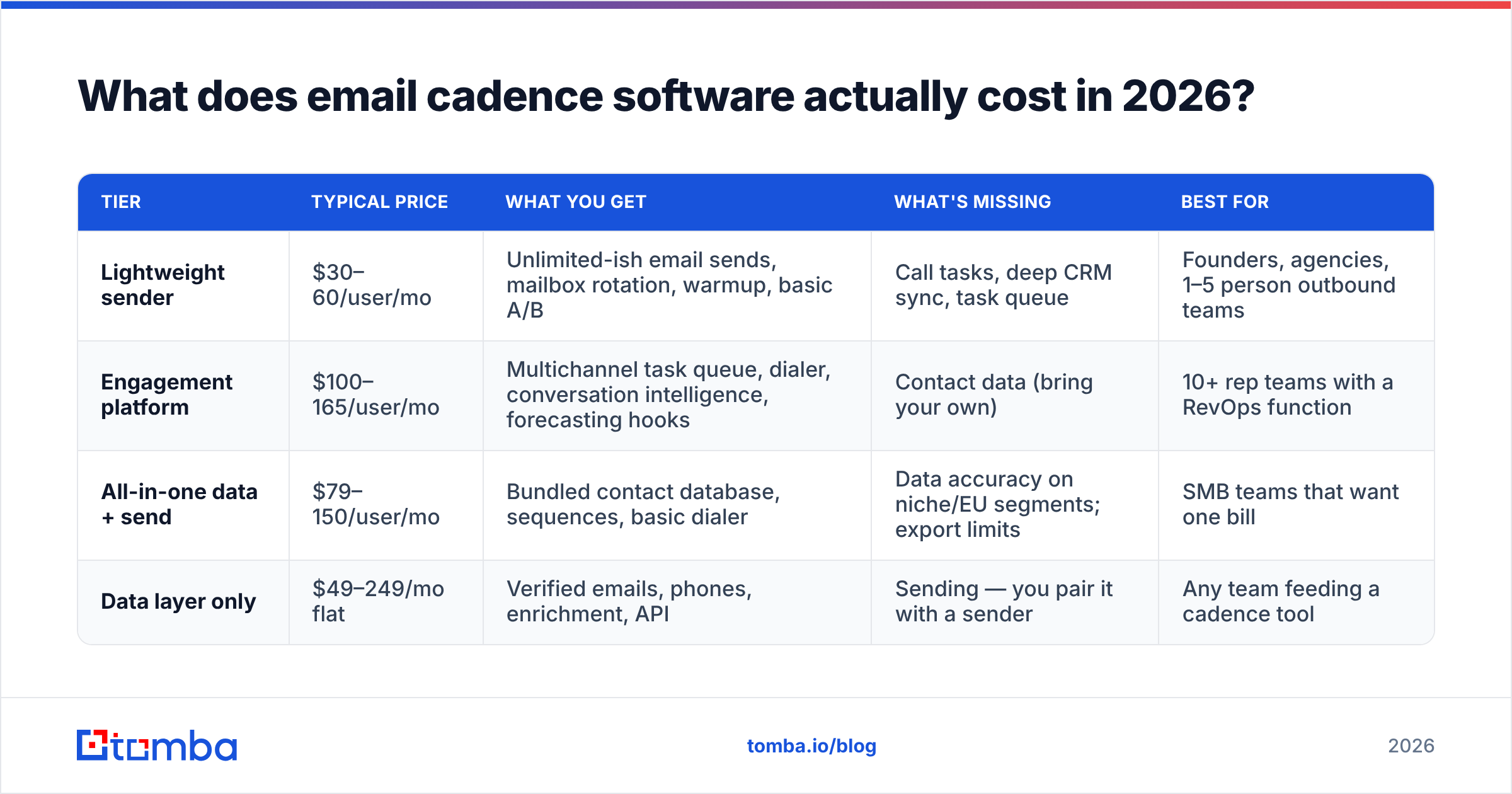
What does email cadence software actually cost in 2026?#
Pricing splits into three clear tiers, and the sticker price hides most of the real cost.
| Tier | Typical price | What you get | What's missing | Best for |
|---|---|---|---|---|
| Lightweight sender | $30–60/user/mo | Unlimited-ish email sends, mailbox rotation, warmup, basic A/B | Call tasks, deep CRM sync, task queue | Founders, agencies, 1–5 person outbound teams |
| Engagement platform | $100–165/user/mo | Multichannel task queue, dialer, conversation intelligence, forecasting hooks | Contact data (bring your own) | 10+ rep teams with a RevOps function |
| All-in-one data + send | $79–150/user/mo | Bundled contact database, sequences, basic dialer | Data accuracy on niche/EU segments; export limits | SMB teams that want one bill |
| Data layer only | $49–249/mo flat | Verified emails, phones, enrichment, API | Sending — you pair it with a sender | Any team feeding a cadence tool |
The hidden costs are consistent across vendors:
- Per-seat minimums. Several engagement platforms require 5–10 seats and an annual contract. A 3-rep team pays for 10.
- Mailbox costs. Running 10 sending mailboxes across 3 domains means 10 Google Workspace seats at roughly $7–14 each, plus domain registration. That's $100–150/mo before your cadence tool.
- Warmup as a separate line item. Some bundle it; some charge $30–50/mo on top.
- Data credits that don't roll over. All-in-one platforms meter exports aggressively. The "unlimited" plan usually isn't.
- Implementation. Enterprise engagement platforms routinely quote a one-time onboarding fee in the low thousands.
For the data layer specifically, Tomba pricing runs a free tier at 25 searches/month, Starter at $49/mo, Growth at $99/mo, Pro at $249/mo, and custom Enterprise — flat platform pricing rather than per-seat, which matters when five reps all need lookup access.
Which email cadence software should you choose?#
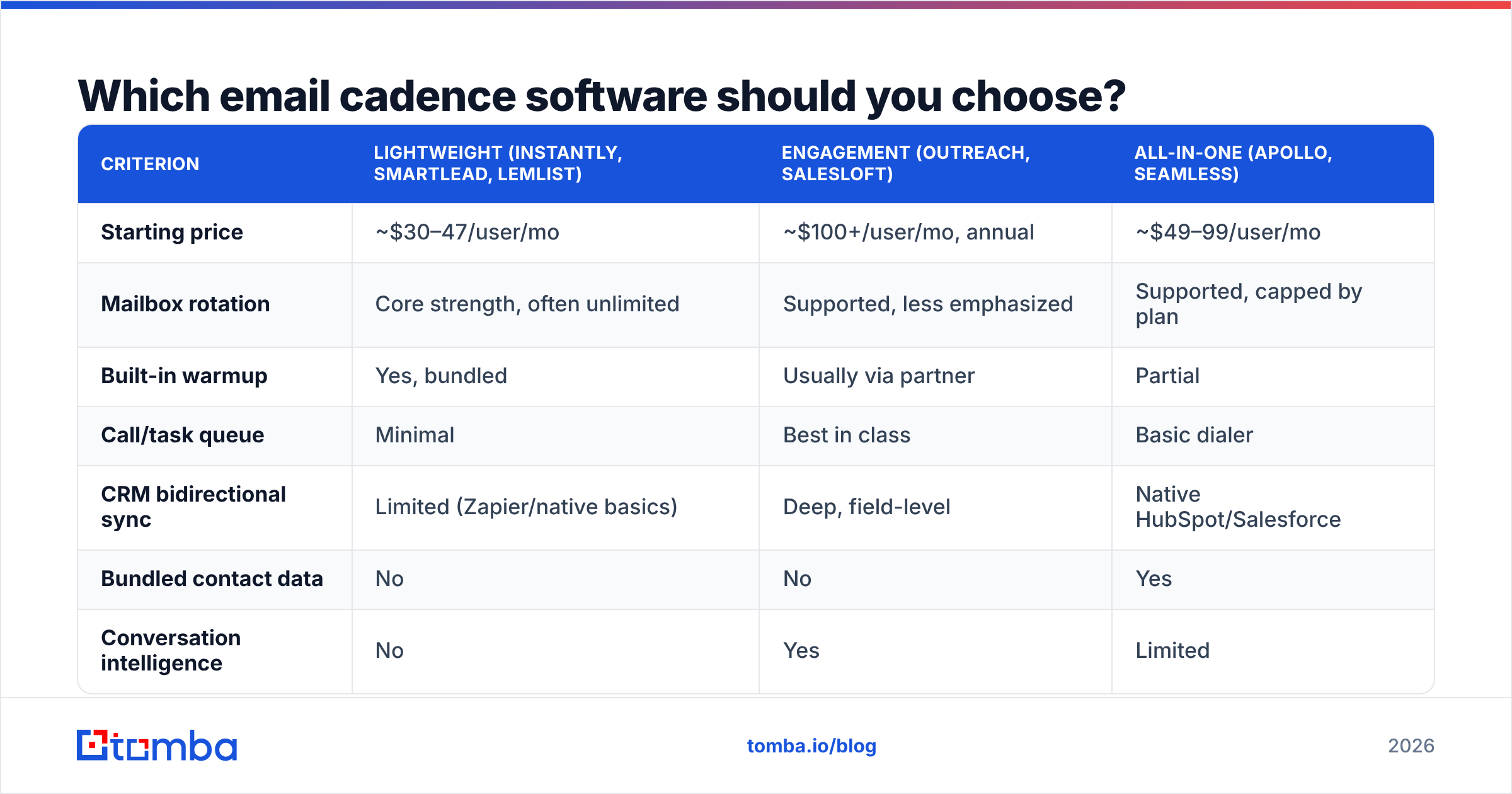
Match the tool to your motion, not to the feature list. Here's how the main options break down on the dimensions that actually change outcomes.
| Criterion | Lightweight (Instantly, Smartlead, Lemlist) | Engagement (Outreach, Salesloft) | All-in-one (Apollo, Seamless) |
|---|---|---|---|
| Starting price | ~$30–47/user/mo | ~$100+/user/mo, annual | ~$49–99/user/mo |
| Mailbox rotation | Core strength, often unlimited | Supported, less emphasized | Supported, capped by plan |
| Built-in warmup | Yes, bundled | Usually via partner | Partial |
| Call/task queue | Minimal | Best in class | Basic dialer |
| CRM bidirectional sync | Limited (Zapier/native basics) | Deep, field-level | Native HubSpot/Salesforce |
| Bundled contact data | No | No | Yes |
| Conversation intelligence | No | Yes | Limited |
| Best fit | High-volume cold, agencies | 10+ reps, complex territories | SMB wanting one vendor |
| Weak spot | Reporting depth, no task queue | Cost, onboarding time | Data accuracy varies by region |
Three decision rules that hold up in practice:
- If your reps make calls, buy an engagement platform. Lightweight senders treat calls as a checkbox. If a rep has to leave the tool to dial, the call step gets skipped by week two.
- If you run 3+ sending domains, buy a lightweight sender. Domain and mailbox rotation is their core competency, and engagement platforms treat it as an afterthought.
- If you're evaluating all-in-ones for the data, price the data separately first. Bundled databases are convenient and genuinely fine for US mid-market. They degrade on EU contacts, small companies under 50 employees, and recently-changed roles. Running a dedicated email verifier against a bundled export is a five-minute test that tells you a lot.
Worth naming a specific case: if your bottleneck is list acquisition rather than sending, a purpose-built B2B database like BookYourData or a lookup-first tool solves more of your problem than a fourth sequencing feature will. Cadence software doesn't create prospects. It contacts them.
For third-party validation on any shortlist, check category grids on G2 and Capterra — but weight recent reviews heavily. Deliverability performance in this category has shifted meaningfully since the 2024 bulk-sender rules.
How long should a cadence be?#
Five to nine touches over 14–21 business days, with widening gaps. Anything longer is usually a symptom of bad targeting rather than good persistence.
A defensible default structure:
- Day 1 — Email 1. Specific trigger, one ask, under 90 words.
- Day 3 — LinkedIn. Profile view or connection request, no pitch.
- Day 5 — Email 2. New angle, not a "just bumping this."
- Day 8 — Call. Reference the emails only if you reach them.
- Day 12 — Email 3. Social proof from a near-identical company.
- Day 18 — Email 4. Breakup with a genuine door left open.
Two things matter more than the step count. First, spacing that widens — front-loading touches 24 hours apart reads as automation, which is exactly what it is. Second, each step must stand alone. If step 3 only makes sense to someone who read step 1, and step 1 landed in spam, you've wasted the sequence.
The rule for response rate improvement: the fastest lever is almost never adding touches. It's tightening the segment so the first email is relevant. HubSpot's sales research has been consistent on this for years — personalization at the segment level outperforms volume at the list level.
Why does data quality decide cadence performance?#
Because bounce rate feeds sender reputation, and sender reputation decides whether steps 2 through 6 get delivered at all.
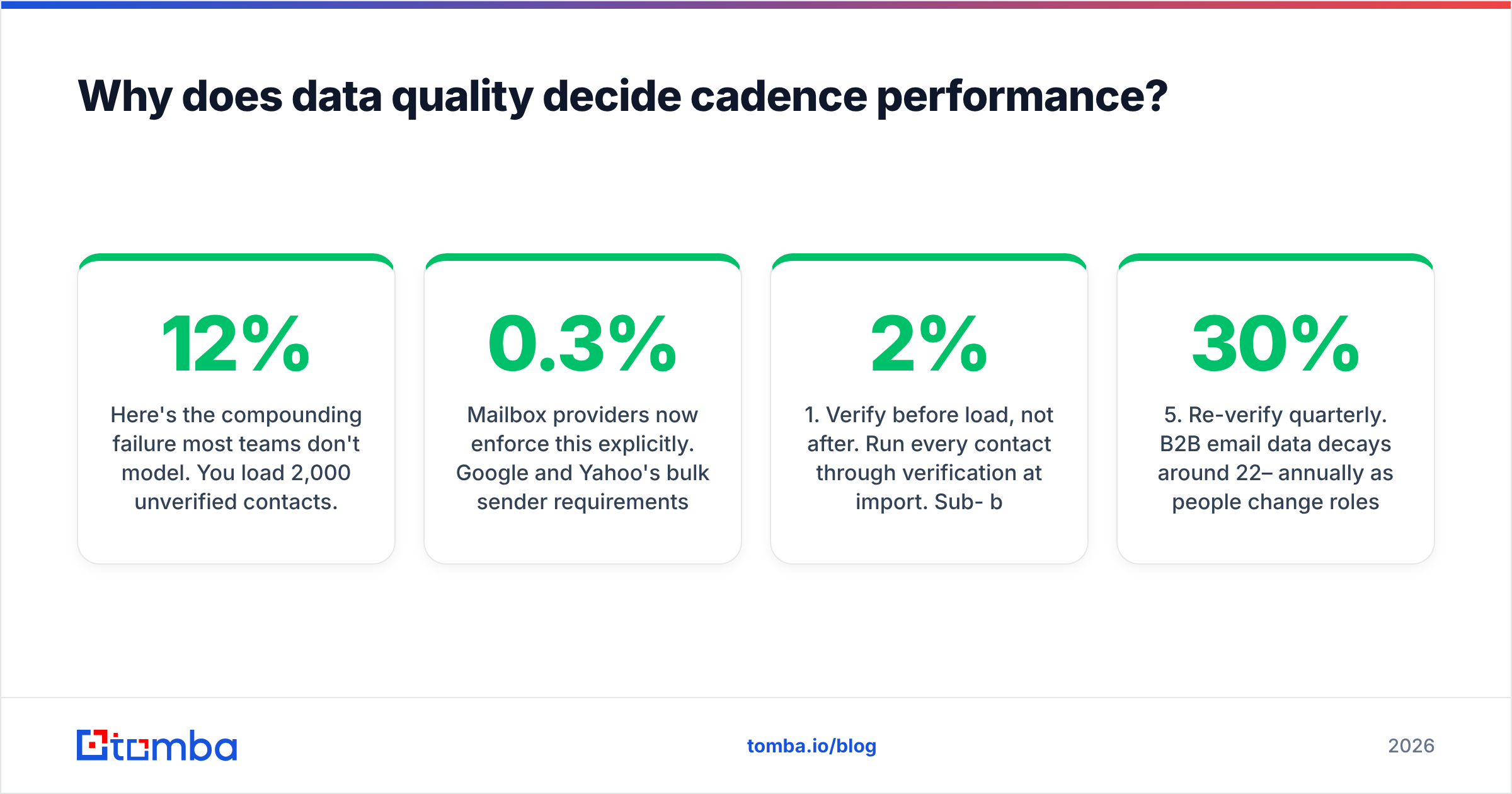
Here's the compounding failure most teams don't model. You load 2,000 unverified contacts. 12% bounce on step 1 — 240 hard bounces in 48 hours. Your domain reputation drops. Steps 2 through 6 go to 1,760 people, but a growing share now land in spam. Your reply rate on step 3 reads as 0.4%, and you conclude your copy is weak. It isn't. Your copy never got read.
Mailbox providers now enforce this explicitly. Google and Yahoo's bulk sender requirements set a spam complaint threshold of 0.3% and require authenticated sending. Once you cross it, recovery takes weeks — during which your entire cadence infrastructure is idle at full cost.
The fix is boring and it works:
- Verify before load, not after. Run every contact through verification at import. Sub-2% bounce is the target; sub-1% is achievable.
- Handle catch-all domains explicitly. Catch-all servers accept everything, so standard verification returns "unknown." A dedicated catch-all verifier separates the real mailboxes from the black holes instead of forcing you to guess.
- Authenticate everything. SPF, DKIM, and DMARC on every sending domain. An SPF checker confirms your record actually resolves — misconfigured SPF is a top-three cause of unexplained placement drops.
- Warm up new mailboxes for 3–4 weeks before they touch a real cadence, and cap them at 30–50 sends/day even after.
- Re-verify quarterly. B2B email data decays around 22–30% annually as people change roles.
If you're using an all-in-one platform's bundled data, run its export through independent verification once. The delta between the vendor's claimed accuracy and your measured bounce rate is the single most useful number in your evaluation.
How do you migrate to a new cadence tool without breaking pipeline?#
Run both in parallel for one full sequence cycle. Never cut over mid-cadence.
The sequence that avoids most of the pain:
- Freeze new enrollments in the old tool but let in-flight contacts finish. Killing mid-sequence contacts loses touches you already paid for and leaves prospects with an abandoned thread.
- Export your do-not-contact list first. This is the highest-risk asset in the migration. Unsubscribes that fail to carry over become compliance problems.
- Rebuild templates manually, don't bulk-import. Migration is the one moment you'll actually reread your copy. Take it.
- Verify CRM field mapping on 10 test records before enrolling anyone. Activity-logging mismatches are the most common post-migration discovery, usually surfaced by a RevOps lead a month later when the win rate report stops matching reality.
- Warm up new domains in advance. If you're changing sending infrastructure, start warmup 30 days before cutover.
- Keep the old tool's reporting for one quarter. You'll need the baseline to prove the new tool improved anything.
Budget 2–3 weeks for a lightweight sender migration, 6–8 weeks for an engagement platform with deep CRM sync and custom fields.
What should you measure?#
Four numbers, in this order:
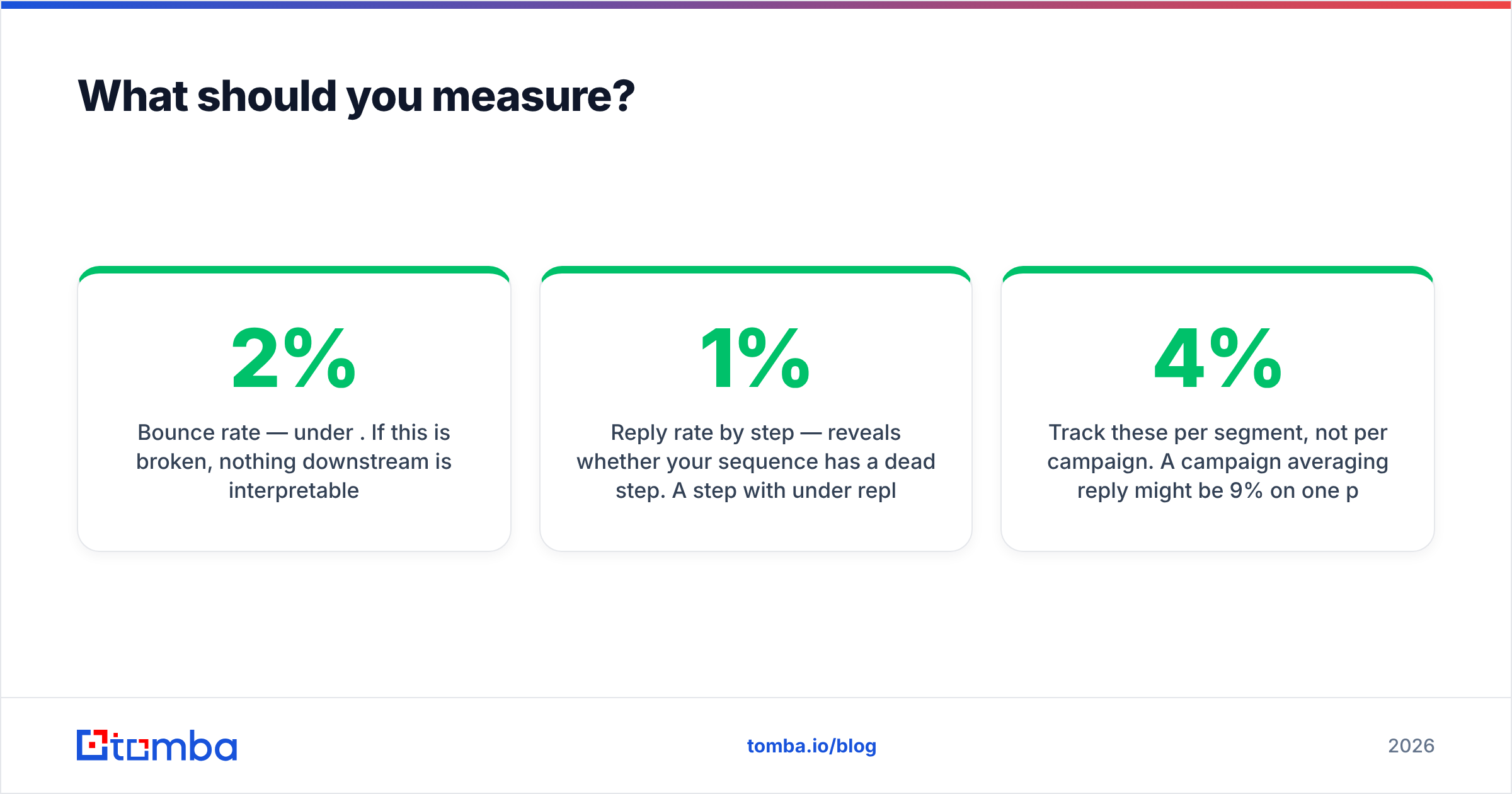
- Bounce rate — under 2%. If this is broken, nothing downstream is interpretable.
- Reply rate by step — reveals whether your sequence has a dead step. A step with under 1% reply after 300 sends should be rewritten or cut.
- Positive reply rate — separate genuine interest from "remove me." Vendors that lump these together are inflating your dashboard.
- Meetings per 100 contacts enrolled — the only metric tied to revenue. Everything else is diagnostic.
Track these per segment, not per campaign. A campaign averaging 4% reply might be 9% on one persona and 0.5% on another, and the average tells you to change your copy when you should change your targeting.
Where should you start?#
Pick the cheapest tool in the tier that matches your motion, then spend the difference on data quality. That ordering is backwards from how most teams buy, and it's why most cadence deployments underperform their pilot.
A concrete starting stack for a small outbound team: one lightweight sender at roughly $40/user/mo, three sending domains with three mailboxes each, 30 days of warmup, and a verified contact source feeding it. Total under $400/mo for a 3-rep team, with the data layer as the only line item worth upgrading first.
If your list is the weak link — and for most teams evaluating cadence software, it is — start there. Tomba Email Finder gives you verified professional emails by domain, name, or company, with a free tier at 25 searches/month to test accuracy against your own known-good contacts before you commit. Run 50 contacts you can independently confirm, measure the hit rate, then feed the result into whatever cadence tool you choose. A clean list makes an average sequencer look good. No sequencer makes a dirty list work.
Related guides#
Ready to find emails that actually work?
Join 150,000+ professionals who stopped guessing and started sending. Free credits on signup — no credit card required.
Get the Tomba newsletter
Practical outbound tactics and product updates — once every two weeks.
About the author