Email Campaign Software in 2026: The Complete Buyer's Guide
Most email campaign software demos look identical. The differences show up in per-contact pricing, sending limits, and whether the platform lets you fix deliverability yourself. Here's how to compare them honestly.
TL;DR
- "Email campaign software" covers two different product categories: marketing ESPs built for opted-in lists (Mailchimp, Klaviyo, Brevo, HubSpot) and outbound sending tools built for cold sequences (Instantly, Smartlead, Saleshandy). Buying the wrong category is the most expensive mistake in this market.
- Sticker prices are close to meaningless. Almost every marketing ESP charges by contact count, and the same 25,000-contact list can cost $75/mo or $400/mo depending on which vendor you signed with.
- No email campaign software fixes deliverability for you. Authentication, warmup, list hygiene, and send volume are your responsibility — the platform just executes.
- Bounce rate is decided before the campaign is ever built. Verify and enrich the list first; a 12% bounce rate will sink a campaign on any platform.
- Pick your tier by list growth trajectory and automation depth, not by feature-checklist length. Most teams overpay for segmentation they never build.
What is email campaign software?#
Email campaign software is the system that takes a list of contacts, a message, and a schedule, and turns them into delivered email — then reports what happened. That's the whole job. Everything else vendors sell around it (visual builders, journey canvases, AI subject-line assistants, revenue attribution) is packaging on top of four primitives: a contact database, a template engine, a sending infrastructure, and an analytics layer.
Think of it like a commercial kitchen. The ESP is the stove, the ovens, and the ticket rail — it cooks and plates consistently at volume. It does not source your ingredients, and it will happily cook rotten ones and serve them to your customers. That distinction is where most buyers get burned.
The category has quietly split into two products that share a name:
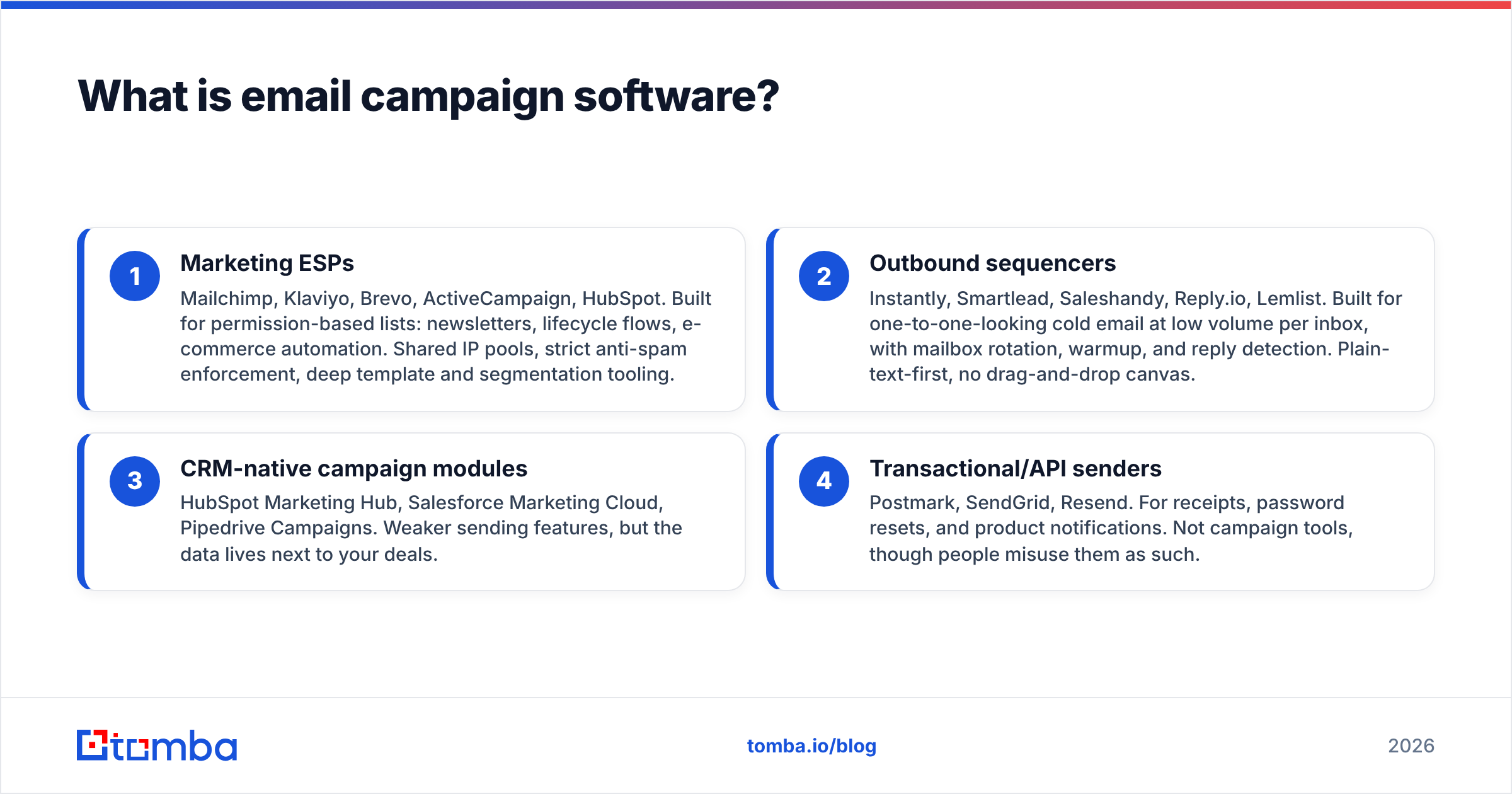
- Marketing ESPs — Mailchimp, Klaviyo, Brevo, ActiveCampaign, HubSpot. Built for permission-based lists: newsletters, lifecycle flows, e-commerce automation. Shared IP pools, strict anti-spam enforcement, deep template and segmentation tooling.
- Outbound sequencers — Instantly, Smartlead, Saleshandy, Reply.io, Lemlist. Built for one-to-one-looking cold email at low volume per inbox, with mailbox rotation, warmup, and reply detection. Plain-text-first, no drag-and-drop canvas.
- CRM-native campaign modules — HubSpot Marketing Hub, Salesforce Marketing Cloud, Pipedrive Campaigns. Weaker sending features, but the data lives next to your deals.
- Transactional/API senders — Postmark, SendGrid, Resend. For receipts, password resets, and product notifications. Not campaign tools, though people misuse them as such.
If you upload a cold prospect list into a marketing ESP, you will get suspended. If you try to run a 90,000-contact newsletter through an outbound sequencer, you will hit mailbox limits by lunch. Decide which product you're buying before you compare a single feature.
What separates a marketing ESP from an outbound sending tool?#
The honest answer is consent model and sending architecture, not features.
Marketing ESPs assume every contact asked to hear from you. Their terms of service say so explicitly, their compliance teams audit complaint rates, and their shared IP pools mean your bad list damages other customers. In exchange, you get sophisticated segmentation, deliverability infrastructure managed by people who do it full time, and templates that render correctly in Outlook.
Outbound tools assume the opposite: the recipient has never heard of you. So they optimize for looking like a human wrote it — plain text, no tracking pixel by default, rotation across ten or twenty connected mailboxes so no single inbox exceeds ~40 sends a day, and automatic pause-on-reply.
Actually, let me fix that markdown — the placeholder goes in the parentheses:

Practical consequences:
- Volume math is different. An ESP sends 100,000 emails from one authenticated domain in an hour. An outbound tool sends 400 emails across 12 mailboxes over eight hours.
- Warmup only exists in outbound tools. ESPs assume you warm the domain yourself. Run the numbers with a warmup calculator before you send anything from a domain younger than 90 days.
- Reply handling is inverted. ESPs treat replies as support tickets. Outbound tools treat replies as the conversion event.
- Complaint tolerance differs by an order of magnitude. Above 0.3% complaints, an ESP will throttle or suspend you. Google's Postmaster thresholds apply to both, but the ESP enforces them first.
Which email campaign software should you compare in 2026?#
Here's the shortlist most B2B teams end up with, with the published entry pricing at the time of writing. Treat these as starting points — every marketing ESP scales price with contact count, so verify on the vendor's own pricing page before you budget.
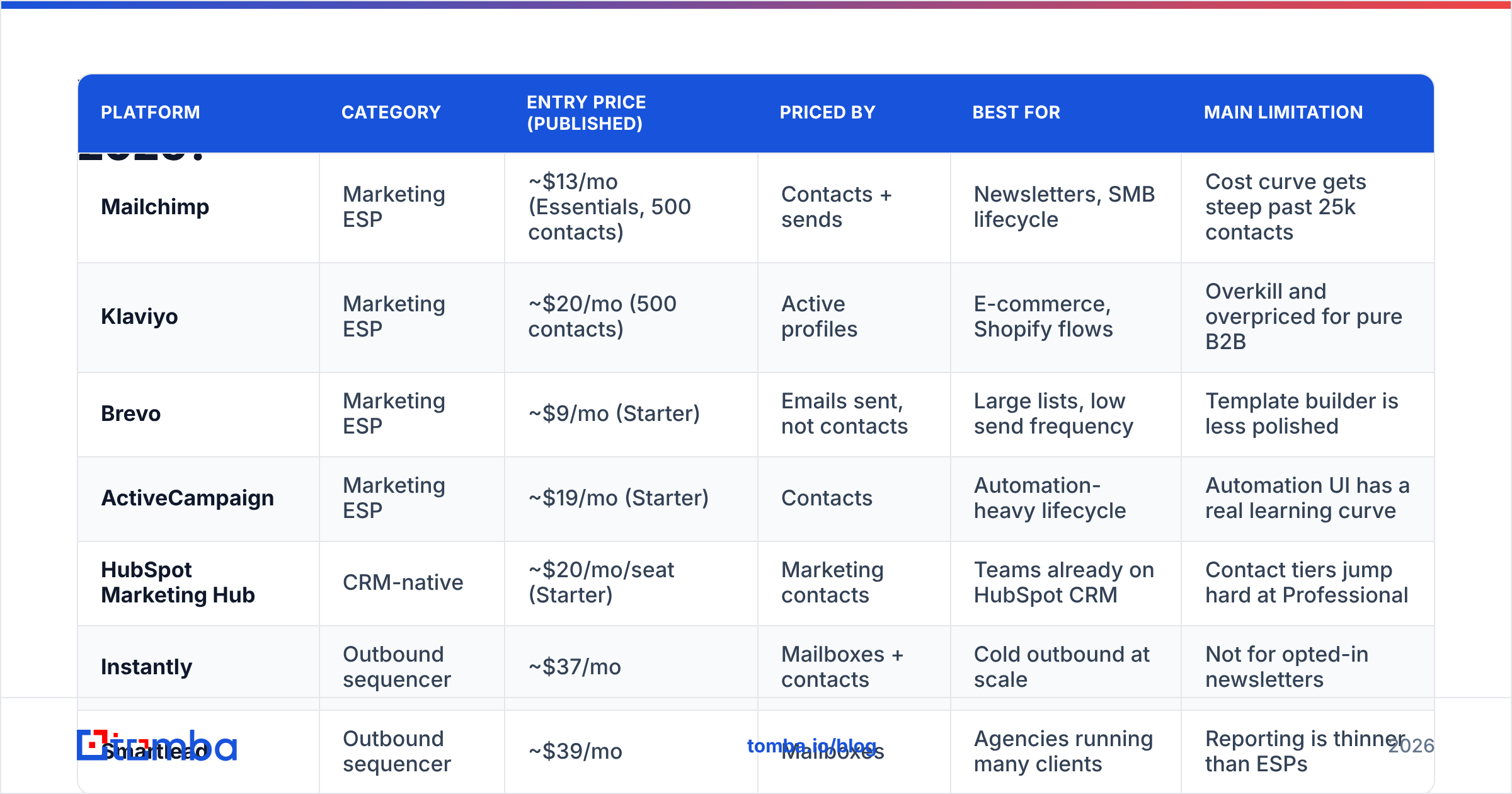
| Platform | Category | Entry price (published) | Priced by | Best for | Main limitation |
|---|---|---|---|---|---|
| Mailchimp | Marketing ESP | ~$13/mo (Essentials, 500 contacts) | Contacts + sends | Newsletters, SMB lifecycle | Cost curve gets steep past 25k contacts |
| Klaviyo | Marketing ESP | ~$20/mo (500 contacts) | Active profiles | E-commerce, Shopify flows | Overkill and overpriced for pure B2B |
| Brevo | Marketing ESP | ~$9/mo (Starter) | Emails sent, not contacts | Large lists, low send frequency | Template builder is less polished |
| ActiveCampaign | Marketing ESP | ~$19/mo (Starter) | Contacts | Automation-heavy lifecycle | Automation UI has a real learning curve |
| HubSpot Marketing Hub | CRM-native | ~$20/mo/seat (Starter) | Marketing contacts | Teams already on HubSpot CRM | Contact tiers jump hard at Professional |
| Instantly | Outbound sequencer | ~$37/mo | Mailboxes + contacts | Cold outbound at scale | Not for opted-in newsletters |
| Smartlead | Outbound sequencer | ~$39/mo | Mailboxes | Agencies running many clients | Reporting is thinner than ESPs |
Two things this table won't tell you. First, whether the platform's deliverability is good — that depends far more on your domain, your list, and your content than on the vendor. Second, whether the automation builder matches how your team actually thinks. Both of those need a trial, not a spec sheet. Read current user reviews on G2 for the second one; ignore anyone claiming to have benchmarked the first, because deliverability is not a vendor-level constant.
How is email campaign software actually priced?#
Understanding the pricing model matters more than comparing the numbers, because the models are structurally different.
- Priced by contacts stored (Mailchimp, ActiveCampaign, Klaviyo, HubSpot): you pay for every record in the database whether you email it or not. A 40,000-contact list you mail once a quarter costs the same as one you mail weekly. This model punishes list hoarding.
- Priced by emails sent (Brevo, most transactional senders): you pay per send. Big dormant lists are cheap; high-frequency sending is expensive. This model punishes over-mailing.
- Priced by connected mailboxes (Instantly, Smartlead): you pay per sending inbox and often per uploaded lead. This model punishes sloppy, unfiltered lists.
- Priced by seat (HubSpot, Salesforce): you pay per marketer with access, usually plus a contact tier. This model punishes broad internal access.
Costs vendors don't put on the pricing page:
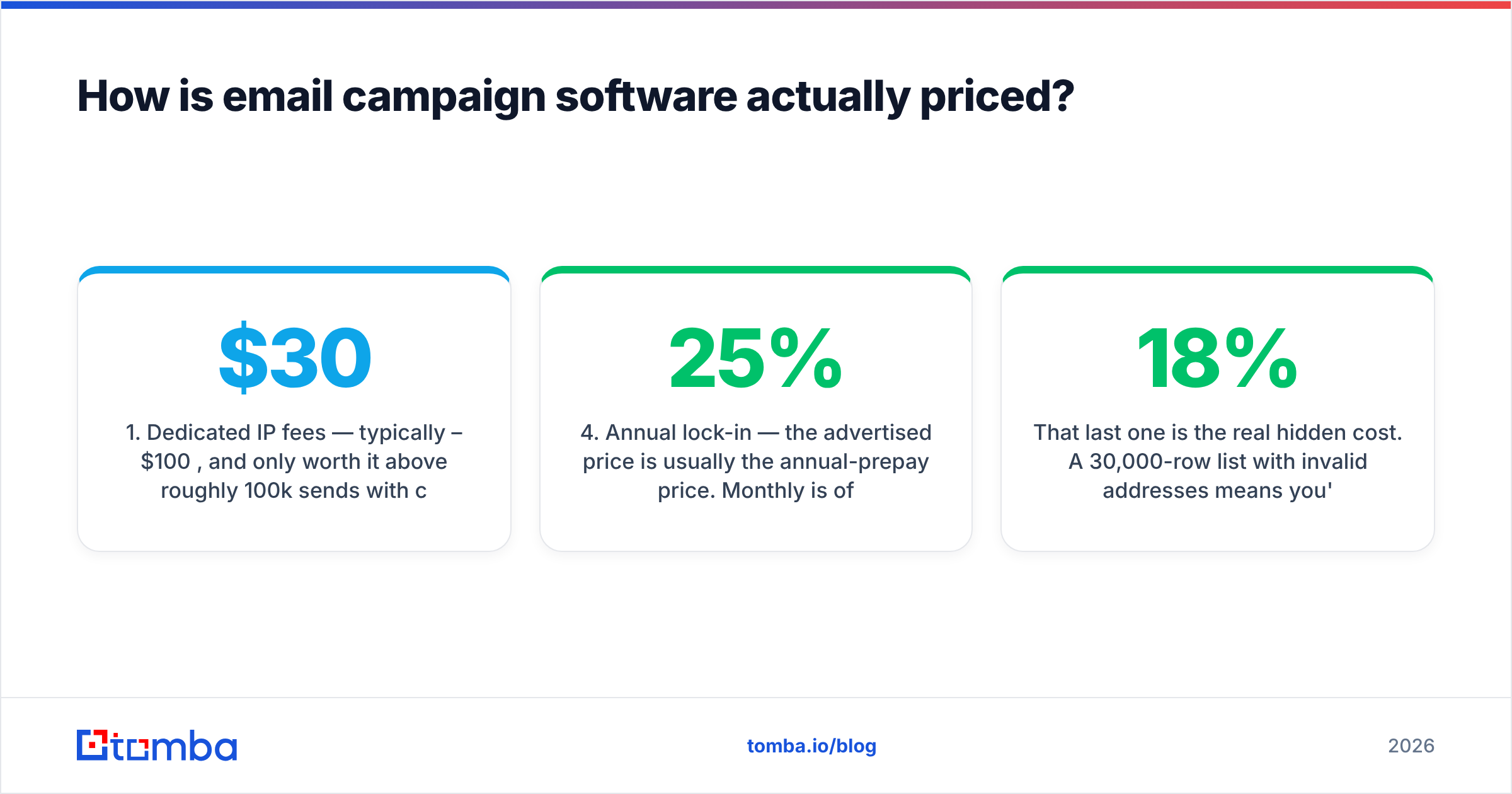
- Dedicated IP fees — typically $30–$100/mo, and only worth it above roughly 100k sends/month with consistent volume.
- Overage rates — blowing past your contact tier mid-month often bills at a worse per-unit rate than upgrading would have.
- Marketing-contact vs. total-contact accounting — HubSpot in particular distinguishes these, and misconfiguring it is a classic surprise invoice.
- Annual lock-in — the advertised price is usually the annual-prepay price. Monthly is often 15–25% higher.
- List cleaning you'll pay for anyway — if you don't verify before import, you pay twice: once in contact-tier fees for dead records, once in deliverability damage.
That last one is the real hidden cost. A 30,000-row list with 18% invalid addresses means you're paying a contact-tier premium for 5,400 records that will never open anything, and generating a bounce rate that suppresses inbox placement for the other 24,600. Running that list through an email verifier or a bulk verify job before import is the cheapest deliverability spend available.
Does your email campaign software control deliverability?#
No — and any vendor implying otherwise is selling you something. Your platform controls maybe 20% of inbox placement. The other 80% is decided by factors that live outside it.
What the platform controls:
- Shared or dedicated IP reputation
- Feedback loop registration with major mailbox providers
- Bounce and complaint processing
- Throttling and send-rate pacing
What you control, regardless of platform:
- Domain authentication. SPF, DKIM, and a DMARC policy. Since Google and Yahoo tightened bulk-sender rules, this is a hard gate, not a best practice. Google's Postmaster guidelines are the reference document — read them once a year.
- List quality. Invalid addresses, spam traps, and role accounts. This is entirely upstream of your ESP.
- Send-volume ramp. Going from 0 to 50,000 sends in a week on a fresh domain trips every filter that exists.
- Content and engagement. Image-heavy templates, link shorteners, and unengaged segments all suppress placement.
- Unsubscribe hygiene. One-click list-unsubscribe headers, honored within two days.
The uncomfortable implication: switching email campaign software rarely fixes a deliverability problem. Teams migrate from Mailchimp to Brevo expecting a lift, see identical open rates, and conclude the new tool is broken. The tool was never the variable. If you want to understand which lever is actually failing, start with the fundamentals of email deliverability rather than the migration.
How do you pick the right platform and tier?#
Work through these in order. Skipping to feature comparison is how teams end up with a $400/mo tool running two campaigns a month.
- Define the consent model. Opted-in list → marketing ESP. Cold prospects → outbound sequencer. Both → two tools, and keep the domains separate. Do not compromise here.
- Project your contact count 12 months out. Not today's list — next year's. Contact-priced tools double in cost roughly every time your list doubles. If you're growing 15%/mo, model the price at month 12 and compare that number instead.
- Count the automations you'll genuinely build. Most teams build three to five: welcome, nurture, re-engagement, abandoned action, win-back. If that's your list, you don't need the enterprise journey canvas.
- Check the integration you can't live without. Your CRM, your product database, your billing system. A platform that requires Zapier for your primary sync will cost you in reliability and in Zapier tasks.
- Test rendering and inbox placement during the trial. Send to a seed set covering Gmail, Outlook 365, and Apple Mail. Check rendering, not just delivery.
- Price the exit. Can you export contacts, engagement history, and templates? Engagement history is the one vendors make hard, and it's the one that matters for re-warming on a new platform.
A note on where the contact data comes from: campaign software is not a data source. Marketing ESPs assume you already have opted-in records. Outbound tools assume you're bringing a prospect list. Whether you build that list from domain search on target accounts, buy from a licensed provider like BookYourData, or export from your CRM, the platform will do nothing to improve its accuracy. Enrich and verify upstream, always.
What does a complete campaign stack look like?#
For a B2B team running both marketing and outbound, the working shape is usually four layers:
| Layer | Job | Typical tools |
|---|---|---|
| Data | Find, enrich, and verify contacts | Tomba, Clay, CRM exports, licensed databases |
| Hygiene | Remove invalid, role, and catch-all risk before import | Email verifier, dedupe, suppression list |
| Sending | Execute campaigns, sequences, and flows | Mailchimp/Brevo (marketing), Instantly/Smartlead (outbound) |
| Measurement | Attribute replies and revenue back to campaigns | CRM, Postmaster Tools, ESP analytics |
The failure mode is almost always layer two. Teams invest in layers one, three, and four, skip hygiene, and then blame the sending platform when placement collapses. Cleaning between find and send costs a fraction of a cent per record and is the highest-leverage step in the chain.
Frequently asked questions#
Can I use one platform for both newsletters and cold outbound? Technically some tools allow it. Don't. Cold sending on the same domain as your marketing list puts your entire sender reputation — including transactional mail — at risk. Use a separate sending domain for outbound, and a separate tool.
Is free email campaign software good enough to start? For under 500 contacts and simple broadcasts, yes. Mailchimp, Brevo, and MailerLite all have usable free tiers. The constraint you'll hit first is automation depth, not send volume.
How many emails per day is safe from a new domain? Start under 20/day per mailbox and ramp roughly 30% weekly over four to six weeks. There's no universal number — it depends on engagement rates, which is exactly why warmup schedules are calculated, not guessed.
Do open rates still mean anything? Less than they did. Apple Mail Privacy Protection inflates opens for a large share of consumer recipients. Use replies, clicks, and pipeline as your real metrics; treat opens as a directional signal only.
Where to start#
Pick your category first, model the 12-month price rather than the entry price, and assume the platform will not save you from a dirty list. Every campaign platform on this page executes reliably. None of them will tell you that 14% of the addresses you just imported don't exist.
That part is upstream — and it's the part that decides whether the campaign works. Use the Tomba Email Finder to build target-account lists with verified, pattern-confirmed addresses before the first send, and check Tomba pricing — the free tier covers 25 searches a month, with Starter at $49/mo when you're ready to run real volume. Clean input, then let the campaign software do the one job it's actually good at.
Related guides#
Ready to find emails that actually work?
Join 150,000+ professionals who stopped guessing and started sending. Free credits on signup — no credit card required.
Get the Tomba newsletter
Practical outbound tactics and product updates — once every two weeks.
About the author