Email Campaign Strategies That Actually Convert in 2026
Most email campaign strategies collapse before the first send — bad lists, wrong sequencing, no segmentation. Here's the framework that still books meetings in 2026, with benchmarks, tables, and a tool stack you can copy.
TL;DR
- The campaign strategy that wins in 2026 is boring: a clean list, one segment per sequence, three to five touches, and a single ask per email.
- List hygiene is now a deliverability requirement, not a nice-to-have. Google and Yahoo enforce a 0.3% spam-complaint ceiling, and a 3%+ bounce rate will throttle you before your copy ever gets read.
- Batch-and-blast campaigns average 1–3% reply rates in B2B. Segmented, trigger-based campaigns routinely hit 8–15% on the same list size.
- Sequence length has a ceiling. Touch 1–4 produce most replies; touches 7+ mostly produce complaints.
- Measure reply rate and meetings booked, not open rate. Apple Mail Privacy Protection has made open rate a vanity metric since 2021.
What is an email campaign strategy, exactly?#
An email campaign strategy is the set of decisions you make before writing a single subject line: who receives the emails, why they were selected, what sequence they enter, how many touches they get, and what defines success.
Think of it like a restaurant's prep list. The cooking (copywriting) gets all the attention, but the meal fails if the ingredients were bought wrong. Most teams obsess over subject lines while sending to a list where a third of the addresses no longer exist.
A complete strategy answers five questions:
- Audience definition — which specific segment, defined by a trigger or firmographic filter, not "everyone in our CRM."
- Entry criteria — what event puts someone into this campaign (job change, funding round, pricing-page visit, webinar signup).
- Sequence architecture — number of touches, spacing, and channel mix.
- Single conversion goal — one ask per campaign, repeated in different framings.
- Exit and suppression rules — what removes someone (reply, unsubscribe, deal created, competitor domain).
If you cannot write those five lines down before you write email one, you do not have a strategy. You have a send.
Why do most email campaigns fail before the first send?#
Because the list is dirty and the segment is too broad. Those two failures account for the majority of campaigns that flatline.
Here is the arithmetic that kills teams. You export 5,000 contacts from a data provider. Roughly 20–30% of B2B email addresses decay per year through job changes and domain churn. Send to that raw list and you produce 1,000+ hard bounces in a week. Your bounce rate crosses 5%, your sending domain gets flagged, and every subsequent campaign — including the good ones — lands in spam.
The fix is unglamorous: run every list through an email verifier before it enters a sequence, and re-verify anything older than 90 days. Catch-all domains need separate handling, since a standard SMTP check returns "accept all" and tells you nothing — that is what a catch-all verifier is for.
The second failure is segment width. A campaign written for "SaaS founders" has to be so generic that it says nothing. A campaign written for "Series A SaaS founders who posted a hiring req for their first AE in the last 30 days" writes itself, and the relevance does the persuasion work that clever copy cannot.
Which email campaign strategies actually work in 2026?#
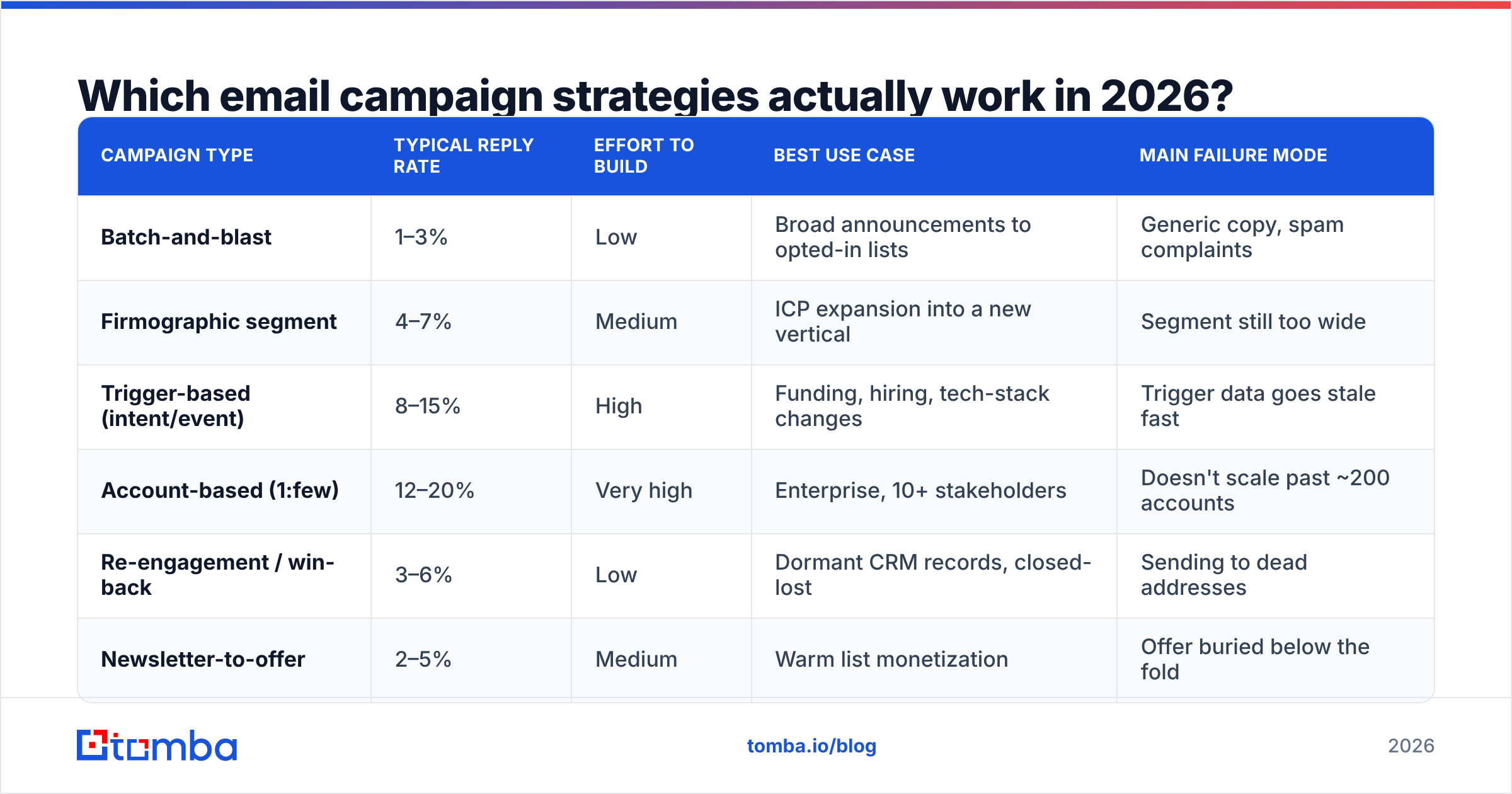
Not all campaign types perform equally, and the gap is wider than most teams assume. Here is how the main archetypes compare on real B2B outbound and lifecycle programs:
| Campaign type | Typical reply rate | Effort to build | Best use case | Main failure mode |
|---|---|---|---|---|
| Batch-and-blast | 1–3% | Low | Broad announcements to opted-in lists | Generic copy, spam complaints |
| Firmographic segment | 4–7% | Medium | ICP expansion into a new vertical | Segment still too wide |
| Trigger-based (intent/event) | 8–15% | High | Funding, hiring, tech-stack changes | Trigger data goes stale fast |
| Account-based (1:few) | 12–20% | Very high | Enterprise, 10+ stakeholders | Doesn't scale past ~200 accounts |
| Re-engagement / win-back | 3–6% | Low | Dormant CRM records, closed-lost | Sending to dead addresses |
| Newsletter-to-offer | 2–5% | Medium | Warm list monetization | Offer buried below the fold |
The pattern is consistent: the more specific the entry trigger, the higher the reply rate — and the higher the operational cost of keeping the trigger data fresh. Most teams should run two campaigns concurrently: one high-volume segment play and one trigger-based play, then shift budget toward whichever produces meetings per hour of work.
How do you build a sequence that earns replies?#
Use four to five touches over 14–18 days, each with a distinct job. Sequences longer than seven touches produce diminishing replies and rising complaints.
- Touch 1 — the relevance proof. Lead with the trigger. "Saw you opened a second office in Austin" beats any value proposition. Under 90 words, one question, no attachments, no links.
- Touch 2 (day 3) — the specific angle. Reframe the problem in the recipient's language. Introduce one concrete number: a benchmark, a customer result, a cost figure.
- Touch 3 (day 7) — the social proof. Name a comparable company and the outcome. This is where a link earns its place — a case study, not your homepage.
- Touch 4 (day 12) — the low-friction ask. Downgrade the request. Instead of a meeting, ask a yes/no question or offer to send something useful.
- Touch 5 (day 18) — the clean exit. State that you're closing the loop. Breakup emails still generate 5–10% of total replies, and they protect your sender reputation by ending the thread cleanly.
Two structural rules matter more than the copy inside them. First, keep every touch under 120 words — mobile clients truncate anything longer and the recipient decides in the preview pane. Second, vary the ask, not just the wording. Four emails that all say "got 15 minutes?" read as one email sent four times.
Test your subject lines before you commit a whole segment to them; a subject line tester will catch spam-trigger phrasing and length problems in seconds.
How should you segment and time your sends?#
Segment by observable behavior first, firmographics second, and personas last. Personas are internal fiction; behavior is evidence.
A practical hierarchy, strongest signal first:
- In-market behavior — pricing page visits, demo abandons, competitor comparison searches, repeat site visits from the same company.
- Company events — funding, acquisition, leadership change, new office, layoffs, new job postings.
- Technographics — the tools they run, which tells you what integrates and what they've already budgeted for.
- Firmographics — headcount, revenue band, industry, geography. Necessary for filtering, insufficient for personalization.
- Role and seniority — useful for choosing the pain, useless for choosing the timing.
On timing: send-time optimization is real but small. Tuesday–Thursday, 7–9am in the recipient's timezone still tests best across most B2B datasets, and HubSpot's email marketing research has consistently found mid-week mornings outperform Monday and Friday. But a two-percentage-point lift from perfect timing is dwarfed by a ten-point lift from a better segment. Fix segmentation before you tune the clock.
Volume pacing matters more than the hour. Keep any single mailbox under 40–50 cold sends per day, ramp new domains over four to six weeks, and spread volume across multiple sending accounts rather than pushing one mailbox hard. A warmup calculator will give you a ramp schedule that doesn't trip provider throttles.
What does deliverability actually require now?#
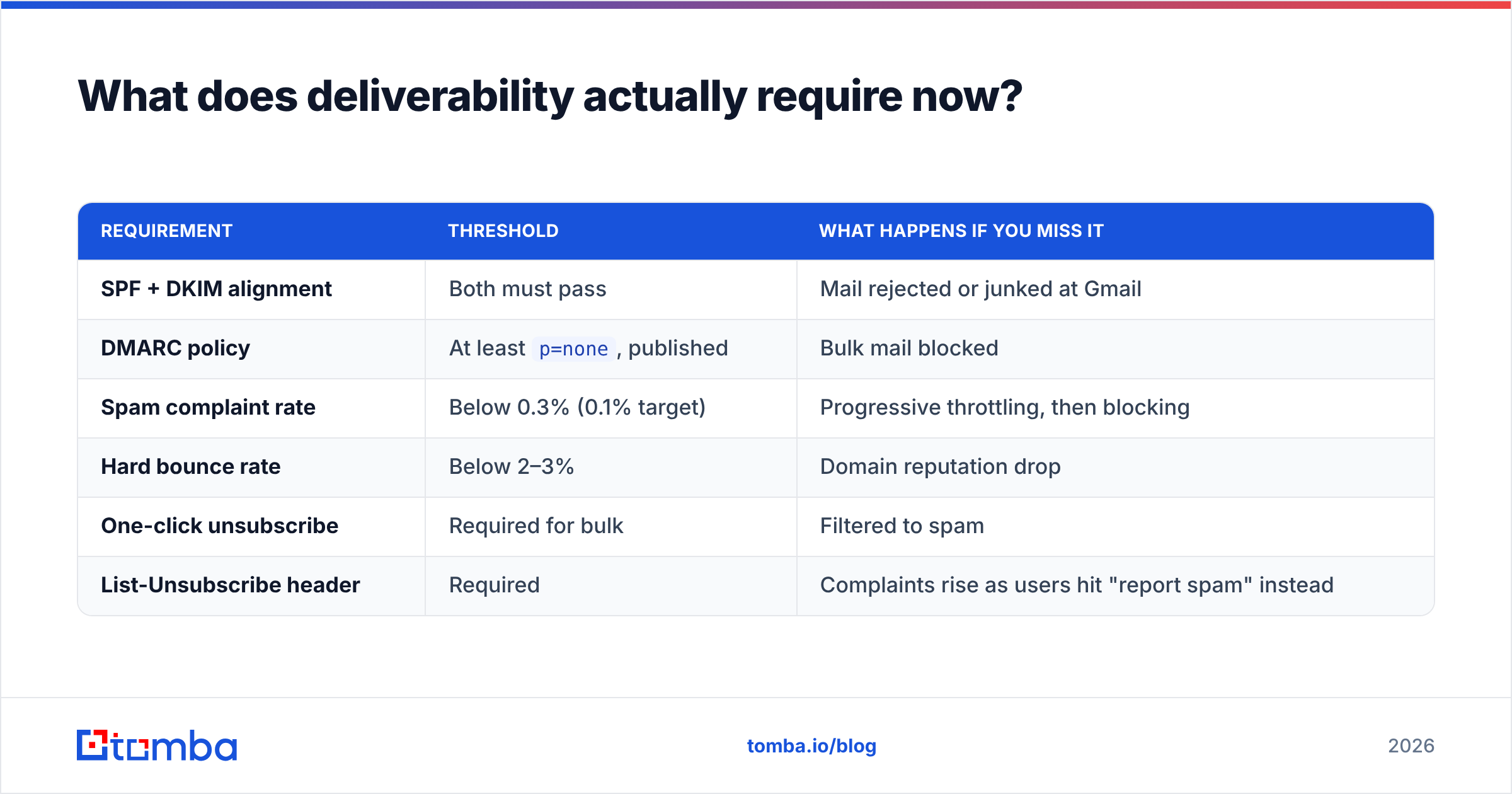
Authentication is table stakes, and the enforcement is automated. Since February 2024, Google and Yahoo require bulk senders to publish SPF, DKIM, and DMARC records, offer one-click unsubscribe, and keep spam complaints under 0.3%. Microsoft rolled out equivalent requirements for high-volume senders in 2025.
| Requirement | Threshold | What happens if you miss it |
|---|---|---|
| SPF + DKIM alignment | Both must pass | Mail rejected or junked at Gmail |
| DMARC policy | At least p=none, published |
Bulk mail blocked |
| Spam complaint rate | Below 0.3% (0.1% target) | Progressive throttling, then blocking |
| Hard bounce rate | Below 2–3% | Domain reputation drop |
| One-click unsubscribe | Required for bulk | Filtered to spam |
| List-Unsubscribe header | Required | Complaints rise as users hit "report spam" instead |
Google's own bulk sender guidelines are the authoritative source here and are worth reading in full rather than relying on vendor summaries.
The practical takeaway: deliverability failures look like copy failures. When reply rates drop by half with no copy change, check inbox placement before you rewrite anything.
Which metrics should you actually track?#
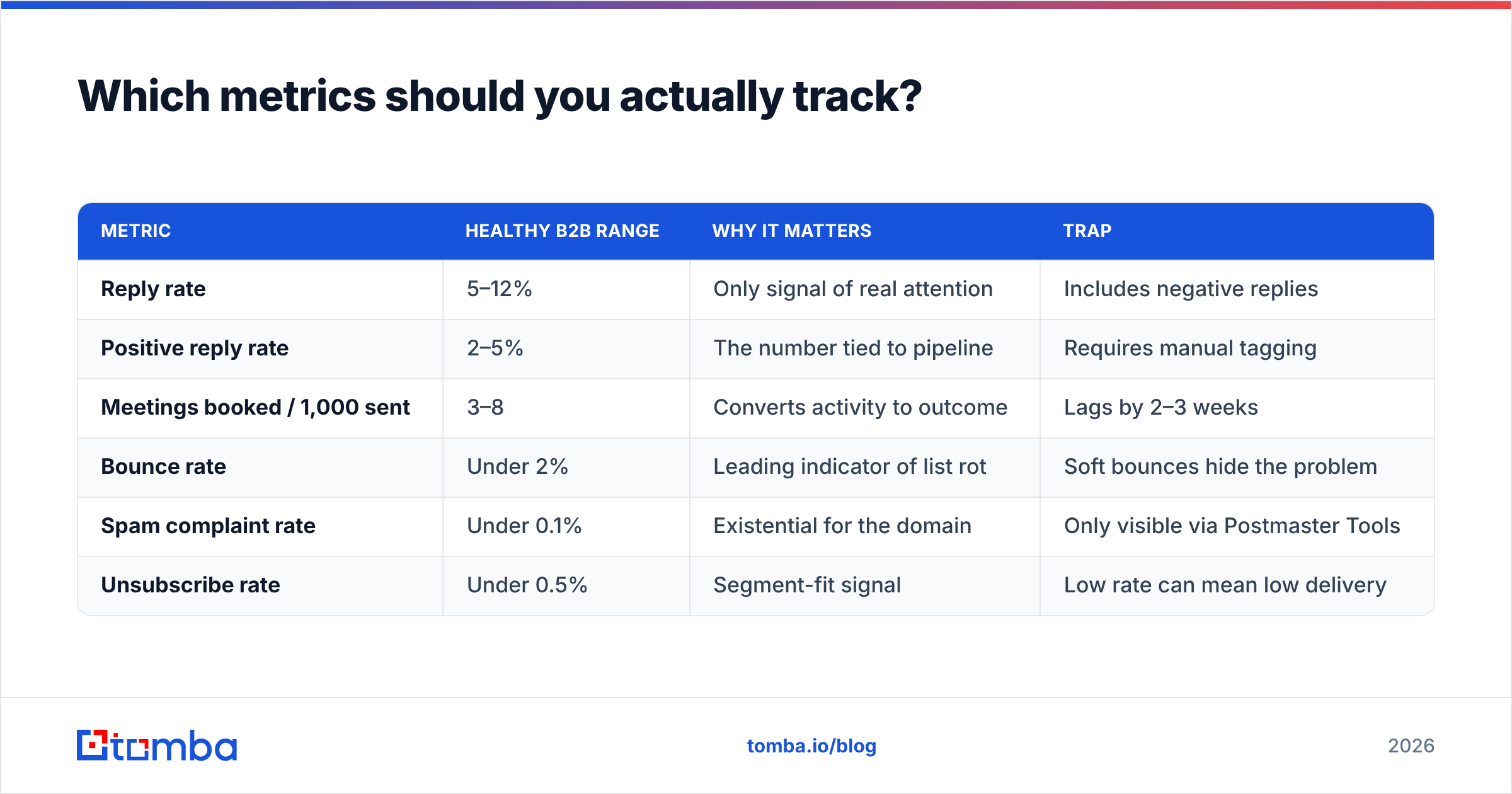
Open rate is dead as a primary metric. Apple's Mail Privacy Protection pre-fetches tracking pixels, which inflates opens for a large and unknowable share of your list. Treat it as directional at best.
| Metric | Healthy B2B range | Why it matters | Trap |
|---|---|---|---|
| Reply rate | 5–12% | Only signal of real attention | Includes negative replies |
| Positive reply rate | 2–5% | The number tied to pipeline | Requires manual tagging |
| Meetings booked / 1,000 sent | 3–8 | Converts activity to outcome | Lags by 2–3 weeks |
| Bounce rate | Under 2% | Leading indicator of list rot | Soft bounces hide the problem |
| Spam complaint rate | Under 0.1% | Existential for the domain | Only visible via Postmaster Tools |
| Unsubscribe rate | Under 0.5% | Segment-fit signal | Low rate can mean low delivery |
Track cohorts, not campaigns. A campaign report averages across segments and hides the fact that one segment is producing every meeting while three others are burning your domain.
What tool stack supports this?#
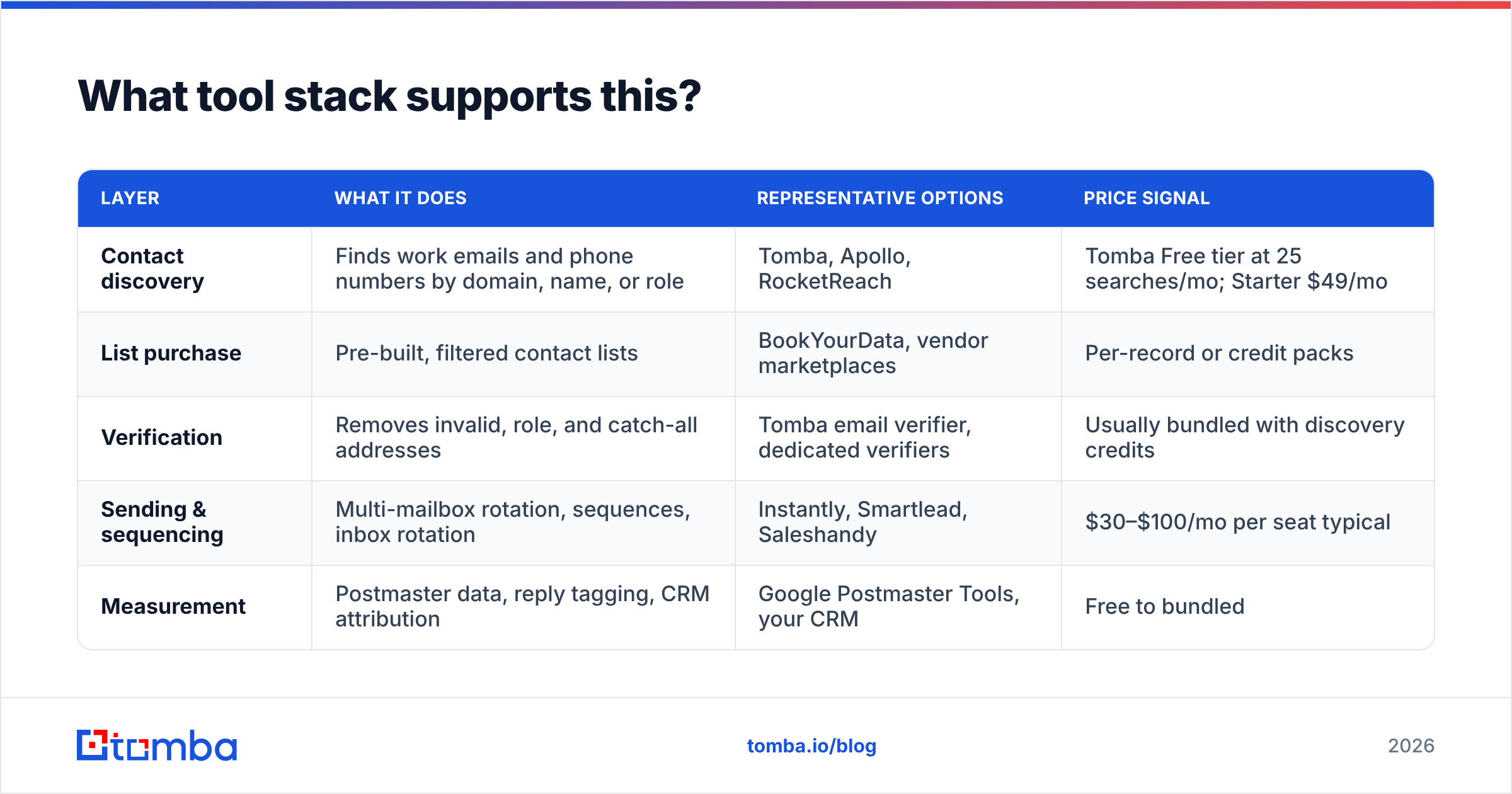
You need four capabilities: contact discovery, verification, sending, and measurement. Some vendors bundle them; bundling costs you quality in at least one layer.
| Layer | What it does | Representative options | Price signal |
|---|---|---|---|
| Contact discovery | Finds work emails and phone numbers by domain, name, or role | Tomba, Apollo, RocketReach | Tomba Free tier at 25 searches/mo; Starter $49/mo |
| List purchase | Pre-built, filtered contact lists | BookYourData, vendor marketplaces | Per-record or credit packs |
| Verification | Removes invalid, role, and catch-all addresses | Tomba email verifier, dedicated verifiers | Usually bundled with discovery credits |
| Sending & sequencing | Multi-mailbox rotation, sequences, inbox rotation | Instantly, Smartlead, Saleshandy | $30–$100/mo per seat typical |
| Measurement | Postmaster data, reply tagging, CRM attribution | Google Postmaster Tools, your CRM | Free to bundled |
A note on ordering: discovery and verification should happen in the same pass. Finding an address and then discovering three weeks later that it bounces means the campaign already went out. Tools that return a confidence score at find-time — rather than a raw guess — save you the second round trip. Compare vendors on G2's email marketing category if you want peer reviews at scale rather than vendor claims.
For teams doing this at volume, pulling contacts programmatically through an email finder API and writing verified records straight into the sequencer removes the CSV step entirely — which is where most list contamination happens. Full Tomba pricing runs Free (25 searches/mo), Starter $49/mo, Growth $99/mo, Pro $249/mo, and Enterprise custom.
What are the mistakes that quietly kill campaigns?#
- Sending from your primary domain. Use a separate, authenticated sending domain so a reputation hit never touches your billing and support mail.
- One sequence for every segment. If you're editing the same sequence for three audiences, you have three campaigns pretending to be one.
- Personalizing the wrong variable. First name in the subject line reads as automation. A specific detail in the first sentence reads as research.
- No suppression list. Existing customers, open opportunities, and past unsubscribes must be excluded programmatically, not by memory.
- Measuring at the campaign level. Roll-up numbers hide the segment that's working.
- Skipping re-verification. A list verified in January is 8–10% wrong by April.
Where should you start this quarter?#
Pick one segment of 300–500 contacts defined by a real trigger. Verify every address. Write a four-touch sequence with one ask. Run it for three weeks, tag replies manually, and count meetings. That single controlled cohort will teach you more than a 10,000-contact blast, and it will not cost you your domain.
Then scale the version that worked — same trigger, wider geography or adjacent vertical — and keep the verification step non-negotiable at every scale.
Start with the list, not the copy. The Tomba Email Finder returns verified professional email addresses by domain, name, or company, with a confidence score on every result, so your sequences reach real inboxes instead of bouncing into a reputation problem. The free tier covers 25 searches a month if you want to test it against a segment you already know before committing a plan.
Related guides#
Ready to find emails that actually work?
Join 150,000+ professionals who stopped guessing and started sending. Free credits on signup — no credit card required.
Get the Tomba newsletter
Practical outbound tactics and product updates — once every two weeks.
About the author