Email Check vs Finderio: Which Email Tool Wins in 2026?
Email Check and Finderio both promise clean B2B contact data, but they solve different halves of the problem. Here's the honest breakdown of accuracy, pricing, and which one your pipeline actually needs.
TL;DR
- "Email check" and Finderio are not really the same category. One is verification (is this address real?), the other is discovery (what is this person's address?). Most teams need both, and buying only one is why bounce rates stay ugly.
- Finderio positions itself as a lightweight finder-plus-verifier with cheap credits. Free email check tools are fine for spot-checking a single address but fall apart on lists over a few thousand.
- Accuracy is the only metric that matters, and it splits by domain type: standard MX domains verify cleanly, catch-all domains do not. Any vendor claiming 99% accuracy on catch-alls is selling you a guess.
- Cost per usable contact beats cost per credit. A $29 plan that returns 45% verified addresses is more expensive than a $49 plan returning 85%.
- If you want find and verify in one workflow with an API, bulk, and CRM sync, Tomba's Starter at $49/mo is the closer comparison — and there's a free tier at 25 searches/mo to test the accuracy claim yourself.
What does "email check vs Finderio" actually mean?#
You are comparing two different jobs.
An email check is validation. You already have sarah.chen@acme.com from a webform, a scraped list, or a conference badge, and you need to know whether sending to it will bounce. The tool runs syntax parsing, DNS/MX lookup, disposable-domain matching, role-account detection, and an SMTP handshake, then returns valid / invalid / risky / unknown. You can do this with a free email checker in about four seconds.
Finderio (finderio.com) sits on the discovery side. You know the company and the person, and you need the address. It works from a domain plus a name, or it crawls a domain and returns whatever addresses it has associated with it, then applies its own verification layer before handing results back.
So the real question is not "which one is better." It is: where does your pipeline leak? If you already have 40,000 addresses of unknown quality, you need checking. If you have 40,000 company names and zero contacts, checking is useless — you need finding first.
Most teams discover they need both about three weeks into a campaign, usually right after their first Google Postmaster reputation dip.

How does email verification actually work under the hood?#
Understanding the mechanics tells you which vendor claims to trust. Every serious verifier runs the same ladder, in roughly this order:
- Syntax validation — RFC 5322 compliance. Catches typos like
john@@acme.comandjane@acme..com. Free, instant, and about 3% of a typical scraped list dies here. - Domain and MX record lookup — does
acme.comexist and does it publish mail-exchange records? A domain with no MX cannot receive mail, period. This is a hard invalid. - Disposable and role detection — flags
mailinator.comthrowaways and role accounts (info@,sales@,support@). Role accounts are technically valid but tank reply rates and often trigger spam complaints from shared inboxes. - SMTP handshake — the verifier opens a connection to the receiving mail server and asks whether the mailbox exists, without sending anything. This is the step that separates real verification from pattern-guessing.
- Catch-all detection — some domains accept every address at the SMTP layer regardless of whether the mailbox exists. Here the handshake returns "yes" for
asdkjfh@acme.comtoo, which means the yes is worthless.
Step five is where vendors diverge hardest. A catch-all domain cannot be verified by SMTP alone — the only honest answers are "we found this address in real-world data" or "we don't know." Tools that mark catch-alls as "valid" are inflating their accuracy numbers with untested addresses. Tools that mark them all "invalid" throw away good contacts, since roughly 20–25% of B2B domains run catch-all, and they skew enterprise. Look for a dedicated catch-all verifier rather than a binary valid/invalid flag.
Email check vs Finderio vs Tomba: how do they compare?#
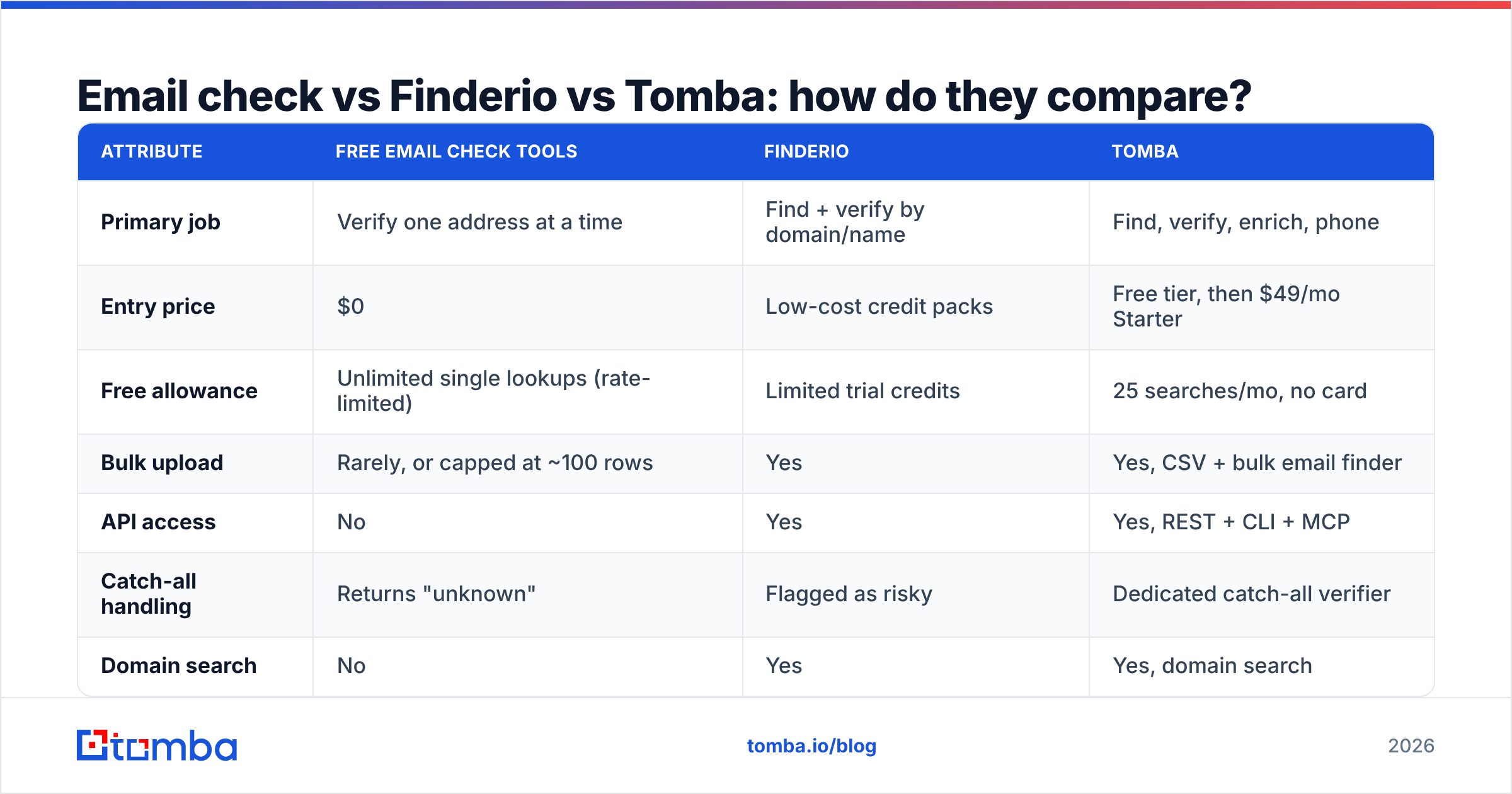
Here's the head-to-head across the attributes that change your monthly bill and your bounce rate. Free-checker figures below refer to the typical single-address web tools, not paid list-cleaning platforms.
| Attribute | Free email check tools | Finderio | Tomba |
|---|---|---|---|
| Primary job | Verify one address at a time | Find + verify by domain/name | Find, verify, enrich, phone |
| Entry price | $0 | Low-cost credit packs | Free tier, then $49/mo Starter |
| Free allowance | Unlimited single lookups (rate-limited) | Limited trial credits | 25 searches/mo, no card |
| Bulk upload | Rarely, or capped at ~100 rows | Yes | Yes, CSV + bulk email finder |
| API access | No | Yes | Yes, REST + CLI + MCP |
| Catch-all handling | Returns "unknown" | Flagged as risky | Dedicated catch-all verifier |
| Domain search | No | Yes | Yes, domain search |
| Phone numbers | No | No | Yes, phone finder + validator |
| Native CRM sync | No | Limited | HubSpot, Salesforce, Pipedrive, Zapier |
| Chrome extension | No | Yes | Yes |
| Best for | One-off checks, form validation | Solo founders on tight budgets | Teams running repeatable outbound |
The honest read: if you send fewer than 50 emails a month and just want to sanity-check an address before hitting send, a free checker is genuinely sufficient and you should not pay anyone. Finderio makes sense when you want basic find-and-verify at the lowest possible credit price and you can live without deep enrichment. Once you are running structured outbound — sequences, multiple SDRs, CRM hygiene, API calls from your own scripts — the single-tool stack stops being the cheap option.

Is Finderio accurate enough for cold outreach?#
Accuracy claims in this category are close to meaningless without a definition, so define it before you compare.
Vendors report accuracy three different ways, and only one of them predicts your bounce rate:
- Coverage / hit rate — of 1,000 contacts you searched, how many returned any address? Finderio, Tomba, Apollo, and everyone else quote this. It says nothing about correctness.
- Verified rate — of the addresses returned, how many carry a "valid" status? Easy to inflate by counting catch-alls as valid.
- Real-world bounce rate — of the addresses you actually sent to, how many hard-bounced? This is the only number your mailbox provider cares about.
Run the test yourself. Take 100 contacts you already know are good — customers, past deals, people who replied to you last quarter. Feed them through each tool. Count how many the tool finds, how many it marks valid, and how many it gets wrong (returns a confidently-valid address that differs from the one you know is real). That last column is the false-positive rate, and it is the number nobody publishes.
In my experience running this on mid-market SaaS domains, the spread between the best and worst tools on coverage is maybe 15 percentage points. The spread on false positives is much wider, and false positives are the expensive failure — a wrong-but-plausible address gets sent to, bounces, and eats your sender reputation.
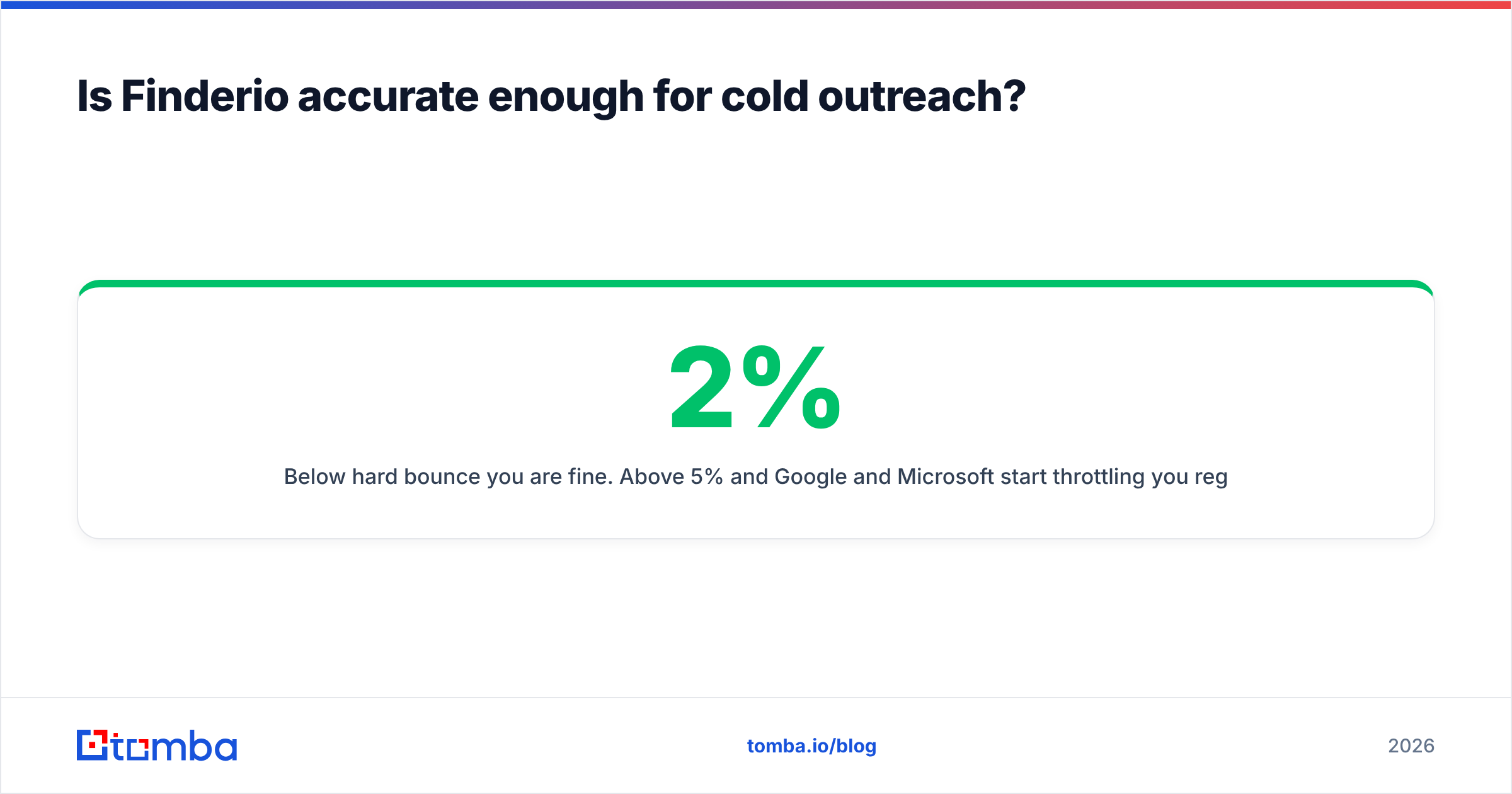
Below 2% hard bounce you are fine. Above 5% and Google and Microsoft start throttling you regardless of how good your copy is. Google's own bulk sender guidelines put the spam-complaint ceiling at 0.3%, and bounces compound the same signal.
What does each option really cost per usable contact?#
Credit pricing hides the real math. Here's the calculation that matters:
Cost per usable contact = (monthly price ÷ credits) ÷ (hit rate × accuracy rate)
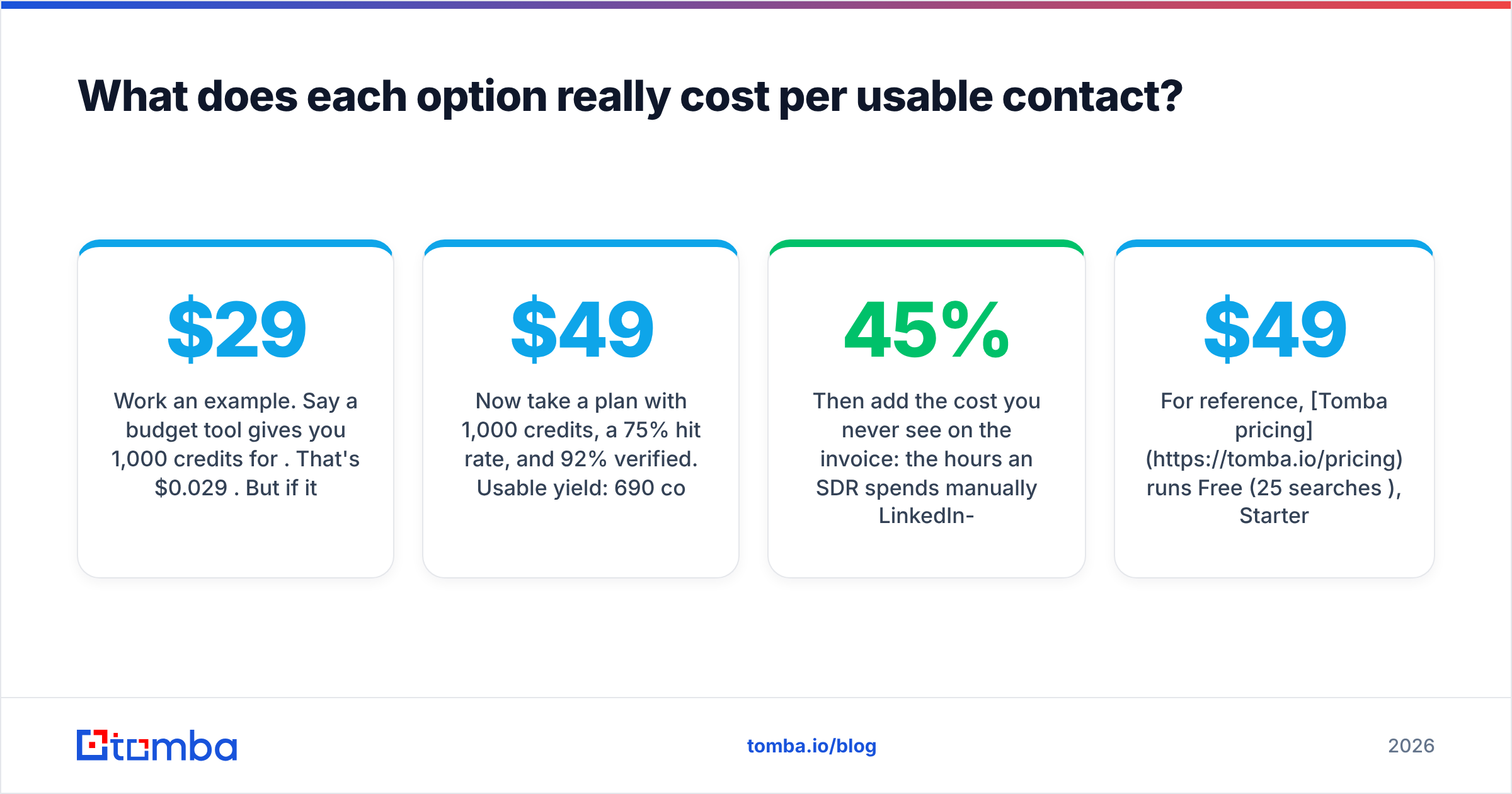
Work an example. Say a budget tool gives you 1,000 credits for $29. That's $0.029 per credit. But if it finds addresses for only 55% of your searches, and 80% of those survive verification, your usable yield is 440 contacts. Real cost: $0.066 each.
Now take a $49/mo plan with 1,000 credits, a 75% hit rate, and 92% verified. Usable yield: 690 contacts. Real cost: $0.071 each — nearly identical per contact, but you got 250 more people to email for $20. If your average deal is worth anything at all, the second option wins on absolute pipeline, not just on unit economics.
Then add the cost you never see on the invoice: the hours an SDR spends manually LinkedIn-stalking the 45% the cheap tool missed, and the deliverability damage from the false positives it confidently returned.
For reference, Tomba pricing runs Free (25 searches/mo), Starter $49/mo, Growth $99/mo, Pro $249/mo, and Enterprise custom — with the email verifier included rather than sold as a separate credit pool, which is the part that usually breaks budget comparisons against verify-only vendors.

Which one should you pick for your use case?#
Match the tool to the job rather than to the price tag.
- You need to validate a signup form in real time. Use a verification API with sub-second response. A finder is irrelevant here — you already have the address. Check rate limits and uptime SLA before anything else.
- You have a stale 30,000-row list from 2023. This is pure list hygiene. Run a bulk verification pass, delete the hard invalids, segment the catch-alls into a low-volume test send, and only then plan a campaign. Do not buy a finder for this.
- You have target accounts but no contacts. You need discovery first. Start with domain search to pull the pattern and the known addresses, then verify what comes back. A verify-only tool literally cannot help you.
- You're enriching inbound leads with only a work email. You want reverse email lookup and enrichment — name, title, company, LinkedIn — not verification. The address already proved itself when they filled out the form.
- You're building this into your own product. API quality, rate limits, and pricing at volume dominate. Test the docs before you test the data; a well-documented email finder API will save you more engineering hours than a 3% accuracy edge saves you in bounces.
- You're a solo founder sending 200 emails a month. Honestly, a free tier plus a free checker gets you there. Don't over-buy. Revisit when you hire your first SDR.
What do reviewers and real users say?#
Vendor sites are marketing. Go to the places where buyers complain.
G2 and Capterra both carry lead-intelligence categories where you can filter reviews by company size — which matters, because a tool that works beautifully for a 3-person agency often collapses at 200 seats, and vice versa. Read the 3-star reviews specifically. Five-star reviews tell you the marketing worked; one-star reviews are usually a billing dispute; three-star reviews tell you what the product actually does and does not do.
The recurring complaints in this category, across essentially every vendor:
- Credits burn on failed searches (check whether the vendor charges for a "not found" result — some do, some don't).
- Verification results disagree between tools on the same address, especially catch-alls.
- Chrome extensions break when LinkedIn ships a UI change.
- Support response times stretch on lower tiers.
Ask about all four during a trial. The answers vary more between vendors than the accuracy numbers do.
How do you run a fair 20-minute test?#
Skip the demo call. Run this instead:
Step 1. Build a 50-row control list: 25 contacts you know are correct (customers, colleagues at other companies, people who've replied), and 25 target contacts you don't have yet.
Step 2. Run all 50 through each tool. Record: found / not found, status returned, and the actual address.
Step 3. Score three columns — coverage on the unknowns, agreement on the knowns, and false positives (confident-valid addresses that contradict what you know is true).
Step 4. Send a small warm-up-safe batch (25–50) to the newly found addresses through your real sending domain and count actual bounces after 48 hours. Nothing simulates production except production.
Step 5. Divide total spend by contacts that survived step 4. That's your true cost per usable contact, and it is the only number to bring into the buying decision.
Include the free tiers in this test. Tomba's free 25 searches, Finderio's trial credits, and any free checker all cost you nothing but 20 minutes, and the result is worth more than every accuracy claim on every pricing page combined.
Common mistakes when choosing between checking and finding#
- Buying verification to fix a discovery problem. If your list is small, cleaning it makes it smaller. You need more contacts, not fewer.
- Treating catch-all as valid. It inflates your list and your bounce rate simultaneously.
- Ignoring role accounts.
info@addresses verify clean and reply almost never, while raising complaint risk from shared inboxes. - Verifying once and never again. B2B data decays at roughly 25–30% per year through job changes alone. A list verified in January is measurably worse by July.
- Optimizing for credit price. See the cost-per-usable-contact math above. The cheapest credit is frequently the most expensive contact.
- Skipping warmup. Perfect data still bounces if you go from 0 to 500 sends a day on a cold domain. Use a warmup calculator and ramp properly.
The verdict#
If your only problem is "is this one address real," a free email check tool wins because it costs nothing and takes four seconds. Nobody should pay for that.
If you need to find addresses at all, the comparison changes shape. Finderio is a reasonable low-cost entry point for founders and small teams who want find-and-verify in one place and don't need enrichment, phone data, or deep integrations. It does what it says on a tight budget, and for a lot of solo operators that's exactly right.
Once you're running repeatable outbound with more than one person touching the data, the calculation shifts to workflow: can you find, verify, enrich, and push to your CRM without exporting a CSV four times? That's where a fuller platform earns its higher line item, and where the per-credit price stops being the deciding factor.
Test all three against your own control list before committing to anything. Twenty minutes of testing beats twenty pricing pages.
Ready to see how the numbers land on your own domains? Start with the Tomba Email Finder free tier — 25 searches a month, no card required — and run your control list through it. Verification, catch-all handling, and domain search are included, so you can score coverage, accuracy, and false positives in a single pass instead of stitching two tools together to get one answer.
Related guides#
Ready to find emails that actually work?
Join 150,000+ professionals who stopped guessing and started sending. Free credits on signup — no credit card required.
Get the Tomba newsletter
Practical outbound tactics and product updates — once every two weeks.
About the author