Email Checker Free Online: How to Verify Emails in 2026
Free email checkers can catch obvious junk in seconds — but most of them quietly fail on catch-all domains and role accounts. Here's what free tools actually verify, where they break, and when paid checks pay for themselves.
TL;DR
- A free online email checker reliably catches four things: bad syntax, dead domains, missing MX records, and known disposable providers. That alone removes 5-15% of a scraped list.
- What free tools cannot settle: catch-all domains, greylisting servers, and whether a real human still reads that inbox. Those are the addresses that actually hurt your bounce rate.
- Single-address free checkers are fine for one-off verification. For lists over a few hundred rows you need bulk processing, an API, and a documented confidence score.
- Bounce math matters more than tool choice: Google and Microsoft both start throttling around a 2% bounce rate, and a single 5% send can undo months of sender reputation work.
- The pragmatic setup: use a free checker for quick spot checks, then run the full list through a paid verifier before any campaign that matters.
What is an email checker and what does "free online" actually mean?#
An email checker is a tool that decides whether an email address can receive mail — without sending anything to it. Think of it like knocking on a door and listening for footsteps instead of walking in. The checker asks the receiving mail server a series of questions and interprets the answers.
"Free online" usually means one of three things, and the difference matters:
- Genuinely free, single-address — paste one address into a web form, get a verdict. No account. This is what most people mean when they search for an email checker free online. Tomba's free email checker works this way.
- Free tier of a paid product — you get a credit allowance (25, 50, 100 verifications a month), then you hit a paywall. Useful for evaluation, not for production.
- Free but you pay in data — the tool logs the addresses you submit and folds them into a resale database. Read the privacy policy before you paste a client list into anything.
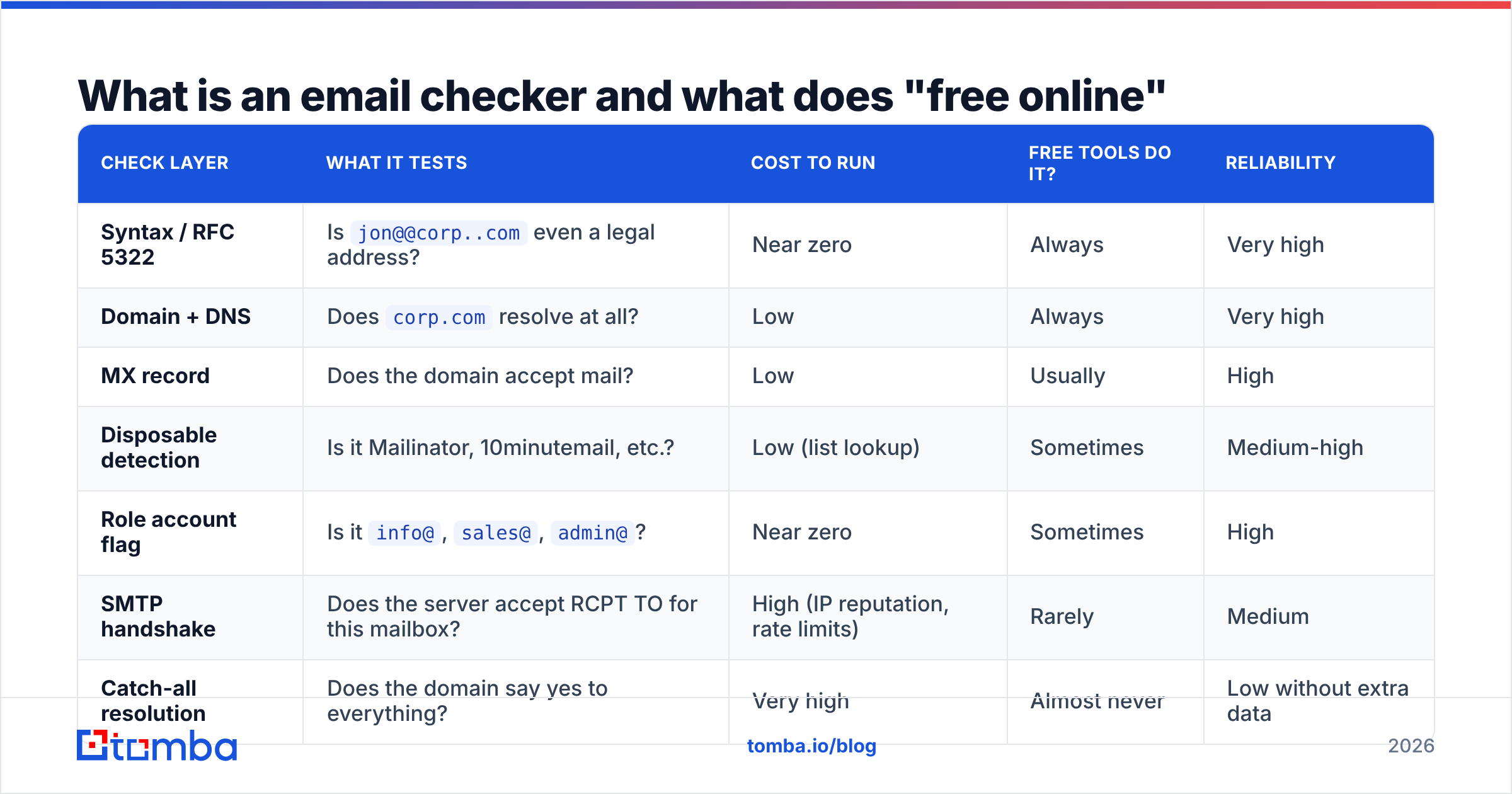
The verification itself happens in layers. Each layer is cheap and fast at the top, expensive and unreliable at the bottom.
| Check layer | What it tests | Cost to run | Free tools do it? | Reliability |
|---|---|---|---|---|
| Syntax / RFC 5322 | Is jon@@corp..com even a legal address? |
Near zero | Always | Very high |
| Domain + DNS | Does corp.com resolve at all? |
Low | Always | Very high |
| MX record | Does the domain accept mail? | Low | Usually | High |
| Disposable detection | Is it Mailinator, 10minutemail, etc.? | Low (list lookup) | Sometimes | Medium-high |
| Role account flag | Is it info@, sales@, admin@? |
Near zero | Sometimes | High |
| SMTP handshake | Does the server accept RCPT TO for this mailbox? | High (IP reputation, rate limits) | Rarely | Medium |
| Catch-all resolution | Does the domain say yes to everything? | Very high | Almost never | Low without extra data |
The top four layers are essentially free to compute, which is why every free tool offers them. The bottom three require maintaining clean sending IPs, rotating them, respecting rate limits, and holding historical response data — which is why they sit behind a paywall almost everywhere.
Which checks does a free email checker actually run?#
Here's the honest breakdown of what you get without paying.
Syntax validation. Catches typos, illegal characters, missing @, double dots. Removes maybe 1-3% of a hand-collected list and almost nothing from a scraped one, because scrapers rarely produce malformed strings.
DNS and MX lookup. Confirms the domain exists and has mail exchange records. This is where dead companies, expired domains, and typo'd domains (gmial.com) get caught. On a list older than 18 months, expect 3-8% to fail here.
Disposable/temporary domain detection. Compares against a blocklist of throwaway providers. Quality depends entirely on how recently that list was updated — new disposable domains spin up daily.
Role-account detection. Flags info@, support@, noreply@. These addresses are technically valid but they route to shared inboxes, and they generate disproportionate spam complaints. Most free checkers will tell you it's a role account; whether you drop it is a judgment call based on your offer.
Sometimes: a basic SMTP ping. Some free tools attempt a handshake. The result is often wrong, because major providers (Yahoo, Outlook consumer, many Microsoft 365 tenants) deliberately return "accept everything" to defeat exactly this kind of probing.

Where do free email checkers break down?#
Three failure modes, in order of how much money they cost you.
Catch-all domains#
A catch-all domain accepts every address at that domain — ceo@, nobody@, asdfgh@ all return "OK." Roughly 15-25% of B2B domains are configured this way, and it skews higher in mid-market and enterprise where IT keeps a wildcard rule for forwarding.
A free checker sees the "OK" and reports the address as valid. You send. The message goes to a black hole, or worse, into a spam-trap folder that the security team reviews. This is the single biggest reason "verified" lists still bounce. Resolving catch-alls requires pattern history and behavioral data across many domains — the kind of thing a catch-all verifier is built for, and no free web form does.
Greylisting and rate limits#
Some servers deliberately defer the first connection from an unknown IP. A checker that only tries once reads that deferral as "unknown" or, badly, as "invalid." Serious verifiers retry with backoff across hours. Free tools do not — they have to answer your web form in under three seconds.
Volume ceilings#
The practical problem. You have 4,000 rows from a conference list. A single-address web form is not a workflow. Free tiers typically cap at 25-100 verifications per month, which is enough to test the tool and nothing else.
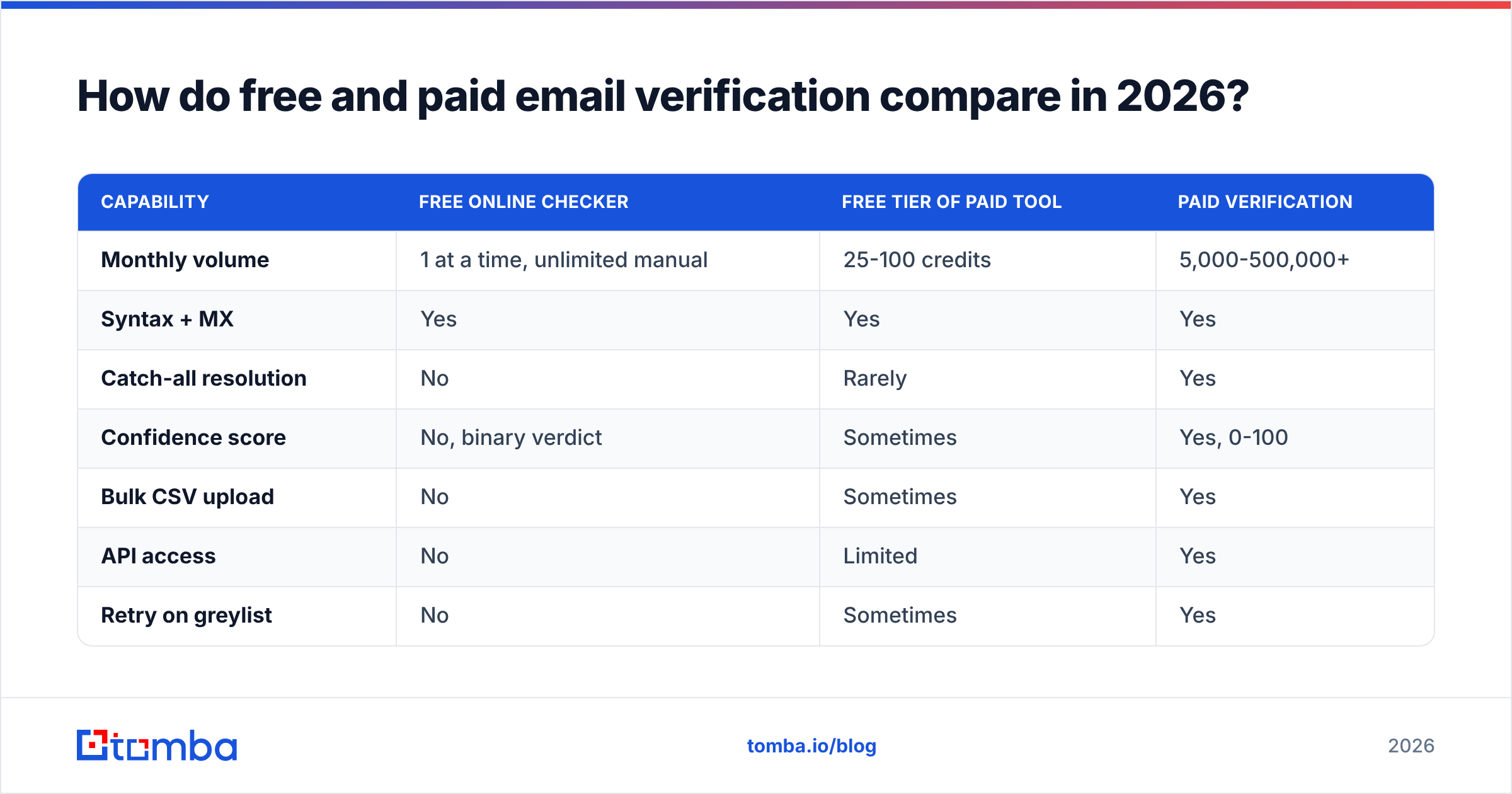
How do free and paid email verification compare in 2026?#
| Capability | Free online checker | Free tier of paid tool | Paid verification |
|---|---|---|---|
| Monthly volume | 1 at a time, unlimited manual | 25-100 credits | 5,000-500,000+ |
| Syntax + MX | Yes | Yes | Yes |
| Catch-all resolution | No | Rarely | Yes |
| Confidence score | No, binary verdict | Sometimes | Yes, 0-100 |
| Bulk CSV upload | No | Sometimes | Yes |
| API access | No | Limited | Yes |
| Retry on greylist | No | Sometimes | Yes |
| Data retention control | Varies, often unclear | Documented | Contractual / GDPR terms |
| Typical entry price | $0 | $0 | $20-$49/mo |
The gap that matters is column three, row three. Everything else is convenience; catch-all resolution is the difference between a 1% and a 6% bounce rate.
For context on pricing at the paid end: Tomba's free plan includes 25 searches a month, then Starter is $49/mo, Growth $99/mo, and Pro $249/mo — full Tomba pricing breaks down credits per tier. Dedicated verification-only vendors like ZeroBounce and Bouncer sit in a similar band. BookYourData takes a different angle entirely, selling pre-verified contact records with a bounce guarantee rather than verifying lists you already own — worth considering if your problem is sourcing rather than cleaning.
Why does bounce rate matter this much?#
Because mailbox providers treat it as a proxy for whether you're a spammer.
Google's Postmaster Tools guidance and Microsoft's sender requirements both put the practical ceiling around 2% hard bounces. Cross it and you don't get a warning email — you get silent throttling, then bulk-folder placement, then rejections. Recovery takes weeks of low-volume warm sending.
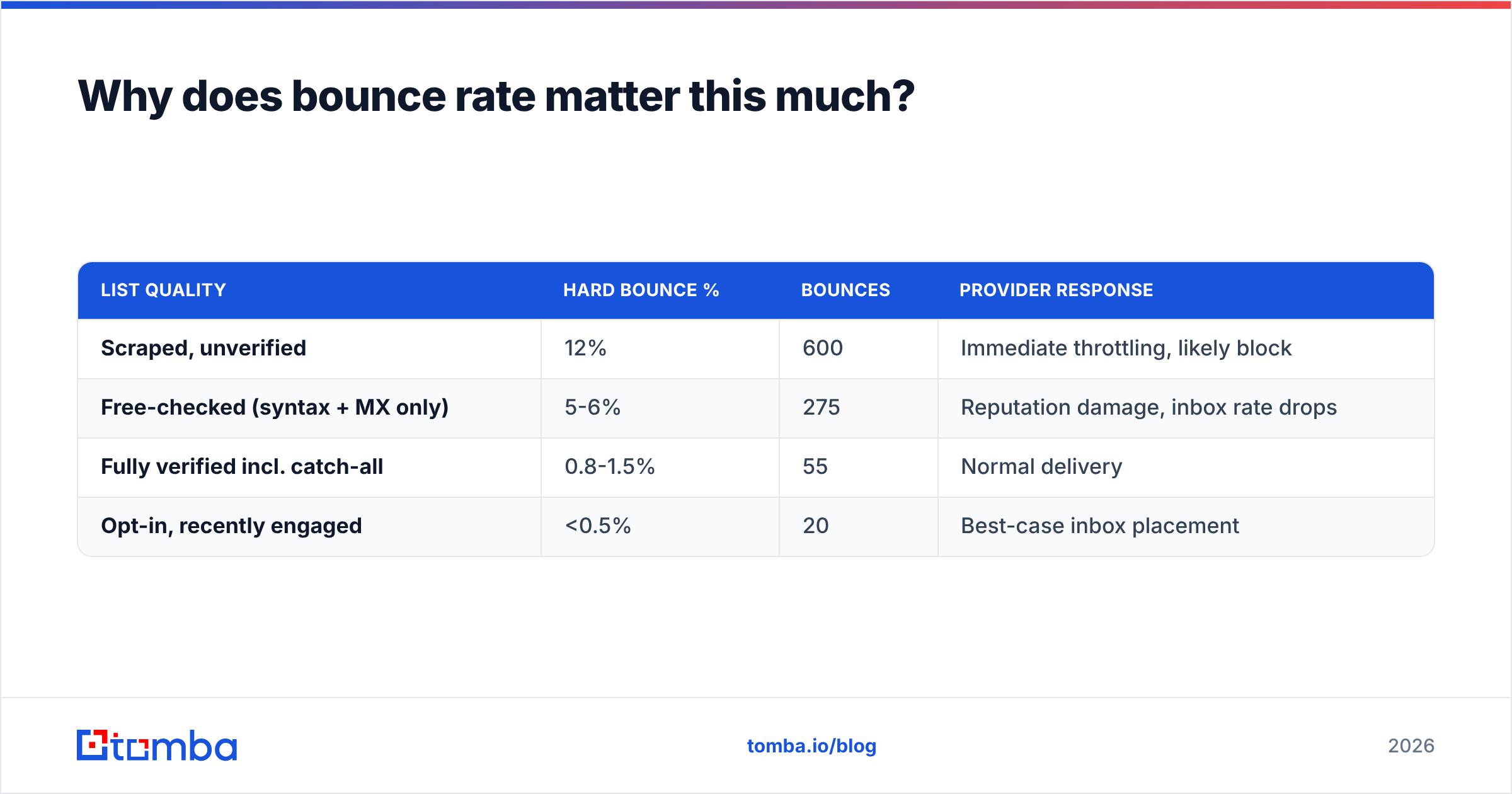
Run the math on a 5,000-contact send:
| List quality | Hard bounce % | Bounces | Provider response |
|---|---|---|---|
| Scraped, unverified | 12% | 600 | Immediate throttling, likely block |
| Free-checked (syntax + MX only) | 5-6% | 275 | Reputation damage, inbox rate drops |
| Fully verified incl. catch-all | 0.8-1.5% | 55 | Normal delivery |
| Opt-in, recently engaged | <0.5% | 20 | Best-case inbox placement |
The middle row is the trap. A free checker moves you from "obviously terrible" to "still bad enough to hurt," and it feels like you did the work. That false confidence is the actual risk — not the free tool itself.
Bounce rate is only one input to sender reputation, but it's the fastest one to wreck. Spam complaints and engagement matter too, and no verifier can help with those.
When is a free email checker the right call?#
Free is genuinely correct in these situations:
- One-off verification. A prospect gave you their address on a call and you want to confirm the spelling before replying. Paste it, get an answer, move on.
- Sanity-checking a pattern guess. You inferred
first.last@company.comfrom a company email pattern and want a quick confirmation the domain accepts mail at all. - Evaluating a vendor. Run 20 addresses you already know the status of — 10 good, 10 dead — through a free tier and compare verdicts against reality. This is the only benchmark that means anything for your data.
- Cleaning a tiny list. Under 50 addresses, doing it by hand in a free form is slower than a paid tool but costs nothing.
Free is the wrong call when: the list is over ~200 rows, when the domains skew enterprise (higher catch-all rate), when you're sending from a domain you can't afford to burn, or when you need the result inside an automated workflow.

How should you build a verification workflow that actually holds up?#
Five steps, in order.
Deduplicate first. Verification is priced per address. Running the same contact three times costs three credits and teaches you nothing. Strip duplicates and normalize casing before anything else — a remove duplicates pass takes seconds.
Free-check the obvious garbage. Syntax, dead domains, disposables. No reason to pay for checks that cost nothing to run. If your source data is messy, this can strip 10% of the file before you spend a credit.
Bulk-verify the remainder. Upload the survivors to a real verifier with catch-all handling. Look for a confidence score, not a binary yes/no — you want to make your own risk call on the 60-80 band. Tomba's email verifier returns a graded result rather than a coin flip.
Segment by score, don't just delete. Send to the high-confidence tier first from your primary domain. Route the medium tier to a secondary domain or a low-volume drip. Park the low tier — don't delete it, because some of those contacts become verifiable later when the domain changes configuration.
Re-verify on a schedule. B2B email data decays roughly 22-30% a year as people change jobs. A list verified in January is measurably worse by July. Quarterly re-verification on your active segments is the standard cadence; annual is the bare minimum.
If verification is a recurring step rather than a one-off cleanup, do it through an email verification API so it happens at the point of capture — form submission, CRM import, enrichment job — instead of as a panic step before a send.
What should you look for when choosing between free tools?#
Not all free checkers are equal. Four things separate the useful ones from the lead-capture forms.
- Does it distinguish "invalid" from "unknown"? A tool that only returns valid/invalid is hiding its uncertainty. Catch-alls and greylisted servers genuinely produce unknown results, and honest tools say so.
- Does it flag catch-all explicitly? Even if it can't resolve them, telling you "this domain is catch-all, treat with caution" is far more useful than a confident green checkmark.
- What happens to the address you submit? Some free tools are lead-gen instruments that keep your input. Check the privacy policy — G2 reviews often surface complaints about this faster than the vendor's own docs.
- Is there a real product behind it? Free tools maintained as marketing for a paid verifier get updated blocklists and working SMTP infrastructure. Standalone free tools tend to rot.
Test any candidate against ground truth. Take 10 addresses you know are dead (bounced last quarter) and 10 you know are live (they replied last week). A tool that gets 20/20 is worth using. A tool that marks your live contacts invalid is worse than no tool, because you'll delete real prospects.
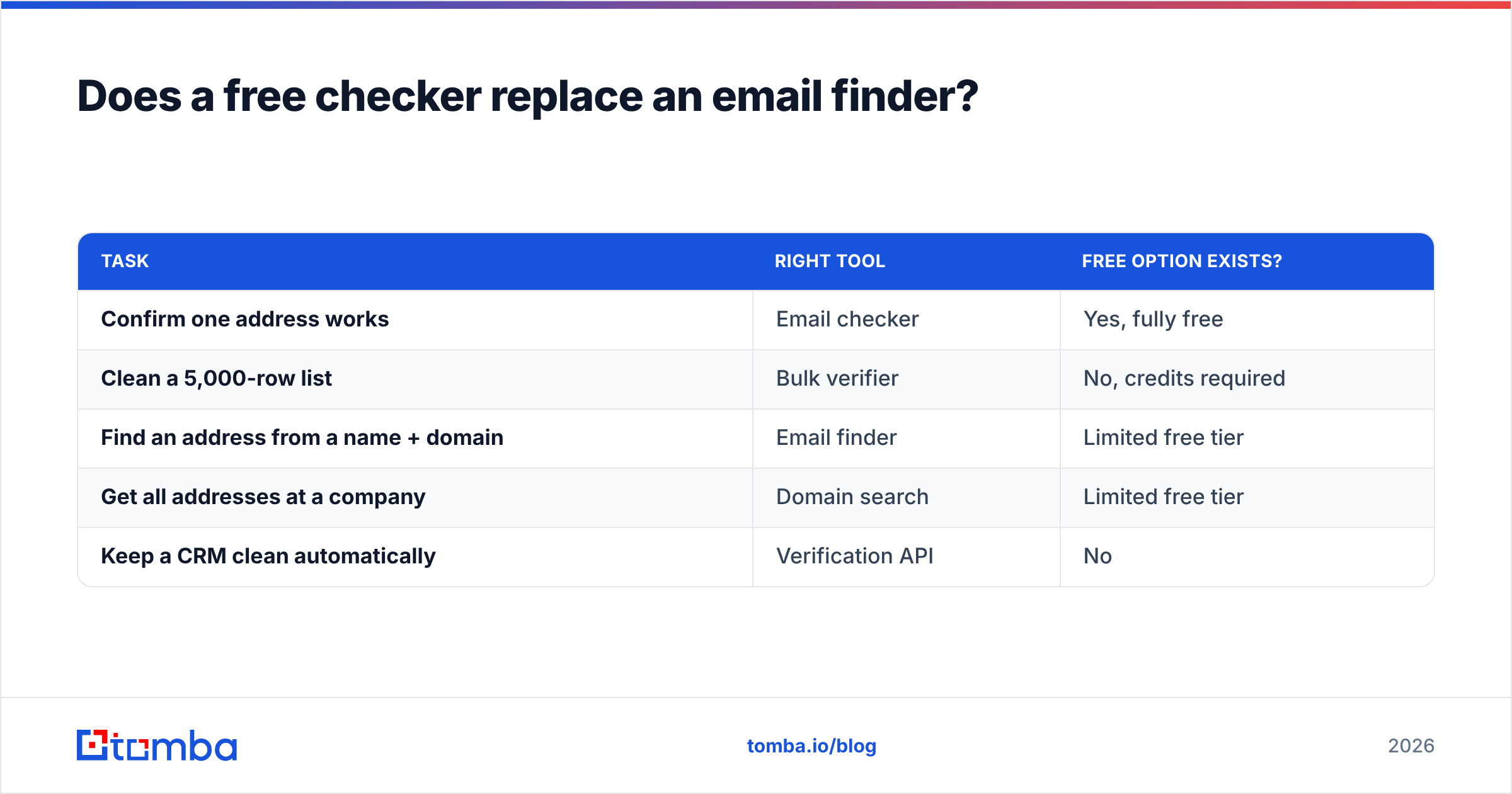
Does a free checker replace an email finder?#
No — they solve different problems, and conflating them is a common mistake.
A checker answers "is this address deliverable?" about an address you already have. A finder answers "what is the address?" for a person you've identified. If your problem is that you have 500 names and companies but no addresses, verification is the second half of the job, not the first.
The efficient sequence: find addresses at the domain level via domain search, which returns known addresses plus the company's naming pattern; generate candidates for the contacts you still need; then verify the whole set. Verification is the quality gate, not the acquisition step.
| Task | Right tool | Free option exists? |
|---|---|---|
| Confirm one address works | Email checker | Yes, fully free |
| Clean a 5,000-row list | Bulk verifier | No, credits required |
| Find an address from a name + domain | Email finder | Limited free tier |
| Get all addresses at a company | Domain search | Limited free tier |
| Keep a CRM clean automatically | Verification API | No |
Get accurate addresses before you verify them#
A free email checker free online is a useful instrument for exactly what it does: telling you an address is syntactically legal and its domain accepts mail. Treat it as a smoke detector, not a fire inspection. It will not tell you whether a real person reads that inbox, and on catch-all domains it will confidently tell you the wrong thing.
If most of your bounces come from guessed addresses rather than stale ones, verification is treating the symptom. Start with better source data: the Tomba Email Finder returns addresses with a confidence score and the sources behind each one, so you're verifying a good list instead of salvaging a bad one. The free plan covers 25 searches a month — enough to test it against contacts whose status you already know, which is the only benchmark that counts.
Related guides#
Ready to find emails that actually work?
Join 150,000+ professionals who stopped guessing and started sending. Free credits on signup — no credit card required.
Get the Tomba newsletter
Practical outbound tactics and product updates — once every two weeks.
About the author