Email Checkernet vs Leadsforge: 2026 Data Accuracy Comparison
Email Checkernet verifies. Leadsforge finds. We compared accuracy, credits, pricing, and API limits across both — plus where a single-vendor stack beats running two.
TL;DR
- Email Checkernet and Leadsforge solve different halves of the same problem: Checkernet-style tools verify addresses you already have, Leadsforge-style tools find addresses you don't.
- Running both means paying twice, reconciling two credit systems, and stitching two APIs — most teams overpay by 40–60% versus a combined platform.
- Verification accuracy claims ("98%+") are marketing math unless the vendor tells you how they handle catch-all domains. That's where the real difference shows up.
- Neither tool wins outright. Pick Checkernet if you're cleaning a legacy list; pick Leadsforge if you're building lists from scratch; pick a combined stack if you're doing both weekly.
- Tomba's Free tier (25 searches/mo) and $49/mo Starter cover find + verify in one credit pool, which is the honest recommendation for teams under 10 SDRs.
What are Email Checkernet and Leadsforge?#
Short answer: one is a verifier, one is a finder, and the comparison only matters because most sales teams need both.
Email Checkernet sits in the email-validation category. You upload a list — CSV, CRM export, form submissions — and it returns a status per address: valid, invalid, risky, catch-all, disposable, role-based. It doesn't discover new contacts. Its job is to stop you from mailing addresses that will bounce and torch your sender reputation.
Leadsforge sits in the lead-discovery / prospecting category. You give it a company, a domain, a job title, or a filter set, and it returns contacts. The pitch is speed of list-building: go from "VP Marketing at Series B SaaS in Germany" to a CSV in minutes.
The mistake teams make is treating these as competitors. They're sequential steps. Discovery without verification produces bounces. Verification without discovery produces a clean list of the same 200 people you already had.
How do verification and discovery actually differ?#
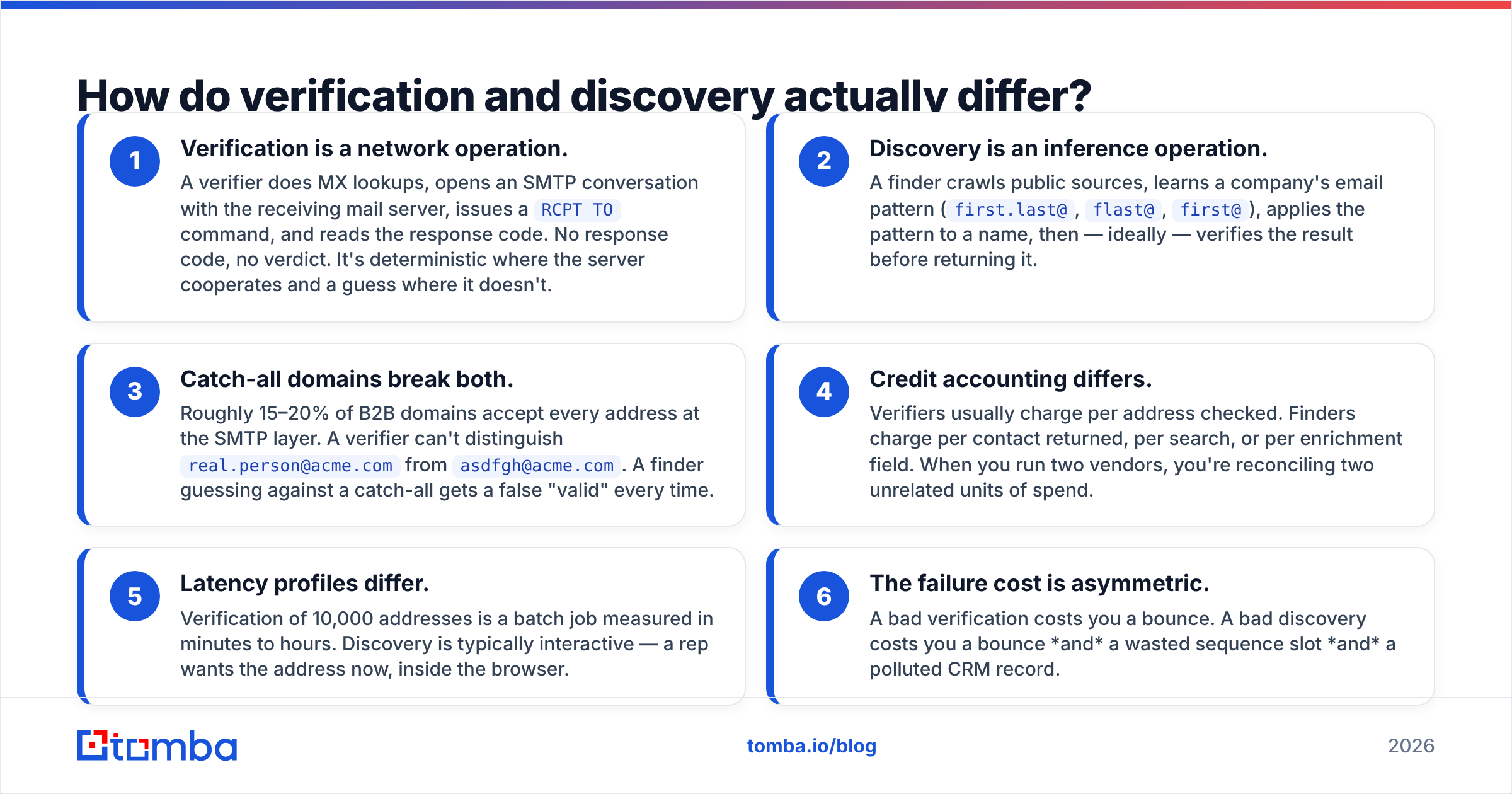
Here's the mechanical difference, which matters more than the marketing copy:
- Verification is a network operation. A verifier does MX lookups, opens an SMTP conversation with the receiving mail server, issues a
RCPT TOcommand, and reads the response code. No response code, no verdict. It's deterministic where the server cooperates and a guess where it doesn't. - Discovery is an inference operation. A finder crawls public sources, learns a company's email pattern (
first.last@,flast@,first@), applies the pattern to a name, then — ideally — verifies the result before returning it. - Catch-all domains break both. Roughly 15–20% of B2B domains accept every address at the SMTP layer. A verifier can't distinguish
real.person@acme.comfromasdfgh@acme.com. A finder guessing against a catch-all gets a false "valid" every time. - Credit accounting differs. Verifiers usually charge per address checked. Finders charge per contact returned, per search, or per enrichment field. When you run two vendors, you're reconciling two unrelated units of spend.
- Latency profiles differ. Verification of 10,000 addresses is a batch job measured in minutes to hours. Discovery is typically interactive — a rep wants the address now, inside the browser.
- The failure cost is asymmetric. A bad verification costs you a bounce. A bad discovery costs you a bounce and a wasted sequence slot and a polluted CRM record.
That last point is why the catch-all question is the single best filter when you're evaluating either vendor. Ask: "What do you return for a catch-all domain, and do you charge me for it?" The answers separate serious tools from wrappers.
Email Checkernet vs Leadsforge: how do they compare?#
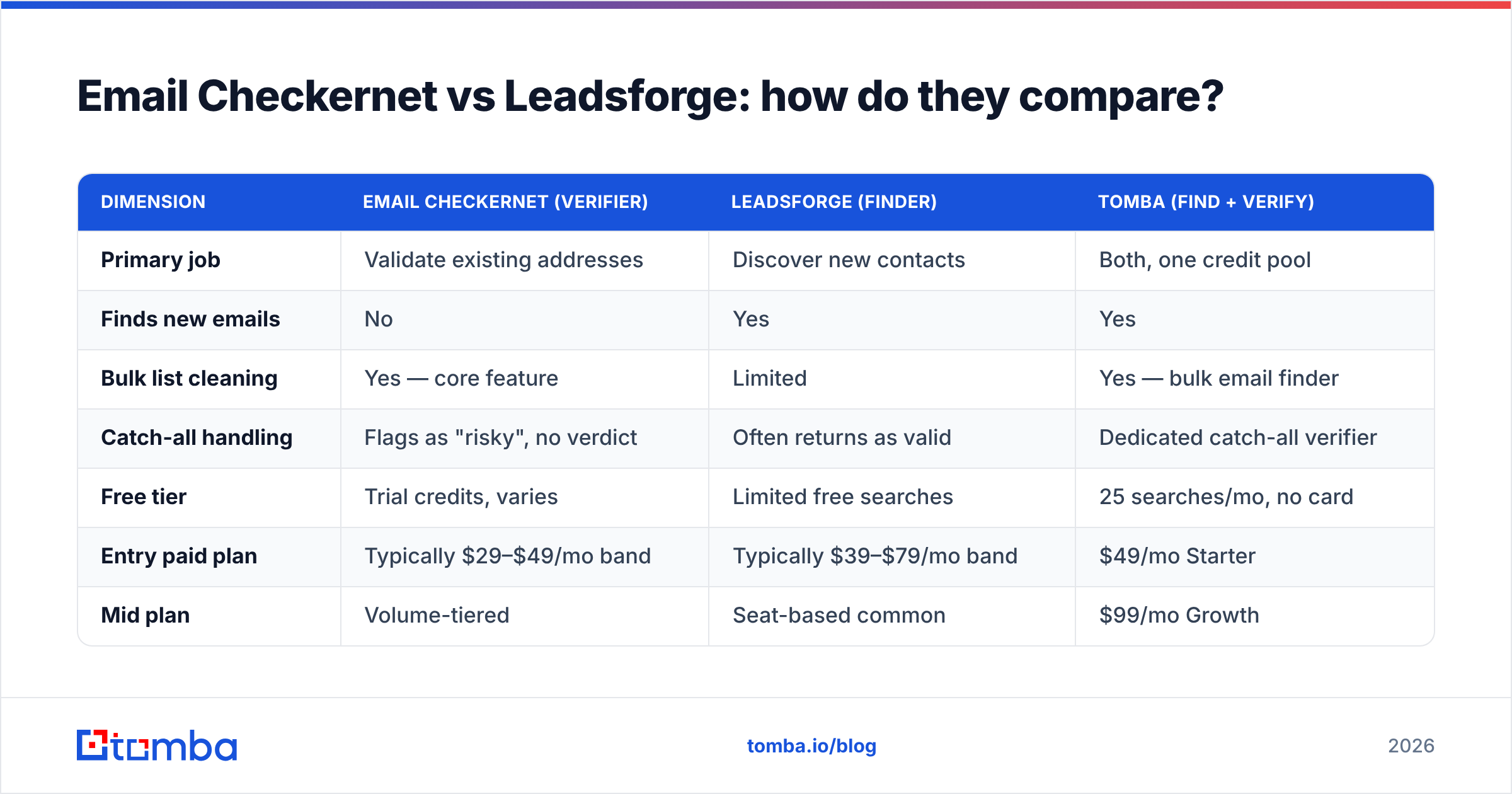
Below is the practical comparison, with a combined-platform column so you can see what you're actually paying for when you run two vendors.
| Dimension | Email Checkernet (verifier) | Leadsforge (finder) | Tomba (find + verify) |
|---|---|---|---|
| Primary job | Validate existing addresses | Discover new contacts | Both, one credit pool |
| Finds new emails | No | Yes | Yes |
| Bulk list cleaning | Yes — core feature | Limited | Yes — bulk email finder |
| Catch-all handling | Flags as "risky", no verdict | Often returns as valid | Dedicated catch-all verifier |
| Free tier | Trial credits, varies | Limited free searches | 25 searches/mo, no card |
| Entry paid plan | Typically $29–$49/mo band | Typically $39–$79/mo band | $49/mo Starter |
| Mid plan | Volume-tiered | Seat-based common | $99/mo Growth |
| Team plan | Volume-tiered | Per-seat scaling | $249/mo Pro |
| API | Verification endpoint | Search/enrich endpoints | Unified email finder API |
| CRM sync | Via Zapier typically | Native on higher tiers | HubSpot, Salesforce, Pipedrive |
| Chrome extension | Rare for pure verifiers | Yes | Yes |
| Phone numbers | No | On higher tiers | Phone finder |
| Best for | Cleaning inherited lists | Net-new list building | Teams doing both weekly |
Pricing bands for third-party tools move constantly — check the vendor's own pricing page before you commit budget. Tomba's numbers above are exact and current: see Tomba pricing.
Which one is more accurate?#
Neither vendor's headline accuracy number means what you think it means, and the reason is worth understanding before you sign anything.
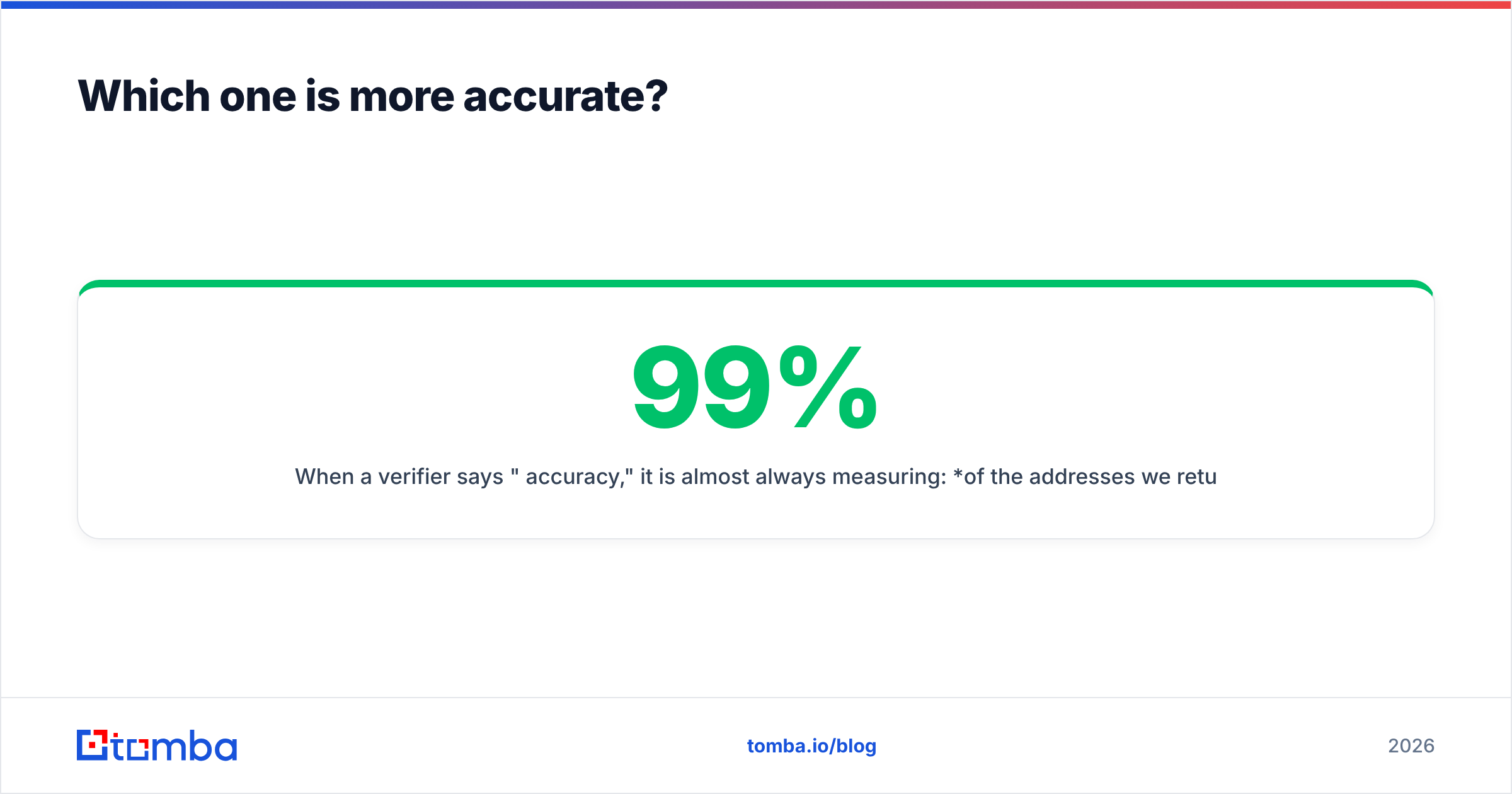
When a verifier says "99% accuracy," it is almost always measuring: of the addresses we returned a definitive verdict on, how often were we right? That excludes every catch-all, every greylisted domain, every server that rate-limited the probe. If 18% of your list is catch-all and the vendor returns "unknown" for all of it, a 99% accuracy claim on the remaining 82% is technically true and practically useless.
The number you should ask for instead is coverage-adjusted accuracy: correct verdicts divided by total addresses submitted, with unknowns counted as failures. Vendors rarely publish it. If you ask and get a straight answer, that's a strong signal.

The same asymmetry applies to finders. Leadsforge-class tools report "valid email found" rates that include pattern-guessed addresses on catch-all domains — addresses that will accept mail at the SMTP layer and then silently route to a black hole or a spam trap. Your bounce rate looks fine. Your reply rate is zero. That's the worst possible failure mode because it's invisible in your dashboard.
Run your own test before you buy. Take 200 contacts you can independently confirm — your existing customers, your LinkedIn connections, people you've actually emailed — and push them through each tool's trial. Measure three things:
- Hit rate: how many addresses came back at all
- Precision: of those, how many matched the address you know is correct
- Honest unknowns: how many the tool declined to guess on
A tool with a lower hit rate and a higher honest-unknown count is often the better buy. Guessing costs you more than abstaining does.
What does it actually cost to run both?#
Here's where the two-vendor stack gets expensive in ways the pricing pages don't show.
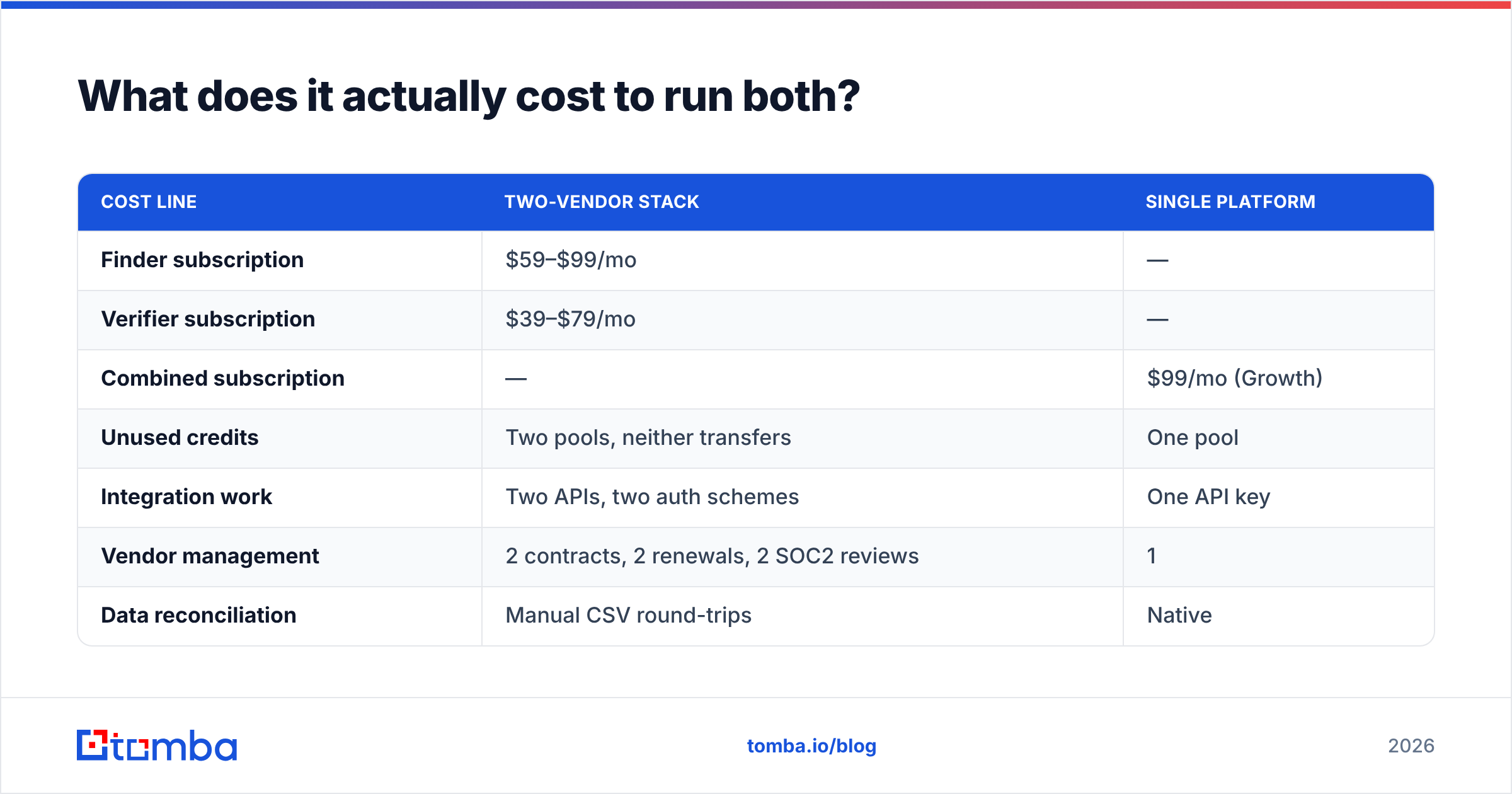
Say you're a five-person SDR team building 2,000 net-new contacts a month and cleaning a 10,000-row legacy list quarterly. On separate vendors you're looking at a finder plan sized for 2,000 contacts/month plus a verifier plan sized for peak batch volume — and verifier plans price on peak, not average, so that quarterly 10,000-row job forces you onto a tier you use one month in three.
| Cost line | Two-vendor stack | Single platform |
|---|---|---|
| Finder subscription | $59–$99/mo | — |
| Verifier subscription | $39–$79/mo | — |
| Combined subscription | — | $99/mo (Growth) |
| Unused credits | Two pools, neither transfers | One pool |
| Integration work | Two APIs, two auth schemes | One API key |
| Vendor management | 2 contracts, 2 renewals, 2 SOC2 reviews | 1 |
| Data reconciliation | Manual CSV round-trips | Native |
The subscription delta alone is usually $30–$80/month. The real cost is the round-trip: export from the finder, import to the verifier, wait, export again, import to the CRM. At 2,000 contacts a month that's several hours of ops time — and every manual CSV hop is a chance to lose a column or duplicate a row.

There's also a subtler tax. When discovery and verification live in different systems, verification happens after discovery, in a batch, days later. When they live in the same system, verification happens at the moment of discovery — the finder can throw away a guess that fails SMTP before it ever reaches your CSV. That's not a workflow convenience, it's a materially different accuracy outcome.
When should you pick each one?#
Pick a dedicated verifier like Email Checkernet when:
- You inherited a large list (50k+) of unknown provenance and need a one-time cleanup
- Your discovery already happens elsewhere — inbound forms, events, a data provider contract
- You need verification as a standalone API step inside an existing pipeline
- Compliance requires a separate audit trail for validation specifically
Pick a dedicated finder like Leadsforge when:
- You're building lists from zero and don't have a legacy database to clean
- Your ICP filtering needs are unusual and one vendor's filter set is genuinely better for your niche
- You already have verification bundled into your sending platform
Pick a combined platform when:
- You do both find and verify on a weekly or continuous basis (this is most outbound teams)
- You want verification to happen before an address enters your CRM, not after
- You're under 10 seats and per-vendor minimums are eating your budget
- You want one API surface — see the email verification API and finder endpoints under one key
Consider a specialist database instead when:
- You need pre-built, human-verified lists by industry rather than tooling. BookYourData is a solid option here — it sells verified contact lists with a pay-as-you-go model, which fits teams that want volume without a subscription commitment. Different shape of product, genuinely useful for the right use case.
How do you evaluate either tool in one afternoon?#
A structured trial beats a feature-matrix stare-down. Here's the sequence:
- Build a 200-row truth set. Real contacts you can independently confirm. Mix domains: Google Workspace, Microsoft 365, self-hosted, and at least 20 known catch-alls.
- Run the same set through every trial. Same file, same day. Don't let one vendor benefit from a fresher crawl.
- Score precision, not hit rate. Count only exact matches against your truth set as wins.
- Test the catch-all subset separately. This is the differentiator. A tool that flags catch-alls honestly is worth more than one that guesses confidently.
- Time the API. Fire 100 sequential requests and record p95 latency. Interactive workflows die at 3-second lookups.
- Check the export path. Can you get data into your CRM without a CSV? Look at the integrations list for whichever vendor you're testing.
Two more checks worth doing: run your sending domain through an SPF checker and a blacklist checker before you start sending to any newly-built list. The cleanest list in the world won't land if your authentication is broken — email deliverability is a chain, and list hygiene is only one link.
For independent signal beyond your own testing, G2's email verification category and Capterra both carry volume review data, and HubSpot's guide to email bounce rates is a useful primer on what your numbers should look like after cleanup.
What's the verdict?#
If you only ever do one job, buy the specialist. A dedicated verifier is the right call for a one-time cleanup of an inherited database, and a dedicated finder is the right call if your verification is already handled downstream.
But most outbound teams do both, continuously, and the two-vendor stack quietly costs more than the sum of its subscriptions. You pay in credits that don't transfer, in ops hours spent on CSV round-trips, and in the accuracy you lose by verifying days after discovery instead of at the moment of it.
Test all three shapes against the same 200-row truth set. The result will be specific to your ICP — a tool that's excellent on US mid-market SaaS can be thin on EU manufacturing, and no comparison table will tell you that. Your truth set will.
Try the combined approach before you renew. Tomba's Email Finder finds professional email addresses by domain, name, or company — and verifies each one at the moment of discovery, from the same credit pool. The free tier gives you 25 searches a month with no card required, which is enough to run the 200-row test described above across your real ICP. If it beats your current two-vendor stack, the $49/mo Starter plan replaces both. If it doesn't, you've spent nothing and you have a benchmark.
Related guides#
Ready to find emails that actually work?
Join 150,000+ professionals who stopped guessing and started sending. Free credits on signup — no credit card required.
Get the Tomba newsletter
Practical outbound tactics and product updates — once every two weeks.
About the author